LP4HUB10 - USB Hub Logik - Free user manual and instructions
Find the device manual for free LP4HUB10 Logik in PDF.


| Product Type | USB Hub |
| Brand | Logik |
| Model | LP4HUB10 |
| Number of Ports | 4 |
| Interface | USB 2.0 |
| Power Source | Mains Adapter (included) |
| Input Voltage | 100-240V AC |
| Output Voltage | 5V DC |
| Compatibility | Windows, Mac OS, Linux |
| Dimensions (approx) | 80 x 30 x 15 mm |
| Weight (approx) | 50 g |
| Maintenance | Clean with dry cloth; avoid liquids |
| Safety | Follow correct removal procedure to prevent data loss |
| Disposal | Recycle separately from household waste |
| Spare Part | Mains Adapter (Part No. LP4HUB10-MA) |
| Included Accessories | Mains Adapter, Quick Start Guide |
| Warranty | Standard manufacturer warranty |
Frequently Asked Questions - LP4HUB10 Logik
User questions about LP4HUB10 Logik
0 question about this device. Answer the ones you know or ask your own.
Ask a new question about this device
Download the instructions for your USB Hub in PDF format for free! Find your manual LP4HUB10 - Logik and take your electronic device back in hand. On this page are published all the documents necessary for the use of your device. LP4HUB10 by Logik.
USER MANUAL LP4HUB10 Logik
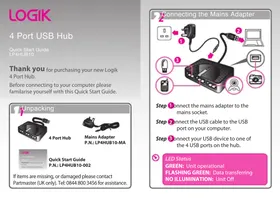
Thank you for purchasing your new Logik 4 Port Hub.
Before connecting to your computer please familiarise yourself with this Quick Start Guide.


NOTE: If you require a replacement for any of the items listed below, please quote their corresponding part numbers:
Replacement Part Part Number
Mains Adapter LP4HUB10-MA

To prevent any damage or data loss, always follow the correct device removal procedure for your computer's operating system.
Partmaster .co.uk
Visit Partmaster.co.uk today for the easiest way to buy electrical
spares and accessories. With over 1 million spares and accessories available we can deliver direct to your door the very next day. Visit www.partmaster.co.uk or call 0844 800 3456 (UK customers only). Calls charged at National Rate.

This symbol on the product or in the instructions means that your electrical and electronic equipment should be disposed of at the end of its life separately from your household waste. There are separate collection systems for recycling in the EU. For more information, please contact the local authority or your retailer where you purchased the product.
DSG Retail Ltd • Maylands Avenue • Hemel Hempstead Herts • HP2 7TG • England
P.N.: LP4HUB10-002
Brand : Logik
Model : LP4HUB10
Category : USB Hub