
MK-F300 - Food processor PANASONIC - Free user manual and instructions
Find the device manual for free MK-F300 PANASONIC in PDF.


| Product Type | Food Processor |
| Brand | Panasonic |
| Model | MK-F300 |
| Dimensions (W x D x H) | Approx. 25 x 20 x 35 cm |
| Weight | Approx. 3.5 kg |
| Power Supply | 220-240 V, 50/60 Hz |
| Power Consumption | 800 W |
| Bowl Capacity | 2.5 L |
| Main Functions | Chopping, slicing, shredding, kneading, blending |
| Control Type | Rotary switch with pulse function |
| Material | Stainless steel blades, plastic bowl and lid |
| Safety Features | Safety lock on lid and bowl; overload protection |
| Cleaning | Removable parts dishwasher safe (top rack) |
| Accessories Included | Chopping blade, slicing disc, shredding disc, kneading hook, spatula |
| Spare Parts Availability | Yes, through Panasonic service centers |
| Repairability | Modular design; replaceable parts |
Frequently Asked Questions - MK-F300 PANASONIC
User questions about MK-F300 PANASONIC
0 question about this device. Answer the ones you know or ask your own.
Ask a new question about this device
Download the instructions for your Food processor in PDF format for free! Find your manual MK-F300 - PANASONIC and take your electronic device back in hand. On this page are published all the documents necessary for the use of your device. MK-F300 by PANASONIC.
USER MANUAL MK-F300 PANASONIC
Operating Instructions
食品加工器(家庭用)
Food Processor (Household Use)
型号.
Model No.
MK-F300
国家标准:
GB 4706.1-2005
GB 4706.30-2008
感谢你购买Panasonic的产品。
Thank you for purchasing this Panasonic product.
• This product is intended for household use only.
- Please read these instructions carefully in order to use this product correctly and safely.
- Before using this product please give your special attention to the section "SAFETY PRECAUTIONS" (Page 19-21).
- Please keep this Operating Instructions for future use.
目录
页
安全注意事项 3-5
重要信息....5
零件名称....6
电路自动断路器 7
安全锁 7
拆卸方法....8
食品加工器
(i) 简介 8
(ii) 叶刀片 9 - 10
- 材料准备工作
- 使用方法
(iii) 切片刀片 • 粉碎刀片 11 - 12
- 材料准备工作
- 使用方法
(iv) 沙拉漏斗 13
- 材料准备工作
- 使用方法
使用后 14-15
故障排除 16
规格 17
安全注意事项(请务必按照指示操作)
natural_image
Line drawing of a blender being added to a cup, showing the blade and handle (no text or symbols)2
flowchart
graph TD
    A["1: Frying with food"] --> B["2: Cutting into a bowl"]
    B --> C["3: Stopping with a lid"]
    C --> D["4: Cover in a container with a spoon"]
将叶刀片放入加工杯中。将材料放入加工杯中。将加工杯盖罩盖在加工杯上面,顺
flowchart
graph TD
    A["Step 1: Hand holding lid"] --> B["Step 2: Cutting down"]
    B --> C["Step 3: Packaging with lid"]
natural_image
Two identical line drawings of a bowl with a lid and side handles, no text or symbols present.图1 图2
食品加工器 - 沙拉漏斗 -
沙拉漏斗材料准备工作
A
natural_image
Two circular mechanical components with central holes and concentric rings, no visible text or symbolsB
2
natural_image
Pure mechanical diagram showing a central shaft and concentric rings with no text or symbols4
2
natural_image
Technical line drawing of a portable electronic device with connected cables and a multimeter (no text or symbols visible)natural_image
Line drawing of a kitchen appliance with a side view showing the lid and handle (no text or symbols)IMPORTANT INFORMATION....21
PART NAMES 22
CIRCUIT BREAKER PROTECTION....23
SAFETY LOCK 23
DISASSEMBLY 24
FOOD PROCESSOR
(i) INTRODUCTION 24
(ii) KNIFE BLADE 25 - 26
- Preparation of Ingredients
- How to Use
(iii) SLICING BLADES · SHREDDING BLADES 27 - 28
- Preparation of Ingredients
- How to Use
(iv) SALAD DRAINER 29
- Preparation of Ingredients
- How to Use
AFTER USE 30 - 31
TROUBLESHOOTING 32
SPECIFICATIONS 33
SAFETY PRECAUTIONS (Make sure to follow these instructions)
In order to prevent accidents or injuries to the user, other people and damage to property, please follow the instructions below.
■ The following indication indicates the degree of damage caused by incorrect operation.

WARNING
Indicates serious injury or death.

CAUTION
Indicates risk of injury or property damage.
■ The symbols are classified and explained as follows.

This symbol indicates prohibition.


This symbol indicates requirement that must be followed.

WARNING

● Do not damage the Cord or the Plug.
(It may cause electric shock, or fire caused by short circuit.)
- Do not use the appliance if the Cord or the Plug is damaged or the Plug is loosely connected to the outlet.
(It may cause electric shock, or fire caused by short circuit.)
→If the Cord is damaged, it must be replaced by the manufacturer, its service center or similarly qualified persons in order to avoid a hazard.
- Do not plug or unplug the Plug with wet hands.
(It may cause electric shock.)
- Do not exceed outlet voltage or use an alternate current other than that specified on the appliance.
(It may cause electric shock or fire.)
- Make sure the voltage supplied to the appliance is the same as your local supply.
- Plugging other devices into the same outlet may cause over-heating.
- Do not immerse the Motor Housing in water or splash it with water.
(It may cause electric shock, or fire caused by short circuit.)
- Do not dismantle, repair or modify the appliance.
(It may cause fire, electric shock or injury.)
→ Please contact your service center for repairing.
- Do not insert any objects into the vent or the gap.
(It may cause electric shock or malfunction.)
- Especially metal objects such as pins or wires.
- Do not replace any parts of appliance with non-genuine spare parts.
(It may cause injury, electric shock or fire.)
- Do not try to remove the Lid when the appliance is still operating.
(It may cause injury.)
- Do not use hot water (over 60°C) for cleaning purpose or fire to dry the appliance.
(It may cause burning or malfunction.)
- Do not place hot ingredients (over 60°C) into the Bowl.
(It may cause injury or malfunction.)
- Do not put your finger or utensils such as spoon, fork etc. into the Bowl during operation.
(It may cause injury, electric shock, or fire caused by short circuit.)
- Do not push the Safety Pin and Safety Lever with any instruments, stick etc. as the appliance might be on.
(It may cause injury.)

● This appliance is not intended for use by children or persons with reduced physical, sensory or mental capabilities, or lack of experience and knowledge, unless they have been given supervision or instruction concerning use of the appliance by a person responsible for their safety. Children should be supervised to ensure that they do not play with the appliance.
(It may cause burning, injury or electric shock.)

WARNING

- Insert the Plug firmly.
(Otherwise it may cause electric shock and fire caused by the heat that may generate around the Plug.)
● Clean the Plug regularly.
(A soiled Plug may cause insufficient insulation due to moisture, and may cause fire.)
- When abnormal operation or breaking down occurs, discontinue the appliance operation immediately and unplug.
(It may cause smoke, fire or electric shock.)
e.g. during abnormal operation or breaking down.
- The Plug and the Cord becomes abnormally hot.
- The Cord is damaged or there has been a power failure.
• The Motor Housing is deformed or abnormally hot.
→Please unplug the appliance immediately and contact the service centre for advice or a repair.
● Make sure to hold the Plug when unplugging the Plug, i.e. never pull on the Cord.
(Otherwise it may cause electric shock, or fire caused by short circuit.)
- Be careful if hot liquid is poured into the Bowl as it can be ejected out of the appliance due to a sudden steaming.
(It may cause burning.)

CAUTION

- Do not leave the appliance unattended when it is in operation.
(It may cause fire or burns.)
- When leaving the appliance unattended, turn the power off.
- Do not use the appliance in the following places:
- Any uneven surface, on non-heat resistant carpet or table cloth etc.
(It may cause fire or injury.)
- In a location where there is risk of the appliance being splashed with water, or near a heat source. (It may cause electric shock or current leakage.)
- Do not process more than the maximum capacity marked on each container respectively. Follow the recommended ingredient amount for processing.
(It may cause injury.)
- Do not continue operation for a long time. It is recommended to rest the appliance after a certain operating time.
(It may cause burns.)
| Function | Operating Time (minutes) | Rest Time (minutes) |
| Food Processor 2 4 |
* With exception for the stated "Ingredient Preparations" in this Operating Instructions.

CAUTION

● Unplug the Plug when the appliance is not in use.
(Otherwise it may cause electric shock, or fire caused by current leakage.)

- Remove the Bowl before lift up the Motor Housing from the table.
(It may cause injury.)
- Switch off the appliance and disconnect it from power supply before changing accessories or approaching parts that are moving during operation.
(It may cause injury.)
- When carrying the appliance, be sure to hold the Motor Housing with both hands. Do not carry it by holding only the Bowl.
(It may cause injury.)
● Care should be taken when handling the sharp cutting blades, emptying the Bowl and cleaning. (e.g. Knife Blade, Slicing Blades and etc.)
(It may cause injury.)
IMPORTANT INFORMATION
- Do not place the appliance in the following places.
- In a location where the appliance being expose to excessive moisture, temperature or direct sunlight. (It may cause malfunction.)
- Any high or low temperature location such as fridge, freezer, microwave or oven. (It may cause malfunction or breakage.)
- Do not process hard ingredients (e.g. hard meat, meat with bones) or viscous material.
(It may cause malfunction.)
Prohibited Ingredients:
| Attachments | Description |
| Knife Blade | Hard ingredients, viscous ingredients, e.g. coffee beans, dried soyabeans, frozen food, dried squid, and etc. |
| Slicing Blades and Shredding Blades | Ingredients with high hard fiber concentrations, viscous ingredients, ingredients that are too soft, e.g. hard vegetables, frozen food, ham, turmeric, ginger, lettuce, tomato, peach, chocolate and etc. |
| Salad Drainer Large | chunky ingredients, ingredients that are soft and fragile, e.g. large carrot or potato chunks, tomato, tofu, pasta, noodle, and etc. |
Before Use:
Always operate the appliance on a clean, dry, flat, hard and smooth surface, and clean the Rubber Foot (P.22) before use to ensure that the Rubber Foot suction is at optimum performance.
PART NAMES
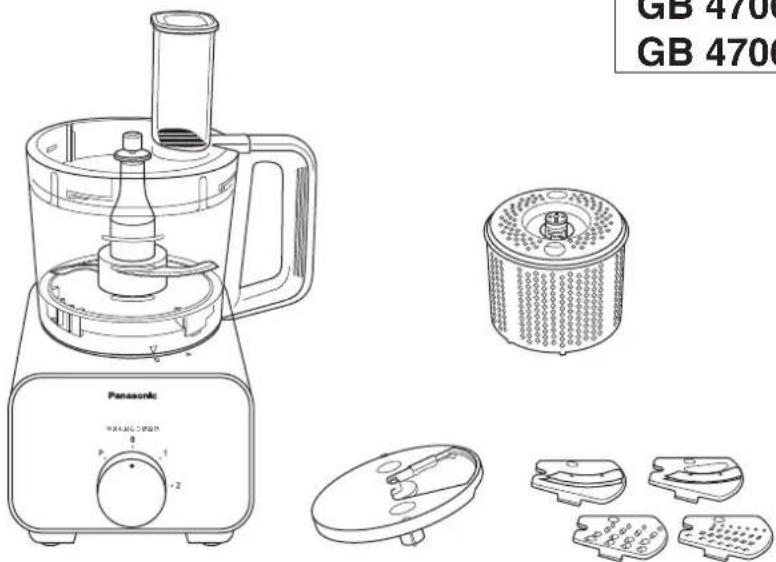
Food Processor
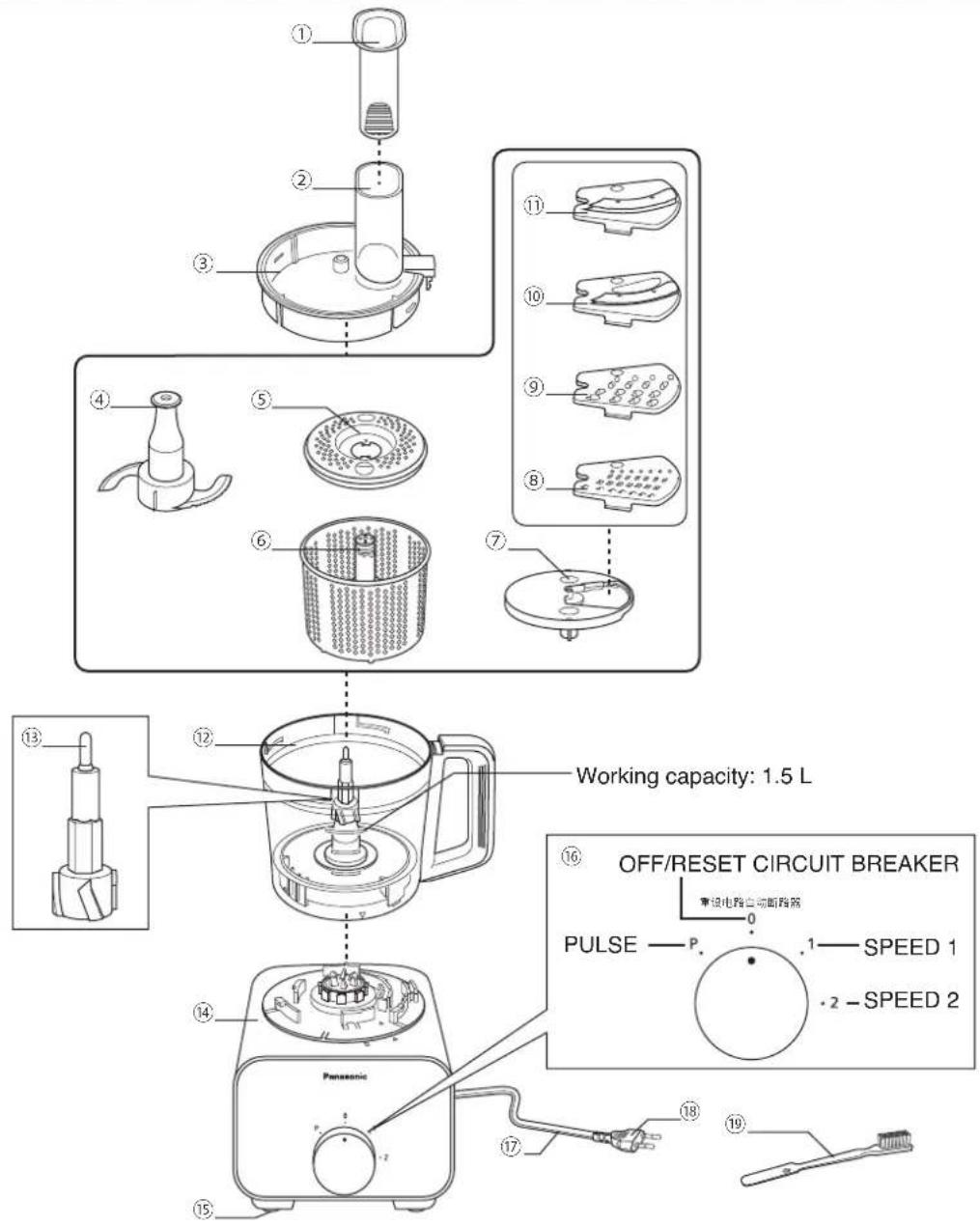
- Food Pusher
- Feeding Tube
- Bowl Lid
- Knife Blade
- Drainer Cover
- Salad Drainer
- Blade Stand
- Fine Shredding Blade
- Coarse Shredding Blade
-
Thin Slicing Blade
-
Thick Slicing Blade
- Bowl
- Drive Shaft
- Motor Housing
- Rubber Foot
- Rotary Switch
- Cord
- *Plug
- Brush
CIRCUIT BREAKER PROTECTION
This appliance has the Circuit Breaker function to stop the motor when motor is overloaded. When the Circuit Breaker stops the motor due to overloading, turn off the Rotary Switch to OFF position "0" and follow the instruction below:
- Reduce the ingredients to less than half and resume operation.
- If it still does not start, turn off the Rotary Switch to OFF position "0" again and resume operation.
- If all else fails, please contact your nearest service centre.
SAFETY LOCK
The Safety Pin is designed to prevent the appliance from switching on when - The Bowl Lid and the Bowl are not fully locked to each other. - The Bowl is not fully locked to the Motor Housing.
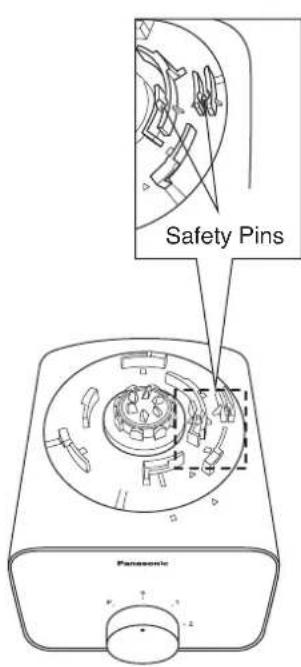
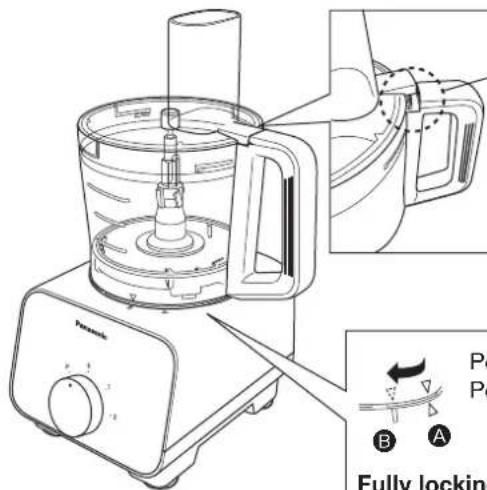
The Safety Lever only activates the Safety Pin if the Bowl Lid is secured on the Bowl.
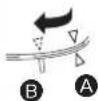
Position A : Unlock Position B : Lock
Fully locking steps : Align the triangular mark on the Bowl with the Motor Housing as in position A shown. Turn it clockwise until 'click' sound is heard and the triangular mark now aligns to position B. To unlock, follow the locking steps in reverse.
Note:
- Do not push the Safety Pin and Safety Lever with any instrument, stick etc.
- Do not pour liquids or ingredient at the Safety Pin and Safety Lever area.
- Keep the Safety Pin and Safety Lever area clean to avoid foreign particles accumulate on the area.
Actions above will ensure the Safety Pin and Safety Lever function properly. If not followed, it will damage the parts related to the Safety Pin and Safety Lever.
DISASSEMBLY
Disassembly from Packaged Condition
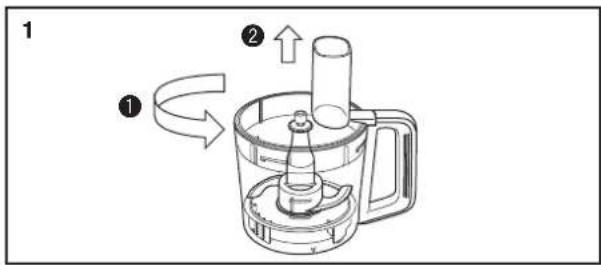
Rotate the Bowl Lid anticlockwise and lift up from the Bowl.
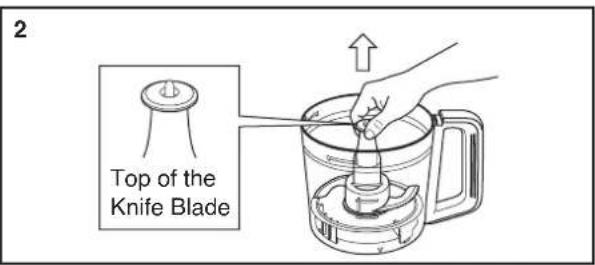
Hold the top of the Knife Blade and lift up to remove from Bowl.
Note:
Beware of the sharp edges of the Knife Blade when removing it from the Bowl.
FOOD PROCESSOR -INTRODUCTION-
It is highly recommended to clean all attachments and accessories and dry well before using the appliance for the first time, refer to page 30 - 31 for the cleaning method. Unplug when assembling the unit. Before plugging in, ensure that the Rotary Switch is in the OFF position "0". Please refer to page 31 under 'Storing' on how to re-position the Motor Housing.
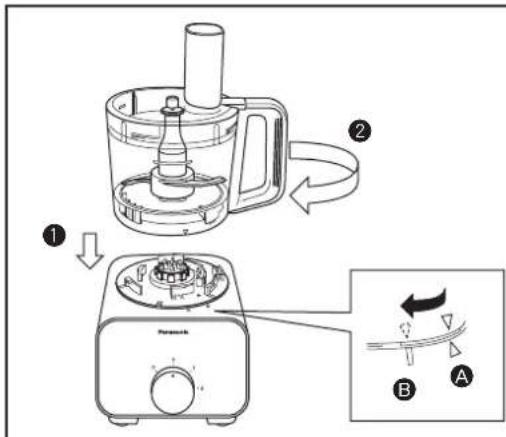
-
Place the Bowl on top of the Motor Housing until the mark aligns as shown in Ⓐ.
-
Turn the Bowl clockwise until a 'click' sound is heard. Ensure that the triangle mark on the Bowl is aligned with the rectangle mark on the Motor Housing as seen in B.
To disassemble, follow the assembly steps in reverse.
FOOD PROCESSOR - KNIFE BLADE -
Ingredient Preparations for Knife Blade
| Function | Ingredient Speed | Quantity Operating Time (approx.) | Preparation Method | |||
| Mince | Meat 50 ~ 400 g2 | 5 ~ 50 sec | 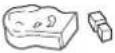 Remove all skin, bones, and tendons, cut into 2 ~ 3 cm cubes. Remove all skin, bones, and tendons, cut into 2 ~ 3 cm cubes.  | |||
| Fish | 50 ~ 500 g | 3 ~ 20 sec | ||||
| Chop | Onion | 1 (Intermittent) | 150 ~ 500 g | 4 ~ 15 times | 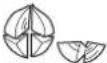 | Peel skin, cut into 2 ~ 3 cm cubes. |
| Garlic | 2 | 5 ~ 500 g | 10 ~ 30 sec | 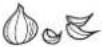 | Peel skin. | |
| Carrot | 50 ~ 450 g | 10 ~ 30 sec | 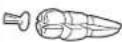 | Peel skin, cut into 2 ~ 3 cm cubes. | ||
| Italian Parsley | 5 ~ 70 g | 10 ~ 40 sec |  | Remove stalk. | ||
| Mushroom | 30 ~ 250 g | 3 ~ 15 sec |  | Cut into 2 ~ 3 cm cubes. | ||
| Parmesan Cheese | 2 | 10 ~ 200 g | 10 ~ 60 secCrush |  | Cut into 2 ~ 3 cm cubes. | |
| Boiled Potato | PULSE | 100 ~ 400 g | 3 ~ 15 timesMash |  | Cut into 2 ~ 3 cm cubes. Do not over process | |
| Frozen Banana | 2 | 250 ~ 450 g | 30 ~ 180 secFrozen | 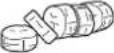 | 1 ~ 2 cm width, half frozen condition, i.e. toothpick can pierce. | |
| Ice Crush | Ice Cubes | 2 | ~ 10 pcs | ~ 20 sec |  | 2 ~ 3 cm ice cubes. |
| Grind | Peanuts | 2 | 10 ~ 200 g | 15 ~ 30 sec | [Z3DS] | Remove peanut shell and skin. |
| Paste | Roasted Peanuts | 2 | 100 ~ 400 g | 5 ~ 10 min |  | Remove peanut shell and skin. |
| Soft White Bread | 2 | 10 ~ 200 g | 15 ~ 60 secCrumb | 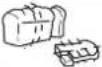 | Slice soft bread into 6 to 8 pieces. | |
| Knead | Flour | 2 | ~ 300 g | ~ 120 sec | Mix yeast with water and add during the processing of dough (adding yeast directly before processing may result in flaking and premature rising). If dough mix still appears flaky after initial processing, add 1 tsp of water into the mix. When large vibrations occur due to dough mix wrapping around the Drive Shaft, add 1 tbsp of flour. Do not reprocess the dough after the process is complete, if the dough is not satisfactory, knead by hand. | |
| Liquid | 160 ~ 200 mL | |||||
| Juice Make | Fruit, Liquid etc. | 2 | ~ 1,500 mL | ~ 120 sec |  | Cut into 2 ~ 3 cm cubes. Process solids first. Fill liquid till total not exceeding 1,500 mL. Do not add more than 10 pcs of ice cubes during processing. |
| Soup Make | Boiled Vegetable, Liquid etc. | 2 | ~ 1,500 mL | ~ 120 sec |  | Cut into 2 ~ 3 cm cubes. Process solids first. Fill liquid till total not exceeding 1,500 mL. |
FOOD PROCESSOR - KNIFE BLADE -
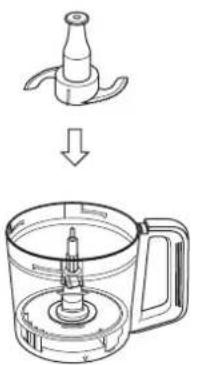
How to Use : Knife Blade
1
2
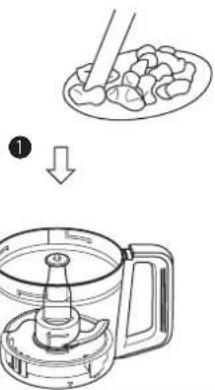
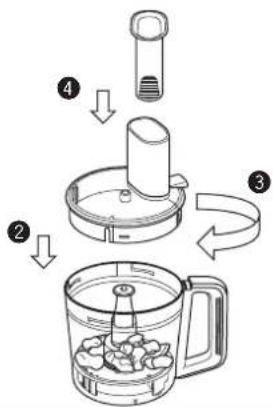
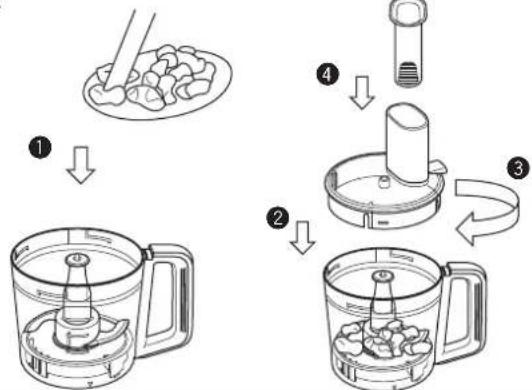
Place the Knife Blade into the Bowl. Put the ingredients into the Bowl. Place the Bowl Lid
Note:
Ensure that the Drive Shaft is protruding from the Knife Blade after insertion.
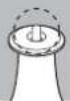
on top of the Bowl and turn it clockwise until a 'click' sound is heard. Insert the Food Pusher into the Feeding Tube. Attach the Bowl assembly onto the Motor Housing as seen in page 24.
3
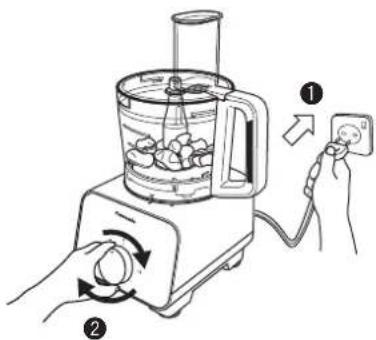
Plug-in the plug into the socket and turn the Rotary Switch to select the speed required (refer to "Preparation of Ingredients" at page 25).
4
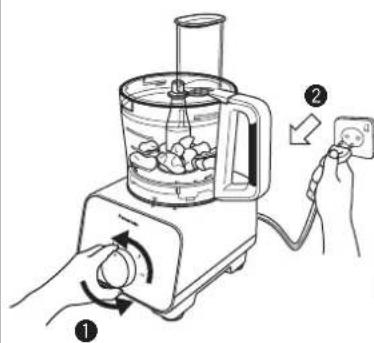
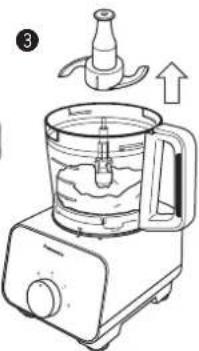
After the processing is completed, return the Rotary Switch to OFF position "0" and unplug from the socket. Remove the Knife Blade from the Bowl before removing the processed ingredients.
Note:
• Always ensure that the Knife Blade is inserted before adding ingredients into the Bowl.
- Do not exceed the stated amount of ingredients for kneading as abnormal vibration may occur.
- Do not insert hot ingredients into the Bowl for processing. Always ensure that the ingredients are sufficiently cooled before inserting, e.g. boiled potato.
- For Juice Make, fill in the solid ingredients first into the Bowl, followed by the liquid ingredients until the total volume does not exceed 1,500 mL.
- When process the liquid ingredients together with ice cubes, put the ice cubes not more than 10 pcs (approx. 170 g).
- Depending on the speed and amount of ingredients used, there will be significant vibrations present. In that case, hold down the Bowl Lid with both hands to support it during its operation.
- For kneading, do not reprocess after the dough has formed the first time.
• High amounts of butter and sugar in the dough may cause abnormal vibration.
- Using flour other than bread flour for bread making may cause abnormal vibration. Before processing, remove 1 \~ 2 tbsp of water from the total amount stated and add the water little by little during processing if necessary.
FOOD PROCESSOR - SLICING BLADES · SHREDDING BLADES -
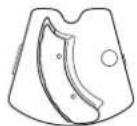
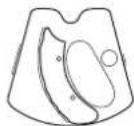
Slicing Blades (Thick / Thin)
- used for slicing ingredients
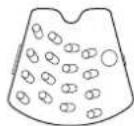
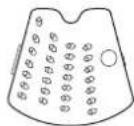
Shredding Blades (Coarse / Fine)
- used for shredding and grating ingredients.
Ingredient Preparations for Slicing Blades (Thick / Thin)
| Function | SpeedIngredient Use | Max Single Preparation Time (approx.) | |||
| Slice - | 2 | 700 gCucumber | 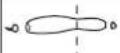 | Cut ingredient till it is small enough to fit into the Feeding Tube. | |
| 700 gOnion | 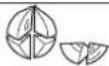 | ||||
| Carrot | 600 g | 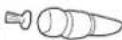 | |||
| Potato | 600 g | [x4TW] | |||
| Cabbage | 400 g | 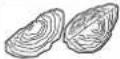 | |||
Ingredient Preparations for Shredding Blades (Coarse / Fine)
| Function | SpeedIngredient Use | Max Single Preparation Time (approx.) | |||
| Shred - | 2 | 500 gCucumber | 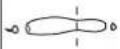 | Cut ingredient till it is small enough to fit into the Feeding Tube. | |
| Carrot | 500 g | 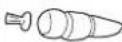 | |||
| Potato | 650 g |  | |||
| Cheese | 500 g | [CYAB] | Cut ingredient till it is small enough to fit into the Feeding Tube. Do not use hard ingredients such as Parmesan. | ||
FOOD PROCESSOR - SLICING BLADES · SHREDDING BLADES -
How to Use: Slicing Blades (Thick / Thin), Shredding Blades (Coarse / Fine)
1
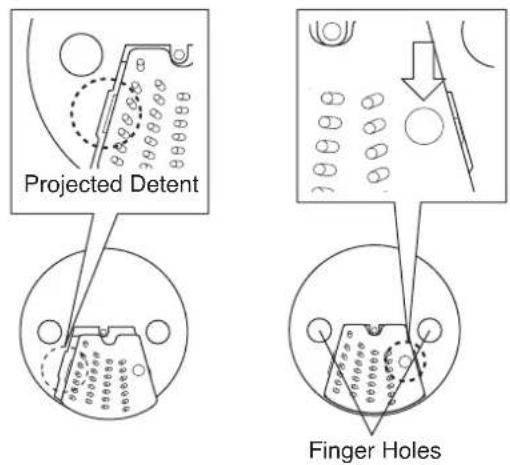
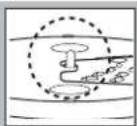
Fit the projected detent of the desired blade onto the Blade Stand and ensure it is seated properly. Push down on the dimple on the blade as seen above until a 'snap' sound is heard.
Note:
- Beware of the sharp edges on the blades while inserting into the Blade Stand.
• To remove the blade, turn over the Blade Stand and push down on the reverse side of the dimple on the blade.
2
flowchart
graph TD
    A["Step 1: Hand holding lid"] --> B["Step 2: Cutting into blender"]
    B --> C["Step 3: Packaging with lid"]
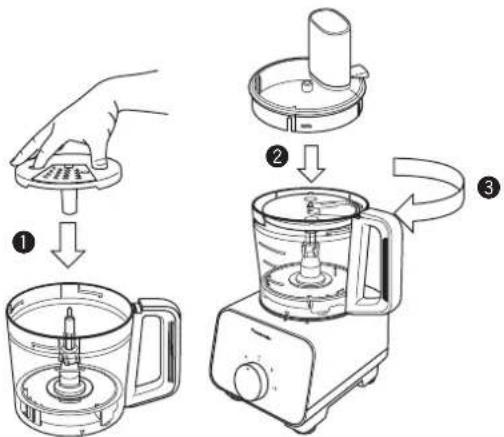
Insert finger and thumb into the finger holes to grip the Blade Stand. Place the assembled Blade Stand into the Bowl. Attach the Bowl to the Motor Housing as seen in page 24. Place the Bowl Cover on top of the Bowl and turn it clockwise until a 'click' sound is heard.
Note:
Ensure that the Drive Shaft is protruding from the Blade Stand after insertion.
3
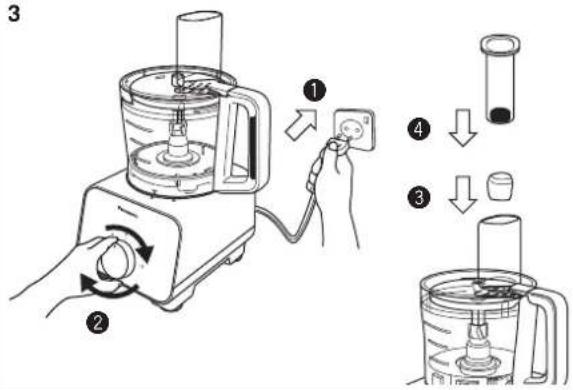
Plug-in the plug into the socket and turn the Rotary Switch to select the speed required (refer to the "Preparation of Ingredients" at page 27). Insert the ingredients into the Feeding Tube and push down with the Food Pusher.
4
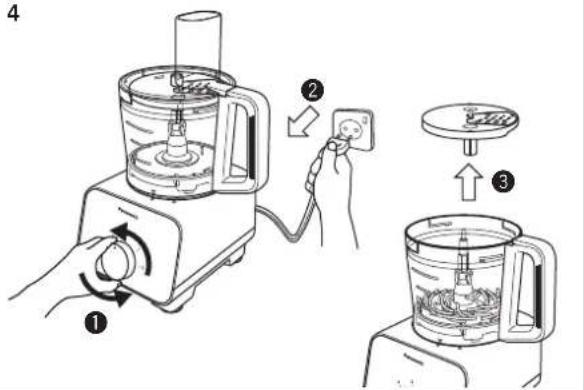
After the processing is completed, return the Rotary Switch to OFF position "0" and unplug from the socket. Remove the Blade Stand from the Bowl before removing the processed ingredients.
Note:
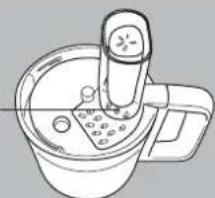
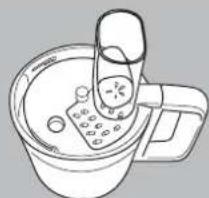
- When using long and narrow ingredients, place it against the front wall of the feeding tube as indicated in Figure 1, for support while in
operation to avoid uneven processing. - Dispose of any remaining lumps of unprocessed ingredients.
- Align high fibre ingredients as indicated in Figure 2 for a consistent processing result.
Front Wall
natural_image
Line drawing of a kitchen appliance with a cylindrical tube and side bowl (no text or symbols)Figure 1
natural_image
Line drawing of a bowl with a spoon and lid, no text or symbols presentFigure 2
FOOD PROCESSOR -SALAD DRAINER-
Ingredient Preparations for Salad Drainer
| Function Ingredient Preparation Method | Max Single Use | Operating Time (approx.) | ||||
| Drainer | Lettuce Leaves | 1 | 100 g | 20 ~ 40 sec |  | Cut into 3 ~ 5 cm slices. |
| 200 gCabbage 20 ~ 50 sec |  | Shredded to 1 ~ 3 mm. | ||||
How to Use: Salad Drainer
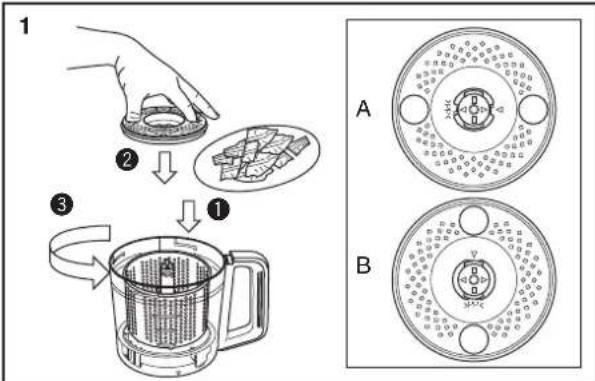
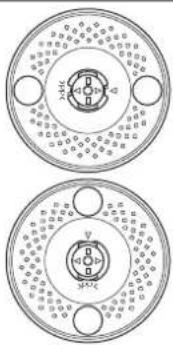
After inserting the Salad Drainer into the Bowl, insert the ingredients into the Salad Drainer. Place the Drainer Cover on top of the Salad Drainer until the mark aligns as shown in A. Turn the Drainer Cover anticlockwise until the mark aligns as shown in B.
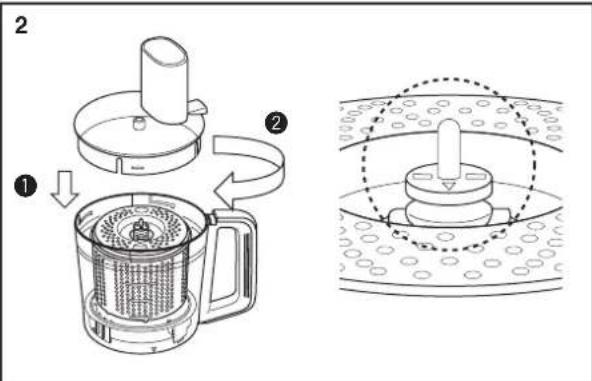
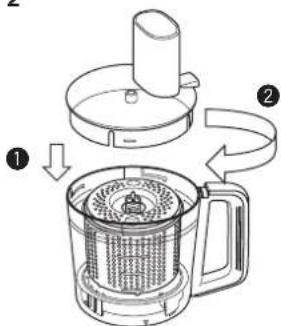
Place the Bowl Lid on top of the Bowl and turn it clockwise until a 'click' sound is heard. Attach the Bowl assembly onto the Motor Housing as seen in page 24.
Note:
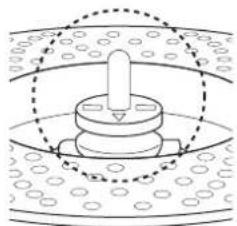
Ensure that the Drive Shaft is protruding from the Salad Drainer after insertion.
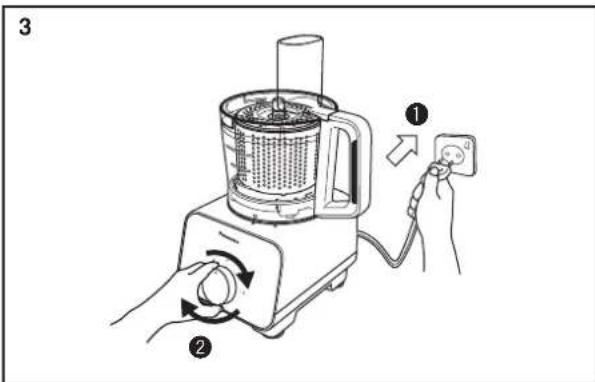
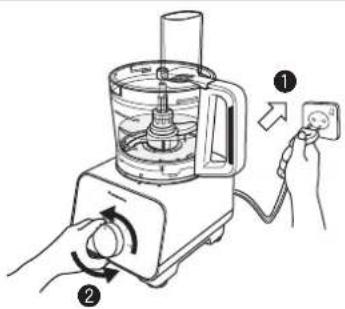
Plug-in the plug into the socket and turn the Rotary Switch to select the speed required.
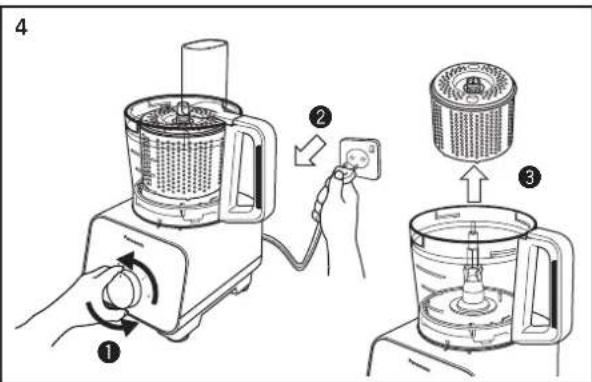
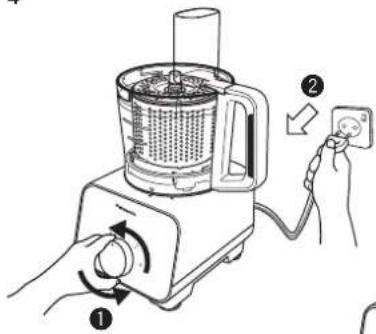
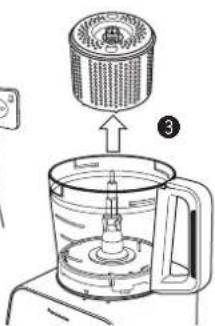
After the processing is completed, return the Rotary Switch to OFF position "0" and unplug from the socket. Remove the Salad Drainer from the Bowl.
Note:
• Maximum working capacity of the Salad Drainer: 200 g or till maximum height of Salad Drainer, whichever comes first.
• Prohibited ingredients: refer to page 21.
- Ensure that the ingredients are spread evenly around the Salad Drainer before processing.
• Always ensure that the Drainer Cover is attached onto the Salad Drainer before operation, otherwise the ingredients might come out and tear around the Bowl.
- Depending on the speed and amount of ingredients used, there will be significant vibrations present. In that case, hold down the Bowl Lid with both hands to support it during its operation.
AFTER USE
Cleaning
Pre-wash
The pre-wash enables easier cleaning. It can be used for the Knife Blade. To pre-wash, simply follow the steps below.
1
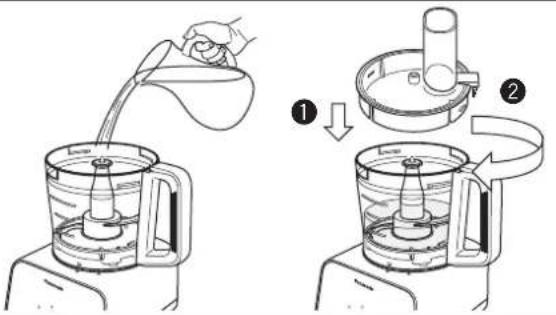
2
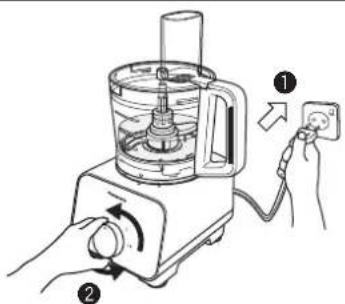
Put the used attachment inside the Bowl, fill the Bowl with water until the attachment is submerged in water (max. 500 mL). Place the Bowl Lid on top of the Bowl and turn it clockwise until a 'click' sound is heard.
Turn the Rotary Switch to "PULSE" 5 \~ 10 times.
3
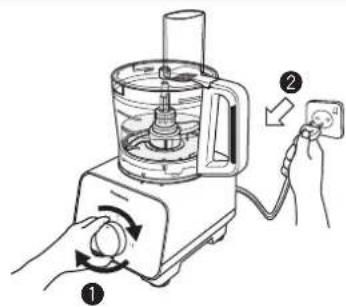
Return the Rotary Switch to OFF position "0" and unplug from the socket. Remove the attachments and proceed for cleaning.
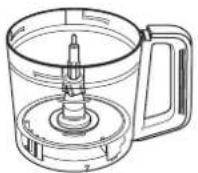
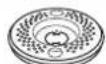
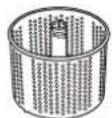
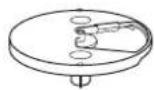
Wash these items by rinsing them under running water. Use neutral kitchen detergent if necessary. Proceed to wipe them dry with a clean cloth.
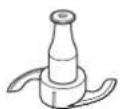


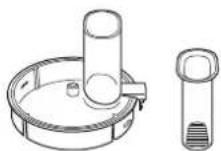
Wash these items by rinsing them under running water, and clean carefully with Brush. Use neutral kitchen detergent if necessary.
Note:
• These items are extremely sharp and should be handled with extra care while cleaning. Avoid hitting these items on hard objects during the cleaning process.
AFTER USE
Motor Housing / Rubber Foot
Wipe off any dirt or stains with a clean damp cloth.
Note:
- Ensure that the power cord is unplugged before cleaning the Motor Housing.
- Do not wash the Motor Housing under running water.
- Never use corrosive liquids (e.g. alcohol, thinner, etc) to clean the Motor Housing.
Cleaning with a Dishwasher
The Bowl and Bowl Lid of this appliance are dishwasher safe.
Note:
- Do not place these items near the dishwasher heater area as high temperatures may damage the parts.
Storing
Ensure all attachments and the Bowl are removed from the Motor Housing prior to storage.
1
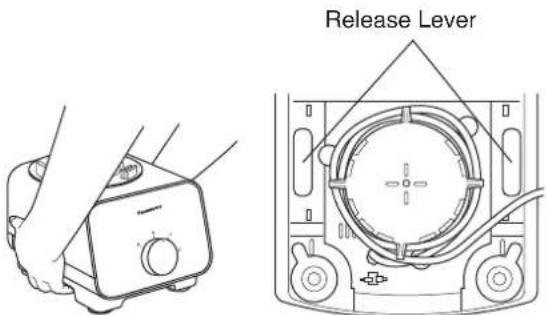
To release the Rubber Foot suction of the Motor Housing, press on the release lever located at the bottom side of the Motor Housing at the same time as seen in the above picture and lift up.
2
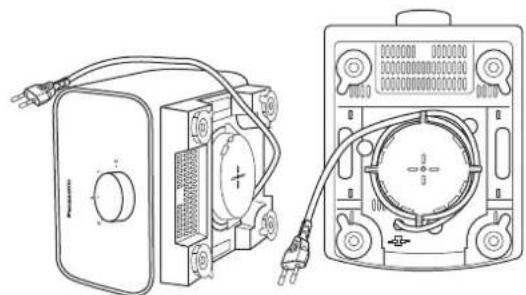
natural_image
Technical line drawing of a portable electronic device with connected cables and a multimeter (no text or symbols visible)Tilt the Motor Housing on its side, and proceed to wind up the Power Cord around the Cord Winding Area partially, leaving the Plug at the sides.
3
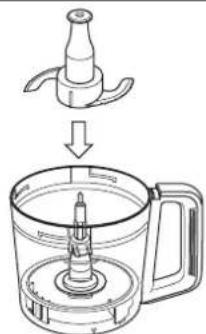
natural_image
Line drawing of a kitchen appliance with a side view showing the lid and base (no text or symbols)Store the Knife Blade inside the Bowl.
Store the other attachments in a dry, safe place.
TROUBLESHOOTING
Please check the following points before arranging for service.
| Problem | Cause and Action | |
| The appliance does not turn on. | ▷ | ● The plug is loose in the outlet. ➔ Plug in firmly into the outlet. |
| The appliance does not operate even when the Rotary Switch is activated. | ▷ | ● The Bowl is not properly locked onto the Motor Housing. ➔ Ensure that the triangle mark on the attachments are aligned with the rectangular mark on the Motor Housing as seen in page 23. ● The Bowl Lid is not fully locked onto the Bowl. ➔ Fully secure the Bowl Lid onto the Bowl. ● The ingredients are jammed. ➔ Remove the ingredients carefully and ensure that the amount used is as stated. |
| The appliance suddenly stops during operation. | ▷ | ● The circuit breaker protection is activated (Refer to page 23). · Too much ingredients were inserted. ➔ Remove the excess ingredients and ensure that the amount used is as stated. · Large chunks or hard ingredients were used. ➔ Ensure that the ingredients are cut into the stated sizes. Do not use hard ingredients such as frozen foods or highly dense solids. ● The safety lock was triggered (Refer to page 23). · Abnormal vibration during operation may offset the safety lock engagement. ➔ Ensure that the ingredients used and the amount are as stated. ➔ Lock the Bowl Lid onto the Bowl firmly, and ensure that the Bowl is locked firmly onto the Motor Housing. |
| There is abnormal vibration and noise during operation. | ▷ | ● The Rubber Feet and/or the work top are not clean. ➔ Wipe off any dirt or stains with a clean damp cloth. The Rubber Foot is only effective when placed on a clean, smooth and flat surface. ● The ingredients used for processing is either too much or too hard. ➔ Ensure that the ingredients used are as stated, reduce the ingredients if it is over the stated amount. |
| The texture and consistency of the processed ingredients did not turn out well. | ▷ | ● Some ingredients might be too difficult to process raw, e.g.pumpkin. ➔ Precook might be necessary to soften the ingredients before processing, i.e. until a fork can easily pierce. ● Ingredient size is not according to the preparation method. ➔ Prepare accordingly to follow the size stated. ● Processing certain ingredients at the same time may result in lumps remaining for Frozen function. ● The maximum ingredient amount and processing duration are meant to serve as a guideline, lesser ingredient amount and different ingredients will affect the performance. ➔ Process the ingredients with a suitable duration till the desired texture and consistency. |
SPECIFICATIONS
| Model No. | MK-F300 |
| Function Food Processor | |
| Power Supply | 220 V ~ 50 - 60 Hz |
| Rated Consumption | 180 W |
| Switch | Rotary Switch |
| Operation Rating | 2 minutes ON, 4 minutes OFF |
| With exception for the stated on "Ingredient Preparations" page. | |
| Dimension (Approx.)(HxWxD) | 435 x 264 x 265 mm |
| 3.1 kgMass (Approx.) | |
| Capacity (Approx.) | Container Capacity: 2.5 LMaximum working capacity:Liquids only = 1.5 LSolids only = 600 g |
| With exception for the stated on "Ingredient Preparations" page. | |
| Attachment & Accessories | Knife Blade, Blade Stand, Slicing Blades (Thick & Thin),Shredding Blades (Coarse & Fine) and Salad Drainer |
| Common Accessories Brush with Spatula | |
| Dishwasher Safe Items Bowl and Bowl Lid | |
Names and Contents of Hazardous Substances Contained in Product
| Part Name | Hazardous Substances | |||||
| Lead (Pb) | Mercury (Hg) | Cadmium (Cd) | Hexavalent Chromium (Cr(VI)) | Polybrominated biphenyls (PBB) | Polybrominated diphenyl ethers (PBDE) | |
| Plug and Cord | ○ ○ ○ ○ ○× | |||||
| Motor | ○ ○ ○ | ○ ○× | ||||
| Metal Parts | ○ ○ ○ | ○ ○× | ||||
This table is prepared in accordance with the provisions of SJ/T 11364.
○ : Indicates that said hazardous substance contained in all of the homogeneous materials for this part is below the limit requirement of GB/T 26572.
× : Indicates that said hazardous substance contained in at least one of the homogeneous materials used for this part is above the limit requirement of GB/T 26572.
MEMO
MEMO
制造商:马来西亚松下制造有限公司
进口商:松下电器(中国)有限公司
No. 3, Jalan Sesiku 15/2, Section 15, Shah Alam Industrial Site, 40200 Shah Alam, Selangor Darul Ehsan, Malaysia.
http://panasonic.cn
UZ50P156
发行年业月:2016年4月
马来西亚印刷
F0416-0
- Operating Instructions
- 目录
- 安全注意事项(请务必按照指示操作)
- 食品加工器 - 沙拉漏斗 -
- SAFETY PRECAUTIONS (Make sure to follow these instructions)
- WARNING
- CAUTION
- - Insert the Plug firmly.
- ● Clean the Plug regularly.
- - When abnormal operation or breaking down occurs, discontinue the appliance operation immediately and unplug.
- ● Make sure to hold the Plug when unplugging the Plug, i.e. never pull on the Cord.
- - Be careful if hot liquid is poured into the Bowl as it can be ejected out of the appliance due to a sudden steaming.
- - Do not leave the appliance unattended when it is in operation.
- - Do not use the appliance in the following places:
- - Do not process more than the maximum capacity marked on each container respectively. Follow the recommended ingredient amount for processing.
- - Do not continue operation for a long time. It is recommended to rest the appliance after a certain operating time.
- IMPORTANT INFORMATION
- Before Use:
- PART NAMES
- Food Processor
- CIRCUIT BREAKER PROTECTION
- SAFETY LOCK
- Note:
- DISASSEMBLY
- FOOD PROCESSOR -INTRODUCTION-
- FOOD PROCESSOR - KNIFE BLADE -
- FOOD PROCESSOR - SLICING BLADES · SHREDDING BLADES -
- FOOD PROCESSOR -SALAD DRAINER-
- AFTER USE
- Cleaning
- Pre-wash
- Motor Housing / Rubber Foot
- Cleaning with a Dishwasher
- Storing
- TROUBLESHOOTING
- MEMO
Brand : PANASONIC
Model : MK-F300
Category : Food processor