
OKW9440 - Oven BLOMBERG - Free user manual and instructions
Find the device manual for free OKW9440 BLOMBERG in PDF.


| Product Type | Built-in electric oven |
| Brand | Blomberg |
| Model | OKW9440 |
| Dimensions (H x W x D) | 59.5 x 59.5 x 56.4 cm |
| Weight | 34 kg |
| Power Supply | 220-240 V ~ 50 Hz, 16 A |
| Energy Class | A+ |
| Oven Capacity | 72 L |
| Number of Functions | 10 |
| Main Functions | Conventional, Fan-assisted, Grill, Defrost, Pizza, Eco, etc. |
| Heating Elements | Top, Bottom, Grill, Fan |
| Control Type | Touch + Rotary knobs |
| Display | Digital LED |
| Cleaning System | Catalytic liners (rear wall) |
| Safety Features | Child lock, Cool touch door, Auto shut-off |
| Installation Type | Built-in under counter |
| Color | Stainless steel |
Frequently Asked Questions - OKW9440 BLOMBERG
User questions about OKW9440 BLOMBERG
0 question about this device. Answer the ones you know or ask your own.
Ask a new question about this device
Download the instructions for your Oven in PDF format for free! Find your manual OKW9440 - BLOMBERG and take your electronic device back in hand. On this page are published all the documents necessary for the use of your device. OKW9440 by BLOMBERG.
USER MANUAL OKW9440 BLOMBERG
natural_image
Simple line drawing of a kitchen oven with a top-mounted dish (no text or symbols)OKW9440X
Please read this user manual first!
Dear Customer,
Thank you for purchasing this Blomberg product. We hope that you get the best results from your product which has been manufactured with high quality and state-of-the-art technology. Therefore, please read this entire user manual and all other accompanying documents carefully before using the product and keep it as a reference for future use. If you handover the product to someone else, give the user manual as well. Follow all warnings and information in the user manual.
Remember that this user manual is also applicable for several other models. Differences between models will be identified in the manual.
Explanation of symbols
Throughout this user manual the following symbols are used:

Important information or useful hints about usage.
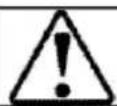
Warning of hazardous situations with regard to life and property.
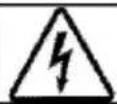
Warning of electric shock.

Warning of risk of fire.
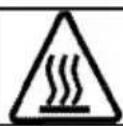
Warning of hot surfaces.
CE
Important instructions for safety and environment 4
General safety....4
Electrical safety....4
Product safety....5
Safety instructions for microwave....6
Intended use....10
Safety for children 10
Disposing of the old product .....11
Package information....11
2 General information 12
Overview 12
Package contents....13
Technical specifications....14
3 Installation 15
Before installation 15
Installation and connection....18
Future Transportation....19
4Preparation 20
Tips for saving energy 20
Initial use....20
Day time setting....20
First cleaning of the appliance....21
Initial heating 21
5 How to operate the microwave 22
General information on microwave cooking....22
How to use the microwave oven....26
Operating modes for microwave....30
Cooking times table....31
6 How to operate the oven 32
General information on baking, roasting and grilling 32
How to operate the electric oven 32
Operating modes.... 33
How to operate the oven control unit 34
Cooking times table.... 38
Operating the grill.... 39
Cooking times table for grilling 39
7 Maintenance and care 40
General information.... 40
Cleaning microwave oven part.... 40
Cleaning the control panel 40
Cleaning the oven 40
Replacing the oven lamp.... 41
8 Troubleshooting 42
9 How to obtain to service 44
10 Guarantee details 45
1 Important instructions for safety and environment
This section contains safety instructions that will help protect from risk of personal injury or property damage. Failure to follow these instructions shall void any warranty.
General safety
- This appliance can be used by children aged from 8 years and above and persons with reduced physical, sensory or mental capabilities or lack of experience and knowledge if they have been given supervision or instruction concerning use of the appliance in a safe way and understand the hazards involved.
- Children shall not play with the appliance. Cleaning and user maintenance shall not be made by children without supervision. - Installation and repair procedures must always be performed by Authorized Service Agents. The manufacturer shall not be held responsible for damages arising from procedures carried out by unauthorized persons which may also void the warranty. Before installation, read the instructions carefully.
- Do not operate the product if it is defective or has any visible damage.
- Ensure that the product function knobs are switched off after every use.
Electrical safety
- If the product has a failure, it should not be operated unless it is repaired by the Authorized Service Agent. There is the risk of electric shock! - Only connect the product to a grounded outlet/line with the voltage and protection as specified in the “Technical specifications”. Have the grounding installation made by a qualified electrician while using the product with or without a transformer. Our company shall not be liable for any problems arising due to the product not being earthed in accordance with the local regulations.
- Never wash the product by spreading or pouring water onto it! There is the risk of electric shock!
- The product must be disconnected during installation, maintenance, cleaning and repairing procedures.
- If the power connection cable for the product is damaged, it must be replaced by the manufacturer, its service agent or similar
qualified persons in order to avoid a hazard.
- The appliance must be installed so that it can be completely disconnected from the mains supply. The separation must be provided by a switch built into the fixed electrical installation, according to construction regulations.
- Rear surface of the oven gets hot when it is in use. Make sure that the electrical connection does not contact the rear surface; otherwise, connections can get damaged.
- Do not trap the mains cable between the oven door and frame and do not route it over hot surfaces. Otherwise, cable insulation may melt and cause fire as a result of short circuit.
- Any work on electrical equipment and systems should only be carried out by authorized and qualified persons.
- In case of any damage, switch off the product and disconnect it from the mains. To do this, turn off the fuse at home.
• Make sure that fuse rating is compatible with the product.
Product safety
- The appliance and its accessible parts become hot during use.
Care should be taken to avoid touching heating elements. Children less than 8 years of age shall be kept away unless continuously supervised.
- Never use the product when your judgment or coordination is impaired by the use of alcohol and/or drugs.
- Be careful when using alcoholic drinks in your dishes. Alcohol evaporates at high temperatures and may cause fire since it can ignite when it comes into contact with hot surfaces.
- Do not place any flammable materials close to the product as the sides may become hot during use.
- During use the appliance becomes hot. Care should be taken to avoid touching heating elements inside the oven.
- Keep all ventilation slots clear of obstructions.
- Do not heat closed tins and glass jars in the oven. The pressure that would build-up in the tin/jar may cause it to burst.
- Do not place baking trays, dishes or aluminium foil directly onto the bottom of the oven. The heat accumulation might damage the bottom of the oven.
-
Do not place aluminium foil on the base of the tray.
-
Do not use harsh abrasive cleaners or sharp metal scrapers to clean the oven door glass since they can scratch the surface, which may result in shattering of the glass.
- Do not use steam cleaners to clean the appliance as this may cause an electric shock.
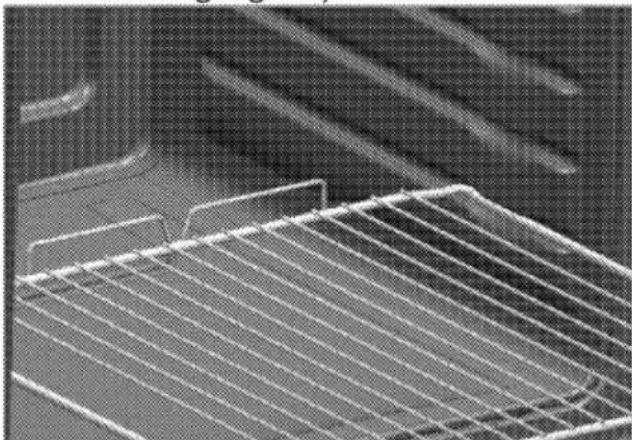
- Placing the wire shelf and tray onto the wire racks properly It is important to place the wire shelf and/or tray onto the rack properly. Slide the wire shelf or tray between 2 rails and make sure that it is balanced before placing food on it (Please see the following figure).
natural_image
Close-up of a metal grate with grid pattern (no text or symbols visible)Do not use the product if the front door glass removed or cracked.
- The Oven handle is not a towel dryer. Do not hang up towels, gloves, or similar textile products when the grill function is being used with the door open.
• Always use heat resistant oven gloves when putting in or
removing dishes into/from the hot oven.
- Ensure that the appliance is disconnected from mains before replacing the lamp to avoid the possibility of electric shock.
Prevention against possible fire risk!
- Ensure all electrical connections are secure and tight to prevent risk of arcing.
- Do not use damaged cables or extension cables.
- Ensure liquid or moisture is not accessible to the electrical connection point.
Safety instructions for microwave
- The appliance is intended to be used in domestic households only. The appliance is not to be used in commercial outlet.
- Only allow children aged from 8 year to use the oven without supervision when adequate instructions have been given so that the child is able to use the microwave oven in a safe way and understands the hazards of improper use.
- When the appliance is operated in the combination mode, children aged from 8 years should only use the oven under adult supervision due to the temperature generated.
- The exposed parts of the product will become hot while and after the product is in use.
- Check the oven for any damage, such as a misaligned or bent door, damaged door seals and sealing surface, broken or loose door hinges and latches and dents inside the cavity or on the door. If there is any damage, do not operate the oven and contact an Authorised Service Agent.
- If the door or door seals are damaged, the oven must not be operated until it has been repaired by a competent person or Authorised Service Agent.
- Before operating your oven ensure that the door has been closed properly. A safety mechanism in the door lock prevents your appliance from operating when the door is open, halting the cooking operation if you open the door. You should not interfere with the door locking system or attempt to override this system. If the door locking system is overridden, risk of exposure to microwaves arises if the appliance is operated with an open door.
- Do not place any kind of object between the front of the oven and the door. You should not operate your oven if objects such as paper
towels or napkins prevent it from being closed properly.
- Radio Interference Place the oven no less than 2 metres from TVs, radios, wireless modems, access points and aerials. Otherwise it may cause interference.
- Do not cook your meals with the cooking time and microwave power set excessively high. Excessive cooking may, burn some parts of the meal.
- Never use aluminum foil or aluminum utensils for microwave cooking. Sparks will damage the appliance.
- Do not use metal objects closer than 3 cm to the oven door while cooking with microwave.
- Do not place corrosive chemicals or materials containing corrosive vapor into the oven.
When there is interference, it may be reduced or eliminated by taking the following measures:
- Clean door and sealing surface of the oven.
- Reorient the receiving antenna of radio or television.
- Relocate the microwave oven with respect to the receiver.
- Move the microwave oven away from the receiver.
- Connect the microwave oven into a different outlet so that the
microwave oven and receiver are on different circuits.
- Place the oven away from other heating appliances and avoid using in damp or steamy environments.
- It is hazardous for anyone other than a competent person or an Authorised Service Agent to carry out any service or repair operation that involves the removal of a cover which gives protection against exposure to microwave energy.
- This product is a Group 2 Class B ISM equipment. The definition of Group 2 which contains all ISM (Industrial, Scientific and Medical) equipment in which radio-frequency energy is intentionally generated and/or used in the form of electromagnetic radiation for the treatment of material, and spark erosion equipment. For Class B equipment is equipment suitable for use in domestic establishments and in establishments directly connected to a low voltage power supply network which supplies buildings used for domestic purpose.
- The microwave oven is intended for heating food and beverages. Drying of food or clothing and heating or warming pads, slippers, sponges, damp cloth and similar
may lead to risk of injury, ignition or fire.
- Your oven has not been designed for drying any living beings.
- Do not operate your oven when it is empty. This may damage the oven. Should you wish to test the oven, place a glass of water inside. The water will absorb the microwave energy and the oven will suffer no damage.
- Only use utensils that are suitable for use in microwave ovens.
Do not use earthenware containers for microwave cooking. Moisture in the earthenware may expand and cause cracking of your container.
To reduce the risk of fire in the oven cavity:
- When heating food in plastic or paper containers, keep an eye on the oven due to the possibility of ignition. If smoke is observed, switch off or disconnect the appliance and keep the door closed in order to stifle any flames.
- Remove wire twist-ties from paper or plastic bags before placing bag in oven.
- Do not use the cavity for storage purposes. Do not leave paper products, cooking utensils or food in the cavity when not in use.
- If you use materials like paper, wood or plastic for cooking in your microwave, do not leave the oven unattended. Paper, wood and similar materials may ignite, while plastic materials may melt. Do not use containers made of such materials for fan oven, grilling and mixed cooking operations.
- The contents of feeding bottles and baby food jars should be stirred or shaken and the temperature checked before consumption, in order to avoid burns.
- Liquids and other foods must not be heated in sealed containers since they are liable to explode.
- Microwave heating of beverages can result in delayed eruptive boiling, therefore care must be taken when handling the container.
- Eggs in their shell and whole hard-boiled eggs should not be heated in microwave ovens since they may exploed, even after microwave heating has ended.
- Do not use your oven to heat carbonated drinks or foods stored in airtight containers like tin cans. This will cause pressure to build up inside the oven that may result in damage or explosion when the door is opened.
- Do not use your microwave oven for cooking or reheating unwhisked eggs, whether shelled or not. Ensure that you pierce the skins of potatoes, apples, chesnut or similar fruits and vegetables before cooking.
- Do not use porcelain containing metal (silver, gold, etc.). Ensure that you remove all metal twist-ties from food packages. Pieces of metal inside the oven can cause arcing that may result in serious damage.
- Do not use your oven for frying with oil since you will be unable to regulate the temperature of the oil. Do not use the microwave to warm cooking oil or drinks with high alcohol volume.
- Do not place the oven where heat, moisture, or high humidity are generated, or near combustible materials.
- Do not use the interior of your oven for storage purposes.
- Do not lean on the oven door when it is open, or let children swing on it. This will warp the oven door and prevent it from closing properly.
- Put a metal teaspoon or glass rod in the container when heating up liquids. This will prevent delay of boiling of the liquid, thus prevent
sudden overflowing when the container is moved.
- Do not use the oven, if:
- The door is not closed properly;
- The door hinges are damaged;
- The contact surfaces between the door and the front side of the oven are damaged;
- The door window is damaged;
- An electrical arc occurs within the oven although there are no metal object in the cooking segment.
- It is very important not to select long durations or extremely high power levels while cooking a small amount of food in order to avoid overheating or burning the meal. For example, a slice of bread may burn after 3 minutes if a very high power level is selected.
- Do not use the oven for frying as it is not possible to control the temperature of oil heated in microwave.
- Contact surfaces of the door (front side of the inner segment and inner side of the doors), must be kept clean to ensure proper operation of the oven.
Intended use
- This product is designed for domestic use. Commercial use will void the guarantee.
- This appliance is for cooking purposes only. It must not be
used for other purposes, for example room heating.
- This appliance is not intended for use at mobile homes, recreational vehicles and similar places.
- Use your oven indoors. Do not use it in gardens, on balconies or in other outdoor settings.
- This product should not be used for warming plates under the grill, drying towels, dish cloths etc. by hanging them on the oven door handles. This product should also not be used for room heating purposes.
- All openings in the wall behind the appliance and in the floor under the appliance shall be sealed.
- Do not obstruct the flow of ventilation air.
- The manufacturer shall not be liable for any damage caused by improper use or handling errors.
- The oven can be used as a microwave, for defrosting, baking, roasting and grilling food.
Safety for children
- Accessible parts may become hot during use. Young children should be kept away.
- The packaging materials will be dangerous for children. Keep the packaging materials away from children. Please dispose of all
parts of the packaging according to environmental standards.
- Electrical products are dangerous to children. Keep children away from the product when it is operating and do not allow them to play with the product.
- When the appliance is operated in combination mode, children aged from 8 years should only use the oven under adult supervision due to temperature generated.
- The exposed parts of the product will become hot while and after the product is in use.
- Do not place any items above the appliance that children may reach for.
- When the door is open, do not load any heavy object on it and do not allow children to sit on it. It may overturn or door hinges may get damaged.
Disposing of the old product Compliance with the WEEE Directive and Disposing of the Waste Product:

This product complies with EU WEEE Directive (2012/19/EU). This product bears a classification symbol for waste electrical and electronic equipment (WEEE).
This product has been manufactured with high quality parts and materials which can be reused and are suitable for recycling. Do not dispose of the waste product with normal domestic and other wastes at the end of its service life. Take it to the collection center for the recycling of electrical and electronic equipment. Please consult your local authorities to learn about these collection centers.
Compliance with RoHS Directive:
The product you have purchased complies with EU RoHS Directive (2011/65/EU). It does not contain harmful and prohibited materials specified in the Directive.
Package information
- Packaging materials of the product are manufactured from recyclable materials in accordance with our National Environment Regulations. Do not dispose of the packaging materials together with the domestic or other wastes. Take them to the packaging material collection points designated by the local authorities.
2 General information
Overview
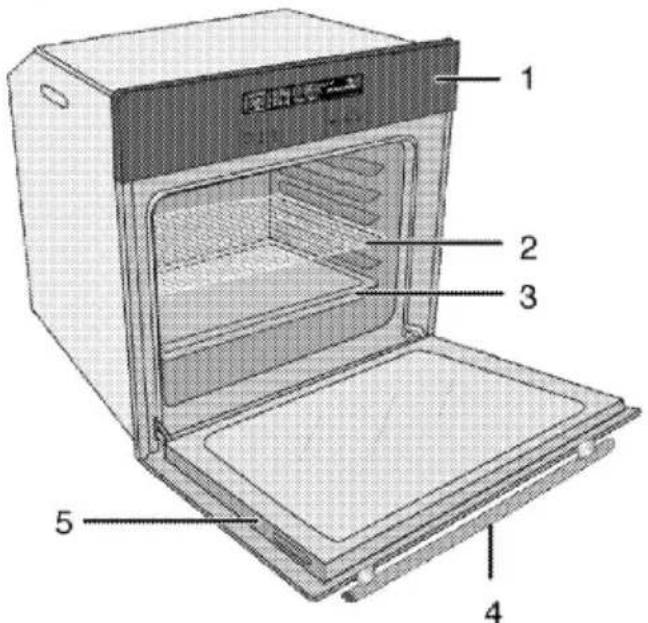
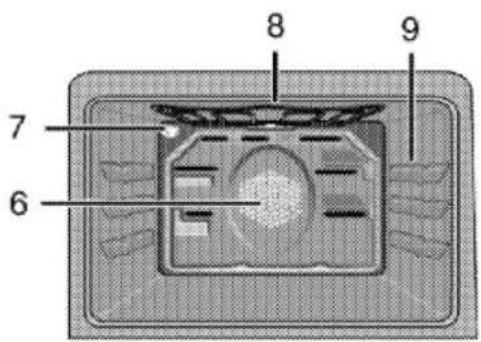
1 Control panel
2 Wire shelf
3 Tray
4 Handle
5 Front door
6 Fan motor (behind steel plate)
7 Lamp
8 Top heating element
9 Shelf positions
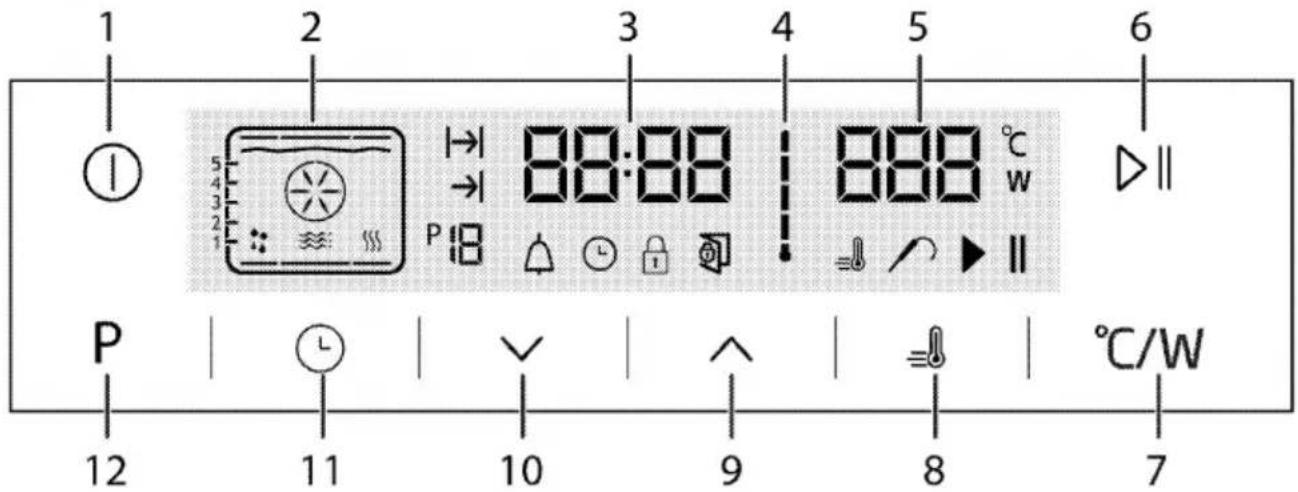
1 On/Off key
2 Function display
3 Current time indicator field
4 Oven inner temperature symbol
5 Temperature indicator field
6 Start/stop cooking key
7 Temperature/power setting key
8 Booster symbol (Quick preheating)
9 Plus key
10 Minus key
11 Setting key
12 Return to function display key
Package contents
Accessories supplied can vary depending on the product model. Not every accessory described in the user manual may exist on your product.
- User manual
- Oven tray
Used for pastries, frozen foods and big roasts.

natural_image
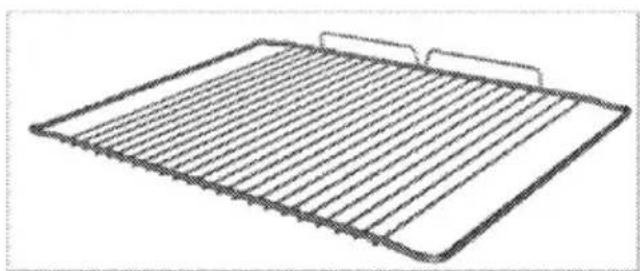
3D rendering of a square baking tray with a mesh pattern (no text or symbols)- Wire Shelf
Used for roasting and for placing the food to be baked, roasted or cooked in casserole dishes to the desired rack.
natural_image
Line drawing of a rectangular metal grate with horizontal slats and two side handles (no text or symbols)- Small wire shelf
It is placed into the tray (if supplied) in order to collect the dripping fat while grilling so that the oven is kept clean.

natural_image
3D wireframe diagram of a rectangular device with internal layered structure (no text or symbols)Technical specifications
| GENERAL | |
| Voltage / frequency | 220-240 V ~ 50 Hz |
| Total power consumption | 3.6 kW |
| Fuse | min. 16 A |
| Cable type / section | H05W-FG 3 x 1,5 mm ^2 or equivalent |
| Cable length | max. 2 m |
| OVEN/GRILL | |
| External dimensions (height / width / depth) | 455 mm/594 mm/567 mm |
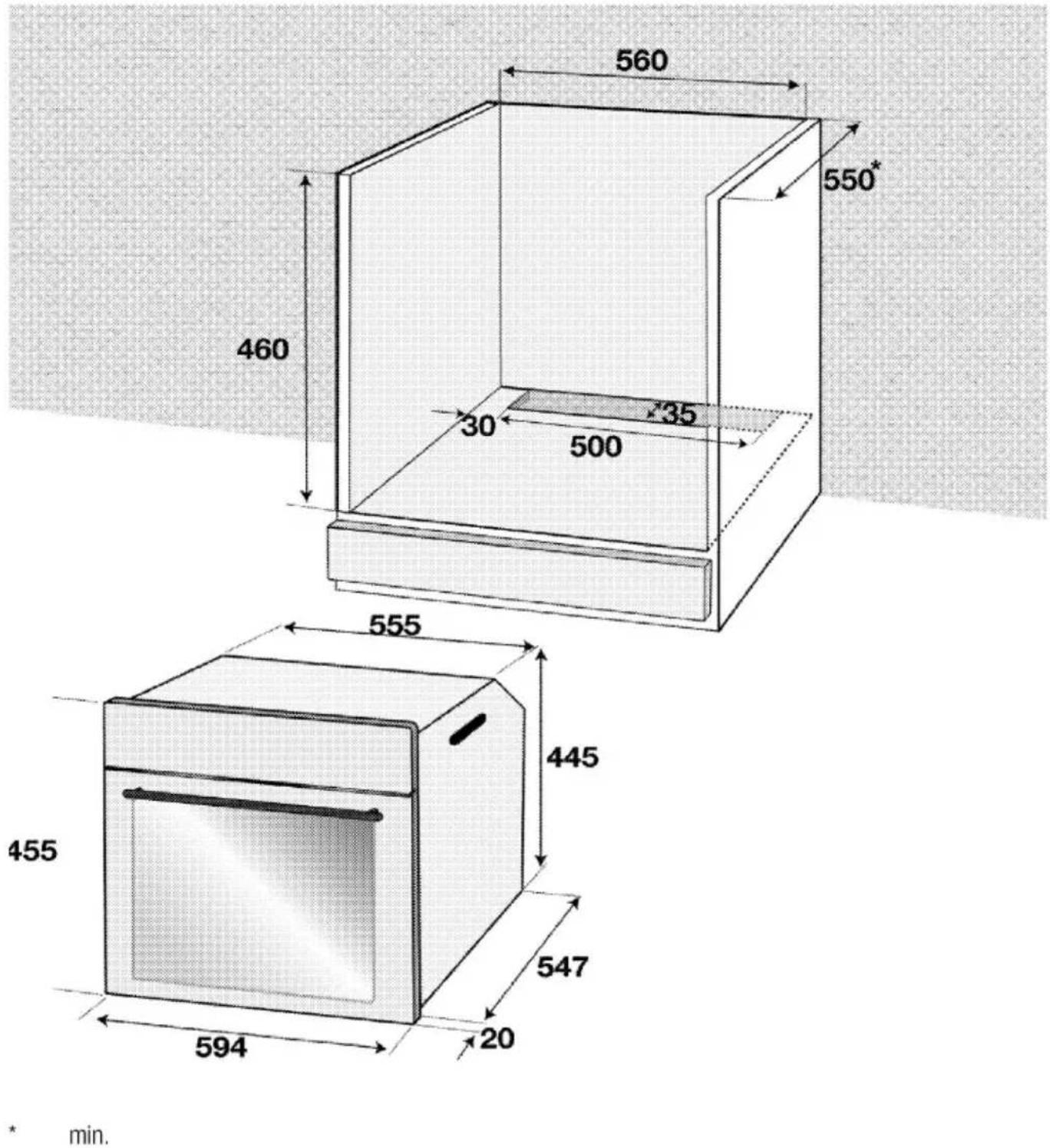
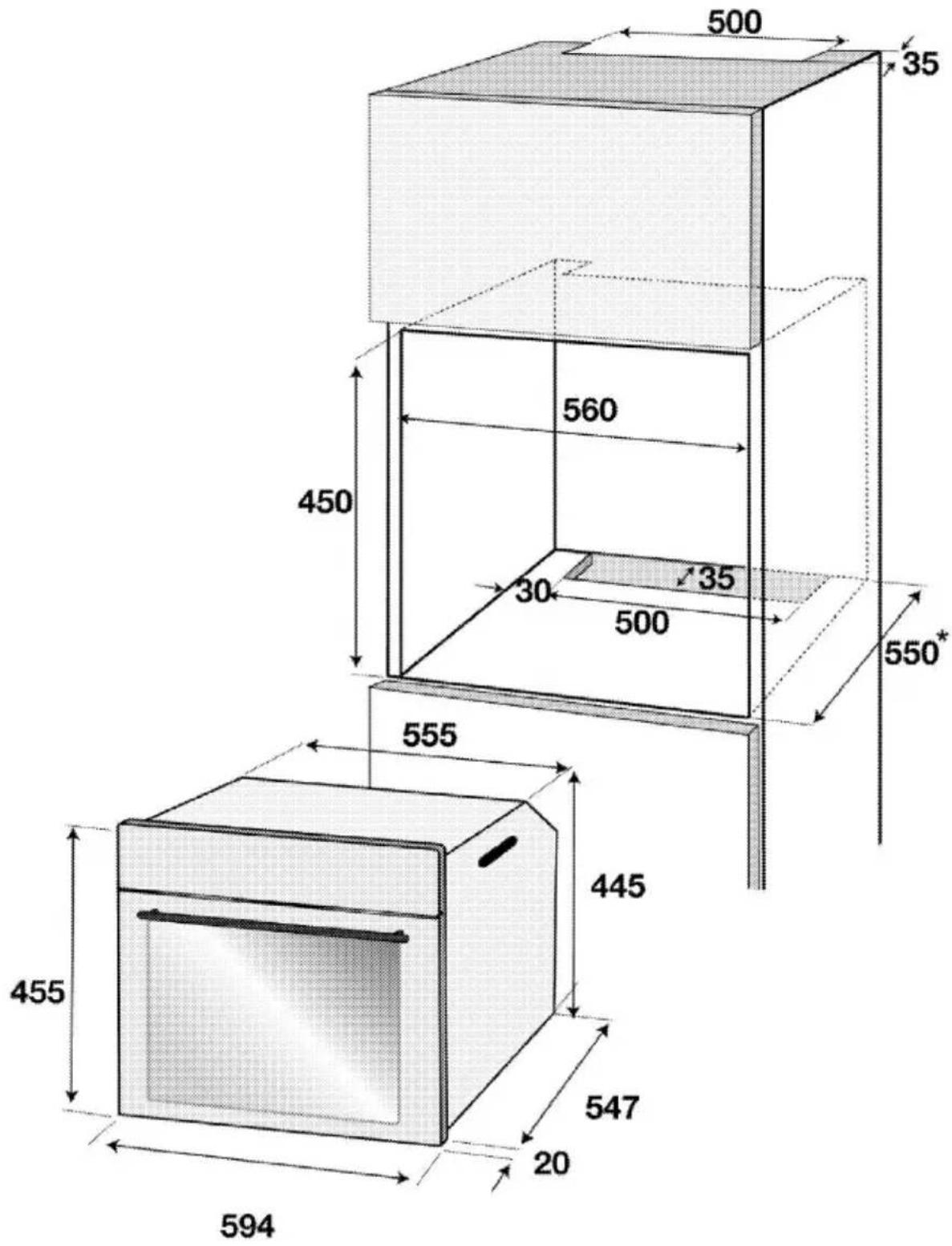
| Installation dimensions (height / width / depth) | **450 or 460 mm/560 mm/min. 550 mm |
| Main oven | Multifunction oven |
| Inner lamp | 15/25 W |
| Grill power consumption | 2.0 kW |
| MICROWAVE | |
| Net volume | 40 lt |
| Microwave power | Max. 900 W |
| Microwave frequency | 2465 MHz |
Basics: Information on the energy label of electrical ovens is given in accordance with the EN 60350-1 / IEC 60350-1 standard. Those values are determined under standard load with bottom-top heater or fan assisted heating (if any) functions.
Energy efficiency class is determined in accordance with the following prioritization depending on whether the relevant functions exist on the product or not. 1-Cooking with eco-fan, 2-Turbo slow cooking, 3-Turbo cooking, 4-Fan assisted bottom/top heating, 5-Top and bottom heating.
See. Installation, page 15.
Technical specifications may be changed without prior notice to improve the quality of the product.

Figures in this manual are schematic and may not exactly match your product.

Values stated on the product labels or in the documentation accompanying it are obtained in laboratory conditions in accordance with relevant standards. Depending on operational and environmental conditions of the product, these values may vary.
3 Installation
Product must be installed by a qualified person in accordance with the regulations in force. The manufacturer shall not be held responsible for damages arising from procedures carried out by unauthorized persons which may also void the warranty.
| Preparation of location and electrical installation for the product is under the installer's responsibility. | |
| DANGER:The product must be installed in accordance with all local electrical regulations. | |
| DANGER:Prior to installation, visually check if the product has any defects on it. If so, do not have it installed.Damaged products cause risks for your safety. |
Before installation
The appliance is intended for installation in commercially available kitchen cabinets. A safety distance must be left between the appliance and the kitchen walls and furniture. See figure (values in mm).
- Surfaces, synthetic laminates and adhesives used must be heat resistant (100 °C minimum).
• Kitchen cabinets must be set level and fixed. - If there is a drawer beneath the oven, a shelf must be installed between oven and drawer.
- Carry the appliance with at least two persons.
| Do not install the appliance next to refrigerators or freezers. The heat emitted by the appliance will lead to an increased energy consumption of cooling appliances. |
| The door and/or handle must not be used for lifting or moving the appliance. |
| If the appliance has wire handles, push the handles back into the side walls after moving the appliance. |
* min.
* min.
Installation and connection
- Product can only be installed and connected in accordance with the statutory installation rules.
Electrical connection
Connect the product to a grounded outlet/line protected by a fuse of suitable capacity as stated in the "Technical specifications" table. Have the grounding installation made by a qualified electrician while using the product with or without a transformer. Our company shall not be liable for any damages that will arise due to using the product without a grounding installation in accordance with the local regulations.
DANGER:
The product must be connected to the mains supply only by an authorised and qualified person. Manufacturer shall not be held responsible for damages arising from procedures carried out by unauthorised persons.

DANGER:
The power cable must not be clamped, bent or trapped or come into contact with hot parts of the product. A damaged power cable must be replaced by a qualified electrician. Otherwise, there is risk of electric shock, short circuit or fire!
- Connection must comply with national regulations.
- The mains supply data must correspond to the data specified on the type label of the product. Open the front door to see the type label.
- Power cable of your product must comply with the values in "Technical specifications" table.

DANGER:
Before starting any work on the electrical installation, disconnect the product from the mains supply. There is the risk of electric shock!
Connecting the power cable
- If a power cable is not supplied together with your product, a power cable that you
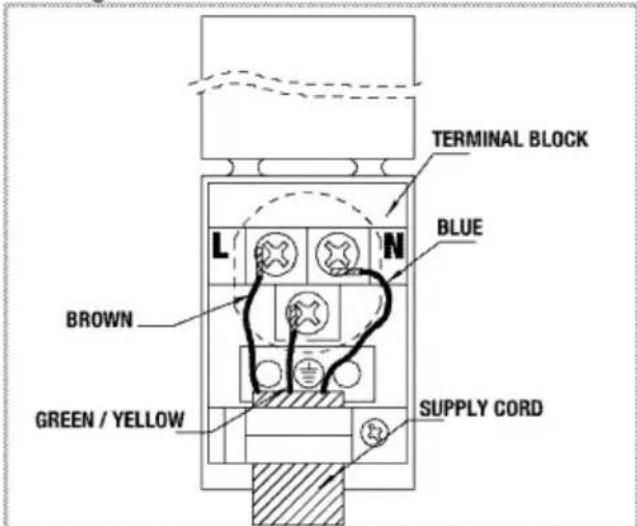
would select from the table (Technical specifications, page 13) in accordance with the electrical installation at your home must be connected to your product by following the instructions in cable diagram.
This product must only be connected by a qualified electrician such as a technician from the local electricity company or NICEIC registered contractor to a suitable double-pole control unit with a minimum contact clearance of 3 mm in all poles. This control unit must be installed accordance with the IEE regulation. Failure to obey this instruction may cause operational problems and invalidate the product warranty.

Additional protection by a residual current circuit breaker is recommended.
- Open the terminal block cover with a screwdriver.
- Insert the power cable through the cable clamp below the terminal and secure it to the main body with the integrated screw on cable clamping component.
- Connect the cables according to the supplied diagram.
-
After completing the wire connections, close the terminal block cover.
-
Route the power cable so that it will not contact the product and get squeezed between the product and the wall.
Power cable must not be longer than 2 m because of safety reasons.
Installing the product
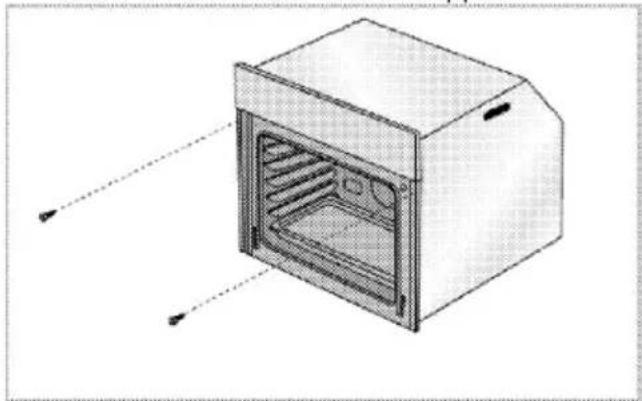
- Slide the oven into the cabinet, align and secure it while making sure that the power cable is not broken and/or trapped.
natural_image
Diagram of a microwave oven with internal grating and ventilation slots (no text or labels)Secure the oven with 2 screws as illustrated.
For products with cooling fan
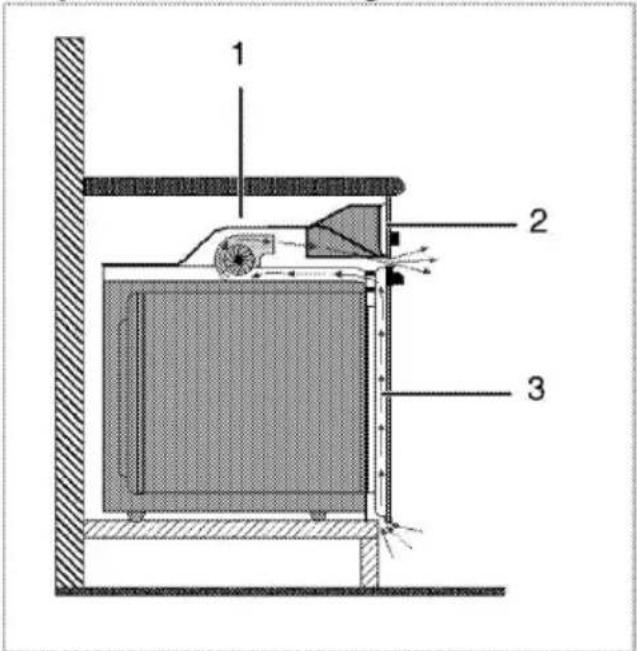
1 Cooling fan
2 Control panel
3 Door
The built-in cooling fan cools both the built-in cabinet and the front of the product.

Cooling fan continues to operate for about 20-30 minutes after the oven is switched off.
Final check
- Connect the power cable and switch on the product's fuse.
- Check the functions.
Future Transportation
- Keep the product's original carton and transport the product in it. Follow the instructions on the carton. If you do not have the original carton, pack the product in bubble wrap or thick cardboard and tape it securely.
- To prevent the wire grill and tray inside the oven from damaging the oven door, place a strip of cardboard onto the inside of the oven door that lines up with the position of the trays. Tape the oven door to the side walls.
- Do not use the door or handle to lift or move the product.

Do not place any objects onto the product and move it in upright position.
In microwave parts (if supplied):
- Pack the glass tray and tape it side walls to avoid it from breakage.
- Tape the front door to the main body.
- Wrap the front glass, door and panel by nylon with bubbles to avoid any impact.

Check the general appearance of your product for any damages that might have occurred during transportation.
4Preparation
Tips for saving energy
The following information will help you to use your appliance in an ecological way, and to save energy:
- Use dark coloured or enamel coated cookware in the oven since the heat transmission will be better.
- While cooking your dishes, perform a preheating operation if it is advised in the user manual or cooking instructions.
-
Do not open the door of the oven frequently during cooking.
-
Try to cook more than one dish in the oven at the same time whenever possible. You can cook by placing two cooking vessels onto the wire shelf.
- Cook more than one dish one after another. The oven will already be hot.
- You can save energy by switching off your oven a few minutes before the end of the cooking time. Do not open the oven door.
• Defrost frozen dishes before cooking them.
Initial use
Day time setting
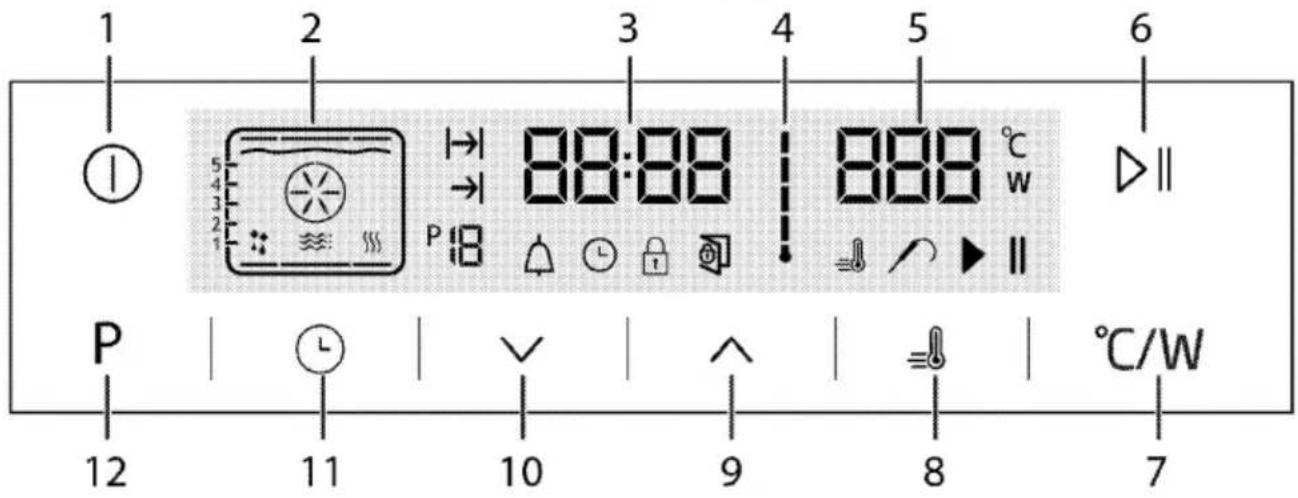
1 On/Off key
2 Function display
3 Current time indicator field
4 Oven inner temperature symbol
5 Temperature indicator field
6 Start/stop cooking key
7 Temperature/power setting key
8 Booster symbol (Quick preheating)
9 Plus key
10 Minus key
11 Setting key
12 Return to function display key
-
At the initial operation of the oven ⏻ symbol lights up; touch ∧/ √ keys to set the hour.
-
Confirm the setting by touching ⏻ symbol and wait for 4 seconds without touching any keys to confirm.

If the current time is not set, time indicator will start increasing/moving up from
12:00. ⏻ symbol will be activated to indicate that the current time has not been set. It will disappear as soon as the time is set.
First cleaning of the appliance
The surface might get damaged by some detergents or cleaning materials. Do not use aggressive detergents, cleaning powders/creams or any sharp objects during cleaning. Do not use harsh abrasive cleaners or sharp metal scrapers to clean the oven door glass since they can scratch the surface, which may result in shattering of the glass.
- Remove all packaging materials.
- Wipe the surfaces of the appliance with a damp cloth or sponge and dry with a cloth.
Initial heating
Heat up the product for about 30 minutes and then switch it off. Thus, any production residues or layers will be burnt off and removed.
WARNING Hot surfaces cause burns! Product may be hot when it is in use. Never touch the hot burners, inner sections of the oven, heaters and etc. Keep children away. Always use heat resistant oven gloves when putting in or removing dishes into/from the hot oven.
Electric oven
- Take all baking trays and the wire grill out of the oven.
- Close the oven door.
- Select the highest oven power.
- Operate the oven for about 30 minutes.
- Turn off your oven.
Grill oven
- Take all baking trays and the wire grill out of the oven.
- Close the oven door.
- Select the highest grill power; see How to operate the grill, page 39
- Operate the grill about 30 minutes.
- Turn off your grill; see How to operate the grill
Smoke and smell may emit for a couple of hours during the initial operation. This is quite normal. Ensure that the room is well ventilated to remove the smoke and smell. Avoid directly inhaling the smoke and the smell that emits.
5 How to operate the microwave
General information on microwave cooking
To prevent overflowing when heating water and other liquids in your microwave oven:
- Do not use closed containers, or containers with narrow openings.
- Do not overheat.
- Before placing the container in the microwave, stir the contents with a teaspoon and then open the door and restir when it is half done. Do not leave the teaspoon inside while the oven is operating.
-
When heating liquids such as soups and sauces, these may unexpectedly bubble up and overflow before they even come to the boil. Do not leave your oven unattended when heating such liquids.
-
After warming baby food or drink inside a feeding bottle, shake and test the temperature before giving to your baby. Before heating, remove the cap and mouthpiece from the bottle.
- Remove food from any plastic packaging before cooking or defrosting. Under certain exceptional circumstances, you may be required to cover food with a special nylon clinging film.
- Do not use your product for making popcorn unless you have specially designed bags for use in microwave ovens.
- Chocolate sweets with low liquid content and flour-based foods should be heated with caution.
- Eggs in their shell and whole hardboiled eggs should not be heated in microwave ovens since they may explode even after microwave heating has ended.
Containers suitable for microwaving
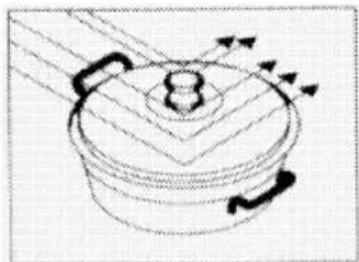
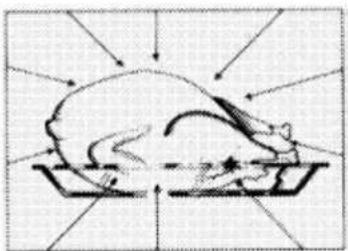
Microwaves pass through porcelain, glass, cardboard or plastic but not the metals. Therefore metal utensils or utensils with metal parts cannot be used in microwave oven.
Microwaves are reflected by metal...
natural_image
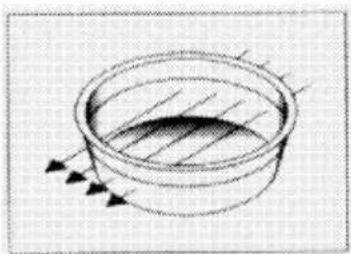
Simple line drawing of a cooking pot with arrows indicating direction (no text or symbols)... but they pass through glass or porcelain...
natural_image
Diagram of a circular container with internal hatching and directional arrows indicating flow or movement (no text or symbols)... and absorbed by the foods.
natural_image
Illustration of a chicken being cut with arrows indicating motion (no text or symbols)
CAUTION
Fire risk!
Never place metal or metal-covered containers in your microwave oven.
CAUTION
Do not use your oven when empty and without tray. This can damage the oven.
- Microwaves cannot penetrate metal. Microwaves will reflect off any metal objects in the oven causing dangerous electric arcing. Most heatproof non-metallic containers are suitable for use in a microwave oven. However, certain containers may contain materials that are unsuitable for microwaving. You can apply the following test to determine whether a container is suitable for microwaving or not:
-
Place the container you wish to test empty in the oven along with another container filled with water.
-
Operate the oven at high power for one minute. If the water has been heated and the container you are testing is cold, then it is suitable for microwaving.
- On the other hand, if the water remains cold and the neighboring container heats up, this means that the microwaves have been absorbed by the container and therefore subject container is unsuitable for microwaving.
Glass containers
- Avoid using containers made of very thin glass or lead crystal. Heatproof glass containers are suitable for use in microwave ovens. On the other hand, in the microwave oven avoid using brittle glass containers such as water and wine glasses that may break as their contents heat up.
Plastic containers
- Do not use pots and dishes made of plastic or melamine for long duration microwaving; the same applies for bags used for storing frozen food. This is because very hot food will sooner or later cause the plastic containers to melt or distort. Use such containers only for short duration microwaving.
Cooking bags
- Cooking bags are suitable for use in microwave ovens, provided that these are designed for cooking. Do not forget to pierce them to enable the steam inside to
escape. Never use normal plastic bags for cooking purposes since they will melt and break up.
Paper
- You should not use any kind of paper for long-duration cooking. This will cause the paper to catch fire. Paper dishes are suitable for oily and dry foods that require short-duration cooking.
Do not use recycled paper. Such paper may contain fragments that can cause arcing.
Wooden and wicker containers
- As microwave causes drying of wooden structure and crisp it, large wooden containers should not be used.
Porcelain containers
- Generally speaking, containers made of such materials are suitable for use in a microwave oven, but you should test them to be sure.
Metal containers
- Metal containers reflect the microwaves away from the food. Therefore, avoid using such containers.
DANGER:
Certain cookware containing high levels of iron or lead are unsuitable for use as cooking containers.
Make sure that you test your cookware in terms of suitability for microwaving.
| Cookware | Microwave | Grill | Convection | Combination modes |
| Heat-Resistant Glass | Yes | Yes | Yes | Yes |
| Non Heat- Resistant Glass | No | No | No | No |
| Heat-Resistant Ceramics | Yes | Yes | Yes | Yes |
| Microwave-Safe Plastic Plate | Yes | No | No | No |
| Kitchen Paper | Yes | No | No | No |
| Metal Tray | Yes* | Yes | Yes | Yes* |
| Metal Rack | No | Yes | Yes | No |
| Aluminum Foil & Foil Container | No | Yes | Yes | No |
| * Only use metal tray given with oven. | ||||
Positioning food
- You will obtain optimal results by arranging the food evenly in the container. This method can be applied in many ways for satisfactory results.
- You can cook a large number of identical pieces (for example potatoes). If you arrange them in an evenly spaced circle around the oven they will cook better. Avoid placing one piece on another.
- Since the microwaves act more powerfully on the outer layers of food, when cooking pieces of food with different shapes and thicknesses, place the thick parts in the centre of the tray. This will ensure that these parts are cooked first.
- Place fish and other food that is not flat with their tails at the edge of the tray.
- You can place very finely carved pieces of meat on top of each other. Thicker items such as sausages and meat slices should be placed close together.
- Heat gravy and sauces in a separate dish. Narrow, deep dishes are better for this purpose than wide, shallow ones. Containers should be no more than two thirds full when you heat gravy, sauces or soups.
- If you are cooking fish whole, pierce them so that their skins do not burst.
- When using clinging film, bags or baking paper, pierce or leave an opening to enable steam to escape.
- Small pieces of food will cook quicker than large pieces, and evenly shaped pieces will cook quicker than other pieces. For the best results cut food evenly into pieces of equal size.
Food height
- With food that is quite thick (generally roasts), the lower part will cook faster. This means that it is sometimes necessary to turn such items over several times.
- Thick or dense items can be placed in a higher position, enabling the microwaves to
act on the bottom and middle parts of the item.
Cooking suggestions
Factors affecting microwaving time :
- Microwaving time depends on a number of factors. The temperature of the ingredients used in a recipe can considerably affect the amount of cooking time required. Thus, a cake made with ice-cold butter, milk and eggs will take considerably longer to cook than one made with ingredients at room temperature.
- Particularly when it comes to bread, cakes and cream sauces, you are recommended with certain recipes to remove the food from the oven before it is fully cooked. Such foods if left covered outside the oven will continue to cook as heat flows from the outer to the inner layers of the food.
If you leave items on the oven until they are fully done, you risk burning the outer layer. With time you will become a better judge of how long items require to be cooked and left to stand.
- Do not leave items to cook unattended. Your microwave oven is automatically lit up when it is in operation, enabling you to keep an eye on the condition of the items being cooked.
Defrosting:
- The defrosting time may depend on the shape of the packet. Shallow, rectangular packets defrost more quickly than deep containers.
- Separate the items as they start to defrost. They will then defrost more readily.
- The more food you cook, the longer it will take. Twice the amount of food will take roughly twice as long. If it takes four minutes to cook one potato, it will take on average seven minutes to cook two potatoes.
The amount of microwaves that your oven produces remains constant however much food you place inside it. This means that the
more food you place inside, the longer it will take to do.
Liquid content
- Liquid content affects cooking time because microwaves are sensitive to moisture. Foods with natural liquid content (such as vegetables, fish, and poultry) will cook quickly and easily. When cooking dry items such as rice and pulses you are recommended to add water.
- Remember that moisture is eliminated in a microwave oven, so that when cooking drier items such as certain vegetables you should first wet them with a little water or cover them so that they retain their moisture.
- When cooking foods with very little water content (thawing bread, making pop-corns) evaporation takes place rapidly. In such cases oven operates as if it is empty and foods can get burnt. And oven or the utensils can get damaged. Therefore, make sure that you just set the required cooking time and never leave the oven unattended during cooking.
Steam
- The moisture within the food may sometimes cause the oven to steam up when it is operating. This is normal.
Sugar
- When making foods with very high sugar content like puddings and tarts, follow the recommendations in your microwave recipe books.
If you exceed the recommended cooking time, this may result in the food burning or damage to your oven.
Food density
- Light, porous items such as bread and cakes will take less time than heavy, dense items such as roasts and stews. Exercise caution when microwaving porous items since they do not have hard, dry surfaces.
Bones and fat content
- Bones conduct heat and fat cooks faster than meat. When cooking pieces of meat containing bones or fat, ensure that they are cooked evenly and not overcooked.
Food colour
- Meat or poultry that has been cooked for fifteen minutes or more will brown gently in its own fat. To give food that has been prepared quickly a more appetizing and roast complexion, you can cover it with barbecue or soy sauce. If you only use a little of this sauce it will not affect the essential flavor of the food.
Reducing the internal pressure in food
- Many kinds of foods are covered in skins. Steam builds up inside as they are cooked which may cause them to burst. To avoid this, the skin should be pierced with a fork or knife. You should apply this procedure with potatoes, chicken livers, mussels, egg yolks, sausages and certain kinds of fruit and vegetable.
Turning and stirring items while cooking
- It is important to stir items when you are microwaving them. In conventional cooking food is stirred to mix it. In microwave cooking, however, food is stirred to achieve equal heat distribution. Always stir from the outside towards the middle because the outside heats up before the middle.
- With bulky and elongated items like roasts and whole poultry, you should turn them over to ensure that the top and bottom are equally cooked. Indeed, you may have to turn sliced meat and chicken over.
- Turning items over and stirring whilst cooking are important to ensure that all sides are equally well done.
Different cooking times
- To begin with, always try out the minimum cooking time and check whether the item is done. The cooking times given in this manual are approximate values. Cooking times may vary according to the dimensions and types of the food and containers.
Standing time
- Leave the food to stand for a while after removing from the oven. When defrosting, cooking and reheating, leaving the items to stand for a while invariably produces better
results. This is because the heat will spread evenly around the food.
Inside the microwave oven, food will continue to cook even after the oven has been turned off. The standing period will raise the heat of the food by between 3°C and 8°C. This process is maintained not by the microwave oven but by the heat within the food. The standing time may vary according to the kind of food. Sometimes this period is as short as the time taken to remove the food from the oven and serve it. This period may extend to as long as ten minutes with large items.
- Remove food from its plastic packaging before cooking or defrosting. Under certain exceptional circumstances it may be necessary to cover you food with a special clinging, nylon film.
- It is especially recommended with items like meat, chicken, bread, cakes and cream sauce to remove them from the oven before they are fully cooked and leave them to stand until fully cooked.
How to use the microwave oven
Before you can use the oven, the time must be set. If the time is not set, oven will not operate.
Your microwave oven operates in 3 different principles, namely, only microwave, only oven function, and combined mode.
| Operating mode | Description |
| Microwave | When the oven operates in microwave mode only, it creates heat directly inside the meal. You may use the microwave for warming meals or drinks, thawing or cooking. In microwave, meals are cooked but not roasted. |
| Oven function | Only the oven heaters cooks the meal by heating it up. You may use the oven for all kinds of cooking and also for thawing. Meals are |
| both cooked and roasted in the oven function. | |
| Combined mode | In the combined mode, both the oven heaters and the microwave operate concurrently. Meals are cooked and roasted in a shorter time in the combined mode. |
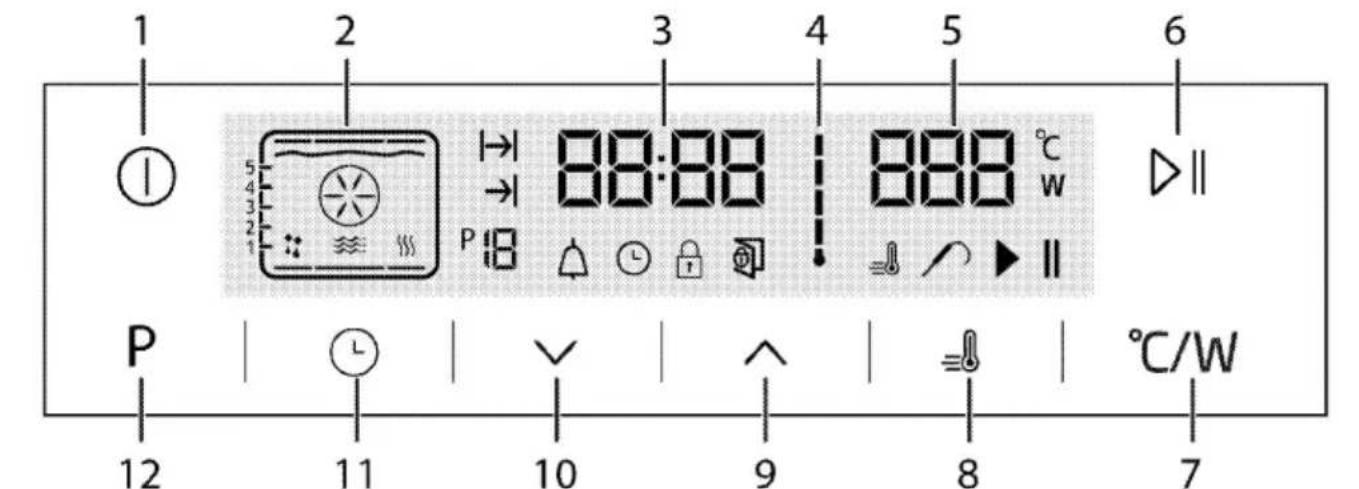
1 On/Off key
2 Function display
3 Current time indicator field
4 Oven Inner Temperature symbol
5 Temperature indicator field
6 Start/stop cooking key
7 Temperature/power setting key
8 Booster symbol (rapid preheating)
9 Plus key
10 Minus key
11 Adjustment key
12 Return to function display key

: Cooking time symbol
: End of cooking time symbol
: Function number
: Alarm symbol
: Clock symbol
: Key lock symbol
: Open door warning symbol
: Booster symbol (rapid preheating)
: Meat probe symbol
: Cooking position symbol
: Cooking in progress symbol
Function table:
Function table indicates the operating functions that can be used in the oven and their respective maximum and minimum temperatures.

1 Rack positions
2 Top heater
3 Grill heater
4 Turbo heater
5 Boost fan
6 Warm keeping
7 Bottom heating
8 Microwave symbol
9 Operating with fan position

Functions vary depending on the product model!
Oven returns to stand-by display after it is switched on and the current time is set. Only the current time appears on the display.
Operating in microwave mode
- Touch ① to switch on the oven.
- Initial operation screen appears when the oven is switched on.

1 Rack positions
2 Microwave symbol
3 Function display
4 Cooking time field: Indicates the set cooking time.
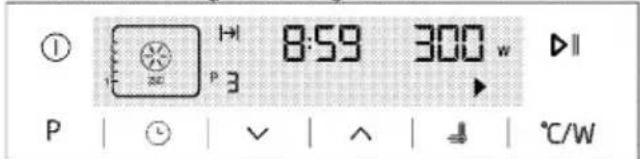
5 Microwave power/Temperature indicator field This screen contains microwave mode with the microwave power level, recommended rack position and cooking time.
3. If you want to change the microwave power level, touch °C/W once to reach the power setting display.
W symbol will flash.
- Touch √ √ until the desired power level appears in the power level field. Touch ℃/W to set the level when the desired value appears on the display.
- For cooking duration, touch Ⓛ once. |→| symbol will flash as well.
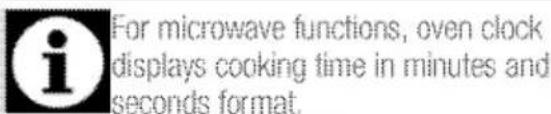
- Touch ∨ ∨ to select the desired cooking time and confirm the setting with Ⓛ. Once the cooking time is set, |→| will be displayed continuously.
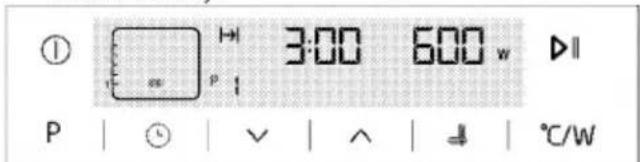
- If cooking time and power level values are suitable, touch ▶ to start cooking. Cooking starts.

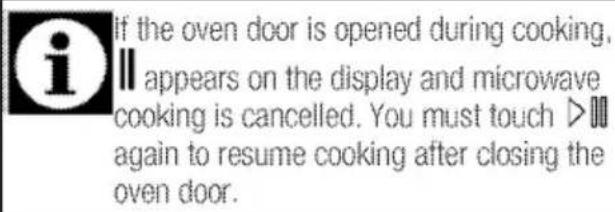
» The oven will be operate on the level set, until the end of the cooking time you selected. The oven lamp is lit during the cooking process.
- After the cooking is completed, "End" and II symbol appear on the display and alarm signal is heard.
-
To stop the alarm signal, just touch any key. Operating in combi mode (oven and microwave together)
-
Touch Ⓐ to switch on the oven.
- Touch ∧ or ∨ to select the desired combi mode.
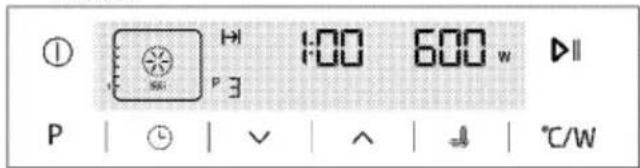
- If you want to change the microwave power level, touch °C/W once to reach the power setting display.
W symbol will flash.
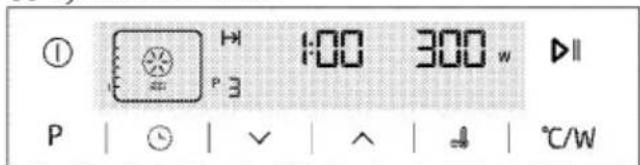
- Touch ∼/∨ until the desired power level appears in the power level field. Touch ℃/W to set the level when the desired value appears on the display.
- If you want to change the temperature in combi mode, touch °C/W twice to reach the temperature setting display.
°C symbol will flash.
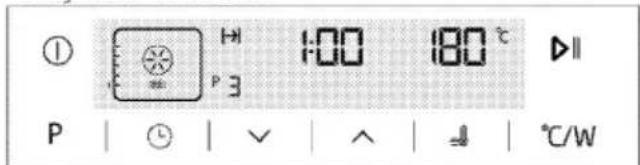
-
Touch √√ until the desired temperature appears in the temperature indicator field. Touch ℃/W to set the temperature when the desired value appears on the display.
-
For cooking duration, touch Ⓛ once. |→| symbol will flash as well.
- Touch √√ to select the desired cooking time and confirm the setting with Ⓛ. Once the cooking time is set, |→| will be displayed continuously.
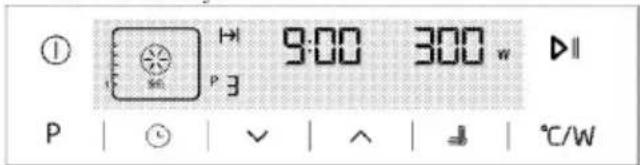
- If the cooking time, power level and temperature values are suitable, touch ▷ to start cooking. Cooking starts.
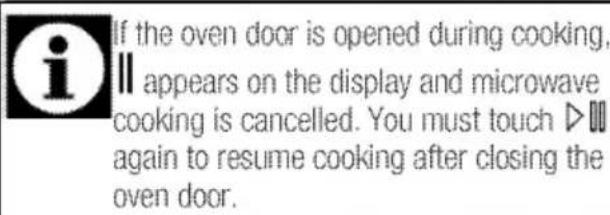
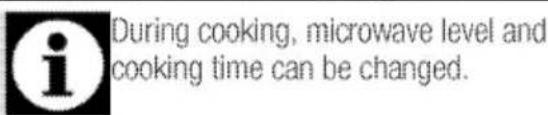
» The oven will be heated up to the preset temperature and will maintain this temperature until the end of the cooking time you selected. At the same time the oven will continue to run at the set microwave power level. The oven lamp is lit during the cooking process.
10. After the cooking is completed, "End" and II symbol appear on the display and alarm signal is heard.
11. To stop the alarm signal, just touch any key.
Switching off the electric oven
Touch ① to switch off the oven.
natural_image
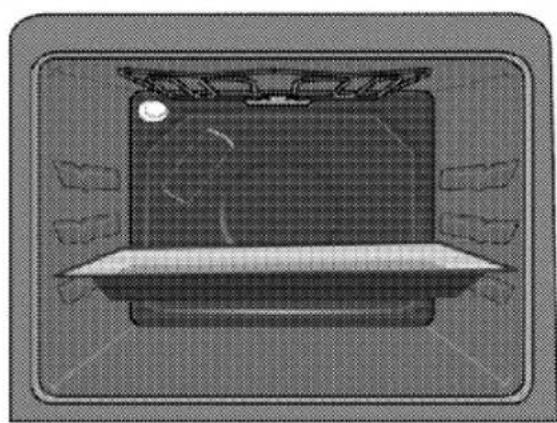
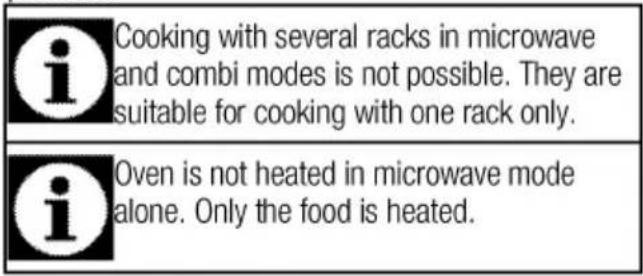
Top-down view of a computer monitor with a blank screen and ventilation grille (no text or symbols visible)First rack of the oven is the bottom rack. Use only the first rack for microwave cooking.



Operating modes for microwave
The order of operating modes shown here may vary according to the arrangement on your product.
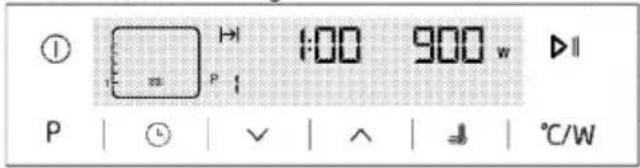
Microwave
Only the microwave operates. It may be used to warm meals and drinks, as well as cooking. Meals are cooked without roasting.
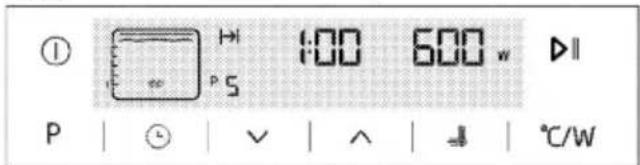
Microwave+Fan Heating
Oven's rear heater also operates together with the microwave. Hot air heated by the rear heater is evenly distributed throughout the oven rapidly by means of the fan. You can cook your meals in a short time and roast at the same time.

Microwave+Full Grill
Microwave and the grill on the ceiling of the oven operate. It is suitable for grilling large amount of meat.
- Put big or medium-sized portions in correct rack position under the grill heater for grilling.
• Set the temperature to maximum level.
• Turn the food after half of the grilling time.
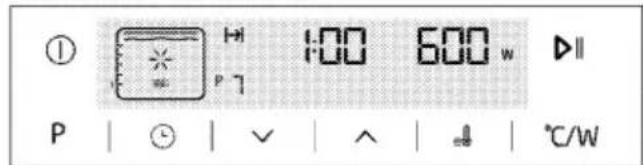
Microwave+Full Grill+Fan
Microwave and hot air heated by the full grill is distributed very fast in the oven by means of the fan. It is suitable for grilling large amount of meat.
Microwave+Full Grill+Fan
- Put big or medium-sized portions in correct rack position under the grill heater for grilling.
- Set the temperature to maximum level.
• Turn the food after half of the grilling time.
Microwave+Defrost
Microwave and only the fan (on the rear wall) operate.
It is suitable for thawing frozen grained food at room temperature slowly and cooling down the cooked food.
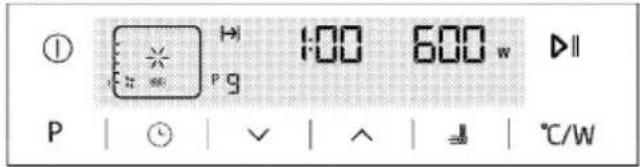
Function table
Function table indicates the functions that can be used in microwave and combi modes and their respective maximum and minimum temperatures.

| Function | Power range (W) | Temperature range (°C) |
| Microwave | 100-900 | - |
| Microwave+Fan Heating | 100-600 | 40-280 |
| Microwave+Full Grill | 100-600 | 50-280 |
| Microwave+Full Grill+Fan | 100-600 | 50-280 |
| Microwave+Defrost | 100-600 | - |
Cooking times table
The timings in this chart are meant as a guide. Timings may vary due to temperature of food, thickness, type and your own preference of cooking.

1st rack of the oven is the bottom rack. Use only 1st rack in microwave cooking.
| Dish | Cooking mode | Weight (gr) | Temperature (°C) | Microwave power (W) | Cooking time (approx. in min.) |
| Chicken baguette | Microwave+Fan supported | 1000 | 210 | 600 | 25 |
| Whole chicken | Microwave+Fan supported | 1500 | 15 min. 230 then 200 | 600 | 35 |
| Frozen pizza | Microwave+Fan supported | 450 | 230 | 200 | 8 |
| Turkey, thigh (boned) | Microwave+Grill+Fan | 1000 | 230 | 300 | 30 |
| Fresh large potatoes | Microwave+Fan supported | 1000 | 180 | 600 | 25 |
| Potatoes graten * | Microwave+Fan supported | 1250 | 180 | 600 | 25 |
| Dalyan mealball | Microwave+Fan supported | 1800 | 5 min. 230 then 170 | 300 | 20 |
| Whole fish | Microwave+Grill+Fan | 1000 | 250 | 600 | 10 |
| Sticks of fish pane | Microwave+Fan supported | 600 | 230 | 300 | 12 |
| Dumplings with tomato and potato | Microwave+Fan supported | 1500 | 210 | 200 | 35 |
| Convenience food (Chickpea with meat) | Microwave | 400 | 600 | 3,5 | |
| Pilaf | Microwave | 400 | 600 | 4 | |
| Please make preheating before cooking in combi mode. Preheating should be made by oven operating modes.* It is suggested to add planed kashar cheese onto it during the final 5 minutes of cooking. | |||||
Defrost
| Dish | Weight (gr) | Microwave power (W) | Dissolution time (min.) (approximately) | Waiting time (min.) | Suggestions |
| All red meat | 250 | 200 | 6 | 10 | Turn over half way through the cooking time |
| 500 | 200 | 12 | 10 | Turn over half way through the cooking time | |
| Ground meat | 100 | 100 | 8 | 10 | |
| 250 | 200 | 5 | 10 | ||
| 500 | 200 | 6 | 10 | Turn over half way through the cooking time | |
| Whole chicken | 1500 | 200 | 25 | 10 | Turn over half way through the cooking time |
| Chicken legs | 750 | 300 | 7 | 10 | |
| Chicken baguette | 500 | 300 | 5 | 10 | |
| 100 | 600 | 6 | 10 | ||
| Whole fish | 250 | 200 | 7 | 5 | Turn over half way through the cooking time |
| 500 | 200 | 10 | 5 | Turn over half way through the cooking time | |
| Sausage | 300 | 200 | 5 | 5 |
6 How to operate the oven
General information on baking, roasting and grilling
WARNING
Hot surfaces cause burns!
Product may be hot when it is in use. Never touch the hot burners, inner sections of the oven, heaters and etc. Keep children away. Always use heat resistant oven gloves when putting in or removing dishes into/from the hot oven.

DANGER:
Be careful when opening the oven door as steam may escape.
Exiting steam can scald your hands, face and/or eyes.
Tips for baking
- Use non-sticky coated appropriate metal plates or aluminum vessels or heat-resistant silicone moulds.
• Make best use of the space on the rack. - Place the baking mould in the middle of the shelf.
- Select the correct rack position before turning the oven or grill on. Do not change the rack position when the oven is hot.
- Keep the oven door closed.
Tips for roasting
- Treating whole chicken, turkey and large piece of meat with dressings such as lemon juice and black pepper before cooking will increase the cooking performance.
- It takes about 15 to 30 minutes longer to roast meat with bones when compared to roasting the same size of meat without bones.
- Each centimeter of meat thickness requires approximately 4 to 5 minutes of cooking time.
- Let meat rest in the oven for about 10 minutes after the cooking time is over. The juice is better distributed all over the roast and does not run out when the meat is cut.
- Fish should be placed on the middle or lower rack in a heat-resistant plate.
Tips for grilling
When meat, fish and poultry are grilled, they quickly get brown, have a nice crust and do not get dry. Flat pieces, meat skewers and sausages are particularly suited for grilling as are vegetables with high water content such as tomatoes and onions.
- Distribute the pieces to be grilled on the wire shelf or in the baking tray with wire shelf in such a way that the space covered does not exceed the size of the heater.
- Slide the wire shelf or baking tray with grill into the desired level in the oven. If you are grilling on the wire shelf, slide the baking tray to the lower rack to collect fats. Add some water in the tray for easy cleaning.
Foods that are not suitable for grilling carry the risk of fire. Only grill food which is suitable for intensive grilling heat.
Do not place the food too far in the back of the grill. This is the hottest area and fatty food may catch fire.
How to operate the electric oven
Functions vary depending on the product model.

Maximum adjustable cooking time in modes except "warm keeping" and microwave functions is limited with 6 hours due to safety reasons.
While adjusting any function, related symbols will flash on the display.

Program will be cancelled in case of power failure. You must reprogram the oven.

| Function | Recommended temperature (°C) | Temperature range (°C) |
| Fan heating | 180 | 40-250 |
| Full grill | 280 | 40-280 |
| Low grill | 280 | 40-280 |
| Eco fan heating | 180 | 160-220 |
| Warm keeping | 60 | 40-100 |
| * Functions vary depending on the product model. | ||
Operating modes
The order of operating modes shown here may be different from the arrangement on your product.
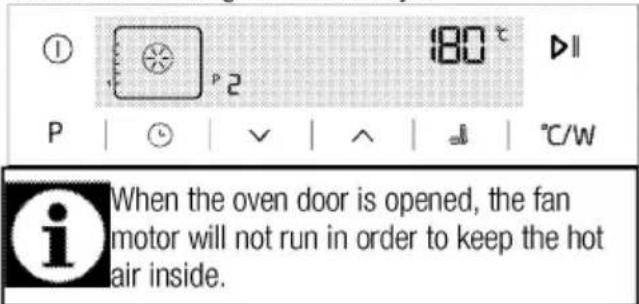
Fan heating
Hot air heated by the rear heater is evenly distributed throughout the oven rapidly by means of the fan. It is suitable for cooking your meals in different rack levels and preheating is not required in most cases. Suitable for cooking with multi trays.
Full grill
Large grill at the ceiling of the oven is in operation. It is suitable for grilling large amount of meat.
Full grill

- Put big or medium-sized portions in correct rack position under the grill heater for grilling.
- Set the temperature to maximum level.
• Turn the food after half of the grilling time.
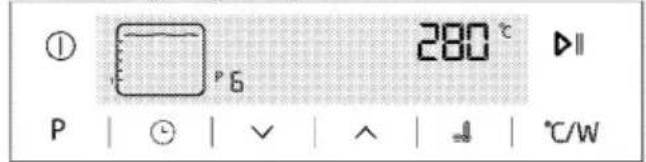
Low grill
Small grill at the ceiling of the oven is in operation. Suitable for grilling and gratin dishes.
- Put small or medium-sized portions in correct rack position under the grill heater for grilling.
- Set the temperature to maximum level.
• Turn the food after half of the grilling time.
Eco fan heating
To save power, you can use this function instead of the cooking operations that you would perform by using Fan Heating at 160-220°C temperature range. However, the cooking time will increase a little bit. Cooking times related to this function are indicated in "Eco Fan Heating" table.

Warm keeping
Used for keeping food at a temperature ready for serving for a long period of time.
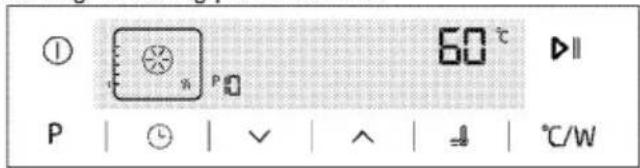
How to operate the oven control unit

1 On/Off key
2 Function display
3 Current time indicator field
4 Oven Inner Temperature symbol
5 Temperature indicator field
6 Start/stop cooking key
7 Temperature/power setting key
8 Booster symbol (rapid preheating)
9 Plus key
10 Minus key
11 Adjustment key
12 Return to function display key

: Cooking time symbol
: End of cooking time symbol
: Function number
: Alarm symbol
: Clock symbol
: Key lock symbol
: Open door warning symbol
: Booster symbol (rapid preheating)
: Meat probe symbol
: Cooking position symbol
: Cooking in progress symbol
How to operate the oven
- Touch the "①" key for approx. 2 seconds to open the oven.
» First operating function appears on display after the oven is turned on. When the display is in this mode, cooking time, the end of cooking time and Booster (quick heating) function can be set.
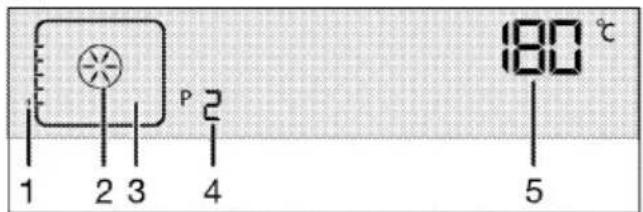
1 Rack positions
2 Function display
3 Function symbol
4 Function number
5 Temperature/weight indicator field
Oven will switch off automatically within 20 seconds if no oven setting is made on this screen.
Manual cooking by selecting temperature and operating function
You can cook by selecting temperature and operating function specific to your meal and check progress manually without setting the cooking duration.
- First operating function appears on display after touching Ⓐ button to open the oven.
-
Select the operating function by touching the √√ keys.
-
If you desire to change the temperature that is recommended for operating function, enable the temperature field by touching °C/W button.
» ℃ symbol flashes.
-
Set the desired temperature by touching √ keys.
-
Confirm the temperature setting by touching ^ C/W key.
-
Put your dish into the oven.
-
Touch ▶ II key to start cooking if temperature and operating function are appropriate. ▶ symbol appears on display.
» Your oven will readily start operating in the selected function and will increase the inner temperature to the set temperature. Each grades of the inner temperature symbol will be lit as inner temperature reaches to the set temperature. Additional active heaters and recommended tray position appear in the Function display.
- The oven does not turn off automatically due to the manual cooking without setting the cooking time. You can finish cooking by touching ▶ || key once again.
» The oven finishes the cooking and || symbol appears on display.
- Touch the "①" key for approx. 2 seconds to close the oven.
Cooking by setting the cooking time;
You can make your oven switch off automatically at the end of cooking duration by selecting the temperature and function specific to your meal and setting the cooking duration.
- First operating function appears on display after touching ① button to open the oven.
- Select the operating function by touching the ∨√ keys.
- If you desire to change the temperature that is recommended for operating function, enable the temperature field by touching ^ C/W button.
» ℃ symbol flashes.
-
Set the desired temperature by touching √√ keys.
-
Confirm the temperature setting by touching ^ C/W key.
-
Touch until ⏱ symbol appears on display for cooking time.
-
Set the cooking time by touching √√ keys and confirm the setting by touching ⏱ key.
» Once the Cooking Time is set, |→| symbol will appear on display continuously.
-
Put your dish into the oven.
-
Touch ▶ II key to start cooking if temperature, operating function and cooking time are appropriate. ▶ symbol appears on display.
» The oven will be heated up to the set temperature and will maintain this temperature until the end of the cooking time you selected. » Your oven will readily start operating in the selected function and will increase the inner temperature to the set temperature. It maintains this temperature until the end of the set cooking time. Each grades of the inner temperature symbol will be lit as inner temperature reaches to the set temperature. Additional active heaters and recommended tray position appear in the Function display.
-
After the cooking process is completed, "End" appears on the display and the alarm sounds.
-
Touch any key to silence the alarm.
» Alarm stops and the oven finishes operating automatically.
Setting the end of cooking time to a later time;
You can ensure that the oven runs and turns off automatically by setting temperature and operating function specific to your meal, the cooking time and end of cooking to a later time, manually controlling without setting the cooking duration.
- First operating function appears on display after touching Ⓐ button to open the oven.
- Select the operating function by touching the √√ keys.
- If you desire to change the temperature that is recommended for operating function, enable the temperature field by touching ^ C/W button.
» ℃ symbol flashes.
-
Set the desired temperature by touching √ keys.
-
Confirm the temperature setting by touching ^ C/W key.
-
Touch until ⓣ symbol appears on display for cooking time.
-
Set the cooking time by touching √√ keys and confirm the setting by touching ⏱ key.
» Once the Cooking Time is set, |→| symbol will appear on display continuously.
-
Touch → until ⏱ symbol appears on display for the end of cooking time.
-
Set the cooking time by touching √√ buttons and confirm the setting by touching ⏻ key.
» Once the end of cooking time is set, → symbol will appear on display continuously.
-
Put your dish into the oven.
-
Touch ▶ || key to start cooking if temperature, operating function, cooking time and the end of cooking time are appropriate. ▶ symbol appears on display.
» Oven timer automatically calculates the startup time for cooking by deducting the cooking time from the end of cooking time you have set. Selected operation mode is activated when the startup time of cooking has come and the oven is heated up to the set temperature. It maintains this temperature until the end of the set cooking time. Each grades of the inner temperature symbol will be lit as inner temperature reaches to the set temperature. Additional active heaters and recommended tray position appear in the Function display.
-
After the cooking process is completed, "End" appears on the display and the alarm sounds.
-
Touch any key to silence the alarm.
» Alarm stops and the oven finishes operating automatically.

If you want to cancel only cooking time or cooking time plus the end of cooking time after you have set them, you need to reset the cooking time.
Setting the booster (Quick Pre-heating)
Use Booster (Rapid Pre-heating) function to make the oven reach the desired temperature faster.
Booster cannot be selected in defrosting, keeping warm and cleaning positions. Booster settings will be cancelled in case of power failure.
- Touch ⚡ after setting the temperature, operating function, cooking time and the end of cooking time.
»≡ symbol appears continuously and booster (rapid pre-heating) setting is enabled.
» Booster symbol disappears as soon as the oven reaches the desired temperature and oven resumes operating in the function it was in before the Booster function.
- Touch ≡ again in order to cancel booster function.
»≡ symbol disappears and booster (rapid pre-heating) setting is disabled.
Switching off the electric oven
Touch ① to switch off the oven.
Activating the key lock
You can prevent oven from being intervened with by activating the key lock function.
-
Touch 🔒 until ⏻ symbol appears on display. »"OFF" appears on the display.
-
Press to activate the key lock.
» Once the key lock is activated, "On" appears on the display and the 🔒 symbol remains lit. Confirm by touching ⏻.

Oven keys are not functional when the key lock is activated. Key lock will not be cancelled in case of power failure.
Deactivating the key lock
-
Touch 🔒 until ⏻ symbol appears on display. »"On" will appear on the display.
-
Disable the key lock by pressing the √ key. »"OFF" will appear once the key lock is deactivated. Confirm by touching ⏻ key.
Oven keys are not functional when the Key lock function is activated. Key lock settings will not be cancelled in case of power outage.
Setting the alarm clock
You can use the timer of the product for any warning or reminder apart from the cooking program.
The alarm clock has no influence on the functions of the oven. It is only used as a warning. For example, this is useful when you want to turn food in the oven at a certain point of time. Timer will give an audio warning at the end of the set time.
- Touch △ until ⏻ symbol appears on display.

Maximum alarm time can be 23 hours and 59 minutes.
- Set the alarm duration by using √√ keys.
»△ symbol will remain lit and the alarm time will appear on the display once the alarm time is set. - At the end of the alarm time, △ symbol starts flashing and the audio warning is heard.
Silencing the alarm
- Audio warning sounds for 2 minutes. To stop the audio warning, just press any key.
» Audio warning will be silenced and current time will be displayed.
Cancelling the alarm;
- Touch △ until ⏻ symbol appears on display in order to cancel the alarm.
- Press and hold √ key until "00:00" is displayed.

Alarm time will be displayed. If the alarm time and cooking time are set concurrently, shortest time will be displayed.
Changing the time of the day
- Touch ⏻ in short intervals until ⏻ symbol appears on display.
- Touch ∨√ keys to set the hour.
- Confirm the setting by touching ⏻ symbol and wait for 4 seconds without touching any keys to confirm.
Current time settings are cancelled in case of power failure. It needs to be readjusted. Current time can not be changed when any of the oven functions is in use.
Adjusting the volume
- While the oven is in Standby mode, touch ⏻ key in short intervals until 'VOL' appears on display.
- Press ∧ / √ keys to set one of L0, L1 or L2 tones.
- Press ⏻ key or wait for 4 seconds without touching any keys to confirm the setting.
Adjusting the Eco lamp setting
- While the oven is in Standby mode, touch Ⓤ key in short intervals until 'LP' appears on display.
- Press ∧/√ keys to set On or ECO option.
- Press ⏻ key or wait for 4 seconds without touching any keys to confirm the setting.
- When set to ON; while the oven door is open in Standby mode and during operation the lamp is turned ON continuously.
- When set to ECO; while the oven door is open in Standby mode and during operation the lamp is turned ON and then turned OFF after 15 seconds.
If any key is touched during operation (excluding ①and 🔊 keys) the lamp is turned ON and then turned OFF after 15 seconds.
Cooking times table

The values specified have been determined in the lab. The values suitable for you may be different from these values.
Baking and roasting

1^st rack of the oven is the bottom rack.
| Dish | Cooking level number | Rack position | Temperature (°C) | Cooking time (approx. in min.) | |
| Cakes in tray* | One level | 1 | 175 | 30 ... 40 | |
| Cakes in mould* | One level | 1 | 175 | 50 ... 60 | |
| Fairy cakes* | One level | 1 | 175 | 25 ... 35 | |
| Sponge cake* | One level | 1 | 200 | 8 ... 15 | |
| Wainut cookies* | One level | 1 | 175 | 25 ... 30 | |
| 2 levels | 1 - 3 | 170 ... 180 | 35 ... 45 | ||
| Dough pastry* | One level | 1 | 200 | 35 ... 45 | |
| 2 levels | 1 - 3 | 200 | 45 ... 55 | ||
| Rich pastry* | One level | 1 | 190 | 25 ... 35 | |
| 2 levels | 1 - 3 | 190 | 35 ... 45 | ||
| Leaven* | One level | 1 | 200 | 35 ... 45 | |
| Lasagna* | One level | 1 | 200 | 30 ... 40 | |
| Beef steak (whole) / Roast | One level | 1 | 25 min., 250/max, then 180 ... 190 | 100 ... 120 | |
| Leg of Lamb (casserole) | One level | 1 | 25 min at 220 and then 180 ... 190 | 70 ... 90 | |
| Roasted chicken | One level | 1 | 15 min., 250/max, then 190 | 55 ... 65 | |
| Turkey (Sliced) | One level | 1 | 25 min., 250/max, then 190 | 150 ... 210 | |
| Fish | One level | 1 | 200 | 20 ... 30 | |
| When cooking with 2 trays at the same time, place the deeper tray on the upper rack and the other one on the lower rack.* It is recommended to perform preheating for all foods. | |||||
Eco Fan Heating

Do not change the cooking temperature after cooking starts in Eco Fan Heating mode.

Do not open the door in Eco Fan Heating mode.
| Dish | Cooking level number | Rack position | Temperature (°C) | Cooking time (approx. in min.) | |||
| Cakes in cooking paper | One level | 1 | 200 | 35 ... 40 | |||
| Walnut cookies | One level | 1 | 200 | 30 ... 35 | |||
| Dough pastry | One level | 1 | 200 | 40 ... 45 | |||
| Rich pastry | One level | 1 | 200 | 40 ... 45 | |||
Tips for baking cake
- If the cake is too dry, increase the temperature some 10^ C and decrease the cooking time.
- If the cake is wet, use less liquid or lower the temperature by 10^ C.
- If the cake is too dark on top, place it on a lower rack, lower the temperature and increase the cooking time.
- If cooked well on the inside but sticky on the outside use less liquid, lower the temperature and increase the cooking time.
Tips for baking pastry
- If the pastry is too dry, increase the temperature some 10^ C and decrease the cooking time. Dampen the layers of dough with a sauce composed of milk, oil, egg and yoghurt.
- If the pastry takes too long to bake, pay care that the thickness of the pastry you have prepared does not exceed the depth of the tray.
- If the upper side of the pastry gets browned, but the lower part is not cooked, make sure that the amount of sauce you have used for the pastry is not too much at the bottom of the pastry. Try to scatter the sauce equally between the dough layers and on the top of pastry for an even browning.
Cook the pastry in accordance with the mode and temperature given in the cooking table. If the bottom part is still not browned enough, place it on one lower rack next time.
Tips for cooking vegetables
- If the vegetable dish runs out of juice and gets too dry, cook it in a pan with a lid instead of a tray. Closed vessels will preserve the juice of the dish.
- If a vegetable dish does not get cooked, boil the vegetables beforehand or prepare them like canned food and put in the oven.
Operating the grill
WARNING
Close oven door during grilling. Hot surfaces may cause burns!
Switching on the grill
-
First operating function appears on display after touching Ⓐ button to open the oven.
-
Touch √√ keys to select the desired grill function.
- If you desire to change the temperature that is recommended for operating function, enable the temperature field by touching °C/W button.
» ℃ symbol flashes.
-
Set the desired temperature by touching √ keys.
-
Confirm the temperature setting by touching ^ C/W key.
-
Touch ▶ || key to start grilling if temperature and operating function are appropriate. ▶ symbol appears on display.
» Your oven will readily start operating in the selected function and will increase the inner temperature to the set temperature. Each grades of the inner temperature symbol will be lit as inner temperature reaches to the set temperature. Additional active heaters and recommended tray position appear in the Function display.
- You can finish grilling by touching ▶ II button once again.
» The oven finishes grilling and || symbol appears on display.
Switching off the grill
- Touch the "①" button for approx. 2 seconds to close the oven.
Cooking times table for grilling
Grilling with electric grill
| Food | Insertion level | Grilling time (approx.) |
| Fish | 2...3 | 20...25 min. |
| Sliced chicken | 2...3 | 25...35 min. |
| Lamb chops | 2...3 | 20...25 min. |
| Roast beef | 2...3 | 25...30 min. |
| Veal chops | 2...3 | 25...30 min. |
| Toast bread | 3 | 1...2 min. |
| depending on thickness | ||

Maintenance and care
General information
Service life of the product will extend and the possibility of problems will decrease if the product is cleaned at regular intervals.
DANGER:
Disconnect the product from mains supply before starting maintenance and cleaning works. There is the risk of electric shock!
DANGER:
Allow the product to cool down before you clean it. Hot surfaces may cause burns!
- Clean the product thoroughly after each use. In this way it will be possible to remove cooking residues more easily, thus avoiding these from burning the next time the appliance is used.
- No special cleaning agents are required for cleaning the product. Use warm water with washing liquid, a soft cloth or sponge to clean the product and wipe it with a dry cloth.
• Always ensure any excess liquid is thoroughly wiped off after cleaning and any spillage is immediately wiped dry. - Do not use cleaning agents that contain acid or chloride to clean the stainless or inox surfaces and the handle. Use a soft cloth with a liquid detergent (not abrasive) to wipe those parts clean, paying attention to sweep in one direction.
The surface might get damaged by some detergents or cleaning materials. Do not use aggressive detergents, cleaning powders/creams or any sharp objects during cleaning. Do not use harsh abrasive cleaners or sharp metal scrapers to clean the oven door glass since they can scratch the surface, which may result in shattering of the glass.

Do not use steam cleaners to clean the appliance as this may cause an electric shock.
Cleaning microwave oven part
- If steam accumulates inside or around the outside of the oven door, wipe with a soft cloth. This may occur when the microwave oven is operated under high humidity condition. And it is normal.
- Remove odors from your oven by combining a cup of water with the juice and skin of one lemon in a deep microwaveable bowl and microwave for 5 minutes. Wipe thoroughly and dry with a soft cloth.
- When it becomes necessary to replace the oven light, please consult an Authorized Service Agent to have it replaced.
- The oven should be cleaned regularly and any food deposits should be removed. Failure to maintain the oven in a clean condition could lead to deterioration of the surface that could adversely affect the life of the product and possibly result in a hazardous situation.
- Please do not dispose this product together with the domestic wastes. It should be disposed to the particular disposal center provided by the municipalities.

Be careful not to damage the door seal when cleaning the oven door. Do not operate the oven with damaged door seal.
Cleaning the control panel
Clean the control panel and control knobs with a damp cloth and wipe them dry.

Do not remove the control buttons/knobs to clean the control panel. Control panel may get damaged!
Cleaning the oven
Clean oven door
To clean the oven door, use warm water with washing liquid, a soft cloth or sponge to clean the product and wipe it with a dry cloth.

Don't use any harsh abrasive cleaners or sharp metal scrapers for cleaning the oven door. They could scratch the surface and destroy the glass.
Replacing the oven lamp
DANGER:
Before replacing the oven lamp, make sure that the product is disconnected from mains and cooled down in order to avoid the risk of an electrical shock. Hot surfaces may cause burns!

The oven lamp is a special electric light bulb that can resist up to 300 °C. See Technical specifications, page 13 for details. Oven lamps can be obtained from Authorised Service Agents.
Position of lamp might vary from the figure.

The lamp used in this appliance is not suitable for household room illumination. The intended purpose of this lamp is to assist the user to see foodstuffs.

The lamps used in this appliance have to withstand extreme physical conditions such as temperatures above 50 °C.
If your oven is equipped with a round lamp:
- Disconnect the product from mains.
- Turn the glass cover counter clockwise to remove it.
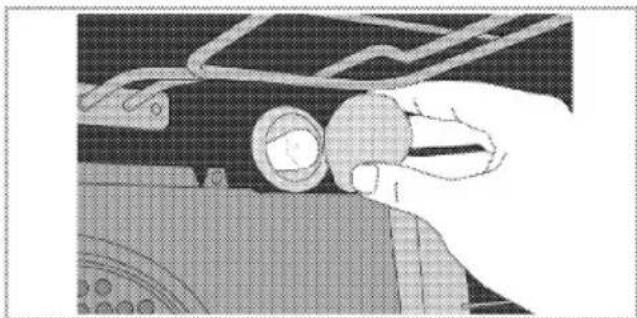
natural_image
Close-up of a hand holding a circular object on a mechanical component (no visible text or symbols)- Pull out the oven lamp from its socket and replace it with the new one.
- Install the glass cover.
8 Troubleshooting
Oven emits steam when it is in use
- It is normal that steam escapes during operation. >>>This is not a fault.
Product emits metal noises while heating and cooling.
- When the metal parts are heated, they may expand and cause noise. >>>This is not a fault.
Product does not operate.
- The mains fuse is defective or has tripped. >>>Check fuses in the fuse box. If necessary, replace or reset them.
- Product is not plugged into the (grounded) socket. >>>Check the plug connection.
- Buttons/knobs/keys on the control panel do not function. >>>Keylock may be enabled. Please disable it. (See.)
Oven light does not work.
- Oven lamp is defective. >>>Replace oven lamp.
- Power is cut. >>>Check if there is power. Check the fuses in the fuse box. If necessary, replace or reset the fuses.
Oven does not heat.
- Function and/or Temperature are not set. >>>Set the function and the temperature with the Function and/or Temperature knob/key.
- Power is cut. >>>Check if there is power. Check the fuses in the fuse box. If necessary, replace or reset the fuses.
There is no response when I keep the keys/buttons pressed for a long time
- Do not operate the oven. Switch off the circuit breaker and unplug the appliance. Call the Authorised Service Agent.
Microwave does not operate.
- Product is not plugged into the socket properly >>>Insert the plug into the socket.
- Door is not closed properly. >>>Door should "click" while closing.
- There can be an obstacle between the door and the front section of the oven. >>>Remove the obstacle and close the door properly.
Some strange noises are heard when the microwave is in operation.
- There is an electrical arc inside the oven resulting from a foreign metal object. >>>Remove the metal object from the oven cavity.
- Oven accessories contact the oven walls. >>>Avoid the contact with the oven door.
- There are loose cutlery items or cooking utensils inside the oven. >>>Remove the cutlery item or cooking utensil from the oven cavity.
Food is not heated or heated too slow.
- Correct operation time and/or power level are not selected. >>>Select the suitable cooking power and time for your food.
- Amount of the food can be larger than normal or it may be colder than the normal level. >>>Set additional cooking time. Check regularly to prevent the food from burning.
- There are loose cutlery items or cooking utensils inside the oven. >>>Remove the cutlery item or cooking utensil from the oven cavity.
Food is too hot, dry or burnt.
- Correct operation time and/or power level are not selected. >>>Check whether you have selected the suitable cooking power and time for your food. Call Authorised Service Agent if your oven is damaged.
Some noises are heard after the cooking time is over.
- Cooling fan may be in operation. >>>This is not a fault. Cooling fan continues to operate after the oven is switched off. Fan will stop automatically when the temperature decreases to a certain level.
Consult the Authorised Service Agent or the dealer where you have purchased the product if you can not remedy the trouble although you have implemented the instructions in this section. Never attempt to repair a defective product yourself.
9 How to obtain to service
Please keep your purchase receipt or other proof of purchase in a safe place; you will need to have it should the product require attention under guarantee.
You should also complete the details below; it will help us assist you when requesting service. (The model number is printed on the Instruction Booklet and the serial number is printed on the Rating Label affixed to the appliance)
Model No:
Serial No:
Retailer:
Date of purchase:
For service under guarantee simply telephone the appropriate number below
UK Mainland & Northern Ireland
| Fridges & Freezers | 0845 6046859/ 0345 6046859 |
| Electric Cookers | 0845 6046859/ 0345 6046859 |
| Gas & Dual Fuel Cookers | 0845 6046859/ 0345 6046859 |
| Washing Machines & Dishwashers | 0845 6046859/ 0345 6046859 |
Republic of Ireland
| All Refrigeration, All Cookers | 01 862 3411 |
| Washing Machines & Dishwashers |
Before requesting service please check the trouble-shooting guide in the Operating Instructions as a charge may be levied where no fault is found even though your product may still be under guarantee.
Should you experience any difficulty in obtaining service please contact the Blomberg Customer Help-Line.
Tel: 0845 604 6859/ 0345 604 6859
10 Guarantee details
Your new BLOMBERG product is guaranteed against the cost of breakdown repairs for three years from the date of the original purchase.
What is covered?
• Repairs necessary as a result of faulty materials, defective components or manufacturing defect.
- The cost of functional replacement parts, but excluding consumable items.
- The labour costs of a BLOMBERG approved repairer to carry out the repair.
What is not covered?
- Transit, delivery or accidental damage or misuse and abuse.
- Cabinet or appearance parts, including knobs, flaps, handles or container lids.
• Accessories or consumable items including but not limited to, ice trays, scrapers, cutlery baskets, filters and light bulbs.
• Repairs required as a result of unauthorised repair or inexpert installation that fails to meet the requirements contained in the user instruction book.
• Repairs to products used on commercial or non-residential household premises. - Loss of frozen food in freezers or fridge/freezers. (Food loss insurance is often included within
your household contents insurance policy, or may be available separately from your retailer).
Important notes.
- Your BLOMBERG product is designed and built for domestic household use only.
- The guarantee will be void if the product is installed or used in commercial or non-residential domestic household premises.
- The product must be correctly installed, located and operated in accordance with the instructions contained in the User Instructions Booklet provided.
• Professional installation by a qualified Electrical Domestic Appliance Installer is recommended for all Washing Machines, Dishwashers and Electric Cookers
• Gas Cookers must only be installed by a Gas Safe (or Gas Networks Ireland) registered Gas Installer.
• The guarantee is given only within the boundaries of the United Kingdom and the Republic of Ireland. - The guarantee is applicable only to new products and is not transferable if the product is resold.
•BLOMBERG disclaims any liability for incidental or consequential damages.
The guarantee does not in anyway diminish your statutory or legal rights.
Blomberg, 1 Greenhill Crescent, Watford, Hertfordshire, WD18 8QU
Tel: 0845 604 8340 / 0345 604 8340 Fax: 0845 6004922
email: service@blomberguk.com www.blomberguk.com
- Please read this user manual first!
- Explanation of symbols
- Important instructions for safety and environment 4
- General information 12
- Installation 15
- 4Preparation 20
- How to operate the microwave 22
- How to operate the oven 32
- Maintenance and care 40
- Troubleshooting 42
- How to obtain to service 44
- Guarantee details 45
- Important instructions for safety and environment
- General safety
- Electrical safety
- Product safety
- Safety instructions for microwave
- Intended use
- Safety for children
- Disposing of the old product Compliance with the WEEE Directive and Disposing of the Waste Product:
- Compliance with RoHS Directive:
- Package information
- General information
- Package contents
- Installation
- Before installation
- Installation and connection
- Electrical connection
- DANGER:
- Connecting the power cable
- Installing the product
- Final check
- Future Transportation
- 4Preparation
- Tips for saving energy
- Initial use
- Day time setting
- First cleaning of the appliance
- Initial heating
- Electric oven
- Grill oven
- How to operate the microwave
- General information on microwave cooking
- Containers suitable for microwaving
- CAUTION
- Glass containers
- Plastic containers
- Cooking bags
- Paper
- Wooden and wicker containers
- Porcelain containers
- Metal containers
- Positioning food
- Food height
- Cooking suggestions
- Defrosting:
- Liquid content
- Steam
- Sugar
- Food density
- Bones and fat content
- Food colour
- Reducing the internal pressure in food
- Turning and stirring items while cooking
- Different cooking times
- Standing time
- How to use the microwave oven
- Function table:
- Operating in microwave mode
- Switching off the electric oven
- Operating modes for microwave
- Microwave
- Microwave+Fan Heating
- Microwave+Full Grill
- Microwave+Full Grill+Fan
- Microwave+Defrost
- Function table
- Cooking times table
- How to operate the oven
- General information on baking, roasting and grilling
- WARNING
- Tips for baking
- Tips for roasting
- Tips for grilling
- How to operate the electric oven
- Operating modes
- Fan heating
- Full grill
- Low grill
- Eco fan heating
- Warm keeping
- How to operate the oven control unit
- How to operate the oven
- Manual cooking by selecting temperature and operating function
- Cooking by setting the cooking time;
- Setting the end of cooking time to a later time;
- Setting the booster (Quick Pre-heating)
- Activating the key lock
- Deactivating the key lock
- Setting the alarm clock
- Silencing the alarm
- Cancelling the alarm;
- Changing the time of the day
- Adjusting the volume
- Adjusting the Eco lamp setting
- Baking and roasting
- Tips for baking cake
- Tips for baking pastry
- Tips for cooking vegetables
- Operating the grill
- Switching on the grill
- Switching off the grill
- Cooking times table for grilling
- Maintenance and care
- General information
- Cleaning microwave oven part
- Cleaning the control panel
- Cleaning the oven
- Clean oven door
- Replacing the oven lamp
- If your oven is equipped with a round lamp:
- Troubleshooting
- Oven emits steam when it is in use
- Product emits metal noises while heating and cooling.
- Product does not operate.
- Oven light does not work.
- Oven does not heat.
- There is no response when I keep the keys/buttons pressed for a long time
- Microwave does not operate.
- Some strange noises are heard when the microwave is in operation.
- Food is not heated or heated too slow.
- Food is too hot, dry or burnt.
- Some noises are heard after the cooking time is over.
- How to obtain to service
- Model No:
- For service under guarantee simply telephone the appropriate number below
- UK Mainland & Northern Ireland
- Republic of Ireland
- Guarantee details
Brand : BLOMBERG
Model : OKW9440
Category : Oven