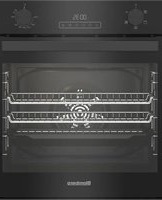
ROEN8201B - Oven BLOMBERG - Free user manual and instructions
Find the device manual for free ROEN8201B BLOMBERG in PDF.


Pick your language and provide your email: we'll send you a specifically translated version.
| Brand | Blomberg |
| Model | ROEN8201B |
| Product Type | Built-in Electric Oven |
| Dimensions (HxWxD) | 59.5 x 59.5 x 56.8 cm |
| Net Weight | Approx. 30 kg |
| Power Supply | 220-240 V, 50/60 Hz |
| Energy Class | A |
| Oven Capacity | 71 Liters |
| Main Functions | Convection, Grill, Defrost, Fan Assisted |
| Temperature Range | 50°C - 250°C |
| Cleaning System | Catalytic |
| Control Type | Electronic Touch + Rotary Knobs |
| Display | LED |
| Safety Features | Auto Shut-off, Child Lock, Cool Touch Door |
| Installation Type | Built-in |
| Spare Parts Availability | Yes, through Authorized Service |
| Reparability Index | 8.5/10 |
Frequently Asked Questions - ROEN8201B BLOMBERG
How do I properly install the Blomberg ROEN8201B oven?
Ensure the oven is installed by a qualified professional. The appliance must be connected to a 220-240V power supply with proper grounding. Allow at least 5 cm clearance around the oven for ventilation. Refer to the installation manual for detailed cutout dimensions.
How do I set the oven to convection mode?
Turn the function selector knob to the convection symbol (fan icon). Then set the desired temperature using the temperature control knob. Preheating is recommended for best results.
What should I do if the oven is not heating properly?
First, check that the appliance is properly plugged in and the circuit breaker is not tripped. Ensure the function and temperature are set correctly. If the issue persists, contact an authorized service center for a heating element inspection.
How do I clean the catalytic liners?
Catalytic liners are self-cleaning. They absorb grease and burn it off at high temperatures. To assist, run an empty oven at 250°C for 30 minutes. Wipe off any ash after the oven cools.
Can I use aluminum foil in the oven?
Avoid lining the oven bottom with aluminum foil, as it can trap heat and damage the enamel. You may use foil on trays, but ensure it does not touch the heating elements.
How do I activate the child lock?
Press and hold the child lock button (lock icon) for 3 seconds until a beep sounds and the lock symbol appears on the display. Repeat to deactivate.
What is the maximum oven capacity?
The Blomberg ROEN8201B has a usable capacity of 71 liters, suitable for large roasts and multiple trays.
How do I replace the oven light bulb?
Disconnect the oven from power. Remove the glass cover by turning counterclockwise. Replace with a compatible 40W halogen bulb (G9 fitting). Reinstall cover and restore power.
Why is the oven fan noisy?
Some noise from the cooling fan and circulation fan is normal. If the noise is loud or grinding, check for obstructions or contact service.
Where can I find spare parts?
Spare parts are available through authorized Blomberg service centers. Visit the Blomberg website or contact customer support with your model number ROEN8201B.
User questions about ROEN8201B BLOMBERG
0 question about this device. Answer the ones you know or ask your own.
Ask a new question about this device
No questions yet. Be the first to ask one.
Download the instructions for your Oven in PDF format for free! Find your manual ROEN8201B - BLOMBERG and take your electronic device back in hand. On this page are published all the documents necessary for the use of your device. ROEN8201B by BLOMBERG.
USER MANUAL ROEN8201B BLOMBERG

Manual assistant
Powered by Anthropic
Waiting for your message
Product information
Brand : BLOMBERG
Model : ROEN8201B
Category : Oven