
BEO 1690 - Oven BLOMBERG - Free user manual and instructions
Find the device manual for free BEO 1690 BLOMBERG in PDF.


Pick your language and provide your email: we'll send you a specifically translated version.
| Product Type | Built-in Electric Oven |
| Brand | Blomberg |
| Model | BEO 1690 |
| Dimensions (HxWxD) | 595 x 594 x 567 mm |
| Oven Capacity | 71 Liters |
| Weight | Approx. 35 kg |
| Power Supply | 220-240 V, 50/60 Hz |
| Energy Efficiency Class | A+ |
| Heating Methods | Conventional, Grill, Fan-Forced, Defrost |
| Temperature Range | 50°C - 275°C |
| Control Type | Rotary Knobs and Electronic Timer |
| Display | LED Digital Display |
| Interior Light | Yes |
| Cleaning Method | Catalytic Enamel (Self-Cleaning) |
| Safety Features | Child Lock, Cooling Fan, Auto Shut-off |
| Door Type | CoolTouch, 4-layer glass |
| Number of Shelves | 2 |
| Accessories Included | Baking Tray, Grill Rack, Meat Probe |
| Installation Type | Built-in |
| Spare Parts Availability | Authorized Service Centers |
| Repairability Index | 7.5/10 |
| Warranty | 2 Years (parts and labor) |
Frequently Asked Questions - BEO 1690 BLOMBERG
How do I preheat the oven?
Turn the function knob to the desired heating mode, set the temperature using the thermostat knob, and wait until the thermostat indicator light turns off. This indicates the oven has reached the set temperature.
Can I use aluminum foil in the oven?
Yes, but avoid covering the bottom of the oven and ensure foil does not touch the heating elements. Use it only on baking trays or to cover dishes.
How do I clean the catalytic enamel?
The catalytic lining absorbs grease and burns it off at high temperatures. Simply run the oven at 250°C for about 30 minutes to activate self-cleaning, then wipe off ash with a damp cloth.
What does the child lock do and how to activate it?
The child lock prevents accidental operation of the oven. To activate, press and hold the 'Child Lock' button for 3 seconds until a key symbol appears on the display. Repeat to deactivate.
Why is the oven not heating?
Check if the appliance is properly plugged in, the timer is set, and the function knob is not in the 'Off' position. If the problem persists, the heating element may be faulty; contact a service center.
How do I use the meat probe?
Insert the probe into the thickest part of the meat, plug it into the oven socket, and set the desired core temperature. The oven will automatically switch off when the temperature is reached.
What is the maximum weight for the oven shelf?
Each shelf can support up to 25 kg. Distribute loads evenly to prevent damage.
How do I set the timer for delayed cooking?
Select the cooking mode and temperature, then press the 'Timer' button repeatedly to set the finish time. The oven will automatically start and stop at the set times.
Can I bake on multiple levels at once?
Yes, using fan-forced mode. Place trays on different shelves, but avoid blocking airflow. You may need to rotate trays halfway for even browning.
What should I do if the oven door is misaligned?
Check if the oven is level by adjusting the feet. If the door sags, it may require hinge adjustment. Contact a qualified technician for repair.
User questions about BEO 1690 BLOMBERG
0 question about this device. Answer the ones you know or ask your own.
Ask a new question about this device
No questions yet. Be the first to ask one.
Download the instructions for your Oven in PDF format for free! Find your manual BEO 1690 - BLOMBERG and take your electronic device back in hand. On this page are published all the documents necessary for the use of your device. BEO 1690 by BLOMBERG.
USER MANUAL BEO 1690 BLOMBERG
natural_image
Interior view of a microwave oven with open lid and tray (no visible text or symbols)natural_image
Close-up of a textured surface with grid patterns and small inset images (no visible text or symbols)natural_image
Hand holding a whiteboard with a grid pattern (no visible text or symbols)natural_image
Close-up of a hand holding a circular mechanical component (no visible text or symbols)natural_image
Illustration of a computer monitor with a QR code overlay, showing no text or symbols on the device itself.natural_image
Simple line drawing of a mechanical component with an arrow indicating direction (no text or symbols)natural_image
Diagram showing a mechanical joint with an arrow indicating direction, no text or symbols presentnatural_image
Interior view of a microwave oven with open door and side panel (no visible text or symbols)Uitschuifbare rail
natural_image
Black-and-white photo of a textured surface with indistinct patterns and a small inset image (no visible text or symbols)Sterilisatie (inmaken)
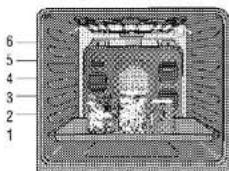
natural_image
Hand holding a transparent object over a grid-patterned surface (no text or symbols visible)natural_image
Close-up of a hand holding a cylindrical object with a circular handle, possibly part of a mechanical or industrial component (no visible text or symbols)natural_image
Diagram showing a device with a textured surface and a magnified inset of its screen (no text or symbols)natural_image
Diagram showing a curved arrow pointing to a rectangular object with a small protrusion, no text or symbols present.natural_image
Diagram showing a mechanical joint or fastener assembly with an arrow indicating rotation (no text or symbols present)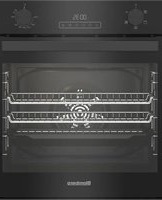
Table of contents
Click a title to access it
Manual assistant
Powered by Anthropic
Waiting for your message
Product information
Brand : BLOMBERG
Model : BEO 1690
Category : Oven