
LiveX50 - Webcam Ozone - Free user manual and instructions
Find the device manual for free LiveX50 Ozone in PDF.


| Product Type | Webcam |
| Brand | Ozone |
| Model | LiveX50 |
| Resolution | Full HD 1080p (1920x1080) |
| Frame Rate | 30 fps (estimated) |
| Microphone | Dual omni-directional microphones |
| Privacy Shutter | Yes |
| Activity Light | Yes |
| Mounting | Flexible base/clip for screen or desktop; tripod screw hole |
| Connection | USB 2.0 (cable included) |
| System Requirements | Windows XP/Vista/7/8/10, Linux 2.6.24+, Ubuntu, Mac OS 10.6+, Android 5.1+ |
| Power Supply | USB powered (5V) |
| Dimensions (approx.) | 10 x 5 x 5 cm |
| Weight (approx.) | 150 g |
| Cleaning | Wipe with a damp cloth; do not use abrasive cleaners |
| Safety | Not for outdoor use; keep away from children; do not disassemble |
| Warranty | 3 years from date of purchase |
| Compliance | EU Directive 2014/30/EU |
| Included Accessories | Webcam, USB cable, user manual |
Frequently Asked Questions - LiveX50 Ozone
User questions about LiveX50 Ozone
0 question about this device. Answer the ones you know or ask your own.
Ask a new question about this device
Download the instructions for your Webcam in PDF format for free! Find your manual LiveX50 - Ozone and take your electronic device back in hand. On this page are published all the documents necessary for the use of your device. LiveX50 by Ozone.
USER MANUAL LiveX50 Ozone
① Omni directional microphone x 2
② Autofocus HD 1080p lens ③ Privacy shutter
④ Flexible Base / Clip ⑤ Activity light
⑥ Tripod Screw Hole ⑦ USB Cable
⑧ User Manual

SYSTEM REQUIREMENTS
- Operating system: Windows XP / VISTA / Win7 / Win8 / Win10 Linux 2.6.24 and above / Ubuntu Mac OS 10.6 and above / Android 5.1 and above
• 32MB memory or higher
- Direct X VGA card support
1. Webcam placement
Put the webcam where you want it, wether it is on top of a computer screen, desktop or tripod*.

natural_image
Line drawings of a desktop computer monitor and a tripod-mounted camera (no text or symbols)* Note: Tripod not included
Placement on a computer screen:
Unfold the webcam clip and follow the steps and methods shown in the figure below to properly place the webcam on top of a screen. Please make sure the clip gets firmly mounted.

2. Webcam connection
Connect the camera to the computer through its USB connector.
Warm Tip: For a more convenient user experience on desktop PC, it is recommended to connect the webcam to a PC rear USB connection.
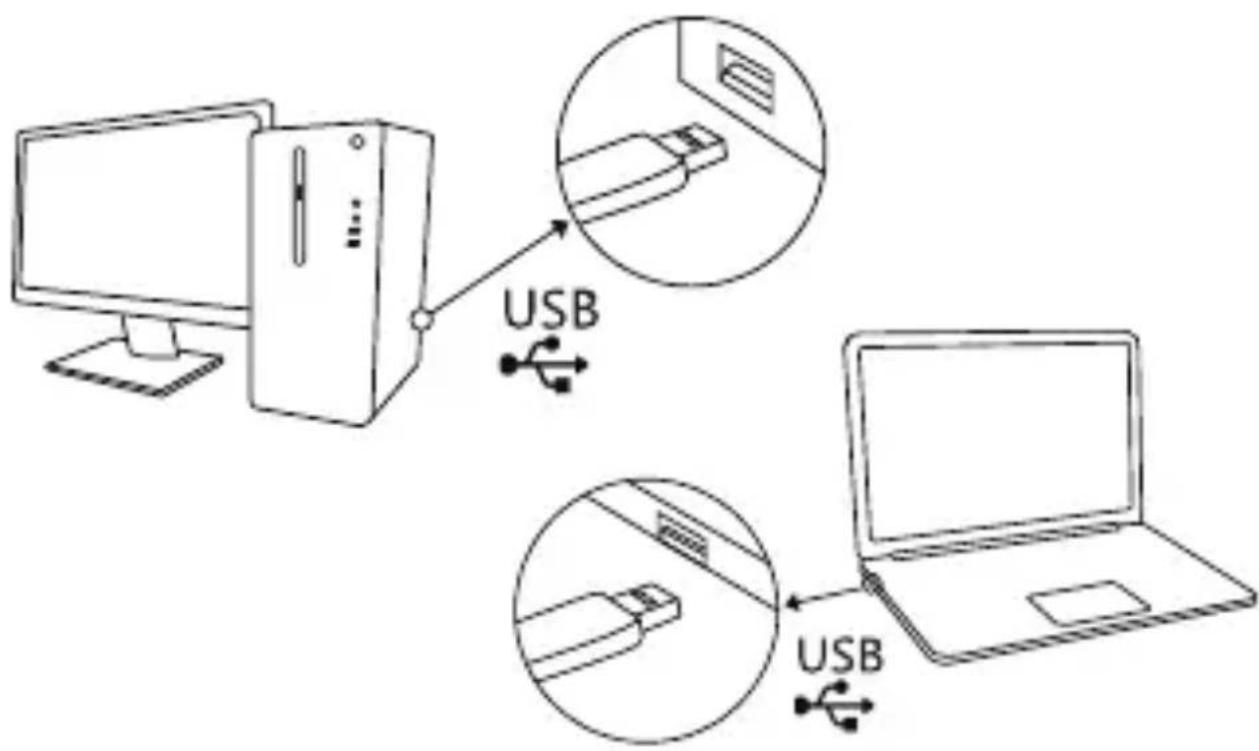
When installation is finished, webcam will be ready for its use and your enjoyment.
#WithinThe.Game
www.ozonegaming.com
③ ozone
EN
All safety warnings give specific details of the potential danger/warning present and indicate how to reduce risk of injury, damage resulting from improper use of the product.
Carefully observe the following instructions:
- Installation and maintenance must be carried out by a qualified technician, in compliance with the manufacturer's instructions and local safety regulations.
- Do not repair or replace any part of the appliance unless specifically stated in the user manual.
- The appliance must be disconnected from the power supply before carrying out any installation work
- Do not touch the appliance with any wet part of the body and do not operate it when barefoot
- The product is not intended for use by persons (including children) with any physical, sensory or mental impairment, or without experience and knowledge of the appliance, unless supervised or previously instructed in its use by those responsible for their safety.
- Children must be supervised to ensure they do not play with the product.
- This product is not suitable for outdoor use.
GENERAL RECOMMENDATIONS:
Before use:
Remove cardboard protection pieces, protective film and adhesive labels from accessories. Children must be supervised during the process to avoid any risk of suffocation.
Check the appliance for any transport damage.
During use:
To avoid any damage do not place any weights on the appliance.
Do not expose the appliance to atmospheric agents.
CLEANING:
IMPORTANT:
Do not use corrosive or abrasive detergents. If any of these products accidentally comes into contact with the appliance, clean immediately with a damp cloth. Do not clean or open the product while when any power cables are attached.
Clean the surfaces with a damp cloth. Finish off with a dry cloth.
IMPORTANT:
Do not use abrasive sponges or metallic scrapers or scourers. Over time, these can ruin the surface.

TATEMENT OF COMPLIANCE WITH EUROPEAN UNION DIRECTIVES
Ozone declares that this product is in compliance with the essential requirements and other relevant provisions from the following Directive: 2014/30/EU, as applicable. The technical documentation required by the Conformity Evaluation process is in Ozone's possession and can be requested through info@ozonegaming.com

AL OF BATTERIES AND ELECTRICAL OR ELECTRONIC EQUIPMENT WASTE
The existence of this symbol on the product, batteries or respective packaging, signifies that this product and the contained batteries can not be disposed as domestic waste.
It is the user's responsibility to deliver this product at a batteries, electrical or electronic recycling pick-up point.
The pick-up and separate recycling contributes for the preservation of natural resources and suppresses potential negative consequences for the human health and the environment resultant of inadequate disposal of dangerous substances contained in batteries and electrical or electronic equipment.
For additional informations regarding batteries, electrical or electronic recycling pick-up points, please contact your local municipal services.
WARNINGS FOR WIRELESS PRODUCTS USAGE
Radio waves from this product may negatively affect the operation of medical electronic equipment, causing them to malfunction. When using this product inside medical facilities or near medical equipment, follow directions from the authorized personnel representing the medical facilities, and follow all posted warnings and directions on the medical equipment.
Radio waves from this product may negatively affect the operation of automatically controlled devices such as automatic doors or fire alarms, and could lead to accidents due to malfunction. When using this product near automatically controlled devices, follow all posted warnings and directions on these devices.
This equipment generates, uses and can radiate radio frequency energy and, if not installed and used in accordance with the instructions, may cause harmful interference to radio communications.
However, there is no guarantee that interference will not occur in a particular installation. If this equipment does cause harmful interference to radio or televisión reception, which can be determined by turning the equipment off and on, the user is encouraged to try to correct the interference by one or more of the following measures:
• Reorient and relocate the receiving antenna
- Increase the separation between the equipment and receiver
- Connect the equipment to an electrical outlet on a different circuit to that which the receiver is connected.
This product, liek other radio devices, emits radio frequency electromagnetic energy and operate within the guidelines found in radio frequency safety standards and recommendations.
WARRANTY:
Who does the warranty protect:
This warranty is valid for the original purchaser only.
What does the warranty protect:
For warranty claims, please contact Ozone's overseas distribution partners in your country. Find the distribution partner list at www.ozonegaming.com
Warranty: 3 years from the date of purchase (from January 2022 and depending on the laws of each country)
What does not the warranty cover:
- Any product, on which the serial number has been defaced, modified or removed.
- Accident, misuse, neglect, fire, water, lightning, or other acts of nature, unauthorized product modification, or failure to follow instructions supplied with the product.
- Repair or attempted repair by anyone not authorized by Ozone Gaming.
- Damage to or loss of any programs, data or removable storage media.
- Software or data loss occurring during repair or replacement.
- Any damage of the product due to shipment.
- Removal or installation of the product.
- External causes, such as electric power fluctuations or failure.
- Use of supplies or parts not meeting Ozone Gaming's specifications.
- Normal wear and tear.
- Any other cause which does not relate to a product defect.
If you have any questions regarding technical problems, please contact us via our website: www.ozonegaming.com
Ozone reserves the right for any modifications in text and/or images.
Ozone Gaming registered trademark of Atlas Informática S.L. - B92492032 - Calle Punta Alta, 33, 29006 - Málaga - Spain. info@ozonegaming.com
WithinTheGame
www.ozonegaming.com
ES
- SYSTEM REQUIREMENTS
- Webcam placement
- Placement on a computer screen:
- Webcam connection
- #WithinThe.Game
- www.ozonegaming.com
- ③ ozone
- EN
- GENERAL RECOMMENDATIONS:
- CLEANING:
- IMPORTANT:
- TATEMENT OF COMPLIANCE WITH EUROPEAN UNION DIRECTIVES
- AL OF BATTERIES AND ELECTRICAL OR ELECTRONIC EQUIPMENT WASTE
- WARNINGS FOR WIRELESS PRODUCTS USAGE
- WARRANTY:
- WithinTheGame
- ES
Brand : Ozone
Model : LiveX50
Category : Webcam