OZBLADERS - Keyboard Ozone - Free user manual and instructions
Find the device manual for free OZBLADERS Ozone in PDF.


Pick your language and provide your email: we'll send you a specifically translated version.
| Product Type | Gaming Keyboard |
| Brand | Ozone |
| Model | OZBLADERS |
| Interface | Wired USB |
| Keyboard Layout | Full-size QWERTY |
| Key Switch Type | Mechanical |
| Anti-Ghosting | Full key rollover (NKRO) |
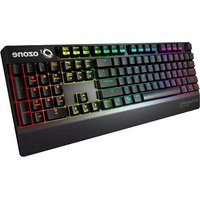
| Backlighting | RGB LED illumination |
| Dimensions | 443 x 138 x 36 mm |
| Weight | 0.85 kg |
| Power Source | Powered via USB |
| Compatibility | Windows 10 / 8 / 7 |
| Cable Length | 1.8 m braided cable |
| Multimedia Keys | Dedicated multimedia shortcuts |
| Macro Support | Programmable macro keys |
| Onboard Memory | Store custom profiles |
| Cleaning Instructions | Clean with soft dry cloth |
| Safe Usage | Keep away from liquids |
| Repair | Refer to certified technician |
| Manufacturer Warranty | 2-year limited warranty |
Frequently Asked Questions - OZBLADERS Ozone
How do I connect the OZBLADERS keyboard to my computer?
Simply plug the USB cable into a free USB port on your computer. The keyboard will be automatically recognized by the operating system.
Does the OZBLADERS keyboard support custom backlighting colors?
Yes, the keyboard features RGB LED backlighting. You can cycle through colors using the function key combinations or via the manufacturer's configuration software.
Can I use the OZBLADERS with a Mac?
The keyboard is primarily designed for Windows systems. It may work on a Mac in basic USB HID mode, but media keys and software features might require Windows or additional mapping.
How do I clean the OZBLADERS keyboard?
First turn off the computer and unplug the keyboard. Use a soft, dry lint-free cloth to wipe the surface. For hard-to-remove residue, slightly dampen the cloth with water, but avoid getting moisture inside the keys.
Are the keycaps replaceable?
The keycaps are removable and can be replaced with standard mechanical keycaps. Pull them straight up with a keycap puller to avoid damage.
Does the keyboard have anti-ghosting or N-key rollover?
Yes, the OZBLADERS supports full anti-ghosting with N-key rollover, so every key press is registered accurately even during complex maneuvers.
What do I do if some keys become unresponsive?
First, unplug and replug the keyboard. If the issue persists, try cleaning the affected keycaps and switches. If the problem continues, contact Ozone support for warranty service.
Is there a wrist rest included?
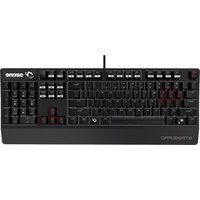
The product package may include a detachable wrist rest for added comfort. Refer to the user manual for assembly instructions.
Can I reprogram the macro keys?
Yes, the keyboard supports macro programming through the dedicated software. You can assign complex sequences to the macro keys for gaming or productivity.
What is the warranty period for the OZBLADERS?
Ozone provides a two-year warranty for this keyboard against manufacturing defects. Keep your purchase receipt for validation.
User questions about OZBLADERS Ozone
0 question about this device. Answer the ones you know or ask your own.
Ask a new question about this device
No questions yet. Be the first to ask one.
Download the instructions for your Keyboard in PDF format for free! Find your manual OZBLADERS - Ozone and take your electronic device back in hand. On this page are published all the documents necessary for the use of your device. OZBLADERS by Ozone.
USER MANUAL OZBLADERS Ozone


Manual assistant
Powered by Anthropic
Waiting for your message
Product information
Brand : Ozone
Model : OZBLADERS
Category : Keyboard