
C 275BEE - Power amplifier NAD - Free user manual and instructions
Find the device manual for free C 275BEE NAD in PDF.


| Product type | Stereo power amplifier |
| Brand | NAD |
| Model | C 275BEE |
| Net dimensions (W x H x D) | 435 x 133 x 352 mm |
| Gross dimensions (W x H x D) | 435 x 150 x 396 mm |
| Net weight | 14.6 kg |
| Shipping weight | 16.9 kg |
| Supply voltage | 120 V ~ 60 Hz or 230 V ~ 50 Hz (depending on version) |
| Power consumption in operation | 312 W |
| Standby power consumption | < 1 W |
| Idle power consumption | < 100 W |
| Continuous output power (8 Ω, both channels) | > 150 W (20 Hz - 20 kHz, < 0.008 % THD) |
| Continuous output power (4 Ω, both channels) | > 150 W (20 Hz - 20 kHz, < 0.008 % THD) |
| Bridge mode power (8 Ω) | > 330 W (20 Hz - 20 kHz, < 0.02 % THD) |
| IHF dynamic power (8 Ω) | 250 W |
| IHF dynamic power (4 Ω) | 410 W |
| IHF dynamic power (2 Ω) | 600 W |
| Peak current | > 50 A (1 Ω, 1 ms) |
| Signal-to-noise ratio | > 102 dB (A-weighted, ref. 1 W) ; > 123 dB (A-weighted, ref. 150 W) |
| Frequency response | ± 0.1 dB (20 Hz - 20 kHz) ; 3 Hz - 100 kHz (-3 dB) |
| Input impedance (fixed input) | 10 kΩ + 200 pF |
| Input impedance (variable input) | 100 kΩ + 100 pF |
| Voltage gain | 29 dB |
| Input sensitivity (rated power) | 1.2 V |
| Special features | PowerDrive™, Soft Clipping™, bridge mode, fixed/variable input, 12V trigger, signal sensing, A and B terminals |
| Maintenance and cleaning | Dry or slightly damp soft cloth (soapy water). Do not use solvents. |
| Fuse (120V version) | T10AL 250V |
| Fuse (230V version) | T5AL 250V |
| Repairability | Contact a qualified technician. No user-serviceable parts inside. |
| Warranty | Consult the provided documentation or the NAD Electronics website. |
| Environment | Do not dispose of with household waste. Recycle according to local regulations (WEEE). |
Frequently Asked Questions - C 275BEE NAD
User questions about C 275BEE NAD
0 question about this device. Answer the ones you know or ask your own.
Ask a new question about this device
Download the instructions for your Power amplifier in PDF format for free! Find your manual C 275BEE - NAD and take your electronic device back in hand. On this page are published all the documents necessary for the use of your device. C 275BEE by NAD.
USER MANUAL C 275BEE NAD
Owner's Manual
SAVE THESE INSTRUCTIONS FOR LATER USE.
FOLLOW ALL WARNINGS AND INSTRUCTIONS MARKED ON THE AUDIO EQUIPMENT.
1 Read instructions - All the safety and operating instructions should be read before the product is operated.
2 Retain instructions - The safety and operating instructions should be retained for future reference.
3 Heed Warnings - All warnings on the product and in the operating instructions should be adhered to.
4 Follow Instructions - All operating and use instructions should be followed.
5 Cleaning - Unplug this product from the wall outlet before cleaning. Do not use liquid cleaners or aerosol cleaners. Use a damp cloth for cleaning.
6 Attachments - Do not use attachments not recommended by the product manufacturer as they may cause hazards.
7 Water and Moisture - Do not use this product near water-for example, near a bath tub, wash bowl, kitchen sink, or laundry tub; in a wet basement; or near a swimming pool; and the like.
8 Accessories - Do not place this product on an unstable cart, stand, tripod, bracket, or table. The product may fall, causing serious injury to a child or adult, and serious damage to the product. Use only with a cart, stand, tripod, bracket, or table recommended by the manufacturer, or sold with the product. Any mounting of the product should follow the manufacturer's instructions, and should use a mounting accessory recommended by the manufacturer.
9 A product and cart combination should be moved with care. Quick stops, excessive force, and uneven surfaces may cause the product and cart combination to overturn.
10 Ventilation - Slots and openings in the cabinet are provided for ventilation and to ensure reliable operation of the product and to protect it from overheating, and these openings must not be blocked or covered. The openings should never be blocked by placing the product on a bed, sofa, rug, or other similar surface. This product should not be placed in a built-in installation such as a bookcase or rack unless proper ventilation is provided or the manufacturer's instructions have been adhered to.
11 Power Sources - This product should be operated only from the type of power source indicated on the marking label. If you are not sure of the type of power supply to your home, consult your product dealer or local power company.

The primary method of isolating the amplifier from the mains supply is to disconnect the mains plug. Ensure that the mains plug remains accessible at all times. Unplug the AC power cord from the AC outlet if the unit will not be used for several months or more.
12 Grounding or Polarization - This product may be equipped with a polarized alternating-current line plug (a plug having one blade wider than the other). This plug will fit into the power outlet only one way. This is a safety feature. If you are unable to insert the plug fully into the outlet, try reversing the plug. If the plug should still fail to fit, contact your electrician to replace your obsolete outlet. Do not defeat the safety purpose of the polarized plug.
13 Power - Cord Protection - Power-supply cords should be routed so that they are not likely to be walked on or pinched by items placed upon or against them, paying particular attention to cords at plugs, convenience receptacles, and the point where they exit from the product.
14 Outdoor Antenna Grounding - If an outside antenna or cable system is connected to the product, be sure the antenna or cable system is grounded so as to provide some protection against voltage surges and built-up static charges. Article 810 of the National Electrical Code, ANSI/NFPA 70, provides information with regard to proper grounding of the mast and supporting structure, grounding of the lead-in wire to an antenna discharge unit, size of grounding conductors, location of antenna discharge unit, connection to grounding electrodes, and requirements for the grounding electrode.
NOTE TO CATV SYSTEM INSTALLER
This reminder is provided to call the CATV system installer's attention to Section 820-40 of the NEC which provides guidelines for proper grounding and, in particular, specifies that the cable ground shall be connected to the grounding system of the building, as close to the point of cable entry as practical.
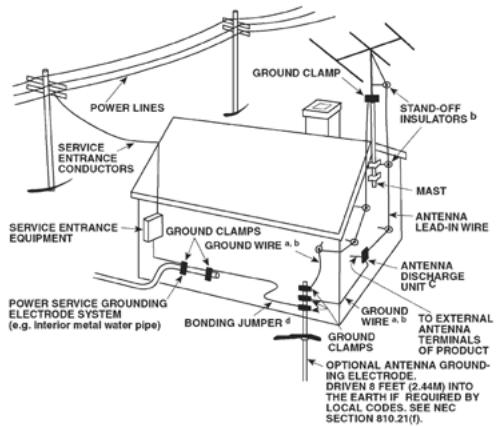
15 Lightning - For added protection for this product during a lightning storm, or when it is left unattended and unused for long periods of time, unplug it from the wall outlet and disconnect the antenna or cable system. This will prevent damage to the product due to lightning and power-line surges.
16 Power Lines - An outside antenna system should not be located in the vicinity of overhead power lines or other electric light or power circuits, or where it can fall into such power lines or circuits. When installing an outside antenna system, extreme care should be taken to keep from touching such power lines or circuits as contact with them might be fatal.
17 Overloading - Do not overload wall outlets, extension cords, or integral convenience receptacles as this can result in a risk of fire or electric shock.
18 Object and Liquid Entry - Never push objects of any kind into this product through openings as they may touch dangerous voltage points or short-out parts that could result in a fire or electric shock. Never spill liquid of any kind on the product.
WARNING: THE APPARATUS SHOULD NOT BE EXPOSED TO DRIPPING OR SPLASHING, AND OBJECTS FILLED WITH LIQUIDS, SUCH AS VASES, SHOULD NOT BE PLACED ON THE APPARATUS. AS WITH ANY ELECTRONIC PRODUCTS, USE CARE NOT TO SPILL LIQUIDS INTO ANY PART OF THE SYSTEM. LIQUIDS CAN CAUSE A FAILURE AND/OR A FIRE HAZARD.
19 Damage Requiring Service - Unplug this product from the wall outlet and refer servicing to qualified service personnel under the following conditions:
a) When the power-supply cord or plug is damaged.
b) If liquid has been spilled, or objects have fallen into the product.
c) If the product has been exposed to rain or water.
d) If the product does not operate normally by following the operating instructions. Adjust only those controls that are covered by the operating instructions as an improper adjustment of other controls may result in damage and will often require extensive work by a qualified technician to restore the product to its normal operation.
e) If the product has been dropped or damaged in any way.
f) when the product exhibits a distinct change in performance—this indicates a need for service.
20 Replacement Parts - When replacement parts are required, be sure the service technician has used replacement parts specified by the manufacturer or have the same characteristics as the original part. Unauthorized substitutions may result in fire, electric shock, or other hazards.
21 Safety Check - Upon completion of any service or repairs to this product, ask the service technician to perform safety checks to determine that the product is in proper operating condition.
22 Wall or Ceiling Mounting - The product should be mounted to a wall or ceiling only as recommended by the manufacturer.
23 Heat - The product should be situated away from heat sources such as radiators, heat registers, stoves or other products (including amplifiers) that produce heat.
WARNING
TO REDUCE THE RISK OF FIRE OR ELECTRIC SHOCK, DO NOT EXPOSE THIS PRODUCT TO RAIN OR MOISTURE.
CAUTION
TO PREVENT ELECTRIC SHOCK, MATCH WIDE BLADE OF PLUG TO WIDE SLOT, FULLY INSERT.

THE LIGHTNING FLASH WITH ARROWHEAD SYMBOL, WITHIN AN EQUILATERAL TRIANGLE, IS INTENDED TO ALERT THE USER TO THE PRESENCE OF UNINSULATED "DANGEROUS VOLTAGE" WITHIN THE PRODUCT'S ENCLOSURE THAT MAYBE OF SUFFICIENT MAGNITUDE TO CONSTITUTE A RISK OF ELECTRIC SHOCK TO PERSONS.

THE EXCLAMATION POINT WITHIN AN EQUILATERAL TRIANGLE IS INTENDED TO ALERT THE USER TO THE PRESENCE OF IMPORTANT OPERATING AND MAINTENANCE (SERVICING) INSTRUCTIONS IN THE LITERATURE ACCOMPANYING THE APPLIANCE.
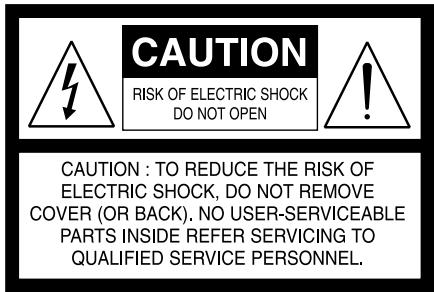
The equipment draws its nominal non-operational power from the AC outlet with its POWER switch in the STANDBY position.
The socket-outlet shall be installed near the apparatus and shall be easily accessible.
CAUTION
Changes or modifications to this equipment not expressly approved by NAD Electronics for compliance could void the user's authority to operate this equipment.
CAUTION REGARDING PLACEMENT
To maintain proper ventilation, be sure to leave a space around the unit (from the largest outer dimensions including projections) that is equal to or greater than shown below.
Left and Right Panels: 10 cm
Rear Panel: 10 cm
Top Panel: 50 cm
NOTES ON ENVIRONMENTAL PROTECTION

At the end of its useful life, this product must not be disposed of with regular household waste but must be returned to a collection point for the recycling of electrical and electronic equipment. The symbol on the product, user's manual and packaging, point this out.
The materials can be reused in accordance with their markings. Through re-use, recycling of raw materials or other forms of recycling of old products, you are making an important contribution to the protection of our environment. Your local administrative office can advise you of the responsible waste disposal point.
INFORMATION ABOUT COLLECTION AND DISPOSAL OF WASTE BATTERIES (DIRECTIVE 2006/66/EC OF THE EUROPEAN PARLIAMENT AND THE COUNCIL OF EUROPEAN UNION) (FOR EUROPEAN CUSTOMERS ONLY)
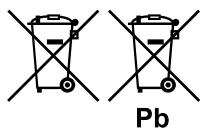
Batteries bearing any of these symbols indicate that they should be treated as “separate collection” and not as municipal waste. It is encouraged that necessary measures are implemented to maximize the separate collection of waste batteries and to minimize the disposal of batteries as mixed municipal waste.
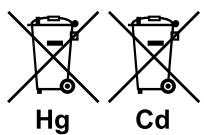
End-users are exhorted not to dispose waste batteries as unsorted municipal waste. In order to
achieve a high level of recycling waste batteries, discard waste batteries separately and properly through an accessible collection point in your vicinity. For more information about collection and recycling of waste batteries, please contact your local municipality, your waste disposal service or the point of sale where you purchased the items.
By ensuring compliance and conformance to proper disposal of waste batteries, potential hazardous effects on human health is prevented and the negative impact of batteries and waste batteries on the environment is minimized, thus contributing to the protection, preservation and quality improvement of the environment.
NOTE: THE C 275BEE IS NOT AN AUTO VOLTAGE POWER AMPLIFIER. CONNECT ONLY TO THE PRESCRIBED AC OUTLET, I.E., 120V 60HZ OR 230V 50HZ.
RECORD YOUR MODEL NUMBER (NOW, WHILE YOU CAN SEE IT)
The model and serial number of your new C 275BEE are located on the back of the cabinet. For your future convenience, we suggest that you record these numbers here:
Model no:....
Serial no:....
QUICK START
In case you simply cannot wait to experience the performance of your new NAD C 275BEE Stereo Power Amplifier, we provide the following QUICKSTART instructions to get you underway.
Please make all the connections to your C 275BEE with the unit unplugged. It is also advisable to power-down or unplug all associated components while making or breaking any signal or AC power connections.
1 Connect your speakers to the SPEAKER A terminals of C 275BEE.
2 Connect your Preamplifier's PRE OUT to the C 275BEE rear panel's INPUT port.
3 Make sure to set the following conditions: your Preamplifier's volume level set to minimum; C 275BEE's +12V Trigger IN switch set to "OFF" position and INPUT SELECT switch at "FIX" position.
4 Connect the AC cord to the C 275BEE's AC Mains input and then plug into an AC outlet.
5 Switch the POWER switch on the rear panel to the "ON" setting in order to turn the C 275BEE to standby mode. The Standby LED indicator embedded around the bezel of the STANDBY button will illuminate amber.
6 Press the STANDBY button to turn ON the C 275BEE. The Standby LED indicator will turn from amber to blue.
SAVE THE PACKAGING
Please save the box and all of the packaging in which your C 275BEE arrived. Should you move or otherwise need to transport your receiver, this is by far the safest container in which to do so. We've seen too many otherwise perfect components damaged in transit for lack of a proper shipping carton, so please: Save that box!
NOTES ON INSTALLATION
Your NAD C 275BEE should be placed on a firm, level surface. Avoid placing the unit in direct sunlight or near sources of heat and damp. Allow adequate ventilation. Do not place the unit on a soft surface like a carpet. Do not place it in an enclosed position such a bookcase or cabinet that may impede the air-flow through the ventilation slots. Make sure the unit is switched off before making any connections.
The RCA sockets on your NAD C 275BEE are colour coded for convenience. Red and white are Right and Left audio respectively.
Use high quality leads and sockets for optimum performance and reliability. Ensure that leads and sockets are not damaged in any way and all sockets are firmly pushed home.
For best performance, use quality speaker leads of 16 gauge (1.5mm) thickness or more. If the unit is not going to be used for some time, disconnect the plug from the AC socket.
Should water get into your NAD C 275BEE, shut off the power to the unit and remove the plug from the AC socket. Have the unit inspected by a qualified service technician before attempting to use it again.
DO NOT REMOVE THE COVER; THERE ARE NO USER-SERVICEABLE PARTS INSIDE.
Use a dry soft cloth to clean the unit. If necessary, lightly dampen the cloth with soapy water. Do not use solutions containing benzol or other volatile agents.
BARE WIRES AND PIN CONNECTORS
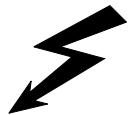
WARNING: The terminals marked with this symbol are hazardous live. External wiring connected to these terminals requires installation by an instructed person or the use of ready-made leads or cords.
Bare wires and pin sockets should be inserted into the hole in the shaft of the terminal. Unscrew the speaker terminal's plastic bushing until the hole in the screw shaft is revealed. Insert the pin or bare cable end into the hole and secure the cable by tightening down the terminal's bushing. Ensure bare wire from the speaker cables does not touch the back panel or another socket. Ensure that there is only 1/2" (1cm) of bare cable or pin and no loose strands of speakers wire.
FRONT PANEL
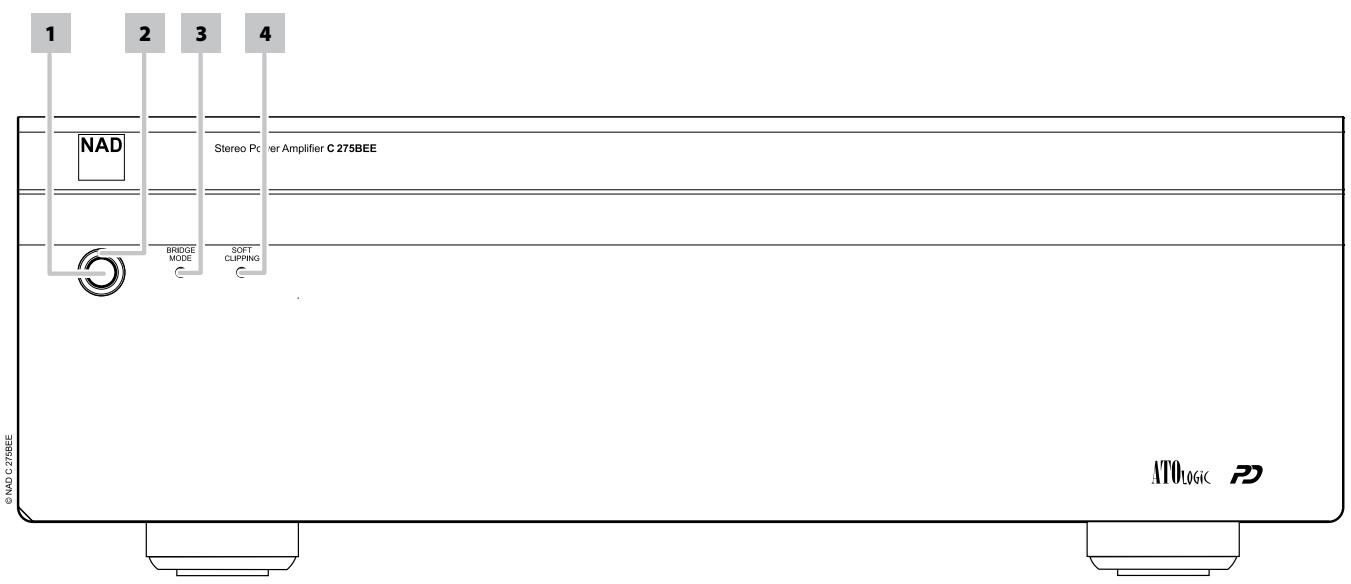
1 STANDBY BUTTON: Press this button to switch ON the C 275BEE. The Standby LED indicator will turn from amber to blue. Pressing the STANDBY button again turns the unit back to standby mode.
IMPORTANT NOTICE
The rear panel POWER switch must be in the ON position for the STANDBY button to activate.
2 STANDBY LED: This indicator will light up amber when the C 275BEE is in standby state. When the C 275BEE is at ON state, this indicator will illuminate blue.
In cases of serious abuse of the C 275BEE, such as excessively low loudspeaker impedance and short circuit, the C 275BEE will engage its Protection circuitry, indicated by the Standby LED turning from blue to red and the sound being muted.
In such a case, turn the C 275BEE OFF by the rear panel POWER switch, wait for it to cool down and/or check the speaker connections, making sure the overall loudspeaker impedance doesn't go below 4 ohms or 8 ohms in Bridge mode. Once the cause for the protection circuitry to engage has been removed, switch ON the rear POWER button and the Standby Button to resume normal operation.
3 BRIDGE MODE INDICATOR: This BRIDGE MODE indicator lights up blue when the C 275BEE is switched to Bridge Mode. Refer also to the item below about BRIDGE MODE at the IDENTIFICATION OF CONTROLS – REAR PANEL.
4 SOFT CLIPPING INDICATOR: The blue SOFT CLIPPING LED shows that the SOFT CLIPPING mode is engaged. Refer also to the item below about SOFT CLIPPING at the IDENTIFICATION OF CONTROLS – REAR PANEL.
ATTENTION!
Please make sure that the C 275BEE is powered OFF or unplugged before making any connections. It is also advisable to power-down or unplug all associated components while making or breaking any signal or AC power connections.
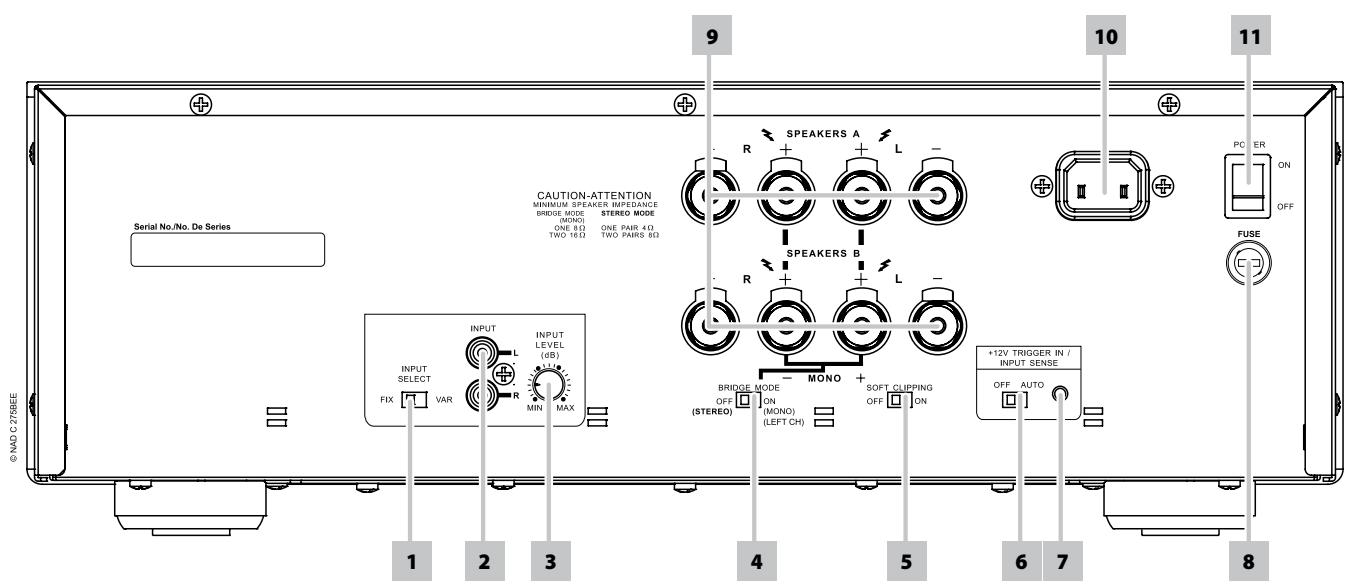
1 INPUT SELECT: Slide this switch to either "FIX" or "VAR". When it is set to FIX, the input signal is taken straight to the power amplifier's circuitry. This setting is normally used in a system with only one power amplifier or multiple but identical power amplifiers.
When the INPUT SELECT switch is set to "VAR" (Variable), it is possible to adjust the volume level for both channels simultaneously, using the INPUT LEVEL CONTROL. This can be useful for:
Level Matching
In a surround sound or system with more than one set of speakers, differences in levels can occur due to variance inefficiencies between these speakers. In case your preamplifier or processor also has individual trims for each channel, set these to neutral or mid position (usually marked as 0dB). Adjust the INPUT LEVEL CONTROL so that the speakers driven by the C 275BEE have the correct volume level compared to the other speakers, judging from your listening position.
Extended Volume Control Range
Many systems have so much voltage gain that the speakers (or your ears) are overdriven at any volume control setting higher than 11 or 12 o'clock. As a result you are confined to using only the lower half of the volume control's range, where adjustments are imprecise and where channel balance errors tend to be greater.
If the input level is reduced, you can turn up the volume control of your processor or preamplifier, making more effective use of its range. (Suggestion: adjust the input level controls so that your preferred maximum sound levels usually occur at about 2 or 3 o'clock on the volume control.) As an added benefit, this procedure suppresses any noise produced by the preamplifier's high level circuitry (e.g. any residual hum or hiss that does not go away when the Volume is turned down).
Bi-Amping
Some loudspeakers have separate connection terminals for their LF (Low Frequency) and HF (High Frequency) sections. Where a separate power amplifier is used for the LF and HF section, this facility allows to "Bi-Amp" such speakers which may improve overall sound quality. When Bi-Amping with different models of power amplifiers, it is likely to occur that one power amplifier has more "gain" than the other, resulting in a mismatch in level for the woofer and tweeter of the speaker. Adjust the level control so that woofer and tweeter are in perfect balance with each other (identical gain of power amplifiers).
NOTES
- Always turn OFF the C 275BEE and other components in the system before connecting or disconnecting anything to the INPUT sockets.
- When the INPUT SELECT switch is set to "VAR" for the first time, it is advised that the "INPUT LEVEL CONTROL" level of the C 275BEE or the volume control level of your preamplifier/processor be set to their minimum settings. This prevents inadvertently beginning a session at excessive volume. You can then adjust both controls to your desired listening level.
2 INPUT: Connect the output from a pre-amplifier or processor, such as a surround-sound decoder, to this set of inputs. Use a twin RCA-to-RCA lead to connect the left and right "Audio Output" of the preamplifier or processor to these input sockets.
3 INPUT LEVEL CONTROL: The INPUT LEVEL CONTROL works in combination with the "VAR" (Variable) input setting. Turn clockwise to increase the "VAR" (Variable) volume level; counter clockwise to lower it.
REAR PANEL
4 BRIDGE MODE: The C 275BEE amplifier can be configured to be MONO (Bridge Mode), more than doubling its output power. This way, the C 275BEE can be used as part of a high power stereo or home-theatre system, by connecting additional power amplifiers.
In BRIDGED MODE, the C 275BEE will produce approximately 330W into an 8 ohm loudspeaker. In this mode, the amplifier sections will react as though the speaker impedance has been halved. Low impedance speakers (under 8 ohms) are not recommended when using Bridge Mode as these may cause the amplifier's thermal cut-out to operate if played at high levels.
Set the BRIDGE MODE switch to the "ON" position and connect the speaker to the terminals marked "L+" and "R+" ensuring that the "L+" is connected to the "+" terminal of your loudspeaker and the "R+" is connected to the loudspeaker's "-" terminal. Connect the source to the INPUT sockets.
The BRIDGE MODE indicator on the front panel will illuminate when the C 275BEE is in Bridge mode.
NOTE
Do not connect anything to the Right Input socket when Bridge Mode is selected.
5 SOFT CLIPPING™: Enables NAD's proprietary Soft Clipping circuitry on all channels. At [ON] position, Soft Clipping gently limits the output of the C 275BEE to minimize audible distortion should the amplifier be over-driven. Soft Clipping may simply be left ON at all times to reduce the likelihood of audible distortion from excessive volume settings. However, for critical listening and to preserve optimum dynamics, you may wish to defeat it by setting this switch to "OFF" position.
The SOFT CLIPPING indicator on the front panel will illuminate when the amplifier is in Soft Clipping mode.
6 +12V TRIGGER IN/INPUT SENSE - OFF/AUTO: This dual function switch alternates between sensing a +12V input as applied through the +12V trigger IN jack (item 7 below) or sensing any input signal applied at the INPUT sockets.
At AUTO setting and with the +12V trigger input of the C 275BEE connected to the DC output jack of a compatible auxiliary component, the C 275BEE can be switched remotely from standby mode to ON and vice-versa. Use a 3.5mm mini-jack to pass +12V from the auxiliary equipment into the C 275BEE.
If there is no 3.5mm mini-jack inserted at the +12V Trigger IN jack and with the switch still at AUTO setting, the C 275BEE will instantaneously turn ON from standby state if it senses any input signal (approximately above 20mV RMS input) applied through the INPUT sockets.
In the absence of a +12V trigger input or any input signal at the INPUT sockets and with OFF/AUTO switch set to AUTO, the C 275BEE will switch automatically to standby mode. Slide the OFF/AUTO switch to OFF setting for the C 275BEE to be normally switched ON (or back to standby mode) using the front panel STANDBY button.
NOTES
- Switch the rear panel POWER switch to ON position in order to make use of the +12V Trigger IN or Input Sense AUTO feature as well as the front panel STANDBY button.
- At input sense mode, it will take about 10 minutes for the C 275BEE to go to standby mode when the input signal source is turned OFF or go below 20 mV.
IMPORTANT NOTICE
With the rear panel POWER switch at ON position and the OFF/AUTO switch at AUTO setting, the C 275BEE cannot be switched ON using the front panel STANDBY button. Slide the OFF/AUTO switch to OFF setting for the C 275BEE to be normally switched ON (or back to standby mode) using the front panel STANDBY button.
7 +12V TRIGGER INPUT: The +12V Trigger input allows the C 275BEE to be switched remotely from standby mode to ON and vice-versa by ancillary equipments such as a preamplifier, AV processor, etc. The controlling device must be equipped with a 12V trigger output to use this feature. Refer also to the section above about "+12V TRIGGER IN/INPUT SENSE - OFF/AUTO".
8 FUSE HOLDER: In the unlikely event a fuse may need to be replaced, unplug the AC cord from the wall. Then, remove all connections from the amplifier. Use a flathead screw driver or similar to open the fuse holder via the slot indicated. With the screw driver in place, push and turn counterclockwise to open the fuse holder. Only replace the fuse with the same type, size, and specification – T10AL 250V for 120V version or T5AL 250V for 230V version.
IMPORTANT NOTICE
Do not use any substitute fuses of different types or with different ratings or values. Failure to observe this precaution may cause damage to the amplifier circuits and may create a fire hazard and/or defeat the safety built into the amplifier and may void the warranty.
9 SPEAKERS A, B: The C 275BEE is equipped with two sets of speaker connectors. Use the Speakers A terminals for the "main" speakers and use the Speakers B terminals for a second pair, for example, extension speakers located in another room.
Connect the right speaker to the terminals marked "R+" and "R-" ensuring that the "R+" is connected to the "+" terminal on your loudspeaker and the "R-" is connected to the loudspeaker's "-" terminal. Connect the terminals marked "L+" and "L-" to the left speaker in the same way.
In Bridge Mode, connect the single speaker to the terminals marked "R+" and "L+" ensuring that the "L+" is connected to the "+" terminal on your loudspeaker and the "R+" is connected to the loudspeaker's "-" terminal. Refer also to the section above about "BRIDGE MODE.
Always use heavy duty (16 gauge; 1.5mm, or thicker) stranded wire to connect loudspeakers to your NAD C 275BEE. The high-current binding post terminals can be used as a screw terminal for cables terminating in spade or pin sockets or for cables with bare wire ends.
10 AC MAINS INPUT: The C 275BEE comes supplied with a separate AC Mains cable. Before connecting the cable to a live wall socket ensure that it is firmly connected to the C 275BEE's AC Mains input socket first. Connect only to the prescribed AC Outlet, i.e., 120V 60 Hz or 230V 50 Hz. Always disconnect the AC Mains cable plug from the live wall socket first, before disconnecting the cable from the C 275BEE's Mains input socket.
11 POWER SWITCH: The POWER switch supplies the master AC mains power for the C 275BEE. Refer to the ATO LOGIC chart below for a better understanding of the role of the POWER switch when switching ON or OFF the C 275BEE. If you intend not to use the C 275BEE for long periods of time (such as when on vacation), switch the POWER switch to the OFF position.
AUTOMATED TURN-ON LOGIC (ATO LOGIC)
The C 275BEE may be turned ON in any one of three discrete ways for complete system flexibility - from the front panel standby button, the 12V-TRIGGER circuit or by the input signal-sensing circuit. The ON/OFF power control is managed by the Automated Turn-On logic or ATO Logic circuit that requires the C 275BEE to be switched back to standby mode in
the same manner by which it was activated. In other words, if the C 275BEE is switched ON via a +12V-control signal, it cannot be switched to standby mode via the front panel STANDBY button, it must wait for removal of the +12V-control signal. In practice, you probably would use only one of the methods once your C 275BEE is installed.
ATO LOGIC CHART
| CONDITION | POWER SWITCH | STANDBY BUTTON | +12V TRIGGER IN(using 3.5mm mini-jack plug) | INPUT SENSE | |||||
| Power ON | Power OFF | Standby Mode (amber) | Switch ON (blue) | +12V | 0V | Mini-jack unplugged | Input signal >20mV | Input signal <20mV | |
| POWER switch : OFF+12V TRIGGER IN/INPUT SENSE Sense: OFF | - | √ | - | - | - | - | - | - | - |
| POWER switch : OFF+12V TRIGGER IN/INPUT SENSE Sense: OFF | - | √ | - | - | √ | - | - | - | - |
| POWER switch : OFF+12V TRIGGER IN/INPUT SENSE Sense: OFF | - | √ | - | - | - | √ | - | - | - |
| POWER switch : OFF+12V TRIGGER IN/INPUT SENSE Sense: OFF | - | √ | - | - | - | - | √ | - | - |
| POWER switch : OFF+12V TRIGGER IN/INPUT SENSE Sense: OFF | - | √ | - | - | - | - | - | √ | - |
| POWER switch : OFF+12V TRIGGER IN/INPUT SENSE Sense: OFF | - | √ | - | - | - | - | - | - | √ |
| POWER switch : ON+12V TRIGGER IN/INPUT SENSE Sense: OFF | √ | - | √ | √ | - | - | - | - | - |
| POWER switch : ON+12V TRIGGER IN/INPUT SENSE Sense: OFF | √ | - | - | √ | √ | - | - | - | - |
| POWER switch : ON+12V TRIGGER IN/INPUT SENSE Sense: OFF | √ | - | √ | - | - | √ | - | - | - |
| POWER switch : ON+12V TRIGGER IN/INPUT SENSE Sense: OFF | √ | - | √ | √ | - | - | √ | - | - |
| POWER switch : ON+12V TRIGGER IN/INPUT SENSE Sense: OFF | √ | - | √ | √ | - | - | - | √ | - |
| POWER switch : ON+12V TRIGGER IN/INPUT SENSE Sense: OFF | √ | - | √ | √ | - | - | - | - | √ |
| POWER switch : ON+12V TRIGGER IN/INPUT SENSE Sense: AUTO | √ | - | - | √ | √ | - | - | - | - |
| POWER switch : ON+12V TRIGGER IN/INPUT SENSE Sense: AUTO | √ | - | √ | - | - | √ | - | - | - |
| POWER switch : ON+12V TRIGGER IN/INPUT SENSE Sense: AUTO | √ | - | √ | √ | - | - | √ | - | - |
| POWER switch : ON+12V TRIGGER IN/INPUT SENSE Sense: AUTO | √ | - | - | √ | - | - | - | √ | - |
| POWER switch : ON+12V TRIGGER IN/INPUT SENSE Sense: AUTO | √ | - | √ | - | - | - | - | - | √ |
NOTE
If the +12V TRIGGER IN/INPUT SENSE switch is set to OFF, the presence or absence of +12V trigger input or any input signal at the INPUT sockets will not have any effect on the C 275BEE, effectively defeating both features.
POWERDRIVE
The C 275BEE uses NAD's proprietary PowerDrive™ amplifier technology for all channels to preserve accurate, linear reproduction regardless of the loudspeaker. This uniquely efficient power-supply topology provides the real-world benefits of high dynamic power that remains uncompromised by low-impedance speakers.
By adding a second high-voltage rail to our well regulated high-current power supply, we get an "overdrive" that can nearly double the continuous power on a short term dynamic power basis. PowerDrive offers greater amplifier stability and low impedance drive capability, resulting in less distortion when driving real speakers with real program material.
TROUBLESHOOTING
| CONDITION | POSSIBLE CAUSES | POSSIBLE SOLUTIONS |
| No power. | ·The power cord is disconnected. | ·Plug the power cord into the wall outlet securely. |
| ·POWER switch set to OFF position. | ·Set the POWER switch to ON position. | |
| C 275BEE always at standby mode; cannot be switched ON using the front panel STANDBY button. | ·+12V TRIGGER IN/INPUT SENSE switch set to “AUTO” position. | ·Slide the +12V TRIGGER IN/INPUT SENSE switch to “OFF” position. |
| No sound. | ·Power AC lead unplugged or power not switched ON. | ·Check if AC lead is plugged-in and POWER switched ON (along with the corresponding ATO logic configuration). |
| ·No input signal applied through the INPUT sockets. | ·Check that there is active input signal applied through the INPUT sockets. | |
| ·INPUT LEVEL CONTROL turned down. | ·Turn INPUT LEVEL CONTROL up to the correct level. | |
| No sound one channel. | ·Speaker not properly connected or damaged. | ·Check connections and speakers. |
| ·Input lead disconnected or damaged. | ·Check leads and connections. | |
| Weak bass/diffused stereo image. | ·Speakers wired out of phase. | ·Check connections to all speakers in the system. |
| POWER/STANDBY LED stays red upon turning POWER ON. | ·There is short circuit in the speaker cabling. | ·Switch C 275BEE OFF and check speaker cable connections for both speaker terminals at the rear panel. |
OVERALL SPECIFICATIONS
FIXED IN, SPEAKER OUT
| Continuous output power into 8 Ω and 4 Ω (both channels driven) | >150 W (ref. rated THD, 20 Hz - 20 kHz) |
| Continuous output power into 8 Ω (Mono, Bridge mode) | >330 W (ref. 20 Hz - 20 kHz, <0.02% THD) |
| Rated THD (250 mW to rated power, CCIF IMD, DIM 100) | <0.008 % (ref. 20 Hz - 20 kHz) |
| Clipping power (4 Ω and 8 Ω) | >170 W (ref. 1 kHz 1% THD) |
| IHF dynamic power - 8 Ω | 250 W |
| 4 Ω | 410 W |
| 2 Ω | 600 W |
| IHF dynamic power (Bridge mode) - 8 Ω | 800 W |
| 4 Ω | 1200 W |
| Peak output current | >50 A (ref. 1 Ω, 1 ms) |
| Signal/Noise ratio | >102 dB (A-weighted, ref. 1 W) |
| >123 dB (A-weighted, ref. 150 W) | |
| Damping factor | >180 (ref. 8 Ω, 50 Hz and 1 kHz) |
| Frequency response | ± 0.1 dB (ref. 20 Hz - 20 kHz) |
| 3 Hz - 100 kHz (ref. -3 dB) | |
| Input impedance (Fixed IN) | 10 kΩ + 200 pF |
| Input impedance (Variable IN) | 100 kΩ + 100 pF |
| Input sensitivity | 1.2 V (ref. rated power) |
| Voltage gain | 29 dB |
| Minimum input level for AUTO TRIGGER | 10 mV at 1 kHz |
| Time to power OFF at no signal in AUTO mode | <10 minutes |
POWER CONSUMPTION
| Normal operation | 312 W (ref. 230V AC 50 Hz; 120V AC 60 Hz) |
| Standby power | <1 W |
| Idle power | <100 W |
DIMENSION AND WEIGHT
| Dimensions (W x H x D) | 435 x 133 x 352 mm (Net) |
| 435 x 150 x 396 mm (Gross*) | |
| Net weight | 14.6 kg |
| Shipping weight | 16.9 kg |
* - Gross dimensions include feet, front panel button and extended speaker terminals.
Specifications are subject to change without notice. For updated documentation and features, please log onto www.NADElectronics.com for the latest information about the C 275BEE.

www.NADelectronics.com
©2008 NAD ELECTRONICS INTERNATIONAL
A DIVISION OF LENBROOK INDUSTRIES LIMITED


- SAVE THESE INSTRUCTIONS FOR LATER USE
- FOLLOW ALL WARNINGS AND INSTRUCTIONS MARKED ON THE AUDIO EQUIPMENT
- NOTE TO CATV SYSTEM INSTALLER
- WARNING
- CAUTION
- CAUTION REGARDING PLACEMENT
- NOTES ON ENVIRONMENTAL PROTECTION
- INFORMATION ABOUT COLLECTION AND DISPOSAL OF WASTE BATTERIES (DIRECTIVE 2006/66/EC OF THE EUROPEAN PARLIAMENT AND THE COUNCIL OF EUROPEAN UNION) (FOR EUROPEAN CUSTOMERS ONLY)
- NOTE: THE C 275BEE IS NOT AN AUTO VOLTAGE POWER AMPLIFIER. CONNECT ONLY TO THE PRESCRIBED AC OUTLET, I.E., 120V 60HZ OR 230V 50HZ
- RECORD YOUR MODEL NUMBER (NOW, WHILE YOU CAN SEE IT)
- QUICK START
- SAVE THE PACKAGING
- NOTES ON INSTALLATION
- DO NOT REMOVE THE COVER; THERE ARE NO USER-SERVICEABLE PARTS INSIDE
- BARE WIRES AND PIN CONNECTORS
- FRONT PANEL
- IMPORTANT NOTICE
- ATTENTION
- LEVEL MATCHING
- EXTENDED VOLUME CONTROL RANGE
- BI-AMPING
- NOTES
- REAR PANEL
- NOTE
- AUTOMATED TURN-ON LOGIC (ATO LOGIC)
- POWERDRIVE
- OVERALL SPECIFICATIONS
Brand : NAD
Model : C 275BEE
Category : Power amplifier