
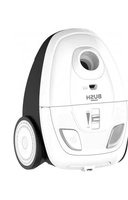
VHS01A17Z - Vacuum Cleaner BUSH - Free user manual and instructions
Find the device manual for free VHS01A17Z BUSH in PDF.


| Product Type | Cylinder Vacuum Cleaner |
| Brand | Bush |
| Model | VHS01A17Z |
| Color | Black / Red |
| Dimensions (approx.) | 440 x 290 x 260 mm |
| Weight | 4.5 kg |
| Power Supply | Mains-powered, 220-240V ~ 50/60 Hz |
| Power Consumption | 700 W |
| Dust Capacity | 1.5 L bag |
| Filtration System | HEPA H13 filter |
| Noise Level | 80 dB(A) |
| Cord Length | 5 m |
| Working Radius | 8 m |
| Control Type | Manual on/off switch on body |
| Attachments Included | Crevice tool, dusting brush, upholstery tool, floor nozzle |
| Features | Automatic cord rewind, carry handle, parking slot |
| Maintenance | Replace bag when full; clean HEPA filter every 3 months |
| Washable Filter | Yes, pre-motor filter (washable) |
| Bag Type | Disposable paper bag or reusable cloth bag (optional) |
| Safety Features | Thermal overload protection, cord strain relief |
| Repairability | Replacement bags and filters available; contact Bush support for other parts |
Frequently Asked Questions - VHS01A17Z BUSH
User questions about VHS01A17Z BUSH
0 question about this device. Answer the ones you know or ask your own.
Ask a new question about this device
Download the instructions for your Vacuum Cleaner in PDF format for free! Find your manual VHS01A17Z - BUSH and take your electronic device back in hand. On this page are published all the documents necessary for the use of your device. VHS01A17Z by BUSH.
USER MANUAL VHS01A17Z BUSH
natural_image
Illustration of a purple and gray vacuum cleaner against an orange geometric background (no text or symbols)You'll soon be enjoying your new vacuum cleaner.
It all begins here, with your instructions. Don't worry, there's nothing too technical coming up. Just simple, step-by-step guidance to get you up and running quickly. Sound good? Then let's get started.
Help and Guidance
We're here to help you get the most from your vacuum cleaner. Should you require any guidance, a simple solution can often be found online at:
www.argos-support.co.uk
If you still require further assistance, call one of our experts on BUSH Technical Helpline 0345 604 0105.
Contents
1 Safety information
Safety information 6
2 Getting to know your vacuum cleaner
Ready?Let's begin 10
3 Operate your vacuum cleaner
Charging 14
Cleaning 14
Replacing battery 15
Docking Station 16
4 Care and maintenance
Dust cleaning 20
Power Brush Cleaning 22
5 Product support
Toubleshooting 24
Help and assistance 25
Declaration of conformance to product 26
Standards
Disposal 27
Safety information
1

natural_image
Abstract geometric pattern composed of orange triangles on a white background (no text or symbols)
Safety Information
Important - Please read all instructions before use and keep for future reference
WARNINGS
- This appliance is intended for domestic household use only and should not be used for any other purpose or in any other application, such as for non-domestic use or in a commercial environment.
- If the supply cord is damaged, it must be replaced by the manufacturer, its service agent or similarly qualified persons in order to avoid a hazard.
- Regarding the detailed instructions for the method and frequency of cleaning and the precautions during user maintenance, refer to the section "Care and maintenance" on page 20 of the manual.
- This appliance can be used by children aged from 8 years and above and persons with reduced physical, sensory or mental capabilities or lack of experience and knowledge if they have been given supervision or instruction concerning use of the appliance in a safe way and understand the hazards involved. Children shall not play with the appliance. Cleaning and user maintenance shall not be made by children without supervision.
- The plug must be removed from the socket-outlet before cleaning or maintaining the appliance.
- Following objects are strictly banned, otherwise the vacuum cleaner will be damaged or fire calamity will be caused, which bring such accidents as human body injuries:
-Don't pick up large or sharp broken such as glasses.
If you require any technical guidance or find that your product is not operating as intended, a simple solution can often be found in the Troubleshooting section of these instructions,
Safety Information
Important - Please read all instructions before use and keep for future reference
- Don't pick up harming or erodent liquids (solvent, corrosive, detergent...).
- Don't pick up inflammable or explosive substance such as gasoline or alcohol.
-Don't pick up/ vacuum burning or glowing objects (cigarettes, matches, hot ashes).
- Only the certified technician may disassemble this product. Users are strictly not allowed to disassemble this product.
• This product shall only be charged using power adapter (YLS0241A-U250080) provided with the appliance.
Other power adapters may cause damages to this product.
- Do not touch power cord, plug or adapter with wet hands.
- Avoid curtains, any kind of strings or user's body part wrapping up on the wheel.
- Keep this product away from cigarette stubs, lighters or flame.
• To clean the product, this product must be fully charged before any cleaning process.
- Do not over-bend the power cord, or place heavy or sharp objects on this product.
• This product is intended for indoor use only, do not use this product outdoors.
- Do not place object (e.g. human) with more than 10KG weight on this product.
- Do not use this product in wet or moist environment (e.g. bathroom).
- Before using this product, please remove any fragile objects (e.g. glasses, lamps etc) from the floor.

Safety Information
Important - Please read all instructions before use and keep for future reference
Also removes any objects that may be wrapped up to the side brushes or may block the suction inlet.
- Do not put this product on table or benches to avoid falling off.
- While delivering or if do not use the product for long time, please turn it off from the bottom.
- Before charging, please check whether the power adapter and socket is connected well.
- When this product is cleaning the room, please inform other members to avoid causing them to fall.
- When the dust bin is full of dust, empty the dust bin before using this product.
- This product is functioning at temperature range within 0°C - 40°C.
- Do not use this product in high-temperature environment.
- Please remove batteries form this product before disposal.
• Depleted batteries should be disposed safely.
- The appliance must be disconnected from the supply mains when removing the battery.
- If the appliance is to be stored unused for a long period, the batteries should be removed.
• The supply terminals are not to be short-circuited.
- The product shall only be charged using the included battery in gift box.
Getting to know your vacuum cleaner
2

natural_image
Abstract geometric pattern with orange triangles and white squares on a white background (no text or symbols)Getting to know your vacuum cleaner
You'll be up and running in no time
Ready? Let's begin...
Please read these instructions carefully. They contain important information which will help you get the best from your Vacuum cleaner and ensure safe and correct installation and operation.
If you require any further assistance, our technical experts are happy to help. For full details, refer to the product support section at the end of these instructions.
Getting to know your Vacuum cleaner
You'll be up and running in no time
Components

1.Main body
2. Extension tube
3.Battery pack
4. Power brush
5.Crevice tool
6.Furniture brush
7. Wall holder
8.Power adapter
9.Battery

| Model no | Rated Charging Voltage | Rated voltage Rated Power | |
| VHS01A17Z | 220-240V 21.6V | 120W | |
If you require any technical guidance or find that your product is not operating as intended, a simple solution can often be found in the Troubleshooting section of these instructions.
Operate your vacuum cleaner
3

natural_image
Abstract geometric pattern with orange triangles and white squares on a white background (no text or symbols)Operate your vacuum cleaner
Charging
This product uses a piece of 18V lithium battery. The battery is not charged at the factory. Be sure to fully charge the battery before use.
- Put the main body on a horizontal table.
- Connect the power cord to the outlet and the charging port in the handle part of the main body to start charging, and the power indicator flashes blue.
- Charging time: 2.5-3.5 hours; discharging time: 15-20 minutes..

natural_image
Line drawing of a portable device with a plug inserted, showing internal components and a black arrow indicating direction (no text or symbols)
- Do not charge at temperatures below 5°C or above 40°C.
- The indicator will flash if the battery power is low in the running process.
Cleaning
To prevent blockage of the air passage large objects like large paper and packing materials should be removed from the area before start cleaning.
-
Press and hold the "Start" button to start cleaning.
-
Release the "Start" button to stop cleaning.
-
Charge when the power indicator flashes.
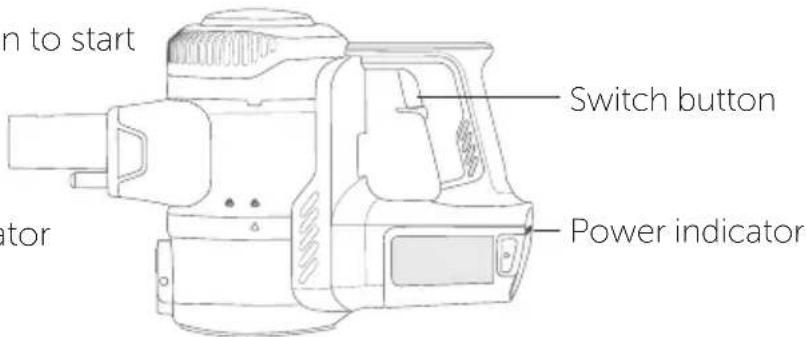

- Do not use the device when the plug is connected.
- Wait 3 seconds before starting after disconnecting the power supply.
If you require any technical guidance or find that your product is not operating as intended, a simple solution can often be found in the Troubleshooting section of these instructions.
Operate your vacuum cleaner
Replacing battery
Tip: If you need to replace the battery, please consult your dealer.
Battery is consumable. If the battery life becomes shorter and charging time becomes longer, please replace the battery.
- Press the battery release button
- Take out the battery
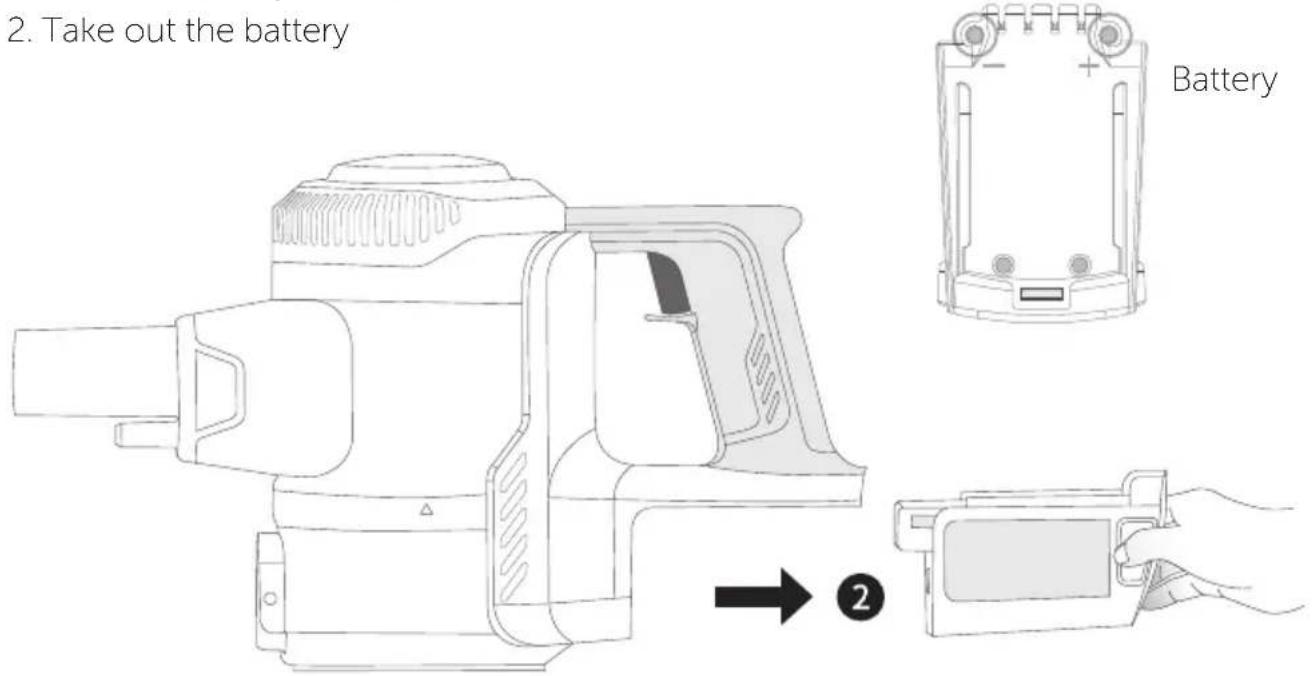

Caution
- Cut off the power supply before removing the battery.
- Do not use and store batteries at temperatures below 5°C or above 40°C.
- When disposing of this product, remove the battery from the device.
- Do not modify the device, accessories or replace the power cord or battery.
5.Battery model : MB2420A 61NR19/66.
Battery recycling: Waste batteries are important resources. When disposing of the product, do not dispose of the battery at will.
Please treat properly in accordance with government regulations to facilitate the recovery to the corresponding waste battery recycling facilities.
Operate your vacuum cleaner
Docking Station
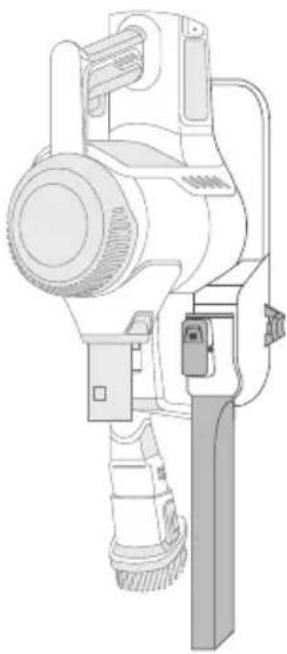
- Installation diagram 2. Fixing on the wall 3. Hanging the


4*30mm Screw

6*30mm Expansion pin
Tips: When installing the docking station, 4*30 mm screw is suggested on the wooden surface.
The 6*30 mm expansion pin and 4*30 mm screw should be used on the cement surface.

Floor Floor
product & accessory
natural_image
Technical line drawing of a handheld electric shaver or power supply device (no text or symbols)
natural_image
Technical line drawing of a surveying instrument (no text or symbols)Operate your vacuum cleaner

Caution
Before installation:
- Do not install on weak structures such as plaster walls and compressed wood boards when their thickness is less than 10 mm.
- To prevent fire or electric shock due to leakage, please do not install it on metal walls.
- Hanging area must be flat.
- Wall holder must be placed in ambient temperature between 5°C and 40°C.
- Ensure screw will not damage gas pipe, water pipe or wire insides of the wall.
- No part of the appliance should touch the ground when. placed on the docking station.
Before use: Disconnect the appliance from the power supply before removing it from the docking station.
When store the appliance:
- Please do not apply undue force to the docking station.
- Do not leave it lean against the wall, always store on the docking station.
- Must be connected with extension tube and brush. Ensure not working while stored.
- The crevice nozzle must be removed from the extension hose prior to storage.
- Ensure that brush and extension tube area is clear: can not be accidentally hit by feet or other falling object.
- Ensure that the wall holder is firmly secured to the wall.
Check regularly and tighten the screws if necessary.
Care and maintenance
4

natural_image
Abstract geometric pattern with orange triangles and white gaps on a white background (no text or symbols)Care and maintenance
Dust cleaning
To maintain the suction power of the vacuum cleaner, please clean the dust regularly.
- Press the button, open the dust cup and dump the dust.
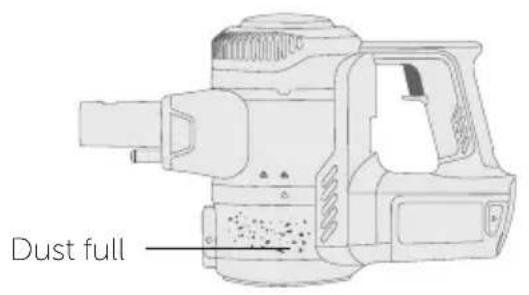
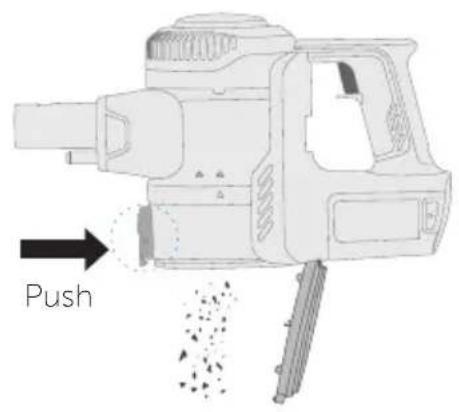
- Turn left to remove the dust cup, and clean the dust attached to the dust cup and the bottom cover.
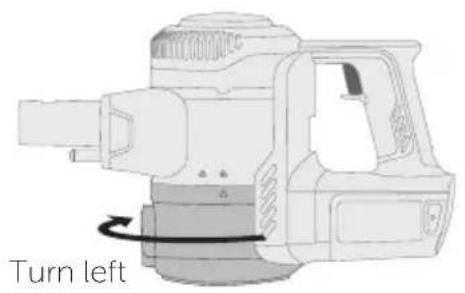
natural_image
Technical line drawing of a mechanical device with a labeled turn left indicator (no other text or symbols)
- Turn left, and remove and clean the filter.

natural_image
Technical illustration of a mechanical device with a downward arrow indicating force or movement (no text or symbols present)
natural_image
Technical line drawing of a mechanical device with a rotating button (no text or symbols)If you require any technical guidance or find that your product is not operating as intended, a simple solution can often be found in the Troubleshooting section of these instructions.
Care and maintenance
- Turn right, remove the top cover, take out HEPA vertically, and wash with water.

- When the parts are fully dry, install according to the steps.
Tip: It is advisable to carry out the above cleaning after dumping dust.

Caution
- Please pay attention to sharp objects such as glass to prevent injury.
- The parts must be completely dry before installing.
- Do not scrub the filter cotton or apply brute force to it.
- Please make sure that the filter cotton has been installed before assembly.
- Do not continue to use when the filter cotton in the dust cup is damaged or if the cleaning and maintenance are not sufficient.
Care and maintenance
Power Brush Cleaning
Please clean the brush when the brushroll or the wheel is entangled by hair
- Disassemble the power brush.

- Unlock the brushroll lock - Disassemble the brushroll for cleaning and reassemble
after all parts are completely dried.

natural_image
Diagram of a mechanical device with internal components and a connector (no text or symbols visible)
natural_image
Diagram of a mechanical device with a connector and internal structure, showing no text or symbols.Tips: The brushroll and its cover are washable. Ensure they are completely dried before use.

Caution
- When the dust blocks the air flow of the floor brush, please clean it with a stick.
- Except for the brushroll and its cover, all others cannot be washed with water.
- Do not apply oil to both ends of the brushroll.
- Do not touch the working brushroll part and stay away from the air outlet when in operation.
- Do not use when wheels or scrubber's nylon loop are damaged.
If you require any technical guidance or find that your product is not operating as intended, a simple solution can often be found in the Troubleshooting section of these instructions.
Product support
5

natural_image
Abstract geometric pattern with orange triangles and white gaps on a white background (no text or symbols)Product support
Help is always at hand
TROUBLESHOOTING
In case of malfunction, please refer to the following table.
| Problem Possible reason Solution | ||
| Three battery power indicators flash white | - Power brush is intertwined Ambient temperature is too high or too low | - Clean the power brush- Use in appropriate environment |
| Electric brush doesn't work | - Large garbage (e.g. packaging film) is winded- Brush is intertwined by hair | - Clear the hair intertwined on the brush- Clear the garbage |
| Running time becomes shorter | - Battery is aged- Ambient temperature is too high or too low- The battery isn't fully charged | - Contact your dealer or after-sales personnel to purchase battery- Use in appropriate environment- Please charge the battery |
| Suction power becomes weak | - Too much dust in the cup- Cotton filter is blocked- Brush or accessory suction port is blocked- Hasn't been fully dried after washing | - Clean in time- Wash the cotton filter- Clear the blockage- Dry the parts in cool place after washing |
| Can't charge | - Ambient temperature is too high or too low | - Charge in appropriate environment (5~40°C) |
| Battery leaks | - The battery is not used for a long time | - Replacement battery |
If you require any technical guidance or find that your product is not operating as intended, a simple solution can often be found in the Troubleshooting section of these instructions.
Product support
Help is always at hand
Help and assistance
If you require any technical guidance or find that your wash vacuum cleaner is not operating as intended, a simple solution can often be found in the Troubleshooting section of these instructions or online at
www.argos-support.co.uk
If you still require further assistance, call one of our experts on 0345 604 0105. To help give us give you a fast and efficient service please have the following information ready:
Model Ref.
Serial number
Date of purchase
You can find these on the rating plate - a small information panel (usually a sticker or metal plate) on the rear of your appliance
This will be shown on your receipt
Local call rates applies*
Lines open 8am-7pm Monday to Saturday and 10am-4pm Sunday.
*Calls to Argos enquiry lines may attract a charge and set up fee from residential lines depending on your call plan/tarif. Mobile and other providers costs may vary, see www.bt.com/pricing for details.
For Security and training purposes, telephone calls to and from customer service centres maybe recorded and monitored. Calls from Republic of Ireland will attract international call charges.
Product support
Help is always at hand

This appliance complies with the following CE directives:
2014/35/EU low voltage directive
2014/30/EU the EMC directive
2011/65/EU the ROHS directive

This is a class II appliance.
Notes on disposal:
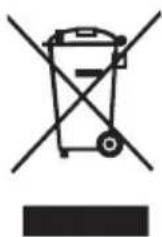
This marking indicates that this product should not be disposed with other household wastes throughout the EU. To prevent possible harm to the environment or human health from uncontrolled waste disposal, recycle it responsibly to promote the sustainable reuse of material resources. To return your used device, please use the collection systems or contact the retailer where the product was purchased. They return and can take this product for environmental safe recycling.
If you require any technical guidance or find that your product is not operating as intended, a simple solution can often be found in the Troubleshooting section of these instructions.
Product support
Help is always at hand
BUSH
Call us now and activate your 12 month guarantee
Thank you for choosing Bush. Your new product is guaranteed against faults and breakdowns for 12 months. Don't forget to register it with us today so we can provide you with our best possible after-sales service and useful updates.
www.bushregistration.co.uk
FREEPHONE*
0800 597 8548
Lines are open 8am - 8pm, 365 days a year. *Calls may be recorded and monitored.
Your Bush Guarantee
This product is guaranteed for twelve months from the date of original purchase. Any defect that arises due to faulty materials or workmanship will be repaired free of charge (or if applicable the product will be replaced or the purchase price refunded) where possible during this period by the dealer from who your purchased the unit.
The guarantee is subject to the following provisions:
- The guarantee does not cover accidental damage, misuse, cabinet parts, knobs or consumable items.
- The product must be correctly installed and operated in accordance with the instructions contained in the manual.
- It must be used solely for domestic purposes. The guarantee will be rendered invalid if the product is
re-sold or has been damaged by inexpert repair.
- Specifications are subject to change without notice.
- Bush disclaim any liability for loss or damage arising from the breakdown of the product.
- This guarantee is in addition to and does not diminish your statutory or legal rights.
Important Data Protection Information
If you provide us with information about another person, you confirm that they have appointed you to act for them, to consent to the processing of their personal data including sensitive personal data and that you have informed them of our identity and the purposes (as set out in the Important Data Privacy notice displayed overleaf) for which their personal data will be processed.
You are entitled to ask for a copy of the information we hold about you (for which we may charge a small fee) and to have any inaccuracies in your information corrected.
For quality control and training purposes, we may monitor or record your communications with us.
If your personal details change, if you change your mind about any of your marketing preferences or if you have any queries about how we use your information, please let us know by contacting our Data Protection Officer, Domestic & General, Leicester House 17 Leicester Street, Bedworth, Warwickshire CV12 8JP.
Guarantor: Argos Limited - 489 - 499 Avtbury Blvd, - Milton Keynes - MK9 2NW
BUSH
Contact:
www.argos-support.co.uk
Helpline: 0345 604 0105

- Help and Guidance
- Contents
- Safety information
- Getting to know your vacuum cleaner
- Operate your vacuum cleaner
- Care and maintenance
- Product support
- Safety information
- 1
- Important - Please read all instructions before use and keep for future reference
- WARNINGS
- Getting to know your vacuum cleaner
- 2
- Ready? Let's begin...
- Operate your vacuum cleaner
- 3
- Charging
- Cleaning
- Replacing battery
- Caution
- Docking Station
- Before installation:
- When store the appliance:
- Care and maintenance
- 4
- Dust cleaning
- Power Brush Cleaning
- Product support
- 5
- TROUBLESHOOTING
- Help and assistance
- Notes on disposal:
- BUSH
- Call us now and activate your 12 month guarantee
- www.bushregistration.co.uk
- Your Bush Guarantee
- The guarantee is subject to the following provisions:
- Important Data Protection Information
Brand : BUSH
Model : VHS01A17Z
Category : Vacuum Cleaner