
VHW01B17W - Vacuum Cleaner BUSH - Free user manual and instructions
Find the device manual for free VHW01B17W BUSH in PDF.


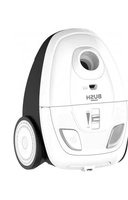
| Product Type | Canister Vacuum Cleaner |
| Brand | Bush |
| Model | VHW01B17W |
| Power | 800 W |
| Dust Capacity | 1.5 L |
| Filter Type | HEPA washable filter |
| Dimensions (WxDxH) | 40 x 30 x 30 cm |
| Weight | 5.0 kg |
| Cord Length | 5.0 m |
| Noise Level | 75 dB |
| Capacity Type | Bagless |
| Vacuum Type | Dry vacuum cleaner |
| Brush Type | Combination floor nozzle |
| Accessories Included | Crevice tool, dusting brush |
| Power Cord Type | Retractable |
| Body Material | Plastic |
| Color | White |
| Warranty | 2 years |
Frequently Asked Questions - VHW01B17W BUSH
User questions about VHW01B17W BUSH
0 question about this device. Answer the ones you know or ask your own.
Ask a new question about this device
Download the instructions for your Vacuum Cleaner in PDF format for free! Find your manual VHW01B17W - BUSH and take your electronic device back in hand. On this page are published all the documents necessary for the use of your device. VHW01B17W by BUSH.
USER MANUAL VHW01B17W BUSH
Handheld Vacuum Cleaner
Model: VHW01B17W

natural_image
White handheld vacuum cleaner with clear lid floating against a geometric orange patterned background (no text or symbols)You'll soon be enjoying your new Bush Handheld Vacuum Cleaner.
It all begins here, with your instructions. Don't worry, there's nothing too technical coming up. Just simple, step-by-step guidance to get you up and running quickly. Sound good? Then let's get started.
Help and Guidance
We're here to help you get the most from your Bush Handheld Vacuum Cleaner. Should you require any guidance; call our Help line on 0345 604 0105. Further contact details can be found online at: www.bush-support.co.uk
Contents
1 Safety information
Power source 6
Ventilation heat and moisture 7
Warning 7
Battery safety 7
2 Getting to know your vacuum cleaner
Accessories 10
Part identification 11
Charging the internal batteries 12
3 Using your vacuum cleaner
Getting started 14
Nozzle use 14
4 Care and maintenance
Maintenance 16
Emptying the dust container 16
Cleaning the filter 17
Technical specification 18
Recycling electrical products 18
5 Product support
Troubleshooting 20
Help and assistance 21
Guarantee 22
Safety information 1

natural_image
Abstract geometric pattern composed of orange triangles on a white background, no text or symbols present
Safety information
Important - Please read these instructions fully before assembling or operating
Power source
- For household and indoor use only
- Keep the appliance and its cord out of reach of children less than 8 years.
- Do not allow children to use the appliance without supervision.
-
This appliance can be used by children aged from 8 years and above and persons with reduced physical, sensory or mental capabilities or lack of experience and knowledge if they have been given supervision or instruction concerning use of the appliance in a safe way and understand the hazards involved. Children shall not play with the appliance. Cleaning and user maintenance shall not be made by children unless they are aged from 8 years and above and supervised.
-
Do not pull on the cable to disconnect from mains supply.
- Fully unwind the cable before plugging in and ensure the cable is positioned away from areas where it is likely to get damaged or cause a trip hazard.
- The output cord of this mains adaptor cannot be replaced. In the event of damage to the cable, jack plug or adaptor, the entire adaptor unit should be replaced.
- Connections must only be made via the mains adaptor supplied, never connect the appliance directly to the 240v mains supply.
• Never use the adaptor supplied with any other appliance. - Remove mains adaptor from supply if appliance is unused for a long period of time, and during thunderstorms.
- Switch off and unplug when not in use and before emptying, cleaning or servicing the appliance. Servicing of this appliance must only be carried out by a qualified electrician.
- Always ensure the mains adaptor plug is readily unpluggable – do not use with 'lockable' sockets or permanently wire to mains.

Safety information
Important - Please read these instructions fully before assembling or operating

Ventilation, heat and moisture
- Keep appliance, cable, mains adaptor plug dry and away from areas where it is likely to get splashed. Avoid using in hot, humid environments.
- The mains adaptor will become warm in use; do not cover or place on or near surfaces that could be affected by heat such as table tops and carpets.
Warning!
- This appliance is intended exclusively for use in domestic households. It is not suitable for commercial use.
- Do not place fingers or other objects into the nozzle of the dust container when the vacuum cleaner is in use.
- Do not use the appliance to pick up burning or hot objects (e.g. coal, ash, cigarettes etc) of any kind.
- Do not cover the appliance or restrict air vents.
- Do not use the appliance to pick up sharp objects (e.g. pins, nails, tacks, staples etc) or string.
- Never use the vacuum without the filter assembly fitted.
Battery safety
This Vacuum cleaner has a built in rechargeable battery (Li-Ion 7.2V 2000mAh) that cannot be replaced.
- Never try to dismantle the vacuum cleaner.
• Do not short-circuit the supply terminals. - Dispose of the vacuum cleaner responsibly at local authority household waste recycling facility.
- DO NOT dispose of the vacuum cleaner in a fire as the battery may explode or leak.
Getting to know your vacuum
2

natural_image
Abstract geometric pattern composed of orange triangles on a white background, no text or symbols present
Getting to know your vacuum
You'll be up and running in no time
Ready? Let's begin...
Please read these instructions carefully. They contain important information which will help you get the best from your vacuum and ensure safe and correct installation and operation.
If you require any further assistance, our technical experts are happy to help. For full details, refer to the product support section at the end of these instructions.
Accessories

natural_image
Simple line drawing of a connected electrical component with wires (no text or symbols)Adaptor
natural_image
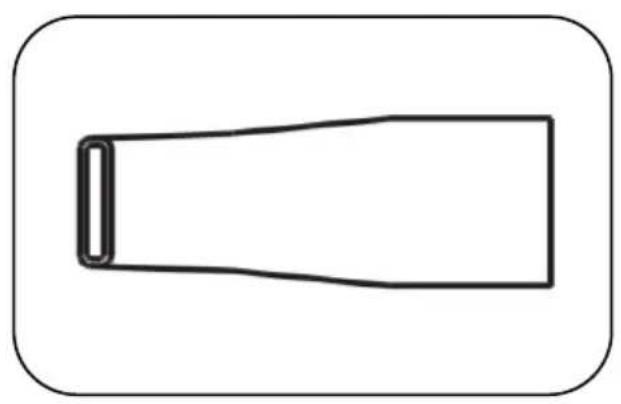
Simple line drawing of a rectangular object with rounded corners, no text or symbols present.Crevice
Getting to know your vacuum
You'll be up and running in no time
Parts identification
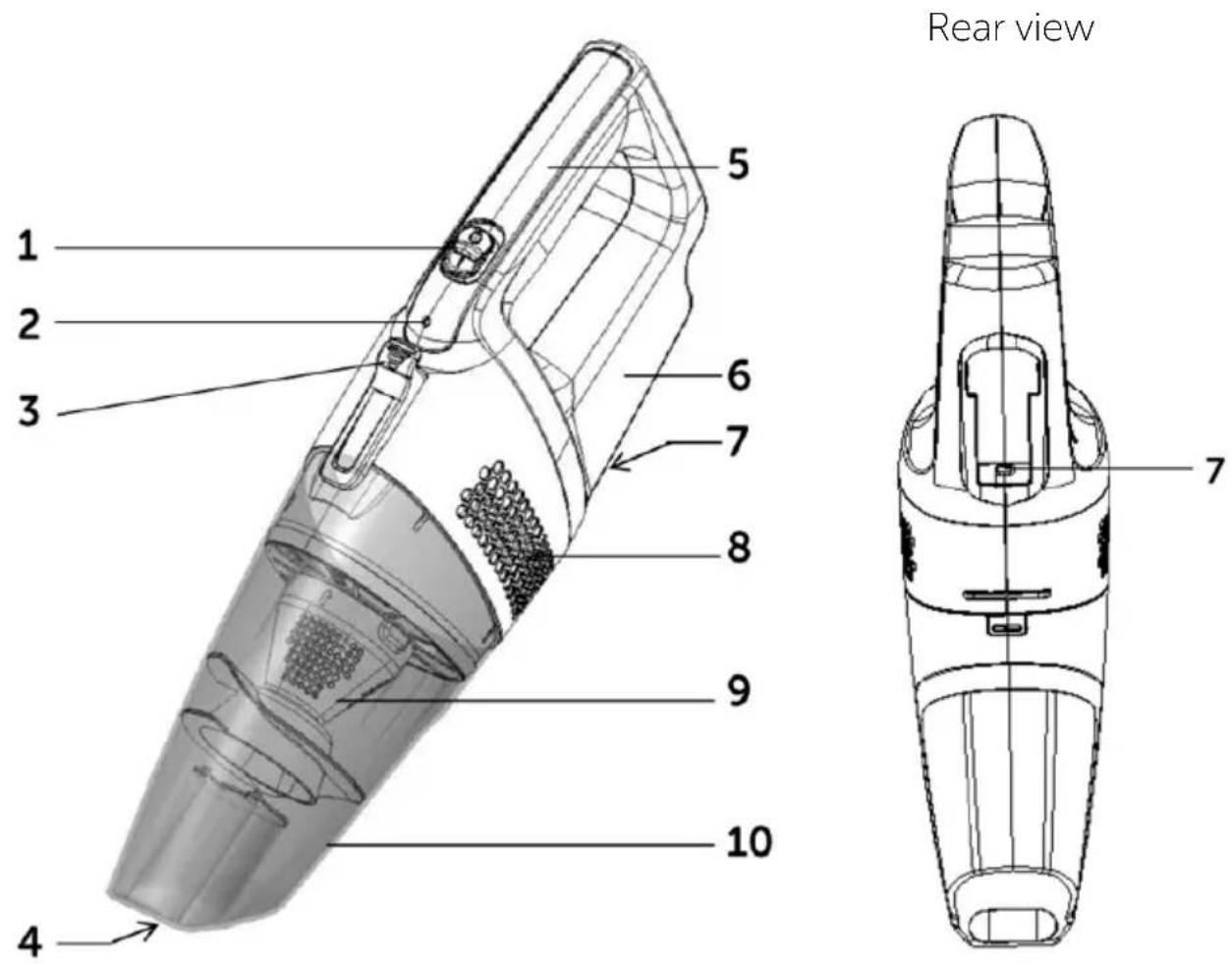
- Power (on / off) switch
- Power / charge indicator
- Dust container release button
- Nozzle
-
Handle
-
Motor housing
- DC Jack
- Air vents
- Filter assembly
- Dust container
Getting to know your vacuum
You'll be up and running in no time
Charging the internal batteries
The internal Lithium battery is supplied with a small amount of charge but it will be necessary to initially charge for 4 hours approx. before using in battery mode.
- Ensure that the power switch is in the OFF (O) position.
- Insert the adaptor cord into the DC jack on the underside of the vacuum and plug the adaptor into the mains supply socket.
- The indicator will illuminate red to show that the unit is in charging mode.
- Allow the unit to fully charge. When the unit is fully charged the indicator will extinguish.
- Disconnect the adaptor from the vacuum and the mains supply. The vacuum can now be used up to 15 minutes.
Notes
- The indicator will flash red when the battery is running low and needs to be recharged. If recharge is not started, the indicator will flash until the vacuum powers off.
- Only charge or recharge the vacuum indoors.
- Do not recharge the battery when the air temperature is below 0^ C or above 37^ C.
- Batteries become hot after heavy use and will become difficult to charge. Allow to cool and wait about an hour between recharges.
Using your vacuum
3

natural_image
Abstract geometric pattern composed of orange triangles on a white background (no text or symbols)
Using your vacuum
Let's get started
Getting started
- When the unit is charged, disconnect the adaptor from the vacuum and the mains supply.
- Slide the POWER switch forward to the ON (I) position, the power indicator will illuminate (green) and the vacuum cleaner will start to work. The vacuum cleaner may be used for approximately 15 minutes when fully charged.
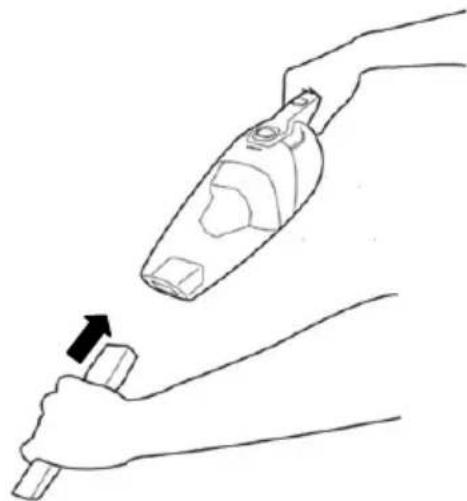
- To use the crevice nozzle, insert the crevice nozzle directly into the dust container nozzle until it is held securely (fig. 1).
natural_image
Line drawing of a hand holding a small object with an arrow indicating motion (no text or symbols)Fig. 1
- Slide the POWER switch backwards towards OFF (O) position to switch the vacuum cleaner off after use.
Nozzle use
| Nozzle | Car interior | Furniture | Between cushions | Curtains | Stairs | Work surfaces | Skirting edges | Radiator |
| No head fitted | √ | √ | √ | √ √ | ||||
| Crevice tool | √ | √ √ | √ | √ √ | √ |
Care and maintenance
4

Care and maintenance
Looking after your appliance
Maintenance
To ensure your vacuum cleaner works at optimum efficiency ensure that the dust container is emptied and the filter is washed regularly.
Keep the ventilation holes and vacuum cleaner surface free from dirt.
- Switch off the vacuum cleaner and disconnect the adaptor from the mains supply.
- Wipe the outside of the vacuum cleaner with a damp (not wet) cloth and then wipe dry. Do not use detergents, solvents or abrasives as these may scratch or damage the surface.
- Never immerse the motor housing, cable or adaptor in water.
- When not in use, store in a cool, dry place.
Emptying the dust container
When the clear dust container looks full or when the suction power is reduced, it is time to empty the dust container.
- Switch off the vacuum cleaner, press the dust container release button and remove the dust container assembly (fig. 2 & 3).

- Position the dust container over a refuse bin, pull out the filter assembly (fig. 4) and tap the filter assembly against the side of the bin to dislodge any loose dust. Finally empty the dust container. The inside of the dust container and cover may be wiped clean with a damp cloth. Dry with a soft dry cloth.
- Refit the filter assembly into the dust container and reattach the dust container onto the vacuum.
Care and maintenance
Looking after your appliance
Cleaning the filter
The frequency that the filter should be cleaned will depend on appliance usage. For maximum efficiency the filter assembly should be cleaned every time the dust container is emptied.
- Switch off the vacuum cleaner.
- To clean the filter, remove the dust container and filter assembly (fig 3 & 4) from cleaner.
-
Hold the filter assembly in one hand, and with the other hand twist the filter anticlockwise to release. Separate the two parts (fig. 5 & 6).
-
Tap the filter against a dustbin to remove most of the dust.

Fig. 5
-
Wash the filter and the filter holder in cool soapy water, rinse under running water (fig. 6) until the water runs clear. Never wash the filter in a washing machine.
-
Allow the filter to air dry fully (fig. 7). Using a damp or wet filter will reduce the suction and damage the motor.
Fig. 6 Fig. 7

natural_image
Diagram showing household appliances and a 24-hour time label, no text or symbols present-
See fig 5. Align the embossed arrow (5) on the filter holder with the line (4) under the 'locked' padlock (2) symbol on the filter rim. Engage the lugs and twist clockwise to secure. The arrow should now be aligned with the line (3) underneath the 'unlocked' padlock symbol (1).
-
Refit the filter assembly into a clean dust container.
Note
• Take care of the filter supplied, as replacements are not available.
Or by calling one of our experts on 0345 604 0105

Other information
Technical Specification
| Model VHW01B17W | |
| SKU | 136565828 |
| Cat No: 3084102 | |
| Rated voltage (transformer) 100 - 240V~ | 50/60Hz, 0.5A |
| Transformer output | 9.4V 400mA |
| Transformer model YLJXA-U094040 | |
| Class rating (transformer) II (double insulated) | |
| Rated voltage (vacuum) 7.2V | |
| Power consumption 60W | |
| Power consumption (standby) <1W | |
| Running time (approx.) 15 min | |
| Recharge time (from empty) 4 hrs | |
| Capacity | 500ml |


Recycling electrical products

You should now recycle your waste electrical goods and in doing so help the environment.
This symbol means an electrical product should not be disposed of with normal household waste. Please ensure it is taken to a suitable facility for disposal when finished with.
Visit www.recycle-more.co.uk, click on "bank locator" and enter your postcode to find your nearest recycling site.
Product support
5

natural_image
Abstract geometric pattern composed of orange triangles on a white background, no text or symbols presentProduct support
Help is always at hand
Troubleshooting
| Observation Potential cause / solution | |
| Vacuum cleaner does not work | Does the battery need to be recharged? |
| Suction power weak | Does the dust container need to be emptied? |
| Is the filter clogged and need to be cleaned? | |
| Is the something blocking the nozzle? | |
| Does the battery need to be recharged? | |
| Vacuum cleaner overheating | Is the filter clogged and need to be cleaned? |
| Dust escaping vacuum cleaner | Check that the dust container is securely attached. |
Product support
Help is always at hand
Help and assistance
If you require any technical guidance or find that your Bush vacuum cleaner is not operating as intended, a simple solution can often be found in the Troubleshooting section of these instructions or online at www.bush-support.co.uk
If you still require further assistance, call one of our experts on 0345 604 0105*. To help give us give you a fast and efficient service please have the following information ready:
Model Ref:

You can find this information on the rating plate – a small sticker (usually a sticker or metal plate on the rear of your product)
Serial number

This will be shown on your receipt
Date of purchase

Local call rate applies*
Lines open 8am-7pm Monday to Saturday and 10am-4pm Sunday.
*Calls to Bush enquiry lines may attract a charge and set up fee from residential lines depending on your call plan / tariff. Mobile and providers costs may vary, see www.bt.com/pricing for details
For security and training purposes, telephone calls to and from customer service centres maybe recorded and monitored. Calls from Republic of Ireland will attract international call charges.
Product support
Help is always at hand
BUSH
Call us now and register your 12 month guarantee
Thank you for choosing Bush. Your new product is guaranteed against faults and breakdowns for 12 months. Don't forget to register it with us today so we can provide you with our best possible after-sales service and useful updates.
www.bushregistration.co.uk
FREEPHONE*
0800 597 8548
Lines open 8am-8pm, 365 days a year. *Calls may be recorded and monitored.
Your Bush Guarantee
This product is guaranteed for twelve months from the date of original purchase. Any defect that arises due to faulty materials or workmanship will be repaired free of charge (or if applicable the product will be replaced or the purchase price refunded) where possible during this period by the dealer from whom you purchased the unit.
The guarantee is subject to the following provisions:
- The guarantee does not cover accidental damage, misuse, cabinet parts, knobs or consumable items.
- The product must be correctly installed and operated in accordance with the instructions contained in the manual.
- It must be used solely for domestic purposes. The guarantee will be rendered
invalid if the product is re-sold or has been damaged by inexpert repair.
- Specifications are subject to change without notice.
- Bush disclaim any liability for loss or damage arising from the breakdown of the product.
- This guarantee is in addition to and does not diminish your statutory or legal rights.
For your personal Guarantee Confirmation code call 0800 597 8548
Guarantee Confirmation Code
Product support
Help is always at hand
Important Data Protection Information
Bush has appointed Domestic & General Insurance PLC to provide product registration services and protection plans to accompany its products.
What we do with your information
At Domestic & General we want to reassure you that we use your information both responsibly and securely to provide you with the best possible service. Below we explain what we do with your information and your rights to your information. If you would like any further details you can get in touch with us using the contact details below or visit our website (www.domesticandgeneral.com).
Using your information
Domestic & General Insurance PLC ("we") is the "data controller" of your information. We process two sets of information about you, "Personal Information" (your name, address, contact and payment details) and the "Goods Information" you provide to register your appliance or device (your name, address, contact and goods details). We'll use your information: (i) as necessary to fulfil our contract with you (including to recover any amounts owing); (ii) for our legitimate interests in: undertaking marketing (about our products and services and those of our third party partners) by post, telephone, email and/or other electronic messaging services; market research; customer surveys; printing services; checking and verifying your identity and contact details; recording your conversations for training, quality and compliance purposes; and for analytics and profiling for marketing purposes; and (iii) where required to do so by law. We may also ask for your consent to some uses of your information.
Sharing your information
From time to time your Personal Information and Goods Information may also be shared with other members of the Domestic & General Group of Companies (Domestic & General Insurance or Services and other future members of the Group whose details we will notify to you ("Group")), with companies acting on our behalf or providing services to us (e.g. the companies we use to carry out repairs, IT & mailing services, storage of paper records and telecommunications) and with the Sainsbury's Argos Group (which currently includes Sainsbury's Supermarkets, Sainsbury's Bank, Argos Limited, Tu Clothing, Habitat, Argos Financial Services, Nectar and Insight 2 Communication, Argos Business Solutions Limited). The Sainsbury's Argos Group will process your Personal Information for their legitimate business interests (including marketing and analytics) in accordance with their privacy policy, which can be found at www.argos.co.uk/help/privacy-policy
Transferring your information
In exceptional cases, we may transfer your information to countries outside the European Economic Area (including the US) which may not have data protection laws which provide the same level of protection as provided in the UK. We have put in place Model Clauses as an appropriate safeguard to ensure that such information is adequately secured and protected and that such transfers meet the requirements of applicable data protection law.
Product support
Help is always at hand
Keeping your information
We keep your Personal Information for six years after you terminate your policy so that we can deal with any claims. Your goods information we keep for a bit longer, normally 10 years (the average life of an appliance) for health and safety. We also keep your information to send you marketing that you might be interested in, unless we receive a request from you to opt-out of marketing.
Rights to your information
By writing to the Data Protection Officer using the contact details provided below, you have the right to ask us:
• for a copy of the Personal Information we hold about you
- for a copy of the Personal Information you provided to us to be sent to you or a third party in a commonly used, machine readable format
• to update or correct your Personal Information to keep it accurate
- to delete your Personal Information from our records if it is no longer needed for the original purpose; and
• to restrict the processing of your Personal Information in certain circumstances
And you may also:
- object to us processing your Personal Information – in which case we will either agree to stop processing or explain why we're unable to; and
• where we rely on your consent, withdraw that consent at any time.
Please note that the above rights are not absolute and certain exemptions apply to them. You can also make a complaint to the Information Commissioner (www.ico.org.uk) if you feel your Personal Information has been mishandled.
Marketing
We, along with other members of our Group, Argos Limited, and other members of the J Sainsbury's Group of Companies may use your information to tell you about any offers, products or services which may be of interest to you. We may contact you by post, telephone, email and/or other electronic messaging services. To change your marketing preference, let us know by emailing marketingpreferences@domesticandgeneral.com or by writing to us using the contact details provided below. If you don't want Argos to send you marketing by phone, email or post then please see Argos's Privacy Policy, which can be found on their website at www.argos.co.uk/help/privacy-policy to opt out of this marketing. Argos will stop sending you marketing communications but will still contact you with service-related messages every now and then.
Contact Details
If you need to contact us about your information or your information rights, or to see a copy of our Model Clauses, please write to: Freepost Plus RTKS-CLRA-GRYE, Data Protection Officer, Domestic & General, Leicester House, 17 Leicester Street, Bedworth, CV12 8JP or dataprotection@domesticandgeneral.com and we'll be happy to help you.
Issue 2 24/9/19
BUSH
Should you require any guidance;
call our Help line on 0345 604 0105.
Further contact details can be found online at:
www.bush-support.co.uk
Produced In China.
Argos Limited, 489-499 Avebury Boulevard, Milton Keynes, MK9 2NW.
Argos (N.I.) Ltd, Forestside Shopping Centre, Upper Galwally, Belfast,
United Kingdom, BT8 6FX. Argos Distributors (Ireland) Limited, Unit 7,
Ashbourne Retail Park, Ballybin Road, Ashbourne, Country Meath, Ireland
Sainsbury's Supermarkets Ltd, London, EC1N 2HT. Sainsbury's (NI) Ltd,
Forestside Shopping Centre, Upper Galwally, Belfast, United Kingdom, BT8 6FX
Bush is a registered trademark of Argos Ltd.


- Help and Guidance
- Contents
- Safety information
- Getting to know your vacuum cleaner
- Using your vacuum cleaner
- Care and maintenance
- Product support
- Safety information 1
- Safety information
- Important - Please read these instructions fully before assembling or operating
- Power source
- Ventilation, heat and moisture
- Warning!
- Battery safety
- Getting to know your vacuum
- 2
- Ready? Let's begin...
- Charging the internal batteries
- Notes
- Using your vacuum
- 3
- Getting started
- Care and maintenance
- 4
- Looking after your appliance
- Maintenance
- Emptying the dust container
- Cleaning the filter
- Note
- Other information
- Technical Specification
- Recycling electrical products
- Product support
- 5
- Help and assistance
- Lines open 8am-7pm Monday to Saturday and 10am-4pm Sunday.
- BUSH
- Call us now and register your 12 month guarantee
- Your Bush Guarantee
- The guarantee is subject to the following provisions:
- For your personal Guarantee Confirmation code call 0800 597 8548
- Important Data Protection Information
- What we do with your information
- Using your information
- Sharing your information
- Transferring your information
- Help is always at hand
- Keeping your information
- Rights to your information
- Marketing
- Contact Details
Brand : BUSH
Model : VHW01B17W
Category : Vacuum Cleaner