
V8715 - Vacuum Cleaner BUSH - Free user manual and instructions
Find the device manual for free V8715 BUSH in PDF.


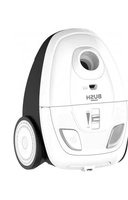
| Product Type | Cylinder Vacuum Cleaner |
| Brand | Bush |
| Model | V8715 |
| Dimensions (L x W x H) | 400 x 300 x 200 mm |
| Weight | 5.2 kg |
| Power Consumption | 2000 W |
| Vacuum Type | Bagged |
| Dust Capacity | 1.5 L |
| Cord Length | 6 m |
| Noise Level | 75 dB(A) |
| Filtration System | HEPA filter |
| Attachments Included | Crevice tool, dusting brush, upholstery nozzle |
| Variable Power Control | Yes |
| Automatic Cord Rewind | Yes |
| Dust Bag Full Indicator | Yes |
| Wheel Type | Swivel castors |
| Safety Features | Thermal overload protection |
| Maintenance | Clean HEPA filter every 3 months; replace dust bag when full |
| Spare Parts Availability | Dust bags, HEPA filters, attachments available online |
| Repairability | User-replaceable filters and bags; professional service for motor issues |
Frequently Asked Questions - V8715 BUSH
User questions about V8715 BUSH
0 question about this device. Answer the ones you know or ask your own.
Ask a new question about this device
Download the instructions for your Vacuum Cleaner in PDF format for free! Find your manual V8715 - BUSH and take your electronic device back in hand. On this page are published all the documents necessary for the use of your device. V8715 by BUSH.
USER MANUAL V8715 BUSH
natural_image
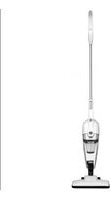
Purple and black handheld vacuum cleaner with 'BUSH 12V' label, against a geometric orange and white background (no readable text beyond branding)You'll soon be enjoying your new handheld vacuum cleaner
It all begins here, with your instructions. Don't worry, there's nothing too technical coming up. Just simple, step-by-step guidance to get you up and running quickly. Sound good? Then let's get started.
Help and Guidance
We're here to help you get the most from your vacuum cleaner. Should you require any guidance, a simple solution can often be found online at:
www.argos-support.co.uk
If you still require further assistance, call one of our experts on TMTI HELPLINE 0345 604 0105.
Contents
1 Safety information
Safety information 6
Electrical requirement 7
2 Getting to know your handheld vacuum cleaner
Illustration 11
Features 11
Power controls 12
Charge 12
3 Using your handheld vacuum cleaner
Using the handheld vacuum cleaner 14
Assembly the charger to the wall 15
4 Care and maintenance
Care for the handheld vacuum cleaner 18
Cleaning the handheld vacuum cleaner 18
Technical specification 20
5 Product support
Toubleshooting 22
Help and assistance 23
Declaration of conformance to product 24
Standards
Disposal 26
Safety information
1
Safety information
Important safety instructions
The use of any electrical appliance requires the following common sense safety rules.
Primarily there is danger of injury or death and secondly the danger of damage to the appliance. These are indicated in the text by the following two conventions:
Warning: Danger to the person!
IMPORTANT: Damage to the appliance! In addition we offer the following safety advice.
Location
- Do not use or keep this product outside when it is raining.
- Do not store the appliance near hot ovens or heating appliances.
Mains lead
- Do not allow the mains lead to become strained or run this appliance over it.
- If the electrical cable becomes damaged, the complete cable assembly must be replaced. Do not attempt this task yourself. Contact the local retailers.
Children
- Do not leave the children use the product alone.
● The product should be stored somewhere children can't reach
Personal safety
● Never modify the cleaner in any way.
● Never use in the presence of explosive liquids or vapors.
● Never pick up inflammable or poisonous liquids such as petrol, copier toner or other volatile substances. Never pick up acids, asbestos or asbestos dust.
● Repairs to electrical appliances are only to be undertaken by trained personnel.
Unprofessional repairs can be dangerous for users.
● The appliance must never be left running when unsupervised.
If you require any technical guidance or find that your product is not operating as intended, a simple solution can often be found in the Troubleshooting section of these instructions.
Product safety
● Never use the appliance without the filters being installed.
● Never use the appliance to clean hot ashes, broken glass, sharp things and harmful liquids.
● To protect against fire, electric shock and personal injury do not immerse cord, plug or cleaner in water or other liquid.
Electrical requirements
Check that the voltage on the rating plate corresponds with your house electricity supply which must be A.C (alternating current)
If the socket outlets in your home are not suitable for the plug supplied with this appliance the plug should be removed and the appropriate one fitted.
You must keep in mind that this product can not be used while it is charging, vice versa.
This appliance is intended for domestic household use only and should not be used for any other purpose or in any other application, such as for non-domestic use or in a commercial environment.
This appliance can be used by children aged from 8 years and above and persons with reduced physical, sensory or mental capabilities or lack of experience and knowledge if they have been given supervision or instruction concerning use of the appliance in a safe way and understand the hazards involved. Children shall not play with the appliance. Cleaning and user maintenance shall not be made by children without supervision.
Getting to know your vacuum cleaner
2

natural_image
Abstract geometric pattern with orange triangles and white gaps on a white background (no text or symbols)Getting to know your vacuum cleaner
You'll be up and running in no time
Ready? Let's begin...
Please read these instructions carefully. They contain important information which will help you get the best from your Vacuum cleaner and ensure safe and correct installation and operation.
If you require any further assistance, our technical experts are happy to help. For full details, refer to the product support section at the end of these instructions.
Getting to know your Vacuum cleaner
You'll be up and running in no time
ILLUSTRATION
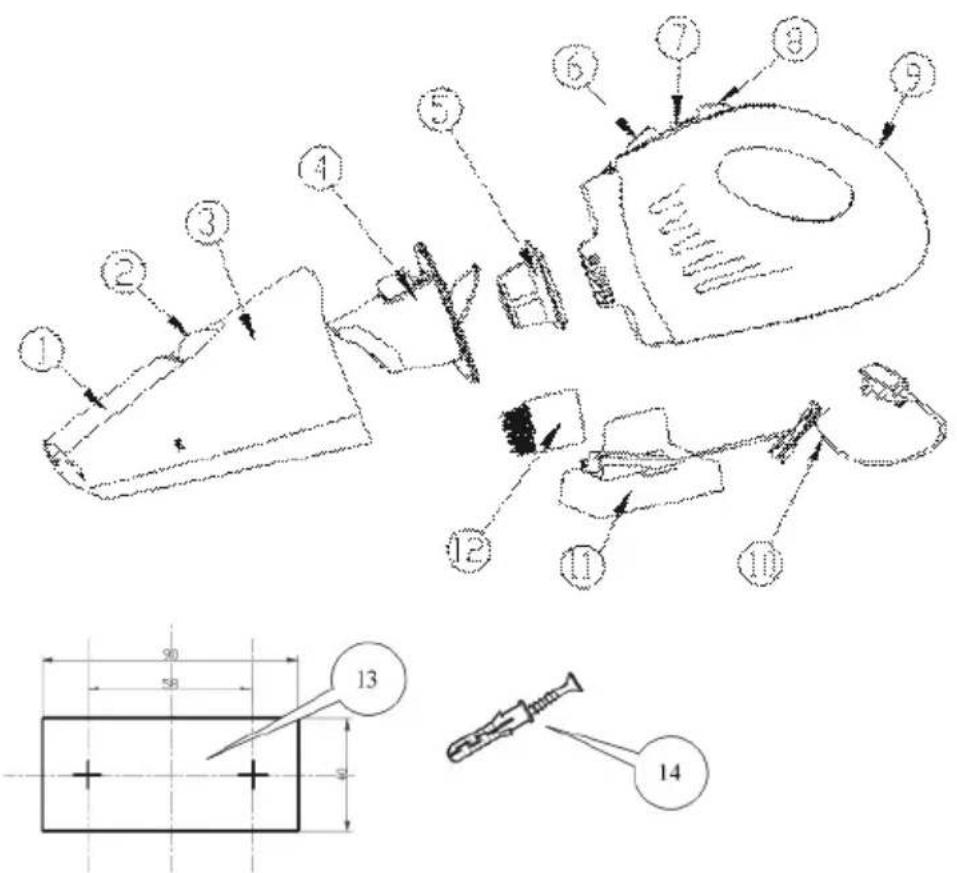
Features
1.Sucker 8.On/off switch-button
2.Sucker button 9.Main body
3.Dust cup 10.Charger
4. Small dust cup 11. Charger assembly
5.filter 12. Assembly brush
6. Dust cup button 13. Adhesive guide
7.Light indicator 14.Screws with anchors
Power controls
The on/off control is operated by On/off switch-button8。(Fig.1)
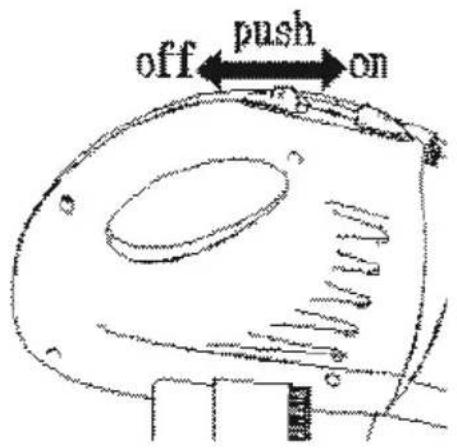
Fig.1
How to charge the appliance
- Insert the appliance in the charger with the opening facing upward and connect to the socket. (Fig.2)

natural_image
Pure line drawing of a mechanical or architectural component without any text, numbers, or symbolsFig.2
- Put the charger into an earthed 230V\~50HZ mains socket, the light indicator 7 around the switch-buttons will turn red.
- The light indicator 7 will turn green when the charging is completed. It will take about 13-16 hours.
WARNING: You can leave the vacuum cleaner being charged the appliance will heat up slightly, but this is absolutely safe. However, if you do not use the product for long time, we recommend that you remove it form the charging.
If you require any technical guidance or find that your product is not operating as intended, a simple solution can often be found in the Troubleshooting section of these instructions,
Using your vacuum cleaner
3

natural_image
Abstract geometric pattern with orange triangles and white dots on a gradient background (no text or symbols)Using your handheld vacuum cleaner
Getting the most from your appliance
First use of handheld vacuum cleaner
Using your vacuum cleaner
- The appliance as you find it in the package is made to vacuum dust or solid materials from broad surfaces.
- For vacuuming dust and solid materials in narrow spaces, use vacuuming sucker 1.
- To vacuum Assembly brush12, use vacuuming accessory (fig.3)

natural_image
Technical line drawing of a mechanical device with directional arrows indicating motion or flow (no text or symbols)Fig.3
- Once the dust or water has reached the maximum capacity level, empty the dust cup.
● Never tilt the appliance upwards so as to avoid spilling the water.
● Always empty the dust cup and dry the filter after each use.
WARNING: Do not vacuum substances or products that are hot (embers, cigarettes, matches),
toxic(solvents), flammable or explosive (petrol, alcohol), sharp (glass) or corrosive (acids) or liquids (but water is excepted).
If you have vacuumed liquids, always empty the tank and dry the filter before placing the appliance in the battery charger base.
If you require any technical guidance or find that your product is not operating as intended, a simple solution can often be found in the Troubleshooting section of these instructions,
How to mount the charger assembly to the wall
- Choose where you wish to position the charger assembly.
● Make sure that the length of the cord is enough to reach the outlet. - Wind any excess cord around the charger assembly. Pass the cord through the groove. (fig.4)
- Apply the adhesive guide to the wall and, with a 5mm-diamer wall drill, make the holes marked on the adhesive.(fig.5)
- Insert the anchors in the wall and secure the charger assembly with the screws.

natural_image
Technical line drawing of a mechanical component with no visible text or symbols
natural_image
Pure electrical wiring diagram showing connections between a power outlet and a terminal block (no text or symbols)Fig.4

natural_image
Simple line drawing of a bent pipe or pipe with a vertical support (no text or symbols)Fig5
Care and maintenance
4

natural_image
Abstract geometric pattern with orange triangles and white gaps on a gradient background (no text or symbols)How to care for the Vacuum Cleaner
● Always disconnect the appliance before performing maintenance.
- Remember that frequent maintenance improves the functional performance of the appliance.
How to care for the Vacuum Cleaner
● Always disconnect the appliance before performing maintenance.
- Remember that frequent maintenance improves the functional performance of the appliance.
How to clean the dust cup and filter
- Press the dust cup button located on top of the appliance and remove the dust cup (fig.6)
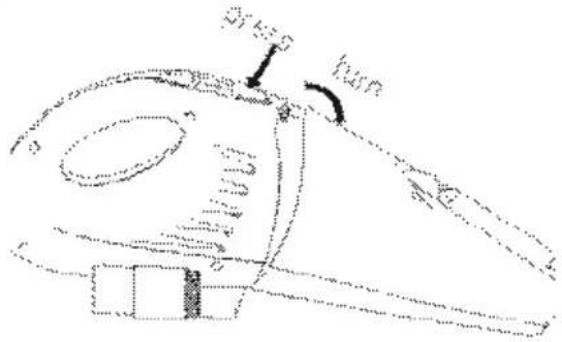
Fig.6
● Empty the dust cup and wash it with water and a detergent that does not contain abrasive substances. Carefully dry them with a soft cloth.
- Remove the filter. fig.7

natural_image
Technical line drawing of a mechanical component with a cylindrical part inserted, showing a left-pointing arrow (no text or symbols)(Fig.7)
If you require any technical guidance or find that your product is not operating as intended, a simple solution can often be found in the Troubleshooting section of these instructions,
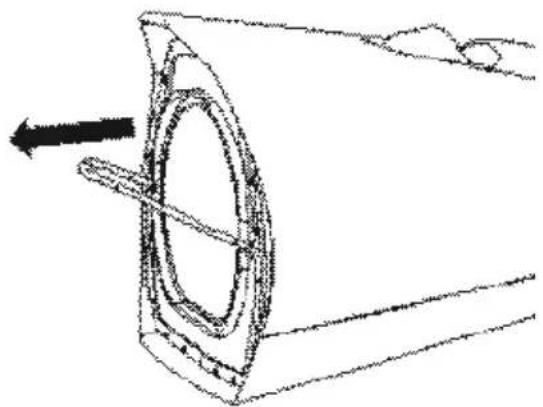
- Remove the Small dust cup. fig.8
natural_image
Technical line drawing of a mechanical component with a circular feature and an arrow indicating direction (no text or symbols)(Fig.8)
- Wash the filter with water and a detergent that does not contain abrasive substances. Dry the filter completely before repositioning it.
- Insert the holder in the dust cup3 and filter5 in the holder.
- Reposition the dust cup3 by placing it in the groove and pressing it, until you hear the "click".
Technical Specifications
| Model Number | V8715 |
| Charge voltage | 220-240V~50/60Hz |
| Battery | 12V NiMH SC1300 mAh |
| Capacity | 400mL |
| Running time | 12mins |
| Suction power | 70W |
| Cable length | 180cm |
| Noise function | 80dB(A) |
| Rated input power | Wet & Dry |
Product support
5

natural_image
Abstract geometric pattern with orange triangles and white gaps on a white background (no text or symbols)Product support
Help is always at hand
TROUBLESHOOTING
Please check the following details before you have your appliance repaired by an authorised servicing agent.
- Vacuum cleaner does not work.
You can check if the battery of the product has been run out. Pls double check if the power switch of the appliance is on. - Suction power becomes weak.
You can check if the product has a low battery power. Or check if the dust cup is full or check if the filter sponge is clogged.
The possible solution is to immediately charging the product, remove the obstruction, or empty the dust cup or clean the filter. - Vacuum cleaner is overheating
You can check if the filter is blocked. The possible solution is to clean the filter. - Dust is coming out of the vacuum cleaner
You can check if the dust container is properly fitted to the cleaner. The possible solution is to refit the dust container to the cleaner.
Product support
Help is always at hand
Help and assistance
If you require any technical guidance or find that your wash vacuum cleaner is not operating as intended, a simple solution can often be found in the Troubleshooting section of these instructions or online at
www.argos-support.co.uk
If you still require further assistance, call one of our experts on 0345 604 0105. To help give us give you a fast and efficient service please have the following information ready:
Model Ref.
Serial number
You can find these on the rating plate - a small information panel (usually a sticker or metal plate) on the rear of your appliance
Date of purchase
This will be shown on your receipt
Local call rates applies*
Lines open 8am-7pm Monday to Saturday and 10am-4pm Sunday.
*Calls to Argos enquiry lines may attract a charge and set up fee from residential lines depending on your call plan/tarif. Mobile and other providers costs may vary, see www.bt.com/pricing for details.
For Security and training purposes, telephone calls to and from customer service centres maybe recorded and monitored. Calls from Republic of Ireland will attract international call charges.
Product support
Help is always at hand

This appliance complies with the following CE directives:
2014/35/EU low voltage directive
2014/30/EU the EMC directive
2011/65/EU the ROHS directive

This is a class II appliance.
Notes on disposal:

This marking indicates that this product should not be disposed with other household wastes throughout the EU. To prevent possible harm to the environment or human health from uncontrolled waste disposal, recycle it responsibly to promote the sustainable reuse of material resources. To return your used device, please use the collection systems or contact the retailer where the product was purchased. They return and can take this product for environmental safe recycling.
Battery

If you want to dispose of the product yourself, the battery must be remove as described below and disposed of in accordance with local regulations.
- Preferably discharge the battery by operating the appliance until the motor stops.
- Press the dirt cup release button and remove the dust container.
- Remove the five screws holding the body of the appliance together.
- Lift the housing cover away from the assembly.
- Detach all lead connections from the battery pack.
- Remove battery pack and motor assembly.
- Place the battery pack and motor assembly in suitable packaging to ensure that the terminal cannot be short- circuited.
• Take the battery pack and motor assembly to your service agent or to a local recycling station, Once removed, the battery cannot be refitted.
Product support
Help is always at hand
BUSH
Call us now and activate your 12 month guarantee
Thank you for choosing Bush. Your new product is guaranteed against faults and breakdowns for 12 months. Don't forget to register it with us today so we can provide you with our best possible after-sales service and useful updates.
www.bushregistration.co.uk
FREEPHONE*
0800 597 8548
Lines are open 8am - 8pm, 365 days a year. *Calls may be recorded and monitored.
Your Bush Guarantee
This product is guaranteed for twelve months from the date of original purchase. Any defect that arises due to faulty materials or workmanship will be repaired free of charge (or if applicable the product will be replaced or the purchase price refunded) where possible during this period by the dealer from who your purchased the unit.
The guarantee is subject to the following provisions:
- The guarantee does not cover accidental damage, misuse, cabinet parts, knobs or consumable items.
- The product must be correctly installed and operated in accordance with the instructions contained in the manual.
- It must be used solely for domestic purposes. The guarantee will be rendered invalid if the product is
re-sold or has been damaged by inexpert repair.
- Specifications are subject to change without notice.
- Bush disclaim any liability for loss or damage arising from the breakdown of the product.
- This guarantee is in addition to and does not diminish your statutory or legal rights.
Important Data Protection Information
If you provide us with information about another person, you confirm that they have appointed you to act for them, to consent to the processing of their personal data including sensitive personal data and that you have informed them of our identity and the purposes (as set out in the Important Data Privacy notice displayed overleaf) for which their personal data will be processed.
You are entitled to ask for a copy of the information we hold about you (for which we may charge a small fee) and to have any inaccuracies in your information corrected.
For quality control and training purposes, we may monitor or record your communications with us.
If your personal details change, if you change your mind about any of your marketing preferences or if you have any queries about how we use your information, please let us know by contacting our Data Protection Officer, Domestic & General, Leicester House 17 Leicester Street, Bedworth, Warwickshire CV12 8JP.
Guarantor: Argos Limited - 489 - 499 Avebury Blvd. - Milton Keynes - MK9 2NW
If you require any technical guidance or find that your product is not operating as intended, a simple solution can often be found in the Troubleshooting section of these instructions,
BUSH
Contact:
www.argos-support.co.uk
Helpline: 0345 604 0105

- Help and Guidance
- Contents
- Safety information
- Getting to know your handheld vacuum cleaner
- Using your handheld vacuum cleaner
- Care and maintenance
- Product support
- Safety information
- 1
- Important safety instructions
- Warning: Danger to the person!
- Location
- Mains lead
- Children
- Personal safety
- Product safety
- Electrical requirements
- Getting to know your vacuum cleaner
- 2
- Ready? Let's begin...
- Features
- Power controls
- How to charge the appliance
- Using your vacuum cleaner
- 3
- Using your handheld vacuum cleaner
- How to mount the charger assembly to the wall
- Care and maintenance
- 4
- How to care for the Vacuum Cleaner
- How to clean the dust cup and filter
- Product support
- 5
- TROUBLESHOOTING
- Help and assistance
- Notes on disposal:
- Battery
- BUSH
- www.bushregistration.co.uk
- Your Bush Guarantee
- The guarantee is subject to the following provisions:
- Important Data Protection Information
Brand : BUSH
Model : V8715
Category : Vacuum Cleaner