
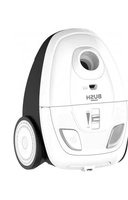
VCS35B15K0D-70 - Vacuum Cleaner BUSH - Free user manual and instructions
Find the device manual for free VCS35B15K0D-70 BUSH in PDF.


| Product Type | Cylinder Vacuum Cleaner |
| Brand | Bush |
| Model | VCS35B15K0D-70 |
| Colour | Black |
| Suction Power | 200 Air Watts |
| Motor Power | 1200 W |
| Filtration System | HEPA 13 Washable Filter |
| Dust Capacity | 1.5 L |
| Bag Type | Bagless (Cyclonic) |
| Dimensions (L x W x H) | 400 x 250 x 280 mm |
| Weight | 4.5 kg |
| Cord Length | 6 m |
| Operating Radius | 8 m |
| Noise Level | 76 dB(A) |
| Power Supply | Mains (220-240 V, 50 Hz) |
| Included accessories | Crevice tool, dusting brush, upholstery tool |
| Warranty | 2 years |
| Maintenance | Clean filter monthly, empty dust bin after each use |
| Safety Features | Overheating protection, automatic shut-off |
| Spare Parts Availability | Filters, brush roll, hose (contact Bush support) |
Frequently Asked Questions - VCS35B15K0D-70 BUSH
User questions about VCS35B15K0D-70 BUSH
0 question about this device. Answer the ones you know or ask your own.
Ask a new question about this device
Download the instructions for your Vacuum Cleaner in PDF format for free! Find your manual VCS35B15K0D-70 - BUSH and take your electronic device back in hand. On this page are published all the documents necessary for the use of your device. VCS35B15K0D-70 by BUSH.
USER MANUAL VCS35B15K0D-70 BUSH
Cyclonic Bagless Vacuum Cleaner
Model: VCS35B15K0D-70
natural_image
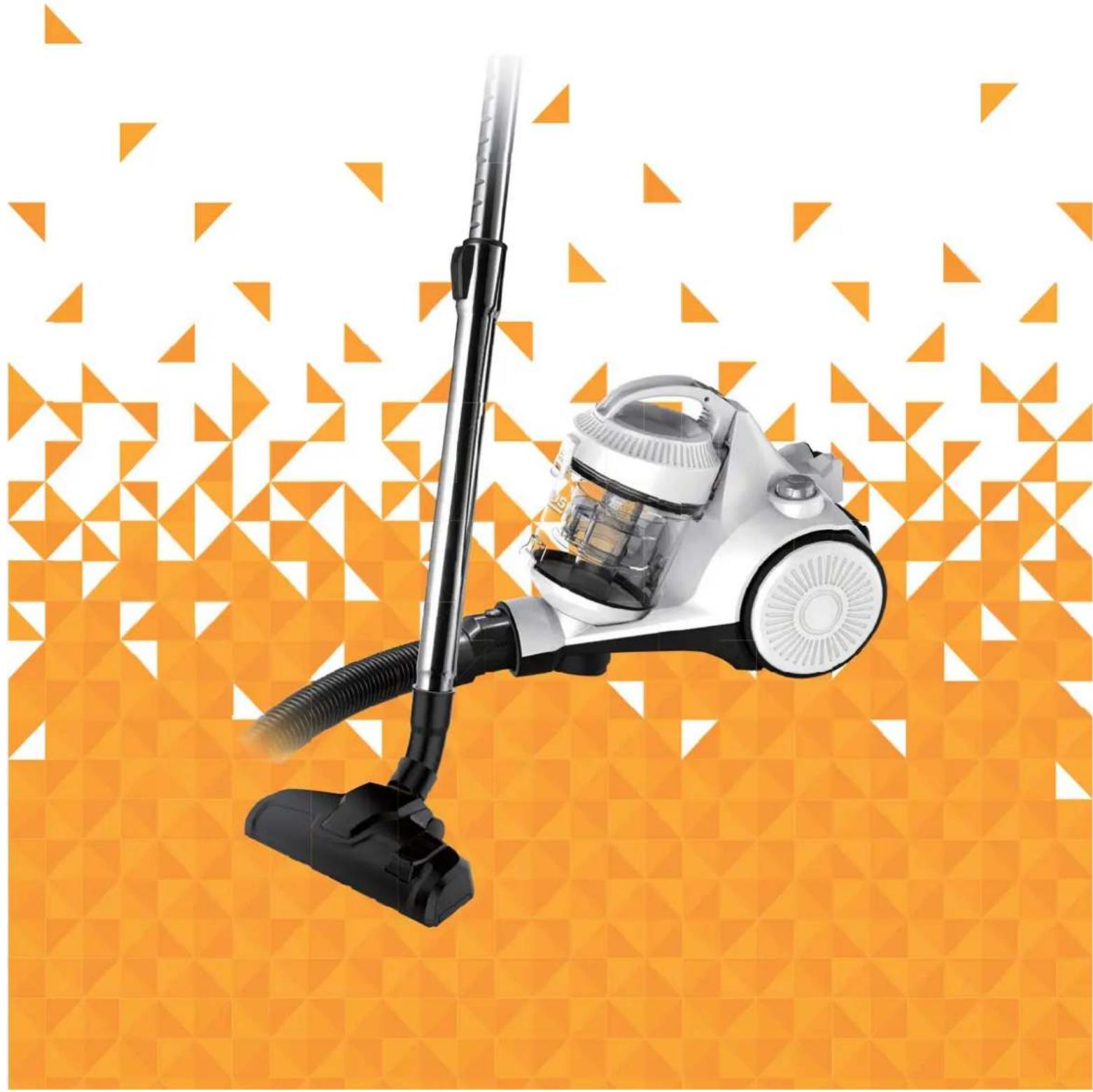
White vacuum cleaner with black handle against orange geometric background (no text or symbols)You'll soon be enjoying your new Bush Cyclonic Bagless Vacuum Cleaner.
It all begins here, with your instructions. Don't worry, there's nothing too technical coming up. Just simple, step-by-step guidance to get you up and running quickly. Sound good? Then let's get started.
Help and Guidance
We're here to help you get the most from your Bush Cyclonic Bagless Vacuum Cleaner.
Should you require any guidance; call our Help line on 0345 604 0105.
Further contact details can be found online at: www.bush-support.co.uk
Contents
1 Safety information
Power source 6
Ventilation heat and moisture 7
Warning 7
Plug / Wiring advice 8
2 Getting to know your vacuum cleaner
Accessories 10
Part identification 11
3 Assembling your vacuum cleaner
Assembly 14
4 Using your vacuum cleaner
Getting started 16
Nozzle use 17
Storage 1/
5 Care and maintenance
Maintenance 20
Emptying the dust container 20
Cleaning the filters 21
Technical specification 23
6 Product support
Troubleshooting 26
Help and assistance 27
Guarantee 28
Safety information
1

natural_image
Abstract geometric pattern composed of orange triangles on a white background (no text or symbols)
Safety information
Important - Please read these instructions fully before BTTFN CMJOH or operating
Power source
• For household and indoor use only
- Keep the appliance and its cord out of reach of children less than 8 years.
- Do not allow children to use the appliance without supervision.
- This appliance can be used by children aged from 8 years and above and persons with reduced physical, sensory or mental capabilities or lack of experience and knowledge if they have been given supervision or instruction concerning use of the appliance in a safe way and understand the hazards involved. Children shall not play with the appliance. Cleaning and user maintenance shall not be made by children unless they are aged from 8 years and above and supervised.
- Do not pull on the cable to disconnect from mains supply.
- Fully unwind the cable before plugging in and ensure the cable is positioned away from areas where it is likely to get damaged or cause a trip hazard.
- Do not operate the vacuum if damaged or after it malfunctions. In the event the supply cord is damaged, it must only be replaced by a qualified service engineer, with a suitably approved part.
- This appliance must be positioned so that the plug is accessible and the plug socket is within easy reach of the power cord.
- Switch off and unplug when not in use and before emptying, cleaning or servicing the appliance. Servicing of this appliance must only be carried out by a qualified electrician.

Safety information
Important - Please read these instructions fully before BTTFN CMJOH or operating

Ventilation, heat and moisture
- Keep appliance, cable and plug away from areas where it is likely to get splashed. Never immerse in water.
Warning!
- Do not place fingers or other objects into the hose nozzle or under the floor head when the vacuum cleaner is in use.
- Do not run the appliance over the power cable.
- Do not use the appliance to pick up burning or hot objects (e.g. coal, ash, cigarettes etc) of any kind.
- Do not use the appliance to pick up any liquids or use on wet surfaces.
- Do not cover the appliance or restrict air vents.
- Do not use the appliance to pick up sharp objects (e.g. pins, nails, tacks, staples etc) or string.


Safety information
Important - Please read these instructions fully before BTTFN CMJOH or operating
Plug / Wiring advice
The wires in this mains lead are coloured in accordance with the following UK electrical code: BLUE = NEUTRAL
$$ B L U E = N E U T R A L $$
$$ B R O W N = L I V E $$
Non-rewireable plug
This appliance may be fitted with a "non-rewireable" plug. If you need to change the fuse in a "non-rewireable" plug, the fuse cover must be refitted. If the fuse cover is lost or damaged, the appliance must not be used.
Rewireable plug
The colours of the wires in the mains lead of this appliance may not correspond with the coloured markings identifying the terminals in a rewireable plug. Rewireable plugs should only be replaced by a suitably competent person. If in doubt, consult a qualified electrician.
Should the fuse need to be replaced, a 13 amp fuse approved to BS1363/A must be used
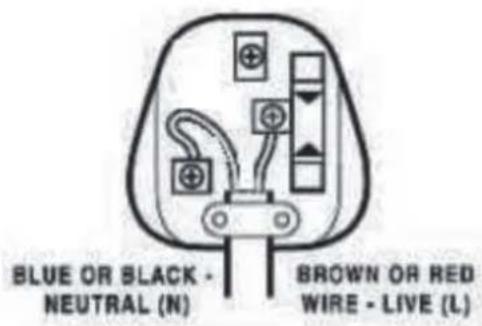
The BLUE wire must be connected to the terminal marked with the letter N
The BROWN wire must be connected to the terminal marked with the letter L
Getting to know your vacuum cleaner
2

natural_image
Abstract geometric pattern composed of orange triangles on a white background (no text or symbols)
Getting to know your vacuum
You'll be up and running in no time
Ready? Let's begin...
Please read these instructions carefully. They contain important information which will help you get the best from your vacuum and ensure safe and correct installation and operation.
If you require any further assistance, our technical experts are happy to help. For full details, refer to the product support section at the end of these instructions.
Accessories
natural_image
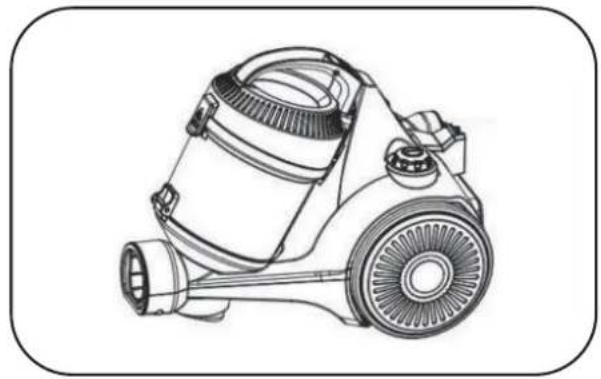
Line drawing of a vacuum cleaner with handle and wheels (no text or symbols)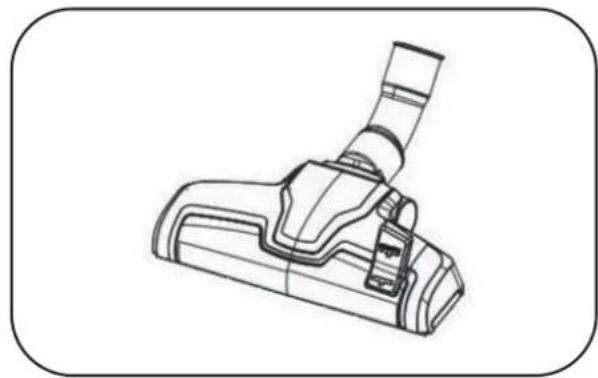
natural_image
Line drawing of a vacuum cleaner device (no text or symbols)Vacuum cleaner Floor head
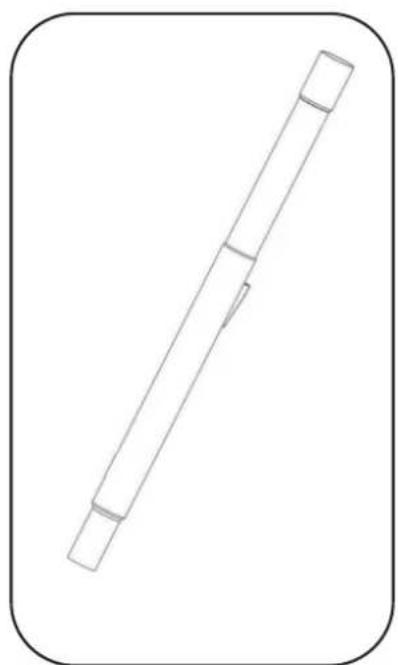
natural_image
Simple line drawing of a cylindrical object with two protrusions, enclosed in a rounded square frame (no text or symbols)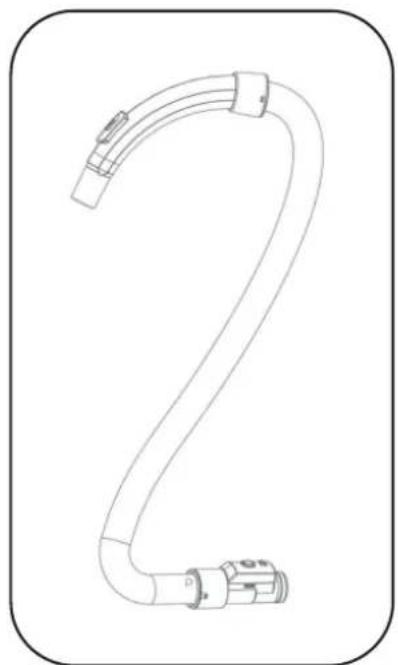
natural_image
Line drawing of a flexible hose with attached connectors, no text or symbols present
natural_image
Simple line drawing of a cylindrical device with a handle and internal structure, no text or symbols present.Combination nozzle
Extension tube Flexible hose
Getting to know your vacuum
You'll be up and running in no time
Part identification
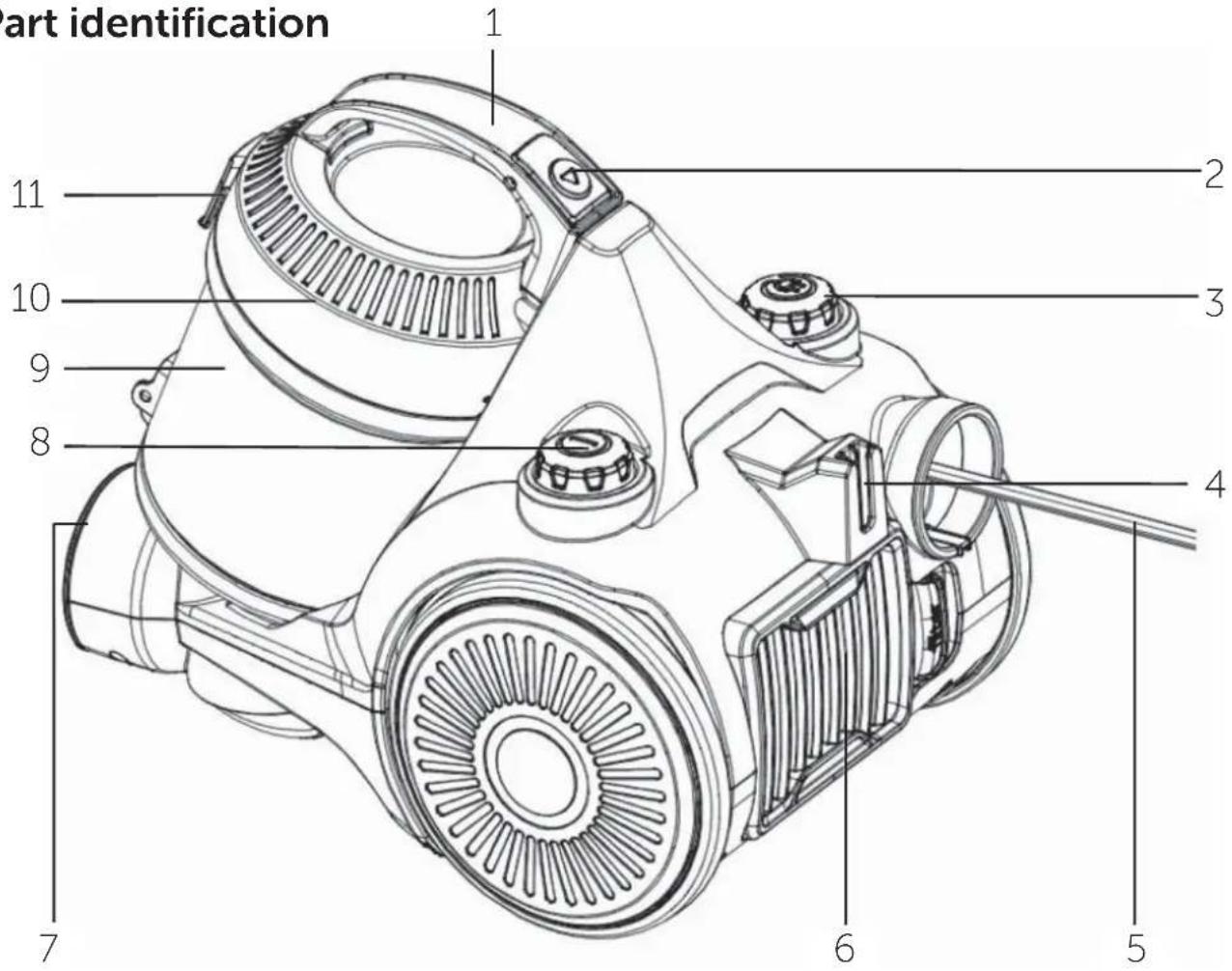
1 Carrying handle
2 Dust container release button
3 Cable rewind button
4 Floor head storage point
5 Power cable
6 Outlet filter cover
7 Flexible hose socket
8 ON/OFF button
9 Dust container
10 Dust container lid
11 Dust container catch
Assembling your vacuum cleaner
3

natural_image
Abstract geometric pattern composed of orange triangles on a white background (no text or symbols)
Assembling your vacuum
Bringing it all together
Assembly
- Insert the flexible hose coupling into the hose socket and push to secure, a click will be heard
- Fit the handle of the flexible hose into the extension tube and push fit the extension tube into the (fig.1). The crevice nozzle can fit onto the curved handle and the extension tube in a similar manner.
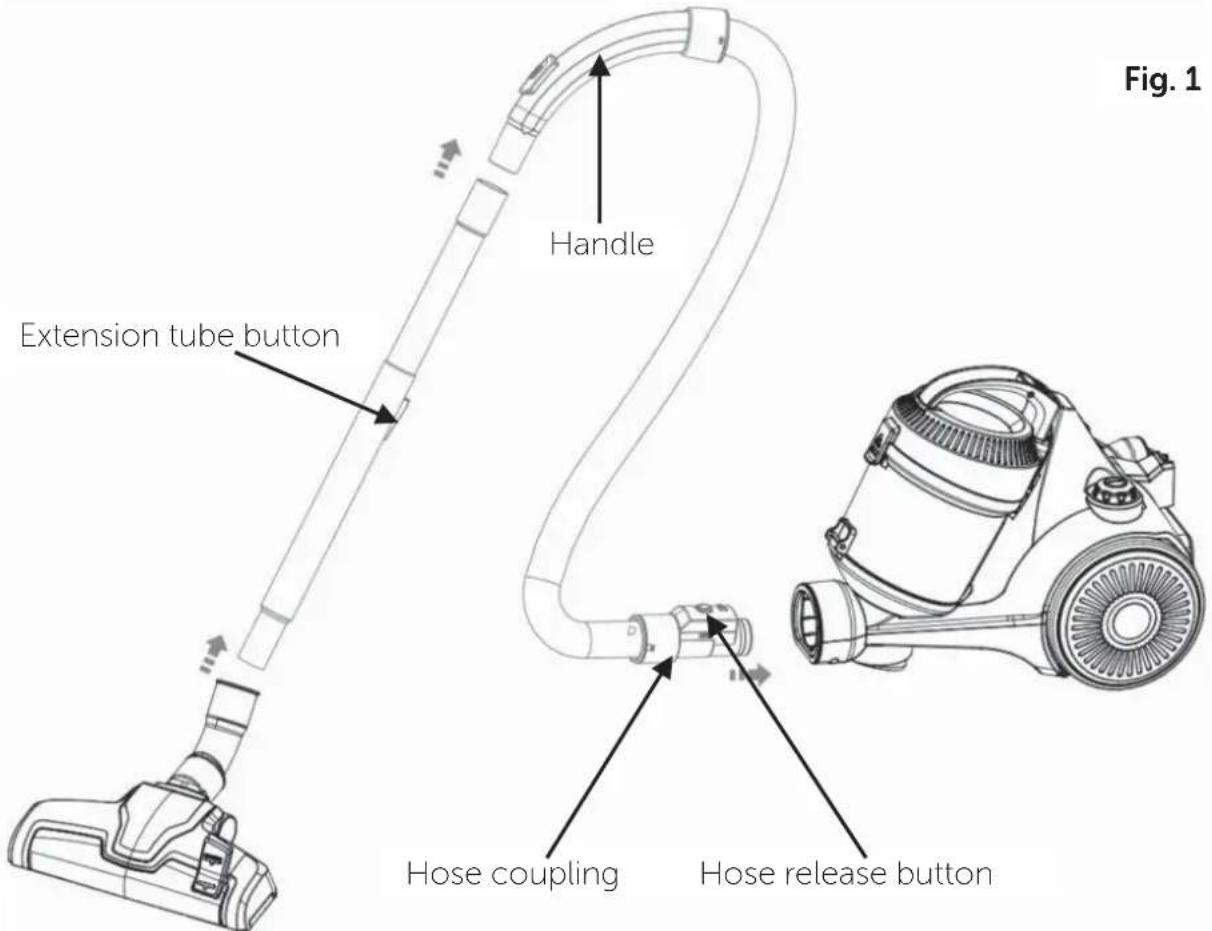
- To adjust the length of the extension tube, press the extension tube button and pull out the inner tube to the required length.
- To remove the extension tube and accessories firmly pull apart.
- To disconnect the flexible hose from the body of the cleaner ensure that vacuum cleaner is switched off. Squeeze the hose release button and pull apart.
Using your vacuum
4

natural_image
Abstract geometric pattern composed of orange triangles on a white background (no text or symbols)
Using your vacuum
Let's get started
Getting started
- Before use, pull out the cable until the yellow mark on the cable is visible. This is the ideal cable length. Do not extend the cable beyond the RED mark.
- Fit the correct nozzle for the cleaning application (see next page) and plug the vacuum cleaner into the mains supply.
- Press the ON/OFF button to start the vacuum cleaner and vacuum as required.
- The suction can be released quickly by moving the suction release slider on the top of the flexible hose handle (fig. 2).
-
To raise or lower the brushes on the floor head (fig. 3) press or lift the floor head adjustment lever.
-
When cleaning carpets, raise the brushes on the floor head.
-
When cleaning hard floors, lower the brushes on the floor head.
-
Press the ON/OFF button again to switch the vacuum cleaner off after use and before disconnecting the plug from the mains supply.
-
Rewind the cable by pressing the cable rewind button. It is advisable to guide the cable with your hand to prevent the cable whipping and damaging the appliance or other household property. If the cable does not rewind completely, pull the cable out a small way and press the rewind button again.
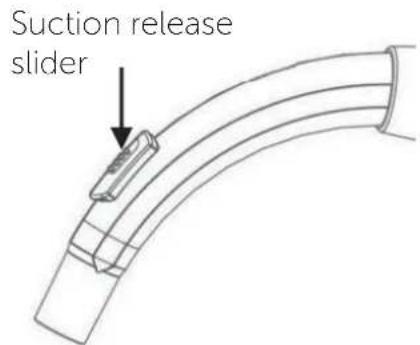
Fig. 2

Fig. 3
Using your vacuum
Let's get started
Nozzle use
| Nozzle | Cleaning area | |||||||
| Floor & carpets | Furniture | Between cushions | Curtains | Stairs | Walls | Skirting edges | Radiators | |
| Floor head | √ | √ | ||||||
| Combination-brush | √ | √ | √ | √ | ||||
| Combination-crevice tool | √ | √ | √ | √ | √ | |||
Storage
To store the vacuum cleaner tidily when not in use, slide the storage point on the floor head into the socket at the rear of the cleaner as shown (fig. 4).

natural_image
Line drawing of a vacuum cleaner with attached pipe and wheel (no text or symbols)Fig. 4
Care and maintenance
5

natural_image
Abstract geometric pattern composed of orange triangles on a white background (no text or symbols)
Care and maintenance
Looking after your appliance
Maintenance
Switch off and disconnect from the mains supply before carrying out cleaning and maintenance.
To ensure your vacuum cleaner works at optimum efficiency, keep the ventilation holes and vacuum cleaner surface free from dirt.
Ensure that the dust container is emptied and the air filters are washed regularly.
- Wipe the outside of the vacuum cleaner and accessories with a damp (not wet) cloth and then wipe dry. Do not use detergents, solvents or abrasives as these may scratch or damage the surface.
- Never immerse the vacuum cleaner, cable or plug in water.
- When not in use, store in a cool, dry place.
Emptying the dust container
- When the dust container reaches the MAX line marked on the dust container or when the suction power is reduced, it is time to empty the dust container.
- Switch off and disconnect from the mains supply.
- Press the dust container release button and lift off the dust container using the handle (fig.5).
Fig.5

Fig.6

natural_image
Line drawing of a container being inverted with a lid, showing liquid and particles (no text or symbols)If you require any technical guidance or find that your product is not operating as intended, a simple solution can often be found in the
Troubleshooting section of these instructions
Care and maintenance
Looking after your appliance
- Position the dust container over a refuse bin, then press the lever at the rear of the container to open the base (fig. 6) and empty the container. Gently tap the container against the side of the bin to remove any stubborn dust.
- The inside of the dust container maybe wiped clean with a damp cloth. Dry with a soft dry cloth before closing the flap and refitting the container to the cleaner. A click will be heard when it is correctly engaged.
Cleaning the filters
- The frequency that the filters should be cleaned will depend on appliance usage. For maximum efficiency the filter at the top of the dust container should be cleaned every time the dust container is emptied and the exhaust filter every two months. Switch off and disconnect from the mains supply.
- Remove the dust container from cleaner (fig. 5) and empty the dust container (fig.6).
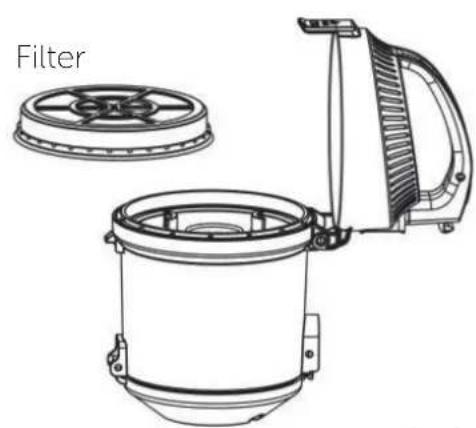
- To clean the dust container filter, flip open the lid of the dust container using the catch at the front of the dust container and lift out the filter on the underside of the lid (fig. 7).
- Tap the filter against a dustbin to remove most of the dust and then wash the filter in cold running water until the water runs clear. Allow to air dry fully. Using a damp or wet filter will reduce the suction and damage the motor.
natural_image
Technical line drawing of a filter device with labeled components (no text or symbols beyond label)Fig. 7

Care and maintenance
Looking after your appliance
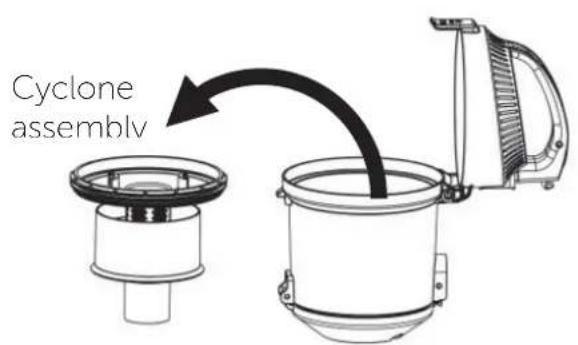
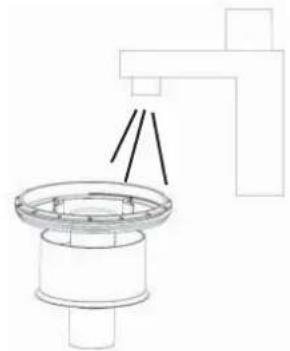
- The cyclone assembly (fig.8) can also be removed from the dust container and washed under running water (fig. 9) if needed. To remove the assembly, simply lift out.
natural_image
Pure technical line drawing of a mechanical component with no text or symbolsFig. 8
Fig. 9
- When the filter and cyclone assembly is completely dry, reverse the above steps and refit the filter into the dust container lid and close the lid. The padded non woven side should fit closest to the lid handle and the sponge side closest to the cyclone assembly.
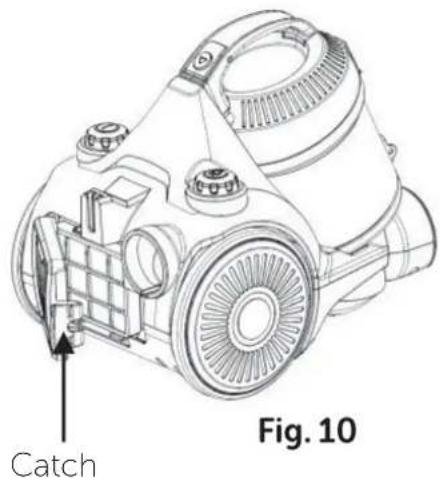
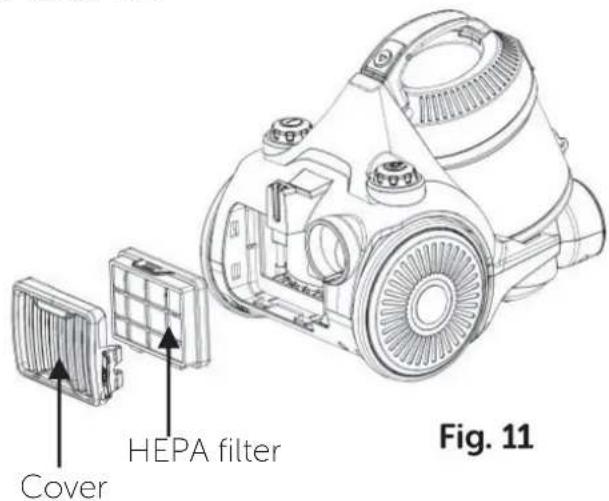
- To clean or replace the air outlet (HEPA) filter, press the catch at the side of the outlet filter cover (fig. 10) and lift off the cover. Wash and dry the filter (fig. 11) in accordance with step 4 above.
- Refit the filter and cover into the cleaner.
Other information
Technical Specification
| Model VCS35B15K0D-70 | |
| SKU | 136564796 |
| Cat No 4498223 | |
| Rated voltage | 220 – 240V 50/60Hz |
| Power | 700W |
| 770W max | |
| Class rating II (double insulated) | |
| BS 1362 fuse 13A | |
| Capacity | 1300ml |
| Noise 79 dB(A) |



Recycling electrical products
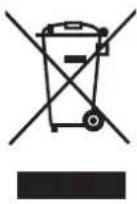
You should now recycle your waste electrical goods and in doing so help the environment.
This symbol means an electrical product should not be disposed of with normal household waste. Please ensure it is taken to a suitable facility for disposal when finished with.
Visit www.recycle-more.co.uk, click on "bank locator" and enter your postcode to find your nearest recycling site.
Product support
6

natural_image
Abstract geometric pattern composed of orange triangles on white background, no text or symbols presentProduct support
Help is always at hand
Troubleshooting
| Observation | Potential cause / solution |
| Vacuum cleaner does not work | Is the plug fully inserted into the mains socket and switched on? |
| Do you have a power cut? | |
| Suction power weak | Does the dust container need to be emptied? |
| Are the filters clogged and need to be cleaned? | |
| Is the something blocking the nozzle? | |
| Vacuum cleaner overheating | Is the filter clogged and need to be cleaned? |
| Dust escaping vacuum cleaner | Check that the dust container is securely fitted. |
Product support
Help is always at hand
Help and assistance
If you require any technical guidance or find that your Bush vacuum cleaner is not operating as intended, a simple solution can often be found in the Troubleshooting section of these instructions or online at
www.bush-support.co.uk
If you still require further assistance, call one of our experts on 0345 604 0105*. To help give us give you a fast and efficient service please have the following information ready:
Model Ref.
Serial number
Date of purchase

natural_image
Empty rectangular frame with no text, symbols, or content inside
natural_image
Empty rectangular frame with no text, symbols, or content inside
natural_image
Empty rectangular frame with no text, symbols, or content insideYou can find this information on the rating plate – a small sticker (usually a sticker or metal plate on the rear of your product)
This will be shown on your receipt
Local call rates applies*
Lines open 8am-7pm Monday to Saturday and 10am-4pm Sunday.
*Calls to Bush enquiry lines may attract a charge and set up fee from residential lines depending on your call plan / tariff. Mobile and providers costs may vary, see www.bt.com/pricing for details
For security and training purposes, telephone calls to and from customer service centres maybe recorded and monitored. Calls from Republic of Ireland will attract international call charges.
Product support
Help is always at hand
BUSH
Call us now and register your 12 month guarantee
Thank you for choosing Bush. Your new product is guaranteed against faults and breakdowns for 12 months. Don't forget to register it with us today so we can provide you with our best possible after-sales service and useful updates.
www.bushregistration.co.uk
FREEPHONE*
0800 597 8548
Lines are open 8am - 8pm, 365 days a year. *Calls may be recorded and monitored.
Your Bush Guarantee
This product is guaranteed for twelve months from the date of original purchase. Any defect that arises due to faulty materials or workmanship will be repaired free of charge (or if applicable the product will be replaced or the purchase price refunded) where possible during this period by the dealer from whom you purchased the unit.
The guarantee is subject to the following provisions:
- The guarantee does not cover accidental damage, misuse, cabinet parts, knobs or consumable items.
- The product must be correctly installed and operated in accordance with the instructions contained in the manual.
- It must be used solely for domestic purposes. The guarantee will be rendered invalid if the product is
re-sold or has been damaged by inexpert repair.
- Specifications are subject to change without notice.
- Bush disclaim any liability for loss or damage arising from the breakdown of the product.
- This guarantee is in addition to and does not diminish your statutory or legal rights.
For your personal Guarantee Confirmation code call 0800 597 8548 Guarantee Confirmation Code
Product support
Help is always at hand
Important Data Protection Information
Bush has appointed Domestic & General Insurance PLC to provide product registration services and protection plans to accompany its products.
What we do with your information
At Domestic & General we want to reassure you that we use your information both responsibly and securely to provide you with the best possible service. Below we explain what we do with your information and your rights to your information. If you would like any further details you can get in touch with us using the contact details below or visit our website (www.domesticandgeneral.com).
Using your information
Domestic & General Insurance PLC ("we") is the "data controller" of your information. We process two sets of information about you, "Personal Information" (your name, address, contact and payment details) and the "Goods Information" you provide to register your appliance or device (your name, address, contact and goods details). We'll use your information: (i) as necessary to fulfil our contract with you (including to recover any amounts owing); (ii) for our legitimate interests in: undertaking marketing (about our products and services and those of our third party partners) by post, telephone, email and/or other electronic messaging services; market research; customer surveys; printing services; checking and verifying your identity and contact details; recording your conversations for training, quality and compliance purposes; and for analytics and profiling for marketing purposes; and (iii) where required to do so by law. We may also ask for your consent to some uses of your information.
Sharing your information
From time to time your Personal Information and Goods Information may also be shared with other members of the Domestic & General Group of Companies (Domestic & General Insurance or Services and other future members of the Group whose details we will notify to you ("Group")), with companies acting on our behalf or providing services to us (e.g. the companies we use to carry out repairs, IT & mailing services, storage of paper records and telecommunications) and with the Sainsbury's Argos Group (which currently includes Sainsbury's Supermarkets, Sainsbury's Bank, Argos Limited, Tu Clothing, Habitat, Argos Financial Services, Nectar and Insight 2 Communication, Argos Business Solutions Limited). The Sainsbury's Argos Group will process your Personal Information for their legitimate business interests (including marketing and analytics) in accordance with their privacy policy, which can be found at www.argos.co.uk/help/privacy-policy
Transferring your information
In exceptional cases, we may transfer your information to countries outside the European Economic Area (including the US) which may not have data protection laws which provide the same level of protection as provided in the UK. We have put in place Model Clauses as an appropriate safeguard to ensure that such information is adequately secured and protected and that such transfers meet the requirements of applicable data protection law.

Product support
Help is always at hand
Keeping your information
We keep your Personal Information for six years after you terminate your policy so that we can deal with any claims. Your goods information we keep for a bit longer, normally 10 years (the average life of an appliance) for health and safety. We also keep your information to send you marketing that you might be interested in, unless we receive a request from you to opt-out of marketing.
Rights to your information
By writing to the Data Protection Officer using the contact details provided below, you have the right to ask us:
• for a copy of the Personal Information we hold about you
- for a copy of the Personal Information you provided to us to be sent to you or a third party in a commonly used, machine readable format
• to update or correct your Personal Information to keep it accurate
• to delete your Personal Information from our records if it is no longer needed for the original purpose; and
- to restrict the processing of your Personal Information in certain circumstances And you may also:
- object to us processing your Personal Information – in which case we will either agree to stop processing or explain why we're unable to; and
- where we rely on your consent, withdraw that consent at any time.
Please note that the above rights are not absolute and certain exemptions apply to them. You can also make a complaint to the Information Commissioner (www.ico.org.uk) if you feel your Personal Information has been mishandled.
Marketing
We, along with other members of our Group, Argos Limited, and other members of the J Sainsbury's Group of Companies may use your information to tell you about any offers, products or services which may be of interest to you. We may contact you by post, telephone, email and/or other electronic messaging services. To change your marketing preference, let us know by emailing marketingpreferences@domesticandgeneral.com or by writing to us using the contact details provided below. If you don't want Argos to send you marketing by phone, email or post then please see Argos's Privacy Policy, which can be found on their website at www.argos.co.uk/help/privacy-policy to opt out of this marketing. Argos will stop sending you marketing communications but will still contact you with service-related messages every now and then.
Contact Details
If you need to contact us about your information or your information rights, or to see a copy of our Model Clauses, please write to: Freepost Plus RTKS-CLRA-GRYE, Data Protection Officer, Domestic & General, Leicester House, 17 Leicester Street, Bedworth, CV12 8JP or dataprotection@domesticandgeneral.com and we'll be happy to help you.

BUSH
Should you require any guidance;
call our Help line on 0345 604 0105.
Further contact details can be found online at:
www.bush-support.co.uk
Produced In China.
Argos Limited, 489-499 Avebury Boulevard, Milton Keynes, MK9 2NW.
Argos (N.I.) Ltd, Forestside Shopping Centre, Upper Galwally, Belfast,
United Kingdom, BT8 6FX. Argos Distributors (Ireland) Limited, Unit 7,
Ashbourne Retail Park, Ballybin Road, Ashbourne, Country Meath, Ireland
Sainsbury's Supermarkets Ltd, London, EC1N 2HT. Sainsbury's (NI) Ltd,
Forestside Shopping Centre, Upper Galwally, Belfast, United Kingdom, BT8 6FX
Bush is a registered trademark of Argos Ltd.


- Help and Guidance
- Contents
- Safety information
- Getting to know your vacuum cleaner
- Assembling your vacuum cleaner
- Using your vacuum cleaner
- Care and maintenance
- Product support
- Safety information
- 1
- Important - Please read these instructions fully before BTTFN CMJOH or operating
- Power source
- Ventilation, heat and moisture
- Warning!
- Plug / Wiring advice
- Non-rewireable plug
- Rewireable plug
- Getting to know your vacuum cleaner
- 2
- Getting to know your vacuum
- Ready? Let's begin...
- Assembling your vacuum cleaner
- 3
- Assembling your vacuum
- Assembly
- Using your vacuum
- 4
- Getting started
- Storage
- Care and maintenance
- 5
- Looking after your appliance
- Maintenance
- Emptying the dust container
- Cleaning the filters
- Other information
- Technical Specification
- Recycling electrical products
- Product support
- 6
- Help is always at hand
- Help and assistance
- BUSH
- Call us now and register your 12 month guarantee
- www.bushregistration.co.uk
- Your Bush Guarantee
- The guarantee is subject to the following provisions:
- Important Data Protection Information
- What we do with your information
- Using your information
- Sharing your information
- Transferring your information
- Keeping your information
- Rights to your information
- Marketing
- Contact Details
Brand : BUSH
Model : VCS35B15K0D-70
Category : Vacuum Cleaner