
ZB1511 - Vacuum Cleaner BUSH - Free user manual and instructions
Find the device manual for free ZB1511 BUSH in PDF.


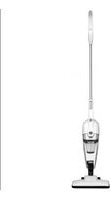
| Product Type | Cylinder Vacuum Cleaner |
| Model | ZB1511 |
| Brand | Bush |
| Colour | Black / Red |
| Dimensions (W x D x H) | 310 x 260 x 220 mm |
| Weight | 4.5 kg |
| Power Supply | Corded Electric, 220-240 V, 50 Hz |
| Power Consumption | 700 W |
| Dust Collection Type | Bagless, Cyclonic |
| Dust Capacity | 1.5 L |
| Filtration System | HEPA H13 |
| Suction Power | 250 Air Watts |
| Cord Length | 5 m |
| Operating Radius | 8 m |
| Nozzle Types | Combination Floor Nozzle, Crevice Tool, Dusting Brush |
| Variable Speed Control | Yes |
| Dust Cup Emptying | Touch-button, No Mess |
| Filter Maintenance | Washable HEPA Filter, Clean Every 3 Months |
| Safety Features | Overheat Protection, Auto Shut-off |
| Spare Parts Available | Filters, Nozzles, Hoses, Belts |
| Repairability Index | 8.0 / 10 |
| Energy Efficiency Class | A |
| Noise Level | 78 dB(A) |
Frequently Asked Questions - ZB1511 BUSH
User questions about ZB1511 BUSH
0 question about this device. Answer the ones you know or ask your own.
Ask a new question about this device
Download the instructions for your Vacuum Cleaner in PDF format for free! Find your manual ZB1511 - BUSH and take your electronic device back in hand. On this page are published all the documents necessary for the use of your device. ZB1511 by BUSH.
USER MANUAL ZB1511 BUSH
natural_image
A vacuum cleaner with a purple handle against an orange geometric background (no text or symbols)You'll soon be enjoying your new vacuum cleaner.
It all begins here, with your instructions. Don't worry, there's nothing too technical coming up. Just simple, step-by-step guidance to get you up and running quickly. Sound good? Then let's get started.
Help and Guidance
We're here to help you get the most from your vacuum cleaner. Should you require any guidance, a simple solution can often be found online at:
www.argos-support.co.uk
If you still require further assistance, call one of our experts on TMTI HELPLINE 0345 604 0105.
If you require any technical guidance or find that your product is not operating as intended, a simple solution can often be found in the Troubleshooting section of these instructions.
Contents
1 Safety information
Safety information 6
IMPORTANT&Note 8
2 Getting to know your vacuum cleaner
Ready?Let's begin 10
Accessories 12
3 Installing your vacuum cleaner
Unpacking 14
Assembly 14
4 Using your vacuum cleaner
First use of vacuum cleaner. 16
Using the vacuum cleaner 17
5 Care and maintenance
Cleaning 20
Care and maintenance 21
Technical specification 22
6 Product support
Toubleshooting 24
Help and assistance 25
Declaration of conformance to product 26
Standards Disposal 27
| >100% of the total. |
Safety information 1
Safety Information
Important - Please read all instructions before use and keep for future reference
WARNINGS
- This appliance should only be used for domestic cleaning, as described in this user guide. Please ensure that this guide is fully understood before operating the appliance.
• Always switch off and remove the charger from the socket before cleaning the appliance or any maintenance task. - This appliance can be used by children aged from 8 years and above and persons with reduced physical, sensory or mental capabilities or lack of experience and knowledge if they have been given supervision or instruction concerning use of the appliance in a safe way and understand the hazards involved. Children shall not play with the appliance. Cleaning and user maintenance shall not be made by children without supervision.
- If the adapter is damaged stop using the appliance immediately.
- Keep hands, feet, loose clothing and hair away from rotating brushes.
- Use only the original charger supplied with the appliance.
- Check that your supply voltage is the same as that stated on the charger.
- This appliance is supplied with a double insulated battery charger which is only suitable for insertion in a 230V (UK 240V) socket outlet.
- Plug the charger into suitable socket outlet and connect the charger jack plug to the appliance.
- Before first use, charge your appliance for at least 6 hours. The charging LED indicator will illuminate red when charging and will illuminate blue when fully charged.
If you require any technical guidance or find that your product is not operating as intended, a simple solution can often be found in the Troubleshooting section of these instructions.
Safety Information
- Re-connect the appliance to the charger after use to recharge the battery.
- Never charge the batteries in temperatures above 37^ C or below 0^ C. It is normal for the charger to become warm to the touch when charging.
- Do not unplug the charger by pulling on the power cord. Unplug the charger in the event of prolonged absence (holidays,etc.). Recharge appliance again before use as batteries may self discharge over increased periods of storage.
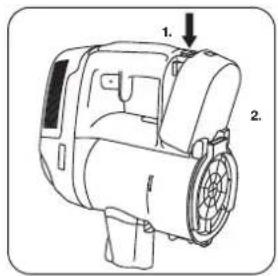
- If the appliance is to be disposed of the batteries must first be removed. The appliance must be disconnected from the supply mains when removing the battery. Dispose of the batteries safely. Run the appliance until it stops because the batteries are fully discharged. Used batteries should be taken to a recycling station and not disposed of with household waste. To remove the batteries, please contact Customer Centre or proceed according to the following instructions.
or online at www.argos-support.co.uk if you still require further assistance, call one of our experts on 0345 604 0105
Safety information
BUSH
IMPORTANT&Note
IMPORTANT: Always fully discharge the batteries before removal and ensure the charger is unplugged.
Run the cleaner until the batteries are completely empty.
Remove the charger jack plug from the appliance.
Pull back the battery pack release button and the battery pack will be pushed out a short distance automatically.
Drag the battery pack slowly from the slot.
Note: Should you experience any difficulty in dismantling the unit or for more detailed information on treatment, recovery and recycling of this appliance, please contact your local city office or your household waste disposal service.
Use only attachments, consumables or spares recommended or supplied by Bush.
Static electricity: some carpets can cause a small build up of static electricity. Any static discharge is not hazardous to health.
Do not use your appliance out of doors or on any wet surface or for wet pick up.
Do not pick up hard or sharp objects, matches, hot ashes, cigarette ends or other similar items. Do not spray with or pick up flammable liquids, cleaning fluids, aerosols or their vapours.
Do not run over the power cord when using your appliance or remove the plug by pulling on the power cord. Do not continue to use your appliance or charger if it appears faulty.
If you require any technical guidance or find that your product is not operating as intended, a simple solution can often be found in the Troubleshooting section of these instructions.
Getting to know your vacuum cleaner
2
Getting to know your vacuum cleaner
You'll be up and running in no time
Ready? Let's begin...
Please read these instructions carefully. They contain important information which will help you get the best from your Vacuum cleaner and ensure safe and correct installation and operation.
If you require any further assistance, our technical experts are happy to help. For full details, refer to the product support section at the end of these instructions.
If you require any technical guidance or find that your product is not operating as intended, a simple solution can often be found in the Troubleshooting section of these instructions.
Getting to know your Vacuum cleaner
You'll be up and running in no time
Components
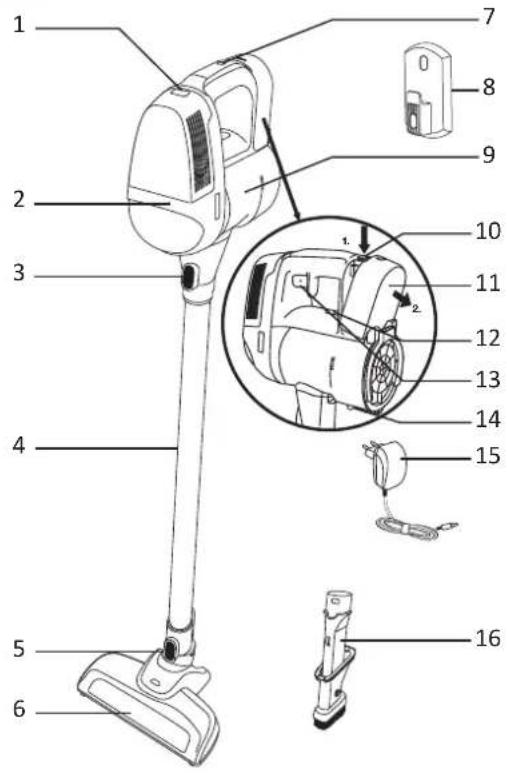
- Release button for motor protection filter cover
- Pilot lamp on/off and battery indicator
- Release button for suction pipe
- Telescopic tube
- Release button for floor nozzle
-
Floor nozzle with rotating brush roller
-
Charging cable connection
- Wall mount
- Dust bin
- Release button for battery
- Battery
-
Release button to extract the dust bin
-
On/off button
- Base flap lock for dust bin
- Battery charger
- 3-in-1 combination nozzle consisting of: crevice nozzle, furniture dust brush
or online at www.argos-support.co.uk if you still require further assistance, call one of our experts on 0345 604 0105 .
| Model no | Specification | Charge Time Noise Level Net Weight | |
| ZB1511 DC18V/150W | 5H 1.4Kg86 dBA | ||
Accessories
This machine includes below accessories, please install these parts by yourself before operating.
- Telescopic tube
- Dusting brush
- Crevice tool
- Cleaning head

If you require any technical guidance or find that your product is not operating as intended, a simple solution can often be found in the Troubleshooting section of these instructions.
Installing your vacuum cleaner 3

natural_image
Abstract geometric pattern with orange triangles and white gaps on a white background (no text or symbols)Installing your Lightweight Cordless Vacuum Cleaner
Bringing it all together
Unpacking
Unpacking your Vacuum cleaner
Carefully remove all packing materials including the foam base, accessories and dispose them correctly.
ASSEMBLY
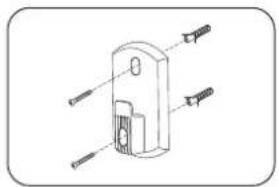
- Fix the docking station to your wall using the screws and screw plugs provided.
- Insert the nozzle head into one side of tube until you hear a "click" sound.
- Insert another side of tube into handheld unit until you hear a "click" sound.
- To fully charge the appliance, connect the charger jack plug to the appliance. It will take around 6Hrs.
NOTE: To remove the nozzle press the nozzle release button and pull away from the main body.
NOTE: Use only the charger supplied with your cleaner to recharge.
It is normal for the charger to become warm to the touch when charging.
natural_image
Technical line drawing of a mechanical component with multiple inserted pins (no text or symbols)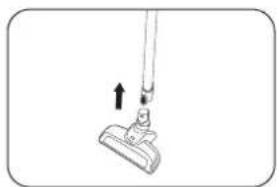
natural_image
Simple line drawing of a hand holding a tool with an arrow indicating motion (no text or symbols)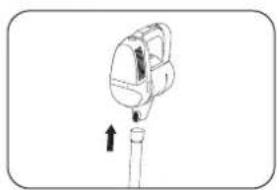
natural_image
Simple line drawing of a mechanical device with an upward arrow, no text or symbols present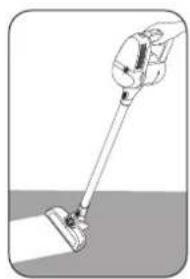
natural_image
Illustration of a hand holding a handheld vacuum cleaner against a textured surface (no text or symbols)If you require any technical guidance or find that your product is not operating as intended, a simple solution can often be found in the Troubleshooting section of these instructions,
Using your vacuum cleaner
4
Using your vacuum cleaner
Getting the most from your appliance
IMPORTANT:
Every 3 month after getting the product, please charge 3 hours (no need fully charged) with specialized charger.
It is forbidden to put the battery on charger for long time. please stop charging when it Charge overtime, in case of battery high heat, deformation or even burn.
When battery is not used for long time or be deeply discharged, the working time will reduce, in order to get the best using effect, we advise you can use up power (normally above 6 hours), and repeat this action for twice. It can renew.
The battery must be removed from the appliance before it is scrapped
The appliance must be disconnected from the supply mains when removing the battery; The battery is to be disposed of safely
If you require any technical guidance or find that your product is not operating as intended, a simple solution can often be found in the Troubleshooting section of these instructions.
Using the vacuum cleaner
Operation
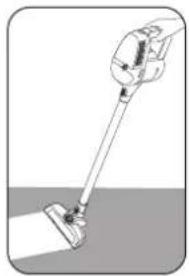
Press the power button on top of the appliance to switch on the appliance.
With handheld feature, you can clean from
floor to ceiling.
natural_image
Illustration of a vacuum cleaner with a lever and handle, lying on a surface (no text or symbols)Advanced functions/use
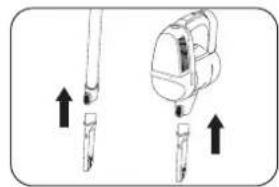
Remove the cleaning head from the tubes then attach the crevice tool to the tubes. You can also attach the crevice tool directly to the front of the cleaner until a click is heard. The crevice tool is used for narrow gaps and hard-to-reach places. Use this crevice tool to vacuum down the side of cushions, corners, edges or small spaces.
Using on wall/curtains
Use the dusting brush by attaching it to the crevice tool to clean more delicate surfaces, e.g. curtains.
natural_image
Illustration of a backpack and two stick figures with directional arrows indicating movement (no text or symbols)
natural_image
Diagram of a device with an arrow indicating direction, showing a mechanical component (no text or symbols present)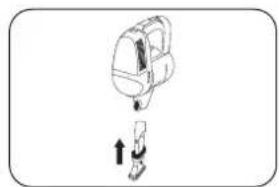
natural_image
Simple line drawing of a backpack and a person climbing, with an upward arrow indicating motion (no text or symbols)Use on the stairs
This machine can be used on stairs. just connect accessories:tube socket, crevice tool and dusting brush.

natural_image
Simple line drawing of a mechanical component with a handle and base, no text or symbols presentor online at www.argos-support.co.uk if you still require further assistance, call one of our experts on 0345 604 0105 -
| >100% of the total. |
Care and maintenance
5
Care and maintenance
Looking after your appliance
Emptying the Dust Container
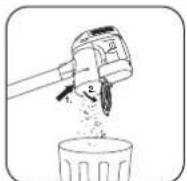
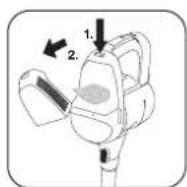
- Push down the dust cup empty button to release the bin flap and empty the contains.
- Close the dust cup flap up, you will hear a click when fully locked.
NOTE: It is recommended to empty the dust cup after each use or when dust is up to the max fill line.
Cleaning the Dust Container and Filter
- Press the accessory release button and remove the tube.
- Press the dust cup empty button to open the bin flap and empty it.
- Press the dust cup release button and also pulling the dust cup away in an downwards and outward direction.
- Turn the mesh filter to the anticlockwise direction to align the arrow mark and then it can be pulled out from the cleaner.
- Turn the cyclone separator to the anticlockwise direction, align the arrow mark and then it can be pulled out from thecleaner.
- Press the two exhaust filter release buttons simultaneously and then remove the exhaust filter.
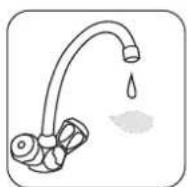
- Wash the exhaust filter in lukewarm water and leave to dry for 24 hours. Reassemble once completely dry and refit to the product.
- Wash the dust cup/mesh filter/cyclone separator in lukewarm water. Ensure it is fully dry before returning to the main body.
- Reassemble the handheld unit and then attach it to the docking station.
If you require any technical guidance or find that your product is not operating as intended, a simple solution can often be found in the Troubleshooting section of these instructions.
Care and maintenance

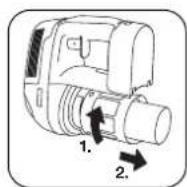
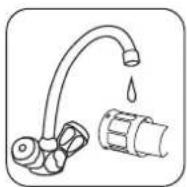
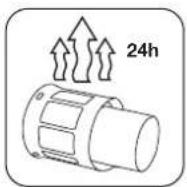
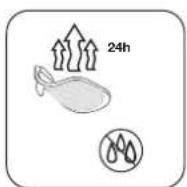
NOTE: Do not use hot water or detergents when cleaning the exhaust filters. In the unlikely event of the exhaust filters becoming damaged, fit a genuine BUSH replacement. Do not try use the product without a filter fitted.
IMPORTANT: For optimum performance, always keep your mesh filter clean. We recommend that the filter should be washed at least once a month.
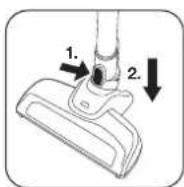
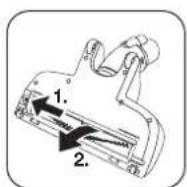
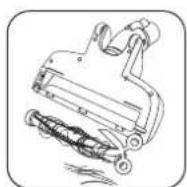
Changing and Cleaning the Agitator
- Remove the power nozzle from the tube and slide the agitator release button outward to remove the agitator.
- Remove all the debris from the agitator or if this is not satisfactory you can replace it.
- When you are refitting the agitator please note it can only be fitted in the one direction. To refit slide the agitator release button outwards and locate agitator in correct position then release button, it will lock automatically.
or online at www.argos-support.co.uk if you still require further assistance, call one of our experts on 0345 604 0105.
Technical Specifications
| Model number ZB1511 | |
| Voltage | 220-240V~50/60Hz (for charger) |
| Battery type | DC18V 2000mAh Li-ion |
| Charge time | 5H(±10%) |
| Work time by full energy | ≥15min |
| Vacuum | ≥5.0Kpa |
| Use type | Only dry |
| Sound power level | 86dBA |
| Rated input power | 150W |
If you require any technical guidance or find that your product is not operating as intended, a simple solution can often be found in the Troubleshooting section of these instructions.
Product support
6
Product support
Help is always at hand
TROUBLESHOOTING
Please check the following details before you have your appliance repaired by an authorised servicing agent.
- Vacuum cleaner does not work.
You can check if the battery is power off, and charge it. - Suction power becomes weak.
You can check if the brush or tube is clogged or damaged. Or check if the dust container is full or check if the filter is clogged and if the tubes are correctly attached. The possible solution is to immediately remove the obstruction. Or empty the dust container or clean the filter or reassemble the tubes. - Vacuum cleaner is overheating
You can check if the filter is blocked. The possible solution is to clean the filter. - Dust is coming out of the vacuum cleaner
You can check if the dust container is properly fitted to the cleaner. The possible solution is to refit the dust container to the cleaner.
If you require any technical guidance or find that your product is not operating as intended, a simple solution can often be found in the Troubleshooting section of these instructions.
Product support
Help is always at hand
Help and assistance
If you require any technical guidance or find that your wash vacuum cleaner is not operating as intended, a simple solution can often be found in the Troubleshooting section of these instructions or online at
www.argos-support.co.uk
If you still require further assistance, call one of our experts on 0345 604 0105. To help give us give you a fast and efficient service please have the following information ready:
Model Ref.
Serial number
Date of purchase

natural_image
Two empty rectangular boxes with no text, numbers, or symbolsYou can find these on the rating plate - a small information panel (usually a sticker or metal plate) on the rear of your appliance

This will be shown on your receipt
Local call rates applies*
Lines open 8am-7pm Monday to Saturday and 10am-4pm Sunday.
*Calls to Argos enquiry lines may attract a charge and set up fee from residential lines depending on your call plan/tarif. Mobile and other providers costs may vary, see www.bt.com/pricing for details.
For Security and training purposes, telephone calls to and from customer service centres maybe recorded and monitored. Calls from Republic of Ireland will attract international call charges:
or online at www.argos-support.co.uk if you still require further assistance, call one of our experts on 0345 604 0105.
Product support
BUSH
Product support
Help is always at hand

This appliance complies with the following CE directives:
2014/35/EU low voltage directive
2014/30/EU the EMC directive
2011/65/EU the ROHS directive

This is a class II appliance.
Notes on disposal:
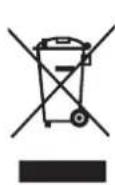
This marking indicates that this product should not be disposed with other household wastes throughout the EU. To prevent possible harm to the environment or human health from uncontrolled waste disposal, recycle it responsibly to promote the sustainable reuse of material resources. To return your used device, please use the collection systems or contact the retailer where the product was purchased. They return and can take this product for environmental safe recycling.
If you require any technical guidance or find that your product is not operating as intended, a simple solution can often be found in the Troubleshooting section of these instructions.
Product support
Help is always at hand

Call us now and activate your 12 month guarantee
Thank you for choosing Bush. Your new product is guaranteed against faults and breakdowns for 12 months. Don't forget to register it with us today so we can provide you with our best possible after-sales service and useful updates.
www.bushregistration.co.uk
FREEPHONE*
0800 597 8548
Lines are open 8am - 8pm, 365 days a year. *Calls may be recorded and monitored.
Your Bush Guarantee
This product is guaranteed for twelve months from the date of original purchase. Any defect that arises due to faulty materials or workmanship will be repaired free of charge (or if applicable the product will be replaced or the purchase price refunded) where possible during this period by the dealer from who your purchased the unit.
The guarantee is subject to the following provisions:
- The guarantee does not cover accidental damage, misuse, cabinet parts, knobs or consumable items.
- The product must be correctly installed and operated in accordance with the instructions contained in the manual.
- It must be used solely for domestic purposes. The guarantee will be rendered invalid if the product is
re-sold or has been damaged by inexpert repair.
- Specifications are subject to change without notice.
- Bush disclaim any liability for loss or damage arising from the breakdown of the product.
- This guarantee is in addition to and does not diminish your statutory or legal rights.
Important Data Protection Information
If you provide us with information about another person, you confirm that they have appointed you to act for them, to consent to the processing of their personal data including sensitive personal data and that you have informed them of our identity and the purposes (as set out in the Important Data Privacy notice displayed overleaf) for which their personal data will be processed.
You are entitled to ask for a copy of the information we hold about you (for which we may charge a small fee) and to have any inaccuracies in your information corrected.
For quality control and training purposes, we may monitor or record your communications with us.
If your personal details change, if you change your mind about any of your marketing preferences or if you have any queries about how we use your information, please let us know by contacting our Data Protection Officer, Domestic & General, Leicester House 17 Leicester Street, Bedworth, Warwickshire CV12 BJP.
Guarantor Argos Limited • 409 • 419 Anthony Blvd, • Milton Keynes • MCI 25W
or online at www.argos-support.co.uk if you still require further assistance, call one of our experts on 0345 604 0105 .
Product support

BUSH
Contact:
www.argos-support.co.uk
Helpline: 0345 604 0105

- Help and Guidance
- Contents
- Safety information
- Getting to know your vacuum cleaner
- Installing your vacuum cleaner
- Using your vacuum cleaner
- Care and maintenance
- Product support
- Safety information 1
- Safety Information
- WARNINGS
- IMPORTANT&Note
- Getting to know your vacuum cleaner
- Ready? Let's begin...
- Accessories
- Installing your vacuum cleaner 3
- Installing your Lightweight Cordless Vacuum Cleaner
- ASSEMBLY
- Using your vacuum cleaner
- IMPORTANT:
- Using the vacuum cleaner
- Operation
- Advanced functions/use
- Using on wall/curtains
- Use on the stairs
- Care and maintenance
- Emptying the Dust Container
- Cleaning the Dust Container and Filter
- Changing and Cleaning the Agitator
- Product support
- TROUBLESHOOTING
- Help and assistance
- Notes on disposal:
- Call us now and activate your 12 month guarantee
- www.bushregistration.co.uk
- Your Bush Guarantee
- The guarantee is subject to the following provisions:
- Important Data Protection Information
- BUSH
Brand : BUSH
Model : ZB1511
Category : Vacuum Cleaner