
T775 DAB - Audio Receiver NAD - Free user manual and instructions
Find the device manual for free T775 DAB NAD in PDF.


| Product type | DAB+/FM digital audio tuner |
| Brand | NAD |
| Model | T775 DAB |
| Category | Audio receiver |
| Frequency bands | DAB (Band III), DAB+, FM (87.5-108 MHz) |
| Number of presets | 30 (DAB) + 30 (FM) |
| Audio outputs | 1 RCA pair (stereo), 1 headphone output (3.5mm jack) |
| Antenna inputs | FM antenna (75 ohms); DAB antenna (BNC or Telescopic) |
| Display | LCD backlit display, radio information display (station name, title, artist) |
| Power supply | 230 V AC, 50/60 Hz; Consumption: 15 W (max), < 1 W standby |
| Dimensions (W x H x D) | 435 x 85 x 300 mm |
| Weight | 4.8 kg |
| Main functions | DAB/DAB+/FM reception, auto search, presets, alarm (radio), sleep timer, firmware update via USB |
| Maintenance and cleaning | Clean with a soft dry cloth. Do not use solvents or abrasive products. Unplug before cleaning. |
| Safety | Do not expose to moisture or splashes. Use in a well-ventilated area. Do not block ventilation slots. |
| Spare parts and repairability | Repairs must be carried out by a qualified technician. Spare parts available through NAD after-sales service. |
| General information | Compliant with CE standards. Made in China for NAD Electronics. |
Frequently Asked Questions - T775 DAB NAD
User questions about T775 DAB NAD
0 question about this device. Answer the ones you know or ask your own.
Ask a new question about this device
Download the instructions for your Audio Receiver in PDF format for free! Find your manual T775 DAB - NAD and take your electronic device back in hand. On this page are published all the documents necessary for the use of your device. T775 DAB by NAD.
USER MANUAL T775 DAB NAD
Until now, analogue radio signals such as FM or AM have been subject to numerous kinds of interference on their way from the transmitter to your radio. These problems were caused by mountains, high-rise buildings and weather conditions. With Digital Audio Broadcast (DAB), you can now receive CD-like quality radio programs without any annoying interference and signal distortion. DAB broadcasts use digital signals rather than traditional analogue transmissions, thus providing clear high quality reception. You get far more robust reception and virtually hiss or crackle free sound with DAB as long as you are within a good coverage area.
With DAB, the listener can scroll through a list of available stations - then instantly tune to the station of his choice. There is no need either to remember channel frequencies. All broadcasts are selected by simply selecting the service name.
The T 775 makes it possible for you to enjoy listening to DAB broadcasts. The T 775 has a Digital Audio Broadcast (DAB) module socket on the rear panel for adding a separately sold and NAD-specified outboard DAB module – the NAD DAB Adaptor DB 1. All the control software for this format is included; just plug-in the module and start enjoying the CD-like quality sound and expansive content selection available with DAB.
CONNECTING THE DAB MODULE
Plug-in the other end of the DIN connector (supplied with your NAD DAB Adaptor DB 1) from the DAB module's output port into the corresponding DAB module input socket on the rear panel of the T 775. Select DAB mode on the T 775 by toggling the [AM/FM/DB] button in the front panel.
NOTES
- Please refer to NAD DAB Adaptor DB 1 installation guide for proper setup connection of the DB1 with respect to the T 775.
- If there is no NAD DAB Adaptor DB 1 connected, the VFD will show "Check DAB Tuner."
DAB OPERATION
With the separately sold NAD DAB Adaptor DB1 already connected to the T 775, you can now carry out the T 775 to receive DAB broadcasts.
1 Toggle [AM/FM/DB] button until DAB mode. The VFD will show "No Service List" indicating that there are no scanned DAB broadcast services yet. This is the default mode of the DB1.
DAB P-- No Service List
2 To tune to DAB broadcast services, press [TUNER MODE] and then toggle the front panel's [TUNE /▶] to select either "Full Scan" or "Local Scan".
FULL SCAN will enable the scanning of the full range of digital frequencies (Band III and L-Band).
LOCAL SCAN performs local scanning of available DAB services in your area. Check with your dealer or visit www.WorldDAB.org to check the applicable digital transmission frequencies in your area.
3 Upon selecting either "Full Scan" or "Local Scan", automatic scanning will be performed. This sequence cannot be interrupted. During the sequence, the following message will be visible in the VFD.
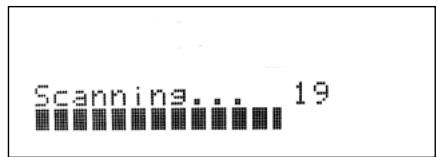
The bars show the progress of the sequence. When scanning is completed, the last number shown on the right side of the VFD corresponds to the total number of DAB broadcast stations found. Then, the first station is tuned in (See "ALPHANUMERIC" section below to understand the order or arrangement of stations).
4 The strength of the incoming signal can be shown on the VFD by pressing the [ENTER] button. The more segments visible in the lower display line, the stronger the signal. By changing the position of the antenna, you can increase the signal strength. You can also opt for an external antenna. Consult an antenna professional for more information.
Sinal Strenst
NOTES
- "No Service List" will also be shown in the VFD when no stations are found after the scanning process. If this occurs, check the connection and position of the DAB antenna or call your local DAB broadcast providers for coverage information.
- HTR 3's [MENU/FM MUTE], [ENTER] and [ / ] are the equivalent remote control keys for the front panel buttons [TUNER MODE], [ENTER] and [TUNE / ] . When using these HTR 3 buttons to navigate DAB options, ensure that the "DEVICE SELECTOR" setting of your HTR 3 is set to "TUNER".
SERVICE LIST
Follow the steps below to select through the DAB service stations found.
1 At DAB mode, press [TUNE / ] to step through the list of available stations as shown in the lower display line of the VFD.
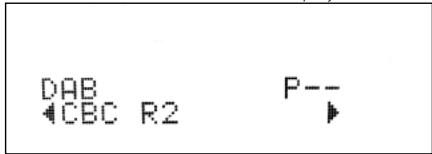
2 Press [ENTER] to select the desired station.
DAB TUNER MODE
Aside from "Full Scan" and "Local Scan" as already described above, pressing the [TUNER MODE] button will also present you with other options namely - Station Order, DRC, Manual Scan, Prune List and Reset
STATION ORDER
Use "Station Order" to sort the sequence of the listed stations. There are three orders – Alphanumeric, Ensemble and Active.
1 While listening to a DAB broadcast, press front panel's [TUNER MODE] button and then [TUNE /▶] to select "Station Order". Press [ENTER].
2 Toggle [TUNE /▶] to select through "Alphanumeric," "Ensemble" and "Active".
3 Press [ENTER] to select desired station order.
ALPHANUMERIC
This is the default setting. Stations are arranged by numbers first and then alphabetically by letters.
ENSEMBLE
Digital radio is broadcast as groups of data called ensemble. Each ensemble contains a number of stations, transmitted at a set frequency. When "Ensemble" is selected as the mode of station order, the radio stations are arranged in the order of their ensemble names.
NOTE
Ensemble is also interchangeably termed as "multiplex" by other broadcast providers.
ACTIVE
Active stations are listed at the top of the channel list. Those channels that are in list but have no service in the area will be displayed last in the channel list.
DRC
The level of compression of stations can be set to eliminate the differences in dynamic range or sound level between radio stations. Popular music would normally be more compressed than classical music, resulting in possible different audio levels when changing from one station to the other. Setting the DRC to "0" means no compression, "1/2" indicates medium compression and "1" shows maximum compression. No compression is recommended, especially for classical music.
1 While listening to a DAB broadcast, press front panel's [TUNER MODE] button and then [TUNE /▶] to select "DRC". Press [ENTER].
2 Toggle [TUNE / ] to select through "DRC 0", "DRC 1/2 " and "DRC 1".
3 Press [ENTER] to select desired DRC level.
MANUAL SCAN
This option allows you to directly tune to a desired channel and include it in the service list (if not yet available at the time). You can also use manual scan to assist you in positioning the DAB antenna for best reception of the desired channel.
1 While listening to a DAB broadcast, press front panel's [TUNER MODE] button and then [TUNE /▶] to select "Manual Scan". Press [ENTER]. The current channel and frequency are shown in the upper line of the VFD. The "bars" at the lower line of the VFD indicate the signal strength level of the current channel.
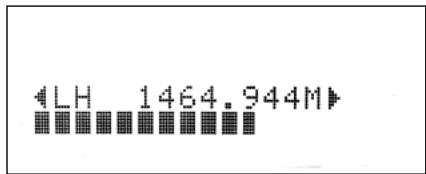
2 To select other channels, toggle [TUNE / ] to step through the channel list. Release [TUNE / ] when you have arrived at your desired channel. Channel and frequency are shown in the upper line of the VFD. The "bars" at the lower line of the VFD indicate the signal strength level of the current channel. To improve the reception of the selected channel, adjust or reposition the DAB antenna until the best reception is indicated.
3 Press [ENTER] to tune the selected channel.
NOTE
The number of ensembles and stations that could be scanned will vary depending on your location.
PRUNE LIST
There maybe situations wherein certain stations become inactive. The "Prune List" option enables the deletion of these inactive stations in the service list.
1 While listening to a DAB broadcast, press front panel's [TUNER MODE] button and then [TUNE / ] to select "Prune List".
2 Press [ENTER]. Any inactive stations are automatically deleted.
RESET
The "Reset" option allows the connected (and separately sold) NAD DAB Adaptor DB1 to be reset to its factory default settings.
1 While listening to a DAB broadcast, press front panel's [TUNER MODE] button and then [TUNE /▶] to select "Reset".
2 Press [ENTER]. "Reset? No" will be shown in the lower line of the VFD. Press [TUNE / ] to switch to "Reset? Yes" option.
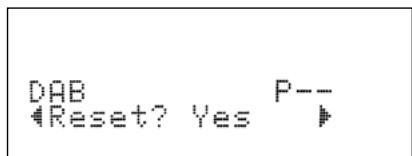
3 To select "Reset? No" or "Reset? Yes", press [ENTER] while at the desired option. Selecting "Reset? Yes" will cause the DB1 to be reset to its factory default settings.
INFORMATION SETTINGS
While listening to a DAB broadcast, the type of information displayed in the lower line of the VFD can be varied. Toggle front panel's [INFO] button to step through the following display options:
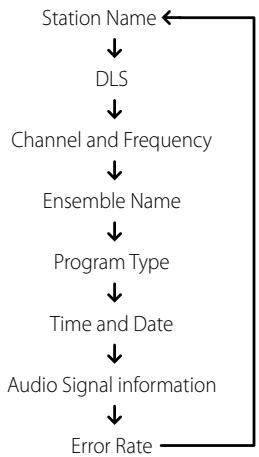
STATION NAME
The name or identification of the DAB broadcast station is shown. This is the default display.
DLS
Dynamic Label Segment (DLS) is the scrolling text supplied by the broadcasting station. It may contain information on music titles or details regarding the program or station.
CHANNEL AND FREQUENCY
The channel and frequency of the currently tuned DAB broadcast are displayed.
ENSEMBLE NAME
The name of the ensemble that is broadcasting the program is displayed.
PROGRAM TYPE
This is a description of the type of broadcast supplied by the station, such as Pop, Rock, Drama and the likes.
TIME AND DATE
The current time and date as supplied by the DAB station are displayed.
AUDIO SIGNAL INFORMATION
Displays the bit rate and audio type (stereo, mono or joint stereo) as transmitted by the DAB broadcast provider. These are set by the broadcaster to suit the type and quality of material being transmitted.
ERROR RATE
This displays the digital error rate (0 to 99) of the currently tuned channel - the lower the figure, the better the quality of the received broadcast.
www.NADelectronics.com
©2008 NAD ELECTRONICS INTERNATIONAL
A DIVISION OF LENBROOK INDUSTRIES LIMITED
Brand : NAD
Model : T775 DAB
Category : Audio Receiver