JSV-600P - Saw Ferm - Free user manual and instructions
Find the device manual for free JSV-600P Ferm in PDF.


| Product Type | Jigsaw |
| Brand | Ferm |
| Model | JSV-600P |
| Power Input | 600 W |
| Power Supply | 230 V, 50 Hz |
| No-Load Speed | 500 - 3000 min⁻¹ |
| Stroke Length | 20 mm |
| Cutting Depth (Wood) | Up to 80 mm |
| Cutting Depth (Steel) | Up to 8 mm |
| Bevel Cut | 0° - 45° |
| Weight | 1.8 kg |
| Dimensions (L x W x H) | 250 x 80 x 200 mm |
| Blade Type | T-shank |
| Orbital Action | Adjustable (4 positions) |
| Dust Extraction | Yes, via external vacuum |
| Variable Speed Trigger | Yes |
| LED Work Light | Yes |
| Tool-Free Blade Change | Yes |
| Soft Grip Handle | Yes |
| Safety Features | Blade guard, lock-off button |
| Maintenance | Clean dust ports, check carbon brushes |
| Spare Parts Availability | Online and authorized service centers |
| Reparability | Moderate, many parts replaceable |
| User Manual | Included (PDF also available) |
Frequently Asked Questions - JSV-600P Ferm
User questions about JSV-600P Ferm
0 question about this device. Answer the ones you know or ask your own.
Ask a new question about this device
Download the instructions for your Saw in PDF format for free! Find your manual JSV-600P - Ferm and take your electronic device back in hand. On this page are published all the documents necessary for the use of your device. JSV-600P by Ferm.
USER MANUAL JSV-600P Ferm
UK Subject to change
| USER'S MANUALFerm Jig SawJSV-600PCEFerm®Art.nr. 726065Screwfix art.nr: 1932 |

FERM JSV-600P JIG SAW USERS MANUAL
TECHNICAL SPECIFICATIONS
| Voltage | 230 V~ | |
| Frequency | 50 Hz | |
| Input power | 570 W | |
| Speed, no load | 500-3000/min | |
| Max. material thickness | 70 mm | |
| Max. cutting stroke | 18 mm | |
| Cutting angle | 0 - 45^ |
| Machine weight | 2 kg |
| LpaSound pressure level | 90.4 dB(A) |
| LwaSound power level | 103.4 dB(A) |
| Vibration | 3.3m/s^-2 |
PACKAGE CONTENTS
I ligsaw appliance
1 4 saw blades
I Allen key
1. Parallel saw guide
1. Parallersaw guide
1. Vacuum cleaner adaptor
1 Vacuum clear
User manual
I Warranty card
I Safety advice
Check the machine and accessories for transport damage.

PRODUCTINFORMATION
- Speed con
- Interlocking knob
- Switch
- Connection point to www.eleven
- Connection
- Allan Law
- Allen Key
- Bottoms plate
- Bottom plate
- Saw Buckle
- Pendulum
- Guard
2 Ferm
ELECTRICAL INFORMATION
This product is complete with a pre-wired mains plug, it is double insulated in accordance with EN 50144 – no earth wire is required.
If the plug needs replacing follow these instructions.
Wire correctly
The wires in the mains lead are coloured in the following way:
BLUE -Neutral
BROWN -Live

Securing wires
Secure wires carefully and firmly to the correct terminals. Secure the mains cable in the plug cord grip firmly Fit a 5-amp fuse. If a 13amp (BS1363) plug is used a (BS1362) ASTA approved 5-amp fuse must be fitted.
Recycle/Dispose of old plug and cable
Prevent inadvertent connection to socket and risk of electric shock
SAFETY INSTRUCTIONS
The following symbols are used in these instructions for use:

Denotes risk of personal injury, loss of life or damage to the tool in case of non-observance of the ns in this manual.

Denotes risk of electric shock.
Carefully read this manual before using the machine. Make sure that you know how the machine functions and how to operate it. Maintain the machine in accordance with the instructions to make sure it functions properly. Keep this manual and the enclosed documentation with the machine.
Ferm products are manufactured to high quality standards they are safe and fit for purpose at time of sale, but all tools can be dangerous if the correct precautions are not taken. Always follow these instructions, do not carry out the operation until you are sure you can do so in safety. Remember to consider the work environment for safe operation as well as safety for tool use.

Warning! When using electric tools, basic safety precautions should always be followed to reduce of fire, electric shock and personal injury. Read all instructions before attempting to operate this product. Use instructions for future reference.
EXPLODED VIEW
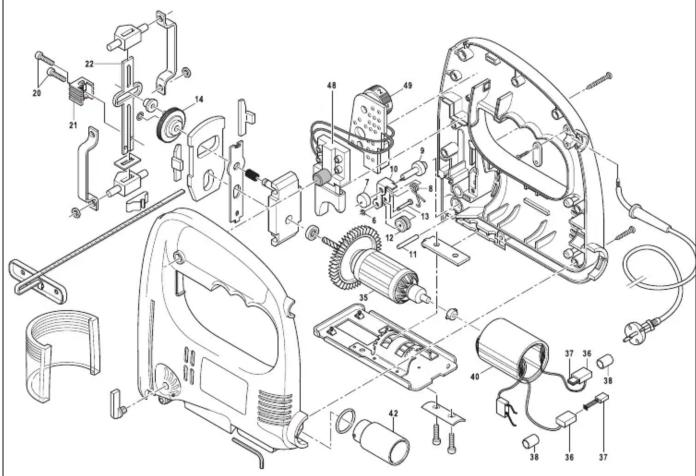
SPARE PARTS
| REF. NR. | DESCRIPTION | FERM NR. |
| 6 | CARBON BRUSH HOLDER | 407800 |
| 7 | CARBON BRUSH (SET) | 407801 |
| 9 | SWITCH | 407802 |
| 10 | SPEED CONTROL PLATE | 407803 |
| 13 | ADAPTER FOR VACUUM CLEANER | 407809 |
| 15 | STATOR | 407804 |
| 17 | ROTOR | 407805 |
| 21 + 35-42 | GUIDE WHEEL COMPLETE | 407808 |
| 23 | GEAR | 407806 |
| 29-31 | SAW MECHANISM COMPLETE | 407807 |
| - | SIDE GUIDE | 407810 |
Ferm 7
Check for damaged parts
Do not use a tool with damaged parts, before further use a damaged tool must be carefully checked by a qualified person to determine that it will operate properly.
Check for alignment of moving parts, binding or breakage of parts, mounting and other conditions that may affect its operation.
A damaged part or guard should be properly repaired by an authorised service centre, unless indicated otherwise in the instruction manual. Have defective switches replaced by an authorised service centre. Do not use a tool if the switch does not turn on and off.
Have your tool repaired by an expert
This appliance is manufactured in accordance with relevant safety standards. Only experts must carry out repairing of electrical appliances, otherwise considerable danger for the user may result.
Storing tools
When not in use tools should be stored in the dry, out of reach of children.
Lubrication
The machine requires a small amount of light oil on the blade guide otherwise no other user lubrication
ENVIRONMENT
Recycle the packaging according to the identification marks on it.
At the end of the product or its accessories life please recycle where facilities exist - phone the Helpline for current advice on recycling.
GUARANTEE
The guarantee conditions can be found on the separately enclosed guarantee card.
CE DECLARATION OF CONFORMITY (UK)
We declare under our sole responsibility that this product is in conformity with the following standards or standardized documents
EN50144-2-10, EN50144-1
EN55014-1, EN55014-2, EN61000-3-2, EN61000-3-3
in accordance with the regulations:
98/37/EEC
73/23/EEC
89/336/EEC
from 01-03-2000
GENEMUIDEN NL
W. Kamphof
Quality department
For any queries relating to operational or safety matters contact:
Ferm Customer Helpline on: 0115 966 1199
Monday-Friday 8am-6pm
Saturday 9am–1pm
PERSONAL SAFETY
Use Personal Protection Safety Equipment
Protect eyes with safety glasses or goggles note: the use of safety protective eyewear without the CE mark can lead to serious injury if the lens breaks. A suitable dust mask should be worn if cutting, drilling or sanding is dusty, in particular chipboard or MDF.
Approved safety footwear and headgear should worn as appropriate, for example on building works or when heavy weights are involved. Wear suitable gloves and apron to protect against sparks/debris. Wear earplugs or ear defenders.
Dress properly
Do not wear loose clothing or jewellery. It can get caught in moving parts. Non-skid footwear is recommended when working out doors. Wear protective hair covering to contain long hair.
Stay alert
Watch what you are doing Use common sense. Do not operate tools when tired or after taking alcohol or prescription/non-prescription drugs.
OPERATIONAL SAFETY

Warning!
This machine can produce fine dust, which is harmful to your health – always wear a suitable dust mask and other protection equipment as appropriate.
Concentrate
Routine and repetition can lead to mistakes. Remember that a slight lack of concentration can result in serious injuries in a split second.
Keep work area clean
Cluttered areas and benches invite injuries.
Consider the work environment
Do not expose power tools to rain or use them in damp or wet locations. Keep work area well lit. Do not use power tools in the presence of flammable liquids, vapours or gases.
Guard against electric shock
This unit contains dangerous voltages. Use a RCD (residual current device) to provide protection against electrical shock. Prevent body contact with grounded surfaces (e.g. pipes, radiator, ranges or refrigerators).
Keep children and pets away
Do not let children or pets come into contact with the tool, extension cable or work area.
Do not force the tool
It will work better and safer at the rate for which it was intended.
Use the right tool
Do not force small tools or attachments to do the job of a heavy-duty tool. Do not use tools for purposes for which they were not intended; for example do not use a circular saw for cutting trees or logs.
Do not abuse cable
Never carry the tool by the cable or pull it to disconnect it from the power socket. Keep the cable away from heat, oil and sharp edges. Do not touch the metal plug pins when connecting or removing the plug.
Secure work
Use clamps or a vice to hold work. It is safer than using your hand and it frees both hands to operate the tool.
Do not over-reach
Keep a proper footing and balance at all times.
Disconnect tools from power supply
When not in use, before servicing and when changing accessories such as blades, bits and cutters. Always switch off and unplug the saw from the power supply before making adjustments or changing blades.
Remove adjusting keys and wrenches
Ensure that they are removed from the tool before switching on.
Avoid unintentional starting
Do not carry plugged in tools with your finger on the switch. Check that the switch is off before plugging in to socket.
Outdoor use extension cables
When the tool is used outdoors use only an extension cable intended for outdoor use and marked accordingly.
Use a RCD (residual current device)
This provides protection against electrical shock. Do not use in rain or damp conditions.
Connect a dust extraction device
Whenever there are facilities for fitting a dust of fume extraction system, make sure it is connected and used.
Use recommended accessories
The use of any other accessory or attachment other than recommended in the instructions or catalogue may present a risk of personal injury. Use extension cables suitable for the power input of the saw (minimum cable size 1.5mm2). When using a cable reel unwind the cable fully.
BEFORE USING THE SAW

Do not use this machine without the footplate mounted. This saw is for hand held use only. Do not touch or clamp in vice. Make sure the saw is switched from unplugged from mains.
SELECTING SAW BLADES
Use universal fitting jigsaw blades suitable for Ferm jigsaws.
In general fine tooth pitch gives a slower cleaner cut—as a guide chose a pitch of 2.5 to 4.00mm for wood and 1.00 to 1.50mm for metal. Blade material, tooth profile and hardness is important, for the best performance. Choose blades manufactured for the material you are using.
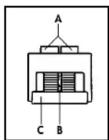
FITTING/CHANGING SAW BLADES
Refer to illustration below.

When changing blades make sure that the blade slot, clamp plate and guide wheel are free from warfetc.
- Slide the clear safety shield to its upper position.
- Loosen both bolts (A) with the 3mm Allen key provided; this is kept in a slot under the dust extractor opening.
- Insert the blade, with the teeth facing upwards towards the saw, into the holder (C) on the jigsaw.
- Ensure the blade is fully home and is in the groove (D) and the rear edge of the blade is in the groove of the roller.
- Make sure the clamping plate (E) is square to the blade and tighten the bolts firmly to secure the blade. - Stow the Allen key in its holder.
- Slide the clear safety shield to its lowest position.

ADJUSTING THE ANGLE OF THE SAW FOOTPLATE
- Loosen the two footplate securing bolts with the Allen key provided.
- Slide the footplate towards the rear of the saw.
- Tilt the footplate to required angle – maximum 450 to left or right.
- Slide the footplate forwards to engage one of the pre-set angle positions if required.
- Tighten bolts securely
SETTING PENDULUM ACTION
To get the best cutting performance on different materials alter the pendulum action which affects the angle that the saw teeth cut into the material.
For best results use this control in conjunction with the electronic speed control (C) - see 'operation' section. You can alter the pendulum action by moving the orange lever on the left side on the saw. The lever can be moved while the saw is in operation.
Here are some suggested settings:
- Setting 'O' – soft materials, softwood, aluminium and cutting curves. Use higher speed
- Setting 'I' – thin materials and clean cutting. Use medium speed.
- Setting 'II' – Harder materials, hard wood, metal, plastics etc. Use lower speed.
To determine the best settings - test on a piece of scrap before proceeding with the job.
DUST COLLECTION
The saw has a connection for dust extraction; it can be connected to a suitable vacuum cleaner. Note this does nor give complete protection against fine dust – wear appropriate personal protection equipment.
USING THE SAW
BEFORE OPERATING
- Check the voltage on the saw corresponds with your power supply voltage and that the plug and lead are in good condition.
- Check you have the correct type of saw blade for the machine and that it is mounted correctly. Do not use parts other than supplied with the machine to make the blade fit properly.
- Check you have a blade suitable for the material being cut and that it is in good condition.
- Run idle for 30 seconds - if there is any abnormal vibration or other fault – switch off, inspect and rectify before continuing.
OPERATION
Refer to illustration below.
- Plug into a suitable mains supply and switch on.
- To switch the saw ON-Push in the trigger switch (A)
- To switch OFF release the trigger switch.
- Continuous operation, depress the trigger switch and push in the trigger lock button (B)
- To unlock trigger switch depress and release the trigger switch.
- To control speed (stroke rate) rotate the speed control wheel (C) Wheel position A is slow - G is fast. The speed required depends on the material being cut and the blade used, as a general guide start slow and increase until the best speed is found.

CUTTING
- Place the saw in a safe rest position, route mains cable so that it cannot come into contact with the blade and plug into mains.
- Place the footplate on the workpiece without the blade touching and switch ON
- Using gentle pressure, move the saw along the line of cut, keep the footplate in firm contact with the workpiece.
-
Let the saw do the cutting, undue pressure will overload the saw resulting in overheating and broken blades.
-
When the cut is finished, switch off and withdraw the saw when the blade has stopped moving.
- Place the saw in a safe rest position.
PLUNGE CUTTING AND MAKING CUT-OUTS
To start in the middle of a workpiece or cut out a shape either drill a starting hole in the waste area of the workpiece (recommended) or use plunge cutting.
- Practice. Before plunge cutting on the workpiece practice on scrap material first to determine if it's suitable for the material/blade being used.
- Use short blades only.
- Ensure the bottom edge of the footplate rests on the workpiece as shown below.
- Start off slowly at a shallow angle, gradually moving the saw to 900 angle to the surface and continue along the cutting line.
- When the cut is finished, switch off and withdraw the saw when the blade has stopped moving.

natural_image
Hand inserting a component into a device housing (no text or symbols visible)DURING USE
- Place the blade gently onto the work piece
- Adjust the stroke rate to suit the material and profile of the cut.
- Tight radius cuts require narrow saw blades.
- Check material for foreign bodies
- For example check wood, plasterboard and building materials for nails screws etc.
- Check for services. Make sure that there no electrical wires, water or gas pipes in the material being cut. Do not proceed if you are unsure.
- Apply suitable lubricant, when cutting metal.
- Do not use water as a lubricant/coolant
- Clamp material properly. Do not use hand or foot to support the work piece.
- Keep the footplate on the surface of material.
- Use constant gentle pressure.
- If the blade seizes in the cut, switch off and open the cut with a suitable tool before pulling the blade out—never switch the saw on with the blade jammed.
- Reciprocating blade. Be aware of backlash if you touch the floor or workpiece with the saw running.
- Do not put the machine down with the motor still running.
- Do not put the machine down on a dusty surface – dust will get into the air vents and damage the motor.
-
Regularly inspect the blade during use (switch off first) for signs of damage or wear and replace when required.
-
Switch the machine off before removing the plug from the mains socket.
- Be careful. Do not point the saw at yourself or other people. Keep your hands away from the blade. Saw away from yourself.
MAINTENANCE, CARE AND REPAIR
REPAIR
Switch off and unplug the machine before carrying out any cleaning, adjusting or changing blades.
CLEANING
Do not use flammable liquids to clean the saw, they will damage the casing and are a fire risk. Clean with a soft brush or a cloth moistened with soapy water – dry off afterwards.
FAULTS
Switch OFF immediately at the mains plug and remove the plug when:
The gluconous blue is damaged.
- The plug or cable is damaged. The switch on the machine is defective.
- The switch on the ma - The motor runs hot
- You smell or see smoke caused by scorched insulation in the machine.
The saw overheats
- Use less pressure
- Clean ventilation slots
- Defective motor, take to your Ferm dealer.
The saw does not work when switched on
- Damaged/faulty plug, switch or power lead, take to your Ferm dealer for repair.
The saw wanders off the cut line
- Worn or bent blade, replace blade
The saw makes a lot of noise and does not run smoothly.
- The carbon brushes are worn; take to your Ferm dealer for replacement.
There are no user serviceable/repairable parts in this unit. Qualified service engineers must carry out repair and servicing.
MAINTAIN TOOLS WITH CARE
Keep the tool clean for better and safer performance. Store the blades properly in accordance with the maker's instructions.
Follow instructions for changing accessories. Inspect tool and extension cables periodically and if damaged, have them repaired by a qualified person or authorised service body. Keep handles free from oil or grease. Keep the ventilation slots clean to prevent the motor overheating.


- FERM JSV-600P JIG SAW USERS MANUAL
- PACKAGE CONTENTS
- PRODUCTINFORMATION
- ELECTRICAL INFORMATION
- Wire correctly
- Securing wires
- Recycle/Dispose of old plug and cable
- SAFETY INSTRUCTIONS
- Check for damaged parts
- Have your tool repaired by an expert
- Storing tools
- Lubrication
- ENVIRONMENT
- GUARANTEE
- CE DECLARATION OF CONFORMITY (UK)
- EN50144-2-10, EN50144-1
- from 01-03-2000
- GENEMUIDEN NL
- PERSONAL SAFETY
- Use Personal Protection Safety Equipment
- Dress properly
- Stay alert
- OPERATIONAL SAFETY
- Warning!
- Concentrate
- Keep work area clean
- Consider the work environment
- Guard against electric shock
- Keep children and pets away
- Do not force the tool
- Use the right tool
- Do not abuse cable
- Secure work
- Do not over-reach
- Disconnect tools from power supply
- Remove adjusting keys and wrenches
- Avoid unintentional starting
- Outdoor use extension cables
- Use a RCD (residual current device)
- Connect a dust extraction device
- Use recommended accessories
- BEFORE USING THE SAW
- SELECTING SAW BLADES
- FITTING/CHANGING SAW BLADES
- ADJUSTING THE ANGLE OF THE SAW FOOTPLATE
- SETTING PENDULUM ACTION
- DUST COLLECTION
- USING THE SAW
- BEFORE OPERATING
- OPERATION
- CUTTING
- PLUNGE CUTTING AND MAKING CUT-OUTS
- DURING USE
- MAINTENANCE, CARE AND REPAIR
- REPAIR
- CLEANING
- FAULTS
- The saw overheats
- The saw does not work when switched on
- The saw wanders off the cut line
- The saw makes a lot of noise and does not run smoothly.
- MAINTAIN TOOLS WITH CARE
Brand : Ferm
Model : JSV-600P
Category : Saw