L2GMP311 - Mp3 player Logik - Free user manual and instructions
Find the device manual for free L2GMP311 Logik in PDF.
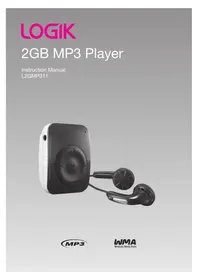


| Product Type | MP3 Player |
| Brand | Logik |
| Model | L2GMP311 |
| Dimensions (approx.) | 40 x 30 x 10 mm |
| Weight (approx.) | 20 g |
| Power Source | Built-in rechargeable lithium-ion battery, USB charging |
| Battery Life (approx.) | Up to 10 hours of music playback |
| Charging Time (approx.) | 2-3 hours via USB |
| Display | 1.5-inch monochrome LCD screen |
| Supported Audio Formats | MP3, WMA, WAV, FLAC |
| Storage Capacity | 8 GB internal (expandable via microSD up to 32 GB) |
| Main Functions | Music playback, FM radio, voice recording, folder navigation |
| Connectivity | USB 2.0 for data transfer and charging, 3.5 mm headphone jack |
| Additional Features | Equalizer presets, repeat/shuffle, A-B repeat, sleep timer |
| Operating System Support | Windows, macOS, Linux (drag and drop) |
| Care & Maintenance | Clean with a soft dry cloth. Avoid exposure to water, extreme temperatures, and direct sunlight. |
| Safety Precautions | Do not disassemble. Use only authorized chargers. Keep away from children under 3 years due to small parts. |
| Spare Parts / Accessories | USB cable, earphones (included). Replacement earphones and cables available from retailer. |
| Warranty | 1 year limited warranty |
Frequently Asked Questions - L2GMP311 Logik
User questions about L2GMP311 Logik
0 question about this device. Answer the ones you know or ask your own.
Ask a new question about this device
Download the instructions for your Mp3 player in PDF format for free! Find your manual L2GMP311 - Logik and take your electronic device back in hand. On this page are published all the documents necessary for the use of your device. L2GMP311 by Logik.
USER MANUAL L2GMP311 Logik
Unpacking....3
Product Overview....4
Connecting to a Computer....5
System Requirements ....5
Copying Files from a Computer to the MP3 Player....5
Charging the Battery 5
Operation 6
Turning On 6
Adjusting the Volume 6
Pausing and Playing music tracks....6
Skipping to the Next/Previous Music Track....6
Fast Rewind/Forward within a Track....6
Setting Equalizer 6
Shuffle or Repeat All Songs (option)....6
Locking All Buttons....7
Turning Off 7
Resetting the Player....7
Hints and Tips 8
Specifications....8
Safety Warnings....9
Thank you for purchasing your new Logik MP3 Player.
It has many exciting features to make your listening to music experience more enjoyable.
We recommend that you spend some time reading this instruction manual in order to fully understand all the operational features it offers. You will also find some hints and tips to help you resolve any issues.
Read all the safety instructions carefully before use and keep this instruction manual for future reference.

Unpacking
Remove all packaging from the unit. Retain the packaging. If you dispose of it please do so according to local regulations.
The following items are included:
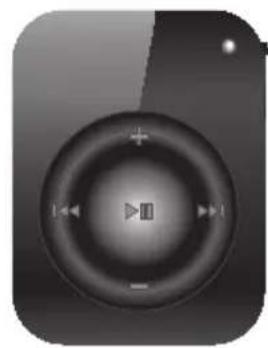
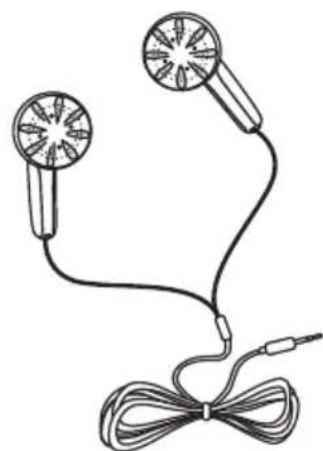
MP3 Player Earphones

USB Cable Instruction Manual CD

If items are missing, or damaged please contact Partmaster (UK only). Tel: 0844 800 3456 for assistance.
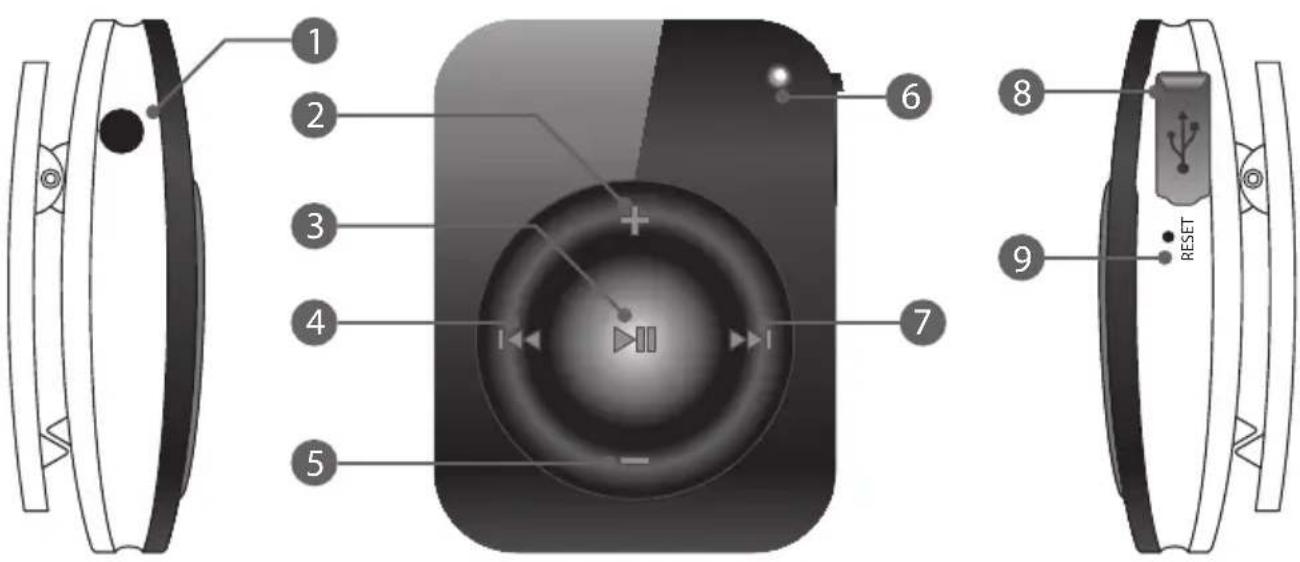
- 3.5mm Headphone socket
- Volume up button; press and hold to switch between EQ modes
- ▶II Play/Pause button; press and hold to Power On/Off
- ▶ Previous button; press and hold to fast rewind
- — Volume down button; press and hold to Lock/Unlock buttons
- Indicator
- ▶▶▶ Next button; press and hold to fast forward
- Mini USB Connection
- Reset button
System Requirements
Your computer system must meet the following requirements:
- Pentium 200MHz or above
- Microsoft Windows 2000 / ME / XP / Vista® / 7 • 120MB of available hard disk space • USB port x 1 (Supports USB 1.1 and 2.0)
Copying Files from a Computer to the MP3 Player
Files can be transferred directly to the MP3 player by using the USB cable (included).
- Make sure your computer has been started before you start.
- Connect the mini plug of the USB cable to the mini USB port on the player, and insert the other end into a free USB port on your computer.
![graph LR A["User"] -->|Open the Mini USB Connection Cover| B["USB Cable"] B --> C["Computer"]](/content/2026/05/968467/images/1d42b0611b16bceeae2539786946dda17c6f0ac628889c1ba7678589f24ce91f.jpg)
- The computer system detects "New hardware" and starts to install the driver automatically. Wait for the system to finish the installation. When it has finished, a new "LOGIK MP3" will be created in "My Computer".
- Select the files on your computer and simply drag and drop them into the "LOGIK MP3".
- To disconnect the MP3 player from the computer, double-click the "Safely Remove Hardware" icon on the taskbar. Click "USB Mass Storage Device", and then click "OK". Then you can unplug the MP3 player safely.

Please do not disconnect the MP3 player from the computer during file transfers, as it may cause the file transfer process and MP3 player to malfunction.
Charging the Battery
Your MP3 player has a built-in rechargeable Li-polymer battery. The battery is charged automatically whenever the MP3 player is connected to a computer.
If you charge the MP3 player while loading files to the MP3 player, it may take a longer time.

- It takes approximately 5 hours to fully charge the battery.
- Fully charge the MP3 player before you use it for the first time (approximately 8 hours) or when you haven't used it for a long period of time.
- Do not overcharge the battery, as it may shorten its life.
- The MP3 player does not function while charging or loading files.
Turning On
- Make sure the battery power level is sufficient and the earphones are connected.
- To turn on the MP3 Player, press and hold the ▶ button. The indicator will illuminate and then flash. After a short pause, the first music track on the MP3 Player will automatically play (files stored in the root directory are played first in alphabetical order). The indicator will flash slowly during playback.
Adjusting the Volume
- To increase the volume, press the + button while music is playing.
- To decrease the volume, press the - button while music is playing.
Pausing and Playing Music Tracks
- To pause playback, press the ▶II button once. The indicator will stop flashing and illuminate permanently.
- To resume playback, press the ▶II button again. The indicator will flash slowly during playback.
Skipping to the Next/Previous Music Track
- To skip to the next music track, press the ▶▶ button once. Repeat this until the desired music track is found.
- To skip to the previous music track, press the ◀◀ button once. Repeat this until the desired music track is found.
Fast Rewind/Forward within a Track
- To fast forward within a track, press and hold the ▶▶ button. When you release the button, it will resume playback from that point.
- To fast rewind within a track, press and hold the ◀◀ button. When you release the ◀◀ button, it will resume playback from that point.
Setting Equalizer
There are 6 preset equalizers on the MP3 Player: Normal, Jazz, Rock, Classic, Pop, Bass. You can select the desired equalizer to suit the type of audio output.
- To select an equalizer, press and hold the + button for at least 4 seconds while the music is playing. Once you release the button, the selected equalizer will be activated.
Shuffle or Repeat All Songs (option)
You can set the play mode for the MP3 Player. While music playing is paused, you can:
- Press the + button, then press the ▶ button to resume playing. The player will repeat all songs.
- Press the button, then press the button to resume playing. The player will shuffle all songs.
Locking All Buttons
This prevents you from accidentally pressing the buttons when using the MP3 Player on the move.
- To enable the lock function, press and hold the button.
- To disable the lock function, press and hold the button again.
Turning Off
To turn off the MP3 Player at any time, press and hold the ▶ button for 2 seconds. When the ▶ II button is released, the indicator and MP3 Player will turn off.

- When the MP3 Player is turned on again, it will continue playing the track that was last playing when the MP3 Player was turned off.
- The MP3 player will turn off automatically if the battery is exhausted.
Resetting the Player
If a malfunction of the player occurs, take a metal pin, e.g. the end of a paper clip, and press it into the RESET hole to re-initialize the player.
If a problem does occur, it may often be due to something very minor. The following table contains various tips.
| Cannot power on • The battery may be exhausted. Connect the USB cable and plug into the USB port of a computer which is turned on. | |
| Files cannot be downloaded | • Check if the driver is installed correctly in the computer.• Check the connection between the MP3 player and computer. |
| No sound from the earphones | • Check that the volume is on.• Check the connection between the earphones and MP3 player.• Check if the music file format is supported by the MP3 player. |
| The buttons do not work | • The key may be locked. Press and hold the— button to deactivate the lock function. |
| The MP3 player does not function properly | • Use a paper clip to press the reset button to turn the MP3 player off. Press and hold the▶|| button to turn it on again. |

Specifications
| Model L2GMP311 | |
| USB Version 1.1, 2.0 | |
| Audio Format MP3/WMA/WAV | |
| MP3 bit Rate 8~320Kbps | |
| WMA bit rate 5Kbps-384Kbps | |
| S/N rate >80dB (30K filter) | |
| Dynamic range >80dB (1kHz) | |
| Distortion <0.2% | |
| Battery MP3/WMA/WAV | playback around 8hrs |
| EQ Normal, Jazz, Rock, Classic, Pop, Bass | |
| Size (including clip) (LxWxH) 45x34.4x16.8mm(include clip) | |
| Weight | Around 16.94g |
| Frequency response | 20Hz~20kHz |
| Dynamic current | <18mA |
| Power off current | <0.3mA |
| Storage condition | Humidity <90%, -20~60°C |
| Working condition | Humidity <80%, 0~45°C |
| Power out 2x1mW (16 ohm load) | |
| Power supply | DC 5V= 100mA |
We continually strive to improve our products. Specifications and features may change without prior notice.
- Retain the manual. If you pass the unit onto a third party make sure to include this manual.
Damage
- Please inspect the unit for damage after unpacking.
- Do not continue to operate the unit if you are in any doubt about it working normally, or if it is damaged in any way - switch off and consult your dealer.
Temperature
- Avoid extreme degrees of temperature, either hot or cold. Place the unit well away from heat sources such as radiators or gas/electric fires.
- Avoid exposure to direct sunlight and other sources of heat.
Naked Flames
- Never place any type of candle or naked flame on the top of or near the unit.
Moisture
- Do not expose this unit to rain, moisture, dripping or splashing.
- If you spill any liquid into the unit, it can cause serious damage. Switch it off and consult your dealer.
Interference
- Do not place the unit on or near appliances which may cause electromagnetic interference. If you do, it may adversely affect the working of the unit, and cause a distorted picture or sound.
Earphones
- For traffic safety, do not use earphones while driving or cycling.
- Listening to loud sounds for prolonged periods of time may permanently damage your hearing.
- Before putting on earphones, turn the volume down then put the earphones on and slowly increase the volume until you reach a comfortable listening level.
Batteries
- Please dispose of the battery correctly by following the guidance in this manual.
Service
- Do not open any fixed covers. The unit does not contain any user-serviceable parts. Please leave all maintenance work to qualified personnel.
Maintenance
- Ensure to switch off the unit before cleaning.
- Do not use any type of abrasive pad or abrasive cleaning solutions as these may damage the unit's surface.
- Do not use liquids to clean the unit.

Visit Partmaster.co.uk today for the easiest way to buy electrical spares and accessories. With over 1 million spares and accessories available, we can deliver direct to your door the very next day. Visit www.partmaster.co.uk
or call 0844 800 3456 (UK customers only). Calls charged at National Rate.
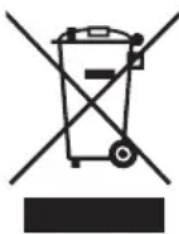
This symbol on the product or in the instructions means that your electrical and electronic equipment should be disposed of at the end of its life separately from your household waste. There are separate collection systems for recycling in the EU.
For more information, please contact the local authority or your retailer where you purchased the product.
DSG Retail Ltd • Maylands Avenue • Hemel Hempstead
Herts • HP2 7TG • England

- UNPACKING
- PRODUCT OVERVIEW
- CONNECTING TO A COMPUTER
- OPERATION
- HINTS AND TIPS
- SPECIFICATIONS
- SAFETY WARNINGS
- SYSTEM REQUIREMENTS
- COPYING FILES FROM A COMPUTER TO THE MP3 PLAYER
- CHARGING THE BATTERY
- TURNING ON
- ADJUSTING THE VOLUME
- PAUSING AND PLAYING MUSIC TRACKS
- SKIPPING TO THE NEXT/PREVIOUS MUSIC TRACK
- FAST REWIND/FORWARD WITHIN A TRACK
- SETTING EQUALIZER
- SHUFFLE OR REPEAT ALL SONGS (OPTION)
- LOCKING ALL BUTTONS
- TURNING OFF
- RESETTING THE PLAYER
- DAMAGE
- TEMPERATURE
- NAKED FLAMES
- MOISTURE
- INTERFERENCE
- EARPHONES
- BATTERIES
- SERVICE
- MAINTENANCE
Brand : Logik
Model : L2GMP311
Category : Mp3 player