SANYO VPC-X1200BK - Digital Camera

VPC-X1200BK - Digital Camera SANYO - Free user manual and instructions

Find the device manual for free VPC-X1200BK SANYO in PDF.

📄 60 pages English EN Download 💬 AI Question 11 questions ⚙️ Specs
Notice SANYO VPC-X1200BK - page 12
View the manual : Français FR English EN
Pick your language and provide your email: we'll send you a specifically translated version.
Product Type Digital Camera
Brand SANYO
Model VPC-X1200BK
Maximum Resolution 12 megapixels (4000 x 3000 pixels)
Optical Zoom 3x (estimated)
Digital Zoom 4x (estimated)
ISO Sensitivity Auto, 64, 100, 200, 400, 800, 1600, 3200
Focus Modes 9-point, Spot, AF Tracking
White Balance Auto, Sunny, Cloudy, Fluorescent, Incandescent, Manual
Display 2.7 inch LCD (estimated)
Storage SD memory card (not specified) and internal memory
Power Rechargeable lithium-ion battery (estimated)
Dimensions (W x H x D) 100 x 60 x 25 mm (estimated)
Weight 150 g (with battery and card, estimated)
Connections USB/AV, TV output (NTSC/PAL)
File Formats JPEG, AVI (video), WAV (audio)
Special Features Blur correction, red-eye correction, distortion correction, PictBridge direct printing, audio recording
Safety Use only recommended battery, do not disassemble the device
Maintenance and Cleaning Clean the lens with a soft, dry cloth. Avoid moisture and shocks.
Spare Parts and Repairability Contact SANYO after-sales service for any repairs.

Frequently Asked Questions - VPC-X1200BK SANYO

Why does the device not turn on?
The battery may be discharged. Recharge or replace it. Also check that the battery is inserted correctly and that the compartment cover is firmly closed.
How to increase battery life?
Avoid extreme temperatures (below 10°C or above 40°C). Use a new battery if the battery life decreases. Turn off the device when not in use.
Why is the flash not working?
The flash-off mode may be selected. Switch to auto or forced flash. Also check that the battery is sufficiently charged.
How to choose the image resolution?
Use 12M for large prints or cropping. 2M is suitable for standard prints. 0.3M is suitable for the web or emails.
What to do if the image is blurry?
Ensure the focus is correct (lock it by pressing halfway). Use a higher shutter speed or a tripod. Enable blur correction in the playback menu.
How to print directly from the device?
Connect the device to a PictBridge printer via the USB cable. Select the image to print, set the number of copies and date if needed, then confirm.
Why is the memory card full even though there is remaining space?
The maximum number of files (99,999) or maximum recording duration (99:59:59) may have been reached. Delete unnecessary files or change the card.
How to transfer photos to a computer?
Connect the device to the computer via the USB cable and select 'COMPUTER' mode on the screen. The files will appear as a removable drive.
What to do if the screen displays 'System Error'?
Remove the memory card and reinsert it. Remove and reinsert the battery. If the problem persists, try another card. If nothing works, contact after-sales service.
How to clean the lens?
Use a soft, dry cloth specifically for optics. Do not press too hard. Avoid any liquid. For stubborn stains, use a lens cleaning product.

User questions about VPC-X1200BK SANYO

1 question about this device. Answer the ones you know or ask your own.

Ask a new question about this device

The email remains private: it is only used to notify you if someone responds to your question.

How to charge the battery of the SANYO VPC-X1200BK digital camera?
Frequently Asked Questions - 31/03/2026
Response Notice-Facile

To charge the 3.7 V Li-ion battery of your SANYO VPC-X1200BK, remove the rechargeable battery by opening the compartment located under the camera or on the side. Insert the battery into the charger provided with your device, ensuring it is correctly positioned according to the markings on the charger.

Connect the charger to a power outlet using the appropriate power cable. A light indicator on the charger will illuminate to indicate that the battery is charging. This indicator will change appearance or turn off once the charging is completely finished.

Once the charging is complete, remove the battery from the charger and reinstall it in the camera's compartment. Make sure to securely close the battery compartment cover before turning on the device.

Important points: Only use the original charger and battery to avoid any damage to your device. Store the battery in an environment between 10 and 40°C (50 to 104°F) to maintain optimal performance. In cold conditions, if the device does not turn on, warm the battery for a few minutes before trying again, as low temperatures can temporarily reduce battery power.

Respond (be the first)

Download the instructions for your Digital Camera in PDF format for free! Find your manual VPC-X1200BK - SANYO and take your electronic device back in hand. On this page are published all the documents necessary for the use of your device. VPC-X1200BK by SANYO.

USER MANUAL VPC-X1200BK SANYO

natural_image Illustration of a digital camera with lens and screen (no text or symbols)

SANYO VPC-X1200BK - 1

Important note

This manual explains how to safely operate the VPC-X1200EX, VPC-X1200 and VPC-X1200GX.

Any information regarding only one of these products will be labeled as such.

Please read these instructions carefully before using the camera.

Make sure to read and understand the separate booklet "SAFETY MANUAL".

Keep this manual, along with the BASIC INSTRUCTION MANUAL, in a safe place for later reference.

HOW TO READ THIS MANUAL

■ Symbols used in this manual

HINT Points giving some extended instructions or special points to pay attention to.

CAUTION Points that require special attention.

(page xx) Refer to the page indicated for detailed information.

You may find the answers to questions or problems concerning camera operation in the sections “COMMONLY ASKED QUESTIONS” (page 46) and “TROUBLESHOOTING” (page 52).

CONTENTS

CONTENTS 1

SETUP

ACCESSING THE MENUS 3

How to display the menus....3

How to operate the menus....4

Overview of the Menus 5

■ SHOOTING

RECORDING SETTINGS 11

Recording and playing back audio files 11

Focus area setting 13

ISO sensitivity 14

White balance 15

Date imprint 16

■ PLAYBACK

PLAYBACK SETTINGS 17

Image protect....17

Rotating images....18

Resize....18

Blur correction....19

Contrast correction 20

Red-eye correction 21

Distortion correction....21

Print orders (DPOF) 22

Slideshow playback 27

Displaying image properties (Information Screen) 28

OPTION

OPTION SETTINGS 29

File No. continued setting 29

Initializing the card memory and internal memory 31

Resetting the camera settings 32

Checking the remaining internal memory and card memory ..... 33

CHECKING THE REMAINING BATTERY CHARGE 35

■ OTHER DEVICES AND CONNECTIONS

CONNECTING TO A TV 37

DIRECT PRINTING ....38

Print preparations ....38

To select one image and print it (print selected image)......40

To print all the images (all images)....42

To print the images that are set to print (print reserved images)......43

To change the printer settings and print images

(change printer settings)......44

■ APPENDICES

COMMONLY ASKED QUESTIONS 46

TROUBLESHOOTING 52

CAMERA 52

Notes regarding the scene function....57

ACCESSING THE MENUS

Detailed camera settings are accessed from the menus.

How to display the menus

1 Turn on the camera, and set it to the recording or playback mode.

- Set the camera to the recording mode to display the Recording Menu, or the playback mode to display the Playback Menu.

2 Press the MENU button.

- The menu for the mode specified in step 1 appears.
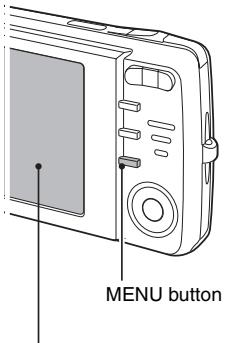
SANYO VPC-X1200BK - Press the MENU button. - 1

text_image MENU button

SANYO VPC-X1200BK - Press the MENU button. - 2

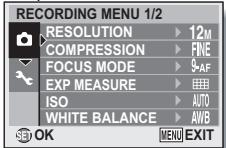
text_image RECORDING MENU 1/2 RESOLUTION ▶ 12M COMPRESSION ▶ FINE FOCUS MODE ▶ $-AF EXP MEASURE ▶ ISO ▶ AUTO WHITE BALANCE ▶ AWB OK MENU EXIT

Exit the menu

Press the MENU button to exit the menu.

How to operate the menus

Use the arrow buttons to select the item you wish to change, press the SET button, and the corresponding screen will appear.

1 Display the menu (page 3).

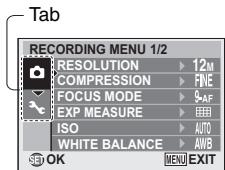
2 Select the 📄 or ▶ tab. Display the Recording Menu: Select the 📄 tab. Display the Playback Menu: Select the ▶ tab. Display the Option Menu: Select the 🖱 tab.
SANYO VPC-X1200BK - Display the menu (page 3). - 1

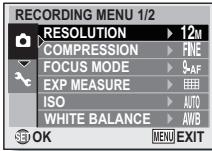
text_image Tab RECORDING MENU 1/2 RESOLUTION ▶ 12M COMPRESSION ▶ FINE FOCUS MODE ▶ 9-AF EXP MEASURE ▶ ISO ▶ AUTO WHITE BALANCE ▶ AWB OK MENU EXIT

3 Press the [▶] button.

4 Press the [▲] or [▼] button to select an item to set.

SANYO VPC-X1200BK - Press the [▲] or [▼] button to select an item to set. - 1

text_image RECORDING MENU 1/2 RESOLUTION ▶ 12M COMPRESSION ▶ FINE FOCUS MODE ▶ 9AF EXP MEASURE ▶ ISO ▶ AUTO WHITE BALANCE ▶ AWB SET OK MENU EXIT

5 Press the SET button.

• The Setting Screen appears.
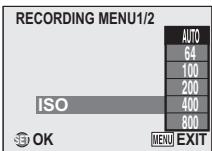
- Press the [▲] or [▼] button to select the desired setting, and then press the SET button to complete the setting.
- To cancel the menu, press the MENU button.
SANYO VPC-X1200BK - Press the SET button. - 1

text_image RECORDING MENU1/2 AUTO 64 100 200 400 800 ISO MENU EXIT OK

Overview of the Menus

Recording Menu

SANYO VPC-X1200BK - Recording Menu - 1

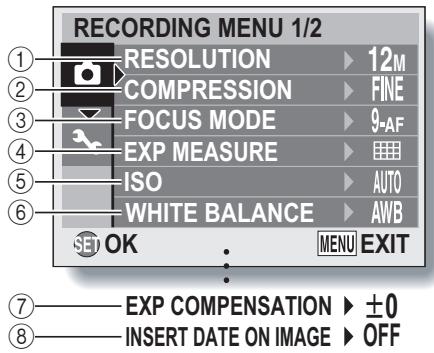
text_image RECORDING MENU 1/2 ① RESOLUTION ▶ 12M ② COMPRESSION ▶ FINE ③ FOCUS MODE ▶ 9-AF ④ EXP MEASURE ▶ ⑤ ISO ▶ AUTO ⑥ WHITE BALANCE ▶ AWB SET OK : MENU EXIT ⑦ EXP COMPENSATION ▶ ±0 ⑧ INSERT DATE ON IMAGE ▶ OFF

- ⑦ and ⑧ are displayed when you press the [▲] or [▼] button to scroll.

① Resolution menu/video size menu

12M: Shoot at 4000 × 3000 pixels

9M: Shoot at 4000 × 2256 pixels (16:9 aspect ratio)

6M: Shoot at 2816 × 2112 pixels

4M: Shoot at 2288 × 1712 pixels

2M: Shoot at 1600 × 1200 pixels

0.3M: Shoot at 640 × 480 pixels

Table of contents Click a title to access it
Manual assistant
Powered by Anthropic
Waiting for your message
Product information

Brand : SANYO

Model : VPC-X1200BK

Category : Digital Camera