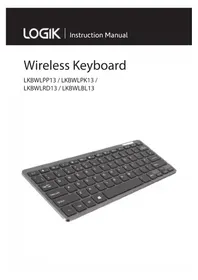
LK212B - Keyboard Logik - Free user manual and instructions

Find the device manual for free LK212B Logik in PDF.

Logik LK212B - Keyboard
📄 2 pages English EN Download 💬 AI Question 10 questions ⚙️ Specs
Notice Logik LK212B - page 1
Pick your language and provide your email: we'll send you a specifically translated version.
Product Type Keyboard
Brand Logik
Model LK212B
Connectivity Wired USB
Cable Length Approximately 1.5 m
Dimensions (L x W x H) Approximately 450 x 150 x 25 mm
Weight Approximately 0.6 kg
Power Supply Powered via USB port (5V)
Key Layout Standard 104-key QWERTY layout
Multimedia Keys Integrated multimedia shortcut keys
Compatibility Windows, macOS, Linux
Wrist Rest Not included
Maintenance & Cleaning Wipe with a soft, dry cloth. Avoid liquids.
Safety Precautions Keep away from moisture and heat sources.
Spare Parts Availability Keycaps may be available; contact manufacturer.
Repairability Limited; no user-serviceable parts inside.
Warranty Standard 1-year limited warranty
Package Contents Keyboard, user manual
Color Black

Frequently Asked Questions - LK212B Logik

Is the Logik LK212B keyboard compatible with Mac computers?
Yes, the Logik LK212B keyboard works with macOS as well as Windows and Linux. Simply plug it into a USB port and it should be recognized automatically.
How do I clean my Logik LK212B keyboard?
To clean the keyboard, first unplug it from the computer. Use a soft, dry cloth to wipe the keys and surface. For stubborn dirt, slightly dampen the cloth with water (do not soak) and wipe gently. Avoid using any liquids directly on the keyboard.
The keyboard is not responding. What should I do?
Check that the USB connector is firmly plugged into a working USB port. Try a different USB port. If it still doesn't work, restart your computer. If the issue persists, the keyboard may need replacement.
Can I use the Logik LK212B with a gaming console?
Most gaming consoles support USB keyboards for text input, but full game compatibility varies. The keyboard is designed for general use with PCs and may not have all features needed for console gaming.
Does the keyboard have backlighting?
No, the Logik LK212B does not feature backlighting. It is a standard wired keyboard without LED illumination.
How long is the cable on the LK212B?
The keyboard cable is approximately 1.5 meters long. This provides a comfortable distance from the computer.
Can I replace individual keys if they break?
Yes, keycaps are removable and can be replaced if damaged. Contact Logik support or search for compatible keycap sets online. The switches themselves are not designed to be user-replaced.
Is the keyboard splash-proof?
No, the Logik LK212B is not splash-proof. Avoid spills near the keyboard. If liquid is spilled, immediately unplug and allow to dry completely before attempting to use again.
Does it require any software or drivers?
No special drivers are needed. The keyboard uses standard HID drivers built into the operating system. Simply plug it in and it works.
What is the warranty period for this keyboard?
The Logik LK212B comes with a standard 1-year limited warranty against manufacturer defects. Keep your proof of purchase for any warranty claims.

User questions about LK212B Logik

0 question about this device. Answer the ones you know or ask your own.

Ask a new question about this device

Your email remains private: it is only used to notify you if someone answers your question.

No questions yet. Be the first to ask one.

Download the instructions for your Keyboard in PDF format for free! Find your manual LK212B - Logik and take your electronic device back in hand. On this page are published all the documents necessary for the use of your device. LK212B by Logik.

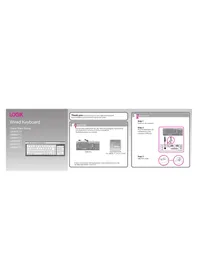
USER MANUAL LK212B Logik

∴ m = 3/11

Logik LK212B - 1

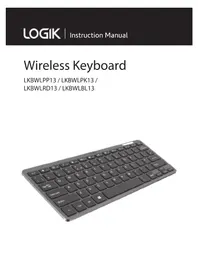
Thank you for purchasing your new Logik Wireless Keyboard. Please familiarise yourself with this Quick Start Guide to enjoy all the exciting features offered.
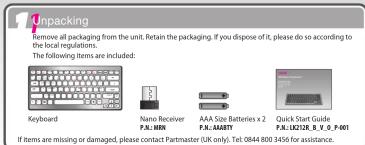
1 Unpacking Remove all packaging from the unit. Retain the packaging. If you dispose of it, please do so according to local regulations. The following items are included: Keyboard Nano Receiver P&L-M80 AAA Size Batteries x 2 P&L-AMMTT Quick Start Guide P&L-UD27E_8_V_S_0_F001 If items are missing or…

Logik LK212B - 3

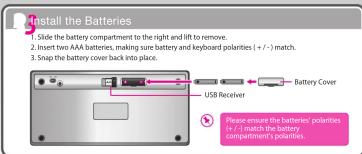
Install the Batteries 1 Slide the battery compartment to the right and lift to remove. 2 Insert two AAA batteries, making sure battery and keyboard polarities (+/-) match. 3 Snap the battery cover back into place. USB Receiver Battery Cover Please ensure the batteries' polarities (+/-) match the bat…

Logik LK212B - 5

Activating the Keyboard 1. If the keyboard does not respond, perform the following: Step 1: Remove the RF receiver. Step 2: Turn over the keyboard without pressing any key. If the power switch is in the OFF position, slide it to the ON position first. Press the Connect Button. Step 3: Re-insert the…

Function Keys The function key (Fn) enables the use of the pink function keys and the operation of the embedded numeric keypad. The function keys are marked by pink text. Pink Alpha/Numeric Keys: Hold down the Fn key while pressing the appropriate key - F11, F12, Scroll, Num Lock, Home, End. Numeric…

Hints and Tips Keyboard not working: 1. Have the batteries been inserted incorrectly or are they spent? 2. Check the polarity (+/-) or exchange them for new ones as necessary. 3. Make sure the USB Receiver is plugged into a USB port and the computer is on. 4. Remove metallic objects between the keyb…

Safety Warning
• Don’t disassemble the keyboard or remove any parts. • Don’t immerise the keyboard in water or any liquid. • Don’t use the keyboard close to heat sources or expose to high temperatures. • Don’t use the keyboard strong electromagnetic waves are present. Strong electric magnetic waves will cause damage to the keyboard. • Keep the keyboard away from direct sunlight, lighting, and noise into allogene chemical products (cleaning products etc). • Before boarding any aircraft or packing a wireless device in luggage that will be checked in, remove it. • Wireless devices can transmit radio frequency (IF) energy and batteries are installed and the wireless device is turned on.To reduce the risk of injury: • Keep batteries out of the reach of children. • Do not make new, puncture, moisture, or dilute batteries in fire. • Do not mix new and old batteries or batteries of different types of batteries. • Do not allow metal objects—to touch the battery terminals on the device; they can become hot and cause burns. • Already have more old, weak, or cocoon batteries promptly or recycle or dispose of them in accordance with Local and National Disposal Regulations. • If a battery is used, it can be kept the leaked fluid from touching your skin or clothes. • Use of battery components to switch with or clothes, flush skin with water immediately. • Remove inserting batteries, thoroughly clean the battery. • Use of battery manufacturers to follow the battery manufacturer’s recommendations for clear conditions.
Battery-Powered Devices: • Inside the power supply system result in battery fluid leakage, overheating, or explosion. Released battery fluid is corrosive and may be toxic. It can be clean and eye burns, or is harmful if swallowed.Rechargeable batteries only: • Reduce battery resistance is repaid by an incorrect type. Use and replace only with the same type and rating as the batteries provided. • Choose with a whichever as protected with the product

Features and specifications are subject to change without prior notice. Windows is a registered trademark of Microsoft Corporation in the United States and other countries. DSG International Sourcing declares that the wireless keyboard and mouse comply with the essential requirements and other relev…

Manual assistant
Powered by Anthropic
Waiting for your message
Product information

Brand : Logik

Model : LK212B

Category : Keyboard