L14VR12 - Vacuum Cleaner Logik - Free user manual and instructions
Find the device manual for free L14VR12 Logik in PDF.


| Product Type | Bagless Cylinder Vacuum Cleaner |
| Brand | Logik |
| Model | L14VR12 |
| Supply Voltage | 220-240 V ~ 50 Hz |
| Power Input (Nominal) | 1200 W |
| Power Input (Maximum) | 1400 W |
| Dust Capacity | 2.5 L |
| Filter Type | Motor Protection Filter, Exhaust Filter, HEPA Filter Unit |
| Cord Length | Approximately 6 m (estimated) |
| Accessories Included | Hose, Telescopic Tube, Hard Floor Brush, Combination Nozzle |
| Special Features | Retractable cord, cord rewind button, thermal cut-off, bagless operation |
| Maintenance | Clean motor protection filter twice a year; wash HEPA filter and exhaust filter as needed; ensure filters dry before reinserting |
| Safety Features | Thermal cut-off auto shut-off, child safety lock (none specified), do not vacuum liquids |
| Weight | Approximately 5.5 kg (estimated) |
| Dimensions (approx.) | Height 35 cm, Width 30 cm, Depth 40 cm (estimated) |
| Spare Parts Availability | Via Partmaster.co.uk (UK only), phone 0844 800 3456 |
Frequently Asked Questions - L14VR12 Logik
User questions about L14VR12 Logik
0 question about this device. Answer the ones you know or ask your own.
Ask a new question about this device
Download the instructions for your Vacuum Cleaner in PDF format for free! Find your manual L14VR12 - Logik and take your electronic device back in hand. On this page are published all the documents necessary for the use of your device. L14VR12 by Logik.
USER MANUAL L14VR12 Logik
CLEANING THE MOTOR PROTECTION FILTER
The motor protection filter should be cleaned twice a year, or when it appears to be visibly clogged.
Always unplug the appliance from mains socket before replacing the filter.
-
Press the open cover button to open the cover (Fig 6).
-
Take out the motor protection filter.
-
Shake out the dust accumulated on the filter into a dustbin.
-
Replace the filter and close the cover. A click will be heard when the cover locks into place.
CLEANING THE EXHAUST FILTER
Always unplug the appliance from mains socket before replacing the filter.
-
Unclip the grill and take out the exhaust filter (Fig 11 & Fig 12).
-
Shake out the dust accumulated on the filter into a dustbin.
-
Replace the filter and the grill.
SAFETY FIRST!
For your continued safety and to reduce the risk of injury or electric shock, please follow all the safety precautions listed below.
- Read all the instructions carefully before using the appliance and keep them for future
reference.
- Retain the manual. If you pass the appliance onto a third party make sure to include this
manual.
- Check that the voltage marked on the rating label matches your mains voltage.
- Consult your dealer if you are ever in doubt about the installation, operation or safety of your
appliance.
- Do not remove any fixed cover as this may expose dangerous voltages.
- Do not allow any electrical appliance to be exposed to dripping or splashing.
• To protect against electrical shock, do not immerse the mains cable, mains plug, or any part of the appliance in water or other liquids.
- Make sure the dust bin is properly installed before use.
- Never vacuum up water or any other liquids. Never vacuum up flammable substances and do not vacuum up ashes until they are cold.
- Never use the appliance without the motor protection filter. This damages the motor and shortens the life of the appliance.
- If a blockage is found in the brushes, hoses or tubes, it should be removed before use. If the unit is already switched on, turn it off, unplug the unit and remove the blockage before re-use.
- Store and use the appliance well away from heat sources such as radiators or gas / electric fires.
- Do not run over the mains cable with the appliance.
- Close supervision is necessary when any appliance is used by or near children.
- This appliance is not intended for use by persons (including children) with reduced physical, sensory or mental capabilities, or lack of experience and knowledge unless they have been given supervision or instructions concerning the use of the appliance by a person responsible for their safety.
• Children should be supervised to ensure that they do not play with the appliance.
- Do not point the hose, tube or any other accessory at the eyes, ears or mouth during operation.
- Unplug the appliance from the mains socket when it is not in use and before replacing filter.
- Unplug the unit from the mains socket before cleaning or maintenance.
- Washing filters maintains vacuum performance. They should be checked and cleaned periodically (depending on the level of use). Make sureall filters are completely dry before inserting back into the vacuum cleaner.
- Allow the appliance to cool completely before cleaning or storing.
- The motor is equipped with a thermal cut-cut. If for any reason the unit should overheat, the thermostat will automatically turn the unit off. Should this occur, unplug the vacuum cleaner from the electrical outlet and turn off the switch. Remove dirt container and empty. Clean filters. Allow the unit to cool for approximately 1 hour. To re-start, plug into an electrical outlet and switch back on.
- Do not use the appliance for other uses than its intended use.
- The use of accessories not recommended by the appliance manufacturer may cause injuries. - Do not use the appliance outdoors.
- Do not operate an appliance with a damaged mains cable or mains plug, or in an abnormal state. If the mains cable is damaged it must be replaced by the manufacturer, its service agent, or similarly qualified persons in order to avoid a hazard.
- Do not continue to operate the appliance if you are in any doubt about it working normally (e.g. abnormal noise, smell, smoke), or if it is damaged in any way - switch off, withdraw the mains plug and consult your dealer.
- Any maintenance and repair must be handled by a professional technician. Do not try to repair by yourself.
SPECIFICATIONS
Supply voltage: 220-240V\~50Hz
Power input: 1200W (nominal), 1400W (Maxium)
Dust capacity: 2.5L
We continually strive to improve our products. Specifications may change without prior notice.
Partmaster co.uk
to your door the very next day. Visit www.partmaster.co.uk or call 0844 800 3456 (UK customers only) Calls charged at National Rate.

This symbol on the product or in the instructions means that your electrical and electronic equipment should be disposed at the end of its life separately from your household waste. There are separate collection systems for recycling in the EU. For more information, please contact the local authority or your retailer where you purchased the product.
DSG Retail Ltd • Maylands Avenue • Hemel Hempstead
Herts • HP2 7TG • England
GB-5
(P.N. CH830A-IM)
LOGIK
Bagless Cylinder Vacuum Cleaner
Instruction Manual
L14VR12

natural_image
Exterior view of a modern vacuum cleaner with handle and clapper (no text or symbols visible)Thank You for purchasing your new Logik Bagless Cylinder Vacuum Cleaner.
We recommend that you spend some time reading this instruction manual in order to fully understand all the operational features it offers.
Read all the safety instructions carefully before use and keep this instruction manual for future reference.
UNPACKING
Remove all packaging from the unit. Retain the packaging. If you dispose of it please do so according to any local regulations.
The following items are included:
- Main Unit • Hose

• Combination Nozzle (P.N.: CH830A-CN)

(P.N.: CH830A-HS)

• Hard Floor Brush (P.N.: CH830A-HF)


• Telescopic Tube (P.N.: CH830A-TB)

• Instruction Manual (P.N.: CH830A-IM)

If items are missing or damaged, please contact Partmaster (UK only). Tel: 0844 800 3456 for assistance.
PRODUCT OVERVIEW FIRST TIME USE

10 Bin lid
11 Bin handle
3 Hose connection opening
12 HEPA filter unit
4 Handgrip of hose
13 Mesh guard
5 Hose connector
14 Base
6 Hose
15 Bir
7 Telescopic tube
16 On/Off button
8 Cover
17 Clip
9 Motor Protection Filter
18 Grill
19 Cord rewind button
20 Exhaust filter
21 Mains plug
22 Wheel
23 Combination nozzle
clip
24 Combination nozzle
25 Hard floor brush




GB-2GB-1 GB-3

1. To connect the hose, insert the hose connector into the hose connection opening until you hear a 'click' (Fig 1).
2. To connect the telescopic tube to the handgrip of the hose, insert the narrow section into the wider section while turning a little (Fig 2).
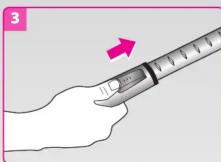
3. Extend the telescopic tube to a length you find the most comfortable by pressing the button located on the telescopic tube (Fig 3).
4. Connect a nozzle/brush suitable for the floor type to be cleaned. The hard floor brush can be used with the brush strips lowered or raised (Fig 4). You may also connect the combination nozzle to vacuum corners, slots or grooves. It can also be used as a brush nozzle by turning the strips out.
OPERATION
The vacuum cleaner is a very powerful unit. Before plugging the cord into the electrical outlet, make sure the switch is in the OFF position.
-
Hold the mains plug and pull the retractable mains cable out of the vacuum cleaner. Connect it to the mains socket. The YELLOW mark indicates the ideal length to extend the cable. Do not extend the mains cable beyond the RED mark which indicates the maximum length.
-
Press the ON/OFF button on the top of the vacuum cleaner to turn it on.
-
To move the vacuum cleaner from room to room, you can unplug and carry it by either the handle or the handgrip. Never use the mains cable to pull the vacuum cleaner.
If the inlet, hose or telescopic tube is blocked, switch off the vacuum cleaner and remove the blockage(s) before re-starting the vacuum cleaner.
POWERING OFF AND STORAGE
-
Press the ON/OFF button on the top of the vacuum cleaner to turn it off and then remove the mains plug from the mains socket.
-
Press the cord rewind button to rewind the retractable mains cable.
-
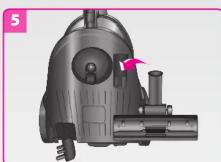
Put the vacuum cleaner in an upright position and attach the lower tube to the clip on the vacuum cleaner (Fig 5).
EMPTYING THE BIN
Always unplug the vacuum cleaner from the mains socket before emptying the bin.
-
Remove the hose from the vacuum cleaner. Open the cover and lift out the bin (Fig 6 and Fig 7).
-
To prevent the dust dispersing, lower the bin into your dustbin.
-
Firmly grip the bin handle and, over a dustbin, push down on the black lever (inside the handle) to release the bottom of the bin. The hinged bottom will swing open and allow convenient emptying of the bin. Snap the bottom back into place. Take out the filter unit to empty any residual dust and/or dirt.
-
If you find the filter unit is blocked or dirty, follow the steps in "CLEANING THE HEPA FILTER UNIT". If not, skip this step.
-
Refit the filter unit back into the bin and then slot the unit back into the vacuum cleaner, ensuring the handle slots back into its groove on the vacuum cleaner's base.
-
Close the cover and reclip the lever clasps on.
CLEANING THE HEPA FILTER UNIT
-
To take out the filter unit from the bin, grip the black plastic lid firmly and pull (Fig 8).
-
Hold the bin lid and twist the base of the mesh guard anti-clockwise to unscrew the two pieces (Fig 8).
-
Lift the HEPA filter from the mesh guard and gently shake out accumulated dust on the mesh guard over your dustbin. You may rinse the filter gently under a running tap (Fig 9).
-
Shake out the dust accumulated on the HEPA filter. You may soak it in warm soapy water for a few minutes, and then rinse it under a running tap to remove all traces of soap. Do not reassemble the filter unit until it is completely dry.
-
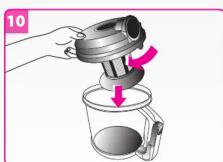
To reassemble the filter unit, slot the mesh guard back into the HEPA filter, with the rubber rim facing upwards (Fig 10).
-
Fit the filter unit into the grooves on the underside of the bin lid, turn clockwise till it locks into place.
-
Slot the entire unit back into the bin, making sure that the bin lid's latches align with the grooves on the bin.
Brand : Logik
Model : L14VR12
Category : Vacuum Cleaner