ST-WM0612 - Washing machine Saturn - Free user manual and instructions
Find the device manual for free ST-WM0612 Saturn in PDF.


| Product Type | Washing Machine |
| Brand | Saturn |
| Model | ST-WM0612 |
| Capacity | 6 kg |
| Dimensions (H x W x D) | 850 x 600 x 530 mm |
| Weight | 60 kg |
| Power Supply | 220-240 V, 50 Hz, 10 A |
| Energy Class | A++ |
| Spin Speed | 1200 rpm |
| Number of Programs | 16 |
| Key Programs | Cotton, Synthetics, Delicates, Quick 30', Eco 40-60, Wool, Rinse & Spin, Drum Clean |
| Special Features | Delay Start (up to 24h), Child Lock, Unbalanced Load Detection, Foam Control |
| Noise Level (Wash/Spin) | 52 dB / 72 dB |
| Water Consumption (per cycle) | 45 L |
| Power Consumption (per cycle) | 0.8 kWh |
| Maintenance | Clean lint filter after each wash, descale every 3 months, clean detergent drawer monthly |
| Safety | Overflow protection, child lock, anti-slip feet |
| Spare Parts Available | Drum, belt, pump, door seal, PCB, heater |
| Repairability Index | 8.0 / 10 |
Frequently Asked Questions - ST-WM0612 Saturn
User questions about ST-WM0612 Saturn
0 question about this device. Answer the ones you know or ask your own.
Ask a new question about this device
Download the instructions for your Washing machine in PDF format for free! Find your manual ST-WM0612 - Saturn and take your electronic device back in hand. On this page are published all the documents necessary for the use of your device. ST-WM0612 by Saturn.
USER MANUAL ST-WM0612 Saturn
natural_image
Exterior view of a white and purple Saturn washing machine with two internal compartments (no text or symbols visible)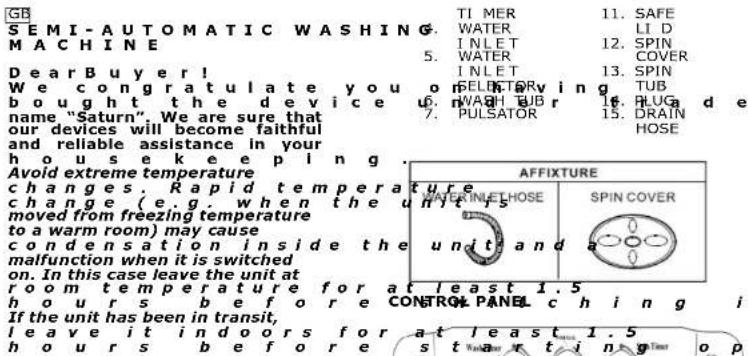
NAME OF PARTS
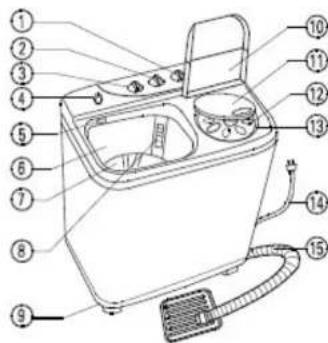
Above diagram is for reference purpose only. It might differ from actual model/design, but indications (1-15) are similar for all models.
- SPIN
TI MER
- FUNCTION
SWIT CH
-
WASH
-
LINT
FILTER
-
BASE
-
SPIN
TUB LID

- Wash Timer
Wash timing bet for selection before washing clothes.
- Function
a. Gentle Wash: For light laundry and soft material.
b. Normal Wash: For all types of materials and laundries.
c. Drain: To release water from the tub.
- Spin Timer
Select Spin timing between 1-5 minutes depending on the laundry materials and load.
SAFEGUARDS
- Do not install the Washer in bathroom or other humid place to prevent from causing malfunction or accidents.
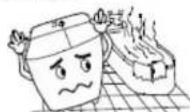
- Do not install the Washer on an inclined or bumpy place and keep away from the wall for at least 2 cm.

- Never put your hands into the operation to prevent from causing injury.

- Keep the washer in a place, which avoid direct sunlight.

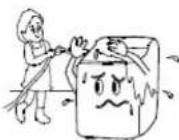
- Do not pour water on the Control I enaP shock circulted.
a a
- Do not allow children to play with the W W
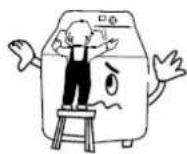
- Do not use water hotter than 50°C. It may change the shape of the plastic parts in the washer and cause malfunction.

- Do not put carpet or soft object below the Washing Machine to block the Air ventilation.

- Do not put flammable/inflamed items near the washer or lit cigarettes, as well as sharp/heavy objects on top of the washer.
CAUTION
- The machine should be connected to a single phase socket, reliable earth connection.
- Please use the socket, which rated electric current is higher than I alone.
- Please do not cut, twist, damage the power cord or hang heavy thing on it, to prevent power supply from cutting off and avoid hazard.

- Please do not pull out the plug from the power supply socket by wet hand, when cleaning the machine.
- This appliance is not intended for use by persons with reduced physical, sensory or mental capabilities, or lack of experience and knowledge, unless they have been given supervision or
appliance by a person responsible for their safety. Children should be supervised to ensure that they do not play with the appliance. 6. If the power cord is damaged, it must be replaced by the manufacture of its service agent or similarly qualified persons in order to avoid hazard.
SPECIAL ATTENTION
- Please wash the light color clothes and dark color clothes separately.

- Please wash too dirty clothes alone.

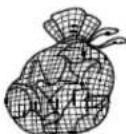
- Please remove coins and sharp objects from clothes before washing.

- Please turn socks inside-out when washing.

- Do not wash or dry any clothes containing petrol or alcohol.

- Please place small items and knitted items in a washing net before washing.
PREPARATION
- Insert the inlet hose to the water inlet and ensure the other end is connected to the tap.
- Ensure the drain hose is placed at the drain outlet.
- Plug the power cord on the power supply socket.
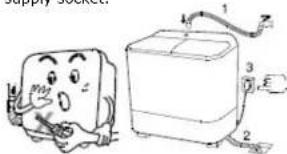
ehNote: I must be replaced by an authorized service agent or a qualified professional in order to avoid hazard.
Laundry Guide
| Type of Fabric | Wash Load | Water Level | Wash Timing | Spin Timing |
| Cotton and Linens | Full | High | 8-12 mins | 4-5 mins |
| Half-Less | Mid-Low | 5-10 mins | 3-4 mins | |
| Nylon and Polyester | Full | High | 4-5 mins | 2 mins |
| Half-Less | Mid-Low | 2-3 mins | 2 mins | |
| Delicates | Half-Less | High | 2-3 mins | 1-2 mins |
RECOMMENDATION
Wash →Spin-dry →Rinse →Spin-dry →Rinse →Spin-dry yldab setarbiv but nips
:teb s'止
clothes neckline, cuffs with a small amount of detergent before washing.
-
With warm water in a container before putting into the tub.
-
Use the special fabric detergent to wash the fine fabric clothes. f f e r 40 F wash after 1 minute, let the laundry soak for 15 minutes before continuing the process.
- Use minimum water level for washing, increasing the water level during the rinsing process, thus allowing cleaning effect.
WASHING INSTRUCTIONS
BH
a. Set the "water inlet selector" to "wash" position. b. Turn "Function" to norm. c. Turn on the tap and fill up water until the selected level, then turn the tap off. d. Pour detergent into waste. e. Load the laundry into the first. Set the wash and the machine will start washing. g. Transfer the washed lau wash tub to the spin tub after done. h. Turn "Function" to "Drain" to empty the wash tub.
出
* To save lime and water, spin-dry the laundry before rinsing * a. Set the "water inlet selector" to "wash", fill-up water until the selected water level, then turn off the tap. b. Transfer the spin-dry to wash tub.
c. Set "Wash timer" to 5 minutes and start rinsing
d. After rinsing, trans tub and spin-dry for 1-2 minutes (If the rinsed water is dirty, please drain it and repeat the step a and b till water is clean).
* Rinse Option (a) You may rinse laundry with the tap on until the water is clean. (b) Then transfer laundry to spin tub to spin-dry.

A. Place the rinsed clothes e spin tub and cover with the spin cover. B. Close the safe lid and the s C. Turn the "Spin Timer" to selected timing and spin day starts
timing and spin dry starts.
NOTE:
please turn off the "spin and spread the clothing evenly once the tub has stopped spinning. 2. T ur n o f machine when not in use.

CAUTION
- Please do not put the raincoat, wind breaker, and waterproofed clothing into the spin tub for spin drying.
- Please put the clothing equably and compactly before spin drying.
- Please do not put your hand into the tub when the spin tub is running.

a. Place the drain hose into the drain outlet on the floor before draining. b. Turn "Function" to "Drain" after washing process and drain water from wash tub. c. When spin-drying, close the spin tub cover, set the spin timer to selected time, place the drain hose into drain outlet on the floor, set the "Function"octed the "Drain" position, then the water is drained in
THE CLEANING METHOD OF FILTER
(If do not clean the filter, it will influence the filtering effect).
- Pull the filter out from the slot on the wash tub.
- Open the filter, clean the dust gauze with water and ge the crumbs.
- Close the filter, insert the filter nd b/acka &b the slot on the v

flowchart
graph TD
    A[" Dry to spin "] --> B[" Step ② "]
    B --> C[" Step ③ "]
    C --> D[" venting in the "]
    D --> E[" Washing Machine (washing box)"]
TROUBLE SHOOTING
| Problem | Reason | ### |
| TimerewfThe pulsator can not rotate | psupply cut-off orswitchturn d off | Check powersupply/T u r switch u |
| T r arbelt bur | A srs e msbl the transmission belt | |
| Pulley belt is loose | Tighten the belt | |
| BulsatordwomeR blocked something: t herruc d | : r bvlockage neuqer F of | |
| The pulsator rotatesblowtytion | Belt is lo#se rBELt or replace it | |
| The motors screw is loose | Tighten the belt and screw | |
| TimeAbnorm noise and vibrati | The clothes anlthe spin-dry tub unbalanced | Place the clothes leven ly |
| rid of | There is v omeR something between pulsator the wash tub | the and |
| Wateaking | rW a s h not | tigteb it i |
| from w a tightened tub | ||
| Spin-d r tub is not rotating | Switch contact is loose | Adjust the contactor or the switch |
| Spin-d ry tub's screw or shaft coupling is loose | Tighten the screw | |
| Spin lined ame tub's shaft is twisted by external material | External material | |
| Brake dragline loose n | Tighten the disagree t h | |
| The spin-tub is not dr jain isn | Sto im eel home drops go st we en spin-tub and out basket | then |
| • Attention: If above p not be solved, please call qualified repair pers o | ||
Technical Data:
ewo P 360W Rated Voltage: taR 50Hz taR 1.6A Maximum Capacity: 4,5kg
Semi-automatic washing m with warranty book 1 P 1
ENVIRONMENT FRIENDLY

You can help protect the
environment! Please remember to respect the local regulations: hand in the non-working electrical equipment to an appropriate
waste disposal center. The manufacturer reserves the right to change the specification and design of goods.
RU
Вышеуказанная схема
The image is too blurry to recognize any text content.
The source image is illegible due to extreme pixelation and distortion. No characters, symbols, or punctuation can be reliably identified. Therefore, no valid OCR text can be generated that matches the visual content of the source image.
The source image is illegible due to extreme pixelation and distortion. No characters, symbols, or punctuation can be reliably identified. Therefore, no valid OCR text can be generated that matches the visual content of the source image.
natural_image
Cartoon illustration of a smiling cheese next to a rectangular toaster with three labeled parts (no text or symbols on the main objects)
ПАНЕЛЬ КЕРУВАННЯ
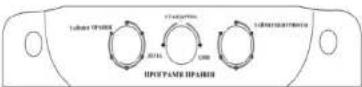
1. Таймер прання
INTERNATIONAL M A N U F A C Y T N A R R A W
The Warranty is provided for the period of 2 years of Right of the country where the appliance was bought provides for a greater minimum warranty period.
All terms of warranty comply with to the Law on Protection of the Consumer Rights and are governed by the legislation of the country where the The warranty and free of charge repair are provided in any cou delivered to by Saturn Home Appliances or authorized representative thereof, and where
no restriction of import or services and tree of charge repair. A P A H T H
Cases uncovered by the warranty and free of charge repair:
-
Guarantee coupon is filled in improperly.
-
The product has become inoperable because of the Buyer's nonobservance of the service regulations indicated in the instruction.
-
The product was used for professional, commercial or industrial purposes (except for the models, specially intended for this purpose that is indica 4. The product has external mechanical damage or damage caused by penetration of the liquid inside, dust, insects and other foreign objects.
-
The product has damages caused by non-observance of the rules of power supply from batteries, mains or accumulators.
-
The product was exposed to opening repair or modification of design by the persons, unauthorized to repair; independent cleaning of internal mechanisms etc. was made.
-
The product has natural wear of parts with limited service life, expendables etc.
-
The product has deposits of scale inside or outside of fire-bar elements, irrespective of used water quality.
-
The product has damages caused by effect of high (low) temperatures or fire on non-hicatrecZisAtaRtUpaktsAofthcp
-
The product has damages of accessories and nozzles which are included into the complete set of product shipment (filters, grids, bag scaling rings, graters, disks, plates, tubes, hoses, brushes, and also power cords, headphone
.) . cte sdroc
On the warranty service and repair, please contact the authorized service centers of Saturn Home Appliances.
CZ
MEZINÁRODNÍ ZÁRUKA
When purchasing the product,
please require its checking before you;
B E S U R E
that the goods sold to you, are functional and complete
and that the warranty coupon is filled in correctly.
This warranty coupon confirms the absence of any defects in th and provides for free of charge repair of the product failed through manufacturer throughout the period of warranty service and free of charge repair.
Failing the presentation of this coupon, in case of its improper filling in, in factory seals (if any), and also in cases not accepted, and no warranty service and free of charge repair is made!
The warranty coupon is valid only in the original copy with the organization, signature of the seller,
CZ
ZÁRUČNÍ LIST
Při koupivýrobku
Buyer's Signature confirming the acquaintance and consent with conditions
of free of charge maintenance service of the product, and absence of the
no stnialpwc
- CAUTION
- SPECIAL ATTENTION
- PREPARATION
- RECOMMENDATION
- WASHING INSTRUCTIONS
- BH
- 出
- THE CLEANING METHOD OF FILTER
- Technical Data:
- ENVIRONMENT FRIENDLY
- The source image is illegible due to extreme pixelation and distortion. No characters, symbols, or punctuation can be reliably identified. Therefore, no valid OCR text can be generated that matches the visual content of the source image.
- Таймер прання
- INTERNATIONAL M A N U F A C Y T N A R R A W
- MEZINÁRODNÍ ZÁRUKA
- ZÁRUČNÍ LIST
Brand : Saturn
Model : ST-WM0612
Category : Washing machine