
AWE81US - Laptop cooler TARGUS - Free user manual and instructions
Find the device manual for free AWE81US TARGUS in PDF.


| Product Type | Laptop Cooler |
| Brand | Targus |
| Model | AWE81US |
| Compatible Laptop Sizes | Up to 15.6 inches |
| Dimensions (W x D x H) | 14.5 x 10.2 x 1.5 in |
| Weight | 1.2 lbs |
| Power Source | USB (5V, 0.5A) |
| Fan Speed | Single fan, 1200 RPM (adjustable) |
| Noise Level | ~25 dBA |
| Material | Plastic with mesh surface |
| Ergonomic Design | Raised typing angle |
| Additional Features | Anti-slip pads, LED indicator |
| Cleaning Instructions | Wipe with dry cloth; avoid liquids |
| Safety Cautions | Do not cover vents; use on hard surface |
| Spare Parts Availability | Contact Targus support for replacements |
| Repair Information | No user-serviceable parts; professional repair recommended |
| Warranty | Limited 1-year warranty |
| Package Contents | Cooler, USB cable, user manual |
Frequently Asked Questions - AWE81US TARGUS
User questions about AWE81US TARGUS
0 question about this device. Answer the ones you know or ask your own.
Ask a new question about this device
Download the instructions for your Laptop cooler in PDF format for free! Find your manual AWE81US - TARGUS and take your electronic device back in hand. On this page are published all the documents necessary for the use of your device. AWE81US by TARGUS.
USER MANUAL AWE81US TARGUS
Thank you for your purchase of the Targus Chill Mat Plus with 4-Port USB Hub. It keeps your laptop cool, plus provides additional USB ports to connect your peripherals. The adjustable height lets you choose from a variety of angles. Use it flat with just your laptop, or use it at the highest setting with an external keyboard.
Features
• 2 USB powered fans
• Integrated 4-port USB 2.0 hub
- Adjustable angle, from flat to 4" high
System Requirements
- USB 1.1/2.0 compliant port
To Use the Chill Mat
- Place the Chill Mat on a surface, such as a table.
- Position your laptop on top of the Chill Mat.
- If you have purchased the optional AC power adapter, connect one end into the Chill Mat's DC port and the other end into the power outlet.
- Connect USB cable into an available USB port on your laptop computer.
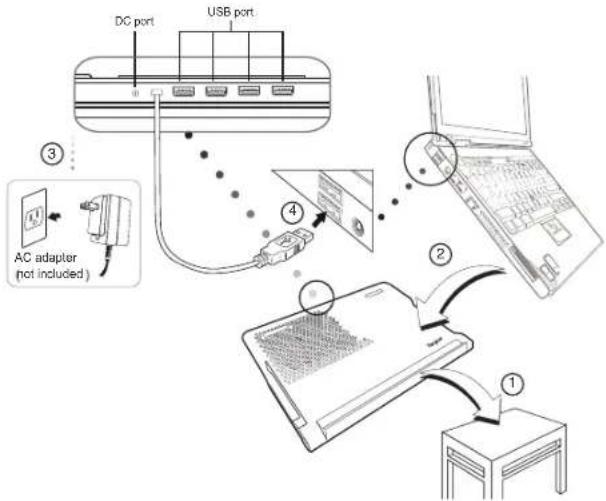
NOTE: If there's insufficient power after connecting USB devices to the Chill Mat, you may purchase and use the separately sold AC Adapter (Targus model number APA09USZ) on www.targus.com to provide more power to the USB devices.
WARNING: KEEP ALL ITEMS, SUCH AS LOOSE CLOTHING AND JEWELRY, AND LONG HAIR AWAY FROM THE FANS TO AVOID POSSIBLE PERSONAL INJURY OR DAMAGE TO THE CHILL MAT OR YOUR LAPTOP.
Technical Support
For technical questions, please visit:
US Internet: www.targus.com/support.asp
Australia Internet: www.targus.com/au
Email: infoaust@targus.com
Telephone: 1800-641-645
New Zealand Telephone: 0800-633-222

FCC E
Microsoft, Windows, and Windows Vista are either registered trademarks or trademarks of Microsoft Corporation in the United States and/or other countries. All trademarks and registered trademarks are the property of their respective owners. All rights reserved. Features and specifications are subject to change without notice. © 2013. Targus Group International, Inc. and Targus, Inc., Anaheim, CA 92806 USA
1 YEAR LIMITED WARRANTY: We pride ourselves on the quality of our products. For complete warranty details and a list of our worldwide offices, please visit www.targus.com. Features and specifications are subject to change without notice. All trademarks and registered trademarks are the property of their respective owners. ©2013 Targus Group International, Inc.
Product Registration
Targus recommends that you register your Targus accessory shortly after purchasing it. Go to:
http://www.targus.com/registration.asp
You will need to provide your full name, email address, country of residence and product information.
ONE YEAR WARRANTY
- Targus warrants to the original purchaser that its products are free from defects in materials and workmanship for one year. This warranty is limited to defects, materials and workmanship. 2. The benefits to the consumer given by the warranty are in addition to other rights and remedies of the consumer under law in relation to the goods to which the warranty relates. 3. The warranty is given by (i) Targus Australia, (ii) Targus Australia's business address is: 117-119 Bowden Street, Meadowbank, NSW 2114 Australia, (iii) Targus Australia's telephone number is 1800 641 645, Email: infoaust@targus.com (iv) To make a warranty claim for goods purchased in New Zealand, the telephone number is: 0800 633 222, or the goods may be returned to the supplier in New Zealand. 4. What the purchaser must do to entitle the purchaser to claim warranty:-(i) The purchaser must call the telephone number for Australia or New Zealand set out above, (ii) The purchaser must provide the purchaser's name, daytime contact number, business hours delivery address, the Targus model number on the product, date and place of purchase with receipt for purchase if required, and describe the fault condition. 5. What Targus must do:-(i) Targus will provide the purchaser with store return information or a return authorisation so that the purchaser may return the product for warranty inspection, (ii) If after inspection Targus finds the product is defective in materials or workmanship, Targus shall replace (or repair) the defective product at the discretion of Targus and ship the product from Targus warehouse at its expense within three business days (Monday to Friday excluding public holidays) of receiving the returned goods. If the product is no longer available Targus reserves the right to replace with the nearest corresponding product of no lesser quality, (iii) Targus will bear the cost of return delivery to the purchaser regardless of the inspection test result. The purchaser must bear the cost of the delivery to Targus. There is no charge for inspection. 6. Our goods come with guarantees that cannot be excluded under the Australian Consumer Law. You are entitled to a replacement or refund for a major failure and for compensation for any other reasonable foreseeable loss or damage. You are also entitled to have the goods repaired or replaced if the goods fail to be of acceptable quality and the failure does not amount to a major failure. 7. Please note: (i) Features and specifications of all Targus products are subject to change without notification, (ii) In some instances: Goods presented for repair may be replaced by refurbished goods of the same type rather than being repaired. Refurbished parts may be used to repair the goods, (iii) If goods accepted for repair retain user-generated data: During the process of repair some or all of your stored data may be lost. Please ensure that you have saved this data elsewhere prior to repair.
Regulatory Compliance
This device complies with Part 15 of the FCC Rules. Operation is subject to the following two conditions: (1) This device may not cause harmful interference, and (2) This device must accept any interference received, including interference that may cause undesired operation.
FCC Statement
Tested to Comply
This equipment has been tested and found to comply with the limits of a Class B digital device, pursuant to Part 15 of the FCC Rules. These limits are designed to provide reasonable protection against harmful interference in a residential installation. This equipment generates, uses, and can radiate radio frequency energy and if not installed and used in accordance with the instructions, may cause harmful interference to radio communications. However, there is no guarantee that interference will not occur in a particular installation. If this equipment does cause harmful interference to radio or television reception, which can be determined by turning the equipment off and on, the user is encouraged to try to correct the interference by one or more of the following measures:
• Reorient or relocate the receiving antenna;
- Increase the separation between the equipment and receiver;
- Connect the equipment into an outlet on a circuit different from that to which the receiver is connected;
- Consult the dealer or an experienced radio/TV technician for help.
Changes or modifications not authorized by the party responsible for compliance could void the user's authority to operate this product.
User Guide
AWE81US / 410-2523-001B
Brand : TARGUS
Model : AWE81US
Category : Laptop cooler