CLT-9911 - Cordless phone SANYO - Free user manual and instructions
Find the device manual for free CLT-9911 SANYO in PDF.


User questions about CLT-9911 SANYO
0 question about this device. Answer the ones you know or ask your own.
Ask a new question about this device
Download the instructions for your Cordless phone in PDF format for free! Find your manual CLT-9911 - SANYO and take your electronic device back in hand. On this page are published all the documents necessary for the use of your device. CLT-9911 by SANYO.
USER MANUAL CLT-9911 SANYO
Congratulations on your purchase of this Sanyo cordless telephone.
Your Sanyo 900-MHz cordless telephone is a fine-
quality home communications product. It is carefully
consumer and industrial electronics equipment . With
consumer and industrial electronics equipment . Withproper maintenance and care , it will provide you with
years of enjoyment and convenience.
Main Features
900-MHz Technology
Extended Range - The use of 900-MHz frequency for signal transmission between base and handset
means greater communication range compared to
means greater communication range compared toconventional 43 - 49 MHz cordless telephones .
Ultra-Low Noise -The high frequency communication
has also significantly reduced noise level. 40-Channel Auto/Manual Scan - Your new telephone
40- Channel Auto/Manual Scan - Your new telephone
uses one of 40 channels in the 500-mHz frequency band. It automatically selects a clear channel every
Replacement Battery Order Form
Modular jack
reduction technology now filters out more
background noise.
10-number speed dial memory
- Lighted keypad (CLT-9916 only)
Ringer on/off switch
Voice man waitng indicator Walkman table
- Belt clip (CLT-9916 only)
*Important:
Reuires a subscription to digital voice mail box provided by your local telephone company.
When you place the handset in the base, the unit
SANYO Canada Inc.
www.sanyocanada.com

GETTING STARTED
Checking the package contents
Make sure your package includes the items shown
here.
Base
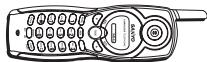
Handset

means greater communication range compared to
Conventional 48 - 46 min/20 seconds telephone: Ultra- Low Noise - The high frequency commu
has also significantly reduced noise level.
40-Channel Auto/Manual Scan -Your new telephone
uses one of 40 channels in the 500-mHz frequency band. It automatically selects a clear channel every
time you receive or place a call on the handset.
COMPANDER PLUS Noise Reduction
This fourth generation of the Sanyo's original noise
background noise.
10-number speed dial memory
-
Lighted keypad (CLT-9916 only)
-
Ringer on/off switch
voice man waiting indicator"
- Belt clip (CLT-9916 only)
*Important:
telephone company.
verifies its security code. After a power outage or battery replacement, place the handset in the base for about 20 seconds to reset the code.
INSTALLATION
Coneonns
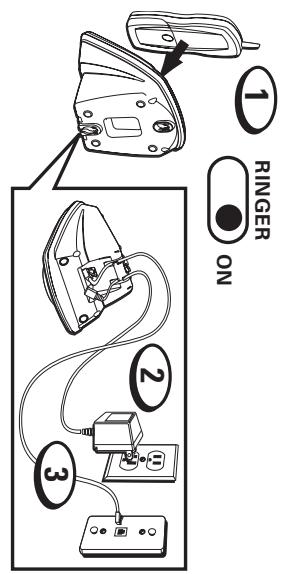
ON and place the handset in the base. Plug the AC adaptor into the POWER 9V DC jack on the bottom of the base and the other end into an electrical outlet. The VOICE MAILCHARGE/ IN USE indicator lights, verifying the battery is charging.
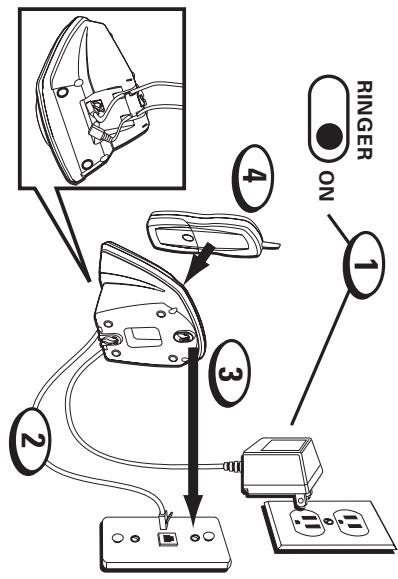
o 120000000000000000000000000000000000000000000000000000000000000000000000000000000000
3. Plug the telephone line cord into the PHONE LINE Jack on the bottom of the base and into a modular
caenee eaeenee aeeenee aeenee eaeenee aeeenee aeeenee aeeenee aeeenee aeeenee aeeenee aeeenee aeeenee aeeenee aeeenee aeeenee aeeenee aeeenee aeeenee aeeenee aeeenee aeeenee aeeenee aeeenee aeeenee aeeenee aeeenee aeeenee aeeenee aeeenee aeaee
Charee eae aee 12 1000
e aee
Note: The phone automatically defaults to touch tone
aannnne aannnnnne nnnnne annnnnne eannnnnne
Mounnnnae on a wall
Do not attempt to wall-mount the phone before initial 12-hour charging is completed.
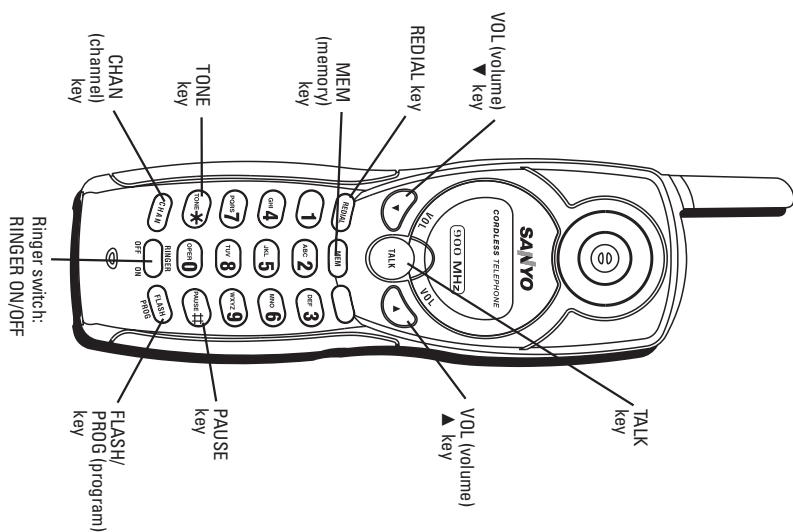
Receiving a call Press TALK.
Ringer switch
While talking, press VOL keys ( and ) to control the receiver volume.
There are four volume levels. Press to in the volume level, and press to decrease.
Making a call
Redialing a call
Press TALK before you dial and press it again to hang up.
Press TALK and then REDIAL to redial the last
number you dialed (up to 32 digits). If you get a busy signal, and want to keep dialing the number, just
phone off and back on).
FLASH key
USE FLASH/PROG key to use special calling
TONE/PULSE setting The dialing mode of yo
The RINGER switch must be ON for the handset to ring during incoming calls.
The claim at factory.
To change it to PULSE mode:
1. Make sure the phone is off (not in TALK mode).
2. Press FLASH/PROG twice.
- Lights when the handset is being charged in the base
-
Press number 2 key to select FULSE 4. Press FLASH/PROG twice to confirm.
-
Lights when the handset is in use.
Voice mail
When you subscribe to a voice mail service offered
CHARGE/IN USE indicator on the base flashes to
indicate there is voice mail waiting. After the voicemail has been reviewed , the indicator stops flashir
This indicator does not work with your answering
Note: The phone will only work with an FSK type of
Tone type of VMWI system.
CHAN (Channel) key
channel to get rid of static while talking.
Temporary tone
This feature enables pulse (rotary) service phoneyears to access touchline services offered by hplo
users to access touch-tone services offered by bankcredit card companies , etc .
- Call the bank's information line.
Handset locater
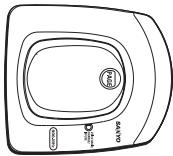
Press PAGE on the base. The handset beeps continu
Press PAGE on the base. The handset beeps continuously for about two minutes until
Note: The RINGER switch does not have to be ON for
this feature to work.
- Hang up when finished. The phone returns to pulse (rotary) service.
Handset locatorThis feature helps locate a misplaced handset
This feature helps to locate a misplaced handset .Process PACE on the base . The handset keeps rotating
key on the handset. Press PAGE to cancel.
4. Hang up when finished. The phone returns to pulse (rotary) service.
- Hang up when finished. The phone returns to pulse
Handset locater
Handset locatorThis feature helps locate a misplaced handset
This feature helps to locate a misplaced handset.
(rotary) service.
(rotary) service.
Handset locater
Handset locatorThis feature helps locate a misplaced handset
This feature helps to locate a misplaced handset.
Handset locater
Handset locatorThis feature helps locate a misplaced handset
This feature helps to locate a misplaced handset.
transaction.
transaction.
transaction.
4 . Hang up when finished . The phone returns to puls
4 . Hang up when finished . The phone returns to puls
4 . Hang up when finished . The phone returns to puls
4 . Hang up when finished . The phone returns to puls
4 . Hang up when finished . The phone returns to puls
4 . Hang up when finished . The phone returns to puls
- Press TONE after your call is connected
- Follow the voice instructions to complete your
- Call the bank's information line. 2. Check TONE, for a call back.
- Press TONE after your call is connected
- Follow the voice instructions to complete
- Follow the voice instructions to complete your
- Follow the voice instructions to complete your
- Call the bank's information line. 2. Check TONE, for a call back.
- Press TONE after your call is connected.
- Follow the voice instructions to complete your
- Follow the voice instructions to complete your
- Follow the voice instructions to complete your

CLT-9911-16E 3/14/03 3:40 PM Page 4
SPEEDDIAL
Store up to 10 numbers in the speed dial memory for quick dialing. The number can be up to 24 digits.
Storing a number in the memory 1. Make sure the phone is off (not in TALK mode).
- Press MEM.
-
Press the desired memory location (0 through 9
-
Press the desired memory location (0 through 9)
-
Press MEM twice.
-
Use the number keypad to enter the telephone number you want to store (up to 24 digits).
-
Press MEM again to store the number. You will hear a confirmation tone.
You will hear a confirmation tone. Changing a stored number
-
Repeat steps 1 through 5 in Storing a number in the memory.
-
Press MEM twice to replace the current number
tone.
Storing last-dialed number 1. Repeat steps 1 through 4 in
memory. 2.Press REDIAL.
- Press MEM twice to store hear a confirmation tone.
Making calls from the memory 1. Press TALK.
-
Press MEM.
-
Press number (0 - 9) for the desired memory
The number is dialed automatically.
Inserting a pause in the dialing sequence
Press PAUSE twice within one second to insert a delay in the dialing sequence of a telephone number when a pause is needed to wait for a dial tone. For
example after you dial 9 for an outside line, or to wait for a computer access tone. Each pause counts as 1 digit in the dialing sequence. - Press number (0 - 9) for the desired memory location.
Chain dialing from the memory
Use this feature to make calls that require a sequence of numbers such as using a calling card for a frequently called long distance number. You can dial
each part of the sequence from a different memory location. The following example shows how you can chain dial to make a call through a long distance
The Number for: Memory Location
Long distance access number 7
Authorization code 8
Frequently called long distance number
-
Make sure the phone is on.
-
When you hear the access tone, press MEM again
-
When you hear the access tone, press MEM again
and then press 6. 4. At the next access tone, press MEM and then 9.
Tip: Wait for the access tones between pressing
- Press MEM twice to store a new confirmation tuple
1
Making calls from the memory 1. Press TALK
Signal:
A long warbling tone:
Signals an incoming
Two long beeps: Confirmation tone
One short and one long beep: Page signal
One short beep every 7 seconds: Low battery warning
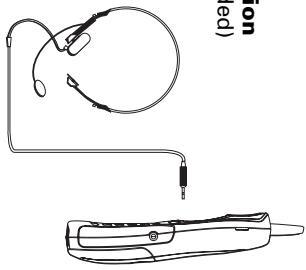
HEADSET JACK AND BELT CLIP
(CLT-9916 only)
Headset connection (Headset not included)
Caution
- Use only the specified battery type (3.6V, 600mAh).
-
Do not remove the battery from the handset to
-
Never throw the battery into a fire, disassemble it.
or heat it.
-
Do not remove or damage the battery casing.
-
Remove battery if storing the phone over 30 days.
Make sure the telephone is off before
you replace the battery.
-
Slide off the battery compartment
-
Disconnect the battery plug from the
-
Disconnect the battery plug from the lid in the compartment and remove
the battery.
- Insert the new battery and connect the card into the cell.
the cord into the jack.
back on.
- Place handset on the base to charge.
Note: If the handset battery is removed for more than 5 minutes, the speed dial
be erased.
Charge the handset battery for 12 cont
prior to first use.
Caution: To reduce the risk of fire or personal injury,
use a 3.6v, 600 mAh battery. Replacement part number: GES PCF03
Power Failure
During the period that the power is off, you will not
be able to make or receive calls with the telephone.
After a power outage, place the handset in the b
for about 20 seconds to reset the digital security code.
Note: Repeated short charges may cause memory effect in the battery, which reduces use time of the
battery. It is recommended not to replace the handset to the base unit after each call.
RECYCLING NICKEL-CADMIUM BATTERIES
Please take your used battery to a store that recycles Ni-Cd batteries.
MAINTENANCE
guidelines:
- Avoid putting the phone near heating appliances
and devices which generate electrical noise (for example, motors or fluorescent lamps).
-
Do not expose to direct sunlight or moisture.
-
Avoid dropping and other rough treatment of the
Clean with a soft cloth
- Clean with a soft cloth
powder because this will damage the finish.
- Retain the original packaging in case you need
ship the phone at a later date.
Causes of poor reception
- Foil backing on insulation
Heating ducts and other m
The phone is too close to appliances such as
microwaves, stoves, computers, etc. 1. Atmospheric conditions, such as strong storms
- Atmospheric conditions, such as strong storms.
- Base is installed in the basement or lower floor of
the house.
microwaves, stoves, computers, etc. Atmospheric conditions such as strong stero
- Atmospheric conditions, such as strong storms.
- Base is installed in the basement or lower floor of
the house.
- Base is plugged into an AC outlet with other electronic devices.
Baby monitor is using t - Baby monitor is using the same frequency.
- Base is plugged into an AC outlet with other electronic devices.
Handset is out of range of the base.
Clean with a soft cloth Never use a strong cle
powder because this will damage the finish.
- Retain the original packaging in case you need to
ship the phone at a later date.
Causes of poor reception
Causes of poor reception Aluminum siding
- Foil backing on insulation
Heating ducts and other m
-
The phone is too close to appliances such as
-
Baby monitor is using the same free
- Handset battery is low.
- Handset is out of range of the base.


TROUBLESHOOTING
VOICE MAIL/CHARGE/IN USE indicator flashes
- When you subscribe to a voice mail service
MAIL/CHARGE/IN USE indicator on t
base flashes when the phone is not in use to
indicate there is a voice mail waiting. It stops flashing after the voice mail has been
reviewed.
No dial tone
tone
- Is the AC adaptor connected to a working
outlet? In the talonbone line cord connected to the
base and the wall jack?
- Disconnect the base from the wall jack and connect another phone to the camera incl.
If there is no dial tone in the second phone
the problem might be your wiring or localcarriage.
Is the handset out of range of the base?
Make sure the battery is properly charged
(12 continuous hours).
Is the battery installed correctly?
Does the handset beep when you press TALK? The battery may need to be cha
Dial tone is OK, but cannot dial out
programmed correctly.
Handset does not ring
Make sure the RINGER s
handset is turned to ON. You may have too many extension ph
. You may have too many extension prson your line . Try unplugging some rh
See solutions for No dial tone.
See solutions for No dial tone.
You experience static, noise or fading in and out
- Change channels,
Move closer to the base.
-
Does the base need to be relocated?
-
Charge battery.
-
Make sure base is not plugged into an outlet with another household appliance.
with another household appliance.
Handset beeps
the security code. If that doesn't work,
charge battery for 12 continuous hours
Clean charging contacts on handset and
base with a soft cloth, or an eraser.
See solutions for No dial tone.
- Replace battery.
Dialing from memory
- Did you follow proper dialing sequence?
- Did you follow proper channeling sequence? Make sure the torque/rule setting is
from memory
Make sure the tone/pulse setting is programmed correctly.
programmed correctly.
- Did you reprogram me?
outage or battery replacement?

TECHNICAL INFORMATION
REN Number:
The Ringer Equivalence Number (REN) assigned to each
number of terminals allowed to be connected to a telephone
The BEN number of this phone is located on the bottom of
the base unit. The termination on an interface may consist of any combination of devices subject only to the requirement
that the sum of the Ringer Equivalence Numbers of all the devices does not exceed 5.
CAUTION
in other countries may violate local laws.
Cordless telephones use radio frequencies to allow mobility.
This affects
1: NOISE Electrical
Electrical pulse noise is present in most homes at one time oranother . This is most intense during electrical storms . Certain
kinds of electrical equipment, such as light dimmers, fluorescent bulbs, motors, fans, etc., also generate puls
noise.
Because radio frequencies are susceptible to this, you occasion beer pulses, being through the handout. This is
usually only a minor annoyance and interpreted as a defect of the phone.
- RANGE
Because radio frequencies are used, the location of the base
station can affect the operating range of the phone. If several locations and choose the one that gives the clearest
signal to the handset. (Turning in a circle while holding the handset may also increase the operating range.)
- INTERFERENCE
Electronic circuits activate a relay to connect the unit to yourtelephone line . These electronic circuits operate in the radio
frequency spectrum. While several protection circuits are
used to prevent unwanted signals, there may be periods when these unwanted signals enter the base station. You may
hear click or hear the relay activate when you are not using the cordless handset. If this occurs frequently, you can
the cordless handset. If this occurs frequently, you can minimize or eliminate the problem by lowering the height of the base station or relocating the base station. It may also be
helpful to change the operating channel and/or the security code setting.
literature accompanying the product.
The exclamation point within an equilateral triangle is intended to alert the user to the presence of important operating and maintenance (servicing) instructions in the
Users should not attempt to make such connections themselves, but should contact the appropriate electrical inspection authority, or electrician, as appropriate.
CAUTION
lines and internal metallic water pipe system, if present, are connected together. This precaution may be particularly important in rural areas.
The user should ensure for his own protection that the electrical ground connections of the power utility, telephone
telecommunications company cause to request that the user disconnect the equipment.
supplier. Any repairs or alterations made by the user to this equipment, or equipment malfunctions, may give the customer an incentive to purchase the product.
Repairs to certified equipment should be made by an authorized Canadian maintenance facility designated by the
conditions may not prevent degradation of service in some situations.
customer should be aware that compliance with the above conditions may not prevent degradation of service in some
situations.
b. Communications prod
b. Communications products purchased in a used condition
b. Communications products purchased in a used condition.
b. Communications products purchased in a used condition.
b. Communications products purchased in a used condition.
b. Communications products purchased in a used condition.
b. Communications products purchased in a used condition.
a. Communications products purchased outside Canada. b. Communications products purchased in a used condition.
WHAT IS NOT COVERED? a. Communications pre
WHAT IS NOT COVERED? a. Communications pre
WHAT IS NOT COVERED? a. Communications pre
WHAT IS NOT COVERED? a. Communications pre
WHAT IS NOT COVERED? a. Communications pre
WHAT IS NOT COVERED? a. Communications pre
WARNING: Changes or modifications not expressly approved by SANYO could be said the user's authority to operate the
adaptor.
WARNING: Changes or modifications not expressly approved.
This symbol on the product is used to identify the following important information. Use only with specified SANYO power.

THE SANYO COMFORT WARRANTY
equipment.
WARNING: Changes of modifications do not expressly apply by SANYO could void the user's authority to operate the
import adaptor.
You, the original retail purchaser, are responsible for any costs of TRANSPORTING the product to and from SANYO
Canada Inc. or to an authorized Sanyo Service Depot when you make a claim under this warranty.
You, the original retail purchaser, must present your original, dated bill-of-sale together with this warranty to SANYO
j. Damage caused by lightning and power surges. ORIGINAL RETAIL PURCHASER'S RESPONSIBILITY
- Damage due to improper maintenance, accident, abuse, misuse or negligence.
g. Accessory items including antenna, and batteries, h. Damage in or due to transportation.
e. Problems due to product set-up and installation. f. Adjustments that are outlined in the Operating Manual.
Regulatory approvals.
d. Communications products not intended for Canadian usage or products without appropriate Canadian
c. Communications products purchased from non Sanyoauthorized dealer.
remaining portion of the warranty period.
workmanship. Replacement PARTS are warranted for the
at our option, replace a communications product which shows evidence of a manufacturing defect in materials or

Canada Inc. or an authorized Sanyo Service Depot. You alsorecognizable for the cost of a MAINTENANCE
are responsible for the ct in respect of the product.
WARRANTY BECOMES V
This warranty becomes void if the product's serial numbers
other than by SANYO Canada Inc. or by an authorized Sanyo
LIMITATIONS
a. SANYO Canada Inc. reserves the right to change or
Improve the design of the model of the product whereunder without incurring any obligation to make
modifications to or to install any improvement in or on the
product. b. In no event shall SANYO Canada Inc. or any of its
Authorized Dealers be liable for special or consequential damage arising from the use of this product.
STATUTORY WARRANTY
The above provisions do not preclude the operation of any applicable provincial statutes which in certain circumstances
may not allow some of the limitations and exclusions
described in this way. Where any term on the domain are prohibited by such a statute, they shall be deemed null
and void but the remainder of this warranty shall remain in effect.
HOW TO OBTAIN WARRANTY SERVICE
Please contact the Sanyo Authorized Dealer from whom the product was purchased, or contact us directly at:
SANYO Canada Inc.
1-300 Applewood Cres. Concord, Ont. L4K 5C7
(905) 760-9944
1-800-263-2244
Printed in China
SOS HELP LINE
NATIONWIDE CUSTOMER SUPPORT
product specialists will quickly answer your quabout setup and use of Sanyo telephone prodd
call toll free from anywhere in Canada to connect to ouronline CCG . Contact us at: 1-
no-charge, SOS support and service network:
1,800,263,2244
between 8:30 am - 7:00 pm EST
Or visit our website at www.sanyoservice.com, and click the Customer Relations button to get access to our FAQ's (Frequently Asked Questions) and other helpful features.
you're stuck. Now with SOS, all that's necessary is a quick call from your home for product assistance.
HASSLE FREE EXCHANGE
Should your Sanyo telephone require servicing due to a
Manufacturing defect during the warranty period; SANT Canada will ship prepaid a replacement unit* within two
business days after receiving your defective unit. Consumers are responsible for the shipping costs of the
unit back to Sanyo.
- For older, non-current models, replacement units may not be available, in which case our regular warranty conditions will apply.
GUARANTEED QUALITY NCSOCCS
GUARANTEED QUALITY ALL SOS replacement sets are checked and serviced by
SOS means you never have to worry.
C.O.D. and/or Collect shipments will r
Unit must be returned to Serve in its original boy wi
Unit must be returned to Sanyo in its original box. Accessories, ie: owner's manual, battery, adaptor, telephone cord, etc.
telephone cord, etc.