Xtorm XW201 - Power bank

XW201 - Power bank Xtorm - Free user manual and instructions

Find the device manual for free XW201 Xtorm in PDF.

📄 2 pages English EN Download 💬 AI Question 10 questions ⚙️ Specs
Notice Xtorm XW201 - page 1
Pick your language and provide your email: we'll send you a specifically translated version.
Product Type Power Bank
Model XW201
Brand Xtorm
Battery Capacity 10000 mAh
Battery Type Lithium-Ion
Input Port USB-C (5V/2A)
Output Port 1 USB-A (5V/2.1A)
Output Port 2 USB-C (5V/3A)
Total Output Up to 3A shared
Charging Time Approx. 4-5 hours
Dimensions 148 x 72 x 14 mm
Weight 240 g
LED Indicator 4-level battery status
Protection Features Overcharge, overdischarge, short circuit, overcurrent
Operating Temperature 0°C to 45°C
Materials ABS plastic
Compatibility Smartphones, tablets, earbuds, cameras
Warranty 2 years

Frequently Asked Questions - XW201 Xtorm

What is the capacity of the Xtorm XW201 power bank?
The Xtorm XW201 has a 10000 mAh battery capacity, enough to charge most smartphones 2-3 times.
How do I charge the power bank?
Connect a USB-C cable (not included) to the input port and a power adapter. The LED indicators will show charging status. Full charge takes about 4-5 hours.
Can I charge multiple devices simultaneously?
Yes, you can charge up to two devices at once using the USB-A and USB-C output ports, with a combined maximum output of 3A.
What devices are compatible?
It works with smartphones, tablets, Bluetooth earbuds, cameras, and other USB-powered devices that require up to 5V input.
How do I check the battery level?
Press the power button once; the 4 LED indicators will light up to show the remaining charge (1 LED = 25%, 4 LEDs = 100%).
Is the power bank safe to use?
Yes, it includes overcharge, overdischarge, short circuit, and overcurrent protection for safe operation.
Can I carry it on a plane?
Most airlines allow power banks up to 100 Wh. The 10000 mAh capacity is approximately 37 Wh, so it is generally permitted in carry-on luggage.
How should I clean the power bank?
Unplug it first. Wipe with a soft, dry cloth. Do not use liquids or abrasive cleaners, and avoid getting moisture in the ports.
What should I do if the power bank does not charge?
Try a different cable and adapter, ensure the input port is clean, and press the power button. If it still doesn’t charge, contact Xtorm support.
How long does the battery last?
Battery lifespan is typically 300-500 charge cycles. Store at 50% charge in a cool, dry place to prolong life.

User questions about XW201 Xtorm

0 question about this device. Answer the ones you know or ask your own.

Ask a new question about this device

The email remains private: it is only used to notify you if someone responds to your question.

No questions yet. Be the first to ask one.

Download the instructions for your Power bank in PDF format for free! Find your manual XW201 - Xtorm and take your electronic device back in hand. On this page are published all the documents necessary for the use of your device. XW201 by Xtorm.

USER MANUAL XW201 Xtorm

Don't drop, dissemble or attempt to repair the charger by yourself.

Don't expose to any heat source.

Don't use in the presence of flammable gas.

(1) 2017年1月1日

NL: Waarschuwing

The following person(s) is/are given

* THIS MANUAL IS AVAILABLE IN DIFFERENT LANGUAGES ON OUR WEBSITE

Hoopdveste 19

3992 DH Houten

The Netherlands

(0) 30 635 48DD

(10) 30 635 4801

www.xform.eu

The Ground Truth image displays a single, solid horizontal line. According to Rule 2 (UNDERSCORE & LINE RULES), this is a stylistic or background line, not a placeholder underscore. Therefore, the OCR result must ignore it. The provided OCR content is "____", which consists of four underscores. This is an incorrect interpretation of the line as a placeholder and violates the rule that stylistic lines must be ignored. The OCR has hallucinated text (underscores) where none should exist. Hence, the result is inconsistent with the Ground Truth.

Xtorm XW201 - The following person(s) is/are given - 1

xtorm

BY A-101LAB

Wireless Power station

XW200 Wireless USB charging station 'Qi'

Xtorm XW201 - The following person(s) is/are given - 2

Xtorm XW201 - The following person(s) is/are given - 3

(1) 2017年1月1日

Xtorm XW201 - The following person(s) is/are given - 4

- March 2017, Schott's Note product

Xtorm XW201 - The following person(s) is/are given - 5

2.2.1.3.4.

Xtorm XW201 - The following person(s) is/are given - 6

Box contains
Xtorm XW201 - The following person(s) is/are given - 7
MICRO USD CABLE

Xtorm XW201 - The following person(s) is/are given - 8
POWER BANK

Specifications:

Input

Wireless output

Wireless technique

Wireless technology

Transmit distance:

Working frequency

Diment

Weight

LED battery indication

Charging time Mobile equipment:

5V/1.5A

5V/0.5-1A

Magnetic induction

'Qi-technology'

3-7mm

110-207 KHz

171.5×71.5×12mm

89grams

Yes

1-6 hrs
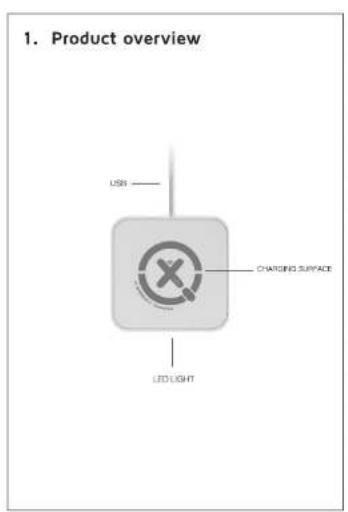
1. Product overview USB CHARGING SURFACE LED LIGHT

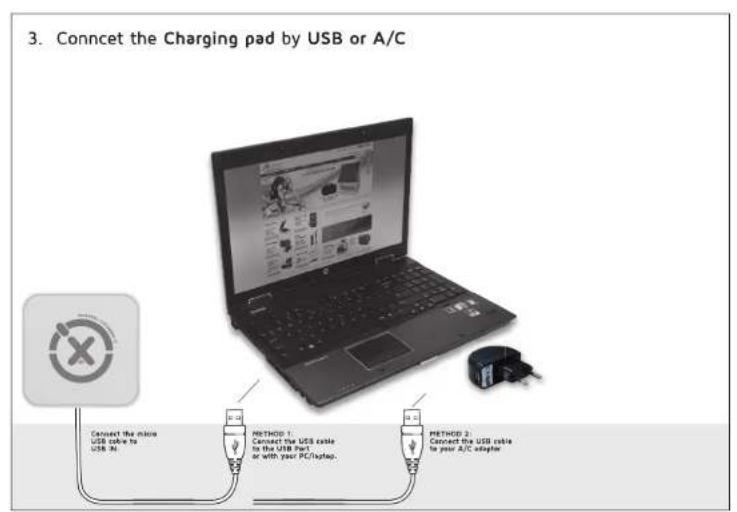
3. Connect the Charging pad by USB or A/C Connect the inside USB cable to USB No. METHOD 1 Connect the USB cable to the USB Part or with your PC/backup. METHOD 2 Connect the USB cable to your A/C adapter

4. Charge your mobile device wirelessly CHARGING SURFACE Make sure the Power Bank is fully charged. Price your photo on the wireless charging surface. The charging will start automatically. The wireless charging distance is 3-7 nm. Your smartphone will indicate charging status.

5. Is your device compatible? Google Nexus 4+5 and higher Nokia Lumia 920 - 928 and higher HTC Droid DNA Samsung S5 Works Works with add on* ✓ ✓ ✓ ✓ *Add-ons sold separately. We advise to use only branded original add-ons. Check www.xtorm.eu/qi for the full list.

Table of contents Click a title to access it
Manual assistant
Powered by Anthropic
Waiting for your message
Product information

Brand : Xtorm

Model : XW201

Category : Power bank