
SB-AFC410 - Loudspeaker TECHNICS - Free user manual and instructions
Find the device manual for free SB-AFC410 TECHNICS in PDF.


| Product Type | Bookshelf Speaker |
| Model | SB-AFC410 |
| Brand | Technics |
| Speaker Type | Passive |
| Impedance | 6 ohms |
| Sensitivity | 87 dB (2.83V/1m) |
| Frequency Response | 50 Hz - 20 kHz |
| Power Handling (RMS) | 100 W |
| Power Handling (Peak) | 150 W |
| Drivers | 1 x 1" tweeter, 1 x 5" woofer |
| Dimensions (W x H x D) | 200 x 300 x 250 mm (each) |
| Weight | 4.5 kg each |
| Cabinet Material | MDF |
| Finish | Black |
| Recommended Amplifier Power | 20 - 100 W per channel |
| Crossover Frequency | 2.5 kHz |
| Connectivity | Binding posts (5-way) |
| Placement | Bookshelf or stand |
| Maintenance | Wipe with soft damp cloth; do not use solvents |
Frequently Asked Questions - SB-AFC410 TECHNICS
User questions about SB-AFC410 TECHNICS
0 question about this device. Answer the ones you know or ask your own.
Ask a new question about this device
Download the instructions for your Loudspeaker in PDF format for free! Find your manual SB-AFC410 - TECHNICS and take your electronic device back in hand. On this page are published all the documents necessary for the use of your device. SB-AFC410 by TECHNICS.
USER MANUAL SB-AFC410 TECHNICS
natural_image
Exterior view of a speaker tower with three speakers (no text or symbols visible)Technics®
Speaker system
Enceinte acoustique
Operating Instructions
Before connecting, operating or adjusting this product, please read these instructions completely.
Please keep this manual for future reference.
Thank you for purchasing this product.
For optimum performance and safety, please read these instructions carefully.
User memo:
DATE OF PURCHASE
DEALER NAME
DEALER ADDRESS
TELEPHONE NUMBER
The model number and serial number of this product can be found either on the back or the bottom of the unit.
Please note them in the space provided below and keep for future reference.
MODEL NUMBER SB-AFC410
SERIAL NUMBER
Supplied accessories

Please check and identify the supplied accessories.
Use numbers indicated in parentheses when asking for replacement parts.
(Only for U.S.A.)
To order accessories contact 1-800-332-5368
or web site (http://www.panasonic.com)
□ Metal wall mounts (2) with screws (RYQ0103-Y)....1

☐ Speaker feet (RFA0631A-K)....1 sheet (4 feet)

Cher client
natural_image
Diagram showing two geometric shapes with connected lines and a grid of circular elements, no text or symbols present.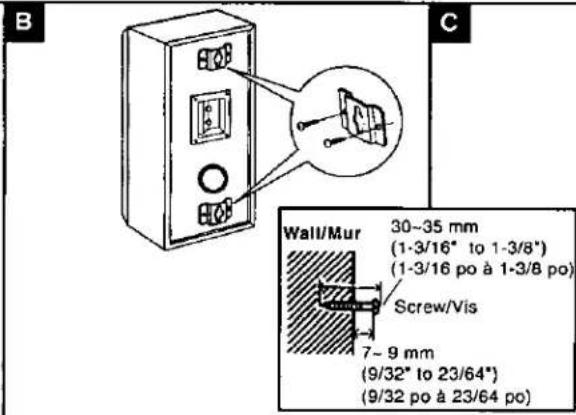
Speaker set-up
A Attach the rubber feet to the speaker
Speaker can be set-up either standing or lying down. Attach these rubber feet to prevent vibration causing the speaker to move or fall over.
One sheet of 4 rubber feet is included.
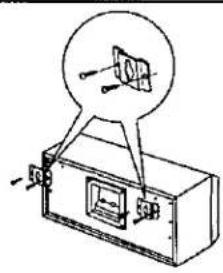
Attaching to the wall
B To attach vertically
C To attach horizontally
Note
Screw the wood screw into a thick and hard part of the wall. The surface you attach the speaker to must be able to support over 6 kg. (13.2 lb.)
Moving the brand badge
You can rotate the badge if you choose to set up the speakers horizontally.
Rotate the badge to the required position.

Speaker set-up
How you connect and place them determines whether they are front, center or surround speakers.
(a) As front speaker (Left)
⑥ As center speaker
© Receiver or amplifier (not included)
(d) As front speaker (Right)
© As surround speaker (Right)
① As surround speaker (Left)
(g) Long speaker cables (not included)
① Short speaker cables (not included)
A Location
The front, center, and surround speakers should be placed at approximately the same distance from the listening position. The angles in the diagram are approximate.
The position should be adjusted to your personal preference, because the effect varies to some degree depending upon the type of music and the music of source.
- Place the speaker on a flat, level and secure base.
Use spacers or a similar item to stop the speakers from rocking.
- Surround speakers should be placed on the side of or slightly behind the listener, about one meter higher than ear level.
•Vibration may cause distortion in the picture if the speaker is placed directly on the television. Use a rack or shelf for the center speaker.
CAUTION
Do not attempt to attach these speakers to walls using methods other than those described in this manual.
B Connections
Confirm the colors of the cords to ensure correct connection. In-correct connection can damage the unit.
- Before making the connections, switch OFF the power to the receiver or amplifier.
- Use with a receiver or amplifier having 8 Ω impedance for these speakers.
- Be sure to connect only positive (+) red wires to positive (+) terminals, and negative (-) black wires to negative (-) terminals.
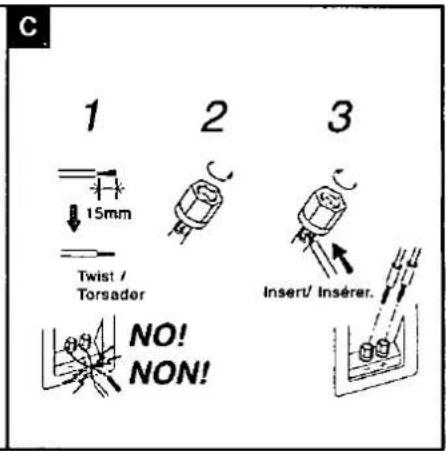
©Connecting the cables
(i) Before connection
To prepare the speaker cables, twist the vinyl tip and pull off.
①Red (+) ④Black (-)
CAUTION
To prevent damage to circuitry, never short-circuit positive (+) and negative (−) speaker wires.
Note
After you have completed set-up and connection, wind the excess cable and keep together with string.
Speaker impedance and allowed input
| Impedance | 8Ω |
| Input power | 100W(DIN) |
CAUTION
The only receivers you should connect to these speakers are those whose rated output does not exceed the above figures. Using a receiver or amplifier with higher ratings than listed above can cause abnormal sounds to occur because of excessive input, damage to the receiver or speakers, and fire. If equipment is damaged in any way or unexpected trouble occurs during playback, unplug the system from its outlet and call a servicenter for assistance.
Protection circuitry
These units incorporate protection circuitry to protect them from damage caused by excessive input or abnormal signals; when excess input is detected, input is automatically interrupted.
If sound is interrupted...
- Reduce the volume of the receiver (or amplifier).
- Check the sound source and connections for any problems.
If there is no problem, the protection circuitry will reset in a few minutes.
After the protection circuit is reset...
Take care not to increase the receiver's volume too high.
Excessive Input
Do not play distorted sound at high levels for extended periods.
Speakers can be damaged and their useful life reduced if sound is played at high levels over extended periods, even when their protection circuitry is not triggered.
Reduce the volume in the following cases to avoid damage
- When operating the tone controls or equalizer on the amplifier.
- When turning the amplifier on and off.
- When playing distorted sound.
- When the speakers are receiving the following types of signals:
- Noise from FM broadcasts
- Howling from a microphone or record player
- Fast-forwarding or rewinding noise from a cassette deck
- Continuous signals from an oscillator, electronic instrument or test disc
Other notes
If irregular coloring occurs on your television
These speakers are designed to be used close to a television, but the picture may be affected with some televisions and set-up combinations.
If this occurs, turn the television off for about 30 minutes.
The television's demagnetizing function should correct the problem.
If it persists, move the speakers further away from the television.
Keep magnetized items away
Magnetized cards, bank cards, commuter passes, etc., can be damaged if allowed too near speaker magnets. Clocks may also be affected.
Avoid locations such as described below.
• In direct sunlight
• Near heating appliances or other sources of heat
• Where the humidity is high
Remarques
To clean this unit, wipe with a soft, dry cloth.
If the surfaces are extremely dirty, use a soft cloth dipped in a soap and water solution or a weak detergent solution.
- Never use alcohol, paint thinner or benzine to clean this unit.
- Before using a chemically treated cloth, read the instructions that came with the cloth carefully.
Product service
Do not attempt to remove the cover(s) or repair the unit yourself. Refer servicing to qualified personnel only.
Product information
For product service, product information or assistance with product operation, refer to the servicenter directory.
In the U.S.A. contact the Panasonic Customer Call Center at 1-800-211-7262, or e-mail consumerproducts@panasonic.com, or web site (http://www.panasonic.com).
In Canada, contact Panasonic Canada Inc. Customer Care Centre at 905-624-5505, or web site (www.panasonic.ca), or an authorized Servicentre near you.
Specifications
| Type | 2 way, 3 speaker systemBass-reflex type |
| Speaker(s) | |
| Woofer: | 12 cm (4-3/4") cone type X2 |
| Tweeter: | 2.5 cm (1") dome type X1 |
| Impedance | 8Ω |
| Input power | 200 W Music, 100 W (DIN) |
| Sound pressure level | 85 dB/W (1.0 m) |
| Crossover frequency | 3.5 kHz |
| Frequency range | 48 Hz ~ 50 KHz (at -16 dB) |
| 54 Hz ~ 43 KHz (at -10 dB) | |
| Dimensions (W × H × D) | 460 × 175 × 235 mm(18-1/8" × 6-7/8" × 9-1/4") |
| Mass | 6 kg (13.2 lbs) |
Note
Specifications are subject to change without notice. Mass and dimensions are approximate.
Entretien
- Technics®
- Speaker system
- Enceinte acoustique
- Supplied accessories
- Cher client
- Speaker set-up
- A Attach the rubber feet to the speaker
- Attaching to the wall
- Note
- Moving the brand badge
- A Location
- CAUTION
- B Connections
- ©Connecting the cables
- Protection circuitry
- Excessive Input
- Other notes
- Remarques
- Product service
- Entretien
Brand : TECHNICS
Model : SB-AFC410
Category : Loudspeaker