FACF16 - Air Conditioning Fortress - Free user manual and instructions
Find the device manual for free FACF16 Fortress in PDF.


| Product Type | Portable Air Conditioner |
| Model | FACF16 |
| Brand | Fortress |
| Cooling Capacity | 16,000 BTU |
| Energy Efficiency Ratio (EER) | 10.5 |
| Coverage Area | Up to 550 sq ft |
| Dimensions (W x D x H) | 18.5 x 15.7 x 31.5 inches |
| Weight | 75 lbs |
| Power Supply | 115V/60Hz |
| Power Consumption (Cooling) | 1500W |
| Amperage | 12.5 A |
| Refrigerant Type | R-410A |
| Functions | Cool, Fan, Dehumidify |
| Fan Speeds | 3 (Low, Medium, High) |
| Thermostat Control | Digital with remote |
| Timer | 24-hour programmable |
| Noise Level | 52 dB (approx) |
| Filter Type | Washable mesh filter |
| Filter Cleaning | Every 2 weeks |
| Drainage | Continuous or manual drain |
| Exhaust Hose Length | 5 ft (standard) |
| Window Kit Included | Yes |
| Safety Features | Overheat protection, auto-restart |
| Certifications | ETL, Energy Star |
Frequently Asked Questions - FACF16 Fortress
User questions about FACF16 Fortress
0 question about this device. Answer the ones you know or ask your own.
Ask a new question about this device
Download the instructions for your Air Conditioning in PDF format for free! Find your manual FACF16 - Fortress and take your electronic device back in hand. On this page are published all the documents necessary for the use of your device. FACF16 by Fortress.
USER MANUAL FACF16 Fortress
natural_image
Line drawing of a portable air conditioner unit with wheels and ventilation slots (no text or symbols)Model No.: FACF16
*Before operating the appliance, please read this manual and all the safety instructions thoroughly and retain it for future reference.
CONTENT PAGE
SAFETY INSTRUCTION 1
PARTS DESCRIPTION 2
IMPORTANT SAFETY INSTRUCTIONS - READ CAREFULLY AND KEEP FOR FUTURE REFERENCE.
- To avoid electric shock, fire or injury, please read the user manual carefully before using the appliance and keep it for future reference.
- This appliance is for household use only. Please use suitable power source (Please refer to SPECIFICATION).
- Never immerse the appliance in water or other liquids.
- Do not use the appliance under direct sunshine.
- Please turn off the appliance when not in use otherwise it may result in danger.
- Please turn off the appliance and unplug the socket when unattended otherwise it may result in danger.
- Keep the appliance away from children.
- The appliance is not intended for used by persons (including children) with reduced physical, sensory or mental capabilities, or lack of experience and knowledge, unless they have been given supervision or instruction concerning use of the appliance by a person responsible for their safety.
- Children should be supervised to ensure that they do not play with the appliance.
- With any indication of malfunction, please stop using the appliance immediately to avoid hazard. Take it to the authorized service center for repair. Do not attempt to repair or change any parts by yourself.
- If the supply cord is damaged, it must be replaced by the manufacturer, its service agent or similarly qualified persons in order to avoid hazard.
- Please turn off and unplug the appliance before water filling, cleaning or maintenance.
- Clean the surface of the appliance with dry cloth. Do not use corrosive detergent or solvent to clean. Do not swash the appliance with water.
- Please turn off and unplug the appliance when not in use. Make sure the power is off before pulling out the plug and do not pull the cord.
- When the appliance is not in use for a prolonged period, please turn it off, unplug it, pack it well and store it in dry cool place.
- Forbid to put flammable and explosive objects around the appliance, and do not use the appliance in an environment full of flammable gas and powder. Keep away from any fire and heat sources.
- Please put the power cord in the right place in order to avoid tripping the appliance over.
- Please keep the air inlet and outlet unblocked to minimize the risk of fire and malfunction.
- Please do not place the air inlet or the air outlet near to curtain or walls when operation because it will block air current and cause fire. The appliance should be placed at minimum distant of 1 meter from the wall or other obstacle.
- Please do not insert any objects into the air inlet or the air outlet in order to avoid electric shock.
PARTS DESCRIPTION
| 1 | 6 |
| 2 | 7 |
| 3 | 8 |
| 9 | |
| 4 | 10 |
| 5 | 11 |
- C o n t r o l P a n e l 7 . R e m o t
- Remote Control Signal Receiver 8. Dust Filter
- H o r i z o n t a l 19. oP uo vw e e r r C o r d
- W a t e r L e v e l 10 D. iW s a p t l e a r y T a n
- C a s t e r 11 . W a t e r T a n
- H a n d l e
Other Accessories:
| C | o | o | l | i | n | g | P | a | d | Fx | r | d | z | e | n | C | r | y | s |
CONTROL PANEL
| Off Button | Cooler Button | Timer Button | HorizontalOscillationButton | VerticalOscillationButton | Mode Button | On/Speed Button |
- Remove the water tank.
- Put the frozen crystals into the water tank.
- Add clean water into the water tank and ensure the water level is between the "Min" and the "Max" level.
- Press the ON/SPEED button to turn on the appliance.
- Press the COOLER button for cooling operation.
Speed
- Press the ON/SPEED button to select fan speed and the corresponding indicator will be on:

Oscillation
- Press the LEFT/RIGHT button to activate horizontal oscillation. The indicator will be on.
- Press the UP/DOWN button to activate airflow vertical oscillation. The indicator will be on.
Timer
- Press the TIMER button to activate auto-off timer with 1/2/4/8 hour selection and the corresponding indicator will be on.
Mode
- Press the MODE button to select Normal, Natural or Sleep mode.
Normal Mode: the appliance will be operating by selected speed and the indicator ■ will be on.
Natural Mode: the appliance simulates the wind in the natural environment. It will be operated from high speed to low speed and goes on circularly. The indicator will be on.
Sleep Mode: the speed will be dropped on level in very half hour until it reaches the lowest speed. The indicator will be on.
Notes: Ensure the water tank is not empty when the appliance is running in cooling operation.
Remote Control Operation
- Pull out the battery door at the back side of the remote control.
- Insert a battery (Model: CR2032) into the tray of the door.
- Insert the battery door back into the remote control.

natural_image
Technical line drawing of a mechanical component with an inset showing a labeled part (no text or symbols present)Remote Control Panel

*Please turn off and unplug the appliance before cleaning or maintenance.
Cleaning the dust filter:
- Hold the filter and pull it downward to remove it.
- Take the dust filter out of the appliance. Tap the filter with water for cleaning. If the filter is really dirty, dip it into natural detergent solution to wash and flush with water. Let it dry naturally.
- Dip the cooling pad assemblage into cleanser for several minutes, then clean and dry it naturally.
- Put the cleaned and dried filter and the cooling pad into the appliance.

Cleaning the water tank:
- Unlock the water tank as below then take it out.
- Use a towel to clean the incrustation of the water tank.

natural_image
Technical line drawings of two mechanical components with cross-sectional views (no text or symbols)Water tank locked Water tank unlocked
Cleaning the body:
- Clean the surface of the appliance with dry cloth. Do not use corrosive detergent or solvent to clean. Do not swash the appliance with water.
- When the appliance is not in use for prolonged period, please turn it off, unplug it, pack it well and store it in dry cool place.
SPECIFICATION
| Model No. FACF16 | |
| Product name Air | Cooler |
| Voltage/Frequency | 220-240V~/50Hz |
| Power 110W | |
| Water Tank Capacity 6L | |
| Dimension (W x H x D) 356mm | x 826mm x 280mm |
WARRANTY
-
The product has 2 years warranty from the date of purchase.
-
The warranty shall not apply:
A. to any product subjected to misuse, alteration, act of God, improper handling, improper transport, improper testing or unauthorized repair;
B. to cosmetic problems or defects which result from normal wear and tear under ordinary use yet not affecting the performance or use of the product;
C. if the product is disassembled or altered;
D. to any packing, transportation, export / import tax or any related expenses.
-
CUSTOMER MUST PRESENT THE SALES INVOICE OR RECEIPT FOR 2 YEARS WARRANTY SERVICES.
-
Please bring along the product and sales invoice or receipt to our services center for warranty services during office hour:
Address : Unit A, 20/F, Yip Shing Industrial Centre, No.19, Yip Shing Street, Kwai Chung.
Service Hotline : (852) 2428 1500
Service Hours:
Monday-Friday : 9:00am - 6:00pm
Saturday : 9:00am - 4:00pm
Sunday & Public Holiday : Closed
NOTES
- To prevent circuit overload and fire, no more than one safety compliant adaptor or extension unit should be inserted into a socket outlet. (Avoid connecting other appliances to the one socket outlet.) No adaptor should be inserted into any extension unit or vice versa.
- Stop using an adaptor or an extension unit or a socket if its socket holes cannot firmly hold a plug if it is too hard to insert a plug into it.
- This appliance must be plugged into a specific 220-240V socket. Please make sure the plug is fully plugged-in before use. Do not use any adapter or extension cord; Never use the same supply socket for this appliance and other appliances at the same time, in order to avoid damage to this appliance.
• THE APPLIANCE IS FOR HOUSEHOLD USE ONLY.
ENVIRONMENT
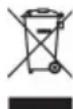
Do not throw away the appliance with the normal household waste at the end of its life, but hand it in at an official collection point for recycling. By doing this, you help preserving the environment.
IMPORTANT NOTICES
IN NO EVENT SHALL OUR COMPANY OR THE SUPPLIER BE LIABLE TO YOU OR ANY OTHER PARTY FOR ANY DIRECT, INDIRECT, GENERAL SPECIAL, INCIDENTAL, CONSEQUENTIAL, EXEMPLARY OR OTHER DAMAGES ARISING OUT OF THE USE OR INABILITY TO USE THE PRODUCT (INCLUDING, WITHOUT LIMITATION, DAMAGES FOR INJURY, LOSS OF PROPERTY, BUSINESS PROFITS, BUSINESS INTERRUPTION) OR FROM ANY BREACH OF WARRANTY, EVEN IF OUR COMPANY OR SUPPLIER HAS BEEN ADVISED OF THE POSSIBILITY OF SUCH DAMAGES. IN NO CASE SHALL OUR COMPANY OR SUPPLIER'S LIABILITY EXCEED THE AMOUNT YOU PAID FOR THE PRODUCT.
Specifications, designs and dimensions are subject to change without prior notice.
Brand : Fortress
Model : FACF16
Category : Air Conditioning