
PSWDV60GN - Sports Watch Pyle - Free user manual and instructions
Find the device manual for free PSWDV60GN Pyle in PDF.


| Product Type | Sports Watch |
| Brand | Pyle |
| Model | PSWDV60GN |
| Display Type | Digital LCD |
| Case Material | Plastic |
| Band Material | Silicone |
| Dimensions (approx.) | 45 x 45 x 12 mm |
| Weight | 50 g |
| Power Source | 1 x CR2032 battery |
| Battery Life | Up to 2 years |
| Water Resistance | 3 ATM (30 meters) |
| Main Functions | Time, Date, Alarm, Stopwatch, Countdown Timer, Backlight |
| Time Format | 12/24 hour selectable |
| Alarm | Daily alarm with snooze |
| Stopwatch | 1/100 second, up to 24 hours |
| Countdown Timer | 1 minute to 24 hours |
| Backlight | LED backlight for night visibility |
| Care and Cleaning | Wipe with a soft, dry cloth. Avoid chemicals. |
| Safety | Battery replacement by qualified personnel. Keep away from children under 3. |
| Spare Parts and Repairability | Battery and band available. No user-serviceable parts inside. |
| General Information | Automatic calendar. Operating temperature: -10°C to 50°C. |
Frequently Asked Questions - PSWDV60GN Pyle
User questions about PSWDV60GN Pyle
0 question about this device. Answer the ones you know or ask your own.
Ask a new question about this device
Download the instructions for your Sports Watch in PDF format for free! Find your manual PSWDV60GN - Pyle and take your electronic device back in hand. On this page are published all the documents necessary for the use of your device. PSWDV60GN by Pyle.
USER MANUAL PSWDV60GN Pyle
APN ref. no : A89107
Date:21-06-2011
Vendor ref:
no. of color : 1C + 1C
B&W artwork attached :
Presentation
Testing
Production/Shipment
| Prepared by: |
| Checked by: |
| Approved by: |

Front CoverRear Cover
1.0 Introduction
Thank you for purchasing this Watch.
The Watch provides some vital findings for divar
diving. The Watch will provide you with the Current
Water Depth, the Maximum Reached Water Depth, the Water Temperature, the Diva Status Indicator and the
Elapsed Dive Time.
These diving facts will be stored into the Watch. You can recall them in a later day, and it can be stored up to ten dive records. Dive Mode also includes a automatic light function for divers convenience, which will turn ON the back light automatically when the user ills his/her wrist.
In addition to dive functionwatch includes 4 more functional modes, they are the Normal Time Mode, Alarm Mode, Timer Mode and Chronograph Mode.
Your watch is carefully designed and produced, in order to utilize this features of your watch, it is advisable to use the watch in conformity with the notes mentioned below:
- Read this manual carefully before you use the Watch, and keep it in a safe place for your further reference
• DO NOT press any key after going into water
- Avoid exposing the Watch to extreme conditions for an unreasonable time, and avoid rough uses or severe impacts on the Watch.
- It is recommended to complete the battery
replacement by a certified service agency because this practice ensures the water proof standard last on your watch. - Clean the Watch, particular the water sensor on the back of the Watch occasionally with a soft cloth.
- DO NOT expose the Watch to strong chemicals such as gasoline and alcohol, as they will damage your watch.
WARNING
- Diving is one of the higher risk sports, commit an error in diving may lead to serious injury or death, hence, always put your safety first, and always remember that you are responsible for your own safety.
- The Watch is an assisting device for proper trained and qualified divers in dives. It is NOT a substitute for dive training.
• /always got proper dive training, instruction and
• Make sure that you fully understand the functions and limitations of the Watch, and you use back-up device in diving.
• DO NOT use the Watch for commercial or professional diving.
2.0 Key Layout and Battery Low Indicator

Key Layout
• The Watch includes 4 keys. They are the [MODE].
[LIGHT], [START/STOP] and [LAPIRESET]. Most of
the operations, except the Live Mode can be performed by these key.
To Replace Battery
- When the battery is low, indicator '☐' will appear.
Replace the battery by a certified agent.

3.0 Functional Modes

flowchart
graph TD
    A["12.30/12.30"] --> B["Normal Time Mode"]
    B --> C["12.30/12.30"]
    C --> D["Chromograph Mode"]
    D --> E["Chron on"]
    E --> F["Timer Mode"]
    F --> G["Dive Record Recall Mode"]
    G --> H["Dive Mode"]
    H --> I["Output: 10-8 15.80 0.30"]
    I --> J["Recirculation: 12.38/12.30"]
    J --> K["Final Output: 12.30/12.30"]
    K --> L["Final Output: 12.30/12.30"]
    L --> M["Final Output: 12.30/12.30"]
    M --> N["Final Output: 12.30/12.30"]
    N --> O["Final Output: 12.30/12.30"]
    O --> P["Final Output: 12.30/12.30"]
    P --> Q["Final Output: 12.30/12.30"]
    Q --> R["Final Output: 12.30/12.30"]
    R --> S["Final Output: 12.30/12.30"]
    S --> T["Final Output: 12.30/12.30"]
    T --> U["Final Output: 12.30/12.30"]
    U --> V["Final Output: 12.30/12.30"]
    V --> W["Final Output: 12.30/12.30"]
    W --> X["Final Output: 12.30/12.30"]
    X --> Y["Final Output: 12.30/12.30"]
    Y --> Z["Final Output: 12.30/12.30"]
    Z --> AA["Final Output: 12.30/12.30"]
    AA --> AB["Final Output: 12.30/12.30"]
    AB --> AC["Final Output: 12.30/12.30"]
    AC --> AD["Final Output: 12.30/12.30"]
    AD --> AE["Final Output: 12.30/12.30"]
    AE --> AF["Final Output: 12.30/12.30"]
    AF --> AG["Final Output: 12.30/12.30"]
    AG --> AH["Final Output: 12.30/12.30"]
    AH --> AI["Final Output: 12.30/12.30"]
    AI --> AJ["Final Output: 12.30/12.30"]
    AJ --> AK["Final Output: 12.30/12.30"]
    AK --> AL["Final Output: 12.30/12.30"]
    AL --> AM["Final Output: 12.30/12.30"]
    AM --> AN["Final Output: 12.30/12.30"]
    AN --> AO["Final Output: 12.30/12.30"]
    AO --> AP["Final Output: 12.30/12.30"]
    AP --> AQ["Final Output: 12.30/12.30"]
    AQ --> AR["Final Output: 12.30/12.30"]
    AR --> AS["Final Output: 12.30/12.30"]
    AS --> AT["Final Output: 12.30/12.30"]
    AT --> AU["Final Output: 12.30/12.30"]
    AU --> AV["Final Output: 12.30/12.30"]
    AV --> AW["Final Output: 12.30/12.30"]
    AW --> AX["Final Output: 12.30/12.30"]
    AX --> AY["Final Output: 12.30/12.30"]
    AY --> AZ["Final Output: 12.30/12.30"]
    AZ --> BA["Final Output: 12.30/12.30"]
    BA --> BB["Final Output: 12.30/12.30"]
    BB --> BC["Final Output: 12.30/12.30"]
    BC --> BD["Final Output: 12.30/12.30"]
    BD --> BE["Final Output: 12.30/12.30"]
    BE --> BF["Final Output: 12.30/12.30"]
    BF --> BG["Final Output: 12.30/12.30"]
    BG --> BH["Final Output: 12.30/12.30"]
    BH --> BI["Final Output: 12.30/12.30"]
    BI --> BJ["Final Output: 12.30/12.30"]
    BJ --> BK["Final Output: 12.30/12.30"]
    BK --> BL["Final Output: 12.30/12.30"]
    BL --> BM["Final Output: 12.30/12.30"]
    BM --> BN["Final Output: 12.30/12.30"]
    BN --> BO["Final Output: 12.30/12.30"]
    BO --> BP["Final Output: 12.30/12.30"]
    BP --> BQ["Final Output: 12.30/12.30"]
    BQ --> BR["Final Output: 12.30/12.30"]
    BR --> BS["Final Output: 12.30/12.30"]
    BS --> BT["Final Output: 12.30/12.30"]
    BT --> BU["Final Output: 12.30/12.30"]
    BU --> BV["Final Output: 12.30/12.30"]
    BV --> BW["Final Output: 12.30/12.30"]
Functional Modes
- The watch includes 6 functional modes, they are Normal Time Mode, Alarm Mode, Chronograph Mode, Timer Mode, Dive Record Recall Mode and Dive Mode.
- Each functional mode includes one or more than one functional displays. The functional display provides supplementary features to the corresponding functional mode.
- Check the coming sections for the details of how these functional modes and functional displays are working.
To Switch among Functional Mode
- Press the [MODE] button to select among the Normal Time Mode. Alarm Mode, Chronograph Mode, Timer Mode and Dive Record Recall Mode.
To Switch to Dive Mode
• The Watch cannot switch to an exit from Dive Mode by key operations. - The Dive Mode will appear automatically if the user submerge, and reached the water depth approximate to 1.5 m (4.92 ft). If the user emerge, and returned to the water depth approximate to 1.5 m (4.92 ft), the Normal Time Mode restarts. Check the coming '8.5 Dive Mode' Section for more detail of how to switch to Dive Mode.
Functional Mode Selection Sequence
NOTE: The degree is given by the common set between a different network display only here, the numbers of these displays DO NOT conform to DUT. No instances.
4.0 Normal Time Mode - Normal Time Mode
![day of week hour, minute and next 2:12 50 200 3 -12:38 data and month year Normal Time Mode (Year Display) [START/STOP] Normal Time Mode (Temperature Display) 2:12 50 201 -12:38 temperature](/content/2026/05/961611/images/91931a3eca79cd28030cba901d8505d4c94249274705562495d2d0895e18df0f.jpg)
Normal Time Mode
Normal Time Mode Display
- To select Normal Time Mode press the [MODE] button following the previous '3.0 Functional Mode Selection Sequence'. The Normal Time Mode includes 2 functional displays. They are the Year Display and the Temperature Display.
- To select between the Year Display and Temperature Display, press the [START/STOP] button in Normal Time Mode.
Year Display
- The date and month appear on the 1st row, the day of week and year appear on the 2nd row, and the normal time (hours, minutes and second) appears on the 3rd row of the display.
Temperature Display
- The date and month appear on the 1st row, the day of week, and the air temperature (Dive Mode) appear on the 2nd row, and the normal time (hours, minutes and second) appears on the 3rd row of the display.
IMPORTANT: If user intends to get the accurate air temperature, the user must taken off the watch from his/her wrist for 20 to 30 minutes prior to the measurement. That practice allows NO body temperature effect on the Watch.
NOTE: To select the temperature unit between 'C and 'F, check the coming '8.5 To Set the Give Mode' Section for more detail.
4.1 Current Time Mode - To Set the Normal Time

flowchart
graph TD
    A["2:12\n5:0000 3\n12:38"] --> B["Input (MΩ)"]
    B --> C{Control}
    C -->|Yes| D["Process"]
    C -->|No| E["Output"]
    D --> F["Normal Time Setting Sequence"]
    E --> F
    F --> G["Final Output"]
To Set Normal Time, Display Contrast, and Check Battery Level
• To select the setting display, press and hold the [MODE] button for about 2 seconds in Normal Time Mode.
- When the 'second' is flashing, press the [START/STOP]
button to select among the different setting items following the Normal Time Setting Sequence, or press the [LAPIRESET] button once to reset the 'second' to zero.
- If one of the setting items (minute, hour, year, month and date) is flashing, press the [IAPRESET] button to scroll the setting by increment of 1 or hold down the button to scroll the setting at a higher speed.
- If the '12' or '24' is flashing, press the [LAP/RESET] button to select between the '12' (12-hour format) and '24' (24-hour format).
- If the 'display contrast' setting appears on the display, press the [LAPRESET] button to scroll the setting between 0 and 15 (15 is the highest). If the 'battery level' appears on the display check that to view the battery level [25, 30, 75 and 100 (100 is the highest)].
- When the designated setting is displayed, press and hold the [MODE] button to exit the setting display. If NO key-stoke has been activated for about 1 minute, the setting display will return to Normal Time Mode automatically.
5.0 Alarm Mode - Alarm Mode

flowchart
graph TD
    A["Amer Node (Amer 128)"] -->|12.38% detection rate| B["Amer Node (Amer 22)"]
    C["Amer Node (Amer 128)"] -->|12.38% detection rate| D["Amer Node (Amer 22)"]
    E["Amer Node (Amer 128)"] -->|12.38% detection rate| F["Amer Node (Amer 22)"]
    G["Amer Node (Amer 128)"] -->|12.38% detection rate| H["Amer Node (Amer 22)"]
    I["Amer Node (Amer 128)"] -->|12.38% detection rate| J["Amer Node (Amer 22)"]
    K["Amer Node (Amer 128)"] -->|12.38% detection rate| L["Amer Node (Amer 22)"]
    M["Amer Node (Amer 128)"] -->|12.38% detection rate| N["Amer Node (Amer 22)"]
    O["Amer Node (Amer 128)"] -->|12.38% detection rate| P["Amer Node (Amer 22)"]
    Q["Amer Node (Amer 128)"] -->|12.38% detection rate| R["Amer Node (Amer 22)"]
    S["Amer Node (Amer 128)"] -->|12.38% detection rate| T["Amer Node (Amer 22)"]
    U["Amer Node (Amer 128)"] -->|12.38% detection rate| V["Amer Node (Amer 22)"]
    W["Amer Node (Amer 128)"] -->|12.38% detection rate| X["Amer Node (Amer 22)"]
    Y["Amer Node (Amer 128)"] -->|12.38% detection rate| Z["Amer Node (Amer 22)"]
    AA["Amer Node (Amer 128)"] -->|12.38% detection rate| AB["Amer Node (Amer 22)"]
    AC["Amer Node (Amer 128)"] -->|12.38% detection rate| AD["Amer Node (Amer 22)"]
    AE["Amer Node (Amer 128)"] -->|12.38% detection rate| AF["Amer Node (Amer 22)"]
    AG["Amer Node (Amer 128)"] -->|12.38% detection rate| AH["Amer Node (Amer 22)"]
    AI["Amer Node (Amer 128)"] -->|12.38% detection rate| AJ["Amer Node (Amer 22)"]
    AK["Amer Node (Amer 128)"] -->|12.38% detection rate| AL["Amer Node (Amer 22)"]
    AM["Amer Node (Amer 128)"] -->|12.38% detection rate| AN["Amer Node (Amer 22)"]
    AO["Amer Node (Amer 128)"] -->|12.38% detection rate| AP["Amer Node (Amer 22)"]
    AQ["Amer Node (Amer 128)"] -->|12.38% detection rate| AR["Amer Node (Amer 22)"]
    AS["Amer Node (Amer 128)"] -->|12.38% detection rate| AT["Amer Node (Amer 22)"]
    AU["Amer Node (Amer 128)"] -->|12.38% detection rate| AV["Amer Node (Amer 22)"]
    AW["Amer Node (Amer 128)"] -->|12.38% detection rate| AX["Amer Node (Amer 22)"]
    AY["Amer Node (Amer 128)"] -->|12.38% detection rate| AZ["Amer Node (Amer 22)"]
    BA["Amer Node (Amer 128)"] -->|12.38% detection rate| BB["Amer Node (Amer 22)"]
    BC["Amer Node (Amer 128)"] -->|12.38% detection rate| BD["Amer Node (Amer 22)"]
    BE["Amer Node (Amer 128)"] -->|12.38% detection rate| BF["Amer Node (Amer 22)"]
    BG["Amer Node (Amer 128)"] -->|12.38% detection rate| BH["Amer Node (Amer 22)"]
    BI["Amer Node (Amer 128)"] -->|12.38% detection rate| BJ["Amer Node (Amer 22)"]
    BK["Amer Node (Amer 128)"] -->|12.38% detection rate| BL["Amer Node (Amer 22)"]
    BM["Amer Node (Amer 128)"] -->|12.38% detection rate| BN["Amer Node (Amer 22)"]
    BO["Amer Node (Amer 128)"] -->|12.38% detection rate| BP["Amer Node (Amer 22)"]
    BZ["Amer Node (Amer 128)"] -->|12.38% detection rate| CA["Amer Node (Amer 22)"]
    CB["Amer Node (Amer 128)"] -->|12.38% detection rate| CD["Amer Node (Amer 22)"]
    CE["Amer Node (Amer 128)"] -->|12.38% detection rate| CF["Amer Node (Amer 22)"]
    GD["Amer Node (Amer 128)"] -->|12.38% detection rate| DH["Amer Node (Amer 22)"]
    DI["Amer Node (Amer 128)"] -->|12.38% detection rate| DJ["Amer Node (Amer 22)"]
    DK["Amer Node (Amer 128)"] -->|12.38% detection rate| DL["Amer Node (Amer 22)"]
    DV["Amer Node (Amer 128)"] -->|12.38% detection rate| DW["Amer Node (Amer 22)"]
    BX["Amer Node (Amer 128)"] -->|12.38% detection rate| BY["Amer Node (Amer 22)"]
    ZB["Amer Node (Amer 128)"] -->|12.38% detection rate| BZ["Bear"]
    BX --> ZB
    ZB --> ZB
Alarm Mode
To Select among Alarm Mode Displays
- This Watch includes 3 alarms. They are the Alarm 1, Alarm 2 and Alarm 3. These alarms will work independently. The coming paragraphs will present how the Alarm 1 is working, but it also applies to Alarm 2 and Alarm 3.
- To select Alarm Mode, press the [MODE] button following the previous 3.0 Functional Mode Selection Sequence.
- In the Alarm Mode - Alarm 1 Display, he alarm time for alarm 1 appears on the 1st row, the alarm ID appears on the 2nd row, and the normal time hour. Minute and second appear on the 3rd row of the display.
- To select among Alarm 1, Alarm 2, Alarm 3 and China Display, press the [START/STOP] button following the Alarm Mode Display Selection Sequence.
To Select between ON and OFF the Hourly Chime - To select between ON and OFF the hourly chime, press the [LAPIRESET] button in Chime Display. When the hourly chime indicator ' ' and 'ON' appeared (hourly chime is ON), the watch will sound once on the hour.
5.1 Alarm Mode - To Set the Alarm Time for the Alarm 1

flowchart
graph TD
    A["Mode 1: 1238Ω"] --> B["LAPRESET"]
    C["Mode 2: 1238Ω"] --> D["LAPRESET"]
    B --> E["hold [MODE"]]
    D --> F["hold [MODE"]]
    E --> G["minus"]
    F --> H["hour"]
    G --> I["Alarm Setting Sequence"]
    H --> I
    I --> J["lock the setting by increment of 1"]
    I --> K["lock the setting by increment of 2"]
To Set the Alarm Time
To Select between ON and OFF the Alarm
- The coming paragraphs will present how the Alarm 1 is setting, but it also applies to Alarm 2 and Alarm 3.
- To select the setting display, press and hold the [MODE] button for about 2 seconds in the Alarm Mode-Alarm 1 Display
- When the minute is flashing, press the [STAR/STOP] button to select between the minute and hour settings.
- If the minute or hour is flashing, press the [LAPRESET] button to scroll the setting by increment of 1 or hold down the button to scroll the setting at a higher speed.
- When the designated setting is displayed, press and hold the [MODE] button to exit the setting display.
- If no key-stake has been activated for about 1 minute, the setting display will return to Normal Time Mode automatically.
- To select between ON and OFF the alarm, press the [LAPIRESET] button in Alarm 1 Display. When the alarm indicator “+” appeared (alarm is ON), the watch will sound at the alarm time for about 30 seconds.
- When the Alarm sounds, it can be stopped prematurely by pressing either one of the buttons
6.0 Chronograph Mode - Chronograph Mode
flowchart
graph TD
    A["Input: macro indicator"] --> B["Chronograph Mode (All-Zone Display)"]
    C["Output: macro and seconds (approxing time)"] --> B
    D["Input: 1-70 sec (approxing time)"] --> B
    E["Output: 1-70 sec (approxing time)"] --> B
    F["Input: 1 Laplace time"] --> G["Output: 1 Laplace time"]
    H["Output: 2 Accumulative elapsed time"] --> I["Input: 2 Accumulative elapsed time"]
    J["Input: 3 Laplace time"] --> K["Output: 3 Laplace time"]
    L["Output: 3 Accumulative elapsed time and Laplace time"] --> M["Input: 3 Accumulative elapsed time"]
Chronograph Mode
To Reset the Chronograph
- To select Chronograph Mode press the [MODE] button following the previous '3.0 Functional Mode Selection Sequence'.
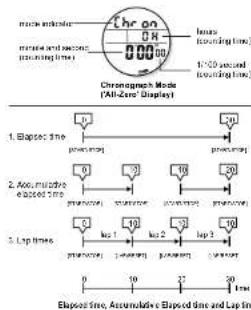
- In Chronograph Mode, the indicator 'Chron' appears on the 1st row, the lap number and the counting hour appear on the 2nd row, and the counting minute, second and 1:100 second appear on the 3rd row of the display.
- This Watch can measure elapsed time, accumulative elapsed time and lap time (store a time record while the chronograph is still counting). The chronograph's counting limit is 23 hours 59 minutes, and 58.99 seconds. The chronograph can store up to 99 lap times.
- To take a new disposed time measurement, reset the chronograph to 'All-Zero' Display.
- To reset the chronograph to 'Al-Zero' Display, press and hold the [LAPIRESET] button for about 2 seconds while the chronograph is stop counting to let the 'ERASE' indicator flash. When the 'ERASE' indicator is flashing, press the [MCDE] button once to reset the display to 'Al-Zero' Display.
NOTE: When the chronograph has been reset, the elapsed time or accumulated elapsed time, and the lap time memories will be ceased.
6.1 Chronograph - To Use the Chronograph


To Record the Elapsed Time and Accumulated Elapsed Time
- In 'AI-Zero' Display, press the [START/STOP] button to start the counting, press the [STAR/STOP] button once again to stop the counting. The elapsed time of which the chronograph is counting will appear on the display.
- Repeat the above key operations later on to get the accumulative elapsed time of which the chronograph is counting, or reset the chronograph to 'All Zero' Display to get the chronograph ready for a new elapsed time measurement.
- Check the previous 6.0 To Reset the Chronograph Section for the details of how to reset the chronograph. To Store Lap Time
- To store a lap time, press the [LAP/RESET] button at any designated moment while the chromatograph is counting. Then, the stored lap time and lap number will appear on the display for about 5 seconds.
- Even the lap time and lap number is frozen on the display, the chronograph is still counting. When the counting display returned, press the [LAPRESET] button at any designated moment to store another lap time. To Recall Lap Time
- To recall lap time, press the [LAPRESET] button while the chronograph is stop-counting, and then the stored lap time and lap number will appear on the display. To recall the next lap time, press the [LAPRESET] button once again.
7.0 Timer Mode - Timer Mode

flowchart
graph TD
    A["1. Timer 1 (UP)"] --> B["2. Timer 2 (SP)"]
    B --> C["3. Timer 3 (SP)"]
    C --> D["Counting Method: Timer 1, Timer 2 and Timer 3"]
    D --> E["Time Node (Timer 1 Display)"]
    style A fill:#f9f,stroke:#333
    style B fill:#f9f,stroke:#333
    style C fill:#f9f,stroke:#333
    style D fill:#f9f,stroke:#333
    style E fill:#ccf,stroke:#333
Timer Mode
- This Watch includes 3 timers. They are the Timer 1, Timer 2 and Timer 3. Each timer are working on one specific counting method unless user's interruption.
- To select Timer Mode, press the [MODE] button following the previous '5.0 Functional Mode Selection Sequence'.
- In Timer Mode, the Timer ID appears on the 1st row, the target time (hour) and the counting method symbol (UP, SP, and RP) on the 2nd row, and the target time (minutes and second) appears on the 3rd row of the display.
The Counting Method
- Timer ↑ (UP): The timer will start down-counting from the target time, then it will start up-counting when it counts to zero.
- Timer 2 (SP): The timer will start down-counting from the target time, then it will stop counting when it counts to zero
- Timor 3 (RP): The timer will start down-counting from the target time, then it will start down-counting from the target time again when it counts to zero.
The Target Time
- The target time is the time that the timer starts down-counting from. The target time can be set by user within a range from 1 second to 38 hours, 50 minutes and 50 seconds.
7.1 Time Mode - To Set the Target Time and Counting Method

flowchart
graph TD
    A["Timer Node (Timer 1 Display)"] --> B["head (MODE)"]
    B --> C["Timer ID"]
    C --> D["sound"]
    D --> E["load"]
    E --> F["LAPRESET"]
    F --> G["load starting by Instrument 1"]
    C --> H["load starting by [LAPRESET"]]
    H --> I["load starting by the second"]
    style A fill:#f9f,stroke:#333
    style C fill:#ccf,stroke:#333
    style D fill:#cfc,stroke:#333
    style E fill:#fcc,stroke:#333
    style F fill:#ffc,stroke:#333
    style G fill:#cfc,stroke:#333
    style H fill:#fcc,stroke:#333
    style I fill:#ffc,stroke:#333
To Set the Target Time and Counting Method
- To set the counting method and target time, press and hold the [MODE] button in the Timer Mode while the timer is slow counting.
- When the timer ID '1', '2' or '3' is trending, press the [START/STOP] button to select among the different selling items following the Timer Setting Sequence, or press the [LAP/RESET] button to select the timer among the '1' (Timer 1), '2' (Timer 2) and '3' (Timer 3). Check the previous 7.0 Timer Mode Section to see the relationship between Timer and Counting Method.
- If one of the setting items (second, minute and hour) is flashing, press the [LAPIRESET] button to scroll the setting by increment of 1 or hold down the button to scroll the setting at a higher speed.
- When the designated setting is displayed, press and hold the [MODE] button to exit the setting display
- If NO key-stoke has been activated for about 1 minute, the selling display will return to Normal Time Mode automatically.
7.2 Timer Mode - To Use the Timer

flowchart
graph TD
    A["Three-Wave - Time 1 (packers, d�eping)"] --> B["Time-Wave - Time 1 (packers, d�eping)"]
    B --> C["Time-Mass - Time 1 (packers, d�eping)"]
    C --> D["Three-Wave - Time 1 (packers, d�eping)"]
    D --> E["Three-Wave - Time 1 (packers, d�eping)"]
    E --> F["Three-Wave - Time 1 (packers, d�eping)"]
    F --> G["Three-Wave - Time 1 (packers, d�eping)"]
    G --> H["Three-Wave - Time 1 (packers, d�eping)"]
    H --> I["Three-Wave - Time 1 (packers, d�eping)"]
    I --> J["Three-Wave - Time 1 (packers, d�eping)"]
    J --> K["Three-Wave - Time 1 (packers, d�eping)"]
    K --> L["Three-Wave - Time 1 (packers, d�eping)"]
    L --> M["Three-Wave - Time 1 (packers, d�eping)"]
    M --> N["Three-Wave - Time 1 (packers, d�eping)"]
    N --> O["Three-Wave - Time 1 (packers, d�eping)"]
    O --> P["Three-Wave - Time 1 (packers, d�eping)"]
    P --> Q["Three-Wave - Time 1 (packers, d�eping)"]
    Q --> R["Three-Wave - Time 1 (packers, d�eping)"]
    R --> S["Three-Wave - Time 1 (packers, d�eping)"]
    S --> T["Three-Wave - Time 1 (packers, d�eping)"]
    T --> U["Three-Wave - Time 1 (packers, d�eping)"]
    U --> V["Three-Wave - Time 1 (packers, d�eping)"]
    V --> W["Three-Wave - Time 1 (packers, d�eping)"]
    W --> X["Three-Wave - Time 1 (packers, d�eping)"]
    X --> Y["Three-Wave - Time 1 (packers, d�eping)"]
    Y --> Z["Three-Wave - Time 1 (packers, d�eping)"]
    Z --> AA["Three-Wave - Time 1 (packers, d�eping)"]
    AA --> AB["Three-Wave - Time 1 (packers, d�eping)"]
    AB --> AC["Three-Wave - Time 1 (packers, d�eping)"]
    AC --> AD["Three-Wave - Time 1 (packers, d�eping)"]
    AD --> AE["Three-Wave - Time 1 (packers, d�eping)"]
    AE --> AF["Three-Wave - Time 1 (packers, d�eping)"]
    AF --> AG["Three-Wave - Time 1 (packers, d�eping)"]
    AG --> AH["Three-Wave - Time 1 (packers, d�eping)"]
    AH --> AI["Three-Wave - Time 1 (packers, d�eping)"]
    AI --> AJ["Three-Wave - Time 1 (packers, d�eping)"]
    AJ --> AK["Three-Wave - Time 1 (packers, d�eping)"]
    AK --> AL["Three-Wave - Time 1 (packers, d�eping)"]
    AL --> AM["Three-Wave - Time 1 (packers, d�eping)"]
    AM --> AN["Three-Wave - Time 1 (packers, d�eping)"]
    AN --> AO["Three-Wave - Time 1 (packers, d�eping)"]
    AO --> AP["Three-Wave - Time 1 (packers, d�eping)"]
    AP --> AQ["Three-Wave - Time 1 (packers, d�eping)"]
    AQ --> AR["Three-Wave - Time 1 (packers, d�eping)"]
    AR --> AS["Three-Wave - Time 1 (packers, d�eping)"]
    AS --> AT["Three-Wave - Time 1 (packers, d�eping)"]
    AT --> AU["Three-Wave - Time 1 (packers, d�eping)"]
    AU --> AV["Three-Wave - Time 1 (packers, d�eping)"]
    AV --> AW["Three-Wave - Time 1 (packers, d�eping)"]
    AW --> AX["Three-Wave - Time 1 (packers, d�eping)"]
    AX --> AY["Three-Wave - Time 1 (packers, d�eping)"]
    AY --> AZ["Three-Wave - Time 1 (packers, d�eping)"]
    AZ --> BA["Three-Wave - Time 1 (packers, d�eping)"]
    BA --> BB["Three-Wave - Time 1 (packers, d�eping)"]
    BB --> BC["Three-Wave - Time 1 (packers, d�eping)"]
    BC --> BD["Three-Wave - Time 1 (packers, d�eping)"]
    BD --> BE["Three-Wave - Time 1 (packers, d�eping)"]
    BE --> BF["Three-Wave - Time 1 (packers, d�eping)"]
    BF --> BG["Three-Wave - Time 1 (packers, d�eping)"]
    BG --> BH["Three-Wave - Time 1 (packers, d�eping)"]
    BH --> BI["Three-Wave - Time 1 (packers, d�eping)"]
    BI --> BJ["Three-Wave - Time 1 (packers, d�eping)"]
    BJ --> BK["Three-Wave - Time 1 (packers, d�eping)"]
    BK --> BL["Three-Wave - Time 1 (packers, d�eping)"]
    BL --> BM["Three-Wave - Time 1 (packers, d�eping)"]
    BM --> BN["Three-Wave - Time 1 (packers, d�eping)"]
    BN --> BO["Three-Wave - Time 1 (packers, d�eping)"]
    BO --> BP["Three-Wave - Time 1 (packers, d�eping)"]
    BP --> BQ["Three-Wave - Time 1 (packers, d�eping)"]
    BQ --> BR["Three-Wave - Time 1 (packers, d�eping)"]
    BR --> BS["Three-Wave - Time 1 (packers, d�eping)"]
    BS --> BT["Three-Wave - Time 1 (packers, d�eping)"]
    BT --> BU["Three-Wave - Time 1 (packers, d�eping)"]
    BU --> BV["Three-Wave - Time 1 (packers, d�eping)"]
    BV --> BW["Three-Wave - Time 1 (packers, d�eping)"]
To Use the Timer
- The coming paragraphs will present how the Timer 1 is working (except the counting method), but it also applies to Timer 2 and Timer 3.
- If a number has been set as the target time for Timer 1, press the [START/STOP] button once to start the down-counting.
- If the timer is down-counting, press the [START/STOP] button once at any designate time to stop the down-counting. To resume the down-counting press the [START/STOP] button once again
- Boops will be heard during the counting. Check the coming '7.2 Timer Mode' Section for more detail of how the boops are sounded.
To Reset the Timer to Target Time
- To reset the timer to target time earlier than that at the end of the counting, press and hold the [LAP:RESET] button when the timer is step down-counting.
Timer Alarm Sound
- Two short beep will be heard when the timer counts to the bed 15, 10, 9, 8, 7, 8, 5, 4, 3, 2, 1 minute(s), 50, 40, 30, 20, 10 seconds(s).
- One short beep will be heard when the timer counts to the last 9 8,7,6,5,4,3,2,1 second(s).
- Three short beeps will be heard when the timer counts to 0.
8.0 Dive Mode - Precaut ion and Dive Mode

Dive Mode Precaution
- DO NOT press any key after going into water, it will cause water leakage. Check the Watch's battery level prior to start a dive. If the low battery indicator '☐' appear, replace the battery with a new one.
- If moisture is escalated around the water sensor, it may activate the Dive Mode unintentionally. To prevent this to happen, dry the water sensor with a soft cloth when the water sensor is wet.
- it dirt is escalated around the water sensor, it may prevent the Watch to switch to Drive Mode automatically when you are diving. To prevent this to happen, clean the water sensor with a soft cloth prior to start a dive.
Drive Mode
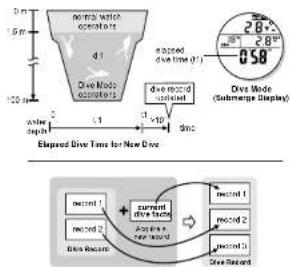
- The Dive Mode will appear automatically if the user submerge, and reached the water approximates to 1.5 m (4.92 ft). When the user emerge, and returned to the water approximate to 1.5 m (4.92 ft), the Normal Time Mode restarts automatically.
- When the Drive Made appear, the following will be displayed:
1) the Current water depth, 2) the Current water temperature, 3) the Maximum reached water depth, 4) the Dive Status Indicator, and 5) the Elspeed Dive Time.
8.2 Dive Mode - Dive Record for a Single Dive (Case A)
flowchart
graph TD
    A["Initial: diameter scale"] --> B{Dive Mode: 0.50 (diameter) / 28"
    B --> C["Dive Mode: Submerge Display"]
    D["Current: record 1"] --> E["+ Current: record 2"]
    E --> F["+ Current: record 3"]
    G["Elapsed Dive Time for New Dive"] --> H["End"]
Acquire a New Dive Record
Dive Record for a Single Dive (Case A)
- If the user finished a dive (d1), the following dive facts of d1 will be stored into the Watch when the user come to a complete slip (returned to the surface for more than 10 minutes).
-
The Elapsed Divs Time.
-
The Maximum Reached Watch Depth.
-
The kroned Viseer Temperature, and
-
The Date and the Starting Time of the day
- User can store up to 13 dive records, and user can recall the dive record(s) in a later day.
- Check the coming '9.0 Dive Record Recall Mode' for more detail of how to recall dive record.
NOTE: If a new dive record is acquired, this record will become the record 1 and the former record 1 will become the record 2. The other records will shift it's location in the similar manner.
8.1 Dive Mode - Dive Status Indicolor, Auto Back Light and Dive Site Selection

Dive Status Indicator and Alarm
- This Watch includes three Dye Status Indicators, they are the Submerge, Emerge and Stay-In. They will flash on the display as follows:
-
Submerge Indicator: if the user submerge at a rate more than or equal to 10 meters per minute, the indicator will 1/24
-
Emerge Indicator: if the user emerge at a rate more than or equal to 6 motors per minute, the indicator will flash and the auto alarm will keep.
-
Stay-In Indicator: If the user is neither 'emerge' nor 'submerge', the Stay-In indicator will flash.
Sea and Lake Dive
- This Watch can work either in sea water or lake water. Set 'SEA' for sea water diving or set 'LAKE' for lake water diving.
- Check the coming '8.5 To Set the Divs mode' for more detail of how to set the diving site setting.
Automatic Back Light
- Give Mode includes an automatic light function for user's convenience. If the automatic Back Light functions is set to ON, the following moves will activate the back light: 1) The user hits his/her wrist and hold that position for 2 seconds, 2) hits the Watch back, 3) the back light will turn ON for 5 seconds.
- Check the coming '8.5 To Set the Drive Mode' for more detail of how to activate the automatic light function.
8.3 Dive Mode - Dive Record for Subsequent Dives (Case B and C)

Dive Record for a Subsequent Dive (Case B)
- If the user has finished a dive (d1), and this user starts another dive (d2) within 10 minutes, the Watch will stored the previous dive (d1) and the subsequent dive (d2) into a single record when the user come to a complete stop (returned to surface for more than 10 minutes).
- Check the coming '9.0 Dive Record Recall Mode' for more detail of how to recall dive record.
Dive Record for Multiple Subsequent Dives [Case C]
- If the user has engaged in a multiple dive (d1,d2 and d3), and every subsequence dive starts right within the 10 minutes interval after the previous dive has finished, the Watch will stored that series of dives (d1,d2 and d3) into a single record when the user came to a complete stop (returned to surface for more than 10 minutes).
- Check the coming '9.0 Dive Record Recall Mono' for more detail of how to recall dive record.
8.4 Dive Mode - Dive Record for Subsequence Dive (Case D and E)
![Pyle PSWDV60GN - Dive Record for Multiple Subsequent Dives [Case C] - 1](/content/2026/05/961611/images/42f48357357456c3105127104549bf440edfde669871579ef96f165f34b5036b.jpg)
21. All will be stated in response to
Elspeed Diee Time for Subsequent Diee (Case D)
![Pyle PSWDV60GN - Dive Record for Multiple Subsequent Dives [Case C] - 2](/content/2026/05/961611/images/13d5e0f125742a05961f659beb117edf516dafd5d8a3f385949932d0fc9d6cf8.jpg)
Dive Mode
[Submerge Display]
Dive Record for Sequence Dives (Case D)
- If the user has finished a dive (d1), and this user starts a subsequent dive (d3) after 10 minutes but NOT later than 24 hours. The Watch will store the subsequent dive d3 into a new record.
- The Elapsed Diva Time of the d3 will start counting from 0. This time will appear on the display with a 'REP' indicator. The 'REP' indicator intends to alert the user that he or she has engaged in two dives within the last 24 hours.
- The dive facts of d3 will be stored into the Watch unless the user come to a complete stop returned to surface for more than 15 minutes.
- Check the coming '9.0 Divs Record/Recall Mode Section for the detail of how to recall dive records.
Dive Record for Subsequent Dive (Case E) - If the user has finished a dive, and this user starts a subsequent dive after 24 hours, this is a new dive. Such case, the Watch will work following the single dive operations.
- Check the previous '8.2 Dive Record for a Single Dive' Section for more detail of the operations.
9.0 Dive Record Mode - Dive Record Recall Mode
![Pyle PSWDV60GN - Dive Record for Multiple Subsequent Dives [Case C] - 3](/content/2026/05/961611/images/349ef7bb831091e7e9ef3baff0bd33deae8726a597f5f2fea3870154890c6e6f.jpg)
![Pyle PSWDV60GN - Dive Record for Multiple Subsequent Dives [Case C] - 4](/content/2026/05/961611/images/f268b38101c5a58cf094aa9bc7ff14979b58abf1729cebff2e2e4deea2da2cb6.jpg)
Dive Record Mode
- To select Dive Record Recall Mode, prase the [MODE] button following the previous '3.0 Functions Mode Selection Sequence'.
- Dive Record Recall Mode can store up to 10 dive records. If there are more than one dive record were stored, press the [Lap/resell] button to select among different Dive Records.
Dive Record Mode Functional Display
- When the designated dive record appear, press the [START/STOP] button to select between Dive Record Display and Dive Time Display.
Dive Record Display
- Dive Record Display: the dive record number appears on the 1st row, the water temperature and the maximum water depth reached appear on the 2nd row, and the Elaped Dive Time appears on the 3rd row of the display.
NOTE: If several water temperatures have been appeared during a dive, the Watch will store the lowest water temperature.
Dive Time Display
- Dive Time Display: the time and date information of the dive record will appear such as the date (may-month) appears on the 1st row, the day of week and the year appear on the 2nd row, and the starling time appears on the 3rd row of the display.
8.5 Dive Mode - To Set the Dive Mode
![Pyle PSWDV60GN - Dive Record for Multiple Subsequent Dives [Case C] - 5](/content/2026/05/961611/images/a83f099d587b1fd7d746b85fc0041b037943345ee93b9e24fbaac2958f995812.jpg)
flowchart
graph TD
    A["PEC 10 30"] --> B["Divo Record Record Mode (Div Record Display)"]
    B --> C["Input: hold [MODE"]]
    B --> D["Output: hold [MODE"]]
    C --> E["MODI-TEMP"]
    D --> F["MODI-TEMP"]
    E --> G["MODI-TEMP STOP"]
    F --> H["MODI-TEMP STOP"]
    G --> I["Output"]
    H --> J["Output"]
    I --> K["Output"]
    J --> L["Output"]
    K --> M["Output"]
    L --> N["Output"]
    M --> O["Output"]
    N --> P["Output"]
    O --> Q["Output"]
    P --> R["Output"]
    Q --> S["Output"]
    R --> T["Output"]
    S --> U["Output"]
    T --> V["Output"]
    U --> W["Output"]
    V --> X["Output"]
    W --> Y["Output"]
    X --> Z["Output"]
    Y --> AA["Output"]
    Z --> AB["Output"]
To Set the Dive Mode
- To set the Dive Mode, press and hold the [MODE] button for about 2 seconds in the Dive Record Recall Mode.
- When the 'MO' appear, press the [START/STOP] button to select among the different setting items following the Dive Mode Setting Sequence, or press the [LAPIRESET] button to select the automatic light function between 'ON' (automatic light ON) and 'OFF' (automatic light OFF).
- If 'm' or 'R' is flashing, press the [LAPIRESET] button to select the water depth unit between 'm' (motor) and 'R' (float)
- If "C" or "F" is flashing, press the [LAPIRESET] button to select the temperature unit between "C" (degree Celsius) and "F" (degree Fahrenheit).
- If 'SEA' and 'LAKE' is flashing, press the [LAPIRESET] button to select the diving site between 'SEA' (see water diving) and 'LAKE' (lake water diving).
- When the designated setting is displayed, press and hold the [MODE] button to exit the setting display.
- If NO key-stoke has been activated for about 1 minute, the setting display will return to Normal Time Mode automatically.
9.1 Dive Mode - To Erase Dive Record
![Pyle PSWDV60GN - Dive Record for Multiple Subsequent Dives [Case C] - 6](/content/2026/05/961611/images/5476d9bef97da5dc4ef845d6003b891c2c0c9b3611b24a2bffb0bf6c7a6b8141.jpg)
![Pyle PSWDV60GN - Dive Record for Multiple Subsequent Dives [Case C] - 7](/content/2026/05/961611/images/0ae1e717e310b66052d6dfe939ba7227bdd8e10f5c1adb2de5b98e714c236687.jpg)
Erase a Olive Record
To Erase a Specific Dive Record
- To erase a specific dive record, press and hold the [LAPRESET] button in the designated dive record display until the ERASE indicator start flashing. Check the previous '9.0 Dive Record Recall Mode' Section for the detail of how to select among dive records.
- When the 'ERASE' indicator is flashing, press the [START/STOP] button once to confirm the erasure or press the [MODE] button to drop the erasure.
NOTE: If a dive record is erased, the record will shift it's location onward.
To Erase All Dive Records
- To erase all dive records, press and hold the [LAP:RESET] button in any dive record display until the 'ERASE' indicator start flashing.
- When the 'ERASE' indicator is flashing, press the [LAPIRESET] button once to confirm the erasure or press the [MODE] button to drop the erasure.
10.0 Specifications
Normal Time Mode
• Hour, minutes and second
• Month, day and day of week
• 12/24 hour format (user selectable)
Alarm Mode
• Three independent alarms
• Alarm beeps sound for 30 seconds
- Hourly chima
Chronograph Mode
• Measure elapsed time, accumulative elapsed
time and lap times
• 17100 second resolution
- Counting limit: 23 hours, 59 minutes, 59.59 seconds
• Store up to 98 lap memories
Timer Mode
• Three counting methods
• Resolution: 1 second
• Programmable range: 1 second to 86 hours, 59 minutes and 59 seconds
• Timer alarm sound:
(1) Two boops at the last 15,10,9,8,7,6,5,4,3,2,1
minerals)
50 40, 31, 21 and 10 seconds
2) One boops at the last 9.8.7.3.5.4.3.2.1 second(s)
Three beeps at zero
Dive Mode
• Depth resolution: 0.1m (0.5ft.)
• Water depth range: 0 to 100m (0 to 328).
- Temperature resolution: 1 C°1 E1
- Tomorrow to 2020: -10 Cdo EIFc 84 F to 14F E
Elocond (no reaction) 1 second
- Clapsed time range: 1 second to 199 minutes.
of 2007-15
• Auto Right
• TO LIVE RECORDS
Back Light
• EL back light Turn ON for about 5 seconds when
the [LIGHT] key is pressed
- EL back light Turn ON automatically for about
5 seconds when user this hather wrist in Live Mode
Water Resistance
• Water resistant 20 Bar
- Introduction
- WARNING
- Key Layout and Battery Low Indicator
- Key Layout
- To Replace Battery
- Functional Modes
- Functional Modes
- To Switch among Functional Mode
- Normal Time Mode - Normal Time Mode
- Normal Time Mode Display
- Year Display
- Temperature Display
- Alarm Mode
- To Select among Alarm Mode Displays
- To Set the Alarm Time
- To Select between ON and OFF the Alarm
- Chronograph Mode
- To Reset the Chronograph
- Chronograph - To Use the Chronograph
- Timer Mode - Timer Mode
- Timer Mode
- The Counting Method
- The Target Time
- Time Mode - To Set the Target Time and Counting Method
- To Set the Target Time and Counting Method
- Timer Mode - To Use the Timer
- To Use the Timer
- Timer Alarm Sound
- Dive Mode Precaution
- Drive Mode
- Dive Record for a Single Dive (Case A)
- Dive Status Indicator and Alarm
- Sea and Lake Dive
- Automatic Back Light
- Dive Record for a Subsequent Dive (Case B)
- Dive Record for Multiple Subsequent Dives [Case C]
- Specifications
- Normal Time Mode
- Dive Mode
- Back Light
- Water Resistance
Brand : Pyle
Model : PSWDV60GN
Category : Sports Watch