
EX-1UTP-IR-70 - AV Extender WyreStorm - Free user manual and instructions
Find the device manual for free EX-1UTP-IR-70 WyreStorm in PDF.


| Product Type | AV Extender (VGA + Audio + IR over Cat5/6) |
| Dimensions (W x D x H) | 100 x 80 x 30 mm (approx.) |
| Weight | 200 g (approx.) |
| Power Supply | External adapter 5V DC, 1A |
| Power Consumption | < 5W |
| Video Input | VGA (HD-15) female |
| Audio Input | 3.5mm stereo jack |
| IR Support | Built-in IR receiver and emitter; 20-60 kHz carrier |
| Maximum Transmission Distance | Up to 300 m over Cat5e/6 cable |
| Resolution Support | Up to 1920x1200 @ 60Hz |
| Bandwidth | 350 MHz (-3dB) |
| Operating Temperature | 0°C to 50°C |
| Storage Temperature | -20°C to 70°C |
| Humidity | 10% to 85% RH (non-condensing) |
| Maintenance & Cleaning | Wipe with a dry, soft cloth. Do not use liquids or solvents. |
| Safety Precautions | Indoor use only. Avoid exposure to moisture, extreme heat, and direct sunlight. |
| Spare Parts & Repairability | No user-serviceable parts. Contact WyreStorm support for repairs. |
| General Information | Brand: WyreStorm; Model: EX-1UTP-IR-70; Professional AV extender for commercial installations. |
Frequently Asked Questions - EX-1UTP-IR-70 WyreStorm
User questions about EX-1UTP-IR-70 WyreStorm
0 question about this device. Answer the ones you know or ask your own.
Ask a new question about this device
Download the instructions for your AV Extender in PDF format for free! Find your manual EX-1UTP-IR-70 - WyreStorm and take your electronic device back in hand. On this page are published all the documents necessary for the use of your device. EX-1UTP-IR-70 by WyreStorm.
USER MANUAL EX-1UTP-IR-70 WyreStorm
WYRESTORM EX-1UTP-IR-70
Single 70m (230ft) HDBaseT 2 way IR & RS232 Extender Set
Attention: We strongly recommend using the supplied mounting brackets to secure both the transmitter and receiver baluns. Sudden movement of these devices can lead to unnecessary service call outs and loss of picture/sound due to stress on connections.
1 HDMI: Connect the HDMI source (i.e. HD-DVD, PS3, Cable/Sat box, Blu-ray etc.) to the HDMI IN of the TRANSMITTER and connect the HDMI DISPLAY (i.e. LCD/plasma TV, digital projector etc.) to the HDMI OUT of the RECEIVER.
Use good quality HDMI cables, ensuring connectors are inserted firmly in ports and avoid excessive bending of cable.
Attention: Do Not Hotswap! - Please insert and extract cables carefully with the power SWITCHED OFF. Connecting and disconnecting while the unit is powered can result in damage to circuitry.
2 One-way IR: Position the small, round IR TX emitter directly over the infrared receiving area of the SOURCE and secure with the adhesive backing. You may need to adjust the location of the emitter later to achieve best results - repositioning to different areas on the source facia can sometimes improve IR performance. Insert the IR TX 3.5mm jack into the IR TX port on the TRANSMITTER.
Tip: You can locate the small, round infrared sensor by shining a flashlight onto the display panel of your source.
3 Insert the IR RX 3.5mm jack into the IR RX port on the RECEIVER. Discretely attach the larger, rectangular IR eye to the DISPLAY with the adhesive backing, ensuring a clear line of sight to the remote control being used. Again, repositioning IR RX may be required to achieve best results.
For two-way control of SOURCE and DISPLAY from both locations, an IR TX eye should also be placed over the IR sensor of the DISPLAY and an IR RX eye placed on the SOURCE.
4 Cat5e/6 Transmission: Connect the TRANSMITTER and RECEIVER with a single, good quality, well terminated and tested Cat5e/6 cable with RJ45 connectors wired to 568B standard at both ends up to a distance of 70m (230ft). (See diagram)
The quality of each RJ45 termination is essential - poor termination leads to intermittent performance and longer install times.
Attention: Check connectors are pushed securely into each port and supported by the connector strain relief clip to prevent them from becoming loose.
5 Power: Add the 5V power supplies provided to both TRANSMITTER and RECEIVER. We do not recommend passing power remotely over long cable distances as this can affect product performance.
6 You can also power TRANSMITER and RECEIVER units using WyreStorm USB to 5V adaptors connected to DISPLAYS or SOURCES with spare USB ports. This not only solves space
and power availability problems at locations, it also offers improved energy efficiency as extenders are only powered when devices are turned on.
7 Finally, power on TRANMITTER, RECEIVER and all connected devices and your extender set is ready for use.

Attention: Check LED POWER and STATUS are lit to confirm the units are powered and a signal link is established between the units. If not, check connections, devices and power supplies or follow the troubleshooting overleaf.

Cat5e/6 Cable Performance Guide
EX-1UTP-IR-70
0m 100m10m 20m 30m 40m 50m 60m 70m 80m 90m
0ft 328ft32ft 65ft 98ft 131ft 164ft 197ft 230ft 262ft 295ft
Cat5e Wiring Guide
The quality of termination for every RJ45 is essential. Poor terminations leads to intermittent performance and longer install times.

Troubleshooting
Regardless of manufacturer or product, the majority of installation difficulties can typically be attributed to communication problems between devices or when high bandwidth transmissions are attempted with insufficient cable/connections. Should you find yourself in such a situation, we have drawn up the following checklist of general issues and causes that should help you shoot your way out of trouble without seeking further assistance.
No or poor quality picture?
Device Connection - Are you connected and powered? Double check all HDMI, UTP and power connections are firmly inserted into correct ports and that all devices are powered. In the event of a poor quality or excessive cable run, transmission may become intermittent. Ensure cable quality, distance and termination meet standards required for successful transmission.
Cable length – is your signal struggling to transmit signals or power the distance of your cable? If you are approaching the maximum capacity of your transmission cable distance, try changing to long cable mode on the DIP switch.
Signal strength – the use of cable joins, stranded patch panels, wall outlets and stranded patch leads as interconnects between them, can significantly reduce signal strength. Use solid core straight, straight through connections wherever possible.
Resolution - If you reduce the resolution of the source, do you get a picture? If so, this suggests a conflicting resolution between source and display or a bandwidth capacity issue with your cable. Check all inputs and outputs share the same resolution and make sure the signal is being successfully transmitted the full length of your cable run.
Picture ‘snow’ / HD ‘noise’ – signifies a failure to fully establish a signal and can often be caused by poorly terminated RJ45 connectors or excessive cable lengths. Ensure your cable is correctly wired to 568B standards. Try swapping in a display and display receivers from a fully functioning location – if the problem continues on the same output, turn off all equipment and swap your signal carrying cables at both ends.
Cable quality and condition – HDMI cable/connectors can be easily damaged and the quality of material can vary, especially in lower price brackets. Successful transmission of video, audio and control, as well as POH functionality can all be affected by cable and termination quality. Always use good quality leads and cables, with RJ45 connectors wired to the 568B standard at both ends. Should transmission problems be experienced, try swapping cables/leads for those already working to see if this improves your image to identify cable issue as source of probem.
Blu-Ray, 3D - Make sure all your equipment has been configured and enabled to transmit and accept the signal, or is capable of passing a signal. Are resolutions between source and display compatible and cable adequate for the large bandwidth required by Blu-ray and 3D transmissions?
4K - Are you trying to pass a 4K signal? This product is not designed to pass 4K resolutions.
IR Control
Check IR TX and IR RX eyes are correctly positioned to allow infrared signals to be transmitted and received through the extenders. IR TX eye should be fixed firmly over infrared sensors of devices. IR RX eye should be attached on or near devices ensuring a clear line of sight to the remote control used to operate.
Is your remote control powered and sending a signal? As IR is invisible to the naked eye, check your remote is transmitting a signal by viewing the remote handset sensor through a digital camera/camera phone – the sensor should flash when a button on the handset is held down.
IR signal dropout can be experienced due to exterior emissions of infrared radiation. Ensure IR transmitters and receivers are away from direct sunlight, halogen lighting and plasma screens that may interfere with IR signals.
Safety Recommendations:
Do not expose this apparatus to any form of moisture, including the placement of anything containing liquids on the unit.
To prevent risk of electric shock or fire hazard, ensure apparatus is installed in an unobstructed, well ventilated area away from any external heat sources - including other electrical devices which may produce heat.
Only use attachments / accessories specified by the manufacturer and refer all servicing to qualified service personnel.
Failure to adhere to these recommendations may invalidate your warranty.
Warranty Information
This product is covered by a 3 year limited parts and labour warranty. During this period there will be no charge for unit repair, component replacement or complete product replacement in the event of malfunction. The decision to repair or replace will be made by the manufacturer.
This limited warranty only covers defects in materials or workmanship and excludes normal wear and tear or cosmetic damage.
Please visit the website product page to download the full user guide including specification and warranty terms & conditions.
www.wyrestorm.com
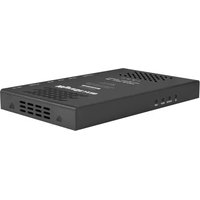
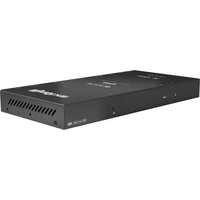
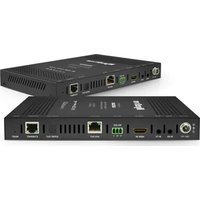

Brand : WyreStorm
Model : EX-1UTP-IR-70
Category : AV Extender