
5700301 - Laminator FELLOWES - Free user manual and instructions
Find the device manual for free 5700301 FELLOWES in PDF.


| Product Type | Laminator |
| Brand | Fellowes |
| Model | 5700301 |
| Dimensions (W x D x H) | 15 x 5 x 3 inches |
| Weight | 3.5 lbs |
| Power Supply | 120V AC, 60 Hz |
| Lamination Speed | Up to 12 inches per minute |
| Max Pouch Thickness | Up to 5 mil |
| Max Pouch Width | 9 inches |
| Lamination Methods | Hot and Cold |
| Warm-up Time | Approximately 4 minutes |
| Auto Shut-off | After 30 minutes of inactivity |
| Jam Release Lever | Yes |
| Cleaning | Wipe exterior with damp cloth; use cleaning sheet for rollers |
| Safety Features | Auto shut-off, overload protection |
| Certifications | ETL listed |
| Included Accessories | Starter laminating pouches, cleaning sheet |
| Repairability | Limited; user-replaceable rollers not available |
Frequently Asked Questions - 5700301 FELLOWES
User questions about 5700301 FELLOWES
0 question about this device. Answer the ones you know or ask your own.
Ask a new question about this device
Download the instructions for your Laminator in PDF format for free! Find your manual 5700301 - FELLOWES and take your electronic device back in hand. On this page are published all the documents necessary for the use of your device. 5700301 by FELLOWES.
USER MANUAL 5700301 FELLOWES
natural_image
Two white spherical devices labeled 'Fellowes' with visible ports and control buttons, one open and one closed (no readable text beyond branding)Cosmic (A4
Please read these instructions before use.
CAPABILITIES
A4 A3
| Pouch Thickness 75-100 microns 75-100 microns | |
| Estimated Heat-Up Time 6 Minutes 6 Minutes | |
| Approximate Cool-Down Time 90 Minutes 90 Minutes | |
| Lamination Speed 30 cm/Minute 30 cm/Minute |
A4 A3
| Maximum Width | 220 mm | 330 mm |
| Voltage | 220 - 240V~ | 220 - 240V~ |
| Frequency | 50/60 Hz | 50/60 Hz |
IMPORTANT SAFETY INSTRUCTIONS — Read Before Using!

WARNING
- The socket-outlet shall be installed near the equipment and shall be easily accessible.
- To prevent electrical shock, do NOT use laminator close to water and do NOT spill water on laminator, electric cord, or wall socket.
- Do not leave electric cord in contact with a warm surface.
- Do not leave electric cord hanging from a cupboard or shelf.
- Do not use laminator if electric cord is damaged.
- Do not laminate metal objects.

CAUTION

- Only use pouches specifically designed for the lamination setting (Hot or Cold) you intend to use.
• Always supervise children during laminator operation. - Keep pets away from laminator while in use.
- Switch off and unplug laminator when not in use.
- Do not open or attempt to repair the laminator yourself, as this could result in electric shock and will void your warranty. Contact Customer Service if you have questions. Please note the warranty does not apply in cases of abuse, mishandling or unauthorized repair.
- Always wrap cord around cable management feet while carrying or in storage.
TIPS
- Always put item in a pouch. Never laminate an empty pouch.
- Trim excess pouch material from around your item after laminating and cooling.
- If using both hot and cold lamination in one session, use the cold setting first to avoid having to wait for the laminator to cool down.
-
With self-adhesive pouches, use the laminator on the cold setting for a smoother finish.
-
Before laminating valuable items, do a test run with an item similar in size and thickness.
- When not in use, wrap cord around feet for portable ease and optimal storage.
- When laminating heat-sensitive documents (i.e., tickets, ultrasounds, etc.) only use self-adhesive pouches on a cold setting.
- Use a dry-erase marker for writing on laminated pouches.
BEFORE YOU LAMINATE
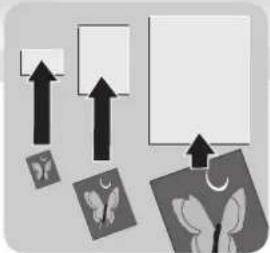
Use Fellowes® brand pouches for best results. Select correct pouch size for laminated item.
natural_image
Abstract diagram with arrows pointing to various shapes and images (no text or symbols)- Plug laminator into power outlet.
- Position laminator so you have enough space to allow items to pass freely through the machine.

natural_image
Illustration of a printer with a paper and a digital screen, connected to a power outlet (no text or symbols visible)
COLD LAMINATION STEPS
CAUTION: Only use self-adhesive pouches when laminating with a cold setting.

Slide power button to Cold Setting and wait for green Ready Light.

natural_image
Illustration of a closed book with a black upward arrow on top (no text or symbols)Center item on clear side against sealed edge; documents cannot be repositioned once laminated.
natural_image
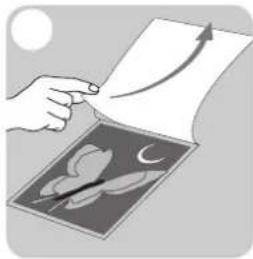
Illustration of a hand pointing at a document with an arrow indicating direction (no text or symbols present)Peel a small part of the protective sheet away from document.

natural_image
Illustration of a hand holding a sheet of paper with an upward arrow, partially covered by a curved object (no text or symbols)Place pouch, sealed edge first, into laminator entry. Keep pouch straight and use the edge guide to center it. Continue peeling the protective sheet away.
natural_image
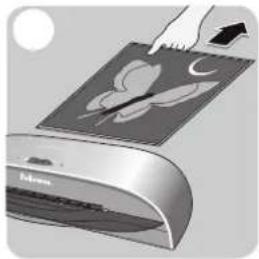
Illustration of a hand pressing down on a digital drawing tablet with leaf graphics (no text or symbols)To prevent jamming, immediately remove laminated item from back of machine.

HOT LAMINATION STEPS
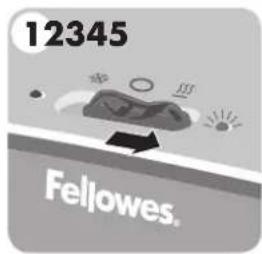
Slide power button to Hot SSS Setting and wait for green Ready Light.

natural_image
Simple diagram showing two stacked rectangular panels with arrows pointing upward (no text or symbols)Place item inside pouch against the sealed edge. To prevent jamming, use a carrier when item is smaller than the pouch.
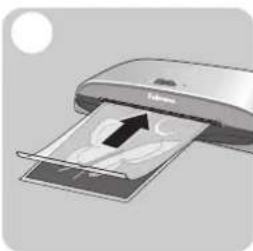
natural_image
Illustration of a printer with paper and a paper sheet, showing internal graphics (no text or symbols)Place pouch, sealed edge first, into laminator entry. Keep pouch straight and use the edge guide to center it.

natural_image
Illustration of a hand pressing down on a stylized airplane wing diagram (no text or symbols)To prevent jamming, immediately remove laminated item from back of machine. Let item cool on flat surface for several seconds.
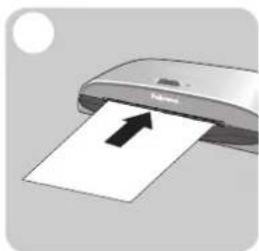
natural_image
Illustration of a printer with an arrow indicating paper being inserted (no text or symbols present)Before switching off laminator, feed empty cleaning/carrier sheet through machine to clean unit.
TROUBLESHOOTING
| Problem | Cause | Solution |
| Ready Light does not go on after extended time. | Laminator is in a hot, humid area. | Move laminator to a cool dry area. |
| Ready Light does not go on for cold lamination. | If you used the hot lamination setting before a cold lamina-tion session, the laminator may need time to cool down. | Wait 90 minutes for laminator to fully cool down. |
| Pouch did not completely adhere to item. | Laminated item may be too thick. | Pass through laminator a second time. |
| Jamming | Laminated item was not immediately removed from machine or small items were laminated without a carrier.Pouch was not used.Pouch was not centered or straight when fed through Pouch/Document Entry. | Press release lever, in back of laminator, to gently pull pouch out of machine. Use cleaning sheet before laminating.Always put item in a pouch.Align sealed edge with Pouch/Document Entry. Use guide to center. |
Need Help?
Please call our experts at Customer Service. You'll find the numbers for your nearest Service Centre on the cover of this booklet.
WARRANTY
Fellowes warrants all parts of the laminator to be free of defects in material and workmanship for 2 years from the date of purchase by the original consumer. If any part is found to be defective during the warranty period, your sole and exclusive remedy will be repair or replacement, at Fellowes' option and expense, of the defective part. This warranty does not apply in cases of abuse, mishandling or unauthorized repair. ANY IMPLIED WARRANTY, INCLUDING THAT OF MERCHANTABILITY OR FITNESS FOR A PARTICULAR PURPOSE, IS HEREBY LIMITED IN DURATION
TO THE APPROPRIATE WARRANTY PERIOD SET FORTH ABOVE. IN NO EVENT SHALL FELLOWES BE LIABLE FOR ANY CONSEQUENTIAL OR INCIDENTAL DAMAGES ATTRIBUTABLE TO THIS PRODUCT. This warranty gives you specific legal rights. You may have other legal rights that vary from this warranty. The duration, terms and conditions of this warranty are valid world-wide, except where different limitations, restrictions or conditions may be required by local law. For more details or to obtain services under this warranty, please contact us or your dealer.
English
This product is classified as Electrical and Electronic Equipment. Should the time come for you to dispose of this product please ensure that you do so in accordance with the European Waste of Electrical and Electronic Equipment (WEEE) Directive and in compliance with local laws relating to this directive.
For more information on the WEEE Directive please visit www.fellowesinternational.com/WEEE
French
Declaration of Conformity Useful Phone Numbers
Declaration of Conformity
Fellowes Manufacturing Company
Yorkshire Way, West Moor Park, Doncaster, South Yorkshire, DN3 3FB, England declares that the product Model Cosmic conforms with the requirements of (RoHS) the Restriction of Hazardous Substances Directive 2002/95/EC. The Low Voltage Directive 72/73/EEC as amended by directive 92/68/EEC. The Electromagnetic Compatibility Directive 89/336/EEC as amended by directives 92/31/EEC & 96/68/EEC. And the following Harmonised European Normes EN standards and IEC standards.
Information Technology Product: EN-60950-1 2001 / IEC-60950-1 2001
EMC: EN-55014-1 / A2 : 2002 EN-55014-2 / A1 : 2001 EN-61000-3-2 : 2000 EN-61000-3-3 / A1 : 2001
Itasca, Illinois, USA
June 30, 2006

Mark Martin
Help Line
| Australia | +1-800-33-11-77 |
| Canada | +1-800-665-4339 |
| Europe | 00-800-1810-1810 |
Fellowes
| Australia | + 61-3-8336-9700 |
| Benelux | + 31-(0)-76-523-2090 |
| Canada | + 1-905-475-6320 |
| Deutschland | + 49-(0)-5131-49770 |
| España | + 34-91-748-05-01 |
| France | + 33-(0)-1-30-06-86-80 |
| Italia | + 39-071-730041 |
| México | + 1-800-234-1185 |
| United States | + 1-800-955-0959 |
| Japan | + 81-(0)-3-5496-2401 |
| Korea | + 82-(0)-2-3462-2884 |
| Malaysia | + 60-(0)-35122-1231 |
| Polska | + 48-(22)-771-47-40 |
| Singapore | + 65-6221-3811 |
| United Kingdom | + 44-(0)-1302-836836 |
| United States | + 1-630-893-1600 |
Fellowes.
1789 Norwood Avenue, Itasca, Illinois 60143-1095 • USA • 630-893-1600
fellowes.com


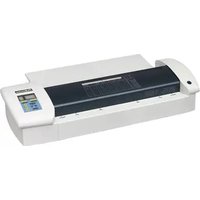

- Cosmic (A4
- CAPABILITIES
- IMPORTANT SAFETY INSTRUCTIONS — Read Before Using!
- WARNING
- CAUTION
- TIPS
- BEFORE YOU LAMINATE
- COLD LAMINATION STEPS
- HOT LAMINATION STEPS
- TROUBLESHOOTING
- Need Help?
- WARRANTY
- English
- French
- Declaration of Conformity Useful Phone Numbers
- Declaration of Conformity
- Fellowes Manufacturing Company
Brand : FELLOWES
Model : 5700301
Category : Laminator