VT-1663 BK - Microwave Vitek - Free user manual and instructions
Find the device manual for free VT-1663 BK Vitek in PDF.


| Product Type | Microwave Oven |
| Brand | Vitek |
| Model | VT-1663 BK |
| Color | Black |
| Capacity | 20 Liters |
| Power Output | 800 W |
| Control Type | Digital with LED Display |
| Functions | Defrost, Auto Cook, Timer, Quick Start |
| Dimensions (W x D x H) | 440 x 360 x 260 mm |
| Weight | 11 kg |
| Power Supply | 230 V ~ 50 Hz |
| Safety Features | Child Lock, Door Safety Interlock |
| Cleaning | Wipe interior with damp cloth, avoid abrasives |
| Repair | Contact authorized Vitek service center |
| Warranty | 1 year (subject to terms) |
Frequently Asked Questions - VT-1663 BK Vitek
User questions about VT-1663 BK Vitek
0 question about this device. Answer the ones you know or ask your own.
Ask a new question about this device
Download the instructions for your Microwave in PDF format for free! Find your manual VT-1663 BK - Vitek and take your electronic device back in hand. On this page are published all the documents necessary for the use of your device. VT-1663 BK by Vitek.
USER MANUAL VT-1663 BK Vitek
Microwave oven for household use
ENGLISH
MICROWAVE OVEN
Instruction manual
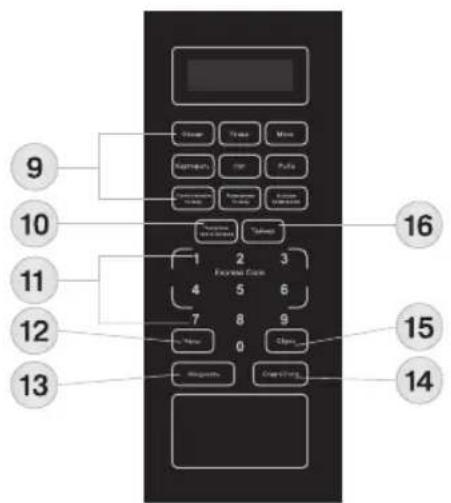
Description
| 1. Oven door latches | 9. Automatic cooking program selection buttons |
| 2. Oven door | 10. «Step-by-step cooking» button |
| 3. Roller support | 11. Current time/cooking time/weight setting buttons |
| 4. Glass bottom plate | 12. «Clock» button |
| 5. Microwave output point | 13. «Power» button |
| 6. Display | 14. «Start/Stop» Button |
| 7. Control panel | 15. «Reset» button |
| 8. Door opening button | 16. «Timer» button |
Attention!
For additional protection it is reasonable to install a residual current device (RCD) with nominal operation current not exceeding 30 mA. To install RCD, contact a specialist.
PRECAUTIONS TO AVOID RISK OF MICROWAVE RADIATION EXPOSURE
• It is prohibited to operate this oven with the door open, as exposure to microwave radiation is dangerous.
- Do not make any changes in electric circuits of oven door protective blocking system.
- Do not place any objects between the body of the oven and its door, remove dirt or remaining detergents from the inner side of the door.
• The microwave output point (5) is covered with a mica plate, do not remove it and keep it clean.
- Do not use the oven when it is damaged, it is especially important that the door closes properly.
• Make sure that there is no damage to:
- the door (for instance, when it is bent),
- hinges and latches (when they are broken or loose),
– the protective screen on the inner side of the viewing window.
- Adjustments and repair of the microwave oven should be performed by specialists of authorized service centers only.
IMPORTANT SAFETY MEASURES
READ THESE INSTRUCTIONS CAREFULLY AND KEEP THEM FOR FUTURE REFERENCE.
ATTENTION! Do not operate the oven if the door or the door sealings are damaged until the defect is repaired by authorized personnel!
ATTENTION! All maintenance and repair works concerning the removal of the lids protecting from the microwave radiation should be performed by specialists only.
ATTENTION! Do not heat liquids and other products in closed containers to avoid the package explosion! ATTENTION! Children are allowed to use the unit unattended only if they are given all the necessary and understandable instructions on safety measures and information about danger that can be caused by improper usage of the unit.
ATTENTION! If the power cord is damaged, it should be replaced at an authorized service centre!
ATTENTION! The microwave oven is not intended for usage by physically or mentally disabled persons (including children) or by persons lacking experience or knowledge if they are not under supervision of a person who is responsible for their safety or if they are not instructed by this person on the usage of the oven! WARNING: During operation, the outer surfaces of the oven get hot.
WARNING: During operation of the unit the temperature of the inner surfaces of the cavity can be high.
• It is necessary to clean the oven regularly and remove all remaining food.
- Insufficient oven cleanness may damage the surface, which may decrease the unit operating life and cause danger.
• This unit is not intended for activation by an external timer or a separate remote control system.
• This unit is designed for household or similar use, in places such as:
– kitchens for employees in shops, offices and other service premises;
- farm houses;
– hotels, motels and other accommodations;
- B&B hotels;
ENGLISH
- The microwave oven is intended for reheating food and beverages. Drying food or clothes, warming up hot-water bags, slippers, sponges, damp cloth and other similar objects may cause risk of damage, inflammation or fire.
- Do not place the unit in a cupboard.
SAFETY MEASURES
Before using the unit, read this instruction manual carefully; keep this manual for future reference.
Use the unit according to its intended purpose only, as it is stated in this user manual. Mishandling the unit can lead to its breakage and cause harm to the user or damage to his/her property.
To avoid burns, electric shock, fire, exposure to leakage of microwave radiation and personal injury, strictly follow the most important safety measures given below.
- Before switching the oven on for the first time, make sure that the mains voltage corresponds to the voltage specified on the unit body.
• Use the microwave oven only for the intended purposes, as specified in this manual.
• The microwave oven is intended for cooking food and heating ready meals. - Do not switch the unit on without food inside.
Observe safety measures to avoid fire in the oven cavity:
- when heating food in a plastic or paper package, watch the heating process to prevent package ignition;
• before putting paper or plastic bags in the unit, remove wire twist-ties (clamps) from them; - in case of fire inside the oven, switch it off and unplug it immediately without opening the door not to let the fire spread;
• do not use the oven cavity for storage of any objects; do not leave paper or food inside it.
• This unit is not intended for activation via an external timer or a separate remote control system.
• Cookware should be preliminarily tested for microwave safety.
• Cookware can heat up strongly from the cooked products, thus it is necessary to use potholders.
- Be careful taking cookware out of the oven as strong boiling of liquids may happen after you have finished heating them in the microwave oven.
- Shell eggs and whole hard-boiled eggs should not be heated in the microwave oven since they may explode due to increase of inner pressure.
- Feeding bottles and baby food jars should be placed in the oven without lids or teats. The contents should be stirred or shaken periodically. Before feeding the baby from a bottle or a jar, check the temperature of its content to avoid scalding.
• Never leave the operating unit unattended.
• For children safety reasons do not leave polyethylene bags, used as a packaging, unattended.
Attention! Do not allow children to play with polyethylene bags or packaging film. Danger of suffocation!
- Close supervision is necessary when children or disabled persons are near the operating unit.
- Do not allow children to touch the unit body and the power cord during operation.
• This unit is not intended for usage by children under 8 years of age. - This unit is not intended for usage by people (including children over 8) with physical, neural, mental disorders or with insufficient experience or knowledge. Such persons can use this unit only if they are under supervision of a person who is responsible for their safety and if they are given all the necessary and understandable instructions concerning the safe usage of the unit and information about danger that can be caused by its improper usage.
- Do not leave children unattended to prevent using the unit as a toy.
- Do not block the ventilation openings on the microwave oven body.
- Do not immerse the power cord and power plug into water or other liquids.
• Make sure that the power cord and the power cord plug do not touch hot surfaces or sharp edges of furniture.
- When unplugging the unit, pull the plug but not the cord.
- Do not touch the power plug with wet hands as it may lead to electric shock.
- Never use the microwave oven if the power cord or the power cord plug are damaged, if the oven works improperly or after it was dropped.
- To avoid electric shock, do not dismantle and repair the microwave oven by yourself; if the unit is damaged, apply to an authorized service center only.
- Do not use the unit outdoors.
- Transport the unit in the original package only.
- Keep the unit out of reach of children and disabled persons.
ENGLISH
The unit should be securely grounded. In case of any inner short circuit, grounding reduces the risk of electric shock, because the current will pass through the ground wire. The power cord used in the microwave oven has a grounding wire and a plug with a grounding contact.
The plug should be connected to a mains outlet with a grounding contact.
Warning:
- Connecting a plug with a grounding contact to a socket with no grounding contact can lead to the risk of electric shock.
- Consult a qualified electrician if the oven grounding instructions are not clear to you or if you are not sure that the unit is securely grounded.
• To prevent tangling of the power cord, the microwave oven is equipped with a short power cord. - If it is necessary to use an extension cord, use only a 3-wire extension cord with a grounding contact on the plug and in the socket.
- Wire section marking of the microwave oven cord and of the extension cord should match.
- The extension cord should not hang from the edges of the table, where children can pull it and it should be placed in such way that excludes possibility of stepping on it.
GENERAL RULES OF COOKING PRODUCTS IN MICROWAVE OVENS
WARNING: Open hermetic or vacuum food package before cooking or warming the food in the microwave oven. Otherwise the pressure that will build up inside the package can burst it.
- Shell eggs and whole hard-boiled eggs should not be heated in the microwave oven since they may explode due to increase of inner pressure.
- Pierce pithy products (such as potatoes, vegetable marrows or apples) in several points before cooking.
- Feeding bottles and baby food jars should be placed in the oven without lids or teats. The contents should be stirred or shaken periodically. The contents' temperature should be checked before feeding to avoid scalding.
- When cooking bacon, do not put it directly on the glass rotary bottom plate, local overheating of the bottom plate can lead to its cracking.
- Use only microwave-safe cookware; put it on the glass bottom plate.
- For even heating of products, put thicker slices near the edges of the cookware.
- Watch the cooking time. Set the shortest cooking time, it can be increased if necessary.
- Do not exceed the cooking time, it can lead to inflammation of the products.
- Cook products under a microwave-safe lid. The lid prevents juice or fat splattering and provides even cooking of food. Do not fry products in the microwave oven without using special cookware and protective lid.
- To speed up the cooking process, turn over fast-food products (e.g. hamburgers) once. Large pieces of meat must be turned over at least twice during cooking.
• Stir the food during cooking both from top to bottom and from the center of the dish to the outside.
RECOMMENDATIONS ON CHOOSING COOKWARE
Use only microwave-safe cookware for this unit.
- The ideal material for microwave-safe cookware should be “transparent” for microwaves, as this allows microwave energy to pass through and heat the food.
- Microwaves can not go through metal; that is why never use metal cookware or plates with metal finishing for cooking in the microwave oven.
- Do not place objects made of recycled paper in the microwave oven, as they may contain small metal fragments which may cause package ignition.
• Round and oval cookware better suits for usage in microwave ovens, than rectangular cookware. - Do not use chopped or cracked cookware.
COOKWARE TESTING BEFORE USING IT IN THE MICROWAVE OVEN
• Put the cookware that you want to test (for instance, a plate) into the cavity; place a glass with cold water on it.
- Switch the microwave oven on at the maximal power and set the operation time for no longer than 1 minute.
- Carefully touch the test cookware. If it is hot, and the water in the glass is cold, do not use this cookware for cooking in the microwave oven.
- Avoid exceeding the maximum testing time of 1 minute.
ENGLISH
Microwave-safe materials and cookware
| Cookware for frying | Follow the manufacturer's instructions. The bottom of cookware intended for frying should be 5 mm thicker than the glass rotary bottom plate. Improper use of the cookware for frying may lead to cracks in the cookware and in the glass rotary bottom plate. |
| Dinnerware | Use only the dinnerware with respective marking. Follow the cookware manufacturer's instructions. Do not use chopped or cracked cookware. |
| Glass containers | Use containers made of heat-resistant glass only. Check that the cookware does not have any metal rims. Do not use chopped or cracked cookware. |
| Glassware | Use cookware made of heat-resistant glass only. Check that the cookware does not have any metal rims. Do not use chopped or cracked cookware. |
| Using special bags | Follow the manufacturer's instructions. Do not close the bags with metal twist-ties. Make several openings in the bag for steam release. |
| Paper plates and cups | Use paper plates and cups only for short-time cooking/heating of products. Do not leave the microwave oven unattended when cooking/heating up food in such cookware. |
| Paper towels | You can cover food with paper towels to keep it warm and to avoid fat splashing. Use only at constant control and only for fast cooking/heating up. |
| Parchment paper | Use parchment paper to avoid fat splashing or as a wrap. |
| Plastic | You can use only plastic items with respective marking: “Microwave-safe”. Follow the manufacturer's instructions. Some plastic containers may soften as the result of heating food in them. Pierce or cut through hermetically sealed plastic bags as shown on the packages. |
| Plastic wrap | You can use only plastic items with respective marking. |
| Wax paper | Use wax paper to avoid fat splashing and to keep moisture. |
Materials and cookware not suitable for microwave ovens
| Aluminium trays and foil | Aluminium trays and foil may cause sparks. Use the cookware specially intended for microwave oven. |
| Cardboard cup with metal handle | Cardboard cups with metal handle may cause sparks. Use the cookware specially intended for microwave oven. |
| Metal cookware or cookware with metal rim | Microwaves can not go through metal. Metal rim may cause sparks. |
| Metal twist-ties | Metal twist-ties may cause sparks and ignition of the package during cooking/heating up food. |
| Paper bags | Paper bags may cause fire in the microwave oven. |
| Soap | Soap may melt and make the oven cavity dirty. |
| Wood | Wooden cookware may dry out, crack and inflame. |
After oven storage at low temperature or its transportation in winter conditions, it is necessary to keep it unpacked for at least two hours at room temperature before switching on.
- Remove the package and the accessories from the oven cavity.
- Check the microwave oven for damages. Pay special attention to the oven door. If there is any defect, do not install and do not switch the oven on.
Protective covering
Body: If there is a protective film on the unit body, remove it from the surface of the body.
Do not remove the light-gray mica plate inside the cavity at the microwave output point (5), as it serves for magnetron protection.
ENGLISH
Installing the glass rotary bottom plate
- Open the oven door (2) by pressing the button (8).
- Set the roller support (3) of the glass rotary bottom plate into the opening located in the bottom of the oven cavity.
- Carefully set the glass rotary bottom plate (4) on the roller support (3). Never set the glass rotary bottom plate with its bottom side up.
Note:
- Do not hinder rotation of the glass rotary bottom plate (4) while oven operation.
• Always use the glass rotary bottom plate (4) and the roller support (3) when cooking.
• Food and cookware should be always placed only on the glass rotary bottom plate (4).
• During operation of the oven the glass rotary bottom plate (4) can rotate clockwise or counterclockwise.
• If cracks or shears appear on the glass rotary bottom plate (4), replace it immediately.
- Before switching the unit on, make sure that the operating voltage and input power of the unit correspond to your mains specification.
- Connect the microwave oven to a mains socket with reliable grounding contact.
- Set the microwave oven on a flat and hard surface that will bear its weight and maximal weight of the products which will be cooked in it.
- Do not install the unit in places with high moisture and temperature, and near inflammable objects.
- Set the unit in places out of reach of children.
- Place the microwave oven keeping at least a 20~cm gap from the sides and the rear of the oven to the wall and a 30~cm gap above the unit.
- Do not remove the supporting legs from the bottom of the oven.
- Do not block ventilation openings in the unit body.
- It is necessary to place the microwave oven away from TV-sets or radio receivers to avoid interferences in the reception of TV and radio signals.
WARNING:
In case the oven is damaged due to the user, the user is deprived of the right for free warranty maintenance and repair of the unit.
Current time setting
- Insert the power plug into the mains socket.
- Press the «Clock» button (12), the 24 hour time format symbols («Hr 24») will be shown on the display (6).
- To change the time indication format to 12 hours, press the «Clock» button (12) again, the symbols «Hr 12» will appear on the display. Skip this step if you want to keep the 24 hour time format.
- Use the buttons (11) to set the current time in hours and minutes.
- To save the settings, press the «Clock» button (12).
Notes:
- If you have not saved the settings, then 20 seconds after the last pressing of the buttons the unit will be switched to the previous settings.
- If you press the «Reset» button (15) during time setting, the unit will be switched to the previous settings.
- Press the «Clock» button (12) to see the current time during cooking.
DELAYED START FUNCTION
This unit allows not only to choose a cooking program, but also the cooking start time. The delayed start function is set with the «Timer» button (16) (see «Cooking in the microwave oven»).
Before you start cooking, set the necessary cooking mode, microwave power level, cooking time, or choose an automatic cooking program.
General information
- Insert the power plug into the socket and set the current time.
- Open the door (2), pressing the button (8), and put the products into the oven cavity. To prevent the oven cavity from getting dirty, cover the products with a microwave-safe protective lid. Close the door.
- Set a cooking program or switch an automatic cooking program on (see below).
ENGLISH
- To cancel settings or a program, press the «Reset» button (15), if necessary, set the required cooking program again.
- Set the delayed start function. For this purpose press the «Timer» button (16) and then use the button (11) to set the cooking start time. If you want to start cooking immediately, skip this step.
- Having finished the settings, switch the unit on by pressing the «Start/Stop» button (14).
Note: - If you do not press the «Start/Stop» button (14) within 20 seconds after having set a cooking program, the unit will be switched to the current time mode and the program settings will be canceled.
- When the cooking is finished, you will hear sound signals, and the symbols «End» will appear on the display.
Note:
- To pause the cooking program, press the «Start/Stop» button (14) or open the door (2). To resume the cooking program, close the oven door and press the «Start/Stop» button (14).
- To switch the cooking program off, press the «Start/Stop» button (14), then the «Reset» button (15).
- If the unit is operating in the delayed start mode, you can check the cooking start time. To do this, press the «Timer» button (16), the cooking start time will be shown on the display (6) during 5 seconds.
- The delayed start function is not available in the defrost and quick start programs (the programs activated with the buttons (11) from «1» to «9», see the «Quick Start» section).
Quick Start
This function allows to switch the oven on quickly for heating up or cooking food at the full power (100%). In current time mode, touch a button (11) from «1» to «9», the unit will be switched on and will be operating at the full power during the set time («1» is for 1 minute, «2» for 2 minutes, etc).
Microwave mode
- To set the power level, press the «Power» button (13), the «P100» symbols will be shown on the display (6).
- By pressing the «Power» button (13) repeatedly, choose the power level: from 100% (P100) to 0% (P-00) with the step of 10%.
Note: - Setting the power to 0% (P-100), you can use the unit as a kitchen timer.
- Set the cooking time in the range from 1 second to 99 minutes 99 seconds with the buttons (11).
- Press the «Start/Stop» button (14), the oven will be switched on and the cooking process will begin, the remaining run-time of the set program will be shown on the display (6).
Note: - Press the «Power» button (13) to check the set power level during cooking.
Cooking by weight
The program «Cooking by weight» allows to cook beef, lamb or pork meat with the maximum weight of 2 kg 300 g.
- Press the «Cooking by weight» button (9).
- Select the type of the product with the button (11) «1», «2» or «3»:
«1» - beef,
«2» - lamb,
«3» - pork. - Use the buttons (11) to enter the weight of products in grams.
- Press the «Start/Stop» button (14) to start cooking.
Defrost by weight
- Press the «Defrost by weight» button (9).
- Use the buttons (11) to enter the weight of the product in grams (maximal weight is 2700 g).
- Press the «Start/Stop» button (14) to start cooking.
- A sound signal will inform you that it is necessary to turn the products over. Having turned the products over, close the oven door (2) and press the «Start/Stop» button (14).
Note: - It is necessary to press the «Start/Stop» button (14) even if you haven't opened the door and haven't turned the products over.
Quick defrosting
- Touch the «Quick defrosting» button (9).
- Set the defrosting time (up to 99 minutes 99 seconds) with the buttons (11).
- Press the «Start/Stop» button (14) to start cooking.
ENGLISH
- A sound signal will inform you that it is necessary to turn the products over. Having turned the products over, close the oven door (2) and press the «Start/Stop» button (14).
Note: - It is necessary to press the «Start/Stop» button (14) even if you haven't opened the door and haven't turned the products over.
Three-step cooking
You can program the oven for cooking in three stages. Select the «Quick defrosting» program as the first step and microwave modes as the other steps. If the products don't need defrosting, you can program a two-step cooking in the microwave mode.
Set the required operation time for each cooking step.
Example: - To defrost the products in quick defrosting mode during 5 minutes, then to cook them during 10 minutes at 80% power and then to cook them during 5 minutes at 30% power.
- Press the «Quick defrosting» button (9) and then set the operation time to 5 minutes «5:00» with the buttons (11).
- Press the «Step-by-step cooking» button (10).
- Pressing the «Power» button (13) consequently, set the power to 80% («P-80») and then set the cooking time to 10 minutes «10:00» with the buttons (11).
- Press the «Step-by-step cooking» button (10).
- Set the power to 30% («P-30») with the «Power» button (13) and then set the cooking time to 5 minutes «5:00» with the buttons (11).
- Press the «Start/Stop» button (14) to start the first cooking step, the cooking time of the first step will be shown on the display (6).
- After the first/second step of cooking ends, you'll hear a sound signal and the next step of cooking will start; the remaining cooking time of this step will be shown on the display (6).
Automatic programs
Press the buttons (9) to select an automatic cooking program.
- Press one of the buttons (9) corresponding to the required cooking program.
- Select the weight/amount of products with the buttons (11).
- Press the «Start/Stop» button (14) to switch the selected program on, the remaining cooking time will be shown on the display (6).
| Program name Weight | ht/Quantity Operation time in minutes Notes | |
| Vegetables | 200 g 4:30 | |
| 300 g 5:30 | ||
| 400 g 6:30 | ||
| 500 g 7:30 | ||
| 600 g 8:30 | ||
| Poultry | 200 g 5:00 | |
| 300 g 6:00 | ||
| 400 g 7:00 | ||
| 500 g 8:00 | ||
| 600 g 9:00 | ||
| Meat | 200 g 4:30 | |
| 300 g 5:30 | ||
| 400 g 6:30 | ||
| 500 g 7:30 | ||
| 600 g 8:30 | ||
| Potatoes | 230 g 6:00 | |
| 460 g 10:00 | ||
| 690 g 14:00 |
ENGLISH
| Soup | 300 ml 2:30 | Microwave mode, 100% power | |
| 600 ml 4:00 | |||
| 900 ml 6:00 | |||
| Fish | 200 g 3:00 | Microwave mode, 80% power | |
| 300 g 4:20 | |||
| 400 g 5:40 | |||
| 500 g 7:00 | |||
| 600 g 8:20 |
Note:
- The result of cooking in the auto-cooking mode depends on the size and form of the products and their location on the glass rotary bottom plate. Anyway, if you find the result unsatisfying, increase or reduce the set weight or amount of the product or use the microwave cooking mode (see the «Microwave mode» section).
Switch the blocking function on, and it will prevent children from using the unit.
- In the current time mode, press and hold the «Reset» button (15) during 3 seconds, the symbols «LoC» will be shown on the display (6).
- To switch the blocking off, press and hold the «Reset» button (15) during 3 seconds.
CLEANING AND CARE
Clean the unit regularly. Absence of due care may may affect the unit operation, cause wear of the unit surfaces and create a hazard to the user.
- Before cleaning, switch the unit off and unplug it.
- Provide that moisture does not get on the unit's control panel, clean it with a soft, slightly damp cloth and then wipe it dry.
- Keep the oven cavity clean. When food remnants or splatters stick to the unit walls, remove them with a damp tissue.
- If the cavity is too dirty, you may use a soft detergent.
- Do not use abrasives and metal brushes to clean inner and outer surfaces of the oven. Provide that no water or detergent gets into the air and steam outlets located on the unit body and lid.
- Do not use ammonia-based detergents.
- Wipe the unit's outer surface with a clean, slightly damp cloth.
- Keep the oven door clean. Provide that no crumbs and food remnants accumulate between the door and the front panel of the oven as it prevents the door from normal closing.
- Regularly remove dust and dirt from the ventilation openings on the oven body, which serve for cooling air intake.
- Regularly take out and clean the glass rotary bottom plate and the roller support, wipe the bottom of the oven cavity.
- Wash the glass bottom plate and the roller support in warm water with a neutral detergent. You can wash these parts in a dishwashing machine.
- Do not immerse the heated glass rotary bottom plate into cold water: the glass plate can splinter due to extreme temperature difference.
TROUBLES AND TROUBLESHOOTING
| The unit creates interference in the reception of TV and radio signals | During operation of the unit, interference in the reception of TV and radio signals can appear. Similar interference appears during operation of small electrical appliances such as a mixer, a vacuum cleaner and a hairdryer. It is normal. |
| Dim lighting Oven cavity lighting can be set. It is normal. | |
| Steam accumulation on the door, hot air output from the ventilation openings. | During cooking, steam can come out from the products. Most of the steam comes out through the ventilation openings, but some part of it can accumulate on the inner side of the door. It is normal. |
ENGLISH
| The microwave oven has been switched on without food inside. | Switching the unit on without food for a short time does not cause its damage. Always make sure that there are food products in the unit before switching it on |
Troubleshooting
| Failure Possible reason Solution | ||
| The unit cannot be switched on | The power cord plug is not properly inserted in the socket | Pull the plug out of the socket. After 10 seconds insert the plug into the socket again |
| Malfunction of the electric socket | Try to connect another unit to the same socket | |
| There is no heating The door is not closed tightly Close the door | tightly | |
| During operation the glass rotary bottom plate produces foreign sounds | The lower part of the oven cavity or the roller support is dirty | Wash the glass bottom plate, the roller support and the bottom of the oven cavity |
Technical specifications
Operation conditions:
| Air temperature From +10°C to +35°C | |
| Relative air humidity 35-80% | |
| Atmospheric pressure 86-106 kPa (650 – 800 mm Hg) |
Main specifications
| Power supply: | 220-240 V ~ 50 Hz |
| Rated input power | 1200 W |
| Rated output microwave power | 700 W |
| Operation frequency 2450 ± 49 MHz | |
| Cavity capacity | 20 L |
| Glass rotary bottom plate diameter | 245 mm |
| Dimensions | 262x452x321 mm |
| Net weight | Approximately 10,5 kg. |
Delivery set
| Microwave oven | 1 pc. |
| Glass bottom plate | 1 pc. |
| Roller support | 1 pc. |
| Instruction manual | 1 pc. |
| Warranty certificate | 1 pc. |
| Individual packing | 1 pc. |
The manufacturer preserves the right to change the design and the specifications of the unit without a preliminary notification.
Unit operating life is 5 years
Guarantee
Details regarding guarantee conditions can be obtained from the dealer from whom the appliance was purchased. The bill of sale or receipt must be produced when making any claim under the terms of this guarantee.

This product conforms to the EMC-Requirements as laid down by the Council Directive 2004/108/EC and to the Low Voltage Regulation (2006/95/EC)
русский
МИКРОВОЛНОВАЯ ПЕЧЬ
MUHIM EHTIYOT CHORALARI
QO'LLANMANI DIQQAT BILAN O'QIB CHIQING VA KEYINCHALIK KERAK BO'LGANDA O'QIB BILISH UCHUN SAQLAB OLIB QO'YING.
DIQQAT! Malakali mutaxassis ko'rib tuzatmaguncha eshigi yoki eshik zichlagichi shikastlangan pechkani ishlatib bo'Imaydi!
DIQQAT! Mikroto'lqin ta'siridan himoya qiladigan qopqoqni olish bilan bog'liq xizmat va ta'mirlash ishlarini faqat malakali mutaxassis bajarishi kerak!
A production date of the item is indicated in the serial number on the technical data plate. A serial number is an eleven-unit number, with the first four figures indicating the production date. For example, serial number 0606xxxxxxx means that the item was manufactured in June (the sixth month) 2006.
RUS
- ENGLISH
- MICROWAVE OVEN
- Instruction manual
- Attention!
- PRECAUTIONS TO AVOID RISK OF MICROWAVE RADIATION EXPOSURE
- IMPORTANT SAFETY MEASURES
- SAFETY MEASURES
- To avoid burns, electric shock, fire, exposure to leakage of microwave radiation and personal injury, strictly follow the most important safety measures given below.
- Observe safety measures to avoid fire in the oven cavity:
- Attention! Do not allow children to play with polyethylene bags or packaging film. Danger of suffocation!
- Warning:
- GENERAL RULES OF COOKING PRODUCTS IN MICROWAVE OVENS
- RECOMMENDATIONS ON CHOOSING COOKWARE
- COOKWARE TESTING BEFORE USING IT IN THE MICROWAVE OVEN
- Protective covering
- Installing the glass rotary bottom plate
- Note:
- Current time setting
- Notes:
- DELAYED START FUNCTION
- General information
- Quick Start
- Microwave mode
- Cooking by weight
- Defrost by weight
- Quick defrosting
- Three-step cooking
- Automatic programs
- CLEANING AND CARE
- Clean the unit regularly. Absence of due care may may affect the unit operation, cause wear of the unit surfaces and create a hazard to the user.
- Technical specifications
- Unit operating life is 5 years
- Guarantee
- русский
- МИКРОВОЛНОВАЯ ПЕЧЬ
- MUHIM EHTIYOT CHORALARI
- RUS
Brand : Vitek
Model : VT-1663 BK
Category : Microwave