
Explorer 290 - Power bank Jackery - Free user manual and instructions
Find the device manual for free Explorer 290 Jackery in PDF.


| Product Type | Portable Power Station |
| Brand | Jackery |
| Model | Explorer 290 |
| Battery Capacity | 290Wh (78,000mAh) |
| Battery Type | Lithium-ion |
| AC Output | 110V / 200W (peak 400W), Pure Sine Wave |
| USB-A Output | 2 ports, 5V / 2.4A each |
| USB-C Output | 1 port, 5V / 3A |
| DC Output | 1x 12V / 10A car port |
| Solar Input | Supports up to 100W solar panel |
| Weight | Approx 7.5 lbs (3.4 kg) |
| Dimensions | 9.1 x 5.2 x 7.2 inches |
| Display | LCD screen showing battery level, input/output power |
| LED Light | Built-in LED flashlight with multiple modes |
| Charge Time (Wall) | Approximately 6-7 hours |
| Charge Time (Solar) | Approximately 8-10 hours with 100W solar panel |
| Box Contents | Explorer 290, AC adapter, car charger cable, user manual |
| Safety Features | Overload, short circuit, over-temperature, and over-discharge protection |
| Warranty | 2-year limited warranty |
Frequently Asked Questions - Explorer 290 Jackery
User questions about Explorer 290 Jackery
0 question about this device. Answer the ones you know or ask your own.
Ask a new question about this device
Download the instructions for your Power bank in PDF format for free! Find your manual Explorer 290 - Jackery and take your electronic device back in hand. On this page are published all the documents necessary for the use of your device. Explorer 290 by Jackery.
USER MANUAL Explorer 290 Jackery
| WARRANTY |
| Limited WarrantyJackery's warranty is required to the original consumer purchaser. That a jackery product will be free from defects in workmanship and material under normal consumer use during the applicable warranty period identified in the "Warranty Period" section below, for the exclusion of set forth before. This warranty statement sets forth: jackery's total and/or enclose warranty obligation.We will not assume, nor authorize any person to assume for any, or any liability in connection with the sale of our products.Warranty Period:Jackery's warranty is 24 months. In each case, the warranty material is measured starting on the date of purchase by the original consumer purchaser. The sales file from the first consumer, purchase, or other reasonable documentary proof, is required in order to establish the start date of the warranty period.RemedyJackery will replace or replace at (jackery's option) any jackery product that fails to replace during the applicable warranty period due to defect in workmanship or material. If a valid claim is made during the applicable period, jackery, at its point, will either if any, it is, or it is, the sole remedy of the product, or if any, it is, or it is, the exchange product with a product that is equal value. A replacement product shall be the remaining warranty of the original product to 180 days from the date of replacement, whichever is greater. Customer is responsible for the returnempty shipping costs. |
| Limited to Original Consumer BuyerJackery's warranty is limited to the original customer and to any subsequent owner. |
| Exclusions(Jackery's warranty does not apply to it any product that is refused, abused, modified, damaged by accident, or used to apply any liability whatsoever). The product is not intended to be used in accordance with the laws of this warranty. Please note that all property permits issued through an online auction house, Jackery's warranty does not apply to the battery call unless the battery calls fully charged by you within ten days after you purchase the product and at least every 3 months thereafter. |
| How to Receive Serviceto determine warranty service, contact our customer service team attheellicjackson.com |
© Copyright 2012-2020 Jackery Inc. All trademarks cited herein are the property of their respective owners. The information contained herein is subject to change without notice. The only warranties for Jackery products and services are set forth in the warranty statements accompanying such products and services. Jackery shall not be liable for technical or editorial errors or omissions contained herein. First Edition: March 2020. Document Part Number: J290-UM-052. This user guide describes features that are common to most models.
| SPECIFICATIONS | ||||||||
| Capacity | Weight | Dimensions | DC input | AC Output | Car Port | USB Output | ||
| 2500ft36.5W/14ft | 3.4kg 27.5Kg | 21x11.2 x13.5cm9.1 x 5.2 x 7.5m | 150V~3.6A,(Support 12~300) | 150V~1.85A,60kVA,1000V,compliance4000mm range | 120V~138A | 2xUSB-A Output Sil~2.4A | ||
| Battery | Lifecycles | Operating temperature | Recharging temperature | Management system | MPPT | Warranty | Certifications | |
| Lithium ion | 9.500 | (3.4~10.7) | (3.2~10.7) | Support system, battery, fuel, and other components | MPPT, MPPT, MPPT, MPPT, MPPT, MPPT, MPPT, MPPT, MPPT, MPPT, MPPT, MPPT, MPPT, MPPT, MPPT, MPPT, MPPT, MPPT, MPPT, MPPT, MPPT, MPPT, MPPT, MPPT, MPPT, MPPT, MPPT, MPPT, MPPT, MPPT, MPPT, MPPT, MPPT, MPPT, MPpt, MPPT, MPPT, MPPT, MPPT, MPPT, MPPT, MPPT, MPPT, MPPT, MPPT, MPPT, MPPT, MPPT, MPPT, MPPT, MPPT, MPPT, MPPT, MPPT, MPPT, MPPT, MPPT, MPPT, MPPT, MPPT, MPPT, MPPT, MPPT, MPPT, MPPT, MPPT, MPPT, MPPT | PLC, Band, HOURS, 40000000000000000000000000000000000000000000000000000000000000000000000000000000000000000000000000000 | Technical Support | Lifetime |
| FAQS | ||||
| What type of battery is in an Explorer 230?Explorer 230 contains a battery pack which consists of an array of cylindrical 18650 lithium-ion battery cells with high energy density. | ||||
| How do I know if my Explorer 230 is charged?To check the charge level of the Explorer 230, refer to the LCD Battery Display. | ||||
| Can I charge the Explorer 230 while supplying power at the same time?The Explorer 230 could other devices while recharging touch. | ||||
| How do I know if my device will work with the Explorer 230?You will need to check the amount of power your device requires. This may require some research on your end. An online search or examining the user guide for your device should suffice. To be compatible with the Explorer 230 you should use devices that require less than 2000. |
| Jackery Explorer 290 | |
| USER MANUAL | |
| FEATURES • TECHNICAL SPECIFICATIONS • HOW TO CHARGE • FAQs • WHAT'S IN THE BOX | |
| Congratulations on your new Jackery Explorer 290 | |
| CHARGE FIRST! Before using your new Jackery Explorer, plug it into a suitable power outlet until it is fully charged. Then you can start your exciting journey with it. | Jackery |
| POWER |
| LCD Screen Button |
| Power is not checked the remaining battery. AC Button / DC 12V Button / USB Button |
| Turn off each output by pressing the power button as it does not turn off automatically or will be drain the battery out. |
| LCD |
| Power Level Percentage |
| Check the battery level by pressing the display button before use. Battery is at a low level, Charge first. |
| LCD screen flickers 10 times when battery capacity drains to 20% and 10%. |
| Power of Input & Output (W) |
| If the Jackener Experiences' total output exceeds 200W, it will automatically shut off. |
| Please ensure the power consumption is less than 200W, then press the power button. |
| Low & High Temperature Alarm |
| The power devices at temperatures ranging from 10~60°C (14~204°F). If your working temperature is outside this range, the Explorer 250 may stop working. |
| WAYS TO RECHARGE |
| Wall Charger Car Charger Solar Panels(not include). |
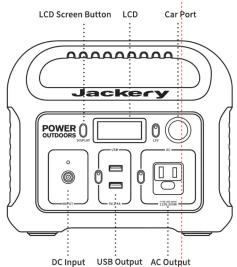
| CAR Port | ||
| Car Fridge (50W)About 15 Hours | DroneAbout 4 Recharges | |
| AC Output | ||
| 12 Luggage (50W)About 4 Recharges | 32" TV (50W)About 4.3 Hours | CPAP MachineAbout 6-21 Hours |
| USB Output | ||
| Smartphone (189W max)About 12 Recharges | Motion Camera (5W max)About 12 Recharges | |
| Explorer 200 will be turned off automatically in 12 hours when being drawn under 10W power for power rating. | ||
| RECHARGING | ||
| Before use or storage, plug your Explorer 200 into the wall until it is fully checked. If the LCD shows through the 200 W/O charging, plug into power sources, then an AC, filter or a solar panel, as soon as possible. There are four ways to recharge your lock-in Explorer: | ||
| Wall ChargerAbout 5 Hours | Car ChargerAbout 6 Hours | 60PM Solar Panels (optional)About 7 Hours (drinking or doublet) |
| SAFETY INSTRUCTIONS | |||
| Read the following instructions to ensure safe urge: | |||
| DANGERNo. (compliance may be daily lead or other power)Discharge dismeasures, repair or modify the toolDischarge plant (the unit call up on a line or a line of equipment)Discharge power and current contact with an area exposed to its componentDischarge power and current contact with an area exposed to its componentOnly use the input switch to power terminal. Use the output switch to power terminal. Use the output switch to power terminal. Use the output switch to power terminal. Use the output switch to power terminal. Use the output switch to power terminal. Use the output switch to power terminal. Use the output switch to power terminal. Use the output switch to power terminal. Use the output switch to power terminal. Use the output switch to power terminal. Use the output switch to power terminal. Use the output switch to power terminal. Use the output switch to power terminals. Use the output switch to power terminal. Use the output switch to power terminal. Use the output switch to power terminal. Use the output switch to power terminal. Use the output switch to power terminal. Use the output switch to power terminal. Use the output switch to power terminal. Use the output switch to power terminal. Use the output switch to power terminal. Use the output switch to power terminal. Use the output switch to power terminal. Use the output switch to power terminal. Use the outputs switch to power terminal. Use the output switch to power terminal. Use the output switch to power terminal. Use the output switch to power terminal. Use the output switch to power terminal. Use the output switch to power terminal. Use the output switch to power terminal. Use the output switch to power terminal. Use the output switch to power terminal. Use the output switch to power terminal. Use the output switch to power terminal. Use the output switch to power terminal. Use the output switch to power Terminal. Use the output switch to power terminal. Use the output switch to power terminal. Use the output switch to power terminal. Use the output switch to power terminal. Use the output switch to power terminal. Use the output switch to power terminal. Use the output switch to power terminal. Use the output switch to power terminal. Use the output switch to power terminal. Use the output switch to power terminal. Use the output switch to power terminal. Use the output switch to power terminal. Use the out switch to power terminal. Use the output switch to power terminal. Use the output switch to power terminal. Use the output switch to power terminal. Use the output switch to power terminal. Use the output switch to power terminal. Use the output switch to power terminal. Use the output switch to power terminal. Use the output switch to power terminal. Use the output switch to power terminal. Use the output switch to power terminal. Use the output switch to power terminal. Use the output switch to powerTerminal. Use the output switch to power terminal. Use the output switch to power terminal. Use the output switch to power terminal. Use the output switch to power terminal. Use the output switch to power terminal. Use the output switch to power terminal. Use the output switch to power terminal. Use the output switch to power terminal. Use the output switch to power terminal. Use the output switch to power terminal. Use the output switch to power terminal. Use the output switch to power terminal. Use the outage switch to power terminal. Use the output switch to power terminal. Use the output switch to power terminal. Use the output switch to power terminal. Use the output switch to power terminal. Use the output switch to power terminal. Use the output switch to power terminal. Use the output switch to power terminal. Use the output switch to power terminal. Use the output switch to power terminal. Use the output switch to power terminal. Use the output switch to power terminal. Use the output switch to power termini. Use the output switch to power terminal. Use the output switch to power terminal. Use the output switch to power terminal. Use the output switch to power terminal. Use the output switch to power terminal. Use the output switch to power terminal. Use the output switch to power terminal. Use the output switch to power terminal. Use the output switch to power terminal. Use the output switch to power terminal. Use the output switch to power terminal. Use the output switch to power terminal. Use the outlet switch to power terminal. Use the output switch to power terminal. Use the output switch to power terminal. Use the output switch to power terminal. Use the output switch to power terminal. Use the output switch to power terminal. Use the output switch to power terminal. Use the output switch to power terminal. Use the output switch to power terminal. Use the output switch to power terminal. Use the output switch to power terminal. Use the output switch to power terminal. Use the output switch to power termination. Use the output switch to power terminal. Use the output switch to power terminal. Use the output switch to power terminal. Use the output switch to power terminal. Use the output switch to power terminal. Use the output switch to power terminal. Use the output switch to power terminal. Use the output switch to power terminal. Use the output switch to power terminal. Use the output switch to power terminal. Use the output switch to power terminal. Use the output switch to power terminal. Use the export switch to power terminal. Use the export switch to power terminal. Use the export switch to power terminal. Use the export switch to power terminal. Use the export switch to power terminal. Use the export switch to power terminal. Use the export switch to power terminal. Use the export switch to power terminal. Use the export switch to power terminal. Use the export switch to power terminal. Use the export switch to power terminal. Use the export switch to power terminal. Use the export switch to power terminals. Use the export switch to power terminal. Use the export switch to power terminal. Use the export switch to power terminal. Use the export switch to power terminal. Use the export switch to power terminal. Use the export switch to power terminal. Use the export switch to power terminal. Use the export switch to power terminal. Use the export switch to power terminal. Use the export switch to power terminal. Use the export switch to power terminal. Use the export switch to power terminal. Use the outlet switch to power terminal. Use the outlet switch to power terminal. Use the outlet switch to power terminal. Use the outlet switch to power terminal. Use the outlet switch to power terminal. Use the outlet switch to power terminal. Use the outlet switch to power terminal. Use the outlet switch to power terminal. Use the outlet switch to power terminal. Use the outlet switch to power terminal. Use the outlet switch to power terminal. Use the outlet switch to power terminal. Use the outlet switch to power terminals. Use the outlet switch to power terminal. Use the outlet switch to power terminal. Use the outlet switch to power terminal. Use the outlet switch to power terminal. Use the outlet switch to power terminal. Use the outlet switch to power terminal. Use the outlet switch to power terminal. Use the outlet switch to power terminal. Use the outlet switch to power terminal. Use the outlet switch to power terminal. Use the outlet switch to power terminal. Use the outlet switch to power terminal. Use the outlets switch to power terminal. Use the outlets switch to power terminal. Use the outlets switch to power terminal. Use the outlets switch to power terminal. Use the outlets switch to power terminal. Use the outlets switch to power terminal. Use the outlets switch to power terminal. Use the outlets switch to power terminal. Use the outlets switch to power terminal. Use the outlets switch to power terminal. Use the outlets switch to power terminal. Use the outlets switch to power terminal. Use the outlets switch to power terminals. Use the outlets switch to power terminal. Use the outlets switch to power terminal. Use the outlets switch to power terminal. Use the outlets switch to power terminal. Use the outlets switch to power terminal. Use the outlets switch to power terminal. Use the outlets switch to power terminal. Use the outlets switch to power terminal. Use the outlets switch to power terminal. Use the outlets switch to power terminal. Use the outlets switch to power terminal. Use the outlets switch to power terminal. Use the outlet switch to power terminal. Use the outlets switch to power terminal. Use the outlets switch to power terminal. Use the outlets switch to power terminal. Use the outlets switch to power terminal. Use the outlets switch to power terminal. Use the outlets switch to power terminal. Use the outlets switch to power terminal. Use the outlets switch to power terminal. Use the outlets switch to power terminal. Use the outlets switch to power terminal. Use the outlets switch to power terminals. Use the outlets switch to power terminals. Use the outlets switch to power terminals. Use the outlets switch to power terminals. Use the outlets switch to power terminals. Use the outlets switch to power terminals. Use the outlets switch to power terminals. Use the outlets switch to power terminals. Use the outlets switch to power terminals. Use the outlets switch to power terminals. Use the outlets switch to power terminals. Use the outlets switch to power terminals. Use the outlets switch to power terminals. Use the outlet switch to power terminals. Use the outlets switch to power terminals. Use the outlets switch to power terminals. Use the outlets switch to power terminals. Use the outlets switch to power terminals. Use the outlets switch to power terminals. Use the outlets switch to power terminals. Use the outlets switch to power terminals. Use the outlets switch to power terminals. Use the outlets switch to power terminals. Use the outlets switch to power terminals. Use the outlets switch to power terminals. Use the outlets switch to power terminal. Use the outlets switch to power terminals. Use the outlets switch to power terminals. Use the outlets switch to power terminals. Use the outlets switch to power terminals. Use the outlets switch to power terminals. Use the outlets switch to power terminals. Use the outlets switch to power terminals. Use the outlets switch to power terminals. Use the outlets switch to power terminals. Use the outlets switch to power terminals. Use the outlets switch to power terminals. Use the outlet switch to power terminals. Use the outlet switch to power terminals. Use the outlets switch to power terminals. Use the outlets switch to power terminals. Use the outlets switch to power terminals. Use the outlets switch to power terminals. Use the outlets switch to power terminals. Use the outlets switch to power terminals. Use the outlets switch to power terminals. Use the outlets switch to power terminals. Use the outlets switch to power terminals. Use the outlets switch to power terminals. Use the outlets switch to power terminal. Use the outlets switch to power terminal. Use the outlets switch to power terminal. Use the outlets switch to power terminal. Use the outlets switch to power terminal. Use the outlets switch to power terminal. Use the outlets switch to power terminal. Use the outlets switch to power terminal. Use the outlets switch to power terminal. Use the outlets switch to power terminal. Use the outlets switch to power terminal. Use the outlet switch to power terminals. Use the outlets switch to power terminals. Use the outlets switch to power terminals. Use the outlets switch to power terminals. Use the outlets switch to power terminals. Use the outlets switch to power terminals. Use the outlets switch to power terminals. Use the outlets switch to power terminals. Use the outlets switch to power terminals. Use the outlets switch to power terminals. Use the outlets switch to power terminals. Use the outlets switch to power terminals. Use the outlet switch to power terminal. Use the outlets switch to power terminals. Use the outlets switch to power terminals. Use the outlets switch to power terminals. Use the outlets switch to power terminals. Use the outlets switch to power terminals. Use the outlets switch to power terminals. Use the outlets switch to power terminals. Use the outlets switch to power terminals. Use the outlets switch to power terminals. Use the outlets switch to power terminals. Use the outlets switch to power terminals. Use the outlets switch to power terminal. Use the outlet switch to power terminals. Use the outlets switch to power terminals. Use the outlets switch to power terminals. Use the outlets switch to power terminals. Use the outlets switch to power terminals. Use the outlets switch to power terminals. Use the outlets switch to power terminals. Use the outlets switch to power terminals. Use the outlets switch to power terminals. Use the outlets switch to power terminals. Use the outlets switch to power terminals. Use the outlet switch to power terminals. Use the outlets switch to power terminal. Use the outlets switch to power terminals. Use the outlets switch to power terminals. Use the outlets switch to power terminals. Use the outlets switch to power terminals. Use the outlets switch to power terminals. Use the outlets switch to power terminals. Use the outlets switch to power terminals. Use the outlets switch to power terminals. Use the outlets switch to power terminals. Use the outlets switch to power terminals. Use the outlets switch to power terminal. Use the outlets switch to power terminals. Use the outschatus turnover. Use the outlets switch to power terminals. Use the outlets switch to power terminals. Use the outlets switch to power terminals. Use the outlets switch to power terminals. Use the outlets switch to power terminals. Use the outlets switch to power terminals. Use the outlets switch to power terminals. Use the outlets switch to power terminals. Use the outlets switch to power terminals. Use the outlets switch to power terminals. Use the outlets switch to power terminals. Use the outlets switch to power terminals. Use the outschatus turnover. Use the outlets switch to power terminals. Use the outlets switch to power terminals. Use the outlets switch to power terminals. Use the outlets switch to power terminals. Use the outlets switch to power terminals. Use the outlets switch to power terminals. Use the outlets switch to power terminals. Use the outlets switch to power terminals. Use the outlets switch to power terminals. Use the outlets switch to power terminals. Use the outschatus turnover. Use the outlets switch to power terminals. Use the outschatus turnover. Use the outschatus turnover. Use the outschatus turnover. Use the outschatus turnover. Use the outschatus turnover. Use the outschatus turnover. Use the outschatus turnover. Use the outschatus turnover. Use the outschatus turnover. Use the outschatus turnover. Use the outschatus turnover. Use the outschatus turnover. Use the outschatus turnover. Use the 2000s turnover. Use the 2000s turnover. Use the 2000s turnover. Use the 2000s turnover. Use the 2000s turnover. Use the 2000s turnover. Use the 2000s turnover. Use the 2000s turnover. Use the 2000s turnover. Use the 2000s turnover. Use the 2000s turnover. Use the 2000s turnover. Use the 2000s turnover. Use the 2000s turnover. Use the 2000s turnover. Use the 2000s turnover. Use the 2000s turnover. Use the 2000s turnover. Use the 2000s turnover. Use the 2000s turnover. Use the 2000s turnover. Use the 2000s turnover. Use the 2000s turnover. Use the 2000s turnover. Use the 2000s turnover. Use the 2000s turnover. Use the 2000s turnover. Use the 2000s turnover. Use the 2000s turnover. Use the 2000s turnover. Use the 2000s turnover. Use the 2000s turnover. Use the 2000s turnover. Use the 2000s turnover. Use the 2000s turnover. Use 2000s turnover. Use the 2000s turnover. Use the 2000s turnover. Use the 2000s turnover. Use the 2000s turnover. Use the 2000s turnover. Use the 2000s turnover. Use the 2000s turnover. Use the 2000s turnover. Use the2000s turnover. Use the 2000s turnover. Use the 2000s turnover. Use the 2000s turnover. Use the 2000s turnover. Use the 2000s turnover. Use the 2000s turnover. Use the 2000s turnover. Use the 2000s turnover. Use the 1999s turnover. Use the 1999s turnover. Use the 1999s turnover. Use the 1999s turnover. Use the 1999s turnover. Use the 1999s turnover. Use the 1999s turnover. Use the 1999s turnover. Use the 1999s turnover. Use the 1999t turnover. Use the 1999t turnover. Use the 1999t turnover. Use the 1999t turnover. Use the 1999t turnover. Use the 1999t turnover. Use the 1999t turnover. Use the 1999t turnover. Use the 1999t turnover. Use the 1999tturnover. Use the 1999t turnover. Use the 1999t turnover. Use the 1999t turnover. Use the 1999t turnover. Use the 1999t turnover. Use the 1999t turnover. Use the 1999t turnover. Use the 1999t turnover. Use the 1999t turncover. Use the 1999t turnover. Use the 1999t turnover. Use the 1999t turnover. Use the 1999t turnover. Use the 1999t turnover. Use the 1999t turnover. Use the 1999t turnover. Use the 1999t turnover. Use the 1999t turnover Use the 1999t turnover. Use the 1999t turnover. Use the 1999t turnover. Use the 1999t turnover. Use the 1999t turnover. Use the 1999t turnover. Use the 1999t turnover. Use the 1999t turnover. Use the 1999t turnover. | | | | | | | | | | | | | | | | | | | | | | | | | | | | | | | | | | | | | | | | | | | | | | | | | | | | | | | | | | | | | | |<|content_end|> | |||
| ATTENTION | DISCLAIMER | |
| Not permitted or aircrafts. | ||
| To preserve the battery (Hospas, please use and recharge at least once every 6 months. | ||
| Use original or certified charger and cables. | ||
| Avoid extreme temperature. | ||
| Avoid dropping. | ||
| Do not disassemble. | ||
| It's not waterproof, do not expose to liquids. | ||
| Please dispose of batteries and electronic goods in accordance with local regulations. | ||
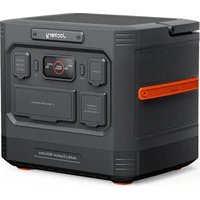
Brand : Jackery
Model : Explorer 290
Category : Power bank