IOPEXT355G - Mouse IOPLEE - Free user manual and instructions
Find the device manual for free IOPEXT355G IOPLEE in PDF.


| Brand | IOPLEE |
| Model | IOPEXT355G |
| Product Type | Wireless Mouse |
| Connection Type | 2.4 GHz Wireless via USB Receiver |
| Dimensions (L x W x H) | 120 x 85 x 49 mm |
| Weight | 87 g |
| Power Supply | Built-in Rechargeable Battery (USB Charging) |
| DPI Settings | 1000 / 1600 / 2400 |
| Number of Keys | 6 (Left, Right, Scroll Wheel, DPI Switch, Forward, Back) |
| Key Sound | Silent Touch |
| Scroll Wheel | ABS Material |
| Body Material | ABS with Rubber Painting |
| Working Distance | 8 - 10 meters |
| Compatible Operating Systems | ChromeOS, macOS, Windows |
| Safety Warnings | Avoid moisture, UV exposure, and harmful chemicals. Do not short-circuit. Dispose of battery properly. |
| Cleaning Instructions | Use a damp microfiber cloth and cotton swab; avoid harsh cleaners. Do not rinse with water. |
| Spare Parts and Repairability | No user-replaceable parts. Contact customer service for repairs. |
| Warranty | 2 years from date of purchase |
| Disposal | Do not dispose with household waste. Recycle at WEEE collection points. |
Frequently Asked Questions - IOPEXT355G IOPLEE
User questions about IOPEXT355G IOPLEE
0 question about this device. Answer the ones you know or ask your own.
Ask a new question about this device
Download the instructions for your Mouse in PDF format for free! Find your manual IOPEXT355G - IOPLEE and take your electronic device back in hand. On this page are published all the documents necessary for the use of your device. IOPEXT355G by IOPLEE.
USER MANUAL IOPEXT355G IOPLEE
natural_image
Line drawing of an iDplee computer mouse with a control panel and scroll wheel (no text or symbols on the device itself)
PORTATA WIRELESS 8-10m
800
1600 2400
DPI

TASTI SLENZIOSI

TASTO ON/OFF

6 TASTI

PINITURA GOMMATA

MICRO RECUTORS

KARICABLE
Mouse
wireless ergonomico
IOPEXTMOUSE355G
Gentile cliente,
Thank you very much for purchasing one of our products. We kindly ask you to read this instruction manual carefully and to keep it, as it provides valuable information regarding safe use and maintenance.
INDEX
1 Safety Warnings
2 Description of the Appliance
3 Before first use
4 Operation
5 Cleaning and maintenance
6 Technical Specification
7 Disposal
8 Warranty and Compliance
1 Safety Warnings
• If the battery is not replaced properly, there is a possibility of leakage, explosion, and personal injury.
- Do not use the battery in case of leakage, discoloration, deformation, or any other abnormalities.
- Do not leave the battery in a discharged or unused state for a long time.
- Do not short-circuit the product.
- The lifespan of batteries varies depending on usage, and discarded batteries should be disposed of in accordance with local laws or disposed of in trash cans used for recycling electronic devices.
- If any liquid accidentally enters the product. Please immediately disconnect the power supply and remove it.
- Continued use of this product if damaged may cause a fire or electric shock. Please contact your agent or nearest customer service center for inspection and repair in a timely manner.
- Storing the mouse:
Moisture-proof
Keep the mouse storage environment dry and avoid moisture. When not in use for a long time, it is recommended to regularly check the storage environment to ensure dryness.
Ultraviolet Light
Avoid prolonged exposure of the mouse to sunlight to prevent accelerated aging.
Anti-theft
Be careful when storing the mouse to avoid theft or damage. It is recommended to place the mouse in a safe place and ensure the security of the storage environment.
• Other precautions:
Do not let the mouse encounter harmful substances.
Avoid exposing the mouse to harmful substances such as alcohol, soap, and other chemicals. These substances may damage the coating on the surface
of the mouse and affect its use.
Do not expose the mouse to damp environments.
Prolonged exposure of the mouse to a humid environment may cause damage to its internal circuits and affect its normal use. Therefore, special attention should be paid to protecting the mouse in damp environments.
Pay attention to cleanliness
Regularly clean the surface and bottom of the mouse to maintain a good user experience. But be careful not to use overly strong cleaning agents to avoid damage to the surface of the mouse.
2 Description of the Appliancear
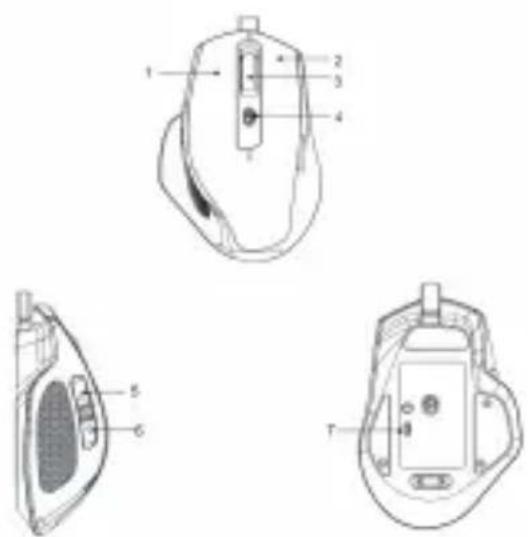
1.Left Button
2.Right Button
3.Scroll Wheel
4. DPI Switch Button+
5. Forward key
6. Back key
7. On Off key
3 Before first use
Before using the mouse, be sure to carefully review the mouse manual and operate according to the requirements and specifications in the manual. When cleaning the mouse, do not rinse it directly with water, as it may result in the mouse being scrapped. The mouse should be kept as dry as possible.
4 Operation
This wireless mouse is a plug and play device. Plug the USB receiver into the free USB port of your PC/Laptop or connected USB Hub. Wait for a few moments until your system recognizes your new mouse. You will be notified once the mouse is ready.
- Insert the USB interface of the Mouse into the USB port of the computer.
- Once inserted, the computer will recognize the Mouse automatically and you can start using it immediately.
NOTE: The mouse will only operate within a 10 metre distance of your PC/Laptop
5 Cleaning and Maintenance
Disconnect the mouse, and if it is a wireless mouse, turn it off.
Dampen a microfiber cloth and cotton swab in water, and then use a cotton swab to wipe all cracks, curves, and gaps that accumulate dust and dirt on the mouse.
Gently wipe the sensor with a cotton swab dipped in water.
Turn the mouse over, roll the scroll wheel to release the accumulated dirt, and then wipe the area with a microfiber cloth.
Finally, use a toothpick to remove unnecessary dirt from the area that your cotton swab cannot reach for the first time. Flip the mouse and clean any dirty areas that you may have missed.
6 Technical Specification
| Model | IOPEXTMOUSE355G |
| Type | 2.4G wireless mouse |
| DPI | 1000/1600/2400 |
| Number of Keys | 6 |
| Connection Type | USB |
| Mouse Roller | ABS |
| Weight | 87g |
| Body material | ABS |
| Size L*W*H (mm) | 120*85*49 |
| Finishing | Rubber painting |
| Battery | Built-in battery |
| Working distance | 8-10 m |
| Key sound | Silent touch |
| Supported Software | ChromeOS, MacOS, Windows |
| Compatible Device | Laptop, PC |
7 Disposal
Processing of electric and electronic equipment at the end of their service life (applicable in member countries of the European Union and other European countries operating a selective waste collection system).
This symbol, affixed to the product or its packaging, indicates that the product must not be processed with household waste. It must be brought to an electric and electronic waste collection point for recycling and disposal. By ensuring the appropriate disposal of this product you also help in preventing potentially negative consequences for the environment and human health. The recycling of materials helps preserve our natural resources. For further information regarding the recycling of this product, please contact your municipality, local waste disposal centre or the store where the product was purchased. In accordance with Legislative Decree of March 14, 2014, No. 49,

"Implementation of Directive 2012/19/EU on Waste Electrical and Electronic Equipment (WEEE)"the crossed-out wheeled bin symbol on the appliance or its packaging indicates that the product must be collected separately from other waste at the end of its life. Therefore, the user should dispose of the end-of-life appliance at the appropriate collection points for electronic and electrical waste or return it to the retailer when purchasing a new equivalent appliance, on a one-to-one basis. Proper separate collection for the subsequent disposal, treatment, and environmentally friendly disposal of the discarded appliance helps to prevent potential negative effects on the environment and health and promotes the recycling of the materials the appliance is composed of. Unauthorized disposal of the product by the user may result in the application of administrative sanctions provided by current regulations.
8 Warranty and Compliance
This IOPLEE Warranty applies only to IOPLEE products purchased for personal use and not those intended for resale.
Your IOPLEE product is warranted in accordance with the terms and conditions of this warranty against defects in workmanship and conformity for a period of a 2 years, and that period begins upon delivery of the item, if purchased from an official dealer.
The warranty will not be valid if the product has been opened, in the presence of physical damage, damage resulting from incorrect use, modifications, repairs by unauthorized persons, negligence and in the event that the product has been used for purposes other than those for which it was intended; furthermore, the legal guarantee will not apply if the purchase methods or other circumstances demonstrate, with reasonable certainty, that the purchase itself is not exclusively aimed at private consumption.
purchase itself is not exclusively aimed at private consumption .
In the event that the product is defective, it can be returned to the retailer along with a description of the type of malfunction, proof of purchase, and any accessories.
If the product is still under warranty, you will receive a replacement product (if available) from the dealer.
These are not covered by the warranty:
- Accidental damage or damage resulting from incorrect or improper use, contact with liquids; damage caused by accidents or force majeure events such as fire, earthquake, flood, vandalism, theft or other external cause.
- Cosmetic damage such as scratches, dents, or other breakage of plastic parts, caused by handling errors.
• Defects resulting from normal product wear and tear (product aging). - Incompatibility with other hardware/software products not listed in the minimum system
requirements.
- Consumable accessories such as batteries, protective covers, and fuses, which normally wear out over time. Problems due to noncompliance related to labour or materials are excluded.
In no event shall the manufacturer be liable for incidental or consequential damages, including any loss of business profits or other commercial damages resulting from the use of the product.
Due to the rapidly evolving nature of our products, the content of this manual may be subject to change without prior notice.

Made in China
ioplee
Manufactured and imported by Exertis Supply Chain Services Limited. Unit 21 Fonthill Business Park, Clondalkin. Dublin 22, D22 FR82, Dublin, Ireland
- INDEX
- Safety Warnings
- - Storing the mouse:
- Moisture-proof
- Ultraviolet Light
- Anti-theft
- • Other precautions:
- Pay attention to cleanliness
- Description of the Appliancear
- Before first use
- Operation
- Cleaning and Maintenance
- Technical Specification
- Disposal
- Warranty and Compliance
- These are not covered by the warranty:
- ioplee
Brand : IOPLEE
Model : IOPEXT355G
Category : Mouse