
Piper CR3044A - Loudspeaker Crosley - Free user manual and instructions
Find the device manual for free Piper CR3044A Crosley in PDF.


| Product type | Portable Bluetooth speaker |
| Brand | Crosley |
| Model | Piper CR3044A |
| Power | 5V 1A DC via USB-C cable |
| Power consumption | 3 W |
| Battery | Rechargeable lithium-ion, 1200 mAh |
| Battery life | Up to 28 hours (volume at 50%) |
| Charging time | 3 to 4 hours |
| Bluetooth version | 5.3 |
| Speaker | 4 Ω, 5 W |
| Connectivity | Bluetooth, USB-A, Micro SD, FM Radio |
| Playback formats | Audio files on USB drive or Micro SD card (max 32 GB) |
| Modes | Bluetooth, USB, Micro SD, FM Radio, Twin Mode (pair) |
| Controls | Volume/power button, Play/Pause/Mode buttons, Back, Forward |
| LED indicator | Red (charging), flashing blue (Bluetooth pairing) |
| Package contents | Speaker, USB-C cable |
| Care and cleaning | Wipe with a soft, dry cloth |
| Safety | Polarized plug, safety instructions included in the manual |
| Certifications | FCC, CE |
| Customer service | 1-888-CROSLEY, www.crosleyradio.com |
Frequently Asked Questions - Piper CR3044A Crosley
User questions about Piper CR3044A Crosley
0 question about this device. Answer the ones you know or ask your own.
Ask a new question about this device
Download the instructions for your Loudspeaker in PDF format for free! Find your manual Piper CR3044A - Crosley and take your electronic device back in hand. On this page are published all the documents necessary for the use of your device. Piper CR3044A by Crosley.
USER MANUAL Piper CR3044A Crosley
natural_image
White Crosley portable electric heater with grille and control knobs (no visible text or symbols on main body)Questions, problems, missing parts?
Before returning to the store, call Customer Service
8 a.m. – 6 p.m., EST, Monday – Friday
1-888-CROSLEY
www.crosleyradio.com
Safety Instructions
Read and understand this entire manual before using this product. Keep these instructions for future reference.
- Do not use this product near water.
- This product should be operated only by the type of power source indicated on the marking label or in this instruction manual.
- Do not defeat the safety purpose of the polarized plug. A polarized plug has two blades with one blade wider than the other. This plug will fit into the power outlet only one way. If you are unable to insert the plug fully into the outlet try reversing the plug. If the plug should still fail to fit, contact your electrician.
- Protect the power cord from being walked on or pinched particularly at plugs, convenience receptacles, and the point where they exit from the product.
- Do not overload wall outlets, extension cords, or integral convenience receptacles as this can result in a risk of fire or electric shock.
- Never push objects of any kind into this product through openings as they may touch dangerous voltage points or short-out parts that could result in a fire or electric shock. Never spill liquid of any kind on the product.
- Do not attempt to service this product yourself as opening or removing covers may expose you to dangerous voltage or other hazards. Refer all servicing to qualified service personnel.
- Changes or modifications to this unit not expressly approved by the party responsible for compliance could void the user's authority to operate the equipment.
- Do not use attachments not recommended by the product manufacturer as they may cause hazards.
- A product and cart combination should be moved with care. Quick stops, excessive force, and uneven surfaces may cause the product and cart combination to overturn.
- Slots and openings in the cabinet are provided for ventilation and to ensure reliable operation of the product and to protect it from overheating. Do not block or cover these openings.
- Unplug the product during lightning storm or when unused for long periods of time.
Items in this package
Before throwing away any packaging materials, please check thoroughly and make sure you find the following items that come along with this package:
- Speaker
- USB-C Cable
Please contact Crosley Customer Service if there is any accessory missing from the package. Retain the original packaging materials for exchange or return purposes.
Specifications
Power Source
DC Output 5V 1A
Power consumption 3W
Speaker 4Ω 5W
Playing Time
Up to 28 hours (50% volume)
Charging Time 3 – 4 hours
Battery Capacity 1200 mA/h
Bluetooth Version 5.3
Note:
- Design and specifications are subject to change without notice.
Product Description
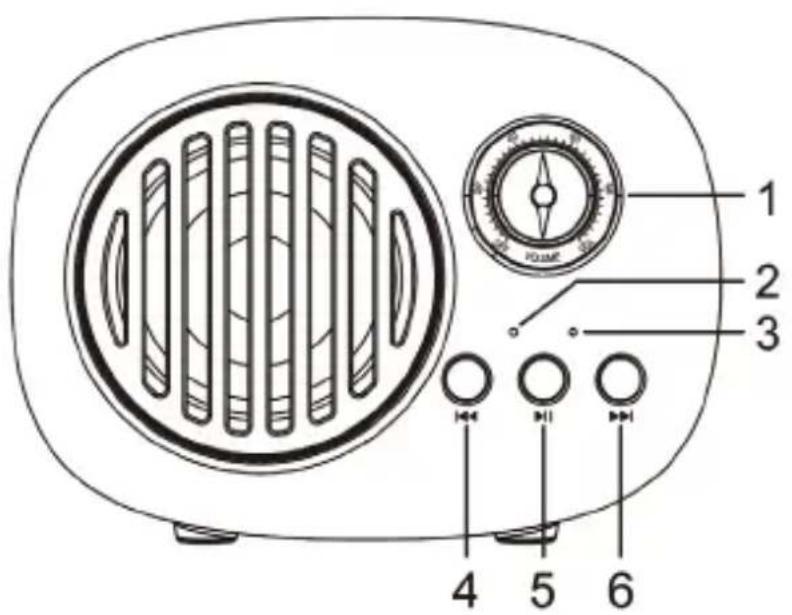
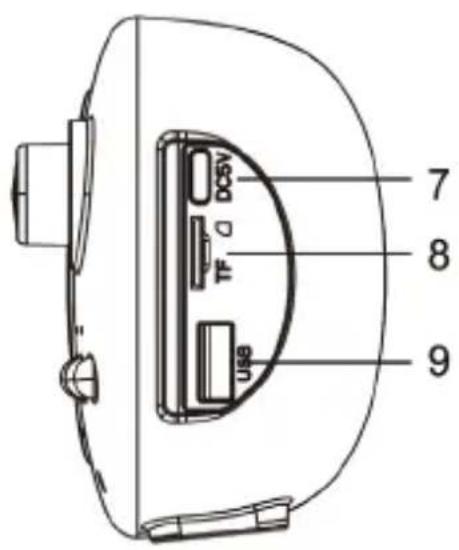
- On/Off-Volume Knob
- Microphone
- LED Indicator
- Backward Skip Button
- Play/Pause/Mode Button
- Forward Skip Button
- Power Jack
- Micro SD Slot
- USB slot
Initial Setup
Essential Setup
- Place the unit on a flat and level surface. The selected location should be stable and free from vibration.
- Connect the USB-C Cable to the Power Jack of the unit.
Charging/Power Source
- This unit has a built in rechargeable battery.
- Connect to a PC, Laptop or 5V USB adaptor with the provided USB-C cable.
- The LED Indicator will be red when charging and will go off when fully charged.
Bluetooth Operation
- Rotate the On/Off Volume Knob to turn on the power.
- Press and hold the Mode button repeatedly to select the Bluetooth mode, you will hear an activation sound from the unit.
- The LED indicator will start flashing blue.
- Turn on the Bluetooth feature of your audio device, search for "CROSLEY CR3044A" and pair.
- Once your device is successfully paired with the unit you will hear a short confirmation sound from the unit.
- Play and stream music from your device to the unit.
- To forward skip, press the Forward Skip Button in and release.
- To backward skip, press the Backward Skip Button in and release.
- To pause the playback, short press the Pause button.
Note: Bluetooth version - 5.3
USB/Micro SD Playback
- Insert a USB device into the USB port or a Micro SD memory card into the Micro SD card slot.
Note: If the unit is on, the playback will start automatically. - Press and hold the Mode button repeatedly to select the USB or SD mode.
- To forward skip, press the Forward Skip Button in and release.
- To backward skip, press the Backward Skip Button in and release.
- To pause the playback, short press the Pause button.
Note:
- Only use 32 GB or smaller USB or Micro SD memory card
Twin Connected Mode
To Connect
- Turn on both speakers by rotating the On/Off Volume Knob.
- Press and hold the forward skip button on each speaker separately.
- You will hear a confirmation notification showing they are paired.
- Connect your Bluetooth.
Note: The function indicator will be blue. - There will be a confirmation notification from one speaker showing they are paired with your Bluetooth device.
Note:
This speaker will be the Primary and the other will be secondary.
This connection only works on Bluetooth mode.
To Disconnect
To disconnect the speakers from the Twin Connected Mode, press and hold the forward skip button on one of twins-connected speakers. You will hear a confirmation notification showing they are disconnected.
FM Radio
- Long press the ⏻ button to turn on the unit.
- Double-click the ⏻ button to switch to FM radio mode.
- Connect the USB-C charging cable to use it as a radio antenna.
- Short press the ⏻ button to automatically search for stations. It will tune to the first station with a strong signal. Short press the ⏻ button to stop search.
- To go to the previous station, short press the – button.
- To go to the next station, short press the + button.
Troubleshooting
There is no power
- No power at the power outlet.
- The battery needs to be charged.
There is no sound
- Make sure the volume is turned up.
- Make sure the volume on your third party device is turned up.
FCC Statements
This device complies with part 15 of the FCC Rules. Operation is subject to the following two conditions:
(1) This device may not cause harmful interference, and
(2) this device must accept any interference received, including interference that may cause undesired operation.
Note: This equipment has been tested and found to comply with the limits for a Class B digital device, pursuant to part 15 of the FCC Rules. These limits are designed to provide reasonable protection against harmful interference in a residential installation. This equipment generates, uses and can radiate radio frequency energy and, if not installed and used in accordance with the instructions, may cause harmful interference to radio communications. However, there is no guarantee that interference will not occur in a particular installation. If this equipment does cause harmful interference to radio or television reception, which can be determined by turning the equipment off and on, the user is encouraged to try to correct the interference by one or more of the following measures:
Reorient or relocate the receiving antenna.
Increase the separation between the equipment and receiver.
Connect the equipment into an outlet on a circuit different from that to which the receiver is connected.
Consult the dealer or an experienced radio/TV technician for help.
Note: The Grantee is not responsible for any changes or modifications not expressly approved by the party responsible for compliance. such modifications could void the user's authority to operate the equipment.
The device has been evaluated to meet general RF exposure requirement. To maintain compliance with FCC's RF exposure guidelines, the distance must be at least 20 cm between the radiator and your body, and fully supported by the operating and installation configurations of the transmitter and its antenna(s).
SIMPLIFIED EU DECLARATION OF CONFORMITY
Hereby, Modern Marketing Concepts Inc. dba Crosley Brands, declares that the radio equipment type is in compliance with Directive 2014/53/EU. The full text of the EU declaration of conformity is available at the following internet address: http://crosleybrands.com/euDoC
CRO SLEY®
CR3044A
Altavoz Bluetooth Piper
natural_image
White CROSLEY portable radio with a circular grille and control knob (no visible text or symbols on the device body)8 a.m. – 6 p.m., EST, Lunes – Viernes
1-888-CROSLEY
www.crosleyradio.com
http://crosleybrands.com/euDoC
CRO SLEY®
CR3044A
Enceinte Bluetooth Piper
natural_image
White Crosley portable electric heater with grille and control knobs (no visible text or symbols on main body)Charge / Alimentation
http://crosleybrands.com/euDoC.
- Safety Instructions
- Items in this package
- Specifications
- Note:
- Product Description
- Initial Setup
- Essential Setup
- Charging/Power Source
- Bluetooth Operation
- USB/Micro SD Playback
- Twin Connected Mode
- To Connect
- To Disconnect
- FM Radio
- Troubleshooting
- There is no power
- There is no sound
- FCC Statements
- SIMPLIFIED EU DECLARATION OF CONFORMITY
- CRO SLEY®
- Charge / Alimentation
Brand : Crosley
Model : Piper CR3044A
Category : Loudspeaker