
Soundbomb CR8008A - Loudspeaker Crosley - Free user manual and instructions
Find the device manual for free Soundbomb CR8008A Crosley in PDF.


| Product Type | Portable Bluetooth Speaker |
| Brand | Crosley |
| Model | Soundbomb CR8008A |
| Dimensions (Approx.) | 7.0 x 3.0 x 3.0 in (17.8 x 7.6 x 7.6 cm) |
| Weight | 1.5 lbs (0.68 kg) |
| Power Source | Rechargeable lithium-ion battery; USB-C charging input |
| Battery Life | Up to 12 hours (estimated) |
| Audio Output | 10W RMS |
| Bluetooth Version | 5.0 |
| Wireless Range | Up to 33 ft (10 m) |
| Supported Audio Sources | Bluetooth, FM Radio, USB, AUX |
| Controls | Volume, Play/Pause, Skip, Mode, Power |
| Indicators | Power and pairing LED |
| Material | Plastic with fabric grille |
| Water Resistance | Not specified (assume not waterproof) |
| Included Accessories | USB charging cable, AUX cable, user manual |
| Maintenance | Wipe with soft dry cloth; avoid moisture |
| Safety | Do not expose to liquids, do not disassemble, keep away from heat |
| Repair | No user-serviceable parts; contact support for issues |
| General Notes | Portable design with carry handle |
Frequently Asked Questions - Soundbomb CR8008A Crosley
User questions about Soundbomb CR8008A Crosley
0 question about this device. Answer the ones you know or ask your own.
Ask a new question about this device
Download the instructions for your Loudspeaker in PDF format for free! Find your manual Soundbomb CR8008A - Crosley and take your electronic device back in hand. On this page are published all the documents necessary for the use of your device. Soundbomb CR8008A by Crosley.
USER MANUAL Soundbomb CR8008A Crosley
natural_image
Five white geometric symbols on black background: propeller, asterisk, pencil, cross, and star (no text or labels)
Instruction Manual
natural_image
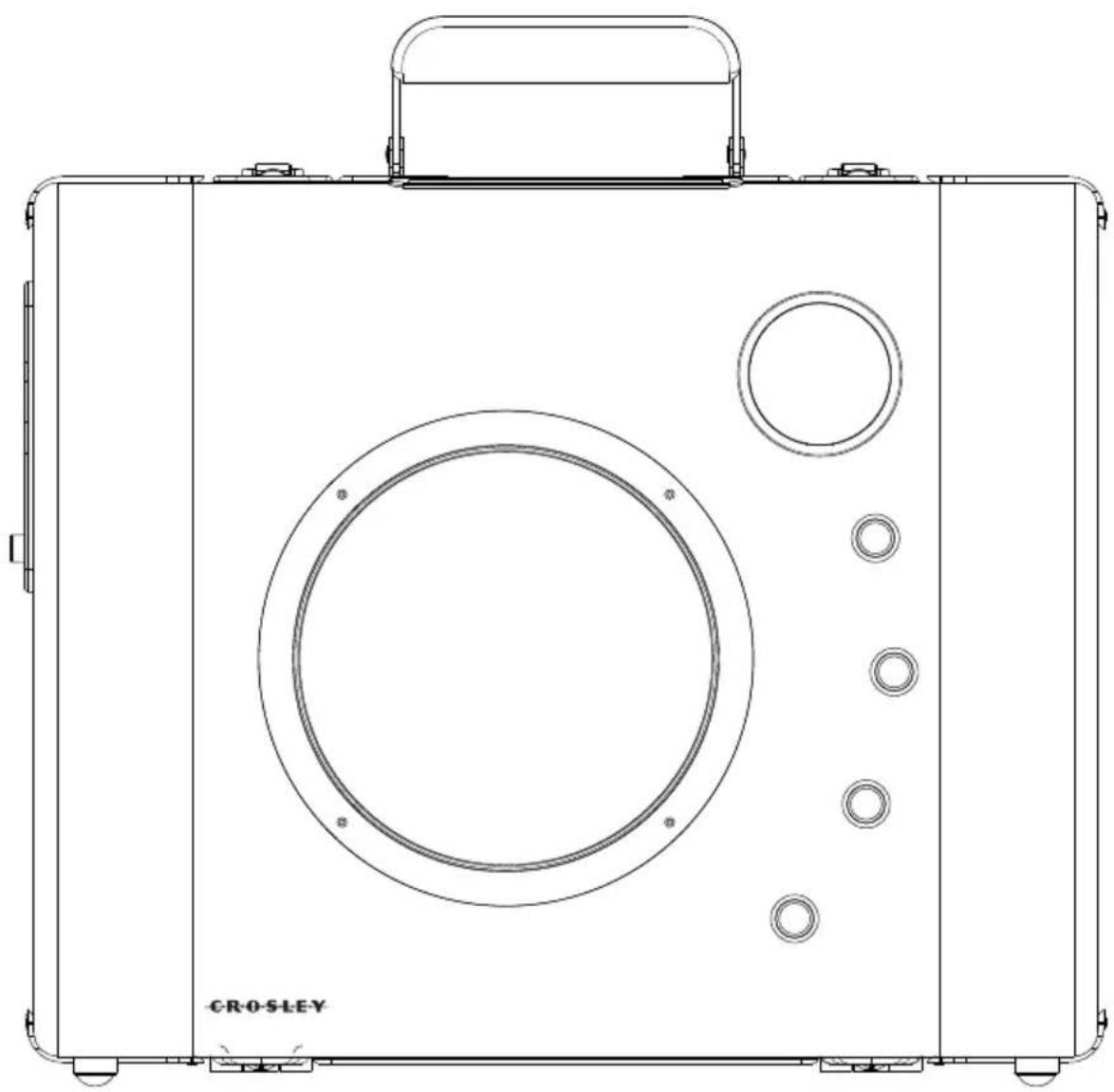
Line drawing of a CROSLEY portable radio device with circular and ring components (no text or symbols on the device itself)IMPORTANT SAFETY INSTRUCTION
PLEASE READ CAREFULLY ALL THE FOLLOWING IMPORTANT SAFEGUARDS THAT ARE APPLICABLE TO YOUR EQUIPMENT
-
Read Instructions - All the safety and operating instructions should be read before the product is operated.
-
Retain instructions - The safety and operating instructions should be retained for future reference.
-
Heed Warnings - All warnings on the product and in the operating Instructions should be adhered to.
-
Follow Instructions - All operating and use instructions should be followed.
-
Cleaning - Unplug this product from the wall outlet before cleaning. Do not use liquid cleaners or aerosol cleaners. Use a damp cloth for cleaning.
-
Attachments - Do not use attachments not recommended by the product manufacturer as they may cause hazards.
-
Water and Moisture - Do not use this product near water - for example, near a bath tub, wash bowl, kitchen sink, or laundry tub; in a wet basement; or near a swimming pool; and the like.
-
A product and cart combination should be moved with care. Quick stops, excessive force, and uneven surfaces may cause the product and cart combination to overturn.
-
Ventilation - Slots and openings in the cabinet are provided for ventilation and to ensure reliable operation of the product and to protect it from overheating, and these openings must not be blocked or covered. The openings should never be blocked by placing the product on a bed, sofa, rug, or other similar surface. This product should not be placed in a built-in installation such as a bookcase or rack unless proper ventilation is provided or the manufacturer's instructions have been adhered to.

-
Power Sources - This product should be operated only from the type of power source indicated on the marking label, if you are not sure of the type of power supply to your home. Consult your product dealer or local power company. For products intended to operate from battery power, or other sources, refer to the operating instructions.
-
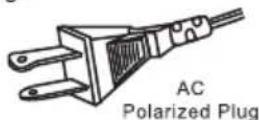
Grounding or Polarization - This product may be equipped with a polarized alternating-current line plug (a plug having one blade wider than the other). This plug will fit into the power outlet only one way. This is a safety feature. If you are unable to insert the plug fully into the outlet try reversing the plug, if the plug should still fail to fit, contact your electrician to replace your obsolete outlet. Do not defeat the safety purpose of the polarized plug.
-
Power - Cord Protection - Power - supply cords should be routed so that they are not likely to be walked on or pinched by items placed upon or against them, paying particular attention to cords at plugs, convenience receptacles, and the point where they exit from the product.
-
Lightning - For added protection for this product during a lightning storm, or when it is left unattended and unused for long periods of time, unplug it from the wall outlet and disconnect the antenna or cable system. This will prevent damage to the product due to lightning and po
-
Power Lines - An outside antenna system should not be located in the vicinity of overhead power lines or other electric light or power circuits, or where it can fall into such power lines or circuits. When installing an outside antenna system, extreme care should be taken to keep from touching such power lines or circuits as contact with them might be fatal.
-
Overloading - Do not overload wall outlets, extension cords, or integral convenience receptacles as this can result in a risk of fire or electric shock.
-
Object and Liquid Entry - Never push objects of any kind into this product through openings as they may touch dangerous voltage points or short - out parts that could result in a fire or electric shock. Never spill liquid of any kind on the product.
-
Servicing - Do not attempt to service this product yourself as opening or removing covers may expose you to dangerous voltage or other hazards. Refer all servicing to qualified service personnel.
-
Damage Requiring Service - Unplug this product from the wall outlet and refer servicing to qualified service personnel under the following conditions;
a. When the power-supply cord or plug is damaged.
b. If liquid has been spilled, or objects have fallen into the product.
c. If the product has been exposed to rain or water.
d. If the product does not operate normally by following the operating instructions. Adjust only those controls that are covered by the operating instructions as an improper adjustment of other controls may result in damage and will often require extensive work by a qualified technician to restore the product to its normal operation.
e. If the product has been dropped or damaged in any way.
f. When the product exhibits a distinct change in performance - this indicates a need for service.
-
Replacement Parts - When replacement parts are required, be sure the service technician has used replacement parts specified by the manufacturer or have the same characteristics as the original part. Unauthorized substitutions may result in fire, electric shock, or other hazards.
-
Safety Check - Upon completion of any service or repairs to this product, ask the service technician to perform safety checks to determine that the product is in proper operating condition.
-
Wall or ceiling Mounting - The product should be mounted to a wall or ceiling only as recommended by the manufacturer.
-
Heat - The product should be situated away from heat sources such as radiators. Heat registers, stoves, or other products (including amplifiers) that produce heat.
WARNING:
TO PREVENT FIRE OR SHOCK HAZARD, DO NOT EXPOSE THIS APPLIANCE TO RAIN OR MOISTURE. DO NOT REMOVE COVER. PILOT LAMPS SOLDERED IN PLACE. NO USER SERVICEABLE PARTS INSIDE. REFER SERVICING TO QUALIFIED SERVICE PERSONNEL.
natural_image
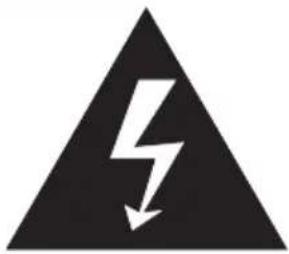
Black triangular warning symbol with a white lightning bolt and downward arrow (no text)The lighting flash with arrowhead symbol, within an equilateral triangle, is intended to alert user to the presence of uninsulated "dangerous voltage" within the product's enclosure that may be of sufficient magnitude to constitute risk of electric shock to persons.
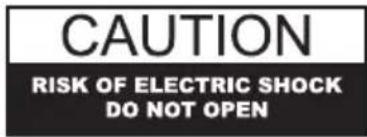
CAUTION: TO REDUCETHE RISK OF ELECTRIC SHOCK, DO NOT REMOVE COVER (OR BACK). NO USER - SERVICEABLE PARTS INSIDE. REFER SERVICING TO QUALIFIED SERVICE PERSONNEL.
natural_image
Black triangular warning symbol with exclamation mark (no text or numbers)The exclamation point within an equilateral triangle is intended to alert user to the presence of important operating and maintenance (servicing) instruction in the literature accompanying the appliance.
SPECIFICATION
| Power Supply | : AC adapter - DC 12V 1A(Included) |
| Power Consumption | : 18W |
| Speaker | : 6" woofer,2" tweeter |
| Rechargeable Battery | :1500mAx3 |
- DESIGN AND SPECIFICATION SUBJECT TO CHANGE WITHOUT NOTICE.

1220 East Oak Street • Louisville, Kentucky 40204 www.crosleyradio.com
Welcome
Thank you for purchasing the Crosley Soundbomb (CR8008A). Before operating this unit, please read this manual thoroughly and retain it for future reference.
About This Manual
Instructions in this manual describe the control functions of the CR8008A.
Included in this package:
- Soundbomb
- Power Adaptor
• Rechargeable Lithium BatteryX3(model:18650) - Battery Charger
- Power Cable
• 3.5mm Stereo Cable
Table of Contents
Getting Started
Control Locators.... 4,5
Unpacking...... 6
Power Source 6
Operation
AUX IN Operation...... 7
Bluetooth Operation ...... 7
Battery Recharge...... 8
General
Warranty.... 9
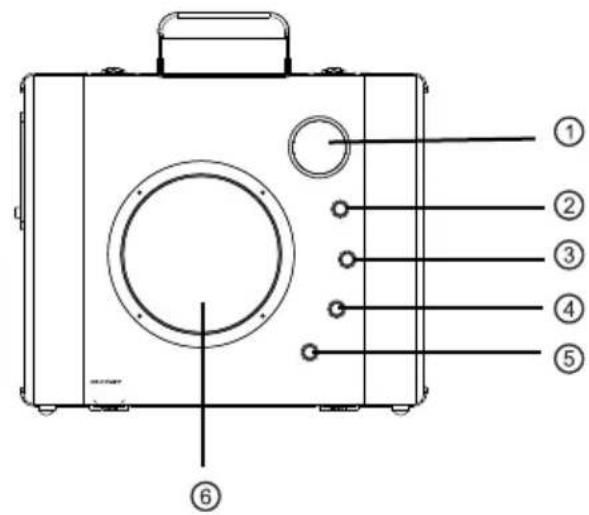
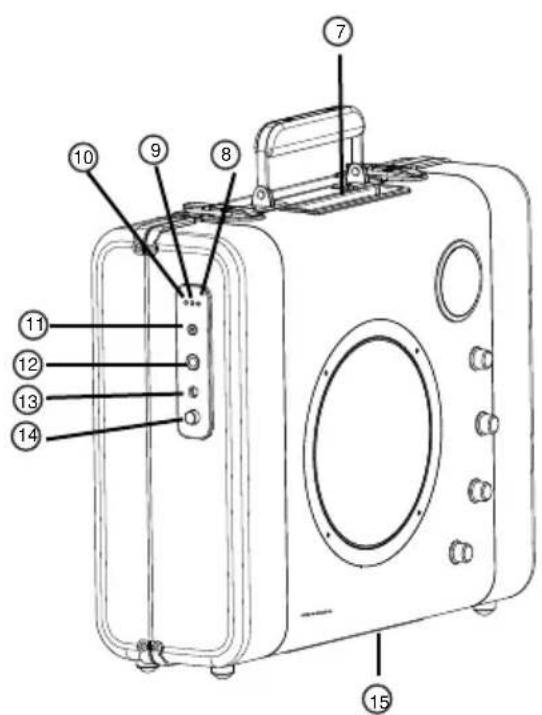
Control Locators
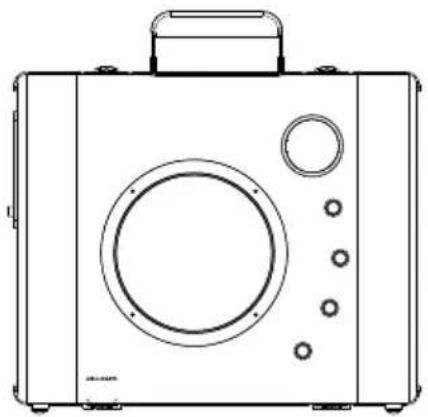
Unit Controls
- Tweeter
- Volume Knob
- MIC Volume Knob
- Treble Knob
- Bass Knob
- Woofer
- Device Holder
- Power Indicator
- Bluetooth Indicator
- AUX Indicator
- 3.5mm AUX IN Jack
- 1/4" Microphone Jack
- Power Jack
- Audio Input Switch
Control Locators
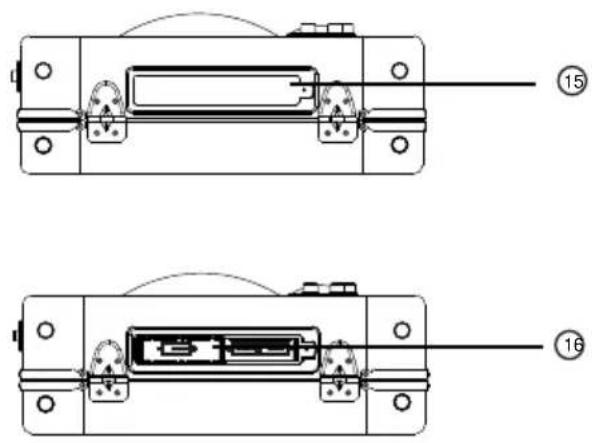
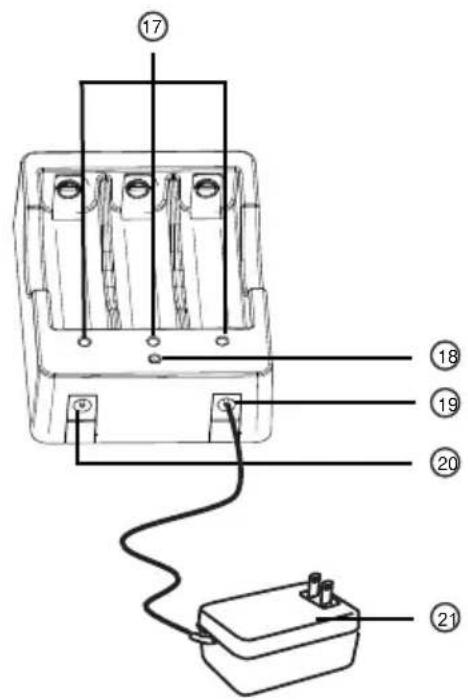
Unit Controls
- Battery Cover
- Battery Compartment
- Battery Charging Indicators
- Power Indicator
- Battery Charger DC IN Jack
- Battery Charger DC OUT Jack
- AC Adapter
Getting Started
Unpacking
1 Remove packing materials from unit.
Note: Save all packing materials.
2 Remove AC ADAPTER (21) from the giftbox of the unit.
3 Remove tie from AC ADAPTER(21).
4 Set the unit on its end,do NOT open the cabinet.
natural_image
Line drawing of a vintage-style portable radio with control panel and buttons (no text or symbols)Power Source
1 You can use the Soundbomb either through the provided AC-DC adaptor or solely on the lithium batteries.
2 To use the power adaptor, please correctly insert the power cord into the appropriate outlet and the Power Jack(13) of the Soundbomb correspondingly.
3 To use the lithium batteries as the power source, please loosen the screw located on the Battery Compartment(16) cover and install the batteries.
★□※□☆☆□□
AUX IN Operation
1 Rotate the ON/OFF Volume Knob(2) to the right to hear a "click" to turn on the unit.
2 Press the Input Switch(14) to switch between the Aux In and Bluetooth mode.
3 When under the Aux In mode, the Aux indicator(10) will be red. Use the provided 3.5mm cable to connect your music device to Soundbomb.
Bluetooth Operation
1 When under the Bluetooth mode, the Bluetooth indicator(9) will be flashing while the Soundbomb is seraching the other Bluetooth device, and it will be constant on while it is successfully connected.
2 Tweak the Volume, Treble and Bass accordingly to your flavor by rotating the Volume Knob(2), Treble Knob(4) and Bass Knob(5) correspondingly and enjoy the music.
3 You can choose to sit your music device into the device holder for your convenience.
+ flowers\*□1 \* \* \* \* \* \* \* \*
Battery Recharge
1 The supplied batteries can usually play for over 15 hours for one complete charge. Depending on the manner you use the Soundbomb, the battery life will vary.
2 When you need to recharge the batteries, please remove them from the battery compartment and use the supplied battery charger along with the power adaptor for charging.
Note: the batteries WON' T be charged while the power adaptor is plugged directly to the Soundbomb.
3 You can use the supplied power cable to connect the battery charger and the Soundbomb while the lithium batteries are being charged in the battery charger.
4 When charging the batteries, the batteries indicators on the charger will be GREEN. When the batteries are fully charged, the indicators will be OFF.
Limited Manufacturer's Warranty
Crosley Radio, Inc. warrants the product to be free from defects in material and workmanship under normal use for a period of one year from the original date of purchase. This warranty is not transferable. If the product is determined to be defective during the warranty period, the unit will be repaired or replaced at Crosley Radio's sole discretion. This warranty covers manufacturing defects and normal consumer use and does NOT cover damage or failure as a result of abuse, accident, alterations, misuse, neglect, abnormal wear and tear, inadequate maintenance, commercial or unreasonable use, damage caused by power surges, mishandling, accident, acts of God or attempted repair by an unauthorized service agent. Also not covered are cosmetic damages, cords and antennas.
Should this product fail to function in a satisfactory manner, it is best to first contact our technical support team for assistance to ensure it is being operated properly.
Tech Support and Product Questions CALL TOLL FREE: 1.888.CROSLEY (1.888.276.7539)
If it is indeed determined that the unit is no longer operational, please contact the retailer from which it was purchased. In many cases, your retailer will be able to provide a replacement unit at no charge within the scope of their return policy. If the retail return period has expired, please contact Crosley Radio directly to participate in the one year protection program.
Crosley 1 Year Warranty Program CALL TOLL FREE: 1.800.926.7801
You will need to contact our offices M-F 8am-5pm EST to obtain an RA (Return Authorization) Number. You will be instructed to send the unit (at your cost) to our offices in its original packaging (or reasonable substitute to prevent damage.) You will need to clearly mark your RA number on the outside packaging and include the original sales receipt (or a copy) indicating date of purchase, amount paid, and place of purchase. You will also need to include your full name, shipping address and daytime contact number. You will be instructed to include a check or money order for any applicable return shipping and handling fees. A Crosley advisor will confirm the fees associated with your product's shipping size/weight. Returned products will not be shipped to PO Boxes. Crosley Radio will not be responsible for delays or unprocessed claims resulting from a purchaser's failure to provide any or all of the necessary information.
There are no express warranties except as listed above. The purchaser's bill of sale is the only proof of warranty entitlement.
This warranty gives the purchaser specified legal rights in addition to any rights which may vary from state to state.
In accordance with the "Moss-Magnuson Warranty Act" of July 10, 1975, this is termed a "limited warranty" which in no way compromises Crosley Radio's high standards of quality and workmanship.
FCC STATEMENT
- This device complies with Part 15 of the FCC Rules.
Operation is subject to the following two conditions:
(1) This device may not cause harmful interference, and
(2)This device must accept any interference received, including interference that may cause undesired operation.
- Changes or modifications not expressly approved by the party responsible for compliance could void the user's authority to operate the equipment.
This equipment has been tested and found to comply with the limits for a Class B digital device, pursuant to part 15 of the FCC Rules. These limits are designed to provide reasonable protection against harmful interference in a residential installation. This equipment generates, uses and can radiate radio frequency energy and, if not installed and used in accordance with the instructions, may cause harmful interference to radio communications. However, there is no guarantee that interference will not occur in a particular installation. If this equipment does cause harmful interference to radio or television reception, which can be determined by turning the equipment off and on, the user is encouraged to try to correct the interference by one or more of the following measures:
--Reorient or relocate the receiving antenna.
--Increase the separation between the equipment and receiver.
--Connect the equipment into an outlet on a circuit different from that to which the receiver is connected.
--Consult the dealer or an experienced radio/ TV technician for help.
FCC Radiation Exposure Statement:
This equipment complies with FCC radiation exposure limits set forth for an uncontrolled environment. In order to avoid the possibility of exceeding the FCC radio frequency exposure limits, Human proximity to the antenna shall not be less than 20cm (8 inches) during normal operation.
- IMPORTANT SAFETY INSTRUCTION
- PLEASE READ CAREFULLY ALL THE FOLLOWING IMPORTANT SAFEGUARDS THAT ARE APPLICABLE TO YOUR EQUIPMENT
- WARNING:
- SPECIFICATION
- Welcome
- About This Manual
- Table of Contents
- Getting Started
- Operation
- General
- Control Locators
- Unit Controls
- Unpacking
- Power Source
- ★□※□☆☆□□
- AUX IN Operation
- Bluetooth Operation
- + flowers\*□1 \* \* \* \* \* \* \* \*
- Battery Recharge
- Limited Manufacturer's Warranty
- FCC STATEMENT
- FCC Radiation Exposure Statement:
Brand : Crosley
Model : Soundbomb CR8008A
Category : Loudspeaker