
MasterKeys Pro S RGB - Keyboard CM Storm - Free user manual and instructions
Find the device manual for free MasterKeys Pro S RGB CM Storm in PDF.


| Product Type | Mechanical Keyboard |
| Brand | CM Storm |
| Model | MasterKeys Pro S RGB |
| Form Factor | Tenkeyless (TKL) |
| Switch Type | Cherry MX (Blue, Brown, Red, or Silver) |
| Backlighting | Per-key RGB, 16.8 million colors |
| Key Rollover | N-Key Rollover |
| Connection Interface | USB 2.0 Type-A to Micro-B |
| Cable Length | 1.5 meters braided cable |
| Dimensions (W x D x H) | 359 x 136 x 33 mm |
| Weight | Approximately 1.0 kg |
| Power Supply | USB bus-powered (5V, 500mA) |
| Onboard Memory | Yes, for custom profiles |
| Software Support | CM Storm MasterKeys software (Windows) |
| Main Functions | RGB lighting customization, macro recording, media controls via Fn layer |
| Keycap Material | ABS or PBT depending on variant |
| Wrist Rest | Not included |
| Maintenance & Cleaning | Wipe with a soft, lint-free cloth; use compressed air for debris |
| Safety Precautions | Do not expose to liquids; avoid extreme temperatures |
| Spare Parts & Repairability | Replacement keycaps available; switches can be replaced with soldering |
| General Information | Released in 2016; compatible with Windows, macOS, Linux (basic) |
Frequently Asked Questions - MasterKeys Pro S RGB CM Storm
User questions about MasterKeys Pro S RGB CM Storm
0 question about this device. Answer the ones you know or ask your own.
Ask a new question about this device
Download the instructions for your Keyboard in PDF format for free! Find your manual MasterKeys Pro S RGB - CM Storm and take your electronic device back in hand. On this page are published all the documents necessary for the use of your device. MasterKeys Pro S RGB by CM Storm.
USER MANUAL MasterKeys Pro S RGB CM Storm
MasterKeys Pro L RGB
Software User Manual
March 17, 2016

Make It Yours.
CONTENT
INSTALL SOFTWARE 3
- SOFTWARE OVERVIEW
- LED tab 9
- Keyboard – Key set 10
- LED Mode - Effect 11
• Color 12
• Profile 13
- QUICK SETTING STEP 14
- LIBRARY sheet 15
FIRMWARE UPDATE 16
Install Software
STEP 1 : Download MasterKeys Pro L software at Cooler Master's official website: http://gaming.coolermaster.com/en/start/
STEP 2 : Unzip and double click file.
STEP 3 : Start installation process.
STEP 4 : Your MasterKeys Pro L RGB software is ready to use. Enjoy your colorful keyboard.
Install Software - Installing Process
PAGE ONE
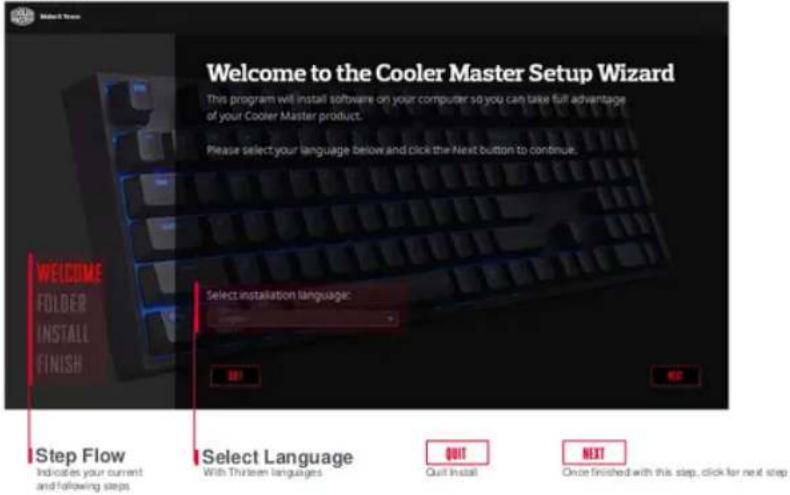
Install Software - Installing Process
PAGE TWO
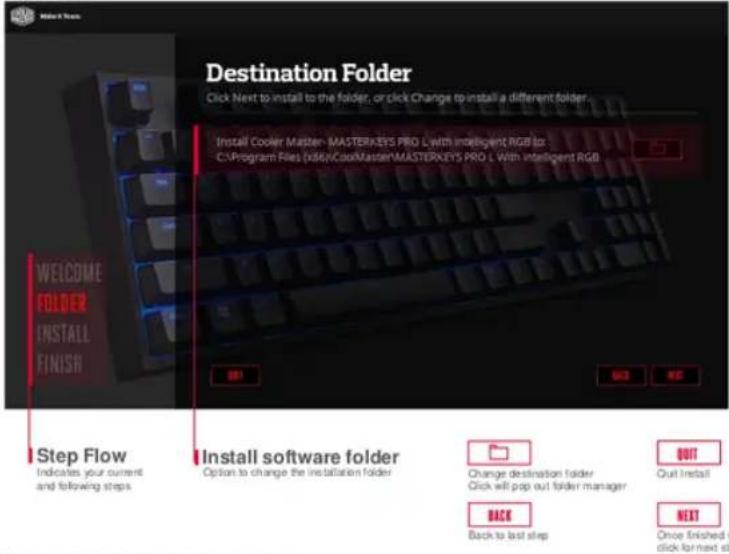
Install Software - Installing Process
PAGE THREE

Install Software - Installing Process
PAGE FOUR

GUI - Overview
Keyboard
Shows per key color settings
Two Main Tabs
LED - set color and effect s (Detail info go to Page : 9) LIBRARY - Manage profile (Detail info go to Page : 15)
Check / Minimize / Exit
7: Check Software and Firmware version - Minimize Program
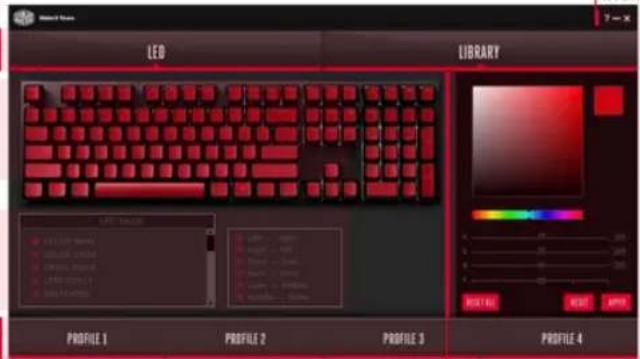
PROFILE
Switch Profile: a red bar at bottom will indicate selected profile
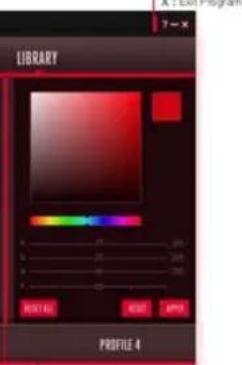
Color / Speed and Setting
Select color and adjust speed Reset / Reset All / Apply
ILED MODE
Light effects or LED mode selection
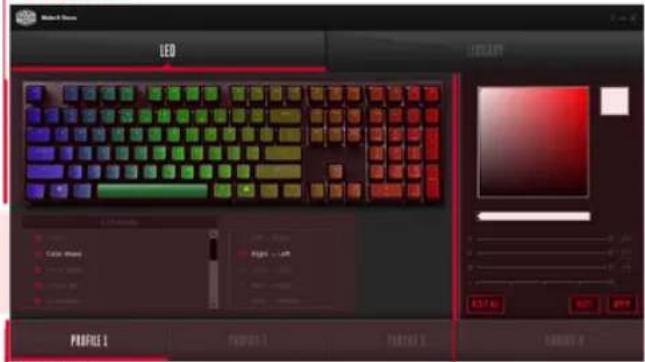
LED Tab - Overview
Keyboard
shows per key color settings Detail info go to PAGE : 10
PROFILE
Switch Profile: a red bar at bottom will indicate selected profile
ILED MODE
Light effects or LED mode selection Detail info go to PAGE : 11
Color / Speed and Setting
Select color and adjust speed
Detail info go to PAGE : 12
Keyboard – Per Key Setting

Keyboard
Shows per key color settings
How it works
Left Click: Paint Color
Right Click : Erase Color
Scroll Click : Pick Color
Hold and Drag Left Click : Area Paint Color
Hold and Drag Right Click : Area Erase Color
LED MODE - EFFECT

ILED MODE
Light effects or LED mode selection
How it works
Left Box: pick an effect
Right Box: detail settings for effects, e.g. direction or layer choice
COLOR
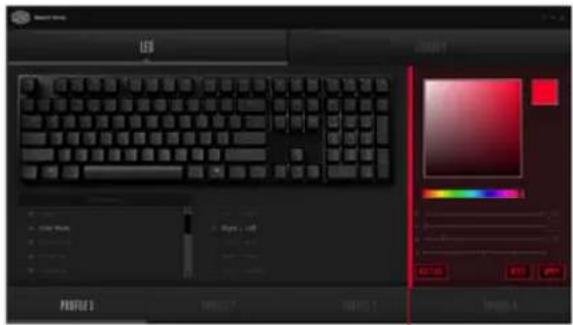
Color / Speed and Setting
Select color and adjust speed Reset / Reset All / Apply
How it works
Color Spectrum: pick a color
Small Box (Right Color Spectrum): shows which color was picked
Bar: click to change hue
R / G / B: Drag to adjust R/G/B color or fill in value in the right box
S: Adjust the speed of effects

Reset Profile Setting

Reset LED Mode to default

Apply to save setting
PROFILE

PROFILE
Switch Profile; a red bar at bottom will indicate selected profile
How it works
A red bar at bottom will indicate selected profile
Click on the bottom profile rectangles to switch profiles
Quick Setting Step

STEP 1 : Select LED Mode
PAGE : 12
STEP 2 : Choose LED Mode's detailed options
PAGE: 12
STEP 3 : Pick or type in a color
PAGE : 13
STEP 4 : Click per key or drag area to paint color
PAGE: 11
| STEP 5 : Click Apply to save settings or Reset and reset to default
LIBRARY – Profile Manage
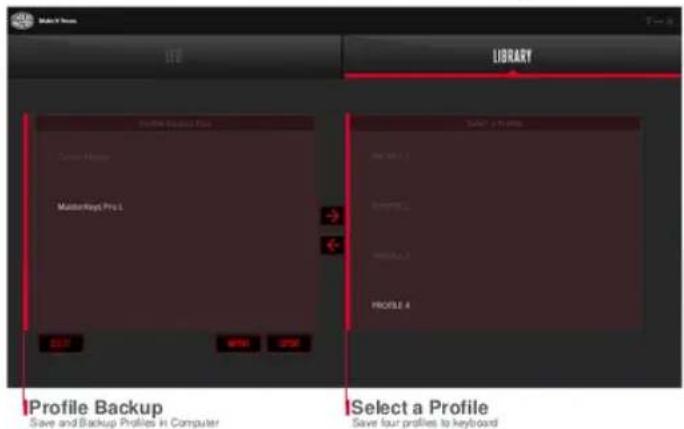
How it works
Double click to change name - 16 characters total

Delete selected Profile on Profile Backup files

Transport Profile to Keyboard

Import / Load Profile from computer

Transport Profile to Computer

Export / Save Profile to Computer
Firmware Update
Check Point One : Once launched, software will check firmware version.
If older version is detected, option to update will pop up.
Check Point Two : Click Software the top-right ? and can check firmware version
Check Point Three : Go to Cooler Master official website to download latest version

38] Copyright 2015 to Cooke Master Corporation, All Rights Reserved.



- MASTERKEYS PRO L RGB
- CONTENT
- INSTALL SOFTWARE
- INSTALL SOFTWARE - INSTALLING PROCESS
- GUI - OVERVIEW
- KEYBOARD
- TWO MAIN TABS
- CHECK / MINIMIZE / EXIT
- PROFILE
- COLOR / SPEED AND SETTING
- ILED MODE
- LED TAB - OVERVIEW
- KEYBOARD – PER KEY SETTING
- HOW IT WORKS
- LED MODE - EFFECT
- COLOR
- QUICK SETTING STEP
- FIRMWARE UPDATE
Brand : CM Storm
Model : MasterKeys Pro S RGB
Category : Keyboard