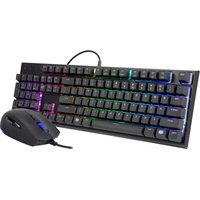
Quick Fire XT - Keyboard CM Storm - Free user manual and instructions
Find the device manual for free Quick Fire XT CM Storm in PDF.


Pick your language and provide your email: we'll send you a specifically translated version.
| Product Type | Mechanical Keyboard |
| Brand | CM Storm |
| Model | Quick Fire XT |
| Connectivity | Wired USB 2.0 |
| Cable Length | 1.8 m (6 ft) |
| Keyboard Layout | Full-size (US ANSI) |
| Switch Type | Mechanical (Cherry MX compatible) |
| Key Rollover | Full N-key (NKRO) over USB |
| Polling Rate | 1000 Hz |
| Backlighting | None |
| Dimensions (W x D x H) | 440 x 130 x 30 mm |
| Weight | 1.2 kg (2.65 lbs) |
| Material | Plastic case with steel backplate |
| Operating Systems | Windows, macOS, Linux |
| Power Supply | USB powered (5V, 500mA) |
| Media Keys | Dedicated multimedia keys via Fn |
| Keycap Material | ABS plastic, laser etched |
| Detachable Cable | No |
| Wrist Rest | Not included |
| Included Accessories | User manual, keycap puller |
Frequently Asked Questions - Quick Fire XT CM Storm
How do I clean my CM Storm Quick Fire XT keyboard?
Unplug the keyboard. Use a can of compressed air to remove debris between keys. Wipe the surface with a slightly damp cloth. For deeper cleaning, remove keycaps with the included puller and clean individually. Avoid liquid contact with the switches.
Are the keycaps removable?
Yes, the keycaps are removable. Use the included keycap puller to gently pry them off. They are standard Cherry MX compatible, so you can replace them with aftermarket keycaps.
Does the Quick Fire XT support N-key rollover?
Yes, it supports full N-key rollover (NKRO) over USB, meaning every keypress is registered simultaneously without ghosting.
What type of switches does it use?
The Quick Fire XT uses mechanical switches from Cherry MX (typically MX Blue, MX Red, or MX Brown depending on variant). These provide tactile or linear feedback.
Is the keyboard backlit?
No, the CM Storm Quick Fire XT does not have backlighting. It is a standard non-backlit mechanical keyboard.
Can I use it with a Mac?
Yes, the keyboard works with macOS. The Windows key functions as Command, though there is no dedicated Mac layout. You can reassign keys in system preferences.
What cable does it use?
The keyboard has a fixed, non-detachable USB 2.0 cable approximately 1.8 meters (6 feet) long. It is not braided.
How do I access media keys?
Media keys are accessed via the Fn key combined with F1 to F12. The specific functions (volume, play/pause, etc.) are printed on the keys in blue.
Is there a wrist rest included?
No, the Quick Fire XT does not come with a wrist rest. You may purchase a separate wrist rest if desired.
What is the warranty period?
CM Storm typically offers a 2-year limited warranty for keyboards. Check your regional warranty terms or contact CM Storm support for confirmation.
User questions about Quick Fire XT CM Storm
0 question about this device. Answer the ones you know or ask your own.
Ask a new question about this device
No questions yet. Be the first to ask one.
Download the instructions for your Keyboard in PDF format for free! Find your manual Quick Fire XT - CM Storm and take your electronic device back in hand. On this page are published all the documents necessary for the use of your device. Quick Fire XT by CM Storm.
USER MANUAL Quick Fire XT CM Storm


Manual assistant
Powered by Anthropic
Waiting for your message
Product information
Brand : CM Storm
Model : Quick Fire XT
Category : Keyboard