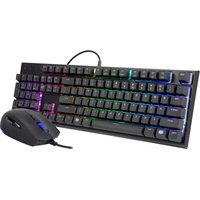
MasterSet MS120 - Keyboard CM Storm - Free user manual and instructions
Find the device manual for free MasterSet MS120 CM Storm in PDF.


| Product Type | Gaming Keyboard |
| Brand | CM Storm |
| Model | MasterSet MS120 |
| Dimensions (L x W x H) | 440 x 135 x 30 mm |
| Weight | 1 kg |
| Connectivity | USB 2.0 |
| Cable Length | 1.8 m, braided |
| Key Switch Type | Mechanical, Cherry MX Blue (or Brown, Red) |
| Backlighting | RGB per-key, customizable |
| Macro Support | Yes, programmable via software |
| Wrist Rest | Detachable, magnetic |
| Polling Rate | 1000 Hz |
| Key Rollover | N-key rollover |
| Compatibility | Windows 7/8/10, macOS, Linux |
| Power Source | USB powered |
| Cleaning Instructions | Wipe with a soft, dry cloth; disconnect before cleaning |
| Safety Precautions | Avoid liquids; do not expose to high heat or direct sunlight |
| Spare Parts | USB cable, wrist rest, keycaps (optional) |
| Repairability | Switches can be desoldered; keycaps are removable |
Frequently Asked Questions - MasterSet MS120 CM Storm
User questions about MasterSet MS120 CM Storm
0 question about this device. Answer the ones you know or ask your own.
Ask a new question about this device
Download the instructions for your Keyboard in PDF format for free! Find your manual MasterSet MS120 - CM Storm and take your electronic device back in hand. On this page are published all the documents necessary for the use of your device. MasterSet MS120 by CM Storm.
USER MANUAL MasterSet MS120 CM Storm

natural_image
Close-up of a black computer mouse with a purple scroll wheel and 'COOLER MASTER' branding on the side (no other text or symbols visible)MASTERSET MS120
Get Your Click Fix
EN

FN + ESC = On/Off Backlight
*Press and Hold for 10 seconds to reset to default

FN + F1 = Quick Pick 10 Different Colors
FN + F2 (Red+) = Red Color Levels (0-5)
FN + F3 (Green+) = Green Color Levels (0-5)
FN + F4 (Blue+) = Blue Color Levels (0-5)

FN + F5 = LED Lighting Mode
FN + F6 = Lighting Zones and Direction
FN + F7 = Lighting Speed Adjust
RU
FN + F9 = Normal Mode (1X)
FN + F10 = Turbo Mode (8X)
FN + F11 = Full keyboard Lock/Unlock
FN + F12 = Windows Key Lock / Unlock

FN + Ins = Play/Pause
FN + Home = Next Track
FN + Page Up = Volume Up

FN • Del - Stop
FN + End = Previous Track
FN + Page Down = Volume Down
Asia Pacific - Cooler Master Technology Inc. BF., No. 788-1, Zhongzheng Rd., Zhonghe Dist., New Taipei City 23586, Taiwan (R.O.C.) Tel: +886-2-2225-3517
North America - Cooker Master NA 4820 Schaefer Ave. Chino CA. 91710, USA Tel: +1-888-624-5099
South America - Cooler Master Brazil Tel 55-11-4003-9969 Email: CONTATO@coolermaster.com.br
Europe • Cooler Master Europe B.V. Lodewijkstraat 1b, 5652AC Eindhoven, The Netherlands Tel: +31-0140-702-0900
China - Cooler Master China Room 2062, Floor 6, No. 421, Weiqing Rd., Jinshan District, Shanghai City, China Tel +86-21-51872177
© 2017 Cooler Master Technology Inc. All Rights Reserved. All trademarks are registered to their respective owners.
Ver 2.0: 2017/07 512000371·GP

Package Contents
• MasterSet 120 Keyboard and Mouse
- Quick Start Guide
- Extra Switch

EN
① DPI
DPI + Wheel Click
2 Static Color
Color Cycle Mode Switching
③ DPI + Forward Button
Static Color Cycle (8 colors)
DPI + Backward Button
4 Adjust Speed of Color Cycle Mode (3 levels)
5 DPI+ Right Click Turn On/Off light
RU
Cooler Master Products: Limited Warranty
This document describes the warranty terms for all Cooler Master product sold in Australia
For Australia only:
Our goods come with guarantees that cannot be excluded under the Australian Consumer Law. You are entitled to a replacement or refund for a major failure and for compensation for any other reasonably foreseeable loss or damage. You are also entitled to have the goods repaired or replaced if the goods fail to be of acceptable quality and the failure does not amount to a major failure. ( Cooler Master Technology Inc., 85, No. 788-1, Zhongzheng Rd., Zhonghe Dist., New Taipei City 23586, Taiwan (R.O.C.).) Telephone: +886-2-2225-3517 (standard international call charges apply.)
Who the Warranty Protects:
This Warranty is valid to the original purchaser only.
What the warranty protects:
This warranty is valid only for the Cooler Master Products distributed by authorized dealer(s) in Australia. Please contact Cooler Master for warranty information and services:
• Cooler Master Support: account.coolermaster.com
What Is and Is Not Covered
It is important to note that our warranty is not an unconditional guarantee for the duration of the Program. Any replaced parts become the property of Cooler Master. The Program does not apply to the software component of a product or a product which has been damaged due to accident, misuse, abuse, improper installation, usage not in accordance with product specifications and instructions, natural or personal disaster, or unauthorized alterations, repairs or modifications.
The Program does not cover any events such as below:
- Any damages unrelated to manufacturing defects.
• Any unsuitable environment or use of the product in Cooler Master Opinion.
- Any product which has been modified without official permission from Cooler Master, or on which the serial number or warranty sticker has been defaced, modified, or removed.
Damage, deterioration or malfunction resulting from:
- Accident, abuse, misuse, neglect, fire, water, lightning, or other acts of nature, commercial or industrial use, unauthorized product modification or failure to follow instructions included with the product.
- Third party products using Cooler Master Components will not be covered by warranty. See your vendor or the manufacturer for information about servicing.
• Repair or attempted repair by anyone not authorized by Cooler Master, Inc.
- Any shipment damages (claims must be made with the carrier).
- Unauthorized repairs to a Cooler Master product will void the warranty offered by the Program. Cooler Master reserves the right to refuse to service any product which has been altered, modified or repaired by non- Cooler Master Service personnel.
- Cooler Master does not warrant that this product will meet your requirements. It is your responsibility to determine the suitability of this product for your purpose.
- Removal or installation charges.
- You are responsible for the cost of shipping the product to Cooler Master, Cooler Master pays the cost of returning a product to you.
• Cooler Master reserves the right to replace the product with a service product at their sole discretion at any time.
- Product malfunction or damage resulting from liquids or moisture
- All accessories that malfunction due to physical damage such as: USB cables, extension cables, adapter cables, adapters, power cords, screws, retention brackets, ear cups, and all other similar accessories.
Limitation of implied warranties:
THERE ARE NO WARRANTIES, EXPRESS OR IMPLIED, WHICH EXTEND BEYOND THE DESCRIPTION CONTAINED HEREIN INCLUDING THE IMPLIED WARRANTY OF MERCHANTABILITY AND FITNESS FOR A PARTICULAR PURPOSE.
Exclusion of damages
COOLER MASTER'S LIABILITY IS LIMITED TO THE COST OF REPAIR OR REPLACEMENT OF THE PRODUCT. COOLER MASTER SHALL NOT BE LIABLE FOR:
- DAMAGE TO OTHER PROPERTY CAUSED BY ANY DEFECT IN THE PRODUCT, DAMAGES BASED UPON INCONVENIENCE, LOSS OF USE OF THE PRODUCT, LOSS OF TIME, LOSS OF PROFITS, LOSS OF BUSINESS OPPORTUNITY, LOSS OF GOODWILL, INTERFERENCE WITH BUSINESS RELATIONSHIPS OR OTHER COMMERCIAL LOSS, EVEN IF ADVISED OF THEIR POSSIBILITY OF SUCH DAMAGES.
• ANY OTHER DAMAGES, WHETHER INCIDENTAL, CONSEQUENTIAL OR OTHERWISE
• ANY CLAIM AGAINST THE CUSTOMER BY ANY OTHER PARTY
Warranty Information:
If the goods is found with reasonable defect within the period of (refer to Table A.) starting on the first day of purchase (with proof of invoice), this is what you must do, to claim the warranty from the above address.
Procedures:
- Consumers should return to the shop where he/she has bought the goods, After confirming with the shop with a valid invoice, they may approach the distributor for RMA claim.
- After confirmed by the distributor that the goods was damaged due to natural causes, replacement and repair will be done by distributor (including brand new or refurbished goods)
- All faulty goods must return to the distributor, expenses for returning the faulty goods will be covered by the consumer, and distributor will cover the cost involved in the transporting of parts or repaired goods to the consumer.
Regarding all the expenses incurred in making the claim, and this is how you would claim:
- Within the valid warranty date, starting from the first day of issuing invoice, Retail shops will assist in confirmation with distributor for the consumer for the following.
A. If the damage was caused by the consumer, then the consumer should cover all expenses in fixing the product, if the product still can't be fixed, we would suggest consumer in buying a brand new product.
B. Product defect caused under natural use, expenses will be covered by the distributor.
- Faulty products with expired warranty dates, we would suggest consumer to purchase a brand new products, without undergoing for repairs.
Table A:
Cooler Master Products
Please check your user manual for the exact warranty period terms for products that are not shown below.
For more warranty information, please visit our official website: http://www.coolermaster.com/service/warranty.html
Cooler Master Gaming Peripherals products warranty
| Product Name | Warranty Term |
| MasterSet MS120 | 2 years |


Brand : CM Storm
Model : MasterSet MS120
Category : Keyboard