
Recon - Computer Mouse CM Storm - Free user manual and instructions
Find the device manual for free Recon CM Storm in PDF.


| Product Type | Gaming Mouse |
| Brand | Cooler Master CM Storm |
| Model | Recon |
| Dimensions (L x W x H) | 124 x 70 x 40 mm |
| Weight | 100 g (without cable) |
| Connection Type | Wired USB 2.0 |
| Cable Length | 1.8 m |
| Sensor Type | Optical, Avago ADNS-3888 |
| DPI Range | 400 - 4000 DPI (adjustable) |
| Polling Rate | 1000 Hz / 1 ms |
| Number of Buttons | 5 programmable buttons |
| Scroll Wheel | Yes, with tactile feedback |
| Lighting | Red LED backlight |
| Software Support | CM Storm Portal (customizable profiles) |
| Onboard Memory | Yes, 128 KB |
| Grip Type | Right-handed ergonomic design |
| Surface Material | Rubberized side grips, smooth top |
| System Requirements | Windows 7/8/10, USB port |
| Power Source | USB bus-powered (5V, 100 mA) |
| Maintenance & Cleaning | Wipe with dry cloth; avoid liquids. Clean sensor with cotton swab. |
| Safety Instructions | Keep away from heat, moisture, and magnets. Do not disassemble. |
| Spare Parts & Repairability | Replacement mouse feet available; cable not user-replaceable. |
| Package Contents | Mouse, quick start guide, sticker |
| Warranty | 2 years limited |
Frequently Asked Questions - Recon CM Storm
User questions about Recon CM Storm
0 question about this device. Answer the ones you know or ask your own.
Ask a new question about this device
Download the instructions for your Computer Mouse in PDF format for free! Find your manual Recon - CM Storm and take your electronic device back in hand. On this page are published all the documents necessary for the use of your device. Recon by CM Storm.
USER MANUAL Recon CM Storm
natural_image
Illustration of a black computer mouse with glowing red circuitry and a spiral design on its body (no text or symbols)Instrucon Manual
2012 Cooler Master Co., Ltd. All Rights Reserved. All trademarks are registered to their respective owners.

CMSFORM
BY COOLER MASTER
SPECIFICATION
• AVAGO 3090 opcal sensor with 800-4000 dpi
• Sensor Li-O-Distance ne-tuning
• On-The-Fly DPI, LOD and USB polling adjustments
- Up to 1.5m/s or 60"/s tracking speed and 20G of acceleraon
• Up to 5 million clicking Omron micro switches
• Extra wide 16-bit USB data path
• 1000 Hz polling rate / 1ms response me
• Super Grip coated ambidextrous mouse body
• Ultra swi mouse feet
• Flexible 1.8 meter or 78.6 inch long cable
• 16.8 million colors lighng to ideny Proles
• Weight (mouse only) : 109g
• Dimensions (W x H x D) :
64.4 x 116.4 x 42 mm
2.53 x 4.58 x 1.65 inches

2012 Cooler Master Co., Ltd. All Rights Reserved. All trademarks are registered to their respective owners.
Highlights
Features
Dimensions
BuonsSoware AP

natural_image
Close-up of a black computer mouse with a control knob and scroll wheel, set against a red background (no text or symbols visible)
CMSSTORM
BY COOLER MASTER
Features

natural_image
Three black circular objects with red, green, and blue gradient stripes against a dark background (no text or symbols)Max Customizaon
Recon features 3 individual mul-color LED zones, the Mousewheel, DPI Buons and CM Storm Logo. The brightness and color of each zone can be ne tuned with over 160.000 colors to choose from, or simply disabled.

natural_image
Close-up of a black motorcycle head with a pink logo on the top (no text or symbols visible)Rubberized Grip
To improve the grip and prevent your ngers from sliding and slipping, the enre mouse body is coated in a thin layer of rubber. An added bonus is a super smooth comfy feel and look, guaranteeing approving nods by whoever lays eyes on it.

Ninja Switches
The Omron micro switches give you consistent tackle feedback even aer millions of clicks. The so actuaon force, mild precise click and super human repeat-rate make the CM Storm Recon a deadly maral arts weapon.

CMSFORM
BY COOLER MASTER

Ambidextrous Design
Thanks to a unique ergonomic Design Recon is comfortable for le and right handed gamers alike. The opposing thumb-rest acts as a ring nger and pinky rest, and the extra thumb buons can be programmed to act as Macro or Special Funcon keys.

Precise Tracking
Thanks to the best Opcal Sensor on the Market (AVAGO 3090). The CM Storm Recon tracks movements with the highest opcal sensitivity on the market. Users can ne tune the sensitivity and dene up to 4 DPI Levels for each Prole.
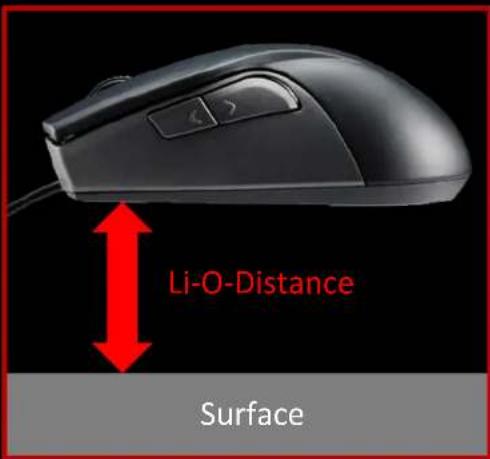
Adapve Control
When the Sensor DPI seng or USB polling rate is changed, the tracking properes of the Sensor change. So with Recon, for the rst me ever, users can ne tune the USB speed and LOD seng for not only every Prole, but every DPI Level within each Prole!

CMSFORM
BY COOLER MASTER
Features Highlights
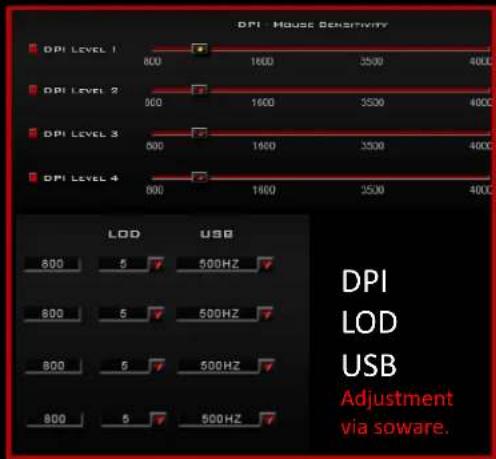
On-The-Fly Tuning
Quickly switch between dierent USB polling speeds, LOD levels and sensor DPI sengs without leaving the virtual Baleeld or being distracng and catching a bullet.

Plug n Play
Built in memory able to save all proles, macros, colors in to the mouse. You can switch on to dierent PC without setup again.

natural_image
Close-up of a black and red electronic device with a central lens and screw base (no visible text or symbols)Super Slick Tracking
Whether its solid, hybrid or so mouse pads, Recon wont get stuck in the mud and lets you aim and shoot without delay and distracons.

CMSFORM
BY COOLER MASTER
Dimensions

natural_image
Close-up of a black computer mouse with glossy surface and scroll wheel (no text or symbols visible)

Militarized Design
Perfect balanced form with unique combinaon of lightness, strength and agility.
2012 Cooler Master Co., Ltd. All Rights Reserved. All trademarks are registered to their respective owners.

CMSFORM
BY COOLER MASTER
Buons


natural_image
Close-up of a black computer mouse with visible scroll wheel and control buttons, marked with red annotations (no text or symbols on the mouse itself)A. Buon 1 Le Click
B. Buon 2 Right Click
C. Buon 3 Scroll Wheel
D. Buon 4 DPI +
E. Buon 5 DPI -
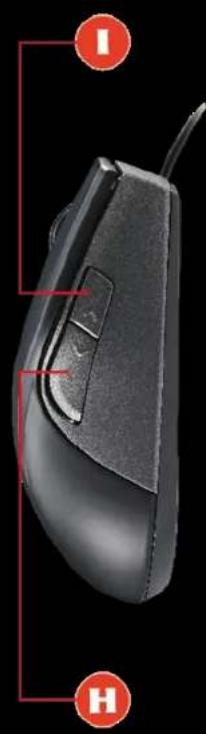
F. Buon 6 Side Buon [IE, Forward]
G. Buon 7 Side Buon [IE, Backward]
H. Buon 8 Side Buon [IE, Backward]
I. Buon 9 Side Buon [IE, Forward]
Soware AP
(Note: Photos may dier slightly from the nal version)

natural_image
Close-up of a black computer mouse with a handle and control knob, set against a red background (no text or symbols visible)
CMSFORM
BY COOLER MASTER
The Recon AP-Features
PROFILE OVERVIEW
Bamet, 1965
Button 2: right click
Button 3: middle click
Button 4: dpi+
Button S: dpi-
Button 7: E backward
Bened, protes
Bancor D. 9018
Fully Customizable
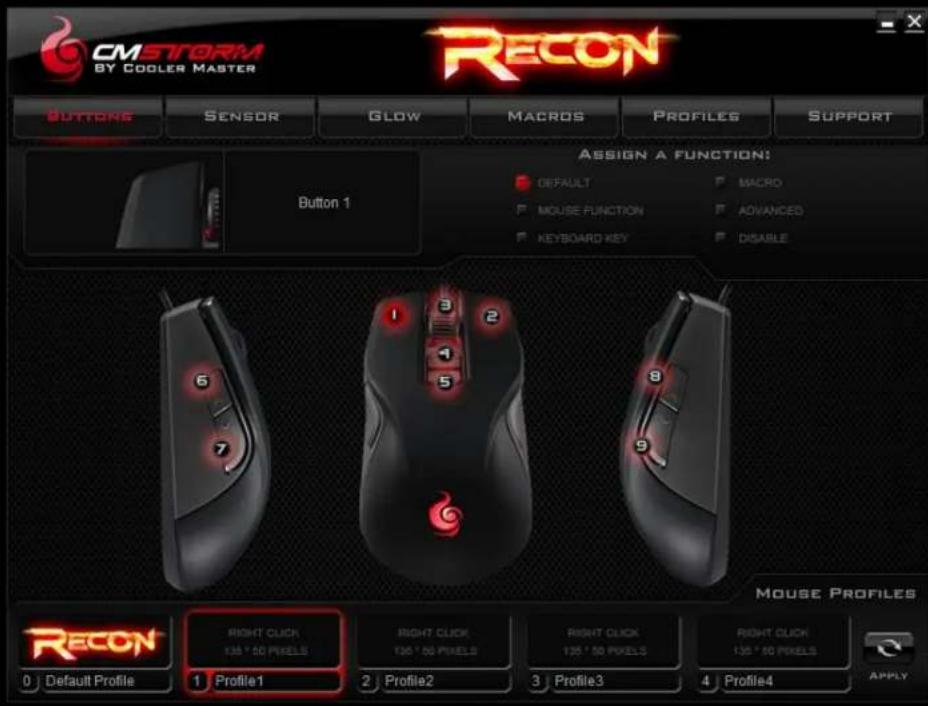
Create up to 4 custom Mouse Proles and reprogram the funcon of each of the 9 Mouse buons!
Buons can be programmed to execute mulmedia commands like play, pause, volume up, mute, act as a keyboard key or even have Macros assigned to them.

CMSFORM
BY COOLER MASTER
The Recon AP-Features
Prole Overview
This window gives you an overview of all buon customizaons of the selected prole, and helps you remember which funcon you assigned to which buon.
Selected Mouse Buon
Displays the mouse from dierent angles, highlighting the buon numbers.
Customizable Prole Image
Mouse Proles can not only have a custom name assigned to them, but have a custom thumbnail assigned to them to quickly recognize them and tell them apart.

RIGHT CLICK
135' 50 PIXELS
1
RIGHT CLICK
135° 50 PIXELS
2
PROFILE 2
PROFILE OVERVIEW
Button 1: left click
Button 2: right click
Button 3: middle click
Button 4 : dpi+
Button 5 : dpi-
Buiton & profile+
Button 7: IE backward
Button 8 profile+
Button 9 profile


CMSFORM
BY COOLER MASTER

There are so many funcons you can assign to a buon, we sorted them into groups of funcons so you don't get lost.
Macro Funcons

The Recon AP-Features
Mouse Funcons

Advanced Funcons

Keyboard Keys

2012 Cooler Master Co., Ltd. All Rights Reserved. All trademarks are registered to their respective owners.

CMSFORM
BY COOLER MASTER
The Recon AP-Sensor
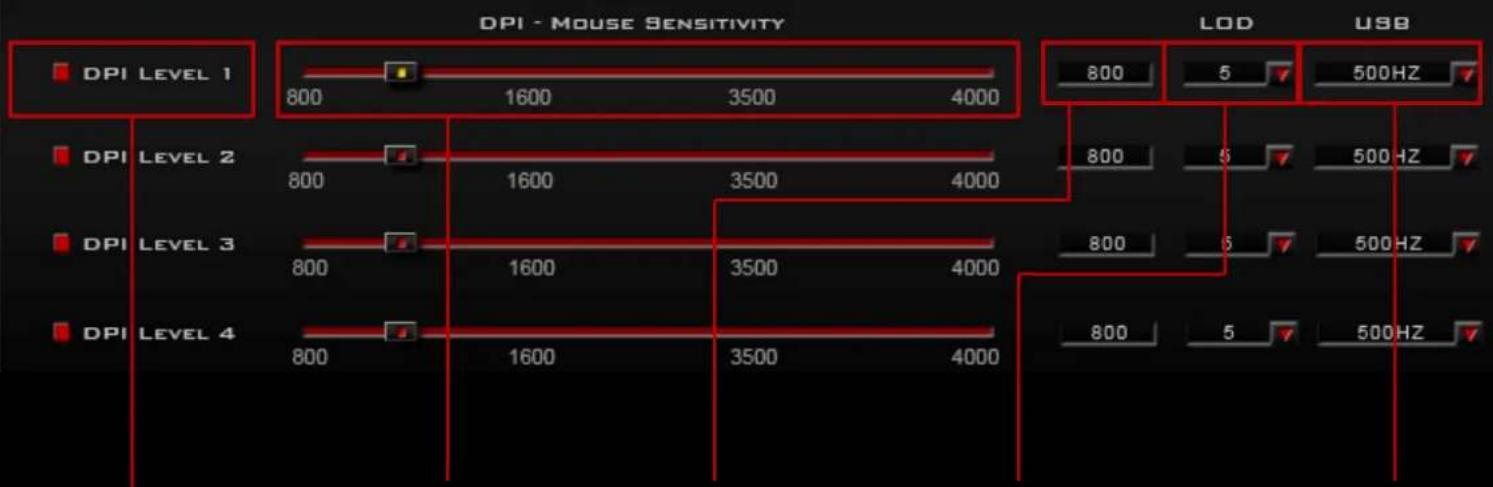
bar
| DPI Level | Value | | --------- | ----- | | DPI LEVEL 1 | 800 | | DPI LEVEL 2 | 800 | | DPI LEVEL 3 | 800 | | DPI LEVEL 4 | 800 |DPI Levels
Each Prole can contain up to 4 DPI levels. Individual levels can be disabled to skip them when cycling through the DPI levels with the DPI+ and DPI- buons.
DPI Slider
Convenient slide bars to quickly adjust the mouse movement sensitivity of each DPI level.
DPI Value
Displays the currently selected DPI value.
LOD
The Li O Distance or LOD can be ne tuned for each individual DPI Level, and industry rst!
USB Polling Combo Box
Displays a list of all available USB polling sengs.
2012 Cooler Master Co., Ltd. All Rights Reserved. All trademarks are registered to their respective owners.

CMSFORM
BY COOLER MASTER
The Recon AP-Sensor

bar
| Metric | Value | | ----------------------- | --------- | | OS Sensitivity | 1 | | OS Double Click Speed | 250us | | OS Double Click Speed | 32ms |Inter/Extrapolaon
Displays and adjusts the current windows OS inter/extrapolaon (mouse pointer sensitivity seng). Adjusng this lets you emulate higher or lower sensor DPI sengs.
Double Click Speed
Adjusts the Windows OS double click speed.
Mouse Buon A2A
The acve to acve delay of all mouse buons can be adjusted with this slider, to allow more clicks per second.
DOUBLE CLICK TESTAREA

Double click Test Field
Test the currently applied mouse buon sengs to see if a double click is registered as a double click or two separate clicks.
2012 Cooler Master Co., Ltd. All Rights Reserved. All trademarks are registered to their respective owners.

CMSFORM
BY COOLER MASTER
The Recon AP-LED

LEDs
Recon features no less than 3 separate LED modules that can each be programmed to a dierent color!
LED Color
Quickly choose a color by clicking on any of the 10 color buons, and if you want, ne tune your LED color and brightness using the RGB color code elds and the LED brightness slider.
LED Mode
Choose between 3 LED modes. Connuous : ON, OFF. Flash on Prole Switch : when switching proles to remind you which prole you just loaded. Rapid Fire : which makes the LEDs ash every me you clicking the le mouse buon.
2012 Cooler Master Co., Ltd. All Rights Reserved. All trademarks are registered to their respective owners.

CMSFORM
BY COOLER MASTER
Soware AP-Macros

Macro Control
Lets you edit Macros by reshuing acons, copying, deleng or adding opons or adjusng their ming.
Macro Library
Displays all macros the user currently has in his macro directory
Macro Timeline
Displays each step a macro contains, when it starts and when it ends.
Macro Tool Bar
Create, Copy or Delete the Macros you worked on and build your own Library of clever shortcuts
2012 Cooler Master Co., Ltd. All Rights Reserved. All trademarks are registered to their respective owners.

CMSFORM
BY COOLER MASTER
Soware AP-Prole

Manage your Proles
Create, Delete, Copy or move a Prole from or to the Library.
2012 Cooler Master Co., Ltd. All Rights Reserved. All trademarks are registered to their respective owners.

- Instrucon Manual
- SPECIFICATION
- Features
- Max Customizaon
- Rubberized Grip
- Ninja Switches
- Ambidextrous Design
- Precise Tracking
- Adapve Control
- Features Highlights
- On-The-Fly Tuning
- Plug n Play
- Super Slick Tracking
- Dimensions
- Buons
- Soware AP
- The Recon AP-Features
- Fully Customizable
- Prole Overview
- Selected Mouse Buon
- Customizable Prole Image
- PROFILE OVERVIEW
- The Recon AP-Sensor
- DPI Levels
- DPI Slider
- DPI Value
- LOD
- USB Polling Combo Box
- Inter/Extrapolaon
- Double Click Speed
- Mouse Buon A2A
- Double click Test Field
- The Recon AP-LED
- LEDs
- LED Color
- LED Mode
- Soware AP-Macros
- Macro Control
- Macro Library
- Macro Timeline
- Macro Tool Bar
- Soware AP-Prole
Brand : CM Storm
Model : Recon
Category : Computer Mouse