
M4A - Loudspeaker ALTO - Free user manual and instructions
Find the device manual for free M4A ALTO in PDF.


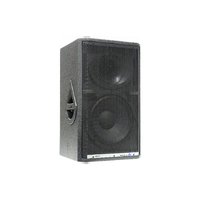
| Product Type | Active Studio Monitor |
| Model | M4A |
| System Type | 2-Way |
| Power Handling (HF) | 36W (EIAJ), 30W (RMS) |
| Power Handling (LF) | 72W (EIAJ), 60W (RMS) |
| SPL (1W/1m) | 92 dB |
| Max SPL | 112 dB |
| Frequency Response | 40 Hz - 15 kHz (-10 dB) |
| Impedance | 4 Ohms |
| Crossover Frequency | 2.3 - 3 kHz (1m/W) |
| Dimensions (H x W x D) | 287.5 x 169 x 201 mm |
| Net Weight | 6.5 kg |
| Power Supply | AC mains (voltage as marked) |
| Input Connector | Combo (XLR / 1/4" jack) balanced/unbalanced |
| Output Connector | XLR link (parallel) |
| Controls | Power switch, Near/Far field selector, Sensitivity trim |
| Indicators | Blue power LED |
| Enclosure Material | High-tech polypropylene with velvet-touch paint |
| Recommended Use | Near-field or mid-field monitoring |
| Cleaning | Dry cloth only; do not use solvents |
| Safety | Do not open; refer servicing to qualified personnel |
| Warranty | 1 year from purchase (with registration) |
Frequently Asked Questions - M4A ALTO
User questions about M4A ALTO
0 question about this device. Answer the ones you know or ask your own.
Ask a new question about this device
Download the instructions for your Loudspeaker in PDF format for free! Find your manual M4A - ALTO and take your electronic device back in hand. On this page are published all the documents necessary for the use of your device. M4A by ALTO.
USER MANUAL M4A ALTO
natural_image
Exterior view of a black rectangular electronic device with two side speakers (no text or symbols visible)
CAUTION
RISK OF ELECTRIC SHOCK DO NOT OPEN

TO REDUCE THE RISK OF ELECTRIC SHOCK PLEASE DO NOT REMOVE THE COVER OR THE BACK PANEL OF THIS EQUIPMENT. THERE ARE NO PARTS NEEDED BY USER INSIDE THE EQUIPMENT. FOR SERVICE, PLEASE CONTACT QUALIFIED SERVICE CENTERS.
This symbol, wherever used, alerts you to the presence of un-insulated and dangerous voltages within the product enclosure. These are voltages that may be sufficient to constitute the risk of electric shock or death.
This symbol, wherever used, alerts you to important operating and maintenance instructions. Please read.
Protective Ground Terminal \~ AC mains (Alternating Current) Hazardous Live Terminal
ON: Denotes the product is turned on. OFF: Denotes the product is turned off
CAUTION
Describes precautions that should be observed to prevent damage to the product.
-
Read this Manual carefully before operation.
-
Keep this Manual in a safe place.
-
Be aware of all warnings reported with this symbol.
-
Keep this Equipment away from water and moisture.
-
Clean it only with dry cloth. Do not use solvent or other chemicals.
-
Do not damp or cover any cooling opening. Install the equipment only in accordance with the Manufacturer's instructions.
-
Power Cords are designed for your safety. Do not remove Ground connections! If the plug does not fit your AC outlet, seek advice from a qualified electrician. Protect the power cord and plug from any physical stress to avoid risk of electric shock. Do not place heavy objects on the power cord. This could cause electric shock or fire.
-
Unplug this equipment when unused for long periods of time or during a storm.
-
Refer all service to qualified service personnel only. Do not perform any servicing other than those instructions contained within the User's Manual.
-
To prevent fire and damage to the product, use only the recommended fuse type as indicated in this manual. Do not short-circuit the fuse holder. Before replacing the fuse, make sure that the product is OFF and disconnected from the AC outlet.

WARNING
To reduce the risk of electric shock and fire, do not expose this equipment to moisture or rain.

Dispose of this product should not be placed in municipal and should be separate collection.
- Movethis Equipment only with a ca stand, tripod, or bracket,
specified by the manufacturer, or sold with the Equipment. When a cart is used, use caution when moving the cart / equipment combination to avoid possible injury from tip-over

natural_image
Abstract black-and-white icon of a person pushing a large rectangular block, enclosed in a circular frame (no text or symbols)- Permanent hearing loss may be caused by exposure to \ extremely high noise levels. The US. Government's Occupational Safety and Health Administration (OSHA) has specified the permissible exposure to noise level. These are shown in the following chart:
| HOURS X DAY | SPL | EXAMPLE |
| 8 | 90 | Small gig |
| 6 | 92 | train |
| 4 | 95 | Subway train |
| 3 | 97 | High level desktop monitors |
| 2 | 100 | Classic music concert |
| 1,5 | 102 | |
| 1 | 105 | |
| 0,5 | 110 |
0,25 or less 115 Rock concert
According to OSHA, an exposure to high SPL in excess of these limits may result in the loss of heat. To avoid the potential damage of heat, it is recommended that Personnel exposed to equipment capable of generating high SPL use hearing protection while such equipment is under operation.
The apparatus shall be connected to a mains socket outlet with a protective earthing connection.
The mains plug or an appliance coupler is used as the disconnect device, the disconnect device shall remain readily operable.
IN THIS MANUAL:
- INTRODUCTION ...... 1
- PHILOSOPHY 2
- INSTALLATION 3
- PANEL CONTROLS ....5
- HOOKUP EXAMPLES ......7
- WALL MOUNTING 9
- APPENDIX 10
- TECHNICAL SPECIFICATION....11
- WARRANTY 13
1. INTRODUCTION
Thank you for your purchasing of the ALTO M Series compact Studio Monitors. The increasing number of home studios and small audio / video production has created a large demand for compact monitors with excellent performance and affordable price. With the M Series Monitors we have addressed these needs. Available in different formats and configurations the M Series also come with a 2-channel amplifier built-in and electronic Xover. Made of durable high-tech Italian designed injected polypropylene, they are almost indestructible and, in they passive version they are also advised for outdoors use given the fact that also the speakers are waterproof. We have also included in the design top, side and bottom groove for easy hanging on the wall of the M Series Monitors through optional bracket.
Enjoy your M series Monitor and make sure to read this Manual carefully before operation!
WHY PLASTIC?
Because we can produce thousands and thousands of piece with the same characteristics of material integrity. Our Plastic is water and moisture resistance and it is finished with a "velvet-touch" paint that protects the unit from fingertips and scratches.
WHY TWO WOOFERS?
Because two is better than one. Joke apart, it is always difficult to get a decent amount of low frequencies out of a compact speaker cabinet. Low frequencies are produced by moving air so the more air you move the more low frequencies you get. Therefore the amount of low frequencies you get out from speaker cabinet is directly related to moving surface of the woofer. One woofer=limited moving surface. Two woofers=more moving surface. In fact you get more bass out from your Alto M Series Monitor than any other cabinet of the same size. But two woofers also mean two moving coils. Take our M3 as an example. Each woofer includes a 25 mm (1") moving coil, so with our two woofers we have 50 mm (2") of moving coil. Such moving coil is usually used in PA cabinet able to handle at least 200 watt. Therefore, you can put a lot of power into your M Monitor without producing heat in the moving coils of the woofers with consequent power compression.
WHY THE TWEETER IN SUCH AN UNUSUAL POSITION?
Positioning the tweeter in the middle of the two woofers allows for a more coherent sound image. Furthermore, the tweeter is almost out of the baffle and can give much more breath and depth to the sound. IN conventional Monitors tweeter are in the middle of a much larger baffle. Try to put your open hands around your mouth and sing. You hear that "ducky, nasal" sound. Now remove the hands and sign again. See… the hands are the baffles. Compact Monitors are usually positioned on the top of the mixer or in any case only a few feet from the Listener. The amazing depth of the M Series with high frequencies is the effect of the position of the tweeter.
WHY PASSIVE AND ACTIVE VERSION?
Small Studio Owners will prefer the active version. Although, some people will privilege the set up with a passive Monitor and an external power amplifier. For example, Alto just introduced a very high-end digital stereo amplifier: the A200.2. It is a half / rack, 1U little animal that can produce up to 240 watts of power. And it does not need a fan! Try this amp with one of the M Series Monitor. You will hear a surprising level of high fidelity and dynamic that it is not possible to achieve in self-powered models.Passive Monitors are then becoming popular for Dolby 5.1 and up to 8.1 set ups.

3. INSTALLATION
Compact Studio Monitors are also generally addressed as "Near-Field Monitors" In big Recording Studios the Monitors are usually far away from the Listeners. They interact the room since the sound will reflect on ceiling, wall and floor thus affecting the sound quality.
Near-filed Monitors are positioned a few feet away from the Listener and as a consequence the sound is less depended to the room conditions. For this reason we have made our M Series Monitors as flat as possible and did not add any frequency control because there would not be any need for it.
Let's explore some possible positionings for your M Series Monitors.
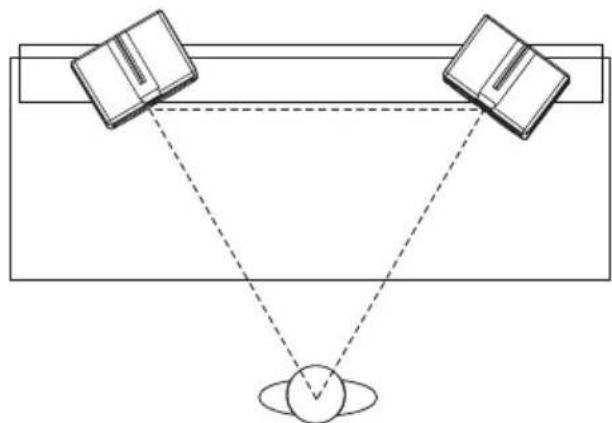
2 CHANNELS NEAR-FIELD
This is the typical Control Room situation. The Monitors will be poisoned on the Meter Bridge of the Mixer or in any case very close to the Listener. You should measure a simple equilateral triangle with the two monitors on two corners and the head of the listener in the other corner. In this way, the Left and Right Monitors will be placed with an angle of 60^ at the same distance to the Listener's head.
natural_image
Diagram of two books aligned with a sphere, connected by dashed lines to a central object (no text or symbols)2 CHANNELS MID-FIELD
This configuration is similar to above. In some situations the Mixer Meter Bridge could be too narrow to sustain the Monitors especially if you are using the M5 or M4 version. In such case, the Monitors are moved back usually on speaker stand making sure that the height of the woofer is above the upper line of the mixer. If you have no possibility for this set-up try to activate the "FAR-FIELD" switch on the back of your M Monitor.

natural_image
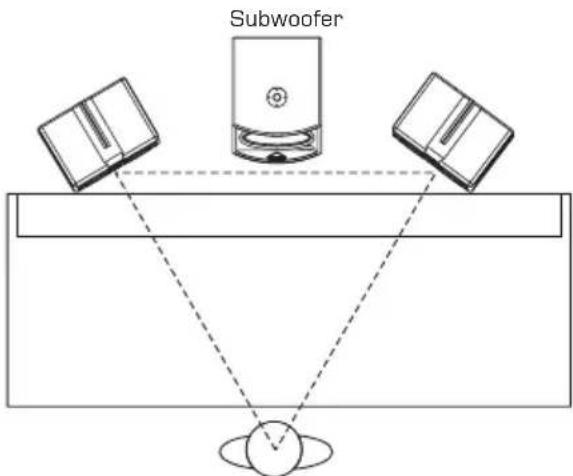
Diagram showing two books standing above a sphere with dashed lines indicating perspective or alignment (no text or symbols)2 CHANNELS+SUBWOOFER
This is the best possible positioning for the Monitors and the subwoofer but this set-up maybe not practical in your room. So, play some music with the subwoofer in different positions. Usually, the only possible positioning is under the table. Choose a sound material where there is a lot of low frequencies. Some positions may create phase misalignment. If the subwoofer has a phase switch, turn it on and listen to the difference. The bass response will increase or decrease. Keep the switch in the position that gives you more bass. Once you have taken care of phase problems adjust the sound level of the subwoofer to get a good and smooth mix with the Monitors.
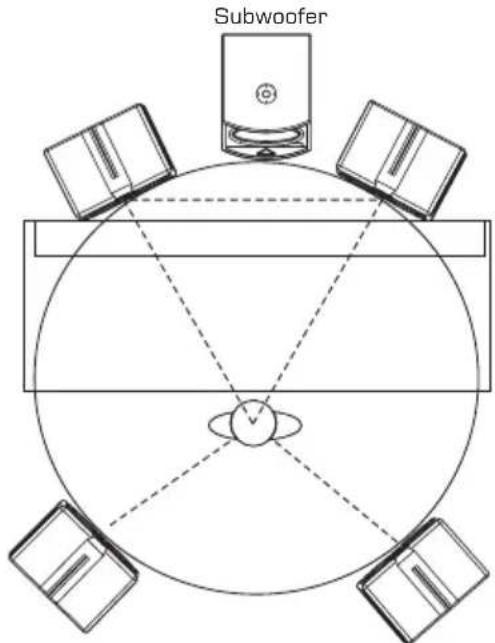
5.1 CHANNEL SURROUND SET-UP
You can keep front monitors and subwoofer in the same position described in the above example. The surround (back) monitors should be positioned slightly behind the listener's head forming an angle of about 90° with the main monitor on the same side.
- Features of the Active Models

natural_image
Technical line drawing of a multi-tiered speaker or fan device with circular components and a triangular component, labeled (1) in the corner (no text or symbols beyond label)
(1) Power Indicator
This blue LED lights up when the M series active monitor are powered on.
(2) Power Switch
This switch is used to turn the M series active monitor on or off.
Caution: Make sure your supply voltage is identical with the value marking on your monitors before turning the power switch on.
(3) AC Socket with Main Fuse
This socket is used to connect your M series active monitor speaker with the mains. Fuse replacement should be done by qualified personnel only, and only with same value fuse.
(4) NEAR or FAR Field Selector
Via this switch, you can use your M series monitors in the near field or far field configuration. Generally, near field option is designed for near distance, and the speakers are placed relatively close to the listener, normally about 1\~1.5m. As for far field option, it is usually designed for the larger sound systems, where the monitor speakers are placed comparative farther away from the listener.
(5) SENSITIVITY Control
Adjust this trim pot to get the proper input gain.
(6) SIGNAL INPUT
This COMBO connector is used to input the program sources either in balanced or unbalanced configuration. You can use either 1/4 jack or XLR connector.
(7) OUT/LINK
This balanced XLR connector is linked in parallel with the SIGNAL INPUT, and it can be used to output the input signal directly to another active monitor.
-.Features of the Passive Models

(1) Input Connector
This professional push-pull speaker terminal is used to input the amplified program sources coming from an external power amplifier.
For detailed connecting information, please refer to the "HOOKUP EXAMPLES" for the passive version.
(2) NEAR or FAR Field Selector
Via this switch, you can use your M series monitors in the near field or far field configuration.
Generally, near field option is designed for near distance, and the speakers are placed relatively close to the listener, normally about 1\~1.5m.
As for far field option, it is usually designed for the larger sound systems, where the monitor speakers are placed comparative farther away from the listener.
-. For Active Monitors
In this example the main outputs or control room outputs of your mixer are connected via jack or XLR to the input COMBO connector of your active M Monitor.

AMX-140FX USB
In this example the main monitors are connected to your mixer as explained above. The OUT/LINK socket is used to send the signal to a second pair of active monitors.

AMX-140FX USB
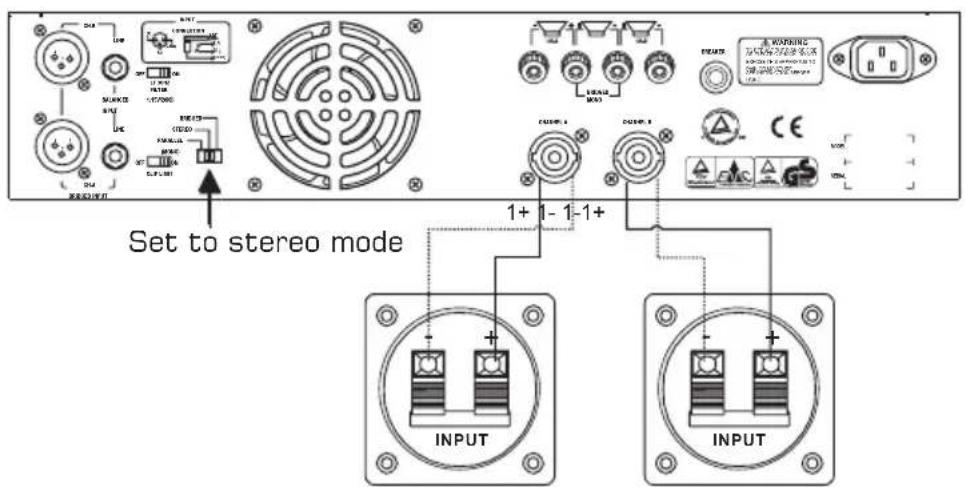
-. For Passive Monitors

Follow this scheme to connect your passive M Monitor to a power amplifier. Make sure to respect the polarity always connecting "+" with "+" and "-" with "-" .
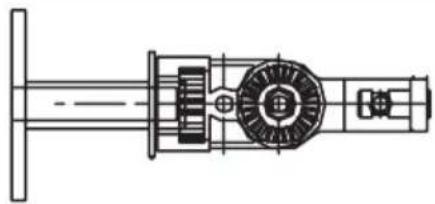
6. WALL MOUNTING
To install M Monitor on the wall or ceiling, Alto has provided an optional custom-built bracket: The YS 60
natural_image
Technical line drawing of a mechanical assembly with gears and shafts (no text or symbols)Installation steps:
- Mount the base (4) on the wall.
- Adjust the angle of the bracket according to your needs.
- Push the Solid Slide (12) into the specific Slot of the monitor speakers.
The M monitors provide 3 slots for each unit, respectively on top, side and bottom. - Use two screws (11, M3×10) to stop the Solid Slide at the proper position in the slot.
- Insert the Connecting Lever (10) of the accessory into its Fixing Lever (8), then use another screw (9, M6×1.0PH ×10) to fasten them.
Caution: While mounting the monitor speaker on the wall, please ensure the wall is strong enough to support it. Consult the installation specialist or the dealer for further instruction.

natural_image
Technical line drawing of a mechanical device with two circular components and a vertical support (no text or symbols)
natural_image
Technical line drawing of a mechanical device with two speakers and a pipe connection (no text or symbols)6. APPENDIX
Exploded Diagram of The Accessory (YS-60)
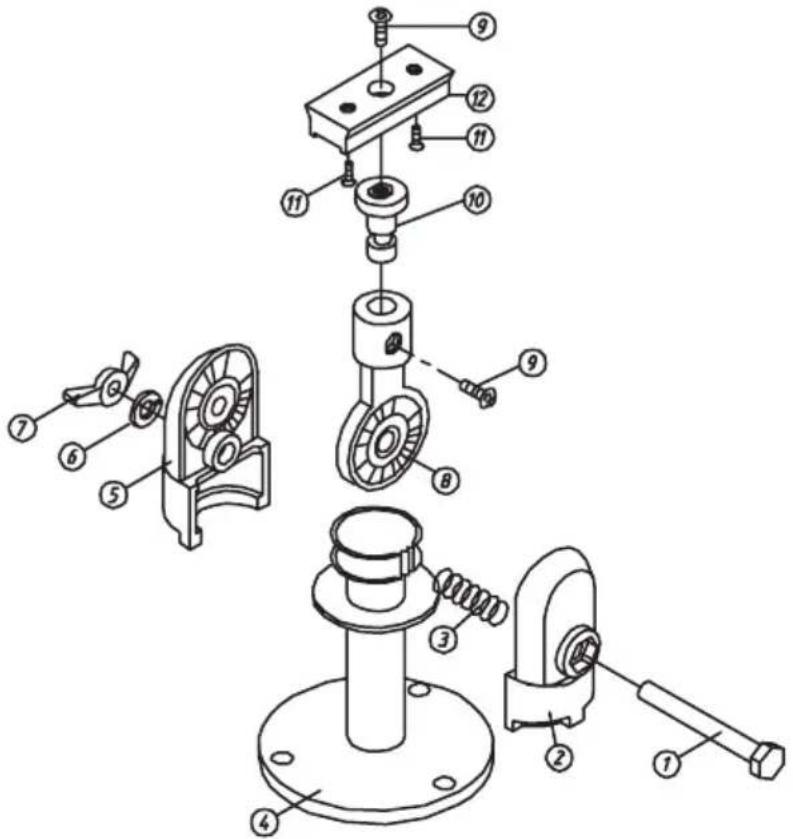
| Item | Part Description |
| 1 | Ni Screw, M6 55 1.0PH |
| 2 | Fixing Bracket - Left |
| 3 | Spring |
| 4 | Mounting Base |
| 5 | Fixing bracket - Right |
| 6 | Spring Washer |
| 7 | Ni Nut |
| 8 | Fixing Lever |
| 9 | Zn Screw, M6 4.0PH 1Q |
| 10 | Connecting Lever |
| 11 | Ni Screw, M3 10 |
| 12 | Solid Slide |
7. TECHNICAL SPECIFICATION
Model No.
System type
Power Handing
SPL (1W/1m)
Frequency Response
Max SPL
Impedance
Crossover Frequency
Dimension(HxWxD)
Net Weight (kg)
M3
2 Way
AES 30 W
87 dB
50 Hz-13 kHz (-10 dB)
102 dB
4 Ohms
2.3-3 kHz (1m/W)
216.5 × 143.5 × 152.5 mm
2.4 kg
Model No.
System type
Power Handing: HF
Power Handing: LF
SPL (1W/1m)
AMP
Frequency Response
Impedance
Crossover Frequency
Dimension(HxWxD)
Net Weight (kg)
M3A
2 Way
20 W[EIAJ], 15 W[RMS]
38 W(EIAJ), 30 W(RMS)
87 dB
50 Hz-13 kHz (-10 dB)
104 dB
4 Ohms
2.3-3 kHz (1m/W)
216.5 x 143.5 x 152.5 mm
3.6 kg
Model No.
System type
Power Handing
SPL (1W/1m)
Frequency Response
Max SPL
Impedance
Crossover Frequency
Dimension(HxWxD)
Net Weight (kg)
M4
2 Way
AES 70 W
92 dB
40 Hz-15 kHz (-10 dB)
110 dB
4 Ohms
2.3-3 kHz (1m/W)
287.5 x 169 x 201 mm
4.8 kg
Model No.
System type
Power Handing: HF
Power Handing: LF
SPL (1W/1m)
AMP
Frequency Response
Impedance
Crossover Frequency
Dimension(HxWxD)
Net Weight (kg)
M4A
2 Way
36 W(EIAJ), 30 W(RMS)
72 W(EIAJ), 60 W(RMS)
92 dB
40 Hz-15 kHz (-10 dB)
112 dB
4 Ohms
2.3-3 kHz (1m/W)
287.5 × 169 × 201 mm
6.5 kg
7. TECHNICAL SPECIFICATION
| Model No. | M5 |
| System type | 2 Way |
| Power Handing | AES 80 W |
| SPL (1W/1m) | 95 dB |
| Frequency Response | 40 Hz-15 kHz (-10dB) |
| Max SPL | 113 dB |
| Impedance | 4 Ohms |
| Crossover Frequency | 2.3-3 kHz (1m/W) |
| Dimension (H x W x D) | 376 x 223.5 x 267 mm |
| Net Weight (kg) | 6.6 kg |
| Model No. | M5A |
| System type | 2 Way |
| Power Handing: HF | 70 W(EIAJ), 60 W(RMS) |
| Power Handing: LF | 142 W(EIAJ), 130 W(RMS) |
| SPL (1W/1m) | 95 dB |
| AMP | 40 Hz-13 kHz (-10 dB) |
| Frequency Response | 118 dB |
| Impedance | 4 Ohms |
| Crossover Frequency | 2.3-3 kHz (1m/W) |
| Dimension (H x W x D) | 376 x 223.5 x 267 mm |
| Net Weight (kg) | 8.3 kg |
1. WARRANTY REGISTRATION CARD
To obtain Warranty Service, the buyer should first fill out and return the enclosed Warranty Registration Card within 10 days of the Purchase Date.
All the information presented in this Warranty Registration Card gives the manufacturer a better understanding of the sales status, so as to provide a more effective and efficient after-sales warranty service. Please fill out all the information carefully and genuinely, miswriting or absence of this card will void your warranty service.
2. RETURN NOTICE
2.1 In case of return for any warranty service, please make sure that the product is well packed in its original shipping carton, and it can protect your unit from any other extra damage.
2.2 Please provide a copy of your sales receipt or other proof of purchase with the returned machine, and give detail information about your return address and contact telephone number.
2.3 A brief description of the defect will be appreciated.
2.4 Please prepay all the costs involved in the return shipping, handling and insurance.
3. TERMS AND CONDITIONS
3.1 warrants that this product will be free from any defects in materials and/or workmanship for a period of 1 year from the purchase date if you have completed the Warranty Registration Card in time.
3.2 The warranty service is only available to the original consumer, who purchased this product directly from the retail dealer, and it can not be transferred.
3.3 During the warranty service, may repair or replace this product at its own option at no charge to you for parts or for labor in accordance with the right side of this limited warranty.
3.4 This warranty does not apply to the damages to this product that occurred as the following conditions:
- Instead of operating in accordance with the user's manual thoroughly, any abuse or misuse of this product.
• Normal tear and wear. - The product has been altered or modified in any way.
- Damage which may have been caused either directly or indirectly by another product / force / etc.
- Abnormal service or repairing by anyone other than the qualified personnel or technician.
And in such cases, all the expenses will be charged to the buyer.
3.5 In no event shall be liable for any incidental or consequential damages.
Some states do not allow the exclusion or limitation of incidental or consequential damages, so the above exclusion or limitation may not apply to you.
3.6 This warranty gives you the specific rights, and these rights are compatible with the state laws, you may also have other statutory rights that may vary from state to state.
SEIKAKU TECHNICAL GROUP LIMITED
NO. 1, Lane 17, Sec. 2, Han Shi West Road, Taichung 40151, Taiwan
http://www.altoproaudio.com Tel: 886-4-22313737
email: alto@altoproaudio.com Fax: 886-4-22346757
All rights reserved to ALTO. All features and content might be changed without prior notice. Any photocopy, translation, or reproduction of part of this manual without written permission is forbidden. Copyright 2007 Seikaku Group
NF01519-1.4
- CAUTION
- WARNING
- IN THIS MANUAL:
- INTRODUCTION
- WHY PLASTIC?
- WHY TWO WOOFERS?
- WHY THE TWEETER IN SUCH AN UNUSUAL POSITION?
- WHY PASSIVE AND ACTIVE VERSION?
- INSTALLATION
- CHANNELS NEAR-FIELD
- CHANNELS MID-FIELD
- CHANNELS+SUBWOOFER
- CHANNEL SURROUND SET-UP
- - Features of the Active Models
- Power Indicator
- Power Switch
- AC Socket with Main Fuse
- NEAR or FAR Field Selector
- SENSITIVITY Control
- SIGNAL INPUT
- OUT/LINK
- -.Features of the Passive Models
- Input Connector
- NEAR or FAR Field Selector
- -. For Active Monitors
- -. For Passive Monitors
- WALL MOUNTING
- Installation steps:
- APPENDIX
- TECHNICAL SPECIFICATION
- Model No.
- M3
- M3A
- M4
- M4A
- WARRANTY REGISTRATION CARD
- RETURN NOTICE
- TERMS AND CONDITIONS
Brand : ALTO
Model : M4A
Category : Loudspeaker