
ADDERView CATxIP 5000 - Network Equipment Adder - Free user manual and instructions
Find the device manual for free ADDERView CATxIP 5000 Adder in PDF.


| Product Type | KVM Extender over IP |
| Model | ADDERView CATxIP 5000 |
| Brand | Adder |
| Dimensions (W x D x H) | 210 mm x 150 mm x 44 mm (1U rackmount) |
| Weight | 1.2 kg |
| Power Supply | 12V DC, 2A, external adapter |
| Power Consumption | <12W |
| Video Resolution | Up to 1920x1080@60Hz |
| Interface | RJ45 (CAT5e/6) for IP connection |
| USB Ports | 2 x USB 2.0 Type A (keyboard/mouse) |
| Audio | Microphone and speaker via 3.5mm jacks |
| Operating Temperature | 0°C to 40°C |
| Storage Temperature | -20°C to 60°C |
| Humidity | 10% to 90% non-condensing |
| Main Functions | Remote access to single computer over IP, VGA/audio/USB extension, rackmount design |
| Cleaning | Wipe with dry cloth; avoid liquids |
| Safety | CE, FCC compliant; use only supplied power adapter |
| Spare Parts | Power adapter, rackmount brackets (included) |
| Repairability | No user-serviceable parts; contact Adder support |
| Warranty | 2 years limited |
Frequently Asked Questions - ADDERView CATxIP 5000 Adder
User questions about ADDERView CATxIP 5000 Adder
0 question about this device. Answer the ones you know or ask your own.
Ask a new question about this device
Download the instructions for your Network Equipment in PDF format for free! Find your manual ADDERView CATxIP 5000 - Adder and take your electronic device back in hand. On this page are published all the documents necessary for the use of your device. ADDERView CATxIP 5000 by Adder.
USER MANUAL ADDERView CATxIP 5000 Adder
AdderView CATxIP 5000
User Guide
CONTENTS
Contents
Welcome 4
Introduction
Creating larger installations ....5
Cascade installations....5
AdderView CATxIP 5000 features - front and rear......6
What's in the box 7
What you may additionally need....7
Installation
Mounting 8
Connections 9
Local user....10
Global users (IP network port)....11
Computer system (via CAM)....12
Power in connection....13
Power control port 14
Multiple video head connections ....15
Remote switching control 16
Configuration
Overall initial configuration ....17
Initial configuration ....18
Main menu....19
General security and configuration steps....20
Registering users and host computers ....20
What to do if the ADMIN password has been forgotten .....21
Clearing IP access control 22
Full configuration by global user 23
Encryption settings....24
Networking issues....25
Console Server Access....29
Linking console devices 29
Setting serial connection parameters....29
Accessing console devices....30
Errors when using console server access....30
Power switching configuration ....31
Upgrading AdderView CATxIP 5000 models....32
Recovering from a failed upgrade 32

Operation
The front panel indicators ....33
Accessing the AdderView CATxIP 5000....33
Local user access 34
Selecting a computer....34
Show All Users....36
Logging in and out 36
The confirmation (status) box 37
User preferences and functions ....37
Select Host menu dot colours 38
Global user access....39
Global user access via VNC viewer 40
Global user access via web browser....41
Using the viewer window 42
The menu bar 42
When using the viewer window 42
Mouse pointers....43
Host selection 43
Configure 43
Auto calibrate 44
Re-synchronise mouse 44
Access mode - shared/private 44
Power switching 44
Editing the viewer window menu bar 45
Controls....46
VNC hotkey selection 51
If you need to enter a port number....52
Viewer encryption settings....52
Supported web browsers....52
Further information
Getting assistance....53
www.adder.com 53
Troubleshooting....53
Appendix 1 – Local setup menus....54
Functions 55
User Preferences ....56
Global Preferences....57
Setup Options 58
Configuration....59
Unit Configuration....60
Network Configuration (IPv4) 61
Network Configuration (IPv6) 62
Serial Configuration....63
Edit Computers (Hosts) 65
Edit Users....66
Appendix 2 - Configuration pages via viewer ....67
User accounts 68
Unit configuration....69
EDID configuration 70
Advanced unit configuration 71
Time & date configuration....72
Network configuration (IPV4)....73
Network configuration (IPV6)....74
Setting IP access control....75
Serial port configuration....76
Host configuration....77
Logging and status 78
LDAP configuration 79
Console server configuration 80
Console server port configuration 81
Contents - page 3

Appendix 3 - VNC viewer connection options....82
Display 82
Inputs 83
Connection 84
Expert 84
Basic 85
Appendix 4 - VNC viewer window options....86
Appendix 5 - Browser viewer options....87
Encoding and colour level 87
Inputs 87
Security 87
Misc....87
Appendix 6 – Addresses, masks and ports ....88
IPv4 addresses 88
Net masks (Subnet masks) 88
Net masks - the binary explanation 89
Calculating the mask for IP access control....90
Ports....91
Security issues with ports....91
An introduction to IPv6 92
Vastly increased address space....92
Standard subnet size 92
Address allocation....92
Mixing IPv4 and IPv6 93
Appendix 7 – Cascading multiple units....94
Connecting units in cascade 95
Addressing computers in a cascade .....96
Using cascaded computers....96
Appendix 8 – Cable and connector specifications....97
AdderView CATxIP 5000 to power switch cable .....97
Power switch to power switch daisy chain cable....97
Multi-head synchronisation cable....97
Appendix 9 – Hotkey sequence codes....98
Permissible key presses....98
Creating macro sequences .....98
Appendix 10 – Supported video modes .....99
End user licence agreement....100
Index

Introduction
Thank you for choosing the AdderView CATxIP 5000 from Adder Technology. This compact unit allows one local user plus four global users (located anywhere that has a network/internet connection) to view and take full control of multiple host computer systems.
Each global user simply requires a Real VNC client application which is supplied on CD and can also be downloaded from various locations, even from the AdderView CATxIP 5000 unit itself. Alternatively, the unit can quickly serve a Java applet to a global user, requiring only a standard internet browser to operate. Like the other models within the highly successful AdderView CATx family, this unit takes full advantage of category 5, 5e or 6 structured cabling to provide flexible installation and configuration. Every connected computer is linked by up to ten metres of standard CATx cable and one of five types of CAM (Computer Access Module) according to the port arrangements on each computer. The AdderView CATxIP 5000 can directly support up to sixteen computers, however, this total can be increased to a maximum of 256 by adding other AdderView units in cascade to provide a much larger network of controlled computers. All AdderView CATx models provide full enterprise level security to restrict access to authorised personnel.
Through the use of Console CAMs the AdderView CATxIP 5000 also allows global users to make console connections to one or more specialist servers or network devices; thus extending the flexibility of the remote management facilities available.
Optional power switch control allows you to remotely perform a hard reset on any host system, no matter how badly it may have locked up.

flowchart
graph TD
    A["Power switch"] --> B["Local user"]
    B --> C["AdderView CATxIP 5000"]
    B --> D["Other devices"]
    C --> E["IP network/Internet"]
    D --> E
    E --> F["Global users"]
    E --> G["AdderView CATxIP 5000"]
    E --> H["Other devices"]
    F --> I["IP network/Internet"]
    G --> I
    H --> I
    I --> J["Common computer"]
    style A fill:#f9f,stroke:#333
    style B fill:#ccf,stroke:#333
    style C fill:#cfc,stroke:#333
    style D fill:#fcc,stroke:#333
    style E fill:#cff,stroke:#333
    style F fill:#ffc,stroke:#333
    style G fill:#cfc,stroke:#333
    style H fill:#fcc,stroke:#333
    style I fill:#ffc,stroke:#333

Creating larger installations
Alone, the AdderView CATxIP 5000 can support sixteen host computers and allow up to five users (four global and one local) to concurrently access any of those hosts. In many cases the number of hosts will exceed these numbers and that is when the flexibility of the Adder CATx range becomes apparent.
There are three main ways to increase the number of supported host computers:
- Cascade: Connect AdderView CATx 1000 units to the ports of the master AdderView CATxIP 5000, then connect the host computers to the '1000 units.
- Enterprise: Add further AdderView CATxIP 5000 units and spread the hosts.
- Enterprise+: Improved access for multiple global users and single local user.
Cascade installations
Cascade installations can support a maximum of 256 host computers, however, they impose the limitation that only a single host can be viewed by users at any time. For more details see Appendix 7 - Cascading multiple units.

AdderView CATxIP 5000 features - front and rear
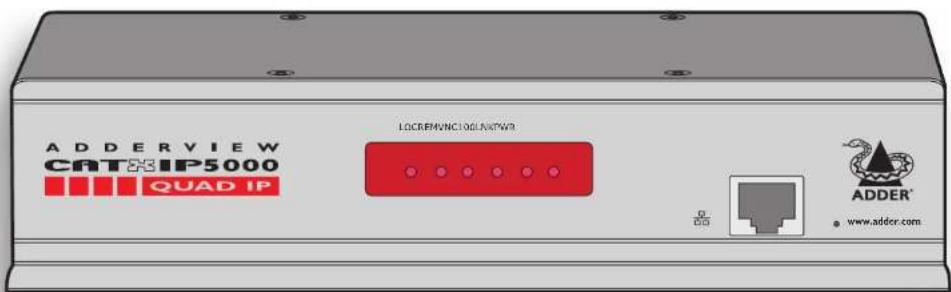
The AdderView CATxIP 5000 units pack a great deal of functionality into a compact space. It occupies half of a single 1U rack space and presents most of its connectors at the rear face. The smart front face features the network port and the operation indicators.

IP network port
The port by which global users are linked to the AdderView CATxIP 5000 unit. This intelligent Ethernet port can automatically sense whether it is attached to a 10Mb or 100Mb network.
Options port
This RS-232 serial port can separately support the following functions:
- Console Server connection - allows remote access to the serial port of a connected device via the Telnet or SSH protocols.
- Power switching - can be configured to control multiple power switching devices.
- Remote control switching - commands can be received that will change the channel, as necessary.
- Synchronisation - allows the actions of two or more AdderView CATxIP 5000 switches to be synchronised so that multiple computers/video screens can be switched and accessed.
Indicators
These six indicators clearly show the key aspects of operation:
- LOC Keyboard or mouse data are being received from the local console.
- REM Keyboard or mouse data are being received from the remote console.
• VNC Indicates that a global user is connected and active.
• 100 Indicates the Ethernet network speed (10/100Mbs)
• LNK Indicates that a network link is present. - PWR Indicates that power is present.

Local user port
Connect a USB keyboard and mouse, plus a video monitor to these connectors. These allow you to perform the initial configuration of the AdderView CATxIP 5000. Additionally, you can use these to locally control the connected computer(s). Can also be used to cascade (via a CAM) to another AdderView CATxIP 5000 unit.
Computer ports
Each computer connects to one of these ports via standard category 5, 5e or 6 cabling. At the other end of the cabling a CAM (Computer Access Module) is used to provide the necessary keyboard, video and mouse (or RS-232 serial) connections.

What's in the box

natural_image
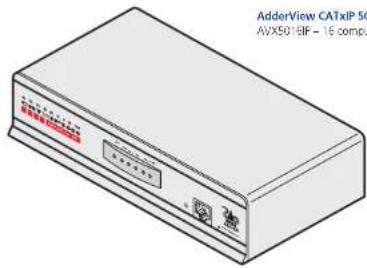
Illustration of a beige electronic device with ports and labels (no readable text or symbols)AdderView CATxIP 5000
AVX5016IP - 16 computer connections, 1 local console connection, 4 global user (network) connections

natural_image
Isometric view of a flat rectangular plate with a faint abstract line pattern on top (no text or symbols)Information wallet
containing:
Four self-adhesive rubber wiret
Safety document
What you may additionally need

natural_image
Line drawing of a USB cable connector with connectors and cables (no text or symbols)Computer Access Modules
One required per connected computer. There are four different formats, depending on the required computer connections.
Connectors: Analog video, PS12-style keyboard and PS12-style mouse
Part number: CATX-PS2
USB
Connectors: Analog video and USB keyboard/mouse
Part number: CATX-USB
Connectors: Analog video, Sun keyboard/mouse and 3.5mm audio jack.
Part number: CAIX-5UNA
Connector: O-Sub 9-way low-voltage
Part number: CATX-CONSOLE
PS/2-style
Sun with audio
Console CAM


Installation
Mounting
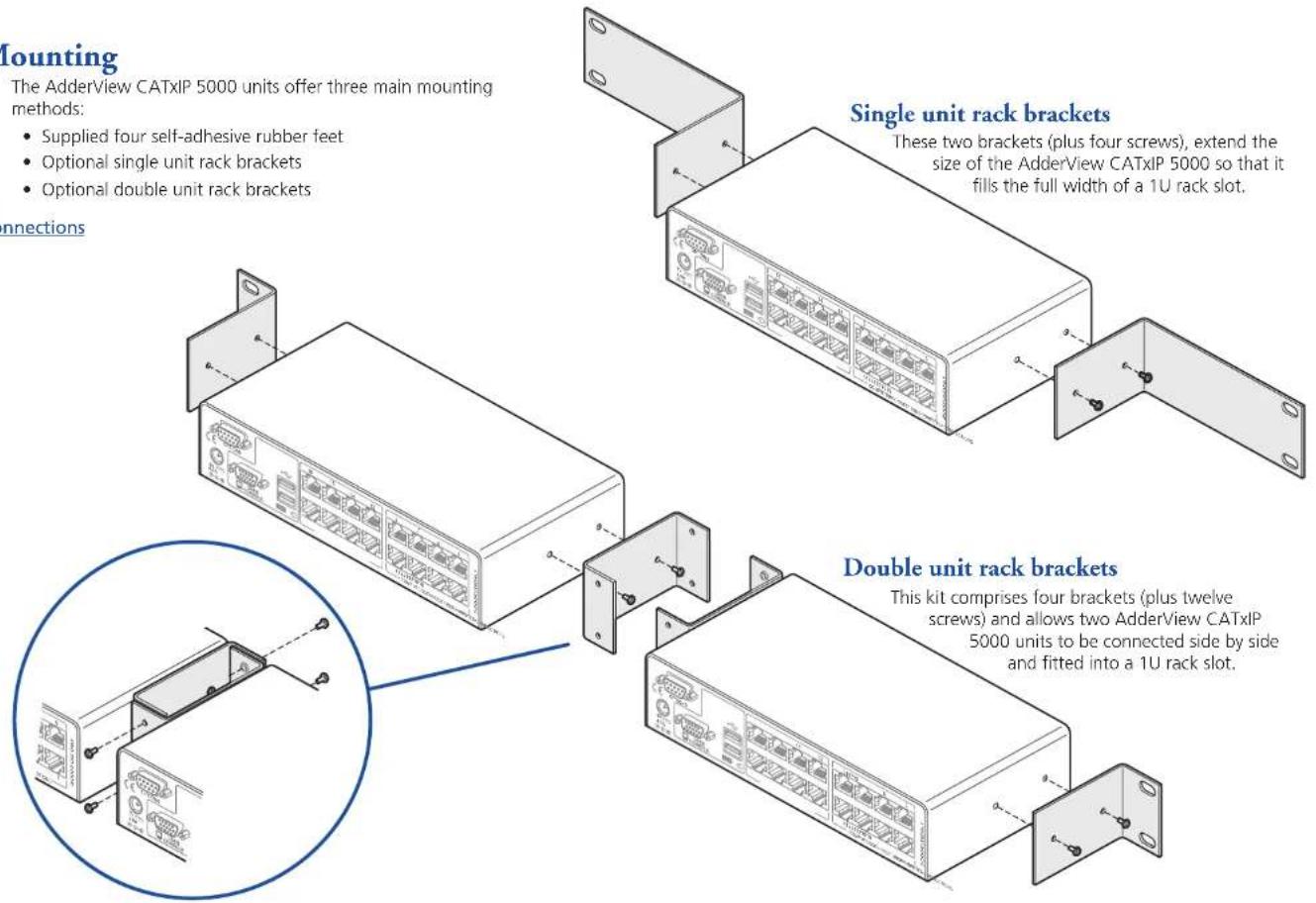
The AdderView CATxIP 5000 units offer three main mounting methods:
• Supplied four self-adhesive rubber feet
- Optional single unit rack brackets
- Optional double unit rack brackets
Connections

Connections
The AdderView CATxIP 5000 provides a great deal of flexibility in its configurations. This chapter details the various connections that can be made to achieve the required installation.

flowchart
graph TD
    A["Local user page 11"] --> B["CAT&3IP"]
    C["Global users page 12"] --> B
    B --> D["LOCAL USER"]
    B --> E["GLOBAL USERS"]
    D --> F["IP"]
    E --> F
    G["POWER IN"] --> B
    H["POWER SWITCH"] --> B
    I["COMPUTER SYSTEM"] --> B
    J["Computer system (via CAM) page 13"] --> B
    K["Computer power control switching page 15"] --> B
Connections do not need to be carried out in the order given within this guide, however, where possible connect the power in as a final step.
flowchart
graph TD
    A["LOCAL USER"] --> B["CTMIP"]
    C["LOCAL USER"] --> B
    B --> D["CMTAM"]
    D --> E["HOST COMPUTER"]
    F["REMOTE CONTROL"] --> G["CNTSIP"]
    H["Remote switching control"] --> I["CTMIP"]
    style A fill:#f9f,stroke:#333
    style C fill:#f9f,stroke:#333
    style F fill:#ccf,stroke:#333
    style H fill:#ccf,stroke:#333

Local user
A locally connected video monitor, keyboard (and mouse) are required during the initial configuration. These are also useful during normal use to allow quick local control of any connected computer systems. The AdderView CATxIP 5000 unit directly supports USB style keyboards and mice.
The local user port can also be used to cascade this unit to another AdderView CATxIP 5000 unit using a CAM. This allows many more hosts to be linked within a single installation. See Enterprise+ installations for details.
Note: Rather than connecting a separate keyboard and mouse, you can alternatively attach a combined keyboard and mouse device (such as a KVM rack drawer) to just one of the USB ports. However, the switch will only support one logical keyboard device and one logical mouse device.

flowchart
graph TD
    A["LOCAL USER"] --> B["IP"]
    C["GLOBAL USERS"] --> B
    D["POWER IN"] --> E["CATEM"]
    F["CAM"] --> E
    G["COMPUTER SYSTEM"] --> E
    H["POWER SWITCH"] --> E
To connect the local user port
1 Position a suitable video monitor, keyboard and mouse in the vicinity of the AdderView CATxIP 5000 unit such that their cables will easily reach.
2 Attach the video monitor, keyboard and mouse connectors to the sockets, collectively labelled as USER CONSOLE, at the rear of the AdderView CATxIP 5000 unit.
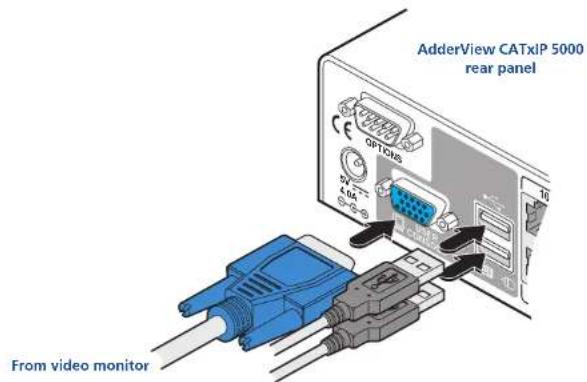
From USB keyboard and mouse

Global users (IP network port)
The AdderView CATxIP 5000 provides an autosensing Ethernet IP port that can operate at 10 or 100Mbps, according to the network speed. The AdderView CATxIP 5000 is designed to reside quite easily at any part of your network:
- It can be placed within the local network, behind any firewall/router connections to the Internet, or
- It can be placed externally to the local network, on a separate sub-network or with an open Internet connection.
Wherever in the network the AdderView CATxIP 5000 is situated, you will need to determine certain configuration issues such as address allocation and/or firewall adjustment to allow correct operation. Please refer to Networking issues within the Configuration chapter for more details.
IMPORTANT: When an AdderView CATxIP 5000 is accessible from the public Internet or dial up connection, you must ensure that sufficient security measures are employed.

flowchart
graph TD
    A["POWER IN"] --> B["CATOP"]
    C["LOCAL USER"] --> B
    D["GLOBAL USERS"] --> E["IP"]
    B --> F["CAM"]
    F --> G["COMPUTER SYSTEM"]
    G --> H["POWER SWITCH"]
To connect the IP network port for global users
1 Depending upon where in the network the AdderView CATxIP 5000 is being connected, run a category 5, 5e or 6 link cable from the appropriate hub or router to the AdderView CATxIP 5000 unit.
2 Connect the plug of the link cable into the IP port on the front panel of the AdderView CATxIP 5000 unit.

3 Configure the network settings as appropriate to the position of the AdderView CATxIP 5000 within the network - see Networking issues for details.

Computer system (via CAM)
Each computer system is connected to the AdderView CATxIP 5000 unit via a Computer Access Module (CAM) and standard category 5, 5e or 6 cabling. CAMs are available in various formats to suit differing computer system types and their particular connector styles.
Each KVM CAM uses Adder Keep Alive technology to ensure that the keyboard and mouse inputs to the computer remain active, even when the particular channel is not selected. This action ensures that there are no connection delays or problems as the port is selected.

flowchart
graph TD
    A["CATSIP"] --> B["POWER IN"]
    A --> C["CAM"]
    A --> D["COMPUTER SYSTEM"]
    A --> E["POWER SWITCH"]
    F["LOCAL USER"] --> A
    G["GLOBAL USERS"] --> A
    H["IP"] --> A
To connect a computer system
1 Ensure that power is disconnected from the AdderView CATxIP 5000 unit and the system to be connected.
2 Locate the required CAM (there are four types available) and attach its connectors to the relevant sockets on the computer system.

3 Lay a suitable length of category 5, 5e or 6 cabling between the computer system and the AdderView CATxIP 5000 unit. The maximum length of the cable is 10 m (32 feet).
4 Attach the connector of the cable run to the socket of the CAM.
Green indicator - power present
Yellow indicator - signal activity
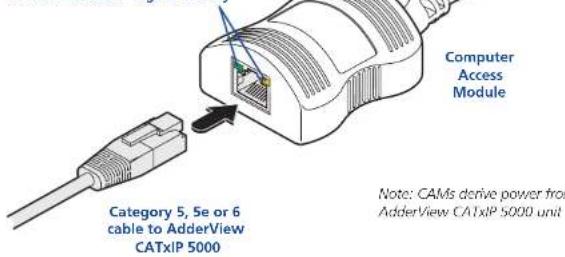
5 At the other end of the cable run, attach the cable connector to one of the sockets labelled COMPUTER CONNECTIONS on the rear panel of the AdderView CATxIP 5000 unit.

Note: Each CAM is specifically shaped so that it can be secured using a cable tie around its middle. In this way, two CAMs can also be neatly joined together, back-to-back.

ADDER
Power in connection
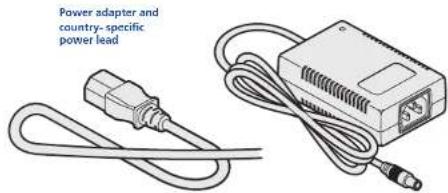
The AdderView CATxIP 5000 unit is powered by the supplied 5V power adapter. There is no on/off switch on the unit, so operation begins as soon as a power adapter is connected.

flowchart
graph TD
    A["POWER IN"] --> B["CRTOP"]
    B --> C["CAM"]
    B --> D["COMPUTER SYSTEM"]
    B --> E["POWER SWITCH"]
    B --> F["LOCAL USER"]
    B --> G["GLOBAL USERS"]
    B --> H["IP"]
To connect the power supply
1 Attach the output lead from the power adapter to the 5V socket on the rear panel of the AdderView CATxIP 5000.
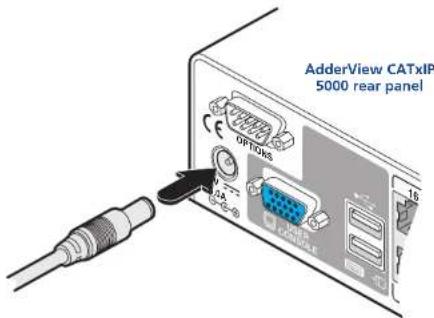
Output lead from power adapter
2 Connect the IEC connector of the supplied country-specific power lead to the socket of the power adapter.

natural_image
Diagram of a device with an internal port and connected to a cable (no text or symbols)3 Connect the power lead to a nearby main supply socket.
Note: Both the AdderView CATxIP 5000 and its power supply generate heat when in operation and will become warm to the touch. Do not enclose them or place them in locations where air cannot circulate to cool the equipment. Do not operate the equipment in ambient temperatures exceeding 40 degrees Centigrade. Do not place the products in contact with equipment whose surface temperature exceeds 40 degrees Centigrade.

Power control port
The options port of the AdderView CATxIP 5000 can be used to connect to one or more optional power control units. This allows you to control the mains power being supplied to the connected computer(s) so that an authorised user can, if necessary, perform a complete remote cold reboot on a failed system.
The control connector of the first power switch is attached, via serial cable, to the rear panel of
the AdderView CATxIP 5000. Any additional power switches are then attached via a 'daisy-chain' arrangement to the first power switch. Each power switch box is then given a unique address and access to each power port (8 ports on each power switch box) is gained using a combination of the switch box address and the port number.

flowchart
graph TD
    A["POWER IN"] --> B["CNT-IP"]
    B --> C["POWER SWITCH"]
    D["LOCAL USER"] --> B
    E["GLOBAL USERS"] --> B
    F["CAM"] --> B
    G["COMPUTER SYSTEM"] --> B
    H["IP"] --> B

flowchart
graph TD
    A["'Daisy-chain' control connections"] --> B["Box 1"]
    A --> C["Box 2"]
    A --> D["Box 3"]
    A --> E["Box 4"]
    B --> F["Power switch boxes"]
    C --> G["Power to computer Box 2, part 6 - address: 26"]
    D --> G
    E --> G
The power ports are connected to the power inputs of each computer system and the power switch box(es) are then connected to a mains power supply. IMPORTANT: Power switching devices have a maximum current rating. It is essential to ensure that the total current drawn by the equipment connected to the power switching device does not exceed the current rating of the power switching device. You must also ensure that the current drawn from any mains socket does not exceed the current rating of the mains socket.
Setting up, configuring and using power switching requires three main steps:
- Connect and address the switch boxes
- Configure the power strings
- Operate power switching via the VNC toolbar or the local Functions menu.
To connect and address the switch boxes
Note: The AdderView CATxIP 5000 unit can be powered on during this procedure, however, the switch boxes should be switched off. The configuration steps below may differ depending on the power switches used. Please refer to your power switch documentation.
1 Mount up to four switch boxes in positions where they are close to the computer systems that they will control and not too distant from the AdderView CATxIP 5000 unit (preferably within 2.5 metres).
2 Use a serial cable with an RJ9 and a 9-pin D-type connector (see Appendix 8 for specification). Attach the RJ9 plug to the socket marked IN on the first switch box. Attach the other end to the socket marked OPTIONS on the AdderView CATXIP 5000.
3 For each of the remaining switch boxes (if used), use a serial cable with RJ9

connectors at both ends (see Appendix 8 for specification). Attach one end to the socket marked out of the previous box and the other end to the socket marked in of the next box.
4 Set the addressing switches on each switch box using the two micro switches marked 'Slct' on the front panel. The box connected directly to the AdderView CATxIP 5000 is Box 1 and so on, down the daisy-chain line to Box 4 at the end.
5 Attach IEC to IEC power leads between each port and the power input socket of each computer system that requires power switching. Carefully note to which power ports, on which boxes, each computer system is connected. If computer systems have multip input must be connected via separate ports, w different boxes.
| Box | Switch 1 | Switch 2 |
| 1 | Off | Off |
| 2 | On | Off |
| 3 | Off | On |
| 4 | On | On |
Off = switch upwards On = switch downwards 5 switch 1 is on the left side
6 Connect each box to a suitable mains power input. Now proceed to the configuration stage covered in the Power switching configuration section within the Configuration chapter.

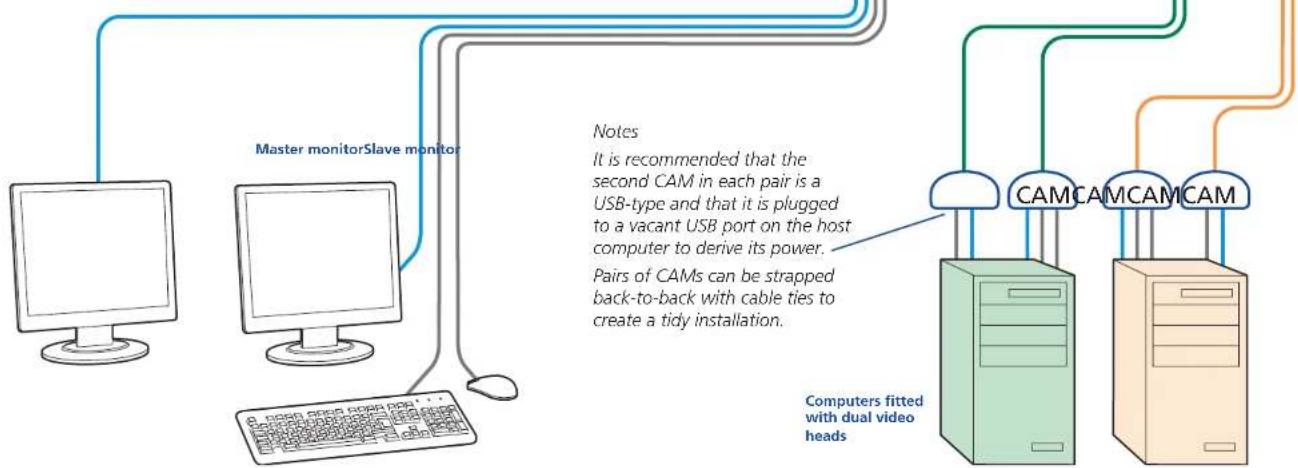
Multiple video head connections
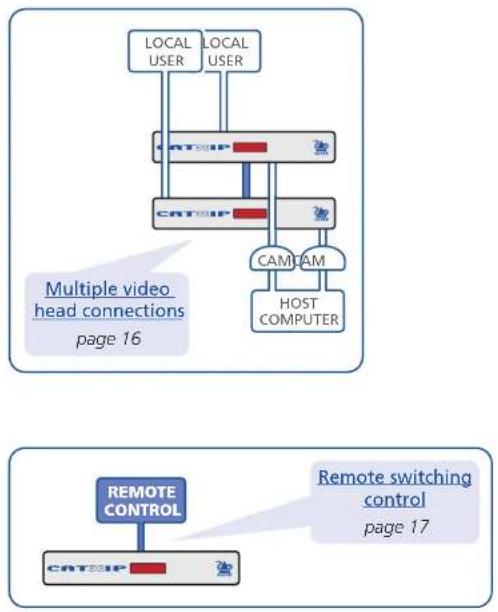
Two or more AdderView CATxIP 5000 units can be connected together so that they operate in a synchronised manner. Synchronised operation is useful for applications that require multiple video signals to be switched together. This type of operation is usually required where each computer is fitted with multiple video cards or video cards with multiple video heads.
Whenever an AdderView CATxIP 5000 channel is switched, it sends an RS232 command out on its serial interface (marked OPTIONS on the rear panel). An AdderView CATxIP 5000 will switch its channel if it receives the same command on its serial interface. Consequently, by linking the serial interfaces, a master unit may be made to automatically switch one or more slave units as shown in the diagram
Note: You must ensure that all AdderView CATxIP 5000 units have their Options serial ports set to 'Sync Units' and that their baud rates are identical. These settings can be made either via the local or global user configuration menus.
It should be noted that the synchronisation cable deliberately does not have the transmit pin of the Slave End connector linked to the receive pin of the Master End connector. To do so would cause the Slave unit to be able to switch the Master unit. This would setup an endless cyclical switching sequence that would prevent the AdderView CATxIP 5000 devices from operating correctly. For more details about the serial synchronisation cables, see Appendix 8.

flowchart
graph TD
    A["LOCAL USER"] --> B["RT/HP"]
    C["LOCAL USER"] --> B
    B --> D["CAM"]
    B --> E["CAM"]
    D --> F["HOST COMPUTER"]
    E --> F
Remote switching control
The port switching functions of the AdderView CATxIP 5000 unit can be remotely controlled by an RS232 link to the OPTIONS port on the rear panel.
The sending device must use the following RS232 communication settings:
Baud rate: 19200 bps
Data bits: 8
Parity: None
Stop bits: 1
No handshaking is implemented, however, valid command characters will be echoed back to the sending device.
Note: You must ensure that the AdderView CATxIP 5000 unit has it Options serial ports set to 'Sync Units'. This setting (together with the baud rate selection) can be made either via the local or global user configuration menus.
The value of the byte received via the serial link determines which computer port should be linked through to the user port. The table given here summarises the valid control codes:

Host computer port/channel
| 1 | 2 | 3 | 4 | 5 | 6 | 7 | 8 | 9 | 10 | 11 | 12 | 13 | 14 | 15 | 16 | 0 | (video off) | |
| Local user | 10 | 11 | 12 | 13 | 14 | 15 | 16 | 17 | 18 | 19 | 1A | 1B | 1C | 1D | 1E | 1F | 71 |

Configuration
Almost all configuration and operational aspects of the AdderView CATxIP 5000 unit are controlled via on-screen menu displays.
Overall initial configuration
When setting up a new installation, the following stages are recommended:
1 Enable the general 'Security' option.
With security disabled (default setting), a local or remote user attached to the AdderView CATxIP 5000 will have full and unrestricted access to all computers and all AdderView CATxIP 5000 settings. In larger installations, you are strongly recommended to enable security and set up individual user accounts with access privileges.
2 Create an ADMIN (administration) password.
All AdderView CATxIP 5000 units have a fixed user account that cannot be deleted or renamed, called ADMIN. If you intend to use security, then it is important to allocate a password to the ADMIN account.
Note: Usernames and passwords may only contain standard ASCII characters and numerals, accented characters are not accepted.
3 Create user accounts and allocate access rights.
Use the ADMIN account to add user profiles, passwords and access rights for each of the system users.
Note: Usernames and passwords may only contain standard ASCII characters and numerals, accented characters are not accepted.
4 Provide names for computers.
When numerous computers are attached, you are strongly advised to provide names for each, to assist with recognition.
5 Configure the required 'Setup Options' and 'Global Preferences'
Use the ADMIN account to determine key AdderView CATxIP 5000 settings and timing characteristics.

Initial configuration
The AdderView CATxIP 5000 unit provides an initial configuration sequence to assist you to make the necessary settings.
When the AdderView CATxIP 5000 is switched on for the first time, you should see the unit configuration screen, as shown here ⇒
IMPORTANT: Complete the initial IP configuration and invoke security measures BEFORE the unit is connected to an open IP network.
If the AdderView CATxIP 5000 unit has been previously configured, it will display either the Login dialog or the Select Host screen, as shown here ↓

↓

↓

If the Login is shown, enter your 'admin' Username and Password - or press twice if none have yet been defined.
From the Select Host screen, press 📄 to display the Main Menu. See Main Menu for more details.
Within the Main Menu, use the 1 and 2 keys to highlight an option, then press 30 select. The Configuration option provides access to separate Unit, Network and Serial Configuration screens that are similar in function to the first three setup screens shown on the right.
1
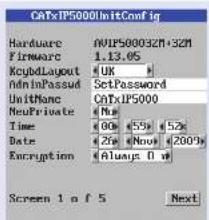
Admin password
Enter a password of at least six characters that has a mix of letters and numerals (standard ASCII characters only). The background colour provides an indication of password suitability and is initially red to indicate that the password is not sufficient. When a password with reasonable strength has been entered it will change to white.
Time and Date
Set these correctly as all entries in the activity log are time stamped using them.
Encryption
See Encryption settings for a description of the issues and the settings.
2
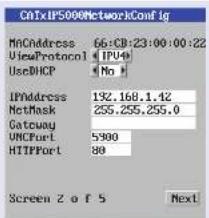
View Protocol
Choose whether the unit should use IPv4 or IPv6. Several options will change within this page when you select the IPv6 protocol - see Network configuration (IPv6) for IPv6 option details.
UseDHCP/IP address/Net Mask/Gateway
You need to either set the DHCP option to 'Yes' or manually enter a valid IP address, Net mask and Gateway. See Networking issues.
VNC and HTTP ports
These should remain set to 5900 and 80, respectively, unless they clash with an existing setup within the network. See Networking issues.
3

Option port (serial) details
These two items control the use of the OPTIONS port on the rear panel of the unit. The port can either be used to control optional power switching devices, to synchronise the operation of two separate AdderView CATxIP 5000 units or to operate as a Console Server connection to link with other devices that are configured/monitored via their serial ports (see the Console Server Access section for details).
If none of these features are required, then you do not need to change anything on this screen.
4

Secure keys generation
With every mouse move and keypress, the single dash will move across the screen (unless the same key is pressed repeatedly). Periodically, a new star character will be added to the bar as the random data are accepted as part of the new encryption key. When the bar is full, the final encryption keys for your AdderView CATxIP 5000 will be created – this process takes roughly 30 to 40 seconds. Once the secure keys have been calculated the AdderView CATxIP 5000 will show either the Login dialog or Select Host screen.
Note: Screen 5 of 5 is displayed while the secure keys are being generated.

Main menu
The main menu allows you to determine many aspects of the AdderView CATxIP 5000 capabilities. From here you can:
- Provide names for all connected computers to allow quick recognition,
- Set individual and global settings for users,
• Run various functions, such as mouse restore operation, - Configure unit, network and serial port settings.
To access the main menu
1 If the select host menu is not already displayed, press and hold Cogndu then press Mising a keyboard attached to a AdderView CATxIP 5000 user port.
The select host menu will be displayed:
![CNTxIP5000SelectHost Computer Port Computer01 01 Computer02 02 Computer03 03 Computer04 04 Computer05 05 Computer06 06 Computer07 07 Computer08 08 UserStatus adminShared F1 - more menus F3 - Find ESC - Quit F4 - Logout Green - accessible Red - inaccessible Blue - a Console CAM is connected to the port. No video connection is possible - More [a] Orange - represents a cascaded AdderView CATxIP 5000. Selecting this entry will provide access to the configuration menus of that unit - More [a] Port numbers Your Login name Connection status Search for a particular computer name](/content/2026/05/958582/images/c7a825d8f5bc9b41527e0d54cb013d9f2e8cbb5ccd41f55f80de17e57a1f478e.jpg)
2 Press ☐ to display the main menu:
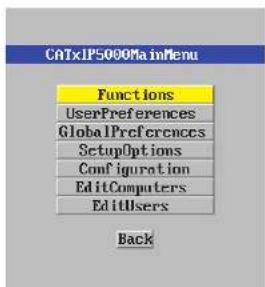
3 Use the 📁nd keys to highlight an option, then press to select.
Hotkeys
Note: and are the standard hotkeys and can be altered to avoid clashes with other devices or software. If you change the hotkeys, remember to use the new ones in place of Ctrl and when following the instructions in this guide.
Security
Note: If the security option has been enabled, you will be asked for a valid user name and password before the main menu can be displayed.

IMPORTANT: When supplied, AdderView CATxIP 5000 units have their security features disabled, which means that any attached users have access to all connected computers and all AdderView CATxIP 5000 settings. You are strongly recommended to enable the 'Security' feature and set an access password for the ADMIN account.
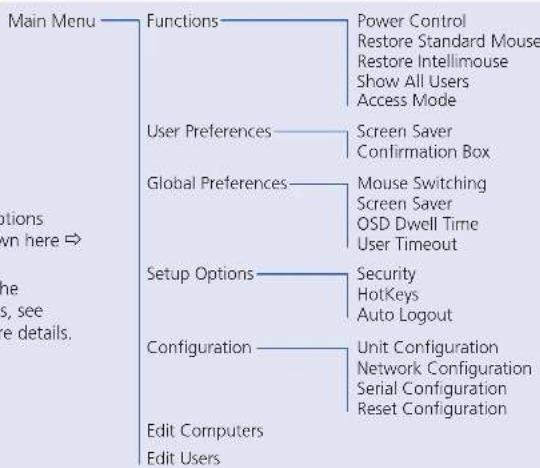
flowchart
graph TD
    A["Main Menu"] --> B["Functions"]
    B --> C["Power Control\nRestore Standard Mouse\nRestore Intellmouse\nShow All Users\nAccess Mode"]
    B --> D["User Preferences"]
    D --> E["Screen Saver\nConfirmation Box"]
    B --> F["Global Preferences"]
    F --> G["Mouse Switching\nScreen Saver\nOSD Dwell Time\nUser Timeout"]
    B --> H["Setup Options"]
    H --> I["Security\nHotKeys\nAuto Logout"]
    B --> J["Configuration"]
    J --> K["Unit Configuration\nNetwork Configuration\nSerial Configuration\nReset Configuration"]
    B --> L["Edit Computers\nEdit Users"]

General security and configuration steps
To enable general security
1 Display the Main menu.
2 Highlight 'Setup Options' and press
3 Highlight 'Security' and press (or click one of the arrow buttons) to select 'Enabled'.
4 Now create a new password for the ADMIN user account - see below.
To set an ADMIN password
1 Display the Main menu.
2 Highlight 'Configuration' and press
3 Highlight 'Unit Configuration' and press
4 Using the cursor keys, move the cursor to the 'Admin Passwd' field.
5 Enter an appropriate password for the ADMIN user account with regard to the following:
• The password can be up to 16 characters long.
- The password can use letters, numerals and/or punctuation marks in any combination. Only standard ASCII characters and numerals are accepted, accented characters are not permitted.
• The password is case sensitive.
Note: The field background colour will remain red until sufficient characters have been entered to form a reasonably robust password.
6 Once the password has been entered, you can navigate away from the menu page and it will be automatically saved.
What to do if the ADMIN password has been forgotten.
To change the hotkeys
The AdderView CATxIP 5000 unit uses and as its standard hotkeys.
These can be changed if they clash with other software or hardware within the installation.
1 Display the Main menu.
2 Highlight 'Setup Options' and press
3 Highlight 'Hotkeys' and press for+click one of the arrow buttons) to select the required hotkey combination. The options are: Ctrl+Alt, Ctrl+Shift, Alt+Shift, Alt Gr, Left+Right Alt, Left Ctrl+Alt or Right Ctrl+Alt.
Registering users and host computers
All user and host computer registration is achieved solely via the global (network) connection to the AdderView CATxIP 5000 unit. See Appendix 2 - Configuration pages via viewer for details.

What to do if the ADMIN password has been forgotten
If the ADMIN password becomes mislaid or forgotten, you will not be able to access the AdderView CATxIP 5000 to add or edit users and computer names, unless you have given other users admin privileges. This situation may be resolved by performing a complete reset to return the AdderView CATxIP 5000 to factory settings.
IMPORTANT: A complete reset erases all the user names and computer names that you have setup.
To clear a password (and restore factory default settings)
1 Remove power from the AdderView CATxIP 5000 unit.
2 Press and hold the reset button on the front panel (requires paper clip or similar).
3 Apply power and after a couple of seconds release the reset button. The Maintenance menu will be displayed
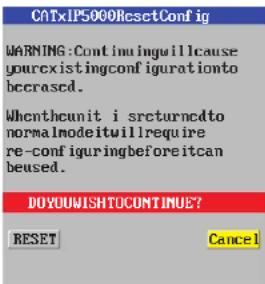
4 Highlight 'Reset Configuration' and press. The Reset Config warning will be displayed
5 Highlight 'Reset' and press All settings will be returned to their factory defaults and the previous Maintenance menu will be re-displayed.
6 Remove power from the unit and then re-apply it.
7 You now need to go through the initial configuration procedure and re-instate all of the required settings.


Clearing IP access control
This option removes all entries from the IP access control feature within the AdderView CATxIP 5000.
What is IP access control?
The IP access control feature (configurable by a remote admin user) allows certain network address ranges to be denied access to the AdderView CATxIP 5000. If set incorrectly, it is possible to exclude all network users and so this option provides an emergency recovery point.
To clear IP access control
1 From a local keyboard (not accessible from a global keyboard), log on as the 'admin' user.
2 Press Can Alt M (hotkeys can change).
3 Press F1 to select the More Menus.
4 Select 'Configuration'.
5 Select 'Network Configuration'.
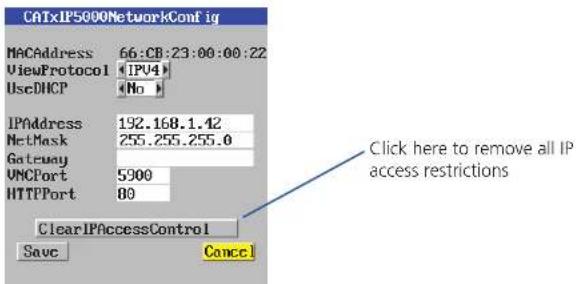
6 Highlight the 'Clear IP Access Control' option and press

Full configuration by global user
Once the basic features have been configured using the AdderView CATxIP 5000 configuration menus, further changes can be made by authorised global users via the VNC interface. There are two main ways to use the VNC interface to access the AdderView CATxIP 5000 unit:
- The VNC viewer – a small application downloadable from the RealVNC website or even downloadable from the AdderView CATxIP 5000 itself. or
- A standard browser that supports Java – When a web browser makes contact, the AdderView CATxIP 5000 provides the option to download a Java application to it. This allows a viewer window to be opened and operation to commence just as it would with the VNC viewer application.
To configure the unit from a global user location
1 Use either the VNC viewer or a standard web browser to make remote contact with the AdderView CATxIP 5000 – see Global user access for more details.
2 If the username entry is not blanked out, enter 'admin'. Then enter the admin password or the username / password of a user with admin privilege (if no password is set, then just press). Once logged in, the AdderView CATxIP 5000 will show the video output from the host system (if one is connected), or otherwise a 'No Signal' message.
3 Click the Configure button in the top right — hand corner of the window to display the main configuration page ↓

User Accounts
Allows you to create and manage up to sixteen separate user accounts, each with separate access permissions.
Unit Configuration
Allows you to alter both basic and fundamental settings within the unit.
Time & Date Configuration
Allows you to configure all aspects relating to time keeping within the unit.
Network Configuration
Here you can alter any of the existing network settings plus you can take advantage of the IP access control feature that lets you to specifically include or exclude certain addresses or networks.
Serial Port Configuration
Lets you setup or alter the details concerning the OPTIONS serial port.
Host Configuration
Allows you to configure user access, hot key switching and power control codes for the connected host systems.
Logging and Status
Provides various details about the user activity on the unit.
LDAP Configuration
Allows you to configure settings which enable the unit to consult external databases in order to verify user details.
Console Server Configuration
Configures all settings concerned with serial port access to server systems. See also the Console Server Accesssectionfordetails.
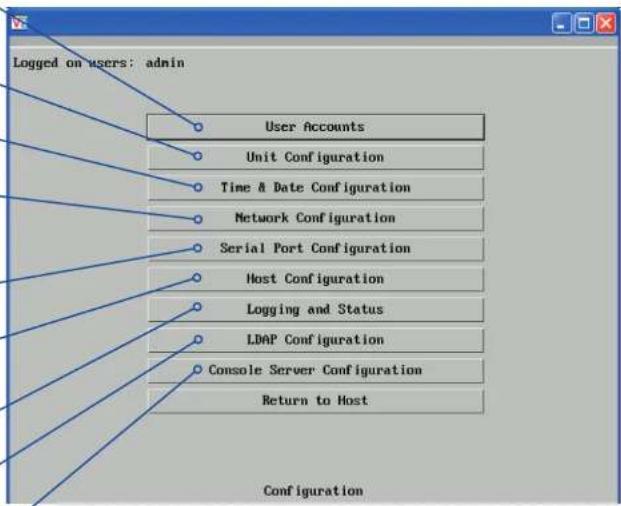
For more information about each page, please see Appendix 2 - Configuration pages via viewer in the 'Further information' chapter.

Encryption settings
The AdderView CATxIP 5000 offers a great deal of flexibility in its configuration and this extends equally to its encryption settings that are used to prevent unauthorised interception of signals. Due to the variety of situations in which the AdderView CATxIP 5000 might be used and the range of viewer applications that need to view it, a number of settings are available. The encryption settings to use depend upon how the potential global users will operate.
Important factors to consider when setting these options might be:
- Do all global user connections and operations require encryption?
- Will some global users be using older VNC viewer versions?
AdderView CATxIP 5000 encryption settings
The AdderView CATxIP 5000 configuration menu offers three encryption settings:
- Always on - This setting will force all viewers to use encryption. Note: This setting will preclude any VNC viewer versions that do not support encryption.
- Prefer off - This setting does not enforce encryption unless a viewer specifically requests it. If a viewer has its 'Let server choose' setting, then an un-encrypted link will be set up.
- Prefer on - This setting generally enforces encryption unless an earlier viewer version is unable to support it, in which case the link will be unencrypted. If a viewer has its 'Let server choose' setting, then the link will be encrypted.
Viewer encryption settings
The web browser viewers and VNC viewers (of level 4.0b5S or higher) offer four encryption settings:
- Always on - This setting will ensure that the link is encrypted, regardless of the AdderView CATxIP 5000 encryption setting.
- Let server choose - This setting will follow the configuration of the AdderView CATxIP 5000. If the AdderView CATxIP 5000 has 'Always on' or 'Prefer on' set, then the link will be encrypted. If the 'Prefer off' setting is selected at the AdderView CATxIP 5000, then the link will not be encrypted.
- Prefer off - This setting will configure an un-encrypted link if the AdderView CATxIP 5000 will allow it, otherwise it will be encrypted.
- Prefer on - If the AdderView CATxIP 5000 allows it, this setting will configure an encrypted link, otherwise it will be un-encrypted.

Networking issues
Thanks to its robust security the AdderView CATxIP 5000 offers you great flexibility in how it integrates into an existing network structure. The AdderView CATxIP 5000 is designed to reside either on an internal network, behind a firewall/router or alternatively with its own direct Internet connection.
Positioning AdderView CATxIP 5000 in the network
Every network setup is different and great care needs to be taken when introducing a powerful device such as the AdderView CATxIP 5000 into an existing configuration. A common cause of potential problems can be in clashes with firewall configurations. For this reason the AdderView CATxIP 5000 is designed to be intelligent, flexible and secure. With the minimum of effort it can reside either behind the firewall or alongside with its own separate Internet connection.
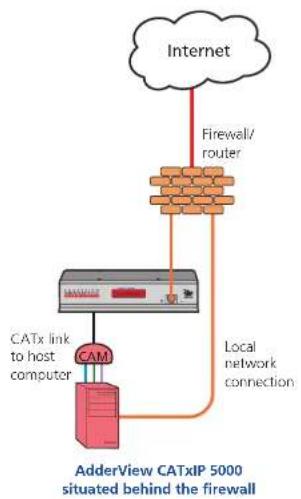
flowchart
graph TD
    A["Internet"] --> B["Firewall/router"]
    B --> C["Local network connection"]
    C --> D["CATx IP 5000 situated behind the firewall"]
    D --> E["Cam"]
    E --> F["CATx link to host computer"]
    F --> G["Firewall/router"]
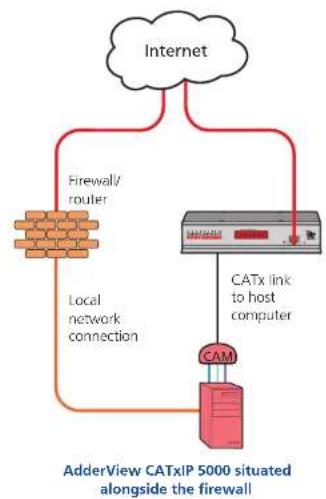
flowchart
graph TD
    A["Internet"] --> B["Firewall/router"]
    B --> C["Local network connection"]
    C --> D["CATx link to host computer"]
    D --> E["CAM"]
    E --> F["AdderView CATxIP 5000 situated alongside the firewall"]
IMPORTANT: When the AdderView CATxiP 5000 is accessible from the public Internet connection, you must ensure that sufficient security measures are employed.

Placing AdderView CATxIP 5000 behind a router or firewall
A possible point of contention between the AdderView CATxIP 5000 and a firewall can occasionally arise over the use of IP ports. Every port through the firewall represents a potential point of attack from outside and so it is advisable to minimise the number of open ports. The AdderView CATxIP 5000 usually uses two separate port numbers, however, these are easily changeable and can even be combined into a single port.
IMPORTANT: The correct configuration of routers and firewalls requires advanced networking skills and intimate knowledge of the particular network. Adder Technology cannot provide specific advice on how to configure your network devices and strongly recommend that such tasks are carried out by a qualified professional.
Port settings
As standard, the AdderView CATxIP 5000 uses two ports to support its two types of viewer:
- Port 80 for users making contact with a web browser, and
• Port 5900 for those using the VNC viewer.
When these port numbers are used, VNC viewers and web browsers will locate the AdderView CATxIP 5000 correctly using only its network address. The firewall/router must be informed to transfer any traffic requesting these port numbers through to the AdderView CATxIP 5000.
When a web server is also on the local network
Port 80 is the standard port used by web (HTTP) servers. If the AdderView CATxIP 5000 is situated within a local network that also includes a web server or any other device serving port 80 then, if you want to use the web browser interface from outside the local network environment, the HTTP port number of the AdderView CATxIP 5000 may need to be changed.
When you change the HTTP port to anything other than 80, then each remote browser user will need to specify the port address as well as the IP address. For instance, if you set the HTTP port to '8000' and the IP address is '192.168.47.10' then browser users will need to enter:
http://192.168.47.10:8000
(Note the single colon that separates the IP address and the port number). The firewall/router would also need to be informed to transfer all traffic to the new port number through to the AdderView CATxIP 5000.
If you need to change the VNC port number
If you change the VNC port to anything other than 5900, then each VNC viewer user will need to specify the port address as well as the IP address. For instance, if you set the VNC port to '11590' and the IP address is '192.168.47.10' then VNC viewer users will need to enter:
192.168.47.10::11590
(Note the double colons that separate the IP address and port number).
The firewall/router would also need to be informed to transfer all traffic to the new port number through to the AdderView CATxIP 5000.
Addressing
When the AdderView CATxIP 5000 is situated within the local network, you will need to give it an appropriate local IP address, IP network mask and default gateway. This is achieved most easily using the DHCP server option which will apply these details automatically. If a DHCP server is not available on the network, then these details need to be applied manually in accordance with the network administrator.
The firewall/router must then be informed to route incoming requests to port 5900 or port 80 (if available) through to the local address being used by the AdderView CATxIP 5000.

flowchart
graph TD
    A["Internet"] --> B["Firewall/router address: 129.7.1.10"]
    B --> C["AdderView CATxIP 5000 at local address 192.168.0.3"]
    B --> D["Remote user with VNC viewer accesses IP address: 129.7.1.10 and automatically uses port 5900."]
    B --> E["IP address: 192.168.0.3"]
    B --> F["Net mask: 255.255.255.0"]
    B --> G["CAM"]

To discover a DHCP-allocated IP address
Once a DHCP server has allocated an IP address, you will need to know it in order to access the AdderView CATxIP 5000 via a network connection. To discover the allocated IP address:
1 In network section of either the local configuration menus or the global configuration pages, set the 'Use DHCP' option to 'Yes' and select 'Save'. Once the page is saved, the AdderView CATxIP 5000 will contact the DHCP server and obtain a new address.
2 Re-enter the same 'Network configuration' screen where the new IP address and network mask should be displayed.
DNS addressing
As with any other network device, you can arrange for your AdderView CATxIP 5000 to be accessible using a name, rather than an IP address. This can be achieved in two main ways:
- For small networks that do not have a DNS (Domain Name System) server, edit the 'hosts' files on the appropriate remote systems. Using the hosts file, you can manually link the AdderView CATxIP 5000 address to the required name.
- For larger networks, declare the IP address and required name to the DNS server of your local network.
The actual steps required to achieve either of these options are beyond the scope of this document.

Placing AdderView CATxIP 5000 alongside the firewall
The AdderView CATxIP 5000 is built from the ground-up to be secure. It employs a sophisticated 128bit public/private key system that has been rigorously analysed and found to be highly secure. Therefore, you can position the AdderView CATxIP 5000 alongside the firewall and control hosts that are also IP connected within the local network.
IMPORTANT: If you make the AdderView CATxIP 5000 accessible from the public Internet, care should be taken to ensure that the maximum security available is activated. You are strongly advised to enable encryption and use a strong password. Security may be further improved by restricting client IP addresses, using a non-standard port number for access.
Ensuring sufficient security
The security capabilities offered by the AdderView CATxIP 5000 are only truly effective when they are correctly used. An open or weak password or unencrypted link can cause security loopholes and opportunities for potential intruders. For network links in general and direct Internet connections in particular, you should carefully consider and implement the following:
- Ensure that encryption is enabled.
By local configuration menu or global configuration page. - Ensure that you have selected secure passwords with at least 8 characters and a mixture of upper and lower case and numeric characters. By global configuration page.
- Reserve the admin password for administration use only and use a non-admin user profile for day-to-day access.
- Use the latest Secure VNC viewer (this has more in-built security than is available with the Java viewer). To download the viewer.
- Use non-standard port numbers.
- Restrict the range of IP addresses that are allowed to access the AdderView CATxIP 5000 to only those that you will need to use. To restrict IP access.
- Do NOT Force VNC protocol 3.3.
- Ensure that the computer accessing the AdderView CATxIP 5000 is clean of viruses and spyware and has up-to-date firewall and anti-virus software loaded that is appropriately configured.
- Avoid accessing the AdderView CATxIP 5000 from public computers.
Security can be further improved by using the following suggestions:
- Place the AdderView CATxIP 5000 behind a firewall and use the port numbers to route the VNC network traffic to an internal IP address.
- Review the activity log from time to time to check for unauthorised use.
- Lock your server consoles after they have been used.
A security white paper that gives further details is available upon request from Adder Technology Limited.
Ports
In this configuration there should be no constraints on the port numbers because the AdderView CATxIP 5000 will probably be the only device at that IP address. Therefore, maintain the HTTP port as 80 and the VNC port as 5900.
Addressing
When the AdderView CATxIP 5000 is situated alongside the firewall, it will require a public static IP address (i.e. one provided by your Internet service provider).
More addressing information:
Discover DHCP-allocated addresses
DNS addressing

Console Server Access
The AdderView CATxIP 5000 unit supports Console Server access to multiple devices (such as dedicated specialist servers, Ethernet switches, IP routers, etc.) that are connected to it via their RS-232 serial ports. Authorised global users can switch to any of the connected devices and access them using either the Telnet or SSH (Secure SHell) protocols.
Global connections are limited to a total of four concurrent sessions and these can be all VNC sessions, all Console Server connections or a mixture of both. Global users logon to Console Server connections using the same username and password details as created for them for VNC global connections.
Linking console devices
Special Console CAMs are used to connect each console device to the AdderView CATxIP 5000 unit. Each Console CAM is connected to the unit using a CATx lead as usual. On its other side, each Console CAM has only a 9-way D-Sub female RS-232 serial connection to link it to the server device.
The Options port on the rear of the unit can also be used as a Console Server connection when it is configured to operate as such within the Serial Port page of either the local menu or the remote menu.
All 16 ports of the AdderView CATxIP 5000 can be used solely with Console CAMs, solely with KVM CAMs or a mixture of the two types, as follows:
- If the entire unit is used solely for console connections then all 16 ports can be used with Console CAMs. With the Options port also set into Console Server mode, that provides a total of 17 possible console connections.
- If at least one KVM CAM is also used, then the maximum number of Console CAMs that may be fitted falls slightly to a total of 13 (the Options port is still useable as an extra console connection).
Note: If a KVM CAM is replaced by a Console CAM, the AdderView CATxIP 5000 unit must be rebooted or reset. This can be achieved either with a power cycle or remotely by using Unit Configuration > Advanced Unit Configuration > Reset Unit button.
Setting serial connection parameters
The serial connection parameters are determined within the Console Server Configuration page of the remote configuration menu (accessible via VNC connection). Within that page you can apply a default set of serial communication parameters to all ports that will be used for console connections. Alternatively, the Console Server Port Configuration page allows you to adjust each console port individually.

Within the Console Server Configuration page there are two key settings which determine the base port addresses for Telnet and SSH connections into the AdderView CATxIP 5000. These are set to 2400 and 2600 respectively and will feature in all global links through the unit to the required console server device, as discussed next.


Accessing console devices
Authorised global users can use either Telnet or SSH (SSH is the preferable option because it creates secure connections) to connect with any of the console ports of the AdderView CATxIP 5000 using the command lines shown below.
Accessing with Telnet
Using a Telnet client on a globally connected system, use the following command line to access a required port on the AdderView CATxIP 5000 unit:
telnet [IP address of the unit] [Telnet Base Port + Port Number]

The exact syntax will depend on the Telnet client being used. You will be prompted for a username and password - use the same username and password as configured for local port and VNC connections.
For example (to access port 04 on the AdderView CATxIP 5000 located at IP address 192.168.1.22):
telnet 192.168.1.22 2404
Accessing with SSH
Using a SSH client on a globally connected system, use the following command line to access a required port on the AdderView CATxIP 5000 unit:
ssh -p [SSH Base Port + Port Number] user@[IP address of the unit]
2600 as standard - set within the Console Server Configuration page
0 to 16 (port 0 is the Options port)
user - enter the username as configured for local port and VNC connections.
The exact syntax will depend on the SSH client being used (the -p parameter indicates that a port number is being given). You will be prompted for a password - use the same password as configured for local port and VNC connections.
For example (to access port 08 on the AdderView CATxIP 5000 located at IP address 192.168.1.22 using the username sky123):
ssh -p 2608 sky123@192.168.1.22
Errors when using console server access
When using console server access, there are a few error states which can occur if a port is accessed by more than one user, an invalid login is used or an accessed port is not suitably enabled. Relevant error messages are returned to the user via the Telnet or SSH client being used.
- Although there can be up to four concurrent global console server connections, only one connection can be made to a Console Server port at any one time (either using Telnet or SSH clients).
If a second global user attempts to connect with a port that is already being accessed, a message such as 'Port already in use' will be displayed (the exact wording depends on the client being used) and that connection will be closed immediately after the username and password have been entered. - If a global user attempts to connect with an invalid username and/or password, the connection will be refused with a "Permission denied" message (the exact wording depends on the client being used).
- If a global user attempts to connect to a port that is not enabled for console server operation or not enabled for the type of client being used, then a 'Connection refused' message will be shown (the exact wording depends on the client being used).

Power switching configuration
Power switch configuration comprises two main steps:
- Configure the OPTIONS serial port to the same speed as used by the power switch box(es), using the configuration menu.
- Configure power ON and OFF strings for each relevant host computer.
For each power port there needs to be a valid 'Power ON string' and similarly an appropriate 'Power OFF string'. In each case, the strings are a short sequence of characters that combine a port address and a power on or off value.
If a particular computer has more than one power input (and thus requires an equivalent number of power ports to control them), collections of strings can be combined to switch all of the required ports together as a group.
To configure the power sequences for each host computer
1 Using VNC viewer or a browser, log on as the 'admin' user.
2 Click the 'Configure' button in the top right corner.
3 Click the 'Host configuration' option.
4 Click a host entry to display a Host configuration dialog:
5 If necessary, configure other parameters (Name, Users, Hot Keys - MORE).

6 Enter the Power control sequences in the Power On and Power Off fields ⇒
7 Click OK to close the dialog and then click the Save button in the main Host Configuration window to store the details.
Power control sequences
Note: The settings given below are for an example power switch - other power switches may require different settings. Please refer to your power switch documentation for details about codes required by other power switches.
The structure of each power sequence (OFF and ON) is as follows:
$$ P x y = z \backslash 0 D $$
Where:
x is the switch box number,
y is the power port number,
z is '0' for OFF or '1' for ON, and
0D represents Enter (or Carriage return).
Example 1
To switch ON port 5 of switch box 2, the code would be as follows:
• Power sequence: P25=1\0D
Example 2
To switch OFF port 8 of switch box 3, the code would be as follows:
• Power sequence: P38=0\0D
For details about operating this feature, see Power switching control within the Operation chapter.
To control two or more ports simultaneously
You can control up to four power ports using a single sequence. This is done using the same command structure as shown above, plus a delay command, for each port. Immediately following a port command, insert the characters
^* before the next port command, and so on up to four ports. For instance, to switch on ports 1 and 2 in the first power switch, the command line would be:
$$ P 1 1 = 1 \backslash 0 D \backslash * P 1 2 = 1 \backslash 0 D $$

Upgrading AdderView CATxIP 5000 models
The AdderView CATxIP 5000 models are upgraded via global connection (through the IP network port). Upgrades are digitally signed by Adder using a secure key. This prevents unauthorised or altered firmware images being downloaded into the AdderView CATxIP 5000.
To upgrade AdderView CATxIP 5000 models
1 Download the latest firmware revision for the AdderView CATxIP 5000 from the Adder website and decompress the download file. View the decompressed files and make a note of the name and location of the .bin file that was part of the download file collection.
2 Make a global connection to the AdderView CATxIP 5000 unit and login as the admin user.
3 Once logged in, click the 'Configure' button in the top right corner of the window.
4 Click the 'Unit Configuration' button.
5 Click the 'Advanced Unit Configuration' button.
6 Click the 'Upgrade Firmware' button. This dialog will be displayed:
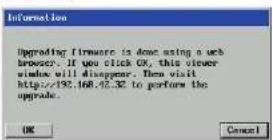
7 Click OK. The AdderView CATxIP 5000 is now ready to accept the upgrade files. Open your browser and connect to the AdderView CATxIP 5000 using the IP address that was confirmed in the dialog. Once connected, the AdderView CATxIP 5000 will offer the following screen:
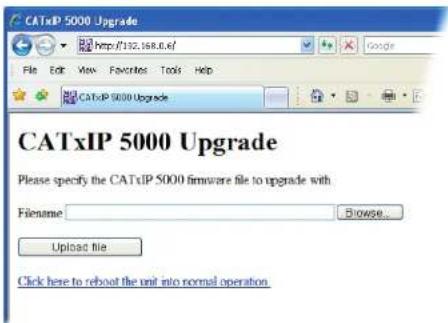
8 Click the 'Browse' button and locate the .bin upgrade file that you downloaded earlier. Click the 'Upload file' button. The AdderView CATxIP 5000 will next show the following screen:
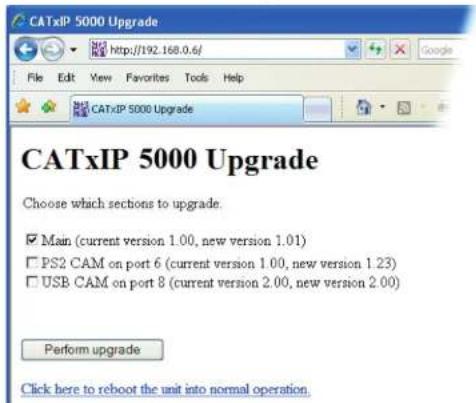
9 Select which portion of the AdderView CATx IP that you wish to upgrade:
- Tick the 'Main' option to upgrade the AdderView CATxIP 5000 unit itself.
- Tick one or more of the CAM options to include them in the upgrade process.
10 When ready, click the 'Perform upgrade' button. The upgrade will take place and its progress will be shown on screen.
11 When the upgrade is complete, click the link 'Click here to reboot the unit into normal operation'.
Recovering from a failed upgrade
If a problem is encountered while upgrading the AdderView CATxIP 5000, it is still possible to restart the unit and attempt a new upgrade process.
To invoke backup/recovery mode
1 Remove power, press and hold the reset button (insert a thin implement such as a straightened paper clip into the small hole next to the IP connector) and then re-apply power. Then, release the reset button
2 Access the AdderView CATxIP 5000 using a web browser on an IP connected system. When the upgrade page is displayed, follow the normal instructions, except after step 10, remove and replace the power on the unit.
Operation
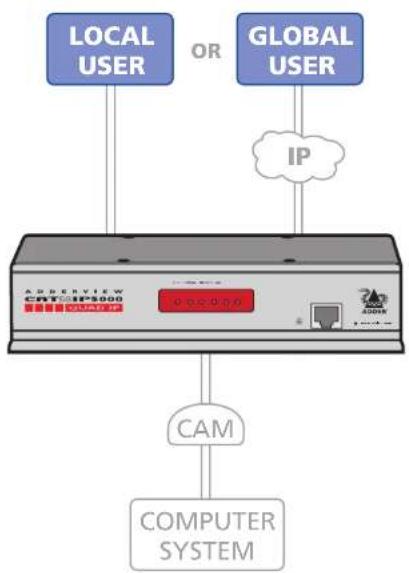
Accessing the AdderView CATxIP 5000
The AdderView CATxIP 5000 provides two ways to gain access:
- Local user access, or
• Global user access via IP network link.
flowchart
graph TD
    A["LOCAL USER"] --> B["CD-ROM 1000"]
    C["GLOBAL USER"] --> D["IP"]
    B --> E["9.32.0.0"]
    D --> E
    E --> F["CAM"]
    F --> G["COMPUTER SYSTEM"]
The front panel indicators

- LOC Keyboard or mouse data are being received from the local console.
- REM Keyboard or mouse data are being received from a remote (global) viewer.
• VNC Indicates that a global user is connected and active.
• 100 Indicates the Ethernet network speed (10/100Mbs).
• LNK Indicates that a network link is present.
• PWR Indicates that power is present.

Local user access
To gain access as a local user:
1 From the local keyboard, press any key to display the login prompt:
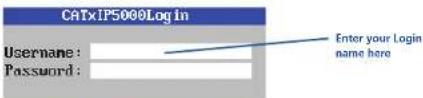
If the above login prompt is not displayed, you are either already logged in to the AdderView CATxIP 5000 unit, or the security features have not been enabled. In such cases see 'To view this menu at any time' below.
2 Enter your username and password. Providing you have the correct permissions, the screen will display the Select Host menu, showing you a list of computers for which you have permission to access:
![CATxIP5000SelectHost Default names for each computer port Computer Port Computer01 01 Computer02 02 Computer03 03 Computer04 04 Computer05 05 Computer06 06 Computer07 07 Computer08 08 UserStatus adminShared F1 - more menus F3 - Find ESC - Quit F4 - Logout Your Login name availability of each computer: Green - accessible Red - inaccessible Blue - a Console CAM is connected to the port. No video connection is possible. Orange - represents a cascaded AdderView CATxIP 5000. Selecting this entry will provide access to the configuration menus of that unit - More [s] This column shows the address for each computer. If you wanted to select ports using the hotkey method, these are addresses that you would enter. Link status of your user port](/content/2026/05/958582/images/450057a35bd70eb69396c0ccb3f222352b5c6086e2606116e55956a9e2c95653.jpg)
To view this menu at any time: Press and hold the hotkeys (usually card Alt), then press and finally release all three keys.
Note: The and keys when pressed in combination are called 'hotkeys' and they signal to the AdderView CATxIP 5000 that you wish to control it, rather than the host computer. However, if these particular hotkeys clash with another device or program, then your administrator may change them to a different combination. If the Cin combination fails to work, then please contact your system administrator for details.
To move the menu (and login) box position
1 While viewing any menu, press and hold the hotkeys (usually 📂d).
2 Press the ↓, ↑, ⊖ and → keys to move the menu to the required position. Note: The new menu position will be used until power is next re-applied.
Selecting a computer
There are three main ways for local users to select a specific computer channel:
- Using hotkeys (as described below) – this is a good method if you continually access a small number of computers.
- Using the Select Host menu – this is the best method when there are many connected computers.
- Using mouse buttons – this is a good method for cycling between a small number of computers.
For all methods (if the confirmation box option is enabled), when the required port is selected, a pop up message will be displayed to confirm the computer name or number, and its status. Alternatively, an error message explaining why a connection is not possible (press ☐ to cancel the latter type of message).
To avoid the 'hall of mirrors' effect
IMPORTANT: Never configure a system so that your viewer is viewing itself.
When controlling a host computer via the local user port if the host computer is networked it is possible to make the VNC viewer or a browser to create a link back to itself via the global (IP) capabilities of the unit. This will set up a 'hall of mirrors' effect, where the computer is viewing itself into infinity.
While technically possible, the AdderView CATxIP 5000 unit is not designed to withstand this treatment and could sustain damage.
To select a computer using hotkeys
1 Simultaneously press and hold and

Note: The grid keys when pressed in combination are called 'hotkeys' and they signal to the AdderView CATxIP 5000 that you wish to control it, rather than the computer. However, if these particular hotkeys clash with another device or program, then your administrator may change them to a different combination. If the grid combination fails to work, then please contact the system administrator for details.
2 While still holding and, press the first numeral of the required port address, then:
- If the port address is a single character, release all of the keys.
- If the port address is two or more characters, release the first numeral key and press the second – repeat this procedure until all of the port address numerals have been entered, then release card.
Note: The numbers on your keyboard's numeric keypad are not valid, use only the numeral keys above the QWERTY section.
Note: If your user port does not have authorisation to view the selected port then an 'Insufficient user rights' messages will be displayed.
Note: When using hotkeys, the leading zeros for all single digit port numbers (including all cascade levels) are optional, i.e. 01, 02...09.

Standard hotkeys
The range of hotkey combinations are as follows:
Note: If your hotkeys have been changed, substitute them for card in at the examples given here.
Ctrl At Selects port 1
CnI At Selects port 2
•
•
Ctrl Ather Selects port 10
Note: When entering multiple digit addresses as
above, keep and pressed down until all
other numbers have been entered.
Ctrl At Selects the next available port
Cm At switches off the video signal – this will cause
a power saving monitor to enter its standby
mode. To awaken the monitor, simply select
any fixed channel using any of the suggested
methods.
Ctrl Alt dgs out the current user (if security is enabled)
or selects port 0 to disable the video signal (if security is disabled).
□ On □ At & ↓, ↑, ← or → Moves the currently displayed on-screen menu
To select a computer using the Select Host menu
1 Display the Select Host menu in one of two ways:
- By simultaneously pressing and then releasing Ctrl AD M
- By pressing the middle and right buttons of a three button mouse.
Note: The mouse switching option is usable only if the 'Mouse
Switching' option is enabled. See Global preferences for more details.
At this point, depending on the security settings and the current log in situation, one of two things will be displayed, either the login screen, or the Select Host menu:
| CATxIP5000SelectHost | |
| Computer | Port |
| Computer01 | 01 |
| Computer02 | 02 |
| Computer03 | 03 |
| Computer04 | 04 |
| Computer05 | 05 |
| Computer06 | 06 |
| Computer07 | 07 |
| Computer08 | 08 |
| UserStatusadminShared | |
| F1 - more menus | F3 - Find |
| ESC - Quit | F4 - Logout |
The Select Host menu – here you can select computers by name.
2 Use the End keys (or the scroll wheel of an IntelliMouse) to highlight the required computer name. Alternatively (for large configurations), press to perform an alphabetical search for a particular port name. You can also use the PgUp and PgDn keys to move up or down a full page of list entries at a time, or press the Home and End keys to quickly move to the beginning or end of the list, respectively.
Note: If security has been enabled then only computers to which the current user has permission will be displayed.
3 Press 📁 to select the highlighted port.
Note: Pressing 📋 will select the highlighted port in shared mode (other users can also view the computer). To select the port in private mode, press 📋 and 📋 when choosing.

To select a computer using mouse buttons
Note: This procedure works only with three-button or IntelliMouse devices and only if the 'Mouse Switching' option has been enabled by your administrator.
1 Hold down the middle button (or scroll wheel) of the mouse.
2 Click the left mouse button to select the next computer port. When the correct port is reached, release the middle button.
Note: Clicking the left mouse button will select the highlighted port in shared mode (other users can also view the computer). To select the port in private mode, hold 📂 and then click the left mouse button.
Note: If security has been enabled then only computers to which you have permission will be displayed.
To select a computer using mouse buttons - Advanced method
1 Select the on-screen menu by pressing the middle and right buttons of a three button mouse.
2 Use the scroll wheel to highlight the required computer port.
3 Then, select either:
- Shared Use - press the left mouse button - This standard method allows other users to view the same computer port. Control of the port is given to one user at a time, on a first-come, first-served basis and is relinquished after a certain period of inactivity.
- Escape without selecting a port – press the right mouse button.
Show All Users
At any time you can view a list of which users are logged-in and the host computers that they are currently accessing (and the manner in which they are accessing them: Local, VNC or Console connections). This can be particularly useful if you find that the host to which you need access is already being viewed in private by another person.
To view the show all users list
1 From a local keyboard, log on as a standard or 'admin' user.
2 Press Ctrl Alt M (hotkeys can change).
3 Press F1 to show the Main Menu.
4 Select 'Functions' and press
5 Select 'Show All Users' and press
| Host | Port |
| LocalUser:admin | |
| Computer00 | 00 |
| UNCUser:admin | |
| Computer16 | 16 |
| UNCUser:admin | |
| Computer00 | 00 |
| ConsoleIiser:admin | |
| Computer02 | 02 |
Logging in and out
The AdderView CATxIP 5000 features a straightforward security system that helps to prevent unauthorised access to some, or all connected computers. If the security option has been selected by your administrator then you will be asked to enter a User Name and Password when you first access a user port. When you have finished using the computer, it is then good practice to logout, forcing any other users to authenticate themselves prior to use.
Note: If the security option has not been enabled then no login is required.
To log in
1 If it is not already displayed, move the mouse or press any key to display the log in screen.

2 Enter your designated User Name and press ↙
3 Enter your designated Password and press 📄. If both entries are correct then the selected port will be displayed.
Note: If either the User Name or Password are incorrect, the entries will be cleared to allow another attempt.
To log out
Either:
- Press Ctrl and at any time to log out.
or
1 Display the Select Host menu in either of two ways:
- By simultaneously pressing and then releasing Ctrl At M Note: The and holidays may have been changed. If the combination fails to work, then please contact the system administrator for details.
- By pressing the middle and right buttons of a three button mouse, or
2 Press F4 You will be logged out and the screensaver will be displayed. Press a key or move the mouse to re-display the login window.

The confirmation (status) box
The AdderView CATxIP 5000 provides the option of a confirmation box that is displayed on screen for three seconds after a computer is selected. The confirmation box indicates the current user port and your user name, the selected computer and the connection status. You can enable or disable the confirmation box, as required.

To enable/disable the confirmation box
1 Display the Select Host menu in one of two ways:
- By simultaneously pressing and then releasing OK OR M
- By pressing the middle and right buttons of a three button mouse.
If you are not already logged in, do so now.
2 Press F1 to select 'More menus'.
3 Highlight the 'User Preferences' option and press to select.
4 Highlight the 'Confirmation Box' option and press to select 'Enabled' or 'Disabled', as required.
5 Select the 'Save' button to return to the previous menu.
User preferences and functions
In addition to enabling or disabling the confirmation box, you can also:
- Select the screen saver style,
- Restore mouse operation, or
• Perform power control functions.
All of these options are discussed within Appendix 1.

ADDER
Select Host menu dot colours
Within the Select Host menu, each listed host has a coloured dot associated with it to indicate its general status:

- Green shows that the host system is accessible.
• Red shows that the host system is not currently accessible. - Blue indicates a Console CAM connection which uses only a serial port, thus no video connection is possible.
- Orange signifies that this entry is a cascaded AdderView CATxIP 5000 unit that can provide access to other host systems. When you select such an entry, you will then be shown the main menu of the cascaded unit, allowing access to the configuration menus of that unit.
Note: On older AdderView CATxIP 5000 units, with firmware less than 1.14, the orange marker represented an error relating to cascaded hosts. This function has now been superseded by the orange dot function explained above.

Global user access
Global users access the AdderView CATxIP 5000 using a viewer and a network/internet link. There are three main types of connection: a standalone VNC viewer, a VNC Java application used within a standard web browser, or a console server connection (used to access specialist server devices).

flowchart
graph TD
    A["GLOBAL USER"] --> B["LOCAL USER"]
    B --> C["IP"]
    C --> D["COMPUTER SYSTEM"]
    D --> E["CAM"]
    E --> F["COMPUTER SYSTEM"]
    G["REAL VNC"] --> H["OR"]
    H --> I["WEB BROWSER"]
    I --> J["CONSOLE SERVER SESSION"]
    J --> K["Select the required connection type"]

What will I see when I first login to a VNC session?
When you login to a VNC session, the result that you first see will depend on the status of your username account:
- If you are using your username for the first time then no host will be initially selected. Click the Hosts button to view a list (see Host selection for details).
- If you have previously been logged in, the last host computer that you viewed will be shown.
- If your username is already logged in at another location, then the host computer currently being viewed in the existing session will be shown.
How do multiple users coexist?
Each of the four global users and also the local user can view any host computer for which they have permission. More than one user can view the same host and potential conflicts are arbitrated in the following ways:
- If a user views a host in private mode and then switches to a new host, then the new host will also be viewed in private.
- If a user is viewing a host in shared mode when another user chooses the same host but in private mode, the first user's view will be blanked and a message indicating that another user has taken private access will be given.
- If a user views a host in private mode and another user chooses the same host, the second user will see a message indicating that the host is already being viewed in private mode.
- If multiple users are viewing the same host and one switches to another host then only that user moves to the new host, all other users are unaffected.
Global user access via VNC viewer
The VNC viewer is a compact application that runs on your IP-connected 'global' system and allows you to view and use the AdderView CATxIP 5000 and its host computer(s). VNC viewer is readily available from a number of different sources:
• from the AdderView CATxIP 5000 installation CD
• from the AdderView CATxIP 5000 itself
• from the RealVNC website
To access via the VNC viewer
1 Locate and select the VNC viewer icon →

A connection details dialog will be displayed:
![VNC Viewer : Connection Details Server: 192.108.3.1 Encryption: Let Server Choose (Default) About... Options OK Cancel Enter the AdderView CATxIP 5000 address here and click OK If required, select the encryption mode - MORE [+] Options button Provides a range of viewer and connection settings - MORE [+]](/content/2026/05/958582/images/2830551a40e89117ac070d30727d0213066c2a38552f8369ee2d721f518464cd.jpg)
2 In the 'Server:' entry, type the address of the AdderView CATxIP 5000 as follows:
v.w.x.y
where v.w.x.y is the IP network address, for example 192.168.0.3
• If you have been asked to also enter a port number.
3 Click the OK button. Depending on the options selected, you may need to confirm certain items. A connection attempt will be made and if successful, an authentication dialog will be displayed:

4 Enter your Username and Password. The viewer window should now open and show the current host computer. Note: If the Username entry is blanked out then only admin user account is currently defined and only a password is required.

Downloading VNC viewer from the AdderView CATxIP 5000
The AdderView CATxIP 5000 has the ability to distribute its own VNC viewer application.
To download the VNC viewer
1 Open your Web browser.
2 Enter the network address where the AdderView CATxIP 5000 is situated (in the form: http://192.168.0.3) and make the link.
3 In the opening AdderView CATxIP 5000 screen, click the link that offers to download the secure VNC viewer 'from the unit'.
4 Save the download file (vncviewer.exe) to your system.
5 Select and run the downloaded file and then connect to the AdderView CATxIP 5000 using the VNC viewer application.
IMPORTANT: During login, if you see a warning message similar to the one shown here, then stop and do not proceed.

This message is displayed if an AdderView CATxIP 5000 unit that your viewer has previously visited, has had a change of security keys. This is not uncommon if a unit is reset for some reason. However, it could also mean that your trusted unit is being spoofed and you may not be connecting to the system that you think you are.
Do not click the Yes button until you have checked with your administrator that the trusted AdderView CATxIP 5000 unit has been recently reset for some reason.
Global user access via web browser
You can use a standard Web browser (supported versions) to gain access to the AdderView CATxIP 5000 and its host computer(s). As soon as you make contact with the AdderView CATxIP 5000 it will begin downloading a small Java application to your browser, which will be used only for the duration of your connection.
To access via your web browser
1 Launch your standard Web browser as usual.
2 In the Address section, type the address of the AdderView CATxIP 5000 as follows:
http://v.w.x.y
where v.w.x.y is the IP network address, for example 192.168.0.3
• If you have been asked to also enter a port number.
3 Press A connection attempt will be made.
4 In the browser window, select the 'Connect using built-in Java VNC viewer' option to download a small application that will temporarily empower your browser (on slow connections the application download can take several tens of seconds to complete). Once complete, a connection details dialog will be displayed;

The previously entered AdderView CATxIP 5000 address will be shown here
If required, select the encryption mode - MORE [+]
Options button
Provides a range of viewer and connection settings - MORE [+]
5 Make any necessary option/encryption changes and click the OK button to proceed. Depending on the options selected, you may need to confirm certain items.
6 A second connection attempt will be made and if successful, an authentication dialog will be displayed:

7 Enter your username and password. The viewer window should now open and show the current host computer. Note: If the Username entry is blanked out then only admin user account is currently defined and only a password is required.
IMPORTANT: During login, if you see a warning message similar to the one shown here, then stop and do not proceed.

This message is displayed if an AdderView CATxIP 5000 unit that your viewer has previously visited, has had a change of security keys. This is not uncommon if a unit is reset for some reason. However, it could also mean that your trusted unit is being spoofed and you may not be connecting to the system that you think you are.
Do not click the Yes button until you have checked with your administrator that the trusted AdderView CATxIP 5000 unit has been recently reset for some reason.

Using the viewer window
The viewer window gives you the ability to view and control the AdderView CATxIP 5000 and its host computer(s). Its operation is almost identical regardless of whether you used the VNC viewer or your Web browser to display it.
The menu bar
The viewer window presents a menu bar similar to that shown below. Certain items within the toolbar are displayed depending upon your access permissions and/or the AdderView CATxIP 5000 configuration.

IMPORTANT: Optimal performance of the AdderView CATxIP 5000 is dependant on the calibration of the video for each host computer. For this reason, if you view an uncalibrated host, the unit will invoke an automatic calibration after a pause of roughly twenty seconds.
If the video is not calibrated the unit can operate slower than expected and will affect all users. If you experience a drop in performance on the VNC viewers, try recalibrating your viewer as a first step. Click the Auto calibrate button or access the Video settings option from the 'Controls' button.
When using the viewer window
What is the best screen resolution to use?
The best resolution for your computer is one that is larger than the screen of the host computer that you are viewing. This will allow you to see everything without scrolling around. Alternatively, the VNC viewer can be set to scale the image to fit your screen, but remember that some pixel dithering effect will be seen when scaling is used.
How do I navigate around a larger screen?
If the screen that you are viewing has a larger resolution than your viewing window you will need to scroll around to see all items. The viewer window allows you to 'bump scroll' (only in full screen mode). This means that when your mouse cursor bumps against the edge of the screen, the screen image will scroll across automatically.
How do I escape from full screen mode?
Press the F8 button. This button is changeable but is most often set to F8.
Why is the button flashing red?
This happens when a new host screen is viewed (that has not been viewed before). Click the button to perform an auto calibration for the screen and the mouse. See Auto calibrate for important information about this feature.
How do I change between host computers?
You can either click the 'Hosts' button to select a host by name (see Host selection) or use hotkey presses to choose a host by its port number (see VNC Hotkey selection).
How do I remove traces of moved items from the screen?
When you move an item or window across the screen, sometimes it can leave unsightly trails. These are called artifacts and can be particularly prevalent when the connection speed is low. To remove artifacts, click the 'Controls' button and select the 'Refresh screen' option. See Controls.
How do I make the most of a slow connection?
The VNC viewer is slightly better suited to slower connections than the browser viewer because it offers more options. Click the Options button of the VNC viewer when entering the AdderView CATxIP 5000 address during log on.
Adjust the Threshold setting
Ensure that the video Threshold setting is set higher than the automatic setting suggests. Tweak this setting manually to ensure the best setting.
Fewer colours
Select the Low (64 colours) mode. The Very low option offers hardly any improvement and looks a lot worse.
Rate limit mouse events
When selected, this mode greatly reduces the mouse movement data that are sent to the host computer. When you move the local mouse, the remote cursor will catch up roughly once per second.

Mouse pointers
Both viewers provide a double mouse cursor to help overcome any delays caused by slow connections. When you move your mouse you will see two mouse cursors, a local one that responds immediately to your movements and a second, slower moving, cursor that represents the current mouse position at the host.

Host selection
The Hosts button on the menu bar provides the quickest and most efficient way to switch between host computers. This is because the button is close at hand, but also because the screen calibration details for each host are reused when this method of switching is used. The alternative is to use hotkey combinations or the AdderView CATxIP 5000 on-screen menu.
To select a host
1 Click the Hosts button to display a list of computers.
2 Click the required computer name to view and control it.
You can use the List Order option to determine whether the hosts are listed by their entry number or alphabetically.
See Appendix 2 - Host
configuration for details about programming new hosts into the AdderView CATxIP 5000 ('admin' user status required).
Key to dot colours
Green - accessible Red - infeasible
Blue - a Console CAM is connected to the port. No video connection is possible. More [+]
Orange - represents a cascaded AdderView CATxIP 5000. Selecting this entry will provide access to the configuration menus of that unit. More [+]
Configure
This option is displayed only when you are logged on as the 'admin' user. When selected it provides access to a wide range of AdderView CATxIP 5000 settings.
See Appendix 2 - Configuration pages via viewer for more details.


Auto calibrate

When you visit a host computer for the very first time, your viewer needs to determine the optimum video and mouse settings for that particular computer. The button will remind you to click it by flashing red when a new computer screen is encountered. Performing this step is important because it can help to decrease unnecessary video information being sent across the link, thus improving overall performance.
Once this has been done, providing you use the 'Hosts' button to switch between host computers, the video settings for each machine will be re-used.
Note: When performing an auto calibration, ensure that the screen image is static (no moving images) and also try to remove any on-screen displays generated by KVM switches (such as host names or menus). This is because they can affect the calibration process and result in a lower overall performance level. For mouse calibration, ensure that there are no application windows located around the upper left corner of the screen. This is because as the mouse calibration takes place, the cursor may change (to match the application as it skims across the window) and this may confuse the calculation. Also ensure that the host computer does not have the mouse cursor trails option enabled.
To auto calibrate the screen and/or mouse
1 Use the Hosts button to select the required computer.
2 Click the button to display the Calibrate options dialog:
3 Click the required action.
A progress indicator will be displayed while the necessary calculations are made.

Upon completion an information dialog will explain the results:

Re-synchronise mouse
If you find that your local mouse pointer and that of the host are not correctly synchronised, use this feature to re-align their movements. This operation is also selectable from the Controls menu.
To re-synchronise the mouse
1 Use the Hosts button to select the required computer.
2 Click the button and then click OK in the subsequent pop-up message. Note: If you find that this doesn't work, you may need to perform a mouse calibration again.
Access mode - shared/private
Up to five users can be simultaneously logged-in (four global users plus one local) and all can view the same or different hosts according to their permission status. If you need to perform a sensitive task that should not be viewed by other users, you can change the access mode to Private. This action blanks the viewer window for any user attempting to view the same host.
Note: For the courtesy of other users, this mode should be used sparingly. The admin user (or any user who has been given IsAdmin status - see User accounts) has the ability to overrule the private setting.
To change the access mode
1 Click one of the arrow buttons adjacent to the Shared/Private indicator.
Power switching
When configured (and where you have access rights) this option allows you to control the mains power input to the currently selected host computer. Note: This option is generally used to power cycle remote systems that have failed to respond. Before switching a system off, ensure that all attempts have first been made to power it down through normal means.
To switch a system on or off
1 Use the Hosts button to select the required computer.
2 Click the Power button and then select the Switch on or Switch off option, as appropriate.
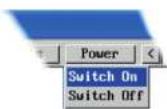

Editing the viewer window menu bar
If required, you can customise the menu bar of the viewer window to ensure that it contains only the necessary options.
The menu bar can be edited locally by each user or edited singly by the admin or alternatively, the admin can globally alter the menu bar for all users.
To edit the menu bar locally
1 Login remotely via VNC viewer and display the viewer window.
2 Place the mouse pointer on the menu bar and click the right mouse button. A popup will be displayed:
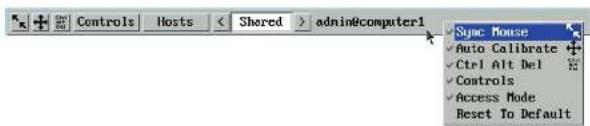
3 Click on any option within the popup to add it to or remove it from the menu bar.
4 When all changes have been made, click anywhere else within the viewer window.
Changes made in this way will affect the individual user only.
Note: The local menu bar edit popup shown above will only appear if the Enable direct right click Menu editing option is ticked within the Gui Edit Configuration screen (for that user) as shown right.
To edit the menu bar via admin
1 Login remotely via VNC viewer as admin user and display the viewer window.
2 Click the Configure button in the top right corner of the viewer window.
3 Click the User Accounts button to display User Accounts button.
4 Against the entry for the required user, click the Menu Bar Edit button. The following dialog will be displayed:

5 Select/deselect the items that you wish to appear on the menu bar. As you do so, the Menu bar appearance image will show how the bar will look using your edited settings.
6 Optional: To globally apply your changes, tick the Apply to all users on Save option.
7 Click the Save button.

Controls
When clicked, this button reveals a menu of options concerned with keyboard, video and mouse operation.

Single Mouse Mode
This mode is for fast network connections where the cursor response is sufficient to provide instant visual feedback on the remote screen. When enabled, the cursor is 'captured' within the viewer window until you use the 'escape' hot keys.
To quit from single mouse mode, press F8 and then P. Alternatively, enable and use the mouse button escape sequences - see Advanced unit configuration for details.
The single mouse mode does not require calibration.
Resync Mouse
This option has the same effect as the 📄 button on the menu bar and re-synchronises the local and remote mouse pointers.
Refresh Screen
This option refreshes the whole screen image to remove any artefacts from moved screen items. This is useful when using very low refresh rates on slow speed communication links.
Mouse Control
This option displays a mouse control dialog and is useful when the remote cursor is failing to respond correctly to your mouse movements, even after using the Resync mouse option.
The mouse control dialog allows you to control the remote mouse cursor using a selection of buttons that you click with your local mouse.
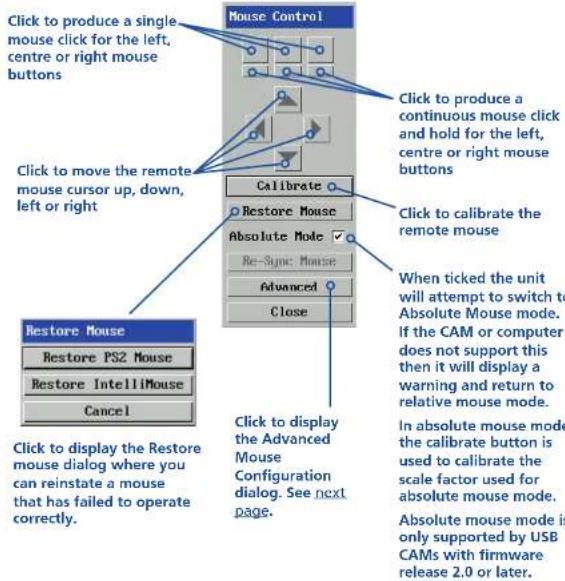

Advanced mouse configuration
This dialog allows the mouse acceleration to be configured according to the operating system in use and also permits manual fine tuning for situations where problems are encountered with the Calibrate function.
For best results, choose the appropriate Change motion: entry to match the host in use (e.g. Windows XP SP2, Vista, Windows 7 etc.)
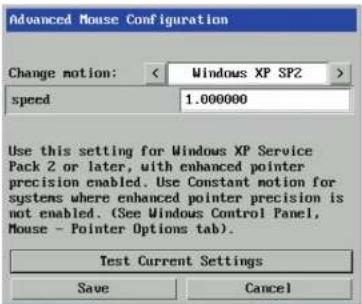
The available Change Motion schemes are: Constant, XFree86, Windows Pre-XP, Windows XP, Windows XP SP2, OSI2, Solaris, Solaris 9 and Mac OSX. Most of these offer the Speed setting as the only option, however, the Windows Pre-Xp and XFree86 options contain many other parameters.
When the Absolute Mode option is ticked in the main Mouse Control menu, this dialog allows you to adjust the Absolute Offset scale:

Info
When selected, this option displays an information dialog showing the current logged on users, the current host, its video mode and its mouse motion details.


Keyboard Control
This option displays a keyboard control dialog and is useful for sending keyboard combinations (to the host) that are needed regularly or that are trapped by the AdderView CATxIP 5000.

When entering codes:
- means press down the key that follows
- means release the key that follows
← means press down and release the key that follows
* means wait 250ms (note: if a number immediately follows the asterisk, then the delay will equal the number, in milliseconds)
It is automatically assumed that all keys specified will be released at the end, so there is need to specify -Ctrl or -Alt if these keys are to be released together.
See Appendix 9 for a list of key sequence codes that can be used.
Examples:
'Ctrl + Alt 12' would be expressed as: +Ctrl+ Alt+1-1+2
+N means press the 'N' key
+Scroll means press the Scroll lock key
+Space means press the space key
Video Settings
see next page
Enable Sun Translation
When enabled, this mode translates certain keyboard sequences to represent the special keys that are present on Sun keyboard. Use this when using a standard keyboard while connecting to a Sun system.
Notes:
The Enable/Disable status of the Sun translation mode is retained, so this mode selection only needs to be done once per host.
The mode selection only affects the host being viewed, so can be set differently for different hosts.
Standard keyboard Sun keyboard
| Right-[Ctrl] [F1] | Stop |
| Right-[Ctrl] [F2] | Again |
| Right-[Ctrl] [F3] | Props |
| Right-[Ctrl] [F4] | Undo |
| Right-[Ctrl] [F5] | Front |
| Right-[Ctrl] [F6] | Copy |
| Right-[Ctrl] [F7] | Open |
| Right-[Ctrl] [F8] | Paste |
| Right-[Ctrl] [F9] | Find |
| Right-[Ctrl] [F10] | Cut |
| Right-[Ctrl] [1] | Mute |
| Right-[Ctrl] [2] | Volume - |
| Right-[Ctrl] [3] | Volume + |
| Right-[Ctrl] [4] | Power* |
| Right-[Ctrl] [H] | Help |
* Certain PSI2 keyboards have a power key which will be mapped to perform the same function for a Sun system.

Video Settings
This dialog provides access to all of the key video settings that determine image quality and link performance.
Threshold
The threshold is effectively a noise filter that differentiates between valid video signals and background noise or interference. This has the effect of reducing unnecessary video signals between the AdderView CATxIP 5000 and the remote system, thus improving performance.
Phase
The phase setting adjusts the alignment of the host video output and the remote system video display to achieve the sharpest image.
Horizontal Position
Determines the horizontal position of the host screen image within the viewer window.
Vertical Position
Determines the vertical position of the host screen image within the viewer window.
Custom Modes
See the next page.
Advanced
See the next page.
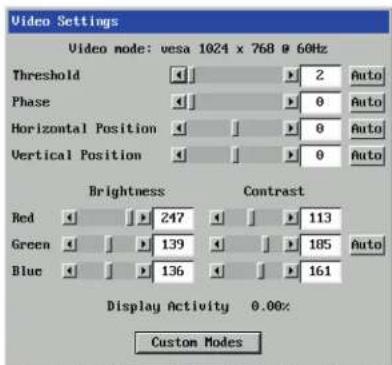

Brightness & Contrast The red, green and blue constituents of the brightness and contrast can be set individually. Alternatively, use the Auto button on the right side to automatically optimise these for the current host and connection speed.
Calibrate All
Click to determine the optimum settings for all aspects of video the video connection from the host system.
Display activity
Indicates the level of video activity currently in progress.
IMPORTANT: Optimal performance of the AdderView CATxIP 5000 is dependant on the calibration of the video for each host computer. For this reason, if you view an uncalibrated host, the unit will invoke an automatic calibration after a pause of roughly twenty seconds.
If the video is not calibrated the unit can operate slower than expected and will affect all users. If you experience a drop in performance on the VNC viewers, try recalibrating your viewer as a first step.
Using automatic configurations
- Every setting can be individually subjected to an automatic configuration (click the appropriate 'Auto' button) or can also be manually adjusted.
- Use the 'Calibrate All' button to automatically determine the optimum settings for all items.
Note: Before using the 'Calibrate All' option, if possible, remove on-screen display (OSD) elements generated by the AdderView CATxIP 5000 (such as a menu). These OSD elements use different video rates to those of the host system(s) and can affect the setting of the automatic threshold value. AdderView CATxIP 5000 uses an improved calculation procedure to filter out the effect of these elements. However, best results are obtained when the screen contains only host system information.
Note: To maximise performance, the threshold level is automatically increased by 50% when a slow link is detected.
Note: When the AdderView CATxIP 5000 is used with one or more other switches, the threshold needs to be higher than 32 due to the signal 'noise' that these switches introduce. The AdderView CATxIP 5000 configuration should detect such noise and adjust the threshold accordingly.
Setting the Threshold manually
Occasionally it can be useful to manually adjust the Threshold setting, in order to achieve a setting that best suits your particular requirements.
1 Use the 'Calibrate All' function to ensure that all other settings are optimised.
2 Click the Threshold left arrow button to decrement the setting by one and observe the 'Display Activity' indicator.
3 Repeat step 2 until the Display Activity indicator suddenly rises to a much higher level (i.e. 50% ). This will mean that you have reached the noise boundary. At this point, increment the Threshold value by 2 or 3 points to achieve an optimum setting.

Show All Users
Select this option to display a list of all users who are currently logged into the AdderView CATxIP 5000 unit together with the host computer (and port) that they are currently viewing and the type of connection: Local, VNC or Console.

Custom Video Modes
This option allows you to define non-standard video resolutions and refresh rates to suit your display characteristics.
Enter the horizontal and vertical pixels counts together with the refresh rate and, optionally the Reduced Blanking option (see below), then click the Calc button. Then click the Add button to include the new mode within the list. If you calculate the setting for a mode that has too high a resolution to be displayed full width, this dialog will calculate the values for a half-width version instead.
Reduced Blanking
The Reduced Blanking option can be enabled when using flat panel display monitors and helps to save bandwidth without any loss of performance. The blanking period is present in all standard video signals and is a small time delay to allow the beam of cathodic ray tube displays to return to the top left corner of the screen. As flat panel displays do not have a beam, the blanking period can be removed.

Advanced Video Settings
This option contains video signal settings that do not normally need to be adjusted.
Pixel Format
Determines the colour depth and data required to represent each video pixel.
YUV / RGB
Determines the colour space used by the unit.


VNC hotkey selection
During a VNC session, you can use hotkey presses to quickly display the Host selection menu or to choose a host by its port number:
To select a computer using hotkeys
1 Simultaneously press and hold and

Note: The and keys when pressed in combination are called
'hotkeys' and they signal to the AdderView CATxIP 5000 that you wish to control it, rather than the computer. However, if these particular hotkeys clash with another device or program, then your administrator may change them to a different combination. If the combination fails to work, then please contact the system administrator for details.
Note: VNC hotkeys are set separately to the hotkeys used by the locally connected keyboard. For details about changing the VNC Viewer hotkeys, see Appendix 2: Unit Configuration.
2 While still holding card, press the first numeral of the required port address, then:
- If the port address is a single character, release all of the keys.
- If the port address is two or more characters, release the first numeral key and press the second – repeat this procedure until all of the port address numerals have been entered, then release and .
Note: The numbers on your keyboard's numeric keypad are not valid, use only the numeral keys above the QWERTY section.
Note: If you do not have authorisation to view the selected port then a message will be displayed to explain your lack of access rights.
Note: When using hotkeys, the leading zeros for all single digit port numbers (including all cascade levels) are optional, i.e. 01, 02...09.
Standard hotkeys
The range of hotkey combinations are as follows:
Note: If your hotkeys have been changed, substitute them for and in at the examples given here.
Ch At Selects port 1
Ctrl Alt Selects port 2
• •
•
Ctrl Authen Selects port 10
Note: When entering multiple digit addresses as
above, keep and pressed down until all other numbers have been entered.
Ctrl Alt Selects no host
Ctrl All Displays the Host Selection menu so that you may choose a host by name.

If you need to enter a port number
Usually, when you make a network connection to the AdderView CATxIP 5000 (either using the VNC viewer or a Web browser) you simply enter the IP address, i.e. 192.168.0.3. However, if a special configuration is necessary, then you may be asked to specify a port number as well as the IP address.
What is a port?
To enter a port number in a Web browser
1 Enter the required IP address in the usual Address box, i.e. http://192.168.0.3
2 At the end of the IP address, add a single colon (:) and then enter the port number (in this example, the required port number is 8000), i.e. http://192.168.0.3:8000
3 Continue with the standard Web browser instructions.
To enter a port number in VNC viewer
1 Enter the required IP address in the usual 'Server' box, i.e. http://192.168.0.3
2 At the end of the IP address, add two colons (::) and then enter the port number (in this example, the required port number is 8000), i.e. http://192.168.0.3::8000
3 Continue with the standard VNC viewer instructions.
Viewer encryption settings
The web browser viewers and VNC viewers (of level 4.0b5S or higher) offer four encryption options. The resulting actions of certain options depend upon how the AdderView CATxIP 5000 to which you are connecting is configured:
- Always on - This setting will ensure that the link is encrypted, regardless of the AdderView CATxIP 5000 encryption setting.
- Let server choose - This setting will follow the configuration of the AdderView CATxIP 5000. If the AdderView CATxIP 5000 has a preference to encrypt the link, then it will be so, otherwise the link will not be encrypted.
- Prefer off - This setting will configure an un-encrypted link if the AdderView CATxIP 5000 will allow it, otherwise it will be encrypted.
- Prefer on - If the AdderView CATxIP 5000 allows it, this setting will configure an encrypted link, otherwise it will be un-encrypted.
Whenever encryption does take place, the viewer will first need to create the necessary secure key before the connection process can continue.
Supported web browsers
The following web browsers have been tested and found to work correctly with AdderView CATxIP 5000.
Windows
- Internet Explorer 5.50 and above, with Microsoft [Java] Virtual Machine (release 5.50). with Java Runtime Environment 1.3 or above.
Linux
- Netscape 4.61 and above, with Java Runtime Environment 1.1 or above.
- Opera, with Java Runtime Environment 1.1 or above.

Further information
This chapter contains a variety of information, including the following:
• Getting assistance - see below
- Troubleshooting - see right
- Appendices
- Appendix 1 - Configuration menus
- Appendix 2 - Configuration pages via viewer
- Appendix 3 - VNC viewer connection options
- Appendix 4 - VNC viewer window options
- Appendix 5 - Browser viewer options
- Appendix 6 - Addresses, masks and ports
• Appendix 7 - Cascading multiple units
- Appendix 8 - Cable specifications
- Appendix 9 - Hotkey sequence codes
- Appendix 10 - Supported video modes
• End user licence agreement
Getting assistance
If you are still experiencing problems after checking the information contained within this guide, then please refer to the Support section of our website:
www.adder.com
Troubleshooting
Global network users are unable to contact the AdderView CATxIP 5000
- Check that the correct address is being used by the remote users.
- Check the network settings. Check that the users network address has not been excluded in the IP access control section.
- If the AdderView CATxIP 5000 is situated behind a firewall, check that the relevant ports are being allowed through the firewall and are being correctly routed.
- Check the front panel indicators, the LNK indicator should be on. If the network link is a 100Mbps connection, the 100 indicator should also be on.
The remote cursor is not correctly responding to my mouse movements
- Recalibrate the mouse. When doing so, ensure that the host system does not have mouse cursor trails enabled and that the top left corner of the screen is clear of application windows.
When logging on using VNC viewer, I cannot enter a username
- Either, the VNC viewer is an old version (download a new one) or only the admin user has been configured on the AdderView CATxIP 5000.

Appendix 1 - Local setup menus
The AdderView CATxIP 5000 local setup menus allow a range of settings to be made both to the installation as a whole and to parts of the system accessed by each user.
To access the local setup menus
1 On the locally connected keyboard/mouse, select the Select Host screen in one of two ways:
- By simultaneously pressing and then releasing OK OR M
- By pressing the middle and right buttons of a three button mouse.
If you are not already logged in, do so now. What to do if the ADMIN password has been forgotten.
2 Press F1 to display the Main Menu.
3 Use the following keys:
and □ to highlight required options.
Space or arrow buttons to change values.
to quit and save the changes.
The full set of options are only available to the Admin user. All other users will see only the Functions and User Preferences options.
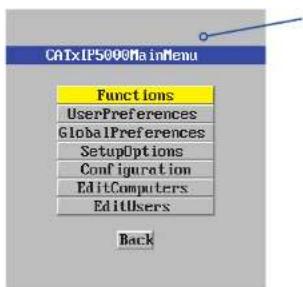
The following items and menus are available in the Main Menu screen:
- Functions
- User Preferences
• Global Preferences - Setup Options
- Configuration
• Edit Computers (Hosts) - Edit Users

Functions
The Functions menu contains a collection of procedures that affect various aspects of AdderView CATxIP 5000 operation.

To get here
1 From a local keyboard, log on as a standard or 'admin' user.
2 Press Ctrl Alt M (hotkeys can change).
3 Press F1 to show the Main Menu.
4 Select 'Functions' and press
Power Control
The options within this section are usable only when the AdderView CATxIP 5000 is used in conjunction with one or more external power switch units and when valid power switching strings have been registered for the currently selected host. For more details see: power switching connections, configuration or operation (via menu)
Switch Computer ON
Select this option to power on one or more computers.
Switch Computer OFF
Select this option to power off one or more computers.
Restore Standard Mouse
This option is used to resume standard mouse operation if it has ceased to operate, for instance, if it has been connected without rebooting the AdderView CATxIP 5000.
This option is used to resume Microsoft Intellmouse operation if it has ceased to operate, for instance, if it has been connected without rebooting the AdderView CATxIP 5000.
Show All Users
This option displays a list of all users who are currently logged into the AdderView CATxIP 5000 unit together with the host computer (and port) that they are currently viewing.

User Preferences
The User Preferences are system operating parameters that are independently selectable for each user and affect only their screen.
To get here
1 From a local keyboard, log on as a standard or 'admin' user.
2 Press Ctrl Alt M (hotkeys can change).
3 Press F1 to show the Main Menu.
4 Select 'User Preferences' and press

Screen Saver
Settings: Blank, Moving Logo
You can select the type of screen saver. If you select BLANK then the screen will blank completely. If you select Moving Logo then a small Adder logo will bounce around the screen.
Confirmation Box
Settings: Disabled, Enabled
When enabled, a confirmation box is displayed on screen for three seconds after a computer is selected. The confirmation box indicates the current user port and user name, the selected computer and the connection status.

Global Preferences
Global preferences are available only to the Admin user and allow settings to be made that affect all users attached to the AdderView CATxIP 5000.
To get here
1 From a local keyboard, log on as the 'admin' user.
2 Press Ctrl Alt M (hotkeys can change).
3 Press ☐ to show the Main Menu.
4 Select 'Global Preferences' and press

Mouse Switching
Settings: Enabled, Disabled
The computer channel can be switched using a three button mouse or IntelliMouse. Pressing the central button or wheel button together with the left hand mouse button will cause the AdderView CATxIP 5000 to switch to the next available computer.
When mouse switching is enabled, you can still use the middle button on its own to control applications. Only when its pressed with the left or right button is it interpreted by mouse switching, otherwise it is passed on to the host application. The rotation action of an IntelliMouse wheel is not affected and is always available to the computer application.
Screen Saver
Settings: Disabled; 2, 5, 10, 15 or 20 Minutes
The AdderView CATxIP 5000 can be set to blank the screen after no keyboard or mouse activity has been detected for a selected timeout period. If preferred, the user can blank the screen manually by selecting channel '0' using the keyboard hotkeys or by pressing ESC from the login screen.
OSD Dwell Time
Settings: 1, 2, 3, 5, 10 Seconds
After a successful computer channel change the AdderView CATxIP 5000 will display a confirmation message for a few seconds. The length of time that this confirmation message dwells on the screen may be changed.
User Timeout
Settings: 1, 2, 5, 10, 30 Seconds, 1, 5, 10 Minutes
When no keyboard or mouse data has been received from an active user port for the user timeout period, the AdderView CATxIP 5000 will relinquish the control of that user port in order to allow other users to access the host computer. The new port then becomes the active port until it too times out. To avoid confusion between users it is desirable to set the timeout period to be sufficiently long so that user's work is not needlessly interrupted by other users and sufficiently short to ensure good overall system efficiency.

Setup Options
Setup options are available only to the Admin user.
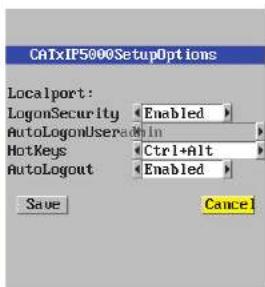
To get here
1 From a local keyboard, log on as the 'admin' user.
2 Press Ctrl Alt M (hotkeys can change).
3 Press F1 to show the Main Menu.
4 Select 'Setup Options' and press
Logon Security
Settings: Disabled, Enabled
When this option is enabled, users are required to logon to the AdderView CATxIP 5000. Each user is allocated access rights to computers by the system administrator and they are only able to see the computers that they have access to on their on-screen menu.
If this option is disabled there is no requirement for users to log-in to the system. All users will have the access rights as defined by the user account selected within the AutoLogon User option (see below).
AutoLogon User
This option allows you to choose a default user name (from the list of configured users) to be used whenever the Logon Security option is disabled. If you do not set the AutoLogon User entry to admin (whenever Logon Security is set to Disabled), an option will be given during logoff to enter a username and password to logon in normal way or allow the user to press Esc to auto logon as the specified AutoLogon User. This means that there is always a way to logon as the admin if the AutoLogon user is not set to admin, thus avoiding a possible lockout situation.
HotKeys
Settings: Ctrl+Alt, Ctrl+Shift, Alt+Shift, Alt Gr, Left+Right Alt, Left Ctrl+Alt, Right Ctrl+Alt
The keyboard hotkeys are special combinations of keys that, when used together with certain keyboard "command keys", perform special AdderView CATxIP 5000 functions. For example, pressing the hotkeys together with the "M" key will cause the on-screen menu to be displayed on your monitor. Other hotkey combinations allow you to query which computer you are connected to and to move the on-screen menu around the screen. You can also use the hotkeys together with the port number to select a particular connected computer.
Auto Logout
Settings: Disabled, Enabled
The AdderView CATxIP 5000 enables you to restrict access to your computers on a login basis. If a user forgets to logout when they have finished accessing the AdderView CATxIP 5000 then the user console may unintentionally be left with full access to all the computers. The AdderView CATxIP 5000 can be set to automatically logout unattended user consoles when the screen saver kicks in. This reduces the risk of security problems by preventing user consoles remaining in a permanent "logged-in" state when there is no keyboard or mouse activity. The automatic logout feature is only enabled when the screen saver feature is active (i.e. not disabled).

Configuration
Available only to the Admin user, the configuration section menu allows you to determine settings that relate directly to the global (IP) user aspects of the unit.
To get here
1 From a local keyboard, log on as the 'admin' user.
2 Press Ctrl Alt M (hotkeys can change).
3 Press F1 to show the Main Menu.
4 Select 'Configuration' and press

- Unit Configuration
IP admin password, encryption settings, etc.
• Network Configuration
IP address, net mask, VNC port, etc. - Serial Configuration
Options port usage and Baud rate. - Reset Configuration
Completely resets the AdderView CATxIP 5000 unit.

Unit Configuration
This page provides access to a selection of both basic and fundamental settings for the AdderView CATxIP 5000.
To get here
1 From a local keyboard, log on as the 'admin' user.
2 Press Ctrl Alt M (hotkeys can change).
3 Press F1 to show the Main Menu.
4 Select 'Configuration' and press
5 Select 'Unit Configuration' and press
Hardware
Indicates the version of the internal circuitry.
Firmware
Indicates the version of the internal software.
Keybd Layout
Use the arrow buttons to match the keyboard layout expected by the host system.
Admin Passwd
Enter the password that will be used to gain administrator access to the AdderView CATxIP 5000. There can only be one admin user and only that user is given access to the configuration menus. The admin password background will show red until you enter a reasonably secure password, although this is only advisory as any password or no password may be entered.
Unit Name
The name entered here will be displayed on the local menus and the remote VNC/browser windows.
| CnTxIP5000UnitConfig | |
| Hardware | AUIP500032M+32M |
| Firmware | 1.13.05 |
| KeybdLayout | UK |
| AdminPassud | SetPassword |
| UnitName | CATxIP5000 |
| NewPrivate | No |
| Time | 00 59 52 |
| Date | 20 Nov 2009 |
| Encryption | Always 0 n |
New Private
Allows you to determine whether new local or VNC connections should be set up as private (when set to Yes) or as shared (when set to No).
Time and Date
Use the left and right arrow keys to select the correct time and date. The time entry uses the 24 hour clock notation. The internal real time clock will continue to run for roughly one week without power to the unit, after that it will be lost and require resetting. Use the up and down arrow keys to move between each of the sections within the time and date entries.
Encryption
Three options are available: Always on, prefer off, prefer on. The one to choose depends on the specific details of your installation - see Encryption settings for details. The use of encryption imposes a slight performance overhead of roughly 10% but is highly secure against third party intrusion.

Network Configuration (IPv4)
This page allows you to configure network details that are mainly related to the use of the IPv4 protocol.
To get here
1 From a local keyboard, log on as the 'admin' user.
2 Press Ctrl Alt M (hotkeys can change).
3 Press F1 to show the Main Menu.
4 Select 'Configuration' and press
5 Select 'Network Configuration' & press 📄

MAC Address
Media Access Control address – this is the unique and unchangeable code that was hard coded within your AdderView CATxIP 5000 unit when it was built. It consists of six 2-digit hexadecimal (base 16) numbers separated by colons. A section of the MAC address identifies the manufacturer, while the remainder is effectively the unique electronic serial number of your particular unit.
View Protocol
Allows you to change between options for IPv4 and IPv6. See the next page for details about IPv6 options.
Use DHCP
DHCP stands for 'Dynamic Host Configuration Protocol'. Its function is particularly useful when connecting to medium size or larger networks. When this option is selected, your AdderView CATxIP 5000 will attempt to locate a DHCP server on the network. If such a server is located, it will supply three things to the AdderView CATxIP 5000: an IP address, an IP network mask (also known as a Subnet mask) and a Gateway address. These are not usually granted permanently, but on a 'lease' basis for a fixed amount of time or for as long as the AdderView CATxIP 5000 remains connected and switched on. Discover allocations.
IP Address
This is the identity of the AdderView CATxIP 5000 within a network. It can either be entered manually or configured automatically using the DHCP option. When the DHCP option is enabled, this entry is unavailable. See IP addresses.
Net Mask
Also often called the 'subnet-mask', this value is used alongside the IP address to help define a smaller collection (or subnet) of devices on a network. In this way a distinction is made between locally connected devices and ones that are reachable elsewhere, such as on the wider Internet. This process helps to reduce overall traffic on the network and hence speed up connections in general. See Net masks.
Gateway
This is the address of the device that links the local network (to which the AdderView CATxIP 5000 is connected) to another network such as the Internet. Usually this is a network router and it will be used whenever a device to be contacted lies outside the local network.
VNC Port
This is the logical link through which communications with a remote VNC viewer will be channelled (see What is a port?). The default setting is 5900 which is a widely recognised port number for use by VNC software. However, in certain circumstances it may be advantageous to alter this number - see Security issues with ports for more details.
Note: The VNC port and HTTP port can be set to the same port number in order to simplify router and firewall configuration. If this is done then the AdderView CATxIP 5000 will "listen" for both types of traffic on the single port.
HTTP Port
This is the logical link through which communications with a remote web browser will be channelled. The default setting of 80 is an established standard for web (HTTP - HyperText Transfer Protocol) traffic though this can be changed to suit your local network requirements.
Clear IP Access Control
This option removes all entries from the IP access control feature within the AdderView CATxIP 5000. The IP access control feature (configurable by a global admin user) allows certain network address ranges to be denied access to the AdderView CATxIP 5000. If set incorrectly, it is possible to exclude all network users and so this option provides an emergency recovery point.

Network Configuration (IPv6)
This page allows you to configure network details that are mainly related to the use of the IPv6 protocol.
To get here
1 From a local keyboard, log on as the 'admin' user.
2 Press Ctrl Alt M (hotkeys can change).
3 Press F1 to show the Main Menu.
4 Select 'Configuration' and press
5 Select 'Network Configuration' & press 📄
6 Change 'View Protocol' option to 'IPV6'

MAC Address
Media Access Control address – this is the unique and unchangeable code that was hard coded within your AdderView CATxIP 5000 unit when it was built. It consists of six 2-digit hexadecimal (base 16) numbers separated by colons. A section of the MAC address identifies the manufacturer, while the remainder is effectively the unique electronic serial number of your particular unit.
View Protocol
Allows you to change between options for IPv4 and IPv6. See the previous page for details about IPv4 options.
Enable IPV6
Change this option to Yes only if the AdderView CATxIP 5000 unit is connected to an IPV6 compliant network.
Use DHCPV6
When this option is set to Yes, the AdderView CATxIP 5000 will attempt to locate a DHCPv6 server on the network to derive a unique IPv6 address for itself as well as an address for the IPv6 Gateway. These are not usually granted permanently, but on a 'lease' basis for a fixed amount of time or for as long as the AdderView CATxIP 5000 remains connected and switched on. Discover allocations.
If this option is set to No, the AdderView CATxIP 5000 will use the Stateless Address Auto Configuration protocol to determine its own IPv6 address. This will be shown in the IPv6 Address field and can be edited if necessary.
IPV6 Address
Allows you to select an address from a list of configured IPv6 addresses.
Add
Adds the selected IPv6 address to the IPv6 Address section.
Rem
Deletes the selected IPv6 address.
IPV6 Address
This section shows the current IPv6 address for the AdderView CATxIP 5000. This can be derived either from a DHCPv6 server (if that option is selected); from the use of the Stateless Address Auto Configuration to determine its own address or by manual entry of an IPv6 address.
IPV6 Gateway
Allows the IPv6 Gateway address to be edited.
VNC Port
This is the logical link through which communications with a remote VNC viewer will be channelled (see What is a port?). The default setting is 5900 which is a widely recognised port number for use by VNC software. However, in certain circumstances it may be advantageous to alter this number - see Security issues with ports for more details.
Note: The VNC port and HTTP port can be set to the same port number in order to simplify router and firewall configuration. If this is done then the AdderView CATxIP 5000 will "listen" for both types of traffic on the single port.
HTTP Port
This is the logical link through which communications with a remote web browser will be channelled. The default setting of 80 is an established standard for web (HTTP - HyperText Transfer Protocol) traffic though this can be changed to suit your local network requirements.
Clear IP Access Control
This option removes all entries from the IP access control feature within the AdderView CATxIP 5000. The IP access control feature (configurable by a global admin user) allows certain network address ranges to be denied access to the AdderView CATxIP 5000. If set incorrectly, it is possible to exclude all network users and so this option provides an emergency recovery point.

(1) 本说明仅供参考。
Serial Configuration
This page allows you to configure the OPTIONS serial port located at the rear of the AdderView CATxIP 5000.
To get here
1 From a local keyboard, log on as the 'admin' user.
2 Press Ctrl Alt M (hotkeys can change).
3. Press ☐ to show the Main Menu.
4 Select 'Configuration' and press
5 Select 'Serial Configuration' & press
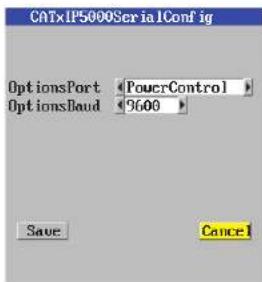
Options Port
Settings: Power Control, Sync Units, Console Server
Determines whether the OPTIONS port at the rear of the unit will be used for connection to power control switches ('Power Control'), to synchronise the operation of two AdderView CATxIP 5000 units ('Sync Units') or to operate as a 'Console Server' connection to link with other devices that are configured/monitored via their serial ports.
Options Baud
Settings: 1200, 2400, 4800, 9600, 19200, 38400, 57600, 115200
Determines the communication speed of the OPTIONS port when the above setting is configured to 'Power Control'. The other communication settings are fixed as: No parity, 8 bit word, 1 stop bit.
Notes:
When 'Options Port' is set to 'Sync Units', the baud rate will be automatically changed to 19200.
When the 'Options Port' is set to 'Console Server', the baud rate and other parameters are set within the Console Server Configuration page for Port 0.

Reset Configuration
This option allows you to completely reset the AdderView CATxIP 5000 unit.
WARNING: This process will remove all network settings and return the unit to use its original state. A complete reconfiguration will be required before the IP features of the unit can be used.
To get here
1 From a local keyboard, log on as the 'admin' user.
2 Press Ctrl Alt M (hotkeys can change).
3 Press to show the Main Menu.
4 Select 'Configuration' and press
5 Select 'Reset Configuration' and press
CATxIP5000ResetConfig
WARNING:Continuingwillcause youexistingconfiguration to beerased.
The unit will then reset and require-configuring before it can be used.
DO YOU WISH TO CONTINUE?
RESET
Cancel
To reset the AdderView CATxIP 5000 configuration
1 From a local or remote (not accessible from a global keyboard), log on as the 'admin' user.
2 Press Ctrl Alt M (hotkeys can change).
3 Press F1 to select 'More menus'.
4 Select 'Configuration'.
5 Select 'Reset Configuration'.
6 Highlight the 'Reset' option and press
7 After a short period, you should see the first of five initial configuration screens. See Initial configuration for details.
Edit Computers (Hosts)
This page allows basic changes to computer/host entries such as adding, name/port edit or deletion. For more advanced changes see Host configuration (via remote link) for details.
To get here
1 From a local keyboard, log on as a standard or 'admin' user.
2 Press Ctrl At M (hotkeys can change).
3 Press ☐ to show the Main Menu.
4 Select 'Edit Computers' and press
CATxIP5000EditHost
| Computer | Port |
| Computer01 | 01 |
| Computer02 | 02 |
| Computer03 | 03 |
| Computer04 | 04 |
| Computer05 | 05 |
| Computer1301 | 1301 |
| Computer1302 | 1302 |
| Computer1303 | 1303 |
Ins - AddDel - Delete Enter - Edit F3 - Find ESC - Exit
To add an entry
Press the Ins key and enter the new host name and port number.
To edit an entry
Move the highlight bar to cover the required entry and then press Enter. Edit the host name and port number as required and then click the Save button to store the change(s).
To delete an entry
Move the highlight bar to cover the required entry and then press the Del key. Confirm your action to remove the selected entry.

Edit Users
This page allows you to add, edit or delete usernames and passwords as appropriate. Note: It is not possible to use this page to change the user type (Admin/User) or to delete the admin entry (or change the admin user name. For such changes, use configuration via the viewer - see User accounts for details.
To get here
1 From a local keyboard, log on as a standard or 'admin' user.
2 Press Ctrl Alt M (hotkeys can change).
3 Press F1 to show the Main Menu.
4 Select 'Edit Users' and press

To add a user
Press the Ins key and enter the new username and corresponding password.
To edit an entry
Move the highlight bar to cover the required username and then press Enter. Edit the username name and/or password as required and then click the Save button to store the change(s). See note above.
Note: Usernames and passwords may only contain standard ASCII characters and numerals, accented characters are not accepted.
To delete an entry
Move the highlight bar to cover the required entry and then press the Del key. Confirm your action to remove the selected user entry. See note above.

Appendix 2 - Configuration pages via viewer
This section covers the configuration pages that are available to global admin users, using either the VNC viewer or the browser methods of access.
To access the remote configuration pages
1 Make a global connection to the AdderView CATxIP 5000 unit and login as the admin user.
2 Once logged in, click the Configure button in the top right corner of the window.


User accounts
This page allows you to manage up to sixteen separate accounts.
The first of the sixteen accounts is the admin account and is the only account with access rights to the configuration menus. The user name and access rights are fixed for the admin account, the only change possible for this account is the password.
There are fifteen user account positions.
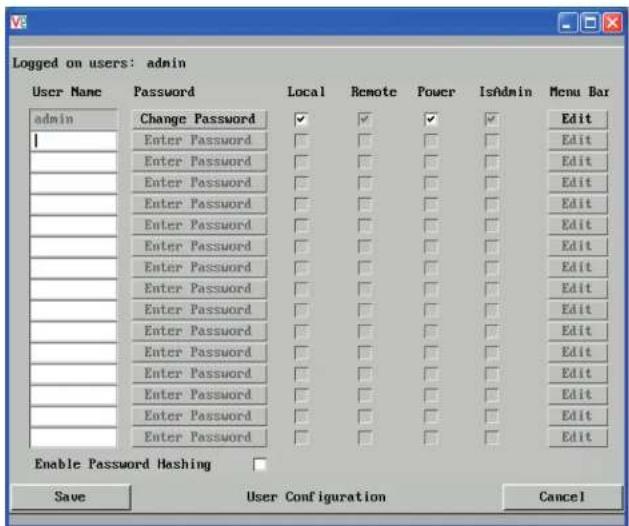
To create a new user account
1 Enter the required User Name to activate that position (the Enter Password button and access tick box positions will become editable).
2 Optionally click the Enter Password button to create a password for the user account.
3 Tick/untick the Local, Remote and Power options that are appropriate to the user.
4 Click the Save button to register your changes.
To disable the admin user
If necessary it is possible to disable the admin user account:
1 Create an alternative user account.
2 Tick IsAdmin for that user.
3 Log on as that user.
4 Untick the Local and Remote boxes for the admin user.
To get here
1 Using VNC viewer or a browser, log on as the 'admin' user.
2 Click the 'Configure' button in the top right corner.
3 Click the 'User Accounts' option.
User Name
All user names must consist of lower case characters or numbers only. No symbols or upper case characters are permissible. The user name can be between 1 and 32 characters in length but cannot contain foreign characters.
Enter/Change Password
Click the adjacent button to add or edit a password. Passwords are case sensitive and can include certain keyboard symbols but cannot contain foreign characters. The password can be between 1 and 16 characters in length. A suitable password is best constructed using a mixture of more than 6 letters, numbers and punctuation characters.
Local
When ticked, the selected user can gain access using the local KVM console directly connected to the AdderView CATxIP 5000 unit.
Remote
When ticked, the selected user can gain access via an IP network link (such as a local intranet or the wider Internet, depending on how the AdderView CATxIP 5000 is connected) and/or Console Server access.
Power
When ticked, the selected user will be permitted to control the power input to host systems (requires optional power control switch unit(s) to be fitted).
IsAdmin
When ticked, the selected user will be given access to the administrator level configuration menus and will also have the ability to force a host computer connection to be shared if another user has selected a private session.
Menu Bar
Allows the contents and position of the buttons in the Menu bar (top of screen) to be configured on a per user basis. See Editing the viewer window menu bar for more details.
Enable Password Hashing
This enables the storing of passwords in an encrypted format, which provides added security. It is particularly useful in combination with adder.net as it allows adder.net to set the password for users directly in its encrypted format.

Unit configuration
This page provides access to a selection of both basic and advanced settings for the AdderView CATxIP 5000. Many of the settings displayed here are also accessible through the on-screen menu.

Hardware Version
Indicates the version of the electronic circuitry within the AdderView CATxIP 5000 unit.
Firmware Version
Indicates the version of the internal software within the AdderView CATxIP 5000 flash memory. This may be updated using the flash upgrade procedure.
Host Keyboard Layout
Use the arrow buttons to match the keyboard layout expected by the host system.
Admin (Change) Password
Click this button to enter/edit the password that will be used to gain administrator access to the AdderView CATxIP 5000.
To get here
1 Using VNC viewer or a browser, log on as the 'admin' user.
2 Click the 'Configure' button in the top right corner.
3 Click the 'Unit Configuration' option.
Unit Name
The name entered here will be displayed on the local menus and the remote VNC viewer/browser windows.
New Connections Private
Allows you to determine whether new local or VNC connections should be set up as private (when ticked) or as shared (when unticked).
Menu Bar Toggle Hot Key
Determines the function key that can be used to display/hide the menu bar within the VNC screen.
Encryption
Three options are available: Always on, prefer off, prefer on. The one to choose depends on the specific details of your installation - see Encryption settings for details. The use of encryption imposes a slight performance overhead of roughly 10% but is highly secure against third party intrusion.
Number of simultaneous VNC Users
Allows you to restrict the number of concurrent VNC sessions. The maximum number (and the default setting) is 4.
VNC Viewer Hot Key Sequence
When using the VNC Viewer, you can use key press combinations to select host computers and also to display the host selection menu. This option allows you to choose which keys should be used to form the hotkeys that will precede a switching command. The default setting is CTRL + ALT, so as an example when you press the CTRL ALT and 2 keys, the viewer will change to the host located at port 2.
EDID Configuration
Advanced Unit Configuration

EDID configuration
Click this button to display advanced EDID options that do not normally require alteration.

This page allows you to edit the contents of the EDID records that are used to inform the computer of the supported modes. The default EDID should be sufficient for the vast majority of situations. If necessary, use the Edit Preferred and Standard Timing button fine tune settings to support specific situations. When you click the Save button, the EDID information within the CAM modules will be updated. As the EDID is usually only read from the CAM modules when a computer is booted, it will be necessary to power cycle the computers to make them re-read the new EDID.

Advanced unit configuration
Click this button to display advanced options that do not normally require alteration.
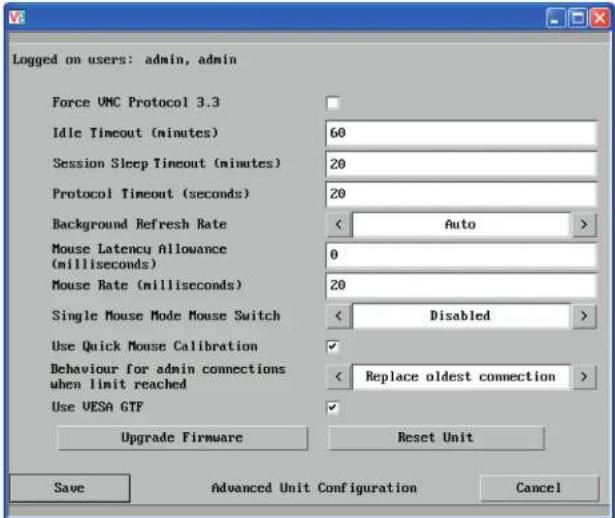
Force VNC Protocol 3.3
IMPORTANT: The use of this option is not recommended. Protocol 3.3 is a legacy version that does not offer any encryption.
Idle Timeout
Determines the period of inactivity on a global connection before the user is logged out. The idle timeout period can be set to any time span, expressed in minutes. Note: The Screensaver option serves a similar purpose for local connections.
Session Sleep Timeout
Determines the period of inactivity before the viewer screen will blank and a message is displayed. When no hosts are being viewed either because of this time out or if no viewers are active then parts of the video circuitry are powered down reducing power consumption by up to a third.
Protocol Timeout
Sets the time period by which responses should have been received to outgoing data packets. If the stated period is exceeded, then a connection is considered lost and terminated.
Background Refresh Rate
Use the arrow keys to alter the refresh rate for screen images via remote links. This allows you to tailor the screen refresh to suit connection speeds. The options are: Slow, Medium, Fast, Auto or Disabled. The Auto option automatically varies the refresh rate when multiple VNC sessions are active to provide a balance between the sessions. When the disabled option is selected, remote users must manually refresh the screen.
Note: When a low connection speed is detected, the background refresh is automatically disabled, regardless of the settings of this option.
Mouse Latency Allowance
This option is used during calibration to account for latency delays that may be caused as signals pass through a device.
During calibration, the AdderView CATxIP 5000 waits for 40ms after each mouse movement before sampling the next. If a device adds a significant delay to the flow of data, the calibration process can be lengthened or may fail entirely. The value entered here is added to (or subtracted from) the default 40ms sampling time. Note: You can enter negative values (down to -40) in order to speed up the calibration process when using fast KVM switches. Use this option with caution as it can adversely affect the calibration process.
Mouse Rate
Defines the rate at which mouse movement data are transmitted to the system. The default option is 20ms, which equates to 50 mouse events per second. This is used to slow down the rate in exceptional circumstances but normally requires no adjustment.
Single Mouse Mode Mouse Switch
Select the mouse button combination to exit from single mouse mode (when active).
Use Quick Mouse Calibration
Invokes optimised calibration techniques that handle the majority of mouse types.
Behaviour for admin connections when limit reached
Determines what should occur when four global connections already exist and a fifth, administrator connection attempt is made. Options are: Replace oldest connection, Replace newest connection and Don't replace. Only non-administrator connections can be terminated in this way.
Use VESA GTF
When ticked, the VESA Generalized Timing Formula will be used to help determine the correct input video resolution and timing details. See Appendix 10 for a list of all supported video modes.
Upgrade firmware
Places the unit into upgrade mode. See Upgrading AdderView CATxIP 5000 models.
Reset Unit
Performs a complete cold boot of the AdderView CATxIP 5000 unit.

Time & date configuration
This page allows you to configure all aspects relating to time and date within the AdderView CATxIP 5000 unit.
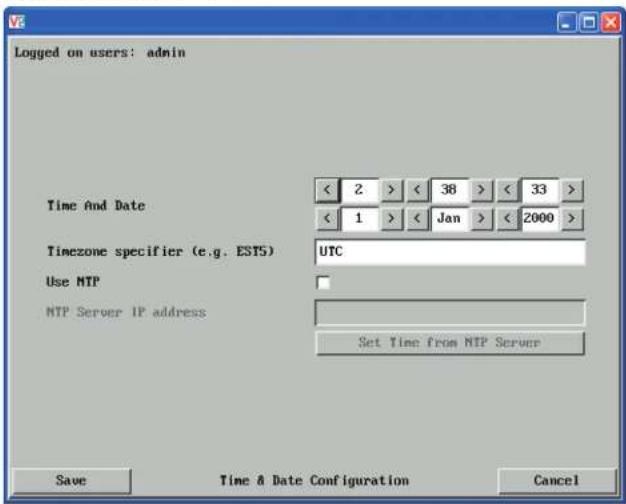
Time and Date
Use the arrow buttons to set the correct current time.
Use NTP
When this option is selected, the AdderView CATxIP 5000 will synchronise its internal clocks using information from the (Network Time Protocol) server listed in the NTP Server IP address field.
NTP Server IP address
Optionally enter the IP address for a known Network Time Protocol server.
Set Time from NTP Server
Click to immediately use the time and date information from the listed NTP server.
To get here
1 Using VNC viewer or a browser, log on as the 'admin' user.
2 Click the 'Configure' button in the top right corner.
3 Click the 'Time & Date Configuration' option.
Timezone specifier
Optionally enter a recognised timezone specifier related to the current position of the AdderView CATxIP 5000 unit. When an NTP server is used, the specifier will be used to provide the correct real time.
The timezone specifier takes the following form:
std offset dst [offset], start[/time], end[/time]
The std and offset specify the standard time zone, such as GMT and 0, or CET and -1, or EST and 5, respectively.
The dst string and [offset] specify the name and offset for the corresponding Daylight Saving Time zone; if the offset is omitted, it defaults to one hour ahead of standard time.
The remainder of the specification describes when Daylight Saving Time is in effect. The start field is when Daylight Saving Time goes into effect and the end field is when the change is made back to standard time. The most common format used for the daylight saving time is: Mm.w.d
Where: m specifies the month and must be between 1 and 12. The day d must be between 0 (Sunday) and 6. The week w must be between 1 and 5; week 1 is the first week in which day d occurs, and week 5 specifies the last d day in the month.
The time fields specify when, in the local time currently in effect, the change to the other time occurs. If omitted, the default is 02:00:00.
Typical examples are:
UK: GMT0BST,M3.5.0/1,M10.5.0/2
Central Europe: CET-1CEST,M3.5.0/2,M10.5.0/3
US Eastern: EST5EDT,M3.2.0/2,M11.1.0/2
US Pacific: PST5PDT,M3.2.0/2,M11.1.0/2
For further details
- For details of timezone specifier formats, please refer to: http://www.gnu.org/software/libc/manual/html_node/TZ-Variable.html
- For details of the Network Time Protocol (main RFC number: 1305; the SNTP subset used as the basis for the AdderView CATxIP 5000: 4330) http://www.ietf.org/rfc.html

Network configuration (IPV4)
This page allows you to configure the various aspects of the IP port when it is used in IPV4 mode. For IPV6 mode, please see the next page.

MAC address
Media Access Control address – this is the unique and unchangeable code that was hard coded within your AdderView CATxIP 5000 unit when it was built. It consists of six 2-digit hexadecimal (base 16) numbers separated by colons. A section of the MAC address identifies the manufacturer, while the remainder is effectively the unique electronic serial number of your particular unit.
Use DHCP
DHCP is an acronym for 'Dynamic Host Configuration Protocol'. Its function is particularly useful when connecting to medium size or larger networks. When this option is selected, your AdderView CATxIP 5000 will attempt to locate a DHCP server on the network. If such a server is located, it will supply three things to the AdderView CATxIP 5000: an IP address, an IP network mask (also known as a Subnet mask) and a Gateway address. These are not usually granted permanently, but on a 'lease' basis for a fixed amount of time or for as long as the AdderView CATxIP 5000 remains connected and switched on. Discover allocations.
To get here
1 Using VNC viewer or a browser, log on as the 'admin' user.
2 Click the 'Configure' button in the top right corner.
3 Click the 'Network Configuration' option.
IP Address
This is the identity of the AdderView CATxIP 5000 within a network. The IP address can be thought of as the telephone number of the AdderView CATxIP 5000. Unlike the MAC address, the IP address can be altered to suit the network to which it is connected. It can either be entered manually or configured automatically using the DHCP option. When the DHCP option is enabled, this entry is greyed out.
IP Network Mask
Also often called the subnet-mask, this value is used alongside the IP address to help define a smaller collection (or subnet) of devices on a network. In this way a distinction is made between locally connected devices and ones that are reachable elsewhere, such as on the wider Internet. This process helps to reduce overall traffic on the network and hence speed up connections in general.
IP Gateway
This is the address of the device that links the local network (to which the AdderView CATxIP 5000 is connected) to another network such as the wider Internet. Usually the actual gateway is a network router and it will be used whenever a required address lies outside the current network.
VNC Port
This is the logical link through which communications with a remote VNC viewer will be channelled (see What is a port?). The default setting is 5900 which is a widely recognised port number for use by VNC software. However, in certain circumstances it may be advantageous to alter this number - see 'Security issues with ports' for more details.
HTTP Port
This is the logical link through which communications with a remote web browser will be channelled (see What is a port?). The default setting of 80 is an established standard for web (HTTP - HyperText Transfer Protocol) traffic though this can be changed to suit your local network requirements.
IP Access Control
This section allows you to optionally specify ranges of addresses which will or won't be granted access to the AdderView CATxIP 5000. If this option is left unchanged, then the default entry of '+0.0.0.0/0.0.0.0' ensures that access from all IP addresses will be permitted. See Setting IP access control for details.

Network configuration (IPV6)
This page allows you to configure the various aspects of the IP port when it is used in IPV6 mode. For IPV4 mode, please see the previous page.

MAC address
Media Access Control address – this is the unique and unchangeable code that was hard coded within your AdderView CATxIP 5000 unit when it was built. It consists of six 2-digit hexadecimal (base 16) numbers separated by colons. A section of the MAC address identifies the manufacturer, while the remainder is effectively the unique electronic serial number of your particular unit.
Enable IPV6
Change this option to Yes only if the AdderView CATxIP 5000 unit is connected to an IPV6 compliant network.
IPV6 Addresses
This section is used to hold the IPv6 addresses for the AdderView CATxIP 5000. A link local IPv6 address is automatically added using the Stateless Address Auto Configuration protocol. Use the Add, Remove, Edit buttons to alter the address as necessary.
To get here
1 Using VNC viewer or a browser, log on as the 'admin' user.
2 Click the 'Configure' button in the top right corner.
3 Click the 'Network Configuration' option.
4 Click the 'IPV6' tab.
Use DHCPv6
When this option is set to Yes, the AdderView CATxIP 5000 will attempt to locate a DHCPv6 server on the network to derive a unique IPv6 address for itself as well as an address for the IPv6 Gateway. These are not usually granted permanently, but on a 'lease' basis for a fixed amount of time or for as long as the AdderView CATxIP 5000 remains connected and switched on. Discover allocations.
If this option is set to No, the AdderView CATxIP 5000 will use the Stateless Address Auto Configuration protocol to determine its own IPv6 address. This will be shown in the IPv6 Addresses field and can be edited if necessary.
IP Gateway
This is the address of the device that links the local network (to which the AdderView CATxIP 5000 is connected) to another network such as the wider Internet. Usually the actual gateway is a network router and it will be used whenever a required address lies outside the current network.
VNC Port
This is the logical link through which communications with a remote VNC viewer will be channelled (see What is a port?). The default setting is 5900 which is a widely recognised port number for use by VNC software. However, in certain circumstances it may be advantageous to alter this number - see 'Security issues with ports' for more details.
HTTP Port
This is the logical link through which communications with a remote web browser will be channelled (see What is a port?). The default setting of 80 is an established standard for web (HTTP – HyperText Transfer Protocol) traffic though this can be changed to suit your local network requirements.
IP Access Control
This section allows you to optionally specify ranges of addresses which will or won't be granted access to the AdderView CATxIP 5000. If this option is left unchanged, then the default entry of '+0.0.0.0/0.0.0.0' ensures that access from all IP addresses will be permitted. See Setting IP access control for details.

Setting IP access control
The golden rule with this feature is 'Include before you exclude' or to put it another way 'Arrange allowed addresses in the list before the denied addresses'.
This is because the positions of entries in the list are vitally important. Once a range of addresses is denied access, it is not possible to make exceptions for particular addresses within that range. For instance, if the range of addresses from A to F are denied access first, then the address C could not be granted access lower down the list. Address C needs to be placed in the list before the denied range.
IMPORTANT: This feature should be configured with extreme caution as it is possible to deny access to everyone. If such an error occurs, see Clearing IP access control for details about how to regain access.
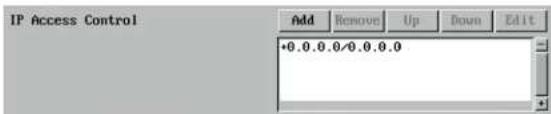
In the list, access control addresses prefixed by '+' are allow entries while those prefixed by '-' are deny entries.
To get here
1 Using VNC viewer or a browser, log on as the 'admin' user.
2 Click the 'Configure' button in the top right corner.
3 Click the 'Network Configuration' option.
To define a new IP access control entry
1 Click the Add button to display a popup dialog:
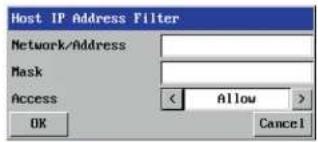
Network/Address
Enter the network address that is to be allowed or denied access. If a range of addresses is being specified then specify any one of the addresses within the range and use the Mask entry to indicate the size of the range.
Mask
Enter an IP network mask that indicates the range of addresses that are to be allowed or denied access. For instance, if only a single specified IP address were to be required, the mask entry would be 255.255.255.255 in order to specify a single location. See Calculating the mask for IP access control for details.
Access
Use the arrow buttons to select either 'Allow' or 'Deny' as appropriate.
2 Enter the base network address, the mask and select the appropriate access setting.
3 Click the OK button.
To reorder access control entries
IMPORTANT: When reordering, ensure that any specific allowed addresses are listed higher in the list than any denied addresses. Take care not to invoke any deny access settings that would exclude valid users.
1 In the access control list, click on the entry to be moved.
2 Click the Up or Down buttons as appropriate.
To edit/remove access control entries
1 In the access control list, click on the appropriate entry.
2 Click either the Edit or Remove button as appropriate.

Serial port configuration
This page provides all access to settings concerned with the OPTIONS port that is situated at the rear of the AdderView CATxIP 5000 unit.

To get here
1 Using VNC viewer or a browser, log on as the 'admin' user.
2 Click the 'Configure' button in the top right corner.
3 Click the 'Serial Port Configuration' option.
Options Port Use
Determines whether the OPTIONS port at the rear of the unit will be used for connection to power control switches ('Power Control'), to synchronise the operation of two AdderView CATxIP 5000 units ('Sync Units') or to operate as a 'Console Server' connection to link with other devices that are configured/monitored via their serial ports.
Baud Rate
Determines the communication speed of the OPTIONS port when the above setting is configured to 'Power Control'. The other communication settings are fixed as: No parity, 8 bit word, 1 stop bit.
Notes:
When 'Options Port Use' is set to 'Sync Units', the baud rate will be automatically changed to 19200.
When the 'Options Port Use' is set to 'Console Server', the baud rate and other parameters are set within the Console Server Configuration page for Port 0.

Host configuration
This page provides the opportunity to configure various details for each of the host systems that may be connected to the AdderView CATxIP 5000. Each entry can be configured with a name, the permitted users, the hot key combinations required to switch to it and, if required, appropriate power control commands.

Add entry for unrecognised host
When selected, any systems visited that are not specified in the Hosts list, will be added to the list. It is useful to tick this option when cascaded systems are first added to the installation.
Sort
Allows you to reorder the list of hosts either alphabetically or by entry number.
Erase Host Configuration
Removes all hosts from the list.
To get here
1 Using VNC viewer or a browser, log on as the 'admin' user.
2 Click the 'Configure' button in the top right corner.
3 Click the 'Host Configuration' option.
To create a new host entry
1 Click one of the host entries to reveal a Host configuration dialog. Note: Host computers connected to a cascaded AdderView unit will appear within the list (providing the 'Add entry for unrecognised host' option is ticked) and you can easily discern them from directly connected systems because their addresses will be four digits, rather than two.
![Host Configuration Name Computer 01] Users * Hotkey / KVM Port 01 Power Control Sequence Power On on Power Off off Save Clear Cancel](/content/2026/05/958582/images/66a01f64c24c74835ddb07fab68c499f3524b5eae8c3ba0ea4175d2a94342676.jpg)
Name
Enter the name that will be displayed in the viewer window when you click the Host button.
Users
Select the users that will be permitted to connect to this host. Either enter * to allow all users or a list of users separated by commas (e.g. admin, nigel, preben, steve).
Hotkey / KVM Port
Declare the numeric sequence that is pressed together with the hotkeys (usually Ctrl + Alt) to select this host system, which is the same value as the KVM port number.
Power On
Enter the code required to make an attached power control unit apply power to the selected host. See Power switching configuration for details.
Power Off
Enter the code required to make an attached power control unit remove power from the selected host. See Power switching configuration for details.
2 Enter the required information in each field.
3 Click the OK button.

Logging and status
This screen provides various details about the user activity on the AdderView CATxIP 5000 unit.

To copy and paste the log
You can copy the information listed within the log and paste it into another application.
1 While viewing the log screen, press Ctrl and C, to copy the data into the clipboard.
2 In a text application (i.e. Word, WordPad, Notepad) press Ctrl and V, or right mouse click and 'Paste'.
Syslog Server IP Address
Logging information can optionally be sent, as it occurs, to a separate system using the standard Syslog protocol. Enter the IP address of a suitable system in the field provided.
For further details
- For details of the Syslog protocol (RFC number: 3164) http://www.ietf.org/rfc.html
To get here
1 Using VNC viewer or a browser, log on as the 'admin' user.
2 Click the 'Configure' button in the top right corner.
3 Click the 'Logging and Status' option.

LDAP configuration
The AdderView CATxIP 5000 can optionally use the industry standard LDAP (Lightweight Directory Access Protocol) to allow user authentication to occur in conjunction with an externally held database. This screen allows you to configure details related to the creation of an LDAP link to an external directory service, such as an Active Directory server.

To get here
1 Using VNC viewer or a browser, log on as the 'admin' user.
2 Click the 'Configure' button in the top right corner.
3 Click the 'LDAP Configuration' option.
Use LDAP
Tick this option to enable the Lightweight Directory Access Protocol features of the unit.
Host Address
Enter the IP address of the LDAP server that holds the required directory service.
Host Port
The standard port address for LDAP links is 389 and this should not need to be changed unless special circumstances exist.
Base DN
This field allows you to enter the top level of the LDAP directory tree at which to start an LDAP search. An example Base DN value might be: "dc=catxip1000,dc=com"
User field
Enter the LDAP database field that will be used to match each user name against. The details entered here will depend on the specific LDAP database being used - 'uid' or 'cn' are commonly used values.
Anonymous Bind
If left unchecked then bind requests are sent with username (Base DN) and password (more suitable for Active Directory applications). If checked, bind requests are anonymous (more suitable for Linux LDAP implementations).

Console server configuration
The Console Server feature allows connections to be made to multiple devices that use RS-232 serial links for configuration and reporting, such as specialist servers, ethernet switches, etc.
You can configure a maximum of seventeen serial ports; one of which uses the OPTIONS port, while the others require Console CAMs to be attached to the various standard ports. The ports can be universally configured using the 'Port Defaults' settings or can be set individually using the Edit Port Configuration button.
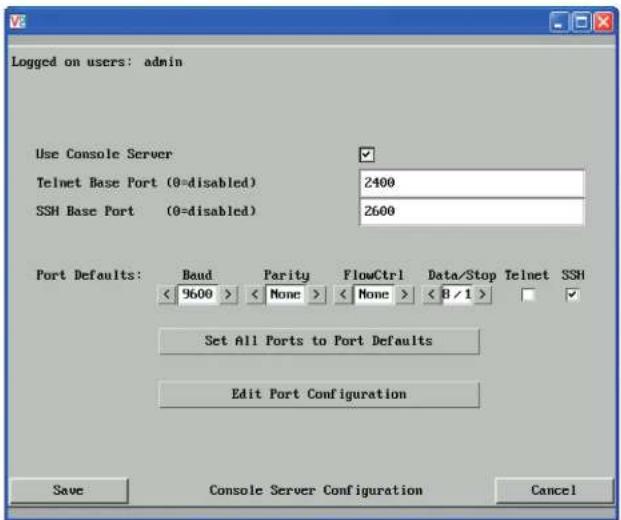
To get here
1 Using VNC viewer or a browser, log on as the 'admin' user.
2 Click the 'Configure' button in the top right corner.
3 Click the 'Console Server Configuration' option.
Use Console Server
Tick this option to enable the Console Server features of the unit.
Telnet Base Port
Sets the base value for the IP port used by Telnet to connect to a particular port on the unit. The port use is Base Port + Port Number (Port Number is 0..16). Set this to 0 to completely disable Telnet access to the Console Server ports.
SSH Base Port
Sets the base value for the IP port used by the SSH (Secure Shell) protocol to connect to a particular port on the unit. The port use is Base Port + Port Number (Port Number is 0..16).
Set this to 0 to completely disable SSH access to the Console Server ports.
Port Defaults
Using these settings, you can determine a standard set of parameters which can be applied to all ports that are using the Console Server feature.
If you have a mixture of settings to apply to the ports, but most adhere to a particular common format, use these Port Defaults (and then the 'Set All Ports to...' button) to first apply the common format to all and then use the 'Edit Port Configuration' button to alter the exceptions to the applied defaults.
Set All Ports to Port Defaults
Click to apply the current Default Port setting to all ports and then display the Console Server Port Configuration page. This allows all ports to be quickly configured to a common set of values and then individual changes to be made as required.
Edit Port Configuration
Click this button to display the Console Server Port Configuration page (shown on next page) where serial parameters and protocol settings can be applied to each port individually.

Console server port configuration
This extra sub-screen allows you to adjust the serial port settings for any of the ports that are using Console CAMs or the OPTIONS port when it is configured as a 'Console Server' connection.
Notes:
If a port has neither the Telnet or SSH support options selected, it is greyed out.
Port 0 (the Options Port) will remain greyed out if the Serial Configuration page has its Options port use to set to any setting other than 'Console Server'.

To get here
1 Using VNC viewer or a browser, log on as the 'admin' user.
2 Click the 'Configure' button in the top right corner.
3 Click the 'Console Server Configuration' option.
4 Click the 'Edit Port Configuration' button.
Baud
Available baud rates for each port: 1200, 9600 or 19200.
Parity
Available parity settings: None, Odd or Even.
FlowCtrl
Available flow control options: None, Hardware (RTS/CTS) or Software (XON/XOFF).
Data/Stop
Available data word and stop bit combinations: 7/1, 7/2, 8/1 or 8/2.
Telnet
Determines whether the associated port can be connected to using the Telnet protocol. If neither this nor the SSH box are ticked for a port, then the port will remain greyed out.
SSH
Determines whether the associated port can be connected to using the SSH (Secure SHell) protocol. If neither this nor the Telnet box are ticked for a port, then the port will remain greyed out.

Appendix 3 - VNC viewer connection options
When you are connecting to the AdderView CATxIP 5000 using the VNC viewer, a number of options are available.

Click here to access the options
There are four tabbed pages of options:
- Display
- Inputs
- Connection
- Expert
You can also reduce this to one tab containing only the most commonly used options by clicking the Basic... button in the lower left corner.
Note: If you make any changes to the options given here and wish to retain them for successive connection sessions, ensure that the option 'Use these settings for all new connections' is ticked.
Display
Scaling
No Scaling
No attempt is made to make the screen image fit the viewer window. You may need to scroll horizontally and/or vertically to view all parts of the screen image.
Scale to Window Size
Adjusts the server screen image to suit the size of the viewer window.
Custom Size
Adjusts the server screen image according to the Width and Height settings in the adjacent fields. A drop box to the right of the fields allows you to define the image size by percentage or by pixels, as required.
Preserve Aspect Ratio
When ticked, maintains a consistent ratio between the horizontal and vertical dimensions of the screen image.

Other options
Full screen mode
When ticked, opens the VNC Viewer in full screen mode.
Enable toolbar
When ticked, the VNC toolbar will be displayed whenever you hover your mouse near the top centre of the VNC window.
Adapt to network speed
When ticked, VNC will automatically adjust the image quality to suit the connection speed. When unticked, a slider allows you to choose the balance manually.
Always use best available colour quality
When ticked, the VNC Viewer will aim to maximise performance while still maintaining a full colour display (even on slower network connections) by affecting other aspects of operation. For instance, by reducing the amount of information sent about the mouse cursor position (which may make the mouse cursor movements appear jerky).

Inputs
Inputs:
When set to 'Enabled', all primary options below are ticked. The 'Disabled' setting unticks all of the primary options (causing 'view-only mode' where no control data may be sent to the AdderView CATxIP 5000. The 'Custom' setting is shown if you choose your own combination of options.
Enable keyboard input
Allows keyboard data to be transferred to the AdderView CATxIP 5000.
Pass special keys directly to server
When ticked, 'special' keys (the Windows key, the Print Screen key, Alt+Tab, Alt+Escape and Ctrl+Escape) are passed directly to the AdderView CATxIP 5000 rather than being interpreted locally.
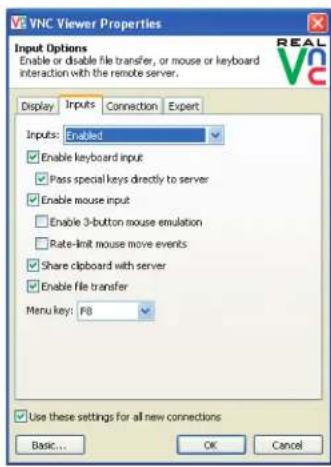
Enable mouse input
Allows mouse data to be transferred to the AdderView CATxIP 5000.
Enable 3-button mouse emulation
This feature allows you to use a 2-button mouse to emulate the middle button of a 3-button mouse. When enabled, press the left and right mouse buttons simultaneously to create a middle button action. You are advised to generally use a 3-button mouse.
Rate-limit mouse move events
When ticked, this feature reduces the mouse movement information that is sent to the AdderView CATxIP 5000 and host system. This is useful for slow connections and you will notice that the remote cursor will catch up with the local cursor roughly once every second.
Share clipboard with server
This feature is restricted to software server versions of VNC and has no effect on AdderView CATxIP 5000 installations, except for retrieving the activity log as described in the logging and status section.
Enable file transfer
This option does not apply to AdderView CATxIP 5000 connections.
Menu key
This feature allows you to select which function key is used to display the VNC viewer options menu. The menu key is the only way to exit from the full screen viewer mode.

Connection
The options on this page are not relevant to AdderView CATxIP 5000 connections and should be left in their default states.

Expert
The options within this section work correctly with AdderView CATxIP 5000 in their default states and should not require alteration except in special circumstances.


Basic
Display
Scale to window size
Adjusts the server screen image to suit the size of the viewer window.
Full screen mode
When ticked, opens the VNC Viewer in full screen mode.
Enable toolbar
When ticked, the VNC toolbar will be displayed whenever you hover your mouse near the top centre of the VNC window.
Adapt to network speed
When ticked, VNC will automatically adjust the image quality to suit the connection speed. When unticked, a slider allows you to choose the balance manually.
Always use best available colour quality
When ticked, the VNC Viewer will aim to maximise performance while still maintaining a full colour display (even on slower network connections) by affecting other aspects of operation. For instance, by reducing the amount of information sent about the mouse cursor position (which may make the mouse cursor movements appear jerky).

Connection
View-only
When ticked, no control data (from keyboard or mouse) are sent to the AdderView CATxIP 5000.
Pass special keys directly to server
When ticked, 'special' keys (the Windows key, the Print Screen key, Alt+Tab, Alt+Escape and Ctrl+Escape) are passed directly to the AdderView CATxIP 5000 rather than being interpreted locally.
Menu key
This feature allows you to select which function key is used to display the VNC viewer options menu. The menu key is the only way to exit from the full screen viewer mode.

Appendix 4 - VNC viewer window options
Click the VNC icon in the top left corner of the viewer window (or press F8) to display the window options:


Appendix 5 - Browser viewer options
When you are connecting to the AdderView CATxIP 5000 using a Web browser, a number of options are available.

Click here to access the options
There are four options pages:
Encoding and colour level
Auto select
When ticked, this option will examine the speed of your connection to the AdderView CATxIP 5000 and apply the most suitable encoding method. This option is suggested for the majority of installations.
Preferred encoding
There are three manually selectable encoding methods which are accessible when the Auto select option is unticked.

- ZRLE – This is a highly compressed method that is best suited to slow modem connections.
- Hextile – This method offers better performance than the ZRLE when used over a high speed network because there is no need for the AdderView CATxIP 5000 to spend time highly compressing the data.
- Raw – This is a primitive, uncompressed method that is mainly used for technical support issues. You are recommended not to use this method.
Colour level
The colour level is fixed at Medium (256 colours) for almost all browsers.
Inputs
View only (ignore mouse & keyboard)
When ticked, the viewer will not send keyboard or mouse information to the AdderView CATxIP 5000 or host computer.
Accept clipboard from server
This feature is restricted to software server versions of VNC and has no effect on AdderView CATxIP 5000 installations.
Send clipboard to server
This feature is restricted to software server versions of VNC and has no effect on AdderView CATxIP 5000 installations.
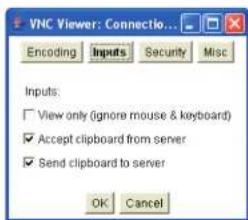
Security
512 bits (low security)
Selects the lowest level of encoding for communications between the browser and the AdderView CATxIP 5000.
1024 bits (medium security)
Selects the middle level of encoding for communications between the browser and the AdderView CATxIP 5000.
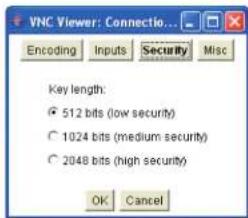
2048 bits (high security)
Selects the highest level of encoding for communications between the browser and the AdderView CATxIP 5000.
Misc
Shared (don't disconnect other viewers)
This feature is restricted to software server versions of VNC and has no effect on AdderView CATxIP 5000 installations.
Render cursor locally
This feature is restricted to software server versions of VNC and has no effect on AdderView CATxIP 5000 installations.
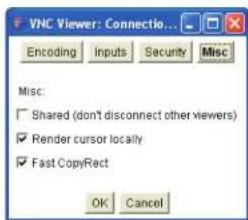
Fast CopyRect
This feature is restricted to software server versions of VNC and has no effect on AdderView CATxIP 5000 installations.

Appendix 6 – Addresses, masks and ports
IP address, network masks and ports are all closely linked in the quest for one device to find another across disparate network links. For IPv6 details, please see here.
IPv4 addresses
As a rough analogy, consider how you use the telephone system. The phone number for Adder Technology in the UK is 0044 (0)1954 780044. This number consists of three distinct parts:
• 0044 connects from another country to the UK,
• (0)1954 selects the main telephone exchange in the Bar Hill area of Cambridgeshire, and
• 780044 is the unique code for Adder Technology within Bar Hill.
The important parts of the whole number depend on where you are. If you were based in the same local area as Adder Technology, there would be no point in dialling out of the UK, or even out of the area. The only part of the whole number that you are interested in is the final part: 780044.
In a similar way to the various parts of the telephone number, the four sections (or Octets) of every IP address have different meanings or "weights". Consider the following typical IP address:
192.168.142.154
192 is the most global part of the number (akin to the 0044 of the phone number) and 154 is the most local (similar to the 780044 unique local code of the phone number).
When two network devices communicate with each other, they always "dial the whole number" regardless of their respective locations in a network. However, they still need to know whether the other device is local to them or not, and this is where the net mask comes into play.
Net masks (Subnet masks)
The net mask (or subnet mask) informs a device as to its own position within a network. From this it can determine whether any other device is within the same local network or is situated further afield.
Taking the telephone number analogy given in the IP address section, in order to use the telephone system efficiently, it is vital for you to know your location relative to the person you are calling. In this way you avoid dialling unnecessary numbers.
When one network device needs to talk to another, the first thing that it will do is a quick calculation using its own IP address, the other device's IP address and its own net mask. Suppose a device with address 192.168.142.154 and net mask 255.255.255.0 needed to communicate with a device at address 192.168.142.22. The sending device would perform several calculations:

flowchart
graph TD
    A["192.168.142.154"] --> B["Sending device IP address"]
    B --> C["255.255 255.0"]
    C --> D["192.168.142.000"]
    D --> E["Result"]
    E --> F["192.168.142.000 = 192.168.142.000 ? Answer: YES"]
    F --> G["Address is local"]
    H["Destination device IP address"] --> I["192.168.142.22"]
    I --> J["255.255 255.0"]
    J --> K["192.168.142.000"]
    K --> L["3"]
    L --> M["Answer: YES"]
    N["Net mask"] --> O["192.168.142.000"]
    O --> P["Result"]
1 The net mask is used to determine the local and global parts of the sender's IP address. Where there is 255 in the mask, the corresponding address slips through, where there is a 0, it is blocked.
2 Where the net mask was 0, the corresponding part of the result is also zero - this section is now known to be the local part of the IP address.
3 The same process is carried out for the destination address, again using the sender's net mask. Now the local parts of both addresses have been equalised to zero, because their values are not important in determining whether they are both in the same local network.
4 The results of the two net mask operations are now compared, if they match, the destination is local. If not, then the sender will still use the same full destination IP address but will also flag the message to go via the local network gateway and out into the wider world.
The reason for doing this? It makes the network, as a whole, much more efficient. If every message for every recipient was shoved straight out onto the Internet, the whole thing would grind to a halt within seconds. Net masks keep local traffic just that - local.
Want to know more?

Net masks - the binary explanation
To really understand the operation of a net mask it is necessary to delve deeper into the life blood of computers – binary; this is native digital, where everything is either a 1 (one) or 0 (zero), on or off, yes or no.
The net mask operation described on the previous page is known as a 'bit-wise AND function'. The example of 255.255.255.0 is handy because the last octet is completely zero and is "clean" for illustrative purposes. However, actual net mask calculations are carried out, not on whole decimal numbers, but bit by bit on binary numbers, hence the term 'bit-wise'. In a real local network, a net mask might be 255.255.255.240. Such an example would no longer be quite so clear, until you look at the net mask in its binary form:
11111111.11111111.11111111.11110000
In this case, the four zeroes at the end of the net mask indicate that the local part of the address is formed by only the last four bits. If you use the diagram from the previous example and insert the new net mask, it will have the following effect on the final result:

Thus, when 154 is bit-wise ANDed with 240, the result is 144. Likewise, any local address from 192.168.142.144 through to 192.168.142.159 would produce exactly the same result when combined with this net mask, hence they would all be local addresses. However, any difference in the upper three octets or the upper four bits of the last octet would slip through the mask and the address would be flagged as not being local.

Calculating the mask for IP access control
The IP access control function uses a standard IP address and a net mask notation to specify both single locations and ranges of addresses. In order to use this function correctly, you need to calculate the mask so that it accurately encompasses the required address(es).
Single locations
Some of the simplest addresses to allow or deny are single locations. In this case you enter the required IP address into the 'Network/Address' field and simply enter the 'Mask' as 255.255.255.255 (255 used throughout the mask means that every bit of the address will be compared and so there can only be one unique address to match the one stated in the 'Network/Address' field).
All locations
The other easy setting to make is ALL addresses, using the mask 0.0.0.0 As standard, the IP access control section includes the entry: +0.0.0.0/0.0.0.0 The purpose of this entry is to include all IP addresses. It is possible to similarly exclude all addresses, however, take great care not to do this as you instantly render all network access void. There is a recovery procedure should this occur.
Address ranges
Although you can define ranges of addresses, due to the way that the mask operates, there are certain restrictions on the particular ranges that can be set. For any given address you can encompass neighbouring addresses in blocks of either 2, 4, 8, 16, 32, 64, 128, etc. and these must fall on particular boundaries. For instance, if you wanted to define the local address range:
192.168.142.67 to 192.168.142.93
The closest single block to cover the range would be the 32 addresses from: 192.168.142.64 to 192.168.142.95.
The mask needed to accomplish this would be: 255.255.255.224
When you look at the mask in binary, the picture becomes a little clearer. The above mask has the form: 11111111.11111111.11111111.1100000 Ignoring the initial three octets, the final six zeroes of the mask would ensure that the 32 addresses from .64 (01000000) to .95 (01011111) would all be treated in the same manner. See Net masks - the binary explanation for details.
When defining a mask, the important rule to remember is:
There must be no 'ones' to the right of a 'zero'.
For instance, (ignoring the first three octets) you could not use a mask that had 11100110 because this would affect intermittent addresses within a range in an impractical manner. The same rule applies across the octets. For example, if you have zeroes in the third octet, then all of the fourth octet must be zeroes.
The permissible mask values (for all octets) are as follows:
Mask octet Binary Number of addresses encompassed
| 255 | 11111111 | 1 address |
| 254 | 11111110 | 2 addresses |
| 252 | 11111100 | 4 addresses |
| 248 | 11111000 | 8 addresses |
| 240 | 11110000 | 16 addresses |
| 224 | 11100000 | 32 addresses |
| 192 | 11000000 | 64 addresses |
| 128 | 10000000 | 128 addresses |
| 0 | 00000000 | 256 addresses |
If the access control range that you need to define is not possible using one address and one mask, then you could break it down into two or more entries. Each of these entries could then use smaller ranges (of differing sizes) that, when combined with the other entries, cover the range that you require. For instance, to accurately encompass the range in the earlier example: 192.168.142.67 to 192.168.142.93
You would need to define the following six address and mask combinations in the IP access control section:
Network/address entry Mask entry
| 192.168.142.67 | 255.255.255.255 | defines 1 address (.67) |
| 192.168.142.68 | 255.255.255.252 | defines 4 addresses (.68 to .7 |
| 192.168.142.72 | 255.255.255.248 | defines 8 addresses (.72 to .7 |
| 192.168.142.80 | 255.255.255.248 | defines 8 addresses (.80 to .8 |
| 192.168.142.88 | 255.255.255.252 | defines 4 addresses (.88 to .9 |
| 192.168.142.93 | 255.255.255.255 | defines 1 address (.93) |

Ports
If you accept the analogy of IP addresses being rather like telephone numbers, then think of ports as extension numbers. In a company of any size, you generally wouldn't expect the accounts department to share the same telephone with the technical department. Although their calls may all be related to the same company, they concern very different aspects of that company.
It is the same with IP network connections. Although you have only one network link into your computer and only one IP address (phone number), you are probably performing many different tasks through that one link, often at the same time. Thus, when you browse the web your outgoing requests and the incoming information are all channelled through port 80. When you send an email, it travels through port 25 and when you transfer files you are, without knowing it, using port 20.
At the "border crossing" between the wider Internet and every local network attached to it, there is a router that is usually combined with a firewall. One of its main tasks is to direct incoming traffic to the correct place within its local network. A key piece of information to help it do this is the port number:
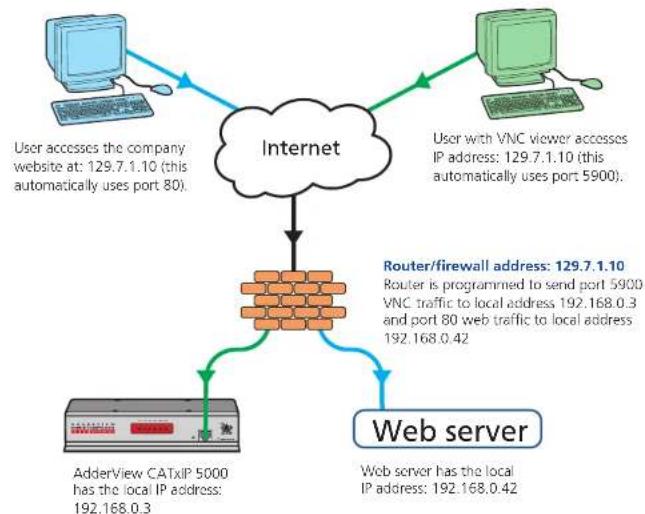
flowchart
graph TD
    A["User accesses the company website at: 129.7.1.10 (this automatically uses port 80.)"] --> B["Internet"]
    C["User with VNC viewer accesses IP address: 129.7.1.10 (this automatically uses port 5900.)"] --> B
    D["AdderView CATxIP 5000 has the local IP address: 192.168.0.3"] --> E["Web server"]
    F["Web server has the local IP address: 192.168.0.42"] --> E
    B --> G["Router/firewall address: 129.7.1.10"]
    E --> G
Security issues with ports
The settings of port numbers become important when the AdderView CATxIP 5000 is situated behind a network firewall. In order for a remote VNC viewer or web browser to make contact with your AdderView CATxIP 5000, it is necessary for the firewall to allow communication through a particular numbered port to occur.
One specific function of firewalls is to restrict access to ports in order to prevent malicious attackers using them as a route into your network. Every new port that is opened offers a new possibility for hackers and so the number of accessible ports is purposefully kept to a minimum. In such cases, it may be advantageous to change one or both AdderView CATxIP 5000 ports to use the same number. The other alternative is to place the AdderView CATxIP 5000 unit outside the firewall and take full advantage of its secure operation features – see Networking issues for details.
IMPORTANT: The correct configuration of routers and firewalls requires advanced networking skills and intimate knowledge of the particular network. Adder Technology cannot provide specific advice on how to configure your network devices and strongly recommend that such tasks are carried out by a qualified professional.

An introduction to IPv6
During the initial design of the Internet, 4.3 billion seemed like an impossibly large number of device addresses, possibly more than would ever be needed. It took nearly forty years, but finally the last remaining vacant address blocks within the current Internet Protocol scheme (called IPv4) were assigned in February 2011.
The Internet Protocol is a crucial element of Internet operation and the eventual exhaustion of unique addresses was predicted and acted upon many years ago. The replacement for IPv4 is known as IPv6 and was defined in December 1998. Since then its uptake has been slow (reportedly used for less than 1% of Internet traffic in 2008) although this will increase rapidly as places within the incumbent system are exhausted.
Vastly increased address space
The most notable feature of IPv6 is the size of its address space, put simply: It's massive. By using 128 bits to define each IPv6 address (rather than the 32 bits used in IPv4), there are now 340 × 10^36 unique addresses (that's 340 trillion trillion trillion or as it is correctly known, 340 undecided).
The larger address size of IPv6 requires a different manner of notation. Instead of the four decimal numbers separated by dots used for IPv4 (e.g. 192.168.0.1), IPv6 addresses consist of eight groups of four hexadecimal digits that are separated by colons (e.g. 2002:00a2:67be:0000:0000:0e82:8723:a144) – each group of four digits represents 16 bits of the address. By necessity, IPv6 addresses are quite long and so there are a couple of techniques to help reduce this in certain cases:
- Where a group has one or more leading zeroes, these can be omitted. In the above example 00a2 and 0e82 can be written a2 and e82, respectively.
- Where one or more consecutive groups consist solely of zeroes, they can be replaced with a double colon (:). In the above example, the fourth and fifth groups could be replaced with the double colon, so that the whole line could be reduced to: 2002:a2:67be:e82:8723:a144. It is easy to return any such shortened address to the full version by replacing the double colons with sufficient groups of zeroes until the total number of groups is returned to eight. For this to work it is essential that only one set of consecutive zero groups within an address are replaced with a double colon.
Standard subnet size
Thanks to the new huge address space, IPv6 does not need to wring every last drop out of each address range and so it handles address allocation in a different manner than its predecessor. Whereas IPv4 uses subnets of varying sizes (using the Subnet Mask entry to define the size of each subnet), IPv6 subnets are (almost) all set to a standard size. A full 64 bits are used to define each subnet, which means that every standard IPv6 subnet has use of an address space that is the square of the entire IPv4 address space (that's 1.8 × 10^19 addresses per subnet). In those subnets, all addresses are valid host locations; gone are special address formats for particular uses, such as broadcast traffic. Also, now that all standard subnets are the same size, the subnet mask is another item that is made redundant under IPv6.
Address allocation
Every device attached to an IPv6 network usually has more than one address type. The two most common types are called a link-local address and a global address and these can be assigned in a number of ways.
In IPv4, device addresses are most commonly assigned either manually or by using a Dynamic Host Configuration Protocol server (DHCP). IPv6 also offers manual addressing and DHCP (now called DHCPv6 and fully supported by the AdderView CATxIP 5000 unit), but also allows devices to automatically configure their own addresses using a series of steps defined as StateLess Address AutoConfiguration (or SLAAC). The key parts of the SLAAC procedure occur roughly as follows:
- The IPv6 compliant device creates a tentative local identifier which is usually derived from its fixed unique hardware identifier (or MAC address). The local identifier is 64 bits in length (the lower half of the full 128 bit address) and this is one of the advantages of having a fixed subnet size; it is very straightforward to automatically figure out the boundaries and contents of the local network. This is exactly what the device does next with its tentative local identifier.
- The device uses the Neighbor Discovery Protocol (part of the Internet Control Message Protocol suite – IMCPv6) to check within the local network whether its tentative local identifier is being used by any other device. If it is, then the device will create a new one and start the process again. If the local identifier is unique within the local network, it is then combined with the standard link-local prefix (fe80::) to form a valid link-local address. At this stage the address is valid only for communication within the local network. The next stage is to replace the link-local prefix with a global prefix and then carry out a similar procedure in order to prevent address duplication, resulting in a validated global address.
continued

Mixing IPv4 and IPv6
Although IPv6 is based upon, and shares a number of similarities with IPv4, there are great differences in their address spaces and other key details which mean that they are not directly compatible. This means that while computers and their operating systems can support both types, IPv4 and IPv6 networks exist essentially as two parallel, independent entities with numerous cross over points (known as relay routers). For the foreseeable future, while both versions coexist, exchanging traffic between them will require many relay routers and various transition techniques.
One such technique involves IPv4-mapped IPv6 addresses. These are used in operating systems and applications that transparently support both IP formats. In such cases IPv6 will be the native format with IPv4 fully supported whenever necessary. When an IPv4 address must be incorporated, it is placed into a special IPv6 address that has its first 80 bits set to zero and the next 16 bits set to one. The remaining 32 bits are where the IPv4 address is embedded. When written, the address is an amalgam of the two network types - ::ffff:192.0.2.128

Appendix 7 - Cascading multiple units
When you need to control more than sixteen host computers using AdderView CATxIP 5000 units, there are two main ways to achieve this:
- The preferred method is to use multiple AdderView CATxIP 5000 units to control groups of sixteen hosts and then use the ADDER.NET utility to manage the interactions of multiple users with those hosts. This method is described in the section Creating larger installations.
- The alternative method is to cascade AdderView CATx 1000 units from the ports of the original AdderView CATxIP 5000 unit. Up to sixteen hosts can then be linked to each of the secondary AdderView CATx 1000 units. The combination of AdderView units can be arranged two levels deep forming a tree, or cascade arrangement, with computer systems situated at either level within that cascade tree.
The limitation of the latter method is that the local and global users linking into the AdderView CATxIP 5000 unit can all only view one host system at a time due to the single pathways formed by the connections between the AdderView units.
This section details the configuration and operation of a cascade system for completeness.
Note: It is not possible to cascade two AdderView CATxIP 5000 units together because they do not have a Remote User Port on their front panels.
The lower units must always be the non-IP AdderView CATx 1000 variants.
See also
- Connecting units in cascade
- Addressing computers in a cascade
The cascade tree
The diagram shows how an AdderView CATxIP 5000 unit and multiple AdderView CATx 1000 units can be cascaded to two levels. Computer systems can be connected at any level. The local or global users can access computer systems situated anywhere within the cascade tree.

flowchart
graph TD
    A["AdderView CATxIP 5000"] --> B["AdderView CATx 1000"]
    A --> C["AdderView CATx 1000"]
    B --> D["Cascade level 2"]
    B --> E["Cascade level 1"]
    C --> F["Cascade level 2"]
    C --> G["Cascade level 1"]
    style A fill:#f9f,stroke:#333
    style B fill:#ccf,stroke:#333
    style C fill:#cfc,stroke:#333

Connecting units in cascade
The method for cascading AdderView CATxIP 5000 and AdderView CATx 1000 units is straightforward and requires no hardware settings or lengthy configuration process.
The method of linking units is the same regardless of the cascade level, or number of devices attached. Put simply:
- A single cascade link is made by connecting a COMPUTER CONNECTIONS socket of the ADDERVIEW CATxIP 5000 unit to the REMOTE USER PORT socket of the ADDERVIEW CATx 1000 unit below it.
Please consider the following when making cascade connections between units.
Tips for successful cascading
• The maximum number of levels for a cascade is two.
- For each cascade link, use a standard category 5, 5e or 6 twisted-pair cable, terminated at each end with an RJ45 connector. There must be no crossover connections within the cable. The cascade link cables can be up to 10m (32 feet) in length providing that the total length from the AdderView CATxIP 5000 or AdderView CATx 1000 to any CAM also does not exceed 10m.
- The procedure given opposite may be carried out in any order but for clarity the instruction will begin at the AdderView CATxIP 5000 unit. The procedure remains the same regardless of exactly which cascade levels are being connected. The basic rule is that each link is made by connecting a COMPUTER CONNECTIONS port of the ADDERVIEW CATxIP 5000 (upper switch) to the REMOTE USER PORT (on the front panel) of the ADDERVIEW CATx 1000.
To connect units in cascade
1 Ensure that power is disconnected from the AdderView CATxIP 5000 and all other units to be connected.
2 Connect one end of the cascade link cable to an appropriate COMPUTER CONNECTIONS port on the rear panel of the AdderView CATxIP 5000.

3 Connect the other end of the cascade link cable to the remote user port (RJ45 socket) on the front panel of the AdderView CATx 1000 unit.
4 Repeat steps 2 and 3 for the cascade links between the AdderView CATxIP 5000 and each AdderView CATx 1000 unit.

Once the units and computers have been connected, you can edit their names to make it much easier to locate them. See the To create a new host entry section in the 'Host configuration' page of Appendix 2 for more details.
See also
- Addressing computers in a cascade

Addressing computers in a cascade
Computer systems connected within a cascade arrangement are addressed using up to four digits, two for each cascade level. The pairs of digits specify which of the COMPUTER CONNECTIONS ports on each of the AdderView CATx 1000 units must be enabled to reach a specific computer. In the diagram given here, a portion of the previous cascade diagram indicates how the routes to two particular computers are formed and addressed.
Each cascade level requires two digits, hence the computer marked in red requires a longer address (1203) as it is situated at cascade level 2, compared to the blue computer at the top level with its two digit port number.
The first time that you make a connection between an AdderView CATxIP 5000 and an AdderView CATx 1000, the master unit will detect this and ask (via the on screen menu) if you want to automatically add computers. If you choose 'Yes' then the ports on the cascade will be automatically added to the on screen menu.
Using cascaded computers
In use, cascaded computers can be accessed using exactly the same methods as for those connected directly to the AdderView CATxIP 5000. However, by far the easiest way is to use the on screen menu. This is because it displays the computer names and does not require any knowledge of port addresses. See either Selecting a computer (for local user access) or Host selection (for global user access) for more details.

flowchart
graph TD
    A["1203"] --> B["AdderView CATxIP 5000"]
    B --> C["Port 12 at cascade level 1"]
    B --> D["The unique address of this host is: 08"]
    B --> E["AdderView CATx 1000"]
    E --> F["The unique address of this host is: 1203"]

Appendix 8 - Cable and connector specifications
AdderView CATxIP 5000 to power switch cable

flowchart
graph LR
    A["9pin D-type female"] --> B["TXD"]
    A --> C["RXD"]
    A --> D["GND"]
    B --> E["2"]
    C --> F["3"]
    D --> G["5"]
    E --> H["3"]
    F --> I["2"]
    G --> J["1"]
    H --> K["RXD"]
    I --> L["TXD"]
    J --> M["GND"]
    K --> N["4"]
    L --> O["GND"]
Power switch to power switch daisy chain cable

flowchart
graph LR
    A["4pin RJ9"] --> B["GND"]
    A --> C["TXD"]
    A --> D["RXD"]
    A --> E["GND"]
    F["4pin RJ9"] --> G["GND"]
    F --> H["TXD"]
    F --> I["RXD"]
    F --> J["GND"]
Multi-head synchronisation cable

flowchart
graph TD
    A["MASTER end 9pin D-type female"] --> B["TXD"]
    A --> C["GND"]
    D["SLAVE end 9pin D-type female"] --> E["RXD"]
    D --> F["GND"]
    G["MASTER end 9pin D-type female"] --> H["TXD"]
    G --> I["GND"]
    J["SLAVE1 end 9pin D-type female"] --> K["RXD"]
    J --> L["GND"]
    M["SLAVE2 end 9pin D-type male"] --> N["RXD"]
    M --> O["GND"]
    B --> P["Use this cable when two AdderView CATxIP 5000 devices are being synchronised."]
    C --> P
    E --> Q["Use this cable when three AdderView CATxIP 5000 devices are being synchronised."]
    H --> R["Use this cable when three AdderView CATxIP 5000 devices are being synchronised."]
    I --> R
    K --> S["Use this cable when three AdderView CATxIP 5000 devices are being synchronised."]

Appendix 9 – Hotkey sequence codes
These codes are used when defining hotkey switching sequences (macros) for host computers and allow you to include almost any of the special keys on the keyboard.
Permissible key presses
Main control keys (see 'Using abbreviations')
Backspace | Tab | Return | Enter | Ctrl | Alt | Win | Shift | LShift | RShift
LCtrl | RCtrl | LAlt | AltGr | RAlt | LWin | RWin | Menu | Escape | Space
CapsLock | NumLock | PrintScreen | Scrolllock
Math operand keys (see 'Using abbreviations')
Add (Plus) | Subtract (Minus) | Multiply
Central control keys (see 'Using abbreviations')
Insert | Delete | Home | End | PageUp | PageDown
Up | Down | Left | Right | Print | Pause
Keypad keys (see 'Using abbreviations')
KP_Insert | KP_Delete | KP_Home | KP_End | KP_PageUp
KP_PageDown | KP_Up | KP_Down | KP_Left | KP_Right | KP_Enter
KP_Add | KP_Subtract | KP_Divide | KP_Multiply
KP_0 to KP_9
Function keys
F1 | F2 | F3 | F4 | F5 | F6 | F7 | F8 | F9 | F10 | F11 | F12
ASCII characters
All characters can be entered using their ASCII codes, from 32 to 126 (i.e. A,B,C,
... 1,2,3 etc.) with the exception of the special characters '+', '-', '+--' and '*'
which have special meanings, as explained below.
Codes with special meanings
+ means press down the key that follows
– means release the key that follows
+— means press down and release the key that follows
* means wait 250ms (note: if a number immediately follows the asterisk, then the delay will equal the number, in milliseconds)
Note: Hotkey sequences are not case sensitive.
Creating macro sequences
Hot key macro sequences can be up to 256 characters long. All keys are assumed to be released at the end of a line, however, you can also determine that a key is pressed and released within a sequence. Any of the following three examples will send a command that emulates and a press and release of the Scroll Lock key:
+SCROLL-SCROLL
+-SCROLL
+SCROLL-
Example:
+-SCROLL+-SCROLL+1+ENTER
Press and release scroll twice, press 1 then enter then release all keys (equivalent definition is +SCROLL-SCROLL+SCROLL-SCROLL+1+ENTER-1-ENTER)
Using abbreviations
To reduce the length of the key definitions, any unique abbreviation for a key can be used. For example: "scroll", "scr" and even "sc" all provide an identifiable match for "ScrollLock" whereas "en" could not be used because it might mean "Enter" or "End" ("ent" would be suitable for "Enter").
Note: Hotkey sequences and abbreviations are not case sensitive.
For information about where to enter these codes, please see the section Keyboard control.

Appendix 10 - Supported video modes
The following video modes are supported and can be automatically configured by the AdderView CATxIP 5000 units. Support for VESA GTF (Generalized Timing Formula) is available and can be enabled via the Advanced Unit Configuration screen.
The support for VESA modes conforming to GTF is up to 1920 x 1200 @ 60Hz although video modes above 1600 x 1200 @ 60 Hz are instead displayed as half-width modes. The half width video modes capture every other pixel. These are not generally recommended for normal use but may be used for emergency access to high resolution, high frequency system screens. Half width screens can be expanded to normal width using the scaling features of the viewer.
| vesa 720 x 400 @ 85Hz | sun 1152 x 900 @ 66Hz |
| vesa 640 x 480 @ 60Hz | sun 1152 x 900 @ 76Hz |
| vesa 640 x 480 @ 72Hz | sun 1280 x 1024 @ 67Hz |
| vesa 640 x 480 @ 75Hz | apple 640 x 480 @ 67Hz |
| vesa 640 x 480 @ 85Hz | apple 832 x 624 @ 75Hz |
| vesa 800 x 600 @ 56Hz | apple 1152 x 870 @ 75Hz |
| vesa 800 x 600 @ 60Hz | 1920 x 1200 @ 60Hz** |
| vesa 800 x 600 @ 73Hz |
* Not actually a VESA mode but a common DOS/BIOS mode
** This mode is displayed as a half width video mode via a VNC viewer.
General Public License (Linux)
The AdderView CATxIP 5000 runs an embedded version of the Linux operating system, licensed under the GNU General Public License. To obtain the source code for the open-source components of the system visit:
http://www.adventiq.com/products/ARQ3/gpl.html

End user licence agreement
PLEASE READ THIS AGREEMENT CAREFULLY. THIS AGREEMENT CONCERNS ENHANCED VNC VIEWER SOFTWARE ("the SOFTWARE") FOR USE WITH THE AdderView CATxIP 5000 PRODUCT ("the PRODUCT"). THE SOFTWARE IS PROVIDED TO ENABLE YOU TO OPERATE THE PRODUCT. BY USING ALL OR ANY PORTION OF THE SOFTWARE YOU ACCEPT ALL THE TERMS AND CONDITIONS OF THIS AGREEMENT. IF YOU DO NOT ACCEPT ALL THE TERMS AND CONDITIONS OF THIS AGREEMENT THEN DO NOT USE THE SOFTWARE. BY USING ANY UPDATED VERSION OF THE SOFTWARE WHICH MAY BE MADE AVAILABLE, YOU ACCEPT THAT THE TERMS OF THIS AGREEMENT APPLY TO SUCH UPDATED SOFTWARE.
1. Intellectual Property Rights
The Software and its structure and algorithms are protected by copyright and other intellectual property laws, and all intellectual property rights in them belong to RealVNC Limited ("RealVNC"), a United Kingdom Limited Company, or are licensed to it. You may not reproduce, publish, transmit, modify, create derivative works from, publicly display the Software or part thereof. Copying or storing or using the Software other than as permitted in Clause 2 is expressly prohibited unless you obtain prior written permission from RealVNC.
2. Permitted and Prohibited Uses
2.1 During the term of this Agreement and as long as you comply with the terms of this agreement, you may use the Software only with the Product for your personal use or for the internal use of your business. You may make as many copies of the Software as you require for your own internal business purposes only and for archival purposes. You are expressly prohibited from distributing the Software in any format, in whole or in part, for sale, or for commercial use or for any unlawful purpose.
2.2 You may not rent, lease or otherwise transfer the Software or allow it to be copied. Unless permitted by law, you may not reverse engineer, decompile or disassemble the Software.
3. Warranty
REALVNC DOES NOT WARRANT ANY RESULTS OBTAINED USING THE SOFTWARE. TO THE EXTENT PERMITTED BY LAW, REALVNC DISCLAIMS ALL OTHER WARRANTIES ON THE SOFTWARE, EITHER EXPRESS OR IMPLIED, INCLUDING BUT NOT LIMITED TO THE IMPLIED WARRANTIES OF MERCHANTABILITY, NON-INFRINGEMENT OF THIRD PARTY RIGHTS AND FITNESS FOR PARTICULAR PURPOSE.
4. Limitation on Liability
UNDER NO CIRCUMSTANCES SHALL REALVNC BE LIABLE FOR ANY CONSEQUENTIAL INDIRECT OR INCIDENTAL DAMAGES WHATSOEVER INCLUDING LOST PROFITS OR SAVINGS ARISING OUT OF THE USE OF THE SOFTWARE, THE SERVICE OR THE INFORMATION, RELIANCE ON THE DATA PRODUCED OR INABILITY TO USE THE SOFTWARE, THE SERVICE OR THE INFORMATION EVEN IF REALVNC HAS BEEN ADVISED OF THE POSSIBILITY OF SUCH DAMAGES. BECAUSE SOME STATES AND COUNTRIES DO NOT ALLOW THE EXCLUSION OR LIMITATION OF LIABILITY FOR CONSEQUENTIAL OR INCIDENTAL DAMAGES, THE ABOVE LIMITATION MAY NOT APPLY TO YOU. NOTHING IN THIS AGREEMENT LIMITS LIABILITY FOR DEATH OR PERSONAL INJURY ARISING FROM A PARTY'S NEGLIGENCE OR FROM FRAUDULENT MISREPRESENTATION ON THE PART OF A PARTY
5. Export Control
The United States and other countries control the export of Software and information. You are responsible for compliance with the laws of your local jurisdiction regarding the import, export or re-export of the Software, and agree to comply with such restrictions and not to export or re-export the Software where this is prohibited. By downloading the Software, you are agreeing that you are not a person or entity to which such export is prohibited.
6. Term and Termination
This licence shall continue in force unless and until it is terminated by RealVNC by e-mail notice to you, if it reasonably believes that you have breached a material term of this Agreement
In the case above, you must delete and destroy all copies of the Software in your possession and control and overwrite any electronic memory or storage locations containing the Software.
7. General Terms
7.1 The construction, validity and performance of this Agreement shall be governed in all respects by English law, and the Parties agree to submit to the exclusive jurisdiction of the English courts.
7.2 If any provision of this agreement is found to be invalid by any court having competent jurisdiction, the invalidity of such provision shall not affect the validity of the remaining provisions of this agreement, which shall remain in full force and effect.
7.3 No waiver of any term of this agreement shall be deemed a further or continuing waiver of such term or any other term.
7.4 This agreement constitutes the entire agreement between you and RealVNC.


www.adder.com
Documentation by:

www.ctxd.com
© 2021 Adder Technology Limited
All trademarks are acknowledged.
Part No. MAN-AVX5000IP-ADDER • Release 1.4

Index

A
Access
local and remote users 34
Access control
configuration 75
mask calculation 90
Access mode
shared & private 44
Account
creation for users 68
Address
explanation 88
Addressing
cascaded computers 96
DNS 27
network issues 26
power switch boxes 14
ADMIN
forgotten password 21
password 20
Admin password
initial setup 18
local setting 60
Advanced mouse configuration 47
Advanced options 59
Advanced unit configuration 70,71
Artifacts
on screen 42
Assistance
from Adder 53
Auto calibrate 44
Autoscanning 21
Auto select 87
B
Baud rate
local setting 63
remote setting 76
Binary
net masks 89
Blue dot
in the Select Host menu 38
Brackets 7
fitting 8
Browser
connection 41
viewer options 87
C
Cable specifications 94,97
Calibrate
mouse 44
screen 44
Calibrate all
video settings 49
CAM
connection 12
console 29
Cascade connections
addressing 96
introduction 5,94
tips for success 95
Clear IP access control
local setting 61,62
Computer
connection 12
ports 6
selecting 34
Computer Access Module
connection 12
Configuration 17
advanced mouse 47
initial IP 23
menu bar edit 45
menus 19,54
overall steps 17
pages 20,67
saving and restoring 21
Confirmation box 37
Connections 9
Computer Access Module 12
computer system 12
global user 12
host computer 10
keyboard 10
local user 10
multiple video head 15
network port 11
power control 14
power supply 13
Connector specifications 97
Console CAM 4,7,12,29
Console Server Access 29
accessing console devices 30
Console server configuration
80
Control menus 42
Controls
viewer options 46
Control strings
power switching 31
D
Daisy chain cable 97
Date
local setting 60
DHCP
discovering allocations 27
during initial setup 18
remote setting 73,74
DNS addressing 27
E
Encryption key 18
Encryption settings 24
viewer 52
End user licence 100
F
Firewall 26
Firmware
current version 69
recovery procedure 32
upgrade 32
Force encryption 60
Front panel
controls and indicators 33
Full screen mode
escape from (F8) 42
Functions 55,59
G
Gateway
local setting 61
remote setting 73,74
Global preferences 57,59
Global user
access 39
connection 12
Gui editing 45
H
Hextile 87
Host computer
changing between 42,43
configuration 77
connecting 10
connection 12
power switching setup 31
selection 43
Hotkeys
changing 20
codes and macros 98
selecting computers 34,51
VNC or browser viewer 51
HTTP port
initial setup 18
local setting 61,62
remote setting 73,74
when altered 26
|
Indicators 6,33
Initial configuration 17
IP access control 73,74,75
calculating mask 90
clearing 22
IP address
explanation 88
IPv4 88
IPv6 92
local setting 61,62
remote setting 73
IP gateway 73,74
IP network mask 73
IP port
configuration via viewer 23
connecting 11
IPv4 88,92
IPv6 92
K
Keyboard codes
sending 48
Keyboard layout
local setting 60
remote setting 69
L
Local connection 34
Local network
connection 25
Local user
connection 10
port 6
Logging 78
Logging in and out
section 36,37
Log on 40
M
MAC address 61,62,72,73,74
Mask
explanation 88
for IP access control 90
Menu bar
viewer window 42
Menu bar editing 45
Menu key
changing 83,85
Mounting 8
Mouse
advanced configuration 47
calibration 44
control 46
pointers 43
resync 44,46
Multiple video head
connections 15
N
Net mask 61
explanation 88
Network configuration
61,62,73,74
Networking issues 25
Network port
connection 11
0
Octets
ip address 88
Operation 33
Options port
baud rate 76
configuration 63
Orange dot
in Select Host menu 38
F
Parts
supplied and extra 7
Password
admin 20
admin - setting 60
forgotten 21
initial setup 18
remote logon 40
setting for users 68
Port number
entering 52
Power control
connection 14
Power strings
for switching 31
Power supply
connecting 13
Power switching
addressing 14
configuration 31
connection 14
control sequences 31
on & off select 44
user permissions 68
via viewer 44
Private
access mode 44
R
Rack mounting 8
Raw 87
Recover
upgrade failure 32
Refresh screen 46
Remote configuration
advanced unit configuration
70,71
host configuration 77
logging and status 78
network configuration 73,74
serial port configuration 76
setting IP access control 75
unit configuration 69
user accounts 68
Reset configuration 64
Resync mouse 46
RJ9 connector 14
Router 26
Routing status 37
s
Saving
configuration settings 21
Screen
best resolution 42
calibration 44
navigation 42
refresh 46
Screensaver
local setting 60
Security
enabling 20
ensuring 28
general steps 20
Selecting
cascaded computers 37
computers 34
with hotkeys 34,51
with mouse buttons 36
with on-screen menu 35
Serial port
configuration 76
Server
configuration 77
Server IP
local setting 63,64
Setup options 55,58
Shared
access mode 44
Show All Users
local user 36,55
VNC or browser viewer 50
Single mouse mode 43,46
Slow connections
optimising for 42
SSH
console server access 30
StateLess Address AutoCon-
figuration 92
Supplied items 7
Syslog 78,79,80,81
T
Telnet
console server access 30
Threshold
adjustment 49
Time
local setting 60
Time & date configuration 72
Troubleshooting 53
U
Unit Configuration 60,69
Unit name
local setting 60
remote setting 69
Upgrade
firmware 32
recover after failure 32
Use DHCP
local setting 61,62
User accounts 68
User preferences 56,58,65,66
v
Video modes 99
Video settings 47
Viewer window 42
menu bar editing 45
VNC port
initial setup 18
local setting 61
remote setting 73,74
when altered 26
VNC viewer
connection 40
connection options 82
download 40
window options 86
W
Web browser
connection 41
viewer options 87
Z
ZRLE 87

(1) 证券代码


- AdderView CATxIP 5000
- User Guide
- Contents
- Introduction
- Installation
- Configuration
- Operation
- Further information
- Index
- Creating larger installations
- Cascade installations
- AdderView CATxIP 5000 features - front and rear
- IP network port
- Options port
- Indicators
- Local user port
- Computer ports
- What's in the box
- What you may additionally need
- Mounting
- Connections
- Local user
- To connect the local user port
- Global users (IP network port)
- To connect the IP network port for global users
- Computer system (via CAM)
- To connect a computer system
- Power in connection
- To connect the power supply
- Power control port
- To connect and address the switch boxes
- Multiple video head connections
- Remote switching control
- Overall initial configuration
- Initial configuration
- IMPORTANT: Complete the initial IP configuration and invoke security measures BEFORE the unit is connected to an open IP network.
- 1
- Admin password
- Time and Date
- Encryption
- 2
- View Protocol
- UseDHCP/IP address/Net Mask/Gateway
- VNC and HTTP ports
- 3
- Option port (serial) details
- 4
- Secure keys generation
- Main menu
- To access the main menu
- Hotkeys
- Security
- General security and configuration steps
- To enable general security
- To set an ADMIN password
- To change the hotkeys
- Registering users and host computers
- What to do if the ADMIN password has been forgotten
- To clear a password (and restore factory default settings)
- Clearing IP access control
- What is IP access control?
- To clear IP access control
- Full configuration by global user
- To configure the unit from a global user location
- Encryption settings
- AdderView CATxIP 5000 encryption settings
- Viewer encryption settings
- Networking issues
- Positioning AdderView CATxIP 5000 in the network
- Placing AdderView CATxIP 5000 behind a router or firewall
- Port settings
- When a web server is also on the local network
- http://192.168.47.10:8000
- If you need to change the VNC port number
- 192.168.47.10::11590
- Addressing
- To discover a DHCP-allocated IP address
- DNS addressing
- Placing AdderView CATxIP 5000 alongside the firewall
- Ensuring sufficient security
- Ports
- Console Server Access
- Linking console devices
- Setting serial connection parameters
- Accessing console devices
- Accessing with Telnet
- Accessing with SSH
- Errors when using console server access
- Power switching configuration
- To configure the power sequences for each host computer
- Power control sequences
- To control two or more ports simultaneously
- Upgrading AdderView CATxIP 5000 models
- To upgrade AdderView CATxIP 5000 models
- Recovering from a failed upgrade
- To invoke backup/recovery mode
- Accessing the AdderView CATxIP 5000
- The front panel indicators
- Local user access
- To gain access as a local user:
- To move the menu (and login) box position
- Selecting a computer
- To avoid the 'hall of mirrors' effect
- To select a computer using hotkeys
- Standard hotkeys
- To select a computer using the Select Host menu
- To select a computer using mouse buttons
- To select a computer using mouse buttons - Advanced method
- Show All Users
- To view the show all users list
- Logging in and out
- To log in
- To log out
- The confirmation (status) box
- To enable/disable the confirmation box
- User preferences and functions
- Select Host menu dot colours
- Global user access
- What will I see when I first login to a VNC session?
- How do multiple users coexist?
- Global user access via VNC viewer
- To access via the VNC viewer
- v.w.x.y
- Downloading VNC viewer from the AdderView CATxIP 5000
- To download the VNC viewer
- Global user access via web browser
- To access via your web browser
- http://v.w.x.y
- Options button
- Using the viewer window
- The menu bar
- When using the viewer window
- What is the best screen resolution to use?
- How do I navigate around a larger screen?
- How do I escape from full screen mode?
- Why is the button flashing red?
- How do I change between host computers?
- How do I remove traces of moved items from the screen?
- How do I make the most of a slow connection?
- Adjust the Threshold setting
- Fewer colours
- Rate limit mouse events
- Mouse pointers
- Host selection
- To select a host
- See Appendix 2 - Host
- Key to dot colours
- Configure
- Auto calibrate
- To auto calibrate the screen and/or mouse
- Re-synchronise mouse
- To re-synchronise the mouse
- Access mode - shared/private
- To change the access mode
- Power switching
- To switch a system on or off
- Editing the viewer window menu bar
- To edit the menu bar locally
- To edit the menu bar via admin
- Controls
- Single Mouse Mode
- Resync Mouse
- Refresh Screen
- Mouse Control
- Advanced mouse configuration
- Info
- Keyboard Control
- When entering codes:
- Video Settings
- Enable Sun Translation
- Threshold
- Phase
- Horizontal Position
- Vertical Position
- Custom Modes
- Advanced
- Calibrate All
- Display activity
- Using automatic configurations
- Setting the Threshold manually
- Custom Video Modes
- Reduced Blanking
- Advanced Video Settings
- Pixel Format
- YUV / RGB
- VNC hotkey selection
- If you need to enter a port number
- What is a port?
- To enter a port number in a Web browser
- To enter a port number in VNC viewer
- Supported web browsers
- Windows
- Linux
- Getting assistance
- Troubleshooting
- Global network users are unable to contact the AdderView CATxIP 5000
- The remote cursor is not correctly responding to my mouse movements
- When logging on using VNC viewer, I cannot enter a username
- Appendix 1 - Local setup menus
- To access the local setup menus
- Functions
- To get here
- Power Control
- Switch Computer ON
- Switch Computer OFF
- Restore Standard Mouse
- User Preferences
- Screen Saver
- Confirmation Box
- Global Preferences
- Mouse Switching
- OSD Dwell Time
- User Timeout
- Setup Options
- Logon Security
- AutoLogon User
- Auto Logout
- Unit Configuration
- Hardware
- Firmware
- Keybd Layout
- Admin Passwd
- Unit Name
- New Private
- Network Configuration (IPv4)
- MAC Address
- Use DHCP
- IP Address
- Net Mask
- Gateway
- VNC Port
- HTTP Port
- Clear IP Access Control
- Network Configuration (IPv6)
- Enable IPV6
- Use DHCPV6
- IPV6 Address
- Add
- Rem
- IPV6 Gateway
- Serial Configuration
- Options Baud
- Reset Configuration
- CATxIP5000ResetConfig
- DO YOU WISH TO CONTINUE?
- To reset the AdderView CATxIP 5000 configuration
- Edit Computers (Hosts)
- To add an entry
- To edit an entry
- To delete an entry
- Edit Users
- To add a user
- Appendix 2 - Configuration pages via viewer
- To access the remote configuration pages
- User accounts
- To create a new user account
- To disable the admin user
- User Name
- Enter/Change Password
- Local
- Remote
- Power
- IsAdmin
- Menu Bar
- Enable Password Hashing
- Hardware Version
- Firmware Version
- Host Keyboard Layout
- Admin (Change) Password
- New Connections Private
- Menu Bar Toggle Hot Key
- Number of simultaneous VNC Users
- VNC Viewer Hot Key Sequence
- EDID Configuration
- Advanced unit configuration
- Force VNC Protocol 3.3
- Idle Timeout
- Session Sleep Timeout
- Protocol Timeout
- Background Refresh Rate
- Mouse Latency Allowance
- Mouse Rate
- Single Mouse Mode Mouse Switch
- Use Quick Mouse Calibration
- Behaviour for admin connections when limit reached
- Use VESA GTF
- Upgrade firmware
- Reset Unit
- Time & date configuration
- Use NTP
- NTP Server IP address
- Set Time from NTP Server
- Timezone specifier
- For further details
- IP Network Mask
- IP Gateway
- IP Access Control
- IPV6 Addresses
- Setting IP access control
- To define a new IP access control entry
- Network/Address
- Mask
- Access
- To reorder access control entries
- To edit/remove access control entries
- Serial port configuration
- Options Port Use
- Baud Rate
- Host configuration
- Add entry for unrecognised host
- Sort
- Erase Host Configuration
- To create a new host entry
- Logging and status
- To copy and paste the log
- Syslog Server IP Address
- LDAP configuration
- Use LDAP
- Host Address
- Host Port
- Base DN
- User field
- Anonymous Bind
- Console server configuration
- Use Console Server
- Telnet Base Port
- SSH Base Port
- Port Defaults
- Set All Ports to Port Defaults
- Edit Port Configuration
- Console server port configuration
- Baud
- Parity
- FlowCtrl
- Data/Stop
- Telnet
- SSH
- Appendix 3 - VNC viewer connection options
- Display
- Scaling
- No Scaling
- Scale to Window Size
- Custom Size
- Preserve Aspect Ratio
- Other options
- Full screen mode
- Enable toolbar
- Adapt to network speed
- Always use best available colour quality
- Inputs
- Inputs:
- Enable keyboard input
- Pass special keys directly to server
- Enable mouse input
- Enable 3-button mouse emulation
- Rate-limit mouse move events
- Share clipboard with server
- Enable file transfer
- Menu key
- Connection
- Expert
- Basic
- Appendix 4 - VNC viewer window options
- Appendix 5 - Browser viewer options
- Encoding and colour level
- Auto select
- Preferred encoding
- Colour level
- View only (ignore mouse & keyboard)
- Accept clipboard from server
- Send clipboard to server
- bits (low security)
- bits (medium security)
- bits (high security)
- Misc
- Shared (don't disconnect other viewers)
- Render cursor locally
- Fast CopyRect
- Appendix 6 – Addresses, masks and ports
- IPv4 addresses
- 192.168.142.154
- Net masks (Subnet masks)
- Net masks - the binary explanation
- 11111111.11111111.11111111.11110000
- Calculating the mask for IP access control
- Single locations
- All locations
- Address ranges
- Security issues with ports
- An introduction to IPv6
- Vastly increased address space
- Standard subnet size
- Address allocation
- Mixing IPv4 and IPv6
- Appendix 7 - Cascading multiple units
- See also
- The cascade tree
- Connecting units in cascade
- Tips for successful cascading
- To connect units in cascade
- Addressing computers in a cascade
- Using cascaded computers
- Appendix 8 - Cable and connector specifications
- Appendix 9 – Hotkey sequence codes
- Permissible key presses
- ASCII characters
- Codes with special meanings
- Creating macro sequences
- Using abbreviations
- Appendix 10 - Supported video modes
- General Public License (Linux)
- End user licence agreement
- Intellectual Property Rights
- Permitted and Prohibited Uses
- Warranty
- Limitation on Liability
- Export Control
- Term and Termination
- General Terms
- A
- B
- C
- D
- E
- F
- G
- H
- |
- K
- L
- M
- N
- 0
- R
- s
- T
- U
- v
- W
- Z
Brand : Adder
Model : ADDERView CATxIP 5000
Category : Network Equipment