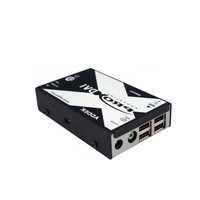
ADDERLink XD C650 - Audio/video extension Adder - Free user manual and instructions
Find the device manual for free ADDERLink XD C650 Adder in PDF.


Pick your language and provide your email: we'll send you a specifically translated version.
| Product Type | Audio/Video Extender |
| Model | ADDERLink XD C650 |
| Brand | Adder |
| Transmission Type | Digital over single Cat5e/6 cable |
| Maximum Resolution | 1920x1200 @ 60Hz (or 1080p) |
| Maximum Distance | Up to 150 meters (Cat6) |
| Video Interface | DVI-D single link |
| Audio Support | Analog stereo audio (3.5mm jack) |
| Housing Material | Metal case |
| Dimensions (L x W x H) | Approx. 100 x 65 x 25 mm |
| Weight | Approx. 200 g |
| Power Supply | 5V DC via included adapter (one unit powered, other via cable) |
| Power Consumption | Less than 5W |
| Main Functions | Extend DVI video and analog audio up to 150m; plug-and-play; no software required |
| Care and Cleaning | Wipe with a dry, soft cloth; avoid liquids and abrasives |
| Safety | Use only supplied power adapter; keep away from moisture; operate in ventilated area |
| Spare Parts | Power supply, mounting brackets (optional); contact support for replacement |
| Repairability | No user-serviceable parts; repair by qualified technician only |
| General Information | Supports EDID pass-through; LED indicators for power and link status |
Frequently Asked Questions - ADDERLink XD C650 Adder
What is the maximum extension distance of the ADDERLink XD C650?
The maximum extension distance is 150 meters when using Cat6 cable. With Cat5e, the distance is typically up to 100 meters.
What video resolutions does it support?
It supports resolutions up to 1920x1200 at 60Hz, including standard 1080p.
Does the extender require any software or drivers?
No, it is a plug-and-play device. No software or drivers are needed.
How are the two units powered?
One unit (typically the transmitter) is powered via an included 5V DC adapter. The receiver receives power over the Cat5e/6 cable from the transmitter.
What connectors are on the device?
The device has a DVI-D connector for video, a 3.5mm stereo audio jack, and an RJ45 port for the Cat cable. There is also a power input on the transmitter.
Can I use this extender with HDMI sources?
Not directly, as it uses DVI. However, you can use a DVI-to-HDMI adapter or cable for video. Audio will need a separate connection.
What does the LED indicator mean?
The power LED indicates the unit is powered. The link LED shows that a valid connection is established between transmitter and receiver.
Is the ADDERLink XD C650 compatible with all DVI sources?
It is compatible with most DVI-D single link sources. Some older or non-standard sources may not work. EDID pass-through helps with compatibility.
How do I clean the device?
Use a dry, soft cloth to wipe the case. Do not use liquids, sprays, or abrasive cleaners.
What should I do if the extender is not working?
Check that all cables are securely connected, power is applied, and the Cat cable is not damaged. Try a shorter cable or different source. If still not working, contact Adder support.
User questions about ADDERLink XD C650 Adder
0 question about this device. Answer the ones you know or ask your own.
Ask a new question about this device
No questions yet. Be the first to ask one.
Download the instructions for your Audio/video extension in PDF format for free! Find your manual ADDERLink XD C650 - Adder and take your electronic device back in hand. On this page are published all the documents necessary for the use of your device. ADDERLink XD C650 by Adder.
USER MANUAL ADDERLink XD C650 Adder
Manual assistant
Powered by Anthropic
Waiting for your message
Product information
Brand : Adder
Model : ADDERLink XD C650
Category : Audio/video extension