
A3 - Game controller Gamesir - Free user manual and instructions
Find the device manual for free A3 Gamesir in PDF.


| Product Type | Game Controller / Remapper |
| Model | A3 |
| Brand | GameSir |
| Compatibility | Android 4.4 or later |
| Connection Type | Wired USB |
| Dimensions (approx.) | 150 x 100 x 50 mm |
| Weight (approx.) | 200 g |
| Power Source | USB (5V/1A adapter or computer) |
| Charging Time | Not specified (typical ~2 hours) |
| Battery Life | No battery; powered via USB |
| Indicator Light | Green flashing during activation; half red half green when active |
| Key Features | Button mapping, USB debugging activation, GameSir World app support |
| Package Contents | GameSir Remapper A3, User Manual |
| Warranty | 12-month replacement from date of receipt |
| Technical Support | Free online support via website, email, or hotline |
| Contact Info | Website: https://gamesir.hk, Email: cs@gamesir.hk, Hotline: +1-888-937-1733 |
| Maintenance | Wipe with a dry cloth; avoid liquids |
| Safety | Keep away from water and small children; use only specified power sources |
| Repairability | Not user-serviceable; contact support for issues |
Frequently Asked Questions - A3 Gamesir
User questions about A3 Gamesir
0 question about this device. Answer the ones you know or ask your own.
Ask a new question about this device
Download the instructions for your Game controller in PDF format for free! Find your manual A3 - Gamesir and take your electronic device back in hand. On this page are published all the documents necessary for the use of your device. A3 by Gamesir.
USER MANUAL A3 Gamesir
GameSir • Gaming is Winning.™
© 2019 GameSir Inc. All rights reserved. Product may vary slightly from those pictures.

GameSir
GameSir Remapper A3
User Manual
PACKAGE CONTENTS
GameSir Remapper A3
User Manual
SYSTEM REQUIREMENTS
Android 4.4 or later
REGISTRATION
Register your GameSir ID online at https://gamesir.hk/ to get real-time information on your product's warranty status and a series of exclusive benefits from GameSir.
YOUR BENEFITS
*12-month replacement of the same model from the date you received it.
* Contact us for free online technical support
Website: https://gamesir.hk
E-mail: cs@gamesir.hk
Hotline: +1-888-937-1733 (USA & Canada)
Service Hours: Sat.-Sun. 9:00 AM-6:00 PM PST
Mon.-Wed. 6:00 AM-6:00 PM PST
Thur.-Fri. 6:00 AM-3:00 PM PST
TUTORIAL
Step 1
Scan the QR code below to download the GameSir World app to your Android phone. Then enable the pop-up permission in the phone settings (Settings > Apps > App permissions > GameSir World > Turn pop-ups on).

Download the GameSir World APP
Step 2
Enable Developer Options menu (Settings > System > About phone > Build number). Click on "Build number" until you see the "You are now a developer!" pop-up.
Step 3
Enable USB Debugging mode (go back to Settings > System > Developer options > enable USB debugging). If your mobile phone brand is Huawei or Honor and the operating system is Android 7.0 or higher, you also need to enable "Allow ADB debugging in charge only mode". If your mobile phone brand is Xiaomi and the operating system is MIUI 8.0 or higher, you also need to enable "USB debugging (security settings)".
Step 4 Step 5
Connect A3 to your Android phone as shown. Then the green indicator light on A3 will flash.
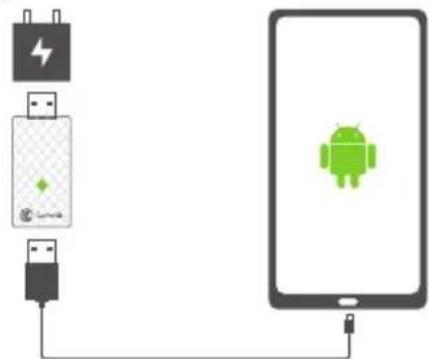
* Charging via USB to computer system or power adapter (5V/1A).
You will see the following pop-ups. Click on "Charge only" and "OK". After the Android phone is successfully activated, the half-red half-green indicator light on A3 will be always on. Activation is complete.
Use USB to

CANCEL
Allow USB debugging
The computer's RSA key fingerprint is: C7:BB:CC:19:26:38:24:97:09:C6:BE:92:EA:5B:16:D7

Always allow from this computer
CANCEL
OK

Mapping starts successfully
If the mapping fails, please reset mapping when starting the game.
DK
* Please Note: If you power off your Android phone, you will need to activate it again after restarting.
日本語
パッケージ 内容
GameSir Remapper A3
取扱説明書
システム要件
Android (4.4以降)
ユーザー登録
C7:BB:CC:19:26:38:24:97:09:C6:BE:92:EA:5B:16:D7

Brand : Gamesir
Model : A3
Category : Game controller