DO200 - Digital decoder S.M.S.L - Free user manual and instructions
Find the device manual for free DO200 S.M.S.L in PDF.


| Product Type | Digital Audio Decoder / DAC |
| DAC Chips | Dual ES9068AS |
| Total Harmonic Distortion + Noise (THD+N) | 0.00008% (-122dB) |
| Dynamic Range (XLR) | 129dB |
| Dynamic Range (RCA) | 125dB |
| Signal-to-Noise Ratio (SNR) | 128dB |
| Output Impedance | 100Ω |
| Maximum Sampling Rate (USB PCM) | 768kHz |
| Maximum Sampling Rate (USB DSD) | 22.5792MHz (DSD512) |
| USB Controller | XMOS XU-216 (32-bit) |
| Bluetooth Version | 5.0 with LDAC, aptX HD, aptX, AAC, SBC |
| MQA Decoding | Yes (USB, Optical, Coaxial, AES/EBU) |
| Inputs | USB, Optical, Coaxial, AES/EBU, I²S (HDMI), Bluetooth |
| Outputs | RCA (unbalanced), XLR (balanced) |
| Display | Full-view color IPS with adjustable dimmer (5-60s) |
| Power Supply | 100-240V AC, 50/60Hz |
| Power Consumption | 5W |
| Remote Control | Included (2x AAA batteries) |
| Hi-Res Audio Certification | Japan Audio Association (JAS) |
| Sound Color Settings | 9 presets (Rich, Tube, Crystal) |
| Pre-amplifier Mode | Volume fixed or variable (pre-amp) |
| Maintenance | Clean with soft dry cloth; avoid solvents and liquids |
| Safety Notes | Use specified voltage only; do not open; place in ventilated area |
| Warranty | 1 year free repair under normal use (conditions apply) |
Frequently Asked Questions - DO200 S.M.S.L
User questions about DO200 S.M.S.L
0 question about this device. Answer the ones you know or ask your own.
Ask a new question about this device
Download the instructions for your Digital decoder in PDF format for free! Find your manual DO200 - S.M.S.L and take your electronic device back in hand. On this page are published all the documents necessary for the use of your device. DO200 by S.M.S.L.
USER MANUAL DO200 S.M.S.L
natural_image
Line drawing of a small electronic device with a screen and two buttons, no text or symbols present.安全注意事项
DSDL=PCM DATA
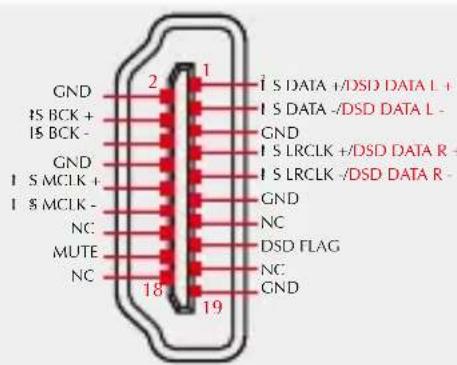
DSDL=PCM LRCK
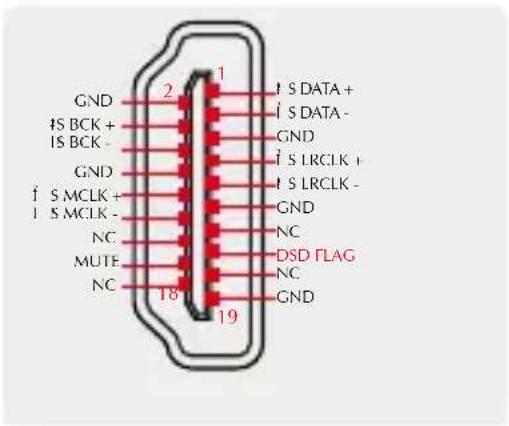
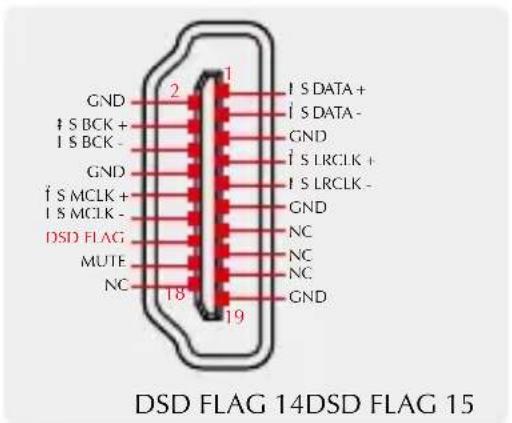
- DSD FLAG = PIN 15
- DSD FLAG = PIN 14
DIMMER (自动熄屏)
5秒\~60秒
natural_image
Line drawing of a small electronic device with a screen and circular button (no text or symbols)The contents of this manual may be changed with the edition, and are subject to change without notice. Ver 1.0
Safety Notes
• Install this unit in a well ventilated, cool, dry, clean place-away from direct sunlight, heat sources, vibration, dust, moisture, or cold..
- Use the voltage specified on this unit Only. Using this unit with a higher voltage than specified is dangerous and may cause fire, damage to this unit, or personal injury. Our company will not be held responsible for any damage resulting from the use of this unit with a voltage other than that specified.
- Do not attempt to modify or fix this unit by yourself. Contact alesperson or customer service when any service is needed. The cabinet should never be opened for any reason.
- When not planning to use this unit for long periods of time (i.e. when going on vacation), disconnect the power cable from the AC wall outlet.
Important note:
The product specifications and information mentioned in this manual are for reference only. The content of this manual is subject to change without notice.
Warranty Terms
1. The Term of Service
Foshan Shuangmusanlin Technology Co., Ltd promises to offer good-quality products. If the product is broken in 7 days after purchasing when you use it normally, you can choose to send it back for return, replacement or repairing (only the product does not affect the second sales can be returned). Repairing for free in one year if you use it normally.
-
Date of purchase is in accordance with the date on invoice or receipt uesd by seller, and if you buy it on line, you can show the screenshot of trade.
-
If an inappropriate usage causes the unit damaged, the warranty will be void. As below.
-
All damages by inappropriate use, including using it under non-normal working environment or without following the instructions.
• Dismantling, refitting, repairing by user in private. - Causing damage by using some fittings instead of the designative or accredited ones.
-
Cannot provide credible proof of purchase.
-
Sending it back to our company for repairing.
-
Contact your S.M.S.L Audio reseller for a return or replacement.
Features
- Both USB and SPDIF support MQA decoding function, and support MQA-CD;
- 2x advanced ES9068AS D/A chips, fully optimized to THD+N as low as -122dB, far exceeding the official specifications;
- 5x High-End dual op amp OPA1612A and a large number of audio grade components;
- XMOS XU-216, a true 32bit USB solution, supporting DoP256 and native DSD512, PCM supports up to 768kHz;
• All input ports support DSD(Except BT), coaxial, optical and AES support DoP64;
• Qualcomm's latest Bluetooth chip supports LDAC 24bit/96kHz, APTX/HD, SBC, AAC; - Ultra-low phase noise and optimized clock system to achieve ultra-low clock jitter;
• Tempered glass display panel, higher light transmittance, longer service life; - Low-noise power supply, while improving power efficiency and lower power consumption;
• Discrete component linear power supplies and multiple low-noise power supplies specially designed for analog circuits;
• High-quality gold-plated input and output connection terminals;
• Full-view color IPS display with dimmer function;
• Japan Audio Association (JAS) Hi-Res certification;
• Equipped with remote control and full-function remote control.
Specifications
Input ...... USB / Optical / Coaxial / AES/EBU / Bluetooth / I²S
Output RCA/XLR
Output Level ....XLR 4.0Vrms
RCA 2.0Vrms
THD+N 0.00008%(-122dB)
Dynamic range ....XLR 129dB
RCA 125dB
SNR 128dB
Output impedance ....100Ω
USB transmission ......Asynchronization
USB compatibility ....Windows 7 / 8 / 8.1 / 10 / 11, Mac OSX、Linux
Bit depth ....USB 1bit, 16 \~ 32bit
Optical / Coaxial / AES/EBU 1bit, 16 \~ 24bit
Sampling rate ....USB / I²S PCM 44.1 \~ 768kHz
DSD 2.8224 \~ 22.5792MHz
Optical / Coaxial / AES/EBU PCM 44.1 \~ 192kHz
DSD DSD64(DoP)
Bluetooth specification......BT 5.0(support SBC,AAC,aptX,aptX HD,LDAC)
Power Consumption ....5W
Specifications are subject to change without notice.
Remote control
• Install 2 x AAA batteries as instructions.
- When using the remote control, point it toward the remote con-trol signal receiver on the main unit from a distance of 5 m (16 ft) or less. Do not place obstructions between the main unit and the remote control.
- The remote control might not work if the remote control signal receiver on the unit is exposed to direct sunlight or bright light. If this occurs, try moving the unit. Beware that use of this remote control could cause the unin-tentional operation of other devices that can be controlled by infra.
Operating the remote control
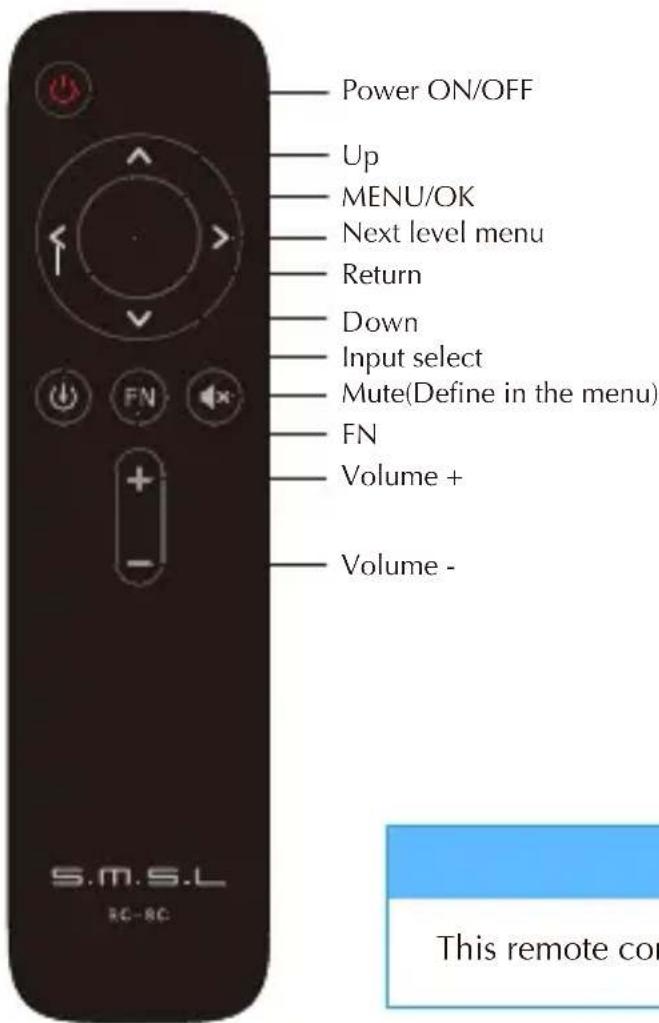
Note
This remote controller use 2 x R03/AAA batteries.
Display Interface and Instructions
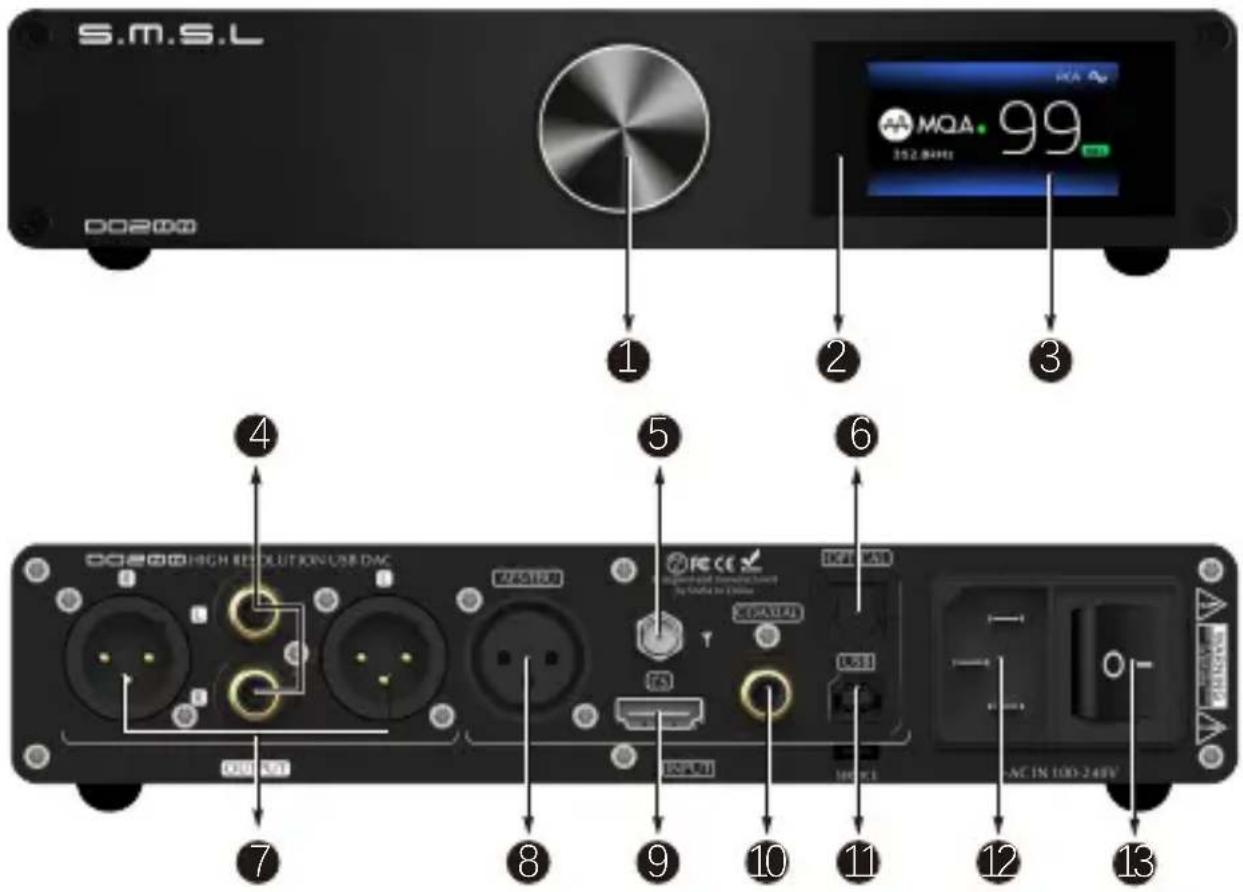
1 Knob
4 RCA output
7 Balanced output
10 Coaxial input USB input
13 Power switch
2 Remote window Display
5 Bluetooth antenna
8 AES/EBU input
11
3
6 Optical input
9 I²S input
12 AC IN(100-240VAC)
Package list
1* SMSL DO200
1* USB cable
1* Warranty card
1* Remote control
1* AC power cable
1* Bluetooth antenna
1* User manual
User interface
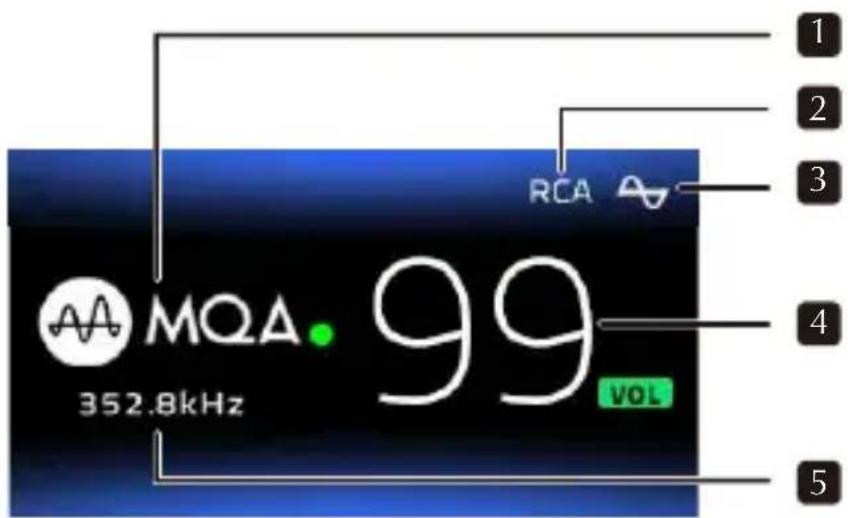
1、Audio format
2、Output interface, when blank, two interfaces output at the same time.
3、Output phase mark, ∞ Normal phase, ∞ Inverted.
4、Volume Level
5、Sampling rate, When Bluetooth input, display the decoding format (SBC, AAC, APTX, APTX HD, LDAC)
About MQA
MQA (Master Quality Authenticated) is an award-winning British technology that delivers the sound of the original master recording. The master MQA file is fully authenticated and is small enough to stream or download. The DO200 includes MQA technology, which enables you to playback MQA audio files and streams, delivering the sound of the original master recording.
Visit How it works https://www.mqa.co.uk/how-it-works for more information.
MQA files playback
• DO200 has only USB, optical, coaxial and AES interfaces, supports MQA decoding.
- DO200's MQA playback does not require additional software. You can use foobar2000 or Audirvana for MQA playback as it supports ASIO or WASAPI audio output. When playing MQA audio, it is suggested to adjust the volume of the computer to the maximum for the best audio output.
- The DO200 LED next to MQA logo glows green or blue to indicate that the unit is decoding and playing an MQA stream or file, and denotes provenance to ensure that the sound is identical to that of the source material. It glows blue to indicate it is playing an MQA Studio file, which has either been approved in the studio by the artist/producer or has been verified by the copyright owner.
- When playing an MQA file, the sampling rate of the original master recording is displayed.

MQA and the Sound Wave Device are registered trade marks of MQA Limited.© 2016
Instructions
INPUTS
USB
• OPTICAL
COAXIAL
AES/EBU
I2S(HDMI)
- BLUETOOTH
OUTPUTS
- ALL Normal
- XLR Normal
- RCA Normal
- ALL Inverted
- XLR Inverted
- RCA Inverted
PCM FILTER
- Fast Linear
- Slow minimum
- Minimum Phase
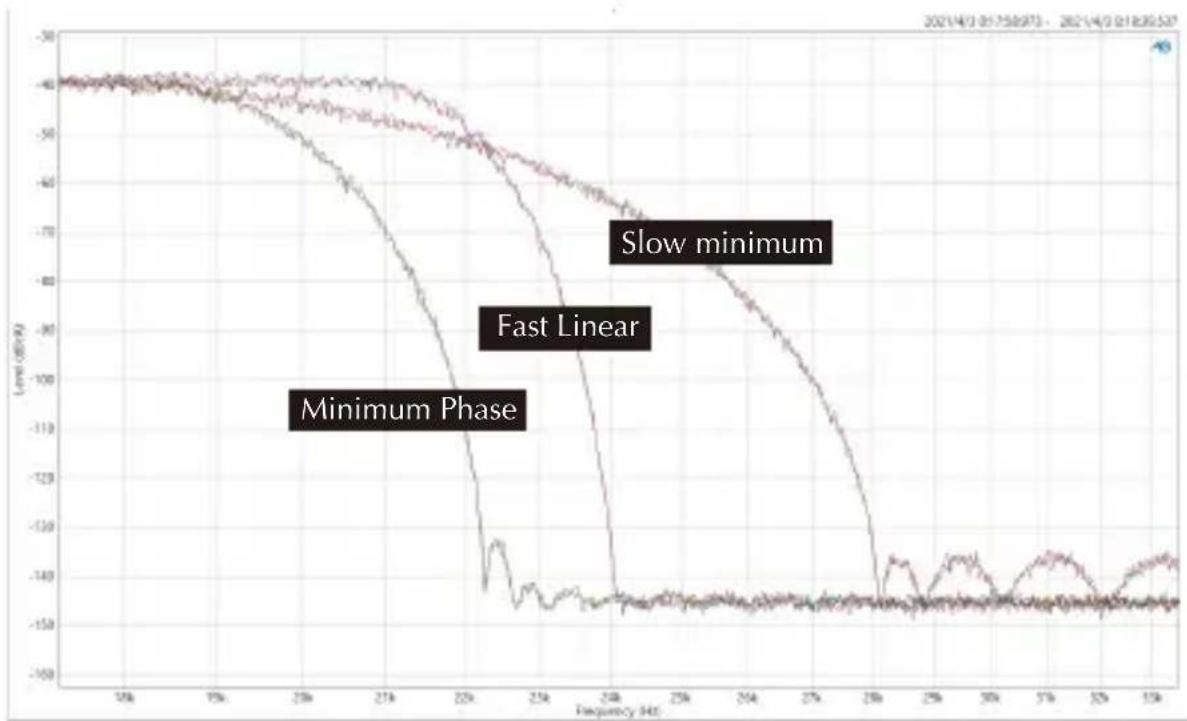
line
| Frequency (Hz) | Level (dBm) | | -------------- | ----------- | | 10k | -40 | | 15k | -45 | | 20k | -50 | | 25k | -60 | | 30k | -70 | | 35k | -80 | | 40k | -90 | | 45k | -100 | | 50k | -110 | | 55k | -120 | | 60k | -130 | | 65k | -140 | | 70k | -145 | | 75k | -148 | | 80k | -149 | | 85k | -149 | | 90k | -149 | | 95k | -149 | | 100k | -149 |SPDIF MODE
This setting is only valid for optical/coaxial and AES interfaces which using SPDIF protocol;
• NORMAL MODE
NORMAL mode, only use the digital receiver chip (DIR) to process the SPDIF signal, used in most occasions, in this mode supports MQA renderer and DoP playback, but at this time due to the limitation of the ES9068AS chip, it cannot display that the current playing is DoP, and only 176.4kHz input can be displayed. This is normal, and the internal will still decode DoP and output normal audio.
- PROCESSOR MODE
PROCESSOR mode, in this mode DO200 will use the XMOS processor to process the optical/coaxial signal, so that it can have more powerful computing power and can handle various complex tasks including MQA, DoP, in this mode, Play DoP audio, the DSD icon will be displayed correctly on the display.
Note: do not switch this mode frequently, try to restart the machine after switching this mode, otherwise it may cause output noise.
SOUND COLOR
There are 9 sound color settings in DO200.
- Rich1、Rich2、Rich3
- Tube1、Tube2、Tube3
• Crystal1、Crystal2、Crystal3
This setting is using the DSP of ES9068AS, to make some different sound color, all of these settings will not change the frequency response curve. When set to "Standard", this setting will be bypassed.
PRE MODE
Volume control enable or disable.
- Vol Fixed: In this mode, volume is fixed on max output level, and the DO200 will ignore the volume operations.
• Vol Variable: In this mode, volume can be adjust, and make DO200 a pre-amplifier.
FN KEY FOR
- Switch XLR/RCA
- ALL Outputs
- Bluetooth
- Switch Phase
DPLL
• MIN \~ MAX
(A total of 15 kinds, the default is 5 kinds. The larger the number is, the stronger the range to adapt to jitter, and the smaller the number, the better the performance against clock jitter.)
This DPLL setting is a special function of ESS series products. It can adjust the internal DPLL digital phase locked loop circuit Bandwidth, so that the chip achieves a balance between anti clock jitter and input tolerance.
Its function:
- When the clock stability of the input signal is good, this value can be reduced, so that the clock performance of the system is better;
- When the clock stability of the input signal is not good, the sound may be interrupted. Increase this value can avoid the sound interruption! Especially when using TV as signal source!
I²S MODE
NORMAL
• INVERTED
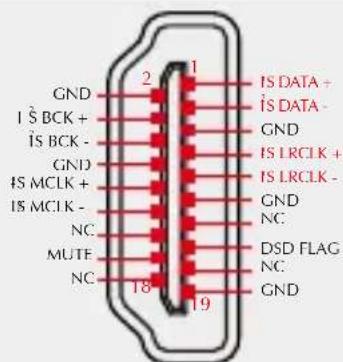
NORMAL
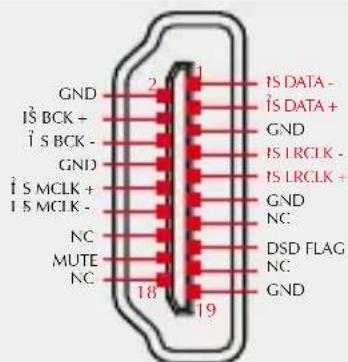
INVERTED
Note: This option is used to match different I2S interface standards, please check the interface definition of the signal source before use
DSD CHANNEL
- DSDL=PCM DATA (The DSD left channel using the PCM DATA pin)
- DSDL=PCM LRCK (The DSD left channel using the PCM LRCK pin)
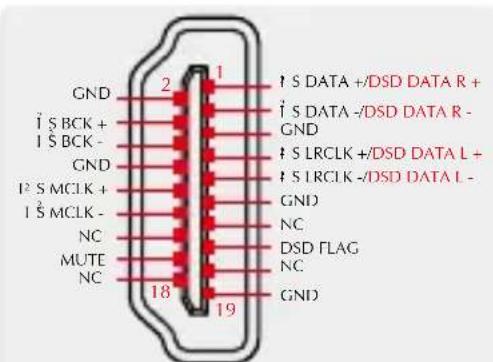
DSDL=PCM DATA
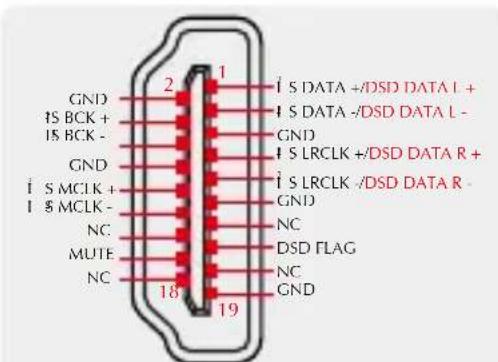
DSDL=PCM LRCK
Note: When using the I2S input to streaming DSD audio, if you find that the left and right channels are incorrect, you can use this option to correct it.
DSD FLAG
DIMMER
- 5 second \~ 60 second
(The range is 5 seconds-60 seconds. After setting, the screen will automatically go off within this time, and the screen will re-light up if you operate the remote control or the knob at any time.)
BRIGHTNESS
- During Bluetooth input, long press the middle button of the knob, the system will only reset the Bluetooth pairing status;
- During other input, long press the middle button of the knob, the system will clear all settings, including Bluetooth.
00200
取扱説明書
natural_image
Line drawing of a small electronic device with a screen and circular button (no text or symbols)安全指示
スイッチのオン/オフ
アップ
メニューへのアクセス/確認
セカンダリーメニューへのアクセス
戻る
ダウン
入力選択
ミユート
FNボタン
ボリュームアップ
ボリュームダウン
ご注意
- USB AUDIO (USB入力)
• OPTICAL (光入力)
COAXIAL (同轴入力) - AES/EBU (AES/EBU入力)
- 12S (HDMI) (12S HDMI入力)
- BLUETOOTH (BLUETOOTH入力)
OUTPUTS
DIMMER(自動スクリーンオフ)
- 5 second \~ 60 second
- 安全注意事项
- DIMMER (自动熄屏)
- Safety Notes
- Important note:
- Warranty Terms
- The Term of Service
- Features
- Specifications
- Remote control
- Operating the remote control
- Note
- Display Interface and Instructions
- Package list
- User interface
- About MQA
- MQA files playback
- Instructions
- INPUTS
- OUTPUTS
- PCM FILTER
- SPDIF MODE
- • NORMAL MODE
- - PROCESSOR MODE
- SOUND COLOR
- PRE MODE
- FN KEY FOR
- DPLL
- Its function:
- I²S MODE
- DSD CHANNEL
- DSD FLAG
- DIMMER
- BRIGHTNESS
- 00200
- 取扱説明書
- 安全指示
- ご注意
- DIMMER(自動スクリーンオフ)
Brand : S.M.S.L
Model : DO200
Category : Digital decoder