
MON-50-DM - Dash cam EchoMaster - Free user manual and instructions
Find the device manual for free MON-50-DM EchoMaster in PDF.


| Product Type | 5-inch Digital TFT LCD Monitor |
| Brand | EchoMaster |
| Model | MON-50-DM |
| Screen Size | 5 inches |
| Display Type | Digital TFT LCD |
| Aspect Ratio | 16:9 |
| Resolution | 800 x 480 pixels |
| Contrast Ratio | 350:1 |
| Luminance | 350 cd/m² |
| Power Supply | 12V DC |
| Current Draw | 3W |
| Video Inputs | 2 (RCA) |
| Video Triggers | 1 (reverse trigger on blue wire) |
| TV System | PAL/NTSC (auto-switch) |
| OSD Languages | English, Chinese |
| Operating Temperature | -20°C to +70°C |
| IP Rating | IP30 |
| Dimensions (W x H x D) | 104.8 x 95.3 x 12.7 mm |
| Mounting | Windscreen mount and bracket included |
| Included Accessories | Monitor, windscreen mount, bracket, harness, removable sunshade, user manual |
| Safety Note | Do not obstruct driver's view or airbags |
| Maintenance | Clean with a soft, dry cloth; avoid silicone on adhesive pad |
| Warranty / Support | Contact AAMP Global: support@aampglobal.com (US) or technical.eu@aampglobal.com (EU) |
Frequently Asked Questions - MON-50-DM EchoMaster
User questions about MON-50-DM EchoMaster
0 question about this device. Answer the ones you know or ask your own.
Ask a new question about this device
Download the instructions for your Dash cam in PDF format for free! Find your manual MON-50-DM - EchoMaster and take your electronic device back in hand. On this page are published all the documents necessary for the use of your device. MON-50-DM by EchoMaster.
USER MANUAL MON-50-DM EchoMaster
natural_image
Product photo of a black rectangular electronic device with attached cables and connectors, set against a teal and yellow background (no visible text or symbols)5" Digital Slim TFT/LCD Monitor
User Manual

ECHOMASTER
MON-50-DM
Introduction
Thank you for purchasing your EchoMaster automotive monitor.
Your monitor displays a clear, high resolution image of the area surrounding your vehicle, meaning your maneuvering and vehicle awareness will be greatly improved.
Please ensure you read and understand all aspects of this manual before fitting or using your EchoMaster monitor.
Box Contents
5" TFT/LCD Display
Windscreen Mount
Mounting Bracket
Harness
User Manual
Key Features
Screen Type: 5" Digital TFT LCD
Display Format: 16.9
Two Video Inputs
Auto switching when in reverse
Auto video detection
PAL/NTSC auto switch
Contrast: 350:1
Pixel: 800 x 480, 480 x 272
Slim and Sleek Design
Removable sunshade included
MON-50-DM
5" Digital Slim TFT/LCD Monitor

ECHOMASTER
Fitting Instructions
Choose a mounting location that will not obscure the driver's view. Also please ensure that the unit is not mounted in a location that will obstruct the operation of any airbags.
Ensure that the mounting area is clean and free of silicone, as this will cause the adhesive pad not to adhere.
Secure the bracket in place.
Once the unit is in place, run the connections cable to behind the dash where the connections are to be made as shown in the wiring diagram section of this manual.
Operating Instructions
To turn on the unit the vehicle ignition should be ON
The monitor will only turn on when there is a video signal present.
Press the POWER button to turn the screen on.
To switch between the 2 video inputs use the MODE select button.
Pressing the MENU button will allow you to adjust the various menu settings available.
When a 12V input is detected on the blue wire, the unit will automatically switch to Camera input. If the unit is currently turned off when this trigger is detected it will automatically turn on and switch to Camera input.
Operating Instructions
Menu
The Menu functions can be adjusted using the + and - buttons on the monitor.
Brightness: Adjust the brightness level of the screen between 0 and 100.
Contrast: Adjust the contrast of the screen between 0 and 100.
Colour: Adjust the colour of the screen between 0 and 100.
Hue: Adjust the hue of the screen between 0 and 100.
Language: English / Chinese
Reset: Resets the unit to factory settings
Wiring Diagram
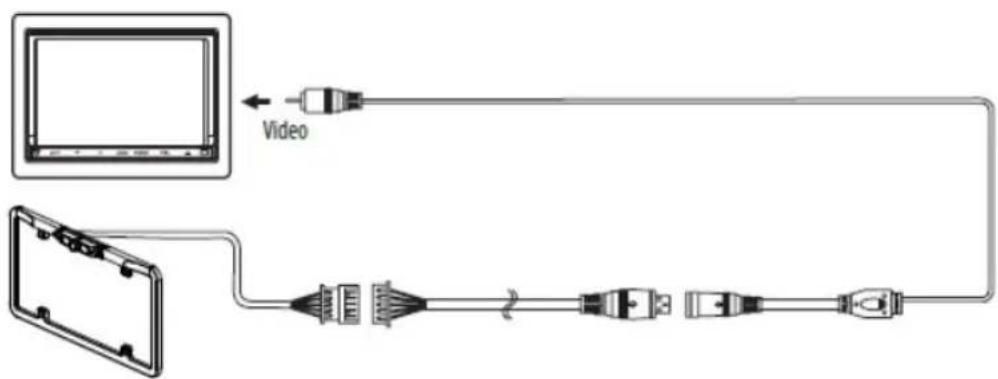
MON-50-DM
5" Digital Slim TFT/LCD Monitor

ECHOMASTER
Dimensions

Specifications
| MON-50-DM | |
| Screen Size 5" Digital TFT/LCD | |
| Aspect Ratio 16:9 | |
| Power Supply 12v DC | |
| Resolution 800 x 480 | |
| Luminance 350 | |
| Contrast 350:1 | |
| TV Format PAL/NTSC | |
| OSD Languages Multi | |
| Video Inputs 2 | |
| Audio Inputs -- | |
| Triggers 1 | |
| Current Draw 3W | |
| Operating Temperature -20°C - +70°C | |
| IP Rating 30 | |
| Parking Guidelines | NO |
| Dimensions (mm) | 104.8 (W) x 95.3 (H) x 12.7 (D) |
| Connection Type | RCA |
Installation Guide

ECHOMASTER
MON-50-DM
5" Digital Slim TFT/LCD Monitor
NOTES:
Installation Guide
MON-50-DM
5" Digital Slim TFT/LCD Monitor

ECHOMASTER
NOTES:

ECHOMASTER
15500 Lightwave Drive, Suite 202, Clearwater, Florida 33760
Unit 25B, Woolmer Way, Bordon, Hampshire, United Kingdom, GU35 9QE
email - support@aampglobal.com (US)
tel - 1-800-477-2267 (East Coast) - 1-888-883-2790 (West Coast)
email - technical.eu@aampglobal.com (Europe)
tel - +44(0)1420 487110 (sales) - +44(0)1420 470618 (technical)

EchoMaster is a Power Brand of AAMP Global.
EchoMaster.com
UG-MON-50-FM
REV. 210817


Brand : EchoMaster
Model : MON-50-DM
Category : Dash cam