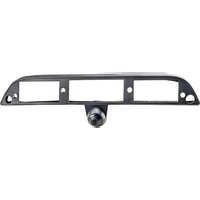
PCAM-JP2-N - Rear Camera EchoMaster - Free user manual and instructions
Find the device manual for free PCAM-JP2-N EchoMaster in PDF.


Pick your language and provide your email: we'll send you a specifically translated version.
| Product Type | Rear View Camera |
| Brand | EchoMaster |
| Model | PCAM-JP2-N |
| Dimensions (L x W x H) | Approx. 2.4 x 1.2 x 1.2 inches (60 x 30 x 30 mm) |
| Weight | Approx. 1.8 oz (50 g) |
| Power Supply | 12V DC |
| Video Output | Composite RCA (1.0V p-p, 75 Ohm) |
| Viewing Angle | 120° diagonal |
| Resolution | 480p (720 x 480) |
| IP Rating | IP67 (waterproof) |
| Main Functions | Reverse-activated display, night vision (IR LEDs), parking guide lines |
| Installation Type | Flush mount or bracket mount |
| Operating Temperature | -4°F to 140°F (-20°C to 60°C) |
| Maintenance | Clean lens with a soft, dry cloth; avoid abrasive cleaners |
| Safety | Disconnect power before cleaning or installation |
| Spare Parts & Repairability | Replacement cables and brackets available; repair by qualified technician |
| Warranty | 1 year limited warranty |
Frequently Asked Questions - PCAM-JP2-N EchoMaster
How do I connect the EchoMaster PCAM-JP2-N camera to my vehicle?
Connect the camera's power wire to the reverse light circuit (12V) and the video output to the monitor's RCA input. Ensure the ground wire is securely attached to the chassis.
Is the camera compatible with all vehicle types?
The camera is designed for universal fitment and works with most cars, trucks, SUVs, and vans. However, verify mounting location and wiring compatibility before installation.
How do I activate the camera automatically when reversing?
Connect the camera's power wire to the reverse light positive lead. When you shift into reverse, the 12V signal triggers the camera and monitor.
What is the best mounting position for the camera?
Mount the camera on the rear of the vehicle, centered if possible, at a height of 12-24 inches from the ground tilted slightly downward for optimal viewing.
Does the camera work in low light or at night?
Yes, the camera features built-in IR LEDs for night vision, providing clear images in complete darkness up to 10 meters.
What should I do if the camera shows no image on the monitor?
Check that the camera is receiving 12V power, video cable connections are secure, and the monitor is set to the correct input. Also verify the vehicle is in reverse if wired that way.
How do I clean the camera lens?
Use a soft microfiber cloth lightly dampened with water or lens cleaner. Gently wipe the lens in a circular motion. Do not use abrasive materials.
Can the camera be used as a front view camera?
Yes, it can be used as a front view camera. Simply mount it at the front and connect the power to an ignition-switched source instead of reverse light.
What is the warranty period for the EchoMaster PCAM-JP2-N?
The camera comes with a 1-year limited warranty against manufacturing defects. Contact EchoMaster support for warranty claims.
Are replacement cables available for this model?
Yes, replacement cables and brackets are available from EchoMaster retailers or through customer service. Check the product manual for part numbers.
User questions about PCAM-JP2-N EchoMaster
0 question about this device. Answer the ones you know or ask your own.
Ask a new question about this device
No questions yet. Be the first to ask one.
Download the instructions for your Rear Camera in PDF format for free! Find your manual PCAM-JP2-N - EchoMaster and take your electronic device back in hand. On this page are published all the documents necessary for the use of your device. PCAM-JP2-N by EchoMaster.
USER MANUAL PCAM-JP2-N EchoMaster

Manual assistant
Powered by Anthropic
Waiting for your message
Product information
Brand : EchoMaster
Model : PCAM-JP2-N
Category : Rear Camera