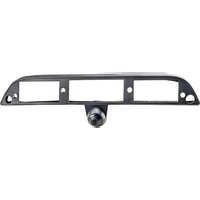
MRC-LP01CP - Rear Camera EchoMaster - Free user manual and instructions
Find the device manual for free MRC-LP01CP EchoMaster in PDF.


Pick your language and provide your email: we'll send you a specifically translated version.
| Product Type | Rear View Camera |
| Brand | EchoMaster |
| Model | MRC-LP01CP |
| Dimensions (L x W x H) | 2.5 x 1.5 x 1.5 inches |
| Weight | 0.2 lbs |
| Power Supply | 12V DC |
| Video Resolution | 720 x 480 pixels |
| Viewing Angle | 120 degrees |
| Night Vision | Yes, infrared LEDs |
| Waterproof Rating | IP67 |
| Color | Black |
| Compatible Monitor | Standard RCA video input |
| Installation Type | Surface mount or flush mount |
| Wiring | Hardwired with included cables |
| Maintenance | Clean lens with soft microfiber cloth |
| Safety Features | Reverse trigger activation |
| Spare Parts Availability | Replacement cables and brackets available from manufacturer |
| Repairability | Professional installation recommended for repairs |
| General Information | Provides clear rear view to assist parking |
Frequently Asked Questions - MRC-LP01CP EchoMaster
How do I install the EchoMaster MRC-LP01CP rear camera?
Mount the camera near the rear license plate, route the video cable to the front monitor, and connect power (12V) to reverse light circuit. Use included brackets and follow the user manual for detailed steps.
What is the viewing angle of this camera?
The MRC-LP01CP has a 120-degree field of view, providing a wide rear view to minimize blind spots.
Does this camera support night vision?
Yes, it features infrared LEDs for clear night vision, allowing visibility in low-light conditions.
Is the camera waterproof?
Yes, it has an IP67 waterproof rating, meaning it is dust-tight and can be submerged in water up to 1 meter for 30 minutes.
What type of video output does it use?
It outputs a standard RCA composite video signal, compatible with most aftermarket monitors.
Can I connect multiple cameras to one monitor?
This requires a separate video switcher. The MRC-LP01CP can be used in systems with multiple inputs.
Do I need to drill holes for installation?
Depending on vehicle, you may need to drill a small hole for the cable. The kit includes a grommet to seal the hole.
How do I clean the camera lens?
Use a soft, dry microfiber cloth. Avoid abrasive cleaners. For stubborn dirt, dampen the cloth slightly with water.
What should I do if the image is blurry?
Check the lens for dirt or moisture. Ensure the camera is properly focused (adjustable on some models). Verify video connections.
Is there a warranty on this product?
EchoMaster offers a 1-year limited warranty against defects. Keep your purchase receipt for service.
User questions about MRC-LP01CP EchoMaster
0 question about this device. Answer the ones you know or ask your own.
Ask a new question about this device
No questions yet. Be the first to ask one.
Download the instructions for your Rear Camera in PDF format for free! Find your manual MRC-LP01CP - EchoMaster and take your electronic device back in hand. On this page are published all the documents necessary for the use of your device. MRC-LP01CP by EchoMaster.
USER MANUAL MRC-LP01CP EchoMaster

Manual assistant
Powered by Anthropic
Waiting for your message
Product information
Brand : EchoMaster
Model : MRC-LP01CP
Category : Rear Camera