
F-VXH50M - Air purifier PANASONIC - Free user manual and instructions
Find the device manual for free F-VXH50M PANASONIC in PDF.


| Product Type | Humidifying Air Purifier |
| Brand | Panasonic |
| Model | F-VXH50M |
| Dimensions (W x D x H) | 360 mm x (230 mm + 10 mm foot) x 560 mm |
| Weight | 8.6 kg |
| Power Supply | 220 V ~ 50/60 Hz |
| Power Cord Length | 2.0 m |
| Water Tank Capacity | Approx. 2.3 L |
| Floor Area Capacity (Clean Air) | Up to 40 m² |
| Floor Area Capacity (Clean/Humid) | Up to 23 m² |
| Air Volume (Clean Air - Hi/Med/Lo) | 5.1 / 1.9 / 0.9 m³/min |
| Air Volume (Clean/Humid - Hi/Med/Lo) | 4.9 / 2.3 / 1.3 m³/min |
| Humidifying Amount (Hi/Med/Lo) | 500 / 230 / 150 mL/h |
| Power Consumption (Clean Air - Hi/Med/Lo) | 45 / 9 / 6 W |
| Power Consumption (Clean/Humid - Hi/Med/Lo) | 45 / 13 / 9 W |
| Key Technologies | nanoe™, Mega Catcher, Econavi |
| Operation Modes | Clean Air, Clean/Humid, Full Auto, Econavi |
| Air Quality Sensors | Odor sensor, Dirt sensor (dust/house dust) |
| Timer Modes | 2 h, 4 h, Sleep (8 h) |
| Child Lock | Yes (press and hold 3 sec) |
| Sleep Mode Auto Operation | Automatically adjusts brightness and air volume based on ambient light |
| Filter Types | Composite air filter (F-ZXHP55Z), Deodorizing filter (F-ZXHD55Z), Humidifying filter (F-ZXHE50Z) |
| Replacement Interval (Composite/Deodorizing/Humidifying) | About once per 10 years each (may vary with usage) |
| Safety Features | Auto shut-off when tank empty, check indicator for malfunctions, child lock, overheat protection (via power plug cleaning advice) |
Frequently Asked Questions - F-VXH50M PANASONIC
User questions about F-VXH50M PANASONIC
0 question about this device. Answer the ones you know or ask your own.
Ask a new question about this device
Download the instructions for your Air purifier in PDF format for free! Find your manual F-VXH50M - PANASONIC and take your electronic device back in hand. On this page are published all the documents necessary for the use of your device. F-VXH50M by PANASONIC.
USER MANUAL F-VXH50M PANASONIC
| Model number | F-VXH50M | |||||
| Power supply | 220V~50Hz | 220V~60Hz | 240V~50Hz | |||
| Operation mode | Clean Air | Clean/Humid. | ||||
| Air Volume settings | Hi | Med | Lo | Hi | Med | Lo |
| Power consumption (w)*1 | 45 | 9 | 6 | 45 | 13 | 9 |
| Humidifying amount (mL/h)*2 | — 2.9 | — 2.9 | — 2.9 | 500 | 230 | 150 |
| Air volume (m3/min) | 5.1 | 1.9 | 0.9 | 4.9 | 2.3 | 1.3 |
| Floor area capacity | Up to 40m2in a standard household room | Up to 23m2in a standard household room | ||||
| Capacity of the tank | About 2.3L | |||||
| Power cord length | 2.0m | |||||
| Product dimensions | 360mmx[230mm+(Foot:10mm)]x560mm(WxDxH) | |||||
| Product weight | 8.6kg | |||||
*1 The power consumption is about 0.3W when the operation is set to "Off", (With the power plug inserted)
*2 The humidifying amount may vary with the indoor temperature and humidity (P.22).
- 3 If there is water in the tank, the unit uses its water to humidify a little. (The water in the tank will be reduced little)
● Replacement composite air filter ● Replacement deodorizing filter ● Replacement humidifying filter
All air volume indicator are flickering.
main unit is breakdown.
Please disconnect power plug and contact to the dealer for repairs.
Yejirat mdar la yao tomuz.
©Panasonic Corporation 2012
VXH5M8950 C
TO812-0
Operating requirements 6
Preparation 8\~10
Operating Methods 11
• Control panel/Front indication.... 11
- Select airflow, air volume, Econavi.
and Spot Air. mode 13
Care and maintenance 14
- When idle for a long time 16
Further information.... 17
• Reference time for filter replacement ...17,18
FAQs 22
Troubleshooting 24,26
Specifications/Optional accessories --Back cover
Panasonic
Operating Instructions
تعليمات التشفيل
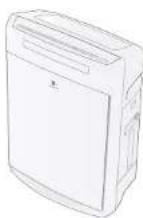
Humidifying Air Purifier
منقى الهواء الرطب
This product is for indoor use only.
Thank you very much for purchasing this Panasonic product.
- Please read these operating instructions carefully in order to use the product correctly and in a safe manner.
● Also, be sure to read the "Safety precautions" section (page 4-7) before use. - Keep the operating instructions in a safe place for future reference.
The "Mega Catcher" and "nanoe™" give you moist and clean air.
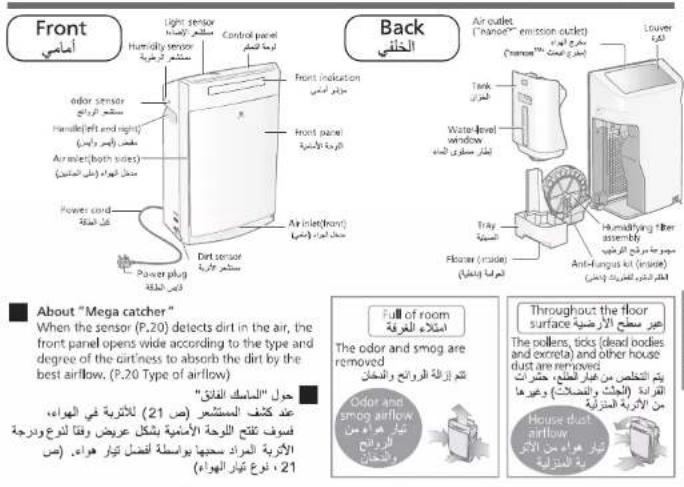
If the sensor detects dirt in the air, the front panel opens wide and the "Mega catcher" with strong absorption capability is enabled.
■ Equipped with "nanoe™" technology.
■ Low power consumption in the Econavi mode.
“nanoe™” و “Mega Catcher” تم JFK
ونظيفا.
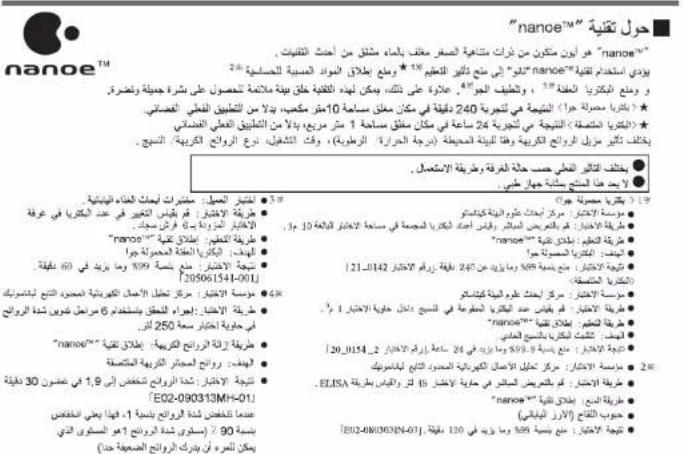
'nanoe™' is a microparticle ion wrapped in water that is derived from the latest technology.
With 'nanoe™' technology, the effect of sterilization ^1 , inhibiting allergic substance ^2 , inhibiting mold bacteria ^3 and deodorization ^4 can be achieved. Furthermore, it creates an atmosphere that is conducive for beautiful hydrated skin.
★
★< airborne bacteria >The result is of a 24-hours test in closed space of 1 m ^3 , instead of in actual application space.
The deodorizer effect differs according to the surrounding environment (temperature/humidity), operation time, type of odor/fiber.
● The actual effect differs according to the room condition and the method of use. ● This product is not a medical equipment.
e1 < airborne bacteria >
- Testing organization: Kitasato Research Center of Environmental Sciences
- Test method: Directly expose and measure the bacteria count collected in action space of 10m ^2
● Sterilization method: release nanoc™
• Target: airborne bacteria
● Test outcome: inhibited 99% and above in 240 minutes. [Test number 21_0142]
- Testing organization: Kitasalo Research Center of Environmental Sciences
- Test method: measure the bacteria count soaked in the fabric inside the 1 m³ test container
● Sterilization method: release nanoa™
● Target: bacteria clinging onto the standard fabric
● Test outcome, inhibited 99.9% and above in 24 hours. (Test number 20_0154_2)
※2●Testing organization: Panasonic Electric Works Analysis Center Co Ltd
●Test method: directly expose in 45L test container and measure with EUSA
method
●Inhibiting method: release nanoo™
● Target pollen Japanese cereal
- Yes: outcome: Inhab: 99% and above in 120 minutes; 120/2010/30/19(POS)
3 Test client: Japan Food Research Laboratories.
- Test method: measure change in bacteria count in test
room measuring 5 tatam mat
●Sterilization method: release nano-™
●Target: airborne mold bacteria
●Test outcome: inhibit 99% and above in 60 minutes.
[205061541-00]
Testing reorganization. Panasonic Electric Works Analysis
● Trading organization, Inc., Center Co. Ltd
●Testing method: conduct verification by using 6-phase
prior intensity rotation in test containers of 750L
●Deodorizing method, release nano ^TM
●target: adhered cigarette odor
●Test outcome: odor intensity drops to 1.9 within 30
minutes. [E02-090313MH-C1]. When odor intensity drops
by 1, it means reduction of 90% (Level 1 of odor intensity
is such a level that one can perceive very weak smell)
If a problem is encountered, investigate it by referring first to the table below. If the problem still persists, please disconnect power plug and contact the dealer for repairs.
| Now | Please confirm the following: |
| 9 The humidity does not increase | ●Is the room size too big for the unit? (Back cover) ●Is the room ventilated, or has laid the carpet onto the floor? →If the floor is carpeted, the humidity may be difficult to increase sometimes, depending on the specific ventilation, floor and wall material. |
| 10 There is condensation inside the tray | ●After the unit stops operation or when the room is cold, there may be condensation. This is normal. |
| 11 The water fill indicator is blinking or lit up | ●Is the tank filled with water? (P.10)The indicator is blinking: The water is used out in the Clean/Humid, mode (The unit stops operation).The light is lit up: The water is used out in the Full Auto mode. (The unit switches to the Clean Air mode)→To continue humidifying, fill water into the tank (P.10).Press Power of this twice, and the operation will start again. |
| 12 Even if there is water in the tank, the water fill indicator is still blinking or lit up. | ●Is the tray fit into the interior of the unit? ●Is the main unit tilted? →Please install the unit onto the level and stable table or floor. ●After filling water when the water fill indicator is blinking or lighting up, press the Power of this button twice, the water fill indicator will turn off, and the operation will start again. |
| 13 The check indicator is on | ●Is the main unit overturned? →① Disconnect the power plug. ② Erect the main unit. (Wipe the water off it) ③ Keep the unit idle for half a day. (Doing this is to dry the unit thoroughly in case water drops into it.) ④ Power the unit on again, and it will operate. ●Have you applied such actions as shaking, tilting and impacting onto the main unit? →Disconnect the power plug, and then reinsert it. ●Do you put any magnet and metal objects onto the main unit? →Disconnect the power plug, and then reinsert it. |
If any of the following conditions occur, please contact the dealer immediately.
⑭ The check indicator is on All the air volume indicators are blinking
● The main unit is failed → Please disconnect the power plug, and send the unit to the dealer for repair.
Parts identification
تعريف الأجنبية
Always observe these precautions
These safety precautions are provided for your protection. Please read and follow them carefully to avoid unnecessary injury and damage to the product itself or other properties.
The following symbols differentiate the levels of danger and injury that may result if the product is not used specifically as instructed.

WARNING This symbol indicates that improper handling may cause a risk of death or serious injury.

CAUTION This symbol indicates that improper handling may cause a risk of injury or damage to the product or to your properties
This manual uses a number of other symbols to indicate additional information for a particular item (The symbols given below are examples)

This symbol indicates an action that must not be performed.

This symbol indicates an action that must be performed.

WARNING
To prevent accidents such as fires and electric shocks

Do not pull on the power cord when carrying or storing away the unit. (It may cause a short-circuit or damage the wires inside the cord, and fire or electric shocks may occur.)

■ Do not touch the power plug with wet hands. (Electric shock may occur.)
Do not do anything that may damage the power cord or power plug.
Power cord must not be damaged, modified, bended excessively or pulled.
Also do not place heavy objects on it.
(electric shock or fire may occur.)
• Consult with distributors to carry out any repairs to the cord and plug.
Do not use overloaded wall socket or wiring equipment, and do not use a power supply other than specification. If the wall socket is overloaded, fire due to overheating may occur.

Insert the power plug thoroughly. If the power plug is not inserted securely, electric shock or fire due to overheating may occur. - Do not use damaged plugs or loose wall sockets.

Periodically clean the power plug. If dust builds up on the power plug, humidity may cause damage to insulation and may result in fire.
- Disconnect the power plug and wipe it with a dry cloth.
- If not using the unit for long period, disconnect the power plug.
Be sure to disconnect the power plug before cleaning the unit. (The unit may start operating unexpectedly and electric shock or injury may occur.)

Do not use the product within the reach of children.
(Causes of electrical shock or injury)
■ Do not clean the product with acid detergents or detergents that contain chlorine
(These detergents can give off harmful gas.) Do not insert your fingers or metal objects into the air inlet or air outlet. (The contact with the inside of the product may cause an electric shock or injury.)

Do not disassemble or modify this unit. (Disassembling or modifying the unit may result in malfunctions or fire.) Consult with distributors to carry out any inspection

Do not let the unit get wet.
(Otherwise a fire and electric shock may be caused due to short circuit)
Attention
If any of the following conditions occur, turn off the unit and contact with the dealer or service center immediately.
- If any of the switches doesn't work
- If the circuit breaker is tripped or a fuse blows.
- If the power cord or plug becomes abnormally hot.
If the supply cord is damaged, it must be replaced by the manufacturer, its service agent or similarly qualified persons in order to avoid a hazard.
This unit is not intended for use by persons(including children)with reduced physical,sensory or mental capabilities,or lack of experiences and knowledge,unless they have been given supervision or instruction concerning use of the unit by a person responsible for the safety.
Children should be supervised to ensure that they do not play with the unit.
If a problem is encountered, investigate it by referring first to the table below. If the problem still persists, please disconnect power plug and contact the dealer for repairs.
| Now | Please confirm the following: |
| 1The clean sign remains red even when the operation continues | ● The indicator may Illuminate red when the unit is subject to steam in the bathroom or vapor emitting from sprayers.● When yellow sand flies off.● Is the dirt sensor dirty? (P.15) |
| 2Automatic operation cannot be stopped | ● Under the settings of "Clean Air,"and "Auto Vol."→The unit will also operate in the "Lo" mode even if the air in the room is clean.● Under the settings of "Full Auto" and "Clean/Humid., Auto Vol."→The unit will also operate according to the indoor humidity even if the air in the room is clean. |
| 3The clean sign remains blue even when the air is dirty. | ● Is the unit placed where the dirty air is difficult to be cleared or is the room size too large for the unit? (P.6, Back cover)● Is the dirt sensor dirty? (P.15) |
| 4Polluted air is difficult to be removed | ● Is the composite air filter dirty? (P.15)→ Clean it. If the symptoms persist, replace the filter with a new one. |
| 5There is sound | ● When the humidifying filter assembly is operating, the water drips may drop sometimes. This is normal.● The water will sound (drip drip drip) when flowing and falling from the tank; This is normal.● After pressing the [non-Off] , [Air/Off] or [Soil/Off] buttons, you may hear some sound near the front panel and louver. This is normal.● Have the claws been installed onto the 6 positions of the filter fixing frame of the humidifying filter kit? (P. 17) |
| 6The air volume is small | ● Is the composite air filter or humidifying filter dirty? (P.15-17)→ Clean it. If the symptoms persist, replace the filter with a new one. |
| 7The odor from the unit is unpleasant | ● Is the main unit, the front panel or the composite air filter dirty?→ Clean it. If the symptoms persist, replace the filter with a new one. (The unit cannot remove the harmful carbon monoxide generated by cigarette.) (P.15-17)● Are the water tank, water tray and humidifying filter dirty? (P.16-17)● Is the water in the tank replaced with new tap water every day? (P.6) In the Clean Air mode, please empty the tray of the tank.● Has it ever used in a room with strong smells?● If the unit is used in a room where people smoke or barbecue, a shorter replacement cycle of filters may be required.→When the unit is used in such an environment, we recommend you use the ventilation system of the room simultaneously. |
| 8The water amount in the tank is not reduced, but the operation indicator is on, and the unit does not humidify. | ● Is the humidifying filter dirty? (P.17)● Does the humidity sign indicate "70% or more"?→ With "Air volume" set to "Auto", for example in the "Full Auto" mode, the unit will stop humidifying when displaying "70% or more" in order to ensure the applicable humidity. (The louver will be closed and the unit enters the standby mode when the air in the room is clean)● Is the tray fit into the interior of the unit?● Is the humidifying filter installed properly? (P.17)→ When the humidifying filter is installed incorrectly, the unit will sound abnormally, and not humidify.● Is the anti-fungus assembly installed properly? (P.16) |
Do not put the unit In the following places:
● Where safety is not guaranteed. (Causes of falling over and in
- Where the temperature or humidity is too high, or water is present, such as a bathroom. (The unit may leak current and electric shock or fire may occur.)
- Places where oil content is airborne, such as in kitchens.
(Otherwise, injury may be caused due to cracks.) ● Where oil or inflammable gas is present and may be leaked. (Otherwise, a fire or smoke may be caused due to ignition in the unit.)
● Where the air outlet faces animals or plants. (Causes of dehydration due to wind)

Do not let volatile substances or burning items such as cigarette or incense get inside the unit. (Fire may occur.)

Do not clean the unit with solvents such as alcohol or thinner, and avoid contact with insect sprays.
(The unit may become cracked and injury may occur, or the unit may short-circuit and cause electric shock or fire.)

Do not operate this unit in places where indoor fumigation type insecticides are being used.
(Chemical residue may build up inside the unit and become discharged from the air outlet, resulting in a health hazard.)
- Verminate the room: We'll alter using insecticides before operating the unit.

Do not sit on or lean against this unit (Otherwise, injuries may be caused or the unit may be damaged.)
Do not push over this unit
(A fire or electric shock may be caused if water spills out)

Do not use a punctured or damaged tank (This may cause spillage and wet the furniture.)
When carrying
- Stop operating, remove the tank, and empty the tray. (the furniture may get wet if water spills out)
- Hold the left and right handles (If you carry the unit by holding the louver and front panel, the unit may be dropped and thus injuries may be caused)
When unplugging the power plug, grasp the power plug instead of the power cord.
(Otherwise, a fire or electric shock may be caused due to wire breakage or short circuit.) Ventilate the room if using this unit together with a heater.
(Carbon monoxide poisoning may occur.) • This unit cannot remove carbon monoxide. Be sure to always keep the water in the tank and interior of the main unit clean.
- Replace the water in the tank with new tap water every day.
Maintain the interior of the main unit periodically. (If the interior is contaminated by dirt or incrustation, a foul odor may occur due to mildew and miscellaneous bacterium breed, and thus do harm to human health, depending on individual constitution)
When you feel uncomfortable, please consult a doctor at once.
Operating requirements
Do not put the unit in the following places:
where the unit will be exposed to direct sunlight or direct blowing of air conditioner. (Otherwise, deformation, degeneration, discolor and malfunction may be caused.)
- Where window or other objects may obstruct the humidity sensor
(Otherwise, the humidity sensor may not work normally)
● Near a TV set or radio
(Otherwise, visual disturbances or noises may be caused)
Keep it 1 m or above away from such devices. If the power plug is inserted into the same outlet as that of these devices, visual disturbances or noises may be caused. In this case, insert the power plug into another outlet.
Do not place any object on the main unit. (Otherwise, an operation error or malfunction may be caused.)
- Do not place magnet and metal objects on the unit (When the unit is overturned, the built-in magnet used for auto stop will act, the check indicator will light up, and the unit may not work.)
■ When there may be freezing, please empty the tank and tray.
(If the unit runs in the frozen status, malfunction may be caused.)
■ If the unit is used in the same place for a long period.
Using it continuously at the same location may result in the walls or the floor surrounding the unit to become dirty. We recommend that you move the unit away from where it is placed for maintenance.
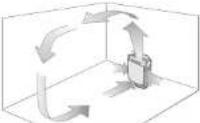
■ To circulate the air efficiently around
the room
To prevent the air inlet or the air outlet from being blocked, install the equipment with its left, right and the top about 30 cm or more away from walls or furniture, curtains etc. To ensure efficient use of this unit, keep its back at least 1 cm away from the wall.
It would be effective if placed here!
Place it low on the floor as a countermeasure against pollen. Since pollen or dust is likely to float in the air near the floor, we recommend you put the unit on the flat floor in the room.

when carrying
- Stop operating, remove the tank, and empty the tray. (the furniture may get wet if water spills out)

● Hold the left and right handles (If you carry the unit by holding the louver and front panel, the unit may be dropped and thus injuries may be caused)

When unplugging the power plug, grasp the power plug instead of the power cord.
(Otherwise, a fire or electric shock may be caused due to wire breakage or short circuit.) Ventilate the room if using this unit together with a heater.

(Carbon monoxide poisoning may occur.) • This unit cannot remove carbon monoxide. Be sure to always keep the water in the tank and interior of the main unit clean.
- Replace the water in the tank with new tap water every day.
Maintain the interior of the main unit periodically. (If the interior is contaminated by dirt or incrustation, a foul odor may occur due to mildew and miscellaneous bacterium breed, and thus do harm to human health, depending on individual constitution)
Please confirm the following before you put questions forward or send the unit for repair


The wind is cold during humidifying?
- When operating in "Full Auto" or "Clean/Humid.", the unit will blow out the wind below the room temperature since the moisture from the humidifying filter containing water absorbs the heat in the air.


There is no steam during humidifying?
This unit is just to make the humidifying filter containing water generate moisture when encountering wind and not boil the water, and hence not generate the steam.


The humidifying amount is reduced?
In the rainy season with high humidity or in the cold weather, the humidifying amount may change, depending on the room temperature and humidity, just as the washed clothes are difficult to dry. The humidifying amount will increase when the weather is warm and dry.

The humidity sign remains "red"?


The indicator is always on
The unit may not sense the humidity properly depending on the installation place. → Change the installation place. (P.6)
30 40 50 60 70
the Human, 3049 indicator(%)
(humidity
indicator
The indicator
is always on

The
- Please use the humidify sign only as a reference.
It is different from the display of the
household hvarometer sometimes.
The humidity value will vary with the - the humidity temperature
● The humidity may also vary with the airflow condition.

Is there a "jee" sound from the emission outlet?
There is a slight sound when nanoe ^™ is taking pace. Depending on the usage environment and operation mode, the sound may seem to be loud or inaudible but these are not abnormalities.


The humidifying filter changes in color?
● The filter may change in color depending on the water quality. This is not a performance problem.


There is dewing on the window and wall?
● Even if the humidity in the room is moderate, there may be dewing on a cold window or wall.

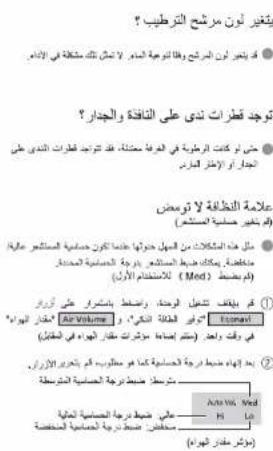
The clean sign does not change. The front panel is always opened. (Change the sensitivity of the sensor)
Such problems are easy to occur when the sensitivity of the sensor is high/low. You can adjust the sensor with a specified sensitivity. (The default setting is "Med" when the unit is used for the first time)
① Stop operating the unit, and press and hold the Econavl and Air Volume buttons at the same time. (The Air volume indicators will light up in turn)
② After the sensitivity is set as required, release the buttons. Medium: Sets the medium sensitivity

(Air volume indicator)

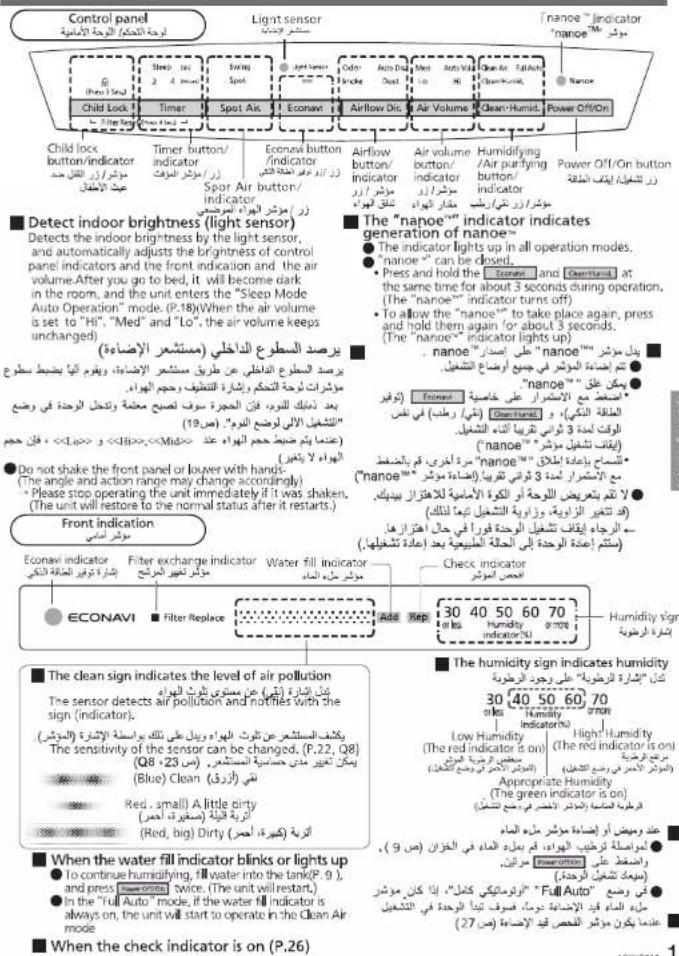
To turn off the front indication.
● The front indication of this product can be turned off.
• To turn off the front indication
(The front indication is off)
• To make the front indication light up again, long press them for about 3 seconds again.
(The front indication lights up)

time.

During operation, the front indication disappears.
- Detects the indoor brightness, and switches the brightness of the front indication automatically with the "Sleep Mode Auto Operation" function. (P.18)


1 Fill in the label with the date installed.
■ Composite air filter replacement ● About once per 10 years Replacement filter
Part No. F-ZXHP55Z
Date installed
■ Deodorizing filter replacement
- Replace a new set when the deactoring function (boco) is not effective (about once per 10 years) Replacement filter
Part No. F-ZXHD55Z
Date installed
■ Humidifying filter replacement
● credit mostly 10 years of a hour every day;
Replacement humidifying filter
Part No. F-ZXHE50Z
Trade Instained: General contract for the following first regulation
(###)
Note
- Be sure to read P.4 to 7 before installation.
ملاحظة
2 Remove the deodorizing filter from the poly bag.
② Toggle the filter hook upward, and remove the filter (2 types).
③ Remove the deodorizing filter from the poly bag.
Functions of the odor sensor/dirt sensor
The sensor can detect the dirtiness of the air, and then indicate the dirtiness through Clean Sign. The unit can optimize the air volume automatically in automatic operation according to the type of dirt.
The sensor's operation may vary with the indoor airflow condition if a heater is placed near the unit in a room.
| Type | Sensing scope | May detect |
| Odor sensor | Odor from cigarettes, incenses, cooking and pets, Cosmetics, alcohol, sprays, etc. | Humidity (water vapor), oil fumes Sudden temperature changes such as when a door is opened or closed. |
| Dirt sensor | House dust (Dust, dead bodies and excreta of ticks, mold spores, pollens, etc.)Smog (cigarettes, incenses etc.) | Oil fumes and fog-stated water drip |
Type of airflow
The louver and front panel move to the best position according to the type and degree of dirt, and thus the unit will operate.
Auto
The unit uses the airflow function separately according to the type of dirt in the air, to achieve a good dirt-removal effect.
■ Status of air dirt and functions of the louver and front panel
| Dirty air | Clean sign | Functions of thelower | Functionsof thefront panel | Figure |
| Clean status | Blue | Switch direction | Closed | A |
| Odor and smogare detected | Red | Upward | Openfrontward | B |
| House dust isdetected | Red | Front | Openupward | C |
| Odor or smogand house dustare detected. | Red | Switch direction | Openupward | D |
degree of dirt, and thus th
Odor and smog
The whole front panel absorbs the odor and smog floating in the air effectively. When people smoke or cook, the odor and smog are removed together. (Figure ⑧)
House dust
The lower part of the front panel absorbs the house dust such as pollens easy to accumulate around the floor. In the pollen season, especially when there is house dust (Figure ©)
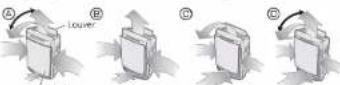
- When the air volume is set to "Hi", the unit will operate with the front panel open.
● The unit will operate with the front panel open after operating for 10 minutes.
Econavi operation
It refers to the automatic operation by combining the "patrol mode" in which the unit checks the dirt in the air in the room every hour with the "learning mode" in which the unit can forecast the dirt generation by mastering the generation time of dirt every day.
It saves power by stopping operation automatically when the air is clean. Meanwhile, the unit will operate in advance to eliminate the dirt effectively before spreading, thus reducing the operation time.
Patrol mode
The unit will stop operating automatically after the air is cleaned. After the operation is paused for 50 min, the unit will operate for 10 min with Air volume set to "Med" in the patrol mode.
● While the operation is paused and in the patrol mode, if the dirt is detected, the unit will operate with the air volume corresponding to the dustiness.
- If "Full Auto" and "Clean/Humid." are set, the unit will also operate according to the indoor humidity even if the indoor air is clean.
Learning mode
Records the "time and dirtiness of air dirt" during operating, and takes the preventive operation within 5 min before the recorded dirt is generated.
(Although the records are updated every day, the previous records will be lost once the power plug is disconnected.)
Install filters
رکب المرشعت
Filling water into the tank
ملء العاء في الخزان
① Install the deodorizing filter. (No distinction between the inside and outside, upper and lower.)
(There is distinction between the inside and outside, upper and lower)
③ Toggle the filter hook downwards, ④ Install the front panel.
and secure the filter.
※ Be sure to attach the front panel for use.
4 Remove the tank, fill it with water, install it back.
(Not required if the unit is running in the mode of Clean Air.)
① Press the hook, and remove the tank.
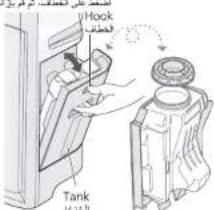
The upper position and lower position of the tank shall be reversed when you fill it with water to that when you install it back.
The water tank can be elevated by its bracket. (The water tank bracket is rotatable.)
Push in the lower part of PUSH until you hear a click
4 ■ Be sure to use the tap water
(This is because that the chlorination has been performed generally for tap water and hence the miscellaneous bacterium is difficult to breed.)
- Do not use the following water: - Water above 40 °C, or water mixed with chemicals, air fresheners, essential oil and detergents. (Otherwise, deformation and malfunction may be caused.) - Water from a water purifier, alkali ion water, mineral water and well water (where the mildew and miscellaneous bacterium multiply fast).
Requirements
- If you have to use the well water (drinkable), please maintain and clean the tray, humidifying filter assembly and anti-fungus kit more frequently.
■ Continuous operation time of a tank of water
● Operate for about 4.6 hours. (under the condition of strong operation/room temperature 20 °C and humidity 30%)
5 Connect the power plug
(Wipe the water off the power plug and your hands before inserting it.)
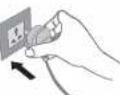
- When inserting the power plug, as the odor sensor uses the degree of cleanliness at this time as the standard, we recommend that you plug it in when the air is fresh (when there is no cigarette smoke). (The standard of the odor sensor automatically updates itself according to the degree of the indoor cleanliness.)
The image is too blurry to recognize any text content.
● After replacement, press and hold 📄 🐦 🐘 for 3 seconds until the filter exchange indicator turns off when the reset is complete. Then, fill in the date installed on the label and stick it on the back of the main unit,
- Please dispose the used filter as non-inflammable garbage.
| General replacement period | Conditions | |
| Humidifying filter | Once every 120 months or so※3 | The unit runs 8 hours a day (According to an in-house test) |
※3 The service life of the humidifying filter may vary with the water quality. In any one of the following cases, please replace it immediately.
● After maintaining it, its odor is still not removed. ● The water in the tank is not reduced. ● It is seriously damaged.
● After replacement, please fill in the date installed on the label and stick it on the back of the main unit. ● Please dispose the used filter as non-inflammable garbage. Do not discard the filter frame and filter plate when replacing the humidifying filter.
About "nanoe™"
Generating environment
- 'nanoe™' is generated using the air in the room and hence, depending on the temperature and humidity, there can be incidences whereby nanoe™ is not stably generated.
Conditions for generations Room temperature: About 5°C-35°C (dew-point temperature: more than 2°C) Relative humidity: About 30% to 85%
Function of the composite air filter
With the bio-sterilization and super allergy buster functions of the dust collection filter, allergic substances (pollen, annoying dung of dead mites), fungus, mold bacteria can be inhibited.
● Bio-sterilization: Inhibit fungus, ^4 mold bacteria.
*4 Testing authority:(Foundation)Japan Food Research Laboratory. Testing method: Confirmation by using Halo method. Inhibiting method: Contact with bio-sterilization. Target: Bacteria trapped in the filter. Testing result: More than 99% inhibition. No 204051292-002 *S Testing authority:(Foundation)Japan Food Research Laboratory. Testing method: Verify the method to prevent mold bacteria(Halo method). Inhibiting method: Contact with bio-sterilization. Target: Mold bacteria trapped in the filter.
Testing result: Verify the effectiveness of preventing mold bacteria using the Halo Test No 207060074-002
● Super Anti-bacterial: inhibits the activity of allergens (pollen, house-dust mites and their waste products).
Testing authority: Osaka Municipal Technical Research Institute Testing method: Check the decrease of refined house dust mite allergen, by using enzyme immune measuring method. Inhibiting method Contact with Super allergy buster. Target 'Allergy substances trapped by the filter (mites,pollen). Testing result: More than 99% inhibition. Daiku research report No.2127 • The composite air filter can give off unique and harmless smell of "Green Tea Catechin", "Anti-bacterial Enzymes" and "Super Allergy-buster".
Sleep Mode Auto Operation
Detects the indoor brightness by the light sensor, and automatically adjusts the brightness of control panel indicators and the front indication and the air volume.
● The brightness of front indication in the
"Sleep Mode Auto Operation" can be changed
| ① Stop operation, then press and hold Timer and Econami buttons at the same time. (The air flow indicators light up in turn) ② Release them when the required setting status is reached | ||
| Odor | Auto Dir | Sleep Mode Auto 1 |
| Stroke | Dust | No Sleep Mode Auto |
| Sleep Mode Auto 2 | ||
(The default setting is "Sleep Mode Auto 1" when the unit is used for the first time)
- When the air volume is set to "Hi", "Med" and "Lo", the air volume is kept unchanged.
| Sleep Mode Auto Setting | Display part | Indoor brightness | |
| Dim | Dark | ||
| Sleep Mode Auto 1 | Control panel | All on | Half on |
| Front indication | Half on | Off | |
| Sleep Mode Auto 2 | Control panel | All on | Half on |
| Front indication | Half on | Half on | |
| No Sleep Mode Auto | Control panel | All on | All on |
| Front indication | All on | All on | |
Operating Methods
طرق التشفيل
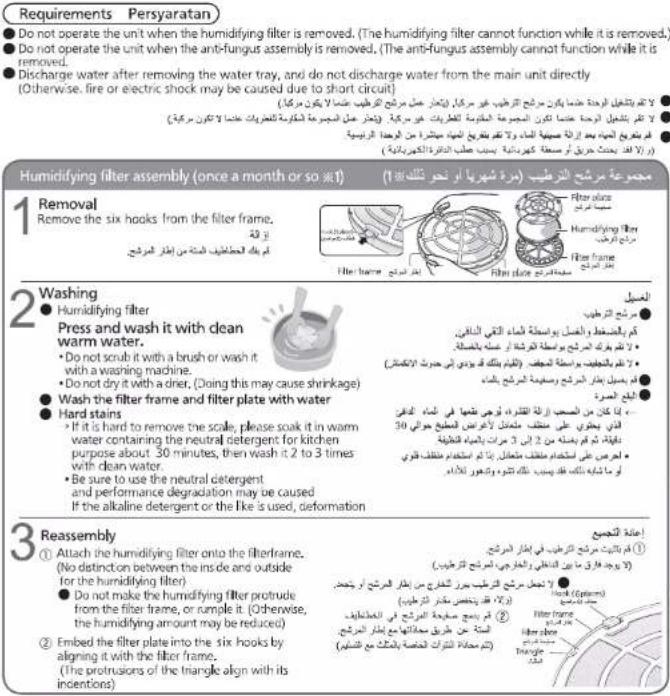
※ 1 As the dirtiness varies with the water quality, maintenance may be required even within one month after the last maintenance if there is unpleasant odor or the water in the tank is reduced in slow speed. ※ كُنّر أَوْسَاعِ تَكُتَ وَبِسْيُّةِ وَمَسْيُّةِ الْمَانَّدِ فَيْرَ بِارِ وَمَسْيُّةِ الْمَانَّدِ فَيْرَ بِرِ لِيْتَ إِلِيْ إِجِّالِهَا سَرَةِ فِيٍ الْقَرَّدِ الْمَانَّدِ بِعَ الْمَانَّدِ الْأَحْرِيَةِ الْأَحْرِيَةِ الْأَحْرِيَةِ الْأَحْرِيَةِ الْأَحْرِيَةِ الْأَحْرِيَةِ الْأَحْرِيَةِ الْأَحْرِيَةِ الْأَحْرِيَةِ الْمَانَّدِ فِيٍ الْقَرَّدِ الْمَانَّدِ فِيٍ الْقَرَّدِ الْمَانَّدِ فِيٍ الْقَرَّدِ الْمَانَّدِ فِيٍ الْقَرَّدِ الْمَانَّدِ فِيٍ الْقَرَّدِ الْمَانَ"
Further information
| Reference time for filter replacement | ||
| General replacement period | Conditions | |
| Composite air filter | When the filter exchange indicator lights up (Once every 10 years or so)×2 | The indication for replacement of filter is when six cigarettes have been smoked daily. (Japan Electrical Manufacturer's Association JEM1467) |
| Deodorizing filter | ||
※2 Filter replacement period may be shorter than normal, depending on the using environment and method. (For example, in household where smoking is frequent.) Please replace whenever the unit is ineffective.
VXH50M 17
Care and maintenance
العنابة والصيانة
Tray (once a month or so ■ 1)
Remove the anti-fungus assembly
Wash it with water
● Wipe the dirt with a swab, or use the toothbrush to scrub it.
- Do not remove the floater (expanded polystyrene) - Hard stains
+ Wipe away the hard stains with a soft cloth
moistened in warm water or water containing neutral detergent for kitchen purpose.
Anti-fungus assembly (once a month or so ^1 )
Immerse it in kitchen-purpose neutral detergent solution and rinse it with water.
- Please soak it in warm water containing the neutral detergent for kitchen purpose about 30 minutes, then wash it 2 to 3 times with clean water.
- Do not scrub it with a brush, and do not disassemble it.
● Please keep it level when installing, and fit into the concave part of the tray.
■ Functions of the anti-fungus assembly
Inhibit the enzyme with the anti-fungus agent. Testing authority: (Foundation) Japan Food Research Laboratory Testing method: Verify the method to prevent mold bacteria
Method and place: Install the anti-fungus assembly in the tray. Testing result: Verify the effectiveness of preventing mold bacteria.
Tip
The anti-fungus assembly may have powder sometimes. This is normal and not a problem with use.
The anti-fungus agent will be small along with the use. This is not a problem with the anti-fungus performance.
● The anti-fungus agent has its own special smell, harmless.
When idle for a long time
① Disconnect the power plug. (The unit still consumes power even at rest)
② Please empty the tank and tray, and maintain them.
③ Dry their interiors completely. (Otherwise, the unit may be failed due to rust.)
- Dry the humidifying filter assembly in a cool place. (Anti-fungus)
④ Cover them with a poly bag, and keep them in a place with little moisture.(If you keep them flat and then overturn them, malfunction may be caused.)
The Ground Truth image displays a single, solid horizontal line. According to Rule 2 (UNDERSCORE & LINE RULES), this is a stylistic or background line, not a placeholder underscore. Therefore, the OCR result must ignore it. The provided OCR content is "____", which consists of four underscores. This is an incorrect interpretation of the line as a placeholder, violating the rule that stylistic lines must be ignored. The OCR has hallucinated text (underscores) where none should exist, violating the rule to ignore such lines. Hence, the OCR result is inconsistent with the Ground Truth.
The Ground Truth image displays a single, solid horizontal line. According to Rule 2 (UNDERSCORE & LINE RULES), this is a stylistic or background line, not a placeholder underscore. Therefore, the OCR result must ignore it. The provided OCR content is "____", which consists of four underscores. This is an incorrect interpretation of the line as a placeholder, violating the rule that stylistic lines must be ignored. The OCR has hallucinated underscores where none should exist based on the GT's visual context. Hence, the OCR result is inconsistent with the Ground Truth.
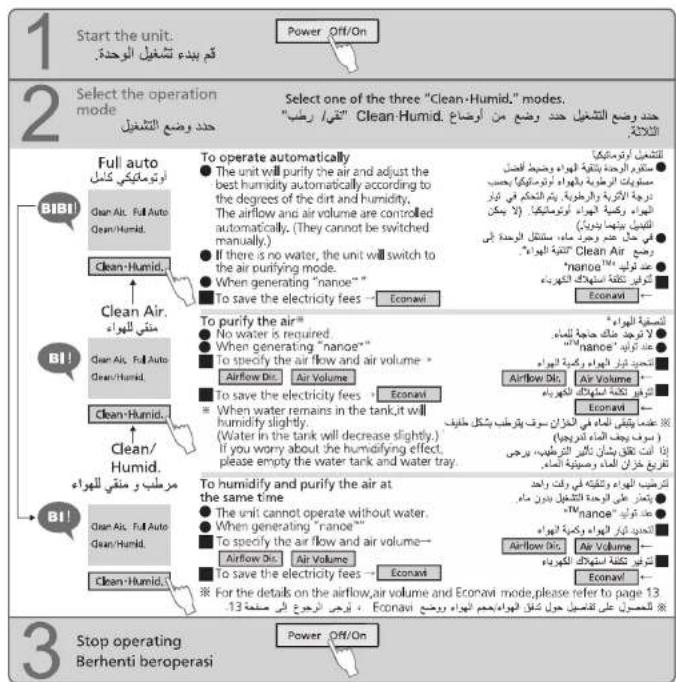
To change the airflow and air volume
Change the airflow
فَرْتَمْدُ لِهُ الْمَاءٍ
(1) 本次股东大会的召集和召开程序
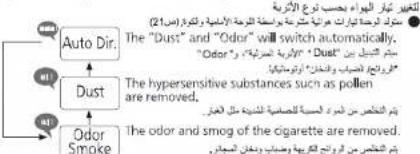
Odor Auto Dis
Smoke Dust
(The indicator is on)
المؤشر في التسجيل,
Airflow Dir.
To change the airflow according to the dirt type
● The unit will generate various airflows by the front panel and louver.(P.20)
(The indicator is on)
(1) _0 (2)
(四) 本公告
Air Volume
The quick brown fox jumps over the lazy dog.
flowchart
graph TD
    A["Auto Vol"] --> B["Hi"]
    B --> C["Med"]
    C --> D["Lo"]
    D --> E["The air volume will switch automatically."]
    F["Humidifying speeds up. The po len and dust in the air are removed quickly."] --> G["Hot air, humidizing speed of dust. Humidifying speed is slow down"]
    H["Quiet operation with the minimum air volume (The speed of humidifying and removal of pollen and dust in the air will slow down)"] --> I["Hot air, humidifying speed of dust. Quiet operation with the minimum air volume (The speed of humidifying and removal of pollen and dust in the air will slow down)"]
To operate in the Econavi mode
Press it again (the indicator is off)
(The settings of "Clean Air" and "Clean/Humid."
can also be cancelled by clicking the button.)
To save the electricity fees
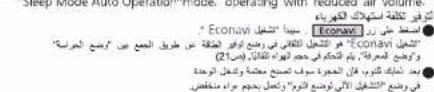
- Press the Econavi button, "Econavi operation" will start. The "Econavi operation" is the auto operation in the power-saving mode by combining the "patrol mode" and "learning mode". The air volume is controlled automatically. (P.20)
● After you go to bed, it will become dark in the room, and the unit enters the "Shoe Maple Auto Operations" vehicle, operating with reduced air volume.
العاء كثيط مه المزة
"Clean/Humid," the Air Volume button.)
Enter the Spot Air mode
■ Exit the "Spot Air" mode
Press the Air Volume or Airflow Unit button
Tip
• 'Econavi cannot be enter in the
'Spot Air mode
Aurifour Det. Air Maharim ٢٠٠٠٠ و صع
"الصّطَرِّ حجم الْمُوَلَة"
الصالح
Care and maintenance
العناية والصيانة
Precautions before care and maintenance
Be sure to disconnect the power plug.
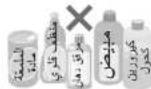
Do not use the detergents
shown on the right.
The oxygenic bleach can
be used only for the
humid-fying filter.
When using chemically
treated cloth, be sure to
follow the instructions
carefully.
Deodorizing filter
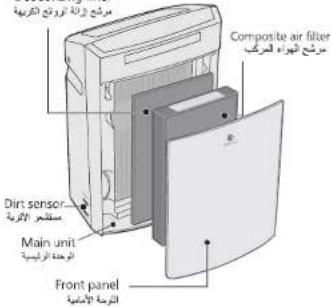
● There are both thick and fine
filter shafts
Please be cautious when
installing the water tray back.
- Remove the tank,
and pull the tray out
● The deodorizing filter is free of maintenance.
● Wipe the main unit and the front panel with a well wrung-out soft cloth.
Do not wipe it with a hard cloth or too much force. Otherwise, the surface may be damaged. Do wipe the power plug with a dry cloth.
- Do not operate the unit when the composite air filter is removed. (Dust will be inhaled into unit inner parts, and causes the unit breakdown. The composite air filter can not function while it is removed.)
- Do not operate the unit when the deodorizing filter is removed. (The deodorizing filter can not function while it is removed.)
- When cleaning, do not leave the removed parts unattended (parts left unattended may be cause of tripping or they may be damaged)
Composite air filter
Suck the black side (front side) with a vacuum cleaner.
(Installation and removal methods→P 8-9)
Dusting brush nozzle
or gap suction nozzle
Lay with newspapers etc
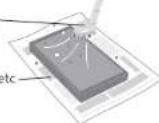
● Delicate.Do not apply too much pressure.
● The back (white) side is free of maintenance
● Never wash the filter with water.
Dirt sensor
< Once every 3 months or so >
Wipe the dirt off the lens with a dry
cotton swab.
● Wipe the lens periodically.
(The sensor may not function normally after being contaminated by the moisture and smog from the cigarette.)
① Remove the external
cover of the dirt sensor. cotton swab as shown in
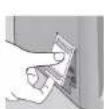
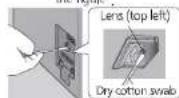
● Do not insert a cotton swab anywhere other than
t
- Be sure to disconnect the power plug from the
outlet prior to this operation.
● You can use a light when not seeing it clearly.
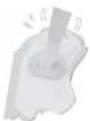
Tank
Wash it with water
● Hard stains
- Wipe away the hard stains with a soft cloth moistened in warm water or water containing neutral detergent for kitchen purpose.
فلتر الهواء المركب
<مرتواحة كل我说ين>
- Panasonic
- Operating Instructions
- The "Mega Catcher" and "nanoe™" give you moist and clean air.
- Test client: Japan Food Research Laboratories.
- Parts identification
- تعريف الأجنبية
- WARNING
- To prevent accidents such as fires and electric shocks
- Attention
- Operating requirements
- It would be effective if placed here!
- Fill in the label with the date installed.
- Note
- ملاحظة
- Remove the deodorizing filter from the poly bag.
- Functions of the odor sensor/dirt sensor
- Type of airflow
- degree of dirt, and thus th
- Odor and smog
- House dust
- Econavi operation
- Patrol mode
- Learning mode
- Remove the tank, fill it with water, install it back.
- ■ Be sure to use the tap water
- Requirements
- ■ Continuous operation time of a tank of water
- Connect the power plug
- About "nanoe™"
- Generating environment
- Function of the composite air filter
- Sleep Mode Auto Operation
- Operating Methods
- طرق التشفيل
- Further information
- Care and maintenance
- العنابة والصيانة
- Tray (once a month or so ■ 1)
- Anti-fungus assembly (once a month or so 1 )
- Immerse it in kitchen-purpose neutral detergent solution and rinse it with water.
- Tip
- When idle for a long time
- To change the airflow and air volume
- To operate in the Econavi mode
- Enter the Spot Air mode
- Precautions before care and maintenance
- Composite air filter
- Suck the black side (front side) with a vacuum cleaner.
- Dirt sensor
- < Once every 3 months or so >
- Wipe the dirt off the lens with a dry
- Tank
- Wash it with water
- فلتر الهواء المركب
- <مرتواحة كل我说ين>
Brand : PANASONIC
Model : F-VXH50M
Category : Air purifier