
MP-F700 - Portable audio player MPMAN - Free user manual and instructions
Find the device manual for free MP-F700 MPMAN in PDF.


User questions about MP-F700 MPMAN
0 question about this device. Answer the ones you know or ask your own.
Ask a new question about this device
Download the instructions for your Portable audio player in PDF format for free! Find your manual MP-F700 - MPMAN and take your electronic device back in hand. On this page are published all the documents necessary for the use of your device. MP-F700 by MPMAN.
USER MANUAL MP-F700 MPMAN
Whatever you want, you can do it.
MP-F700
User Manual
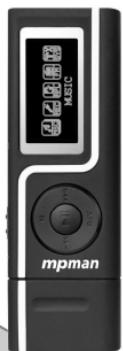

man
www.mpmaneurope.com
English
Accessories
①
Installation CD
②

USB Cable
③

Earphone
④

Quick Start Guide
⑤

Adaptor
Buttons and the functions
- 【R/V】: Record mode or volume mode
- 【】:Play/Pause/confirm button
-
【M】: Menu button
-
【-】:Backward
4.【】:Forward
6.【HOLD】:MP3 lock button
Play MP3 Music
To Start:
- Connect earphone to earphone jack.
- Switch "【HOLD】" to no lock position.
- Long press【H】button to enter into "MSC" mode.
- Short press【▶】button to play music.
In the play mode, short press 【M】 to enter into sub menu and short press 【↑】/【←】 button to select your desired mode (e.g. Repeat, Equalizer ,3D, Play Rate, Intro, Display, A-B, File Browse)
Short press ^山 to confirm.
To return main-Menu: Short press【M】button when music pause mode.
To Pause play: Short press [▶] button.
To resume play: Short press [] button again.
To change tracks: use [+\-1]/[- \+] button.
To enter record mode:long press【R/V】button start to record
To switch between card and Flash: long press【M】button to switch NAND Flash/MMC Micro Card.
To turn unit off: Long press 【】 button.
Repeat:
- Select repeat mode and short press 【H】 button to enter into.
-
Short press [串] / [串] button to select your desired option(e.g. No Repeat, ONE, All, Random All, Dir Repeat, Dir All Repeat, Dir Random All)
-
Short press 【H】button to confirm.
Equalizer:
- Select Equalizer mode and short press [▶] button to enter into.
- Short press [串] / [串] button to select your desired option (e.g. Normal, Pop, Rock, Classic, Jazz, Bass, Custom EQ)
- Short press 【II】 button to confirm.
3D:
- Select 3D mode and short press【▶■】 button to enter into.
- Short press [] + [] / [] - [] button to select your desired option(e.g. ON, Off)
Play Rate:
- Select Play Rate mode and short press [] button to enter into.
- Short press [串] / [一] button to select your desired option(e.g. 1.00X, 1.14X, 1.33X, 0.67X, 0.80X)
- Short press [▶] button to confirm.
Intro:
- Select "Intro" mode and short press [] button to enter into.
- Short press [串 +] / [一串] button to select your desired option from "00" to "15"
- Short press [▶] button to confirm.
Display:
- Select "Display" mode and short press 【■】 button to enter into.
- Short press【+】/【-】button to select your desired option(e.g. Off, Wave motion, Stereo)
- Short press 【按钮 to confirm
A-B repeat
- Select "A-B" mode and short press 【■】 button to enter into.
- Short press R / V button to select "A" point and short press R / V button again to select "B" point.
- Short press [R / V] button the third to cancel "A-B" repeat.
File Browse
- Select "File Browse" mode and short press [▶] button to enter into
- Short press [串] / [一] button to select your desired file.
- Short press【R/V】button to delete the file, short press【 串串 1 ^ 串串 】/【-】button to select "Yes" or "No",Short press 【按钮】 button to confirm delete.
- Short press 【】 button to play your desired file.
Adding/ Removing MP3 Files
- Plug USB connector into computer
- Add MP3 files to the USB storage's folder
-
Dele any MP3 files from the USB storage's folder
-
Close the USB Storage's folder (right click on icon).
- Follow Operating system guidelines for removal of unit.
- Remove unit from Computer.
Menu Navigation
【M】button:EnterMain-Menuor Sub-Menuor return
NOTE: Long press【M】button to check the MMC card mode in the music、record and play record mode.
Display: MMC card mode display: flash IC mode.
Skip button ((\text{【\n\n(\left[\begin{array}{c} \vdots \ \vdots \end{array}\right]})) :Shift menus.
Play/Pause button (【I】):Play,Pause,or confirm.
Adjust Volume
In MP3 Play, RPL mode, FM mode, short press [R/V] and short press [艹] / [一] button to adjust the volume.
RPL (Record mode and Play the record mode)
- In main menu, short press [ +] / [-] button to select RPL mode.
- Short press 【■】 button to confirm.
- Long press 【R/V】 button start to record.
- Short press 【按钮 to pause record.
- Short press 【R/V】 button to save the record file.
-
Short press 【】 button to play the record.
-
Short press【M】button to enter into sub menu when play record mode(e.g. Repeat, Play Rate, Intro, Display, A-B, File Browse)
- Short press 【II】 button to confirm.
- Long press【M】button to switch NAND Flash/ MMC Micro Card.
FM Radio (Optional function and only for MP3 player with "FM" function.)
- Short press【M】button to enter main-Menu.
- Short press [串] / [串] button to select "FM Radio" mode.
- Short press 【H】 button to enter "FM Radio" mode.
- Short press [串 +] / [一] button to tune your desired stations.
Short press 【H】 button to enter sub menu (e.g. Preset, Auto Search, Manual Search, Save, Exit)
Short press [] button to confirm.
Preset
- Short press [串] / [串] button to select the preset stations.
- If none preset station found, short press 【▶】 button to enter sub menu (e.g. Preset, Auto Search, Manual Search, Delete, Delete all, Exit) to select "Auto Search" or "Manual search" mode to search the station then save.
Auto Search
Select 'Auto search' mode, the FM tuner will search stations automatically, short press 【H】button to enter sub menu (e.g. Preset, Auto Search, Manual Search, Save, Save all, Exit)
Manual Search
Select 'Manual search' mode, press [ +] / [ -] to select the desired station frequency by 0.1MHz. Short press [ +] button to enter sub menu (e.g. Preset, Auto Search, Manual Search, Save, Exit)
Save
- Select your desired band
- Short press【II】button to enter into sub menu to select "Save" mode
- Short press [] button to enter into and short press [] / [一] button to select your desired save number (Only save 30 bands)
- Short press [H] button to save.
Record FM
In the receive the FM radio, long press [R / V] button to enter record mode, press [R / V] button to exit the FM record mode to enter Play the record file mode.
SYS (system)
- In main menu, short press [串] / [一] button to select "SYS" mode.
- Short press【H】button to enter into.
- Press [^ +]/[^ -] to choose your desired mode(e.g. Power, Language, Display, Sys Tools, Storage)
- Short press 【■】 button to confirm.
Power:
Short press [ + ] /[-按钮 to select Auto off: 000 or always on in playback. When
you select "Auto off:000" and press 【+】/【-】 to select your desired time.
Language:
- Select language mode and short press 【■】 button to confirm.
- Short press [1] to select your desired option (e.g. English, Czech, Danish, Finnish, French, German, Greek, Hungarian, Italian, Japanese, Korean, Norwegian, Polish, Portuguese, Russia, Spanish, Swedish, Turkish, Ukrainian, Holand, Arabic, Thai)
- Short press 【■】 button to confirm.
Display:
Short press [艹 +] / [一] button to select Contrast or Backlight. Short press [艹 +] / [一] button to select your desired number.
Sys Tools:
- Short press [ + ] /【-】button to select your desired option.(e.g. Del File, Format, Reset, System Info.)
- Short press [串] / [串] button to select "Format" mode and short press [串] button to enter into.
- Short press 【】 button to enter into sub menu(e.g. Quick, Complete)
- Short press [串] / [串] button to select your option and short press [串] / [串] button to select "Yes/NO"
- Short press 【■】 button to confirm.
Select“Reset”mode and short press【▶】button to confirm. Short press【▶】/【-▶】 button to select“Yes/NO"
Select "System Info" mode and short press [+ +] /【-】button to look "FW,CHIP and FREE"
Storage:
- Short press [串] / [串] button to select your desired option (e.g. Internal, MMC Micro)
- Short press [^山] button to confirm ("Checking..." display to check the storage)
CD disk use specification
- USB Flash Disk driver for windows98SE (If the user's computer OS is Windows98SE, please install the driver)
(1) Put CD disk to the CD driver
(2) Click the right key to turn on CD driver and to operate "CD disk/driver/MP3/SETUP.EXE" file.
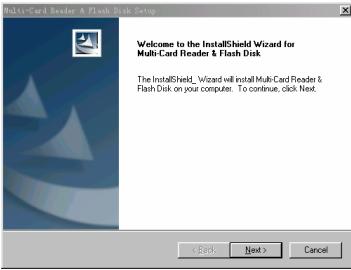
3) Click "NEXT" to enter into the next picture.
(4) Click "NEXT" to enter into the next picture.
(5) Choose "Finish" to finish setup program. Restart the PC and you can use the MP3 player.
2. Format to the MP3 player
The MP3 player format is "FAT" format. If you will format the MP3 player and click right key to choose format mode to format in the operate system.
Notice
Please unlock the button before use.
EQ is not obvious when playing WMA format music.
Can't identify the sixth and above sixth level of directory.
Do not leave the player in a place subject to moisture with temperature higher than 35^ or lower than -5^
Do not use the earphones while driving an automobile or riding a bicycle, it's not only dangerous but also against the law.
It may cause an accident if you turn up the volume of the earphones while walking down the street, especially crossing at intersections.
Do not turn up the volume too high, doctors warn against prolonged exposure to high volume.
Stop using the device or turn the volume down if you have ringing in your ears.
Our packages use cardboard, polyethylene, and do not use any unnecessary materials
As U-disk, the disk will be write-protected if you switch the hold to lock the buttons.
Press【Reset】button to reset the setting when hang up.
The user manual only for reference. It is standard by the sample.
If the file is WMA format that do not support "Play rate" mode.
Technical Specification
| No. | Name | Description |
| 1 | Capacity of Flash Memory | Support MMC Micro Card, up to 1G Build-in Flash Memory, up to 2G. |
| 2 | USB Interface | USB2.0(High speed) |
| 3 | LCD Display | 128x64, 2-color (yellow and blue) OLED |
| 4 | Power supply | Li-Polymer |
| 5 | S/N ratio | >85dB |
| 6 | Audio Frequency Range | 20hz – 20kHz |
| 7 | EQ | Normal, Pop, Rock, Classic, Jazz, Bass, Custom EQ |
| 8 | Decoding Format | MP3 (MPEG 1.0/2.0/2.5, Layer 1/2/3, ID3 display supported) and WMA |
| 9 | File System | FAT16, FAT32 |
| 10 | File number | 9999 files (max) |
| 11 | Operating Temperature | 5°C ---35°C (41°F---95°F) |
| 12 | Operating Moisture | 10%—75% |