
MM 550 TRAVEL - Wireless headphones SENNHEISER - Free user manual and instructions
Find the device manual for free MM 550 TRAVEL SENNHEISER in PDF.


User questions about MM 550 TRAVEL SENNHEISER
0 question about this device. Answer the ones you know or ask your own.
Ask a new question about this device
Download the instructions for your Wireless headphones in PDF format for free! Find your manual MM 550 TRAVEL - SENNHEISER and take your electronic device back in hand. On this page are published all the documents necessary for the use of your device. MM 550 TRAVEL by SENNHEISER.
USER MANUAL MM 550 TRAVEL SENNHEISER
Important safety instructions 2
MM 550 4
Delivery includes 5
Product overview 7
Putting the MM 550 into operation 8
Charging the battery pack 8
Adjusting the headband 10
Switching the MM 550 on/off 11
Connecting the MM 550 to the audio source 12
Connecting the MM 550 using the audio cable 15
Using the MM 550 16
Adjusting the MM 550 to the listening situation 16
Changing the volume 17
Remote-controlling connected devices from the MM 550 18
Resetting the settings of the MM 550 20
Transporting the MM 550 21
Cleaning and maintaining the MM 550 22
If a problem occurs 23
Accessories 25
Specifications 26
SRS WOW HD 27
Manufacturer Declarations 28
Important safety instructions
- Please read these instructions carefully and completely before using the product.
- Make these instructions easily accessible to all users at all times. Always include these instructions when passing the product on to third parties.
- Only use the product in aircraft where wireless Bluetooth® transmission is permitted.
- Do not use the product in situations which require special attention (e.g. in traffic or when performing skilled jobs).
- Always keep the product dry and do not expose it to extreme temperatures (normal operating temperatures: 0^ C / 32^ F to 35^ C / 95^ F ).
- Use the product with care and store it in a clean, dust-free environment.
- Switch off the product after use to conserve battery power. Remove the batteries if the product will not be used for extended periods of time.
- The headset contains magnets that generate a magnetic field which could cause interference with cardiac pacemakers and implanted defibrillators. Keep the headset at least 1.2'' (3 cm) from cardiac pacemakers or implanted defibrillators.
- Please protect your hearing from high volume levels. Sennheiser headsets also sound exceptionally good at low volumes.
- Only use the mains units and charging cables supplied by Sennheiser.
- To reduce the risk of fire or electric shock, do not use the product near water and do not expose it to rain or moisture.
-
Unplug the mains unit from the wall socket
-
to completely disconnect the product from the mains
- during lightning storms or
-
when unused for long periods of time.
-
Only operate the mains unit from the type of power source specified in the chapter "Specifications" (see page 26).
-
Ensure that the mains unit is
-
in a safe operating condition and easily accessible,
- properly plugged into the wall socket,
-
only operated within the permissible temperature range,
not covered or exposed to direct sunlight for longer periods of time in order to prevent heat accumulation (see "Specifications" on page 26). -
Do not operate the product near any heat sources.
- Only use attachments/accessories specified by Sennheiser (see "Accessories" on page 25).
Intended use
Intended use includes:
- having read this instruction manual, especially the chapter "Important safety instructions" on page 2,
- using the product within the operating conditions and limitations described in this instruction manual.
"Improper use" means using the product other than as described in this instruction manual, or under operating conditions which differ from those described herein.
Safety instructions for the Lithium-Polymer battery pack
If abused or misused, the battery pack may leak. In extreme cases, it may even present

- a heat hazard,
- a fire hazard,
- an explosion hazard,
- a smoke or gas hazard.
Please understand that Sennheiser does not accept liability for damage arising from abuse or misuse.
| Keep away from children. | When not using the product for extended periods of time, remove the battery pack from the product. | |
| Immediately remove the battery pack from an obvi-ously defective product. | Only use battery packs recommended by Sennheiser. | |
| Dispose of the battery pack at special collection points or return it to your specialist dealer. | Switch battery pack-powered products off after use. | |
| Only charge the battery pack with the appropriate Sennheiser chargers. | When not using the battery pack for extended periods of time, charge it regularly (about every 3 months). | |
| Only charge the battery pack at ambient temperatures between 10°C/50°F and 40°C/104°F. | Do not heat above 70°C/158°F, e.g. do not expose to sunlight or throw into a fire. | |
| Do not mutilate or dismantle. | Do not continue to use a defective battery pack. | |
| Do not short-circuit. | Do not expose to moisture. | |
MM 550
The MM 550 is an accessory which allows for wireless music enjoyment when used with mobile phones or other Bluetooth devices/Bluetooth compliant devices. Its circumaural, closed design and the latest active noise compensation technology (NoiseGard) make the MM 550 especially suitable for use with in-flight entertainment systems. Due to its active and passive attenuation of ambient noise, it lets you enjoy music even in noisy environments.
Bluetooth

The MM 550 complies with the new Bluetooth 2.1 standard. Via its Bluetooth interface, it can be connected to a wide variety of Bluetooth enabled devices. Bluetooth wireless technology allows the MM 550 to communicate with your Bluetooth enabled device (e.g. mobile phone, MP3 player, PC or PDA) within a range of up to 10 meters.
SRS WOW HD™

SRS WOW HD improves the dynamic audio performance of compressed and uncompressed audio by expanding the size of the audio image and creating a deep, rich bass response. The patented techniques in SRS WOW HD widen the horizontal sound field and raise the vertical sound image, retrieving information lost in the mixing process to create a more natural audio experience.
NoiseGardTM

The NoiseGard active noise compensation system is based on the principle of cancelling out sound using "anti-sound" (phase-inverted sound). Tiny microphones pick up low-frequency ambient noise (up to 1kHz ) near the ear. The NoiseGard electronics use this noise to generate a sound wave which is the exact opposite (IE: at the same level but polarity reversed -180^ out-of-phase), the effect being that the polarity reversed signal cancels most of the outside noise.
TalkThrough
The MM 550 has a TalkThrough function, which allows you to communicate with other people without having to remove the headset. When TalkThrough is activated, professional quality microphones mounted on the outside of the headset pick up all acoustic signals in the immediate vicinity. Annoying background noise is electronically filtered out, only allowing the voice of the other person to pass through the headset clearly.
Additional features
- Great for travel: comfortable, rugged and foldable headset construction
- Optional connection via audio cable for music enjoyment without Bluetooth technology
Outstanding sound quality due to Duofol diaphragms - Optimum protection against ambient noise due to active and passive noise attenuation
Delivery includes
1 MM 550 headset
1 BA 370 PX battery pack
1 USB charging cable
1 mains unit with country adapters
1 stereo audio cable (2.5 mm to 3.5 mm jack plug)
1 audio adapter (3.5 mm jack socket to 14'' (6.35 mm) jack plug)
1 in-flight adapter (3.5 mm jack socket to 3.5 mm double mono jack plug)
1 transport case
1 quick start guide incl. CD ROM with detailed instruction manual as PDF
1 safety guide
Overview of the pictograms
Meaning of the pictograms for pressing a button
| Pictogram | Meaning |
| ↓4s | Briefly press this button. |
| 4s | Keep this button pressed for 4 seconds. |
| ↓ | Keep this button pressed until the desired setting is made or the desired action is completed. |
Meaning of the pictograms for the flashing of the LED
| Pictogram | Meaning |
| This pictogram symbolizes a flashing. | |
| - | This pictogram symbolizes an interruption. |
| 1s | This pictogram symbolizes an interval. |
| → | This pictogram symbolizes a continuous flashing. |
Examples of some of the pictograms that are used throughout this instruction manual:
| Pictogram | Meaning |
| 3s | The LED flashes once every 3 seconds. |
| 1s | The LED flashes 3 times per second. |
| 1s | The LED flashes in a rhythmic sequence. |
| - - - - | The LED flashes blue 3 times and then goes off. |
The pictogram "i"

This note provides important information!
Notes marked with the pictogram "i" provide important information on the use of the headset.
Product overview
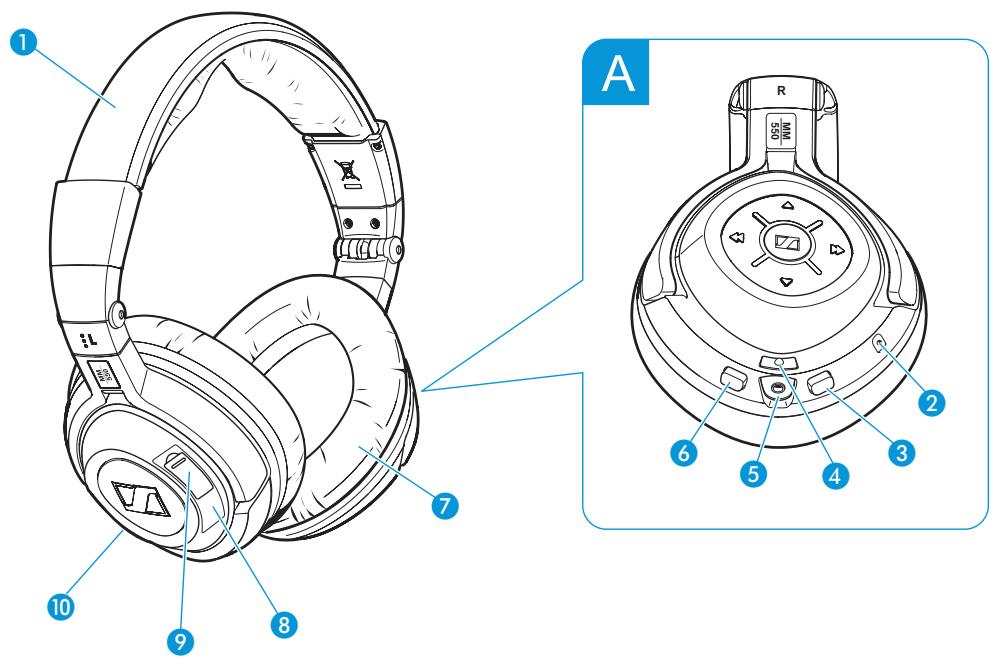
Headband
Microphone
3 NoiseGard button
SRS button
5 Socket for audio cable
6 Bluetooth button
7 Ear pad
8 Socket for charging cable
Battery pack compartment
10 Microphone
A Operating panel
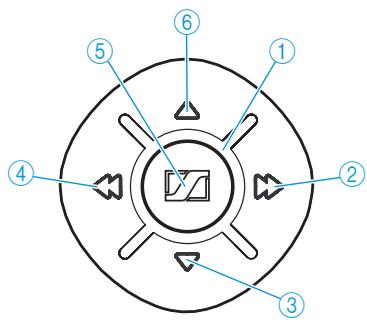
① LED
② Fast-forward button
③ Volume button
④ Rewind button
⑤ Master button
Volume button
Putting the MM 550 into operation
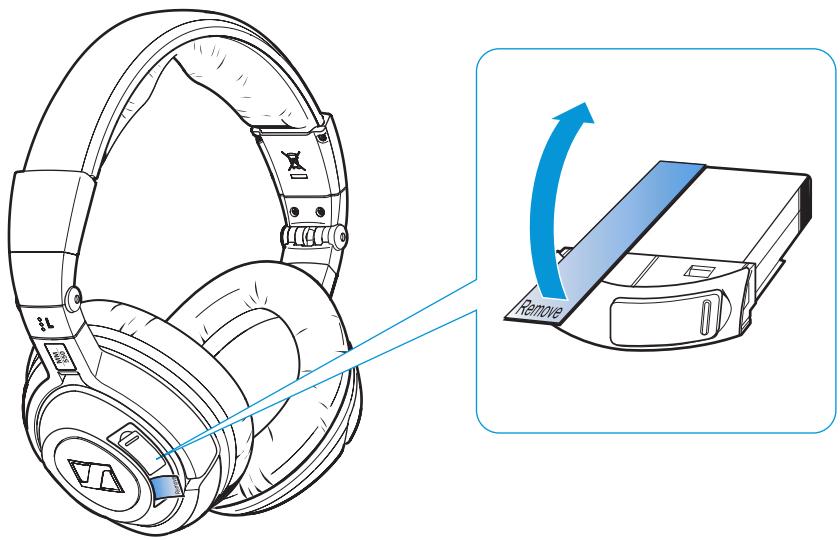
Before using the MM 550 for the first time, remove the protection strip from the battery pack.
Charging the battery pack

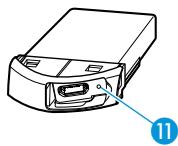

Before using the battery pack for the first time, charge it for at least 3 hours. The battery pack can also be charged inside the headset during operation.
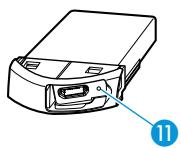
When charging the battery pack, the LED 11 on the battery pack lights up red. When the battery pack is fully charged, the LED 11 on the battery pack lights up green.
When the battery pack is almost flat, the LED ① flashes red. You hear a short, descending acknowledgement tone.
The operating time of the battery pack depends on the device settings, the listening situation and the audio sources used. The operating time will be reduced if you use SRS WOW HD.
| Type of use | Operating time |
| NoiseGard and Bluetooth technology | 8 hours |
| NoiseGard without Bluetooth technology | 20 hours |
| Bluetooth technology without NoiseGard | 10 hours |

Remove the battery pack if the headset will not be used for extended periods of time.
Possibilities of charging the battery pack
First, connect the charging cable 12 to the battery pack as described in section a and then connect the charging cable 12 to a power source as described in section b.
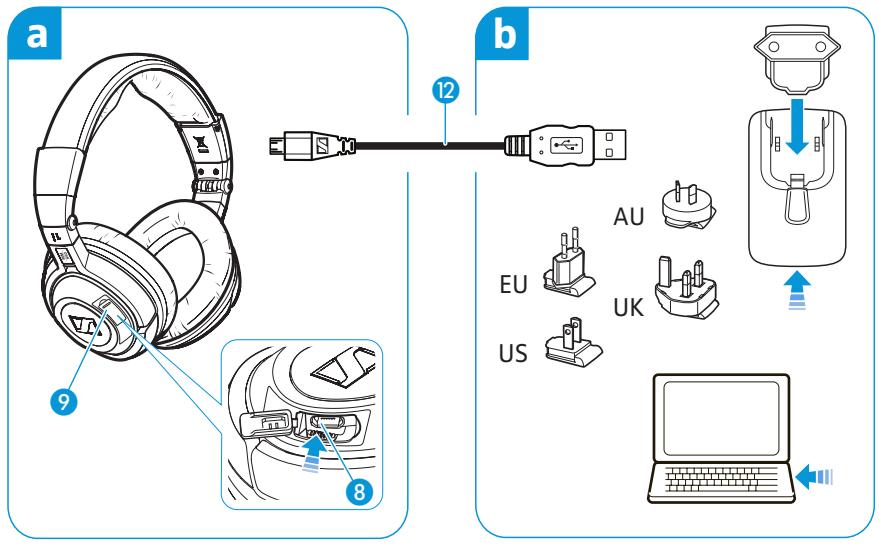

Connecting the charging cable to the battery pack
You can charge the battery pack either inside or outside the headset. This is helpful if you are using a spare battery pack (to be ordered separately).
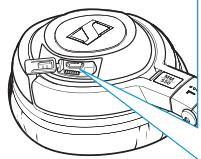
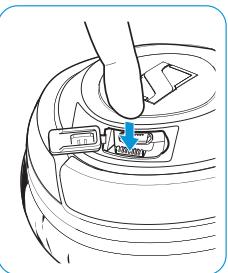
To charge the battery pack inside the headset:
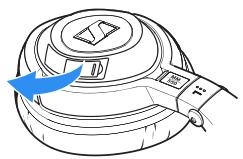
Open the cover of the battery pack compartment on the left ear cup.
Connect the charging cable 12 to the socket for charging cable 8 on the headset.
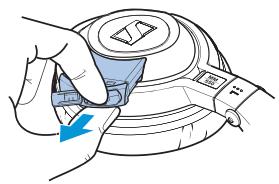
To charge the battery pack outside the headset:
Open the cover of the battery pack compartment on the left ear cup.
Press the button next to the battery pack compartment and remove the battery pack.
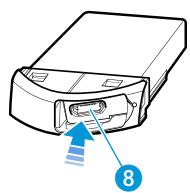
Connect the charging cable 12 to the socket for charging cable 8 on the battery pack.

Connecting the charging cable to the mains unit, to a PC or to other USB devices
In order to charge the battery pack, you can connect the charging cable to either the USB socket of your PC or the supplied mains unit or to other USB devices.
To connect the charging cable to a PC:
Connect the USB plug of the charging cable 12 to the USB socket of your PC.
The battery pack is being charged. The LED 11 on the battery pack lights up red.
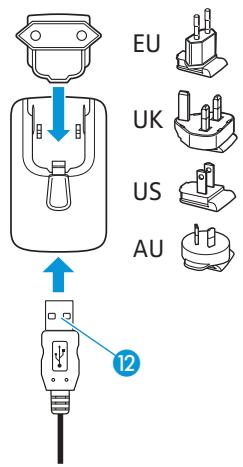
To connect the charging cable to the mains unit:
Connect the charging cable 12 to the mains unit.
Plug the suitable country adapter onto the mains unit.
Plug the mains unit into a wall socket. The battery pack is being charged. The LED 1 on the battery pack lights up red.
After charging, unplug the mains unit from the wall socket.
If you have charged the battery pack outside the headset:
Insert the charged battery pack into the headphone's battery pack compartment until it locks into place.
Close the cover of the battery pack compartment 9.
Adjusting the headband
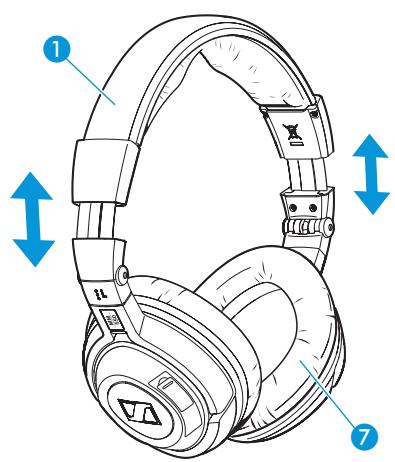
For optimum transmission quality, good noise attenuation and best possible comfort, the headband has to be adjusted to properly fit your head:
Wear the headset so that the headband 1 runs over the top of your head.
Adjust the length of the headband so that
- the ear pads ⑦ rest comfortably against the ears,
- you feel even, gentle pressure around your ears,
- a snug fit of the headband ① on the head is ensured.
To ensure maximum noise attenuation, final adjustment is best made in a noisy environment.
Switching the MM 550 on/off
CAUTION Hearing damage due to high volumes!

Listening at high volume levels for long periods can lead to permanent hearing defects.
Before putting the headset on, set the volume to a low level.
Do not continuously expose yourself to high volumes.
Switching the MM 550 on
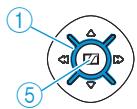

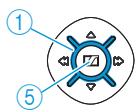
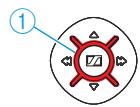
Press the Master button ⑤ and keep it pressed until the LED ① flashes blue. You hear an ascending beep.
- When switching the headset on for the first time, it will automatically go into pairing mode.
The headset is waiting to be paired with a Bluetooth enabled device (see page 12).
- When the headset is already paired with an audio source, the Bluetooth connection is automatically established. You hear an ascending beep and then you hear your audio source.
- When the headset is already paired with an audio source but the audio source is switched off or out of range, the LED ① flashes blue.
The headset will try for 3 minutes to connect to one of the up to 8 previously paired audio sources. If this fails, the headset automatically switches off after 60 minutes.

Switching the MM 550 off
Press the Master button ⑤ and keep it pressed until the LED ① flashes 3 times red.
You hear a descending beep. The Bluetooth connection is automatically deactivated. The headset switches off.
Connecting the MM 550 to the audio source
CAUTION Danger of malfunction!
The transmitted radio waves can impair the operation of sensitive and unprotected devices.
Only use the headset in aircraft where wireless Bluetooth transmission is permitted or use the audio cable instead (see "Connecting the MM 550 using the audio cable" on page 15).
The headset complies with the Bluetooth 2.1 standard. In order that data can be transmitted wirelessly using Bluetooth technology, you have to register your headset with your audio source (pairing).
The headset can save the connection profiles of up to 8 Bluetooth devices with which it has been paired. After switch-on, the headset automatically connects to one of these devices.
If you pair the headset with a ninth audio source, the saved connection profile of the first Bluetooth device will be overwritten. If you want to re-establish a connection with the first audio source, you have to pair the headset with this audio source again.
If your audio source does not have a Bluetooth interface, use an optional dongle (see "Accessories" on page 25).

For an optimum listening experience, your audio source has to support the A2DP profile.
Pairing the MM 550 with an audio source

Make sure that your headset is switched off (see "Switching the MM 550 off" on page 11).
When switching the headset on for the first time, it will automatically go into pairing mode. The headset is waiting to be paired with a Bluetooth enabled device (see page 12).

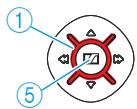
Press the Master button ⑤ and keep it pressed until the LED ① alternately flashes blue and red.
On your audio source, activate the Bluetooth function "Add a new device".
Proceed as described in the instruction manual of the audio source.
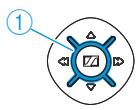

If a suitable audio source is found, the devices will exchange device identification information. The LED ① flashes 3 times blue and you hear an ascending beep. The devices have identified each other and the headset is paired with the audio source.

PIN code
When the audio source prompts for a password or PIN code, enter the default PIN code "0000".
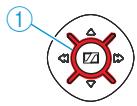

If no device is found within approx. 5 minutes, the LED ① flashes 3 times red and you hear a descending beep. The headset will then try for 3 minutes to connect to one of the up to 8 previously paired audio sources. If this fails, the headset automatically switches off after 60 minutes.
In this case, repeat the necessary steps to pair the headset with the audio source again.
Switching the "Bluetooth connection" flashing on/off
Switch the headset off (see "Switching the MM 550 off" on page 11).
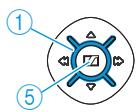

To switch the flashing on during a Bluetooth connection:
Press the Master button ⑤ and keep it pressed until the LED ① alternately flashes blue and red.
Briefly press the Volume button ⑥.
To switch the flashing off during a Bluetooth connection:
Briefly press the Volume button ③.
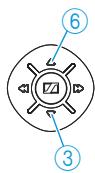
Disconnecting the Bluetooth connection

The Bluetooth button is backlit, indicating the current setting. The backlighting goes off after a short time to conserve energy.
Press any button on the headset to display the current setting of the Bluetooth function.
To disconnect the Bluetooth connection to the audio source, you can switch off the headset or the Bluetooth function. This setting is retained until the Bluetooth function is switched on again.
To switch the headset off:
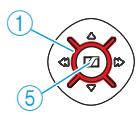

Press the Master button ⑤ and keep it pressed until the LED ① flashes 3 times red.
You hear a descending beep. The Bluetooth connection is automatically deactivated. The headset switches off.
To switch the Bluetooth function off:
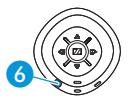

Press the Bluetooth button 6 and keep it pressed until the LED ① flashes 3 times red. You hear a descending beep.
The Bluetooth button goes off. The Bluetooth function is switched off.
Connecting the MM 550 using the audio cable
Connecting the audio cable
You can connect the headset to the audio source using the audio cable if:
- you do not want to use the Bluetooth function,
- you are not allowed to use the Bluetooth function (some airlines do not allow Bluetooth transmission) or
the battery pack is flat.
When the audio cable is connected to the headset, the Bluetooth function cannot be switched on.
If the headset is already connected to the audio source via the Bluetooth interface, the Bluetooth connection is automatically disconnected when you connect the audio cable. The LED① flashes 3 times red and you hear a descending beep.
Connect the 2.5mm jack plug of the audio cable to the socket 5 of the headset.
Connect the 3.5mm jack plug of the audio cable 13 to
- the headphone socket of your audio source or
- the audio adapter for 14'' (6.35 mm) jack socket 14 if the 3.5 mm jack plug of the audio cable is too small
- the in-flight adapter 15 if you want to use the headset with an in-flight entertainment system.
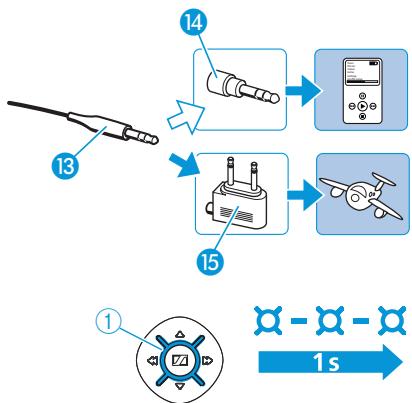
When the audio cable is connected to your audio source, you hear the sound from your audio source and the LED ① flashes blue.
Detaching the audio cable
If you only want to use the MM 550 as a Bluetooth headset, you can detach the audio cable 13.
Pull the 2.5mm jack plug of the audio cable 13 from the socket 5 of the headset.

When detaching the audio cable, the Bluetooth function is not automatically switched on.
Switch the Bluetooth function on again (see "Switching the Bluetooth function on/off" on page 17).
Using the MM 550
Adjusting the MM 550 to the listening situation
The headset has a SRS WOW HD function, a NoiseGard function, a Bluetooth function and a TalkThrough function. Depending on the listening situation, you can switch these functions on or off.
Switching the SRS WOW HD function on/off
SRS WOW HD ensures enhanced sound quality and bass boost performance, thus allowing for a spectacular sound experience.
To switch the SRS WOW HD sound enhancement on:
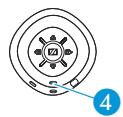

Briefly press the SRS button 4.
The button is backlit in yellow and the SRS WOW HD function is switched on.
To switch the SRS WOW HD sound enhancement off:
Briefly press the SRS button 4.
The yellow backlighting goes off and the SRS WOW HD function is switched off.
Switching the NoiseGard function on/off

The NoiseGard button 3 is backlit, indicating the current setting. The backlighting goes off after a short while in order to conserve energy.

Press any button on the headset to display the current setting of the NoiseGard active noise compensation.
The NoiseGard function has to be switched on to be active. If the NoiseGard function is switched off, the MM 550 can also be used as a conventional headset.
To switch the NoiseGard function on:
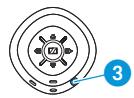

Press the NoiseGard button 3 for 2 seconds.
The button is backlit in red and the NoiseGard function is switched on.
To switch the NoiseGard function off:
Press the NoiseGard button 3 for 2 seconds.
The red backlighting goes off and the NoiseGard function is switched off.

Conserving energy
Switch the NoiseGard function off after use to conserve energy.
Switching the TalkThrough function on/off
The MM 550 provides excellent attenuation of ambient noise. The Talk-Through function allows you to communicate undisturbed with other people without having to remove the headset even when NoiseGard is switched on.
To switch the TalkThrough function on:
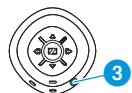

- Briefly press the NoiseGard button 3. The LED ① lights up red. The TalkThrough function is switched on.
To switch the TalkThrough function off:
- Briefly press the NoiseGard button 3. The LED ① goes off. The TalkThrough function is switched off.

When the TalkThrough function is switched on, you cannot listen to music.
Switching the Bluetooth function on/off
Via the Bluetooth interface, the headset can be connected to a wide variety of Bluetooth enabled devices.
To switch the Bluetooth function on:
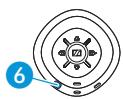

Press the Bluetooth button 6 and keep it pressed until the LED ① flashes 3 times blue. The Bluetooth function is switched on.
To switch the Bluetooth function off:
Press the Bluetooth button and keep it pressed until the LED ① flashes 3 times red. You hear a descending beep. The Bluetooth button goes off. The LED ① flashes blue and the Bluetooth function is switched off.
Changing the volume
The MM 550 allows you to change the volume of the audio signal during a call or while listening to music:
| Button | Duration | Function | Button | Duration | Function |
| Incremen- tally increases the volume | Incremen- tally reduces the volume | ||||
| 1s | Continuously increases the volume | 1s | Continuously reduces the volume |
If you press the respective button briefly, the volume is changed incrementally; if you hold down the button, the volume is changed continuously.
When the minimum or maximum volume is reached, you hear an acknowledgement tone.
Remote-controlling connected devices from the MM 550
You can directly remote-control any device supporting the AVRCP profile and connected to the MM 550 by using the buttons on the headset. Please refer to the instruction manual of your audio source for information on whether your device supports the AVRCP profile.
Remote-controlling the audio source from the MM 550
If your headset has a Bluetooth connection to an audio source (e.g. mobile phone, iPod, MP3 or CD player), you can use the MM 550 to remote-control the audio source as follows:
| Button | Duration | Function | Button | Duration | Function |
| Incrementally increases the volume | Incrementally reduces the volume | ||||
| 1s | Continuously increases the volume | 1s | Continuously reduces the volume | ||
| Skipping to the next track | Skipping to the previous track | ||||
| 1s | Fast-forwards the track* | 1s | Rewinds the track* | ||
| Plays the track | 1s | Stops the track (acknowledgement tone) |
- These functions are not supported by all connected Bluetooth devices.
Remote-controlling a mobile phone from the MM 550
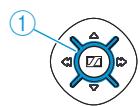
If your MM 550 has a Bluetooth connection to your mobile phone, the LED ① on the headset flashes to indicate that the mobile phone is ringing. The LED flashes 3 times blue. After a pause, the flashing is repeated. You can also hear the ring tone of your mobile phone if your mobile phone supports this function.

Switching the Bluetooth function off
If you press the Bluetooth button too long, the Bluetooth function switches off!
You can use the MM 550 to remote-control different functions of your mobile phone.
If the mobile phones rings:
| Button | Duration | Function | |
| or | Accepts the call | ||
| or | 2s | Rejects the call (acknowledgement tone) | |
| or | Ends the call | ||
If the mobile phone is switched on, does not ring and you do not make a phone call:
| Button | Duration | Function |
| 2s | Redials the last number (acknowledgement tone) | |
| Activates voice dial |
During a call:
| Button | Duration | Function |
| Transfers the ongoing call back to the mobile phone | ||
| Activates the muting function (acknowledgement tone) | ||
| Any button | Deactivates the muting function |
Resetting the settings of the MM 550
You can reset all settings of your headset to the factory default settings. This allows you to prevent that other users of the headset can access your Bluetooth enabled devices. You can then pair five new devices with the headset.
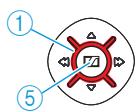
Press the Master button ⑤ and keep it pressed until the LED ① flashes 3 times red. The headset switches off (see “Switching the MM 550 off” on page 11).
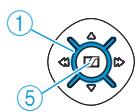

Press the Master button ⑤ and keep it pressed until the LED ① alternately flashes blue and red.
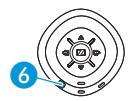

Press the Bluetooth button 6 and keep it pressed until the settings of the headset are reset.
Transporting the MM 550
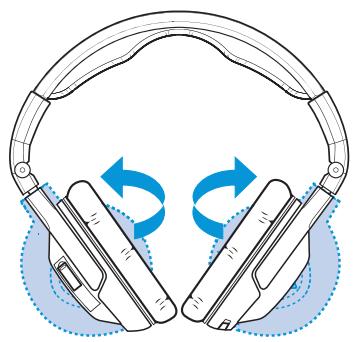
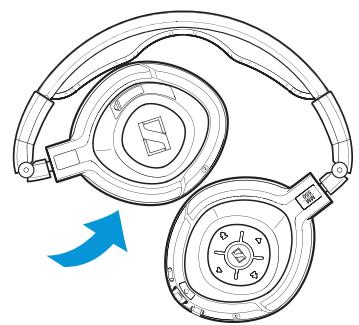
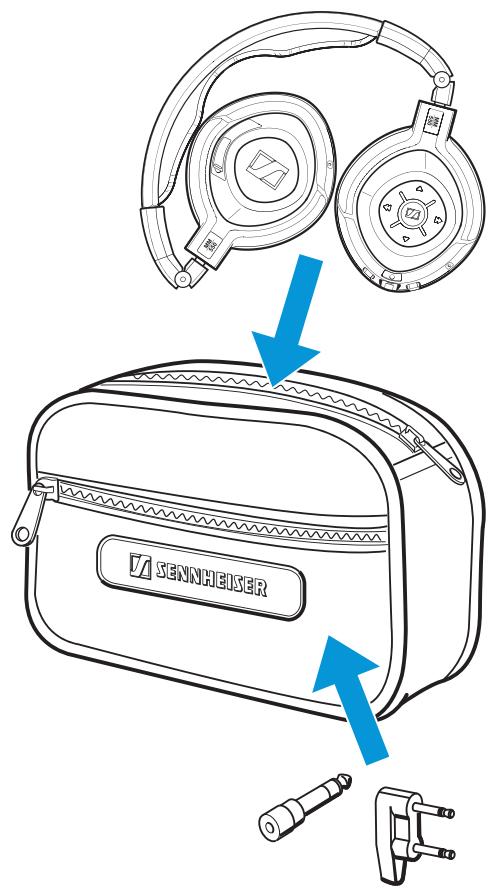
For space-saving transportation, the headset can be folded up flatly and compactly.
Rotate the ear cups by 90^ .
Fold the ear cups inwards.
Place the headset flat into the transport case.

Your accessories can be transported in the front bag of the transport case:
Audio adapter (1 / 4^ (6.35 mm) jack plug)
In-flight adapter (3.5 mm double mono jack)
Cleaning and maintaining the MM 550
Cleaning the MM 550
CAUTION Liquids can damage the electronics of the product!
Liquids entering the housing of the product can cause a short-circuit and damage the electronics.
Keep all liquids far away from the product.
Do not use any solvents or cleansing agents.
For reasons of hygiene, you should clean the headset regularly:
Before cleaning, make sure that the product is not recharged via the mains.
Only use a dry and soft cloth to clean the product.
Replacing the ear pads
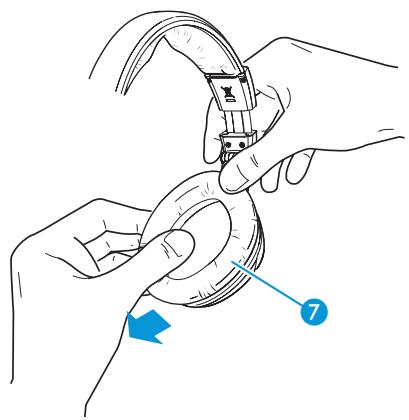
You can replace the ear pads. Spare ear pads are available from your Sennheiser partner or can be ordered at www.sennheiser.com under "Service & Support".
▶ Grasp the edge of the ear pad ⑦ behind the ear cup and peel it up and away from the ear cup.
▶ Slide the new ear pad onto the ear cup.
If a problem occurs …
| Problem | Possible cause | Solution | Page |
| No operation indicator – headset cannot be switched on | The battery pack is flat. | Recharge the battery pack. | 8 |
| No audio signal when the audio cable is connected | The jack plug of the audio cable is not properly connected. | Check the connection to your audio source. | 15 |
| No audio signal during Bluetooth connection | The headset is switched off. | Switch the headset on. | 11 |
| The headset is not paired with an audio source. | Check if the headset is paired. If necessary, pair the headset with the audio source again. | 12 | |
| The Bluetooth function on the headset is switched off. | Switch the Bluetooth function on the headset on. | 17 | |
| The audio cable is connected to the headset. | The connection of the audio cable automatically switches off the Bluetooth connection. Remove the audio cable and then switch the Bluetooth function on again. | 15 | |
| The volume is adjusted too low. | Increase the volume. | 17 | |
| Headset cannot be paired | The pairing does not work. | Check if the audio source supports the A2DP profile. If not, use one of the optional dongles. | - |
| The audio source is switched off. | Switch the audio source on. | 12 | |
| No audio signal during NoiseGard operation | The headset is switched off. | Switch the headset on. | 11 |
| The TalkThrough function is switched on. When in Talk-Through mode, the audio signal is not available. | Switch the TalkThrough function off. | 17 | |
| Headset do not react to any button press | The operation of the headset is faulty. | Remove the battery pack from the headset. Reinsert the battery pack into the headset. Switch the headset on again. | - |
| Bluetooth connection is suddenly interrupted | The Bluetooth button has been pressed too long. | Switch the Bluetooth function on. | 17 |
If a problem occurs that is not listed in the above table or if the problem cannot be solved with the proposed solutions, please contact your Sennheiser partner for assistance.
To find a Sennheiser partner in your country, search at www.sennheiser.com.
Accessories
Cat. No. Accessory
540364 Ear pads, 1 pair
540363 Headband padding, 1 pair
525776 PSC 03R-050 mains unit with 4 country adapters (EU/UK/US/AUS)
531406 Stereo audio cable
(2.5 mm jack plug to 3.5 mm jack plug)
088526 In-flight adapter
(3.5 mm jack socket to 3.5 mm double mono jack plug)
077046 Audio adapter
(3.5 mm jack socket to 14'' (6,35 mm) jack plug)
531407 USB cable
(microUSB to USB)
535105 BA 370 PX battery pack
502388 BTD 300 Audio
502390 BTD 300 USB
502389 BTD 300i
Specifications
Transducer principle
Ear coupling
Frequency response
Nominal impedance
active/passive
Sound pressure level at
1 kHz and 1 Volt
THD at 1 kHz
Audio connection
Audio adapter
In-flight adapter
Cable length
Audio cable
Charging cable
Weight
BA 370 PX battery pack
Charging time
Operating time
Operating temperature range
Storage temperature range
Passive noise attenuation
NoiseGard
active noise compensation
dynamic, closed
circumaural
15-22,000 Hz
590/100Ω
107 dB SPL
< 0.1%
3.5 mm stereo jack socket
1/4" (6.35 mm) stereo jack plug
3.5 mm double mono jack plug
1.4 m
0.8 m
179g
3.7 V; 250 mAh Lithium-Polymer
3 hrs
8 hrs/10 hrs/20 hrs
0^ to +40^
-10°C to +70°C
25 dB
23 dB
PSC 03R-050 mains unit
Nominal input voltage
Nominal input current
Mains frequency
Nominal output voltage
Nominal output current
Operating temperature range
Storage temperature range
Relative humidity
Weight
110-240 V~
max. 0.2 A
50-60Hz
5V---
max. 0.5 A
0^ to +45^
-40°C to +85°C
20 to 90%
approx.61g
Bluetooth

Bluetooth


Bluetooth®
Range
Transmission frequency
Transmission power
Profiles
Codec
Bluetooth QD ID PX
version 2.1 + EDR
up to 10 m
2.4 GHz
8 dBm
HSP, HFP, A2DP, AVRCP
SBC
B014795
SRS WOW HD
Remarkable enhancement for mono and stereo playback
SRS WOW HD™ improves the dynamic audio performance of compressed and uncompressed audio by expanding the size of the audio image and creating a deep, rich bass response. The patented techniques in SRS WOW HD widen the horizontal sound field and raise the vertical sound image, retrieving information lost in the mixing process to create a more natural audio experience. SRS WOW HD also shapes a maximized bass response using sculpted filters and driver physics to go beyond the low-frequency limitations of speakers and headphones. SRS WOW HD also adds Definition™ Control, for realistic clarity, and the new Center Control, for dynamic extraction and positioning of dialog.
Immersive 3D audio
SRS WOW HD adjusts the space of the stereo image and eliminates the narrow stereo sweet spot and creates an immersive stereo image from mono and stereo source material. It also restores audio realism which is often masked by traditional recording and playback techniques.
Center Control
SRS WOW HD adjusts the mix of the center information into the stereo image. It works in tandem with the space control to create the perfect balance, acting as a "zoom" lens for sound. It can bring content to the forefront to dominate the mix or fade it backward, virtually eliminating the content all together.
Optimal headphone listening
SRS WOW HD includes techniques based on patented HRTFs to deliver a natural, non-fatiguing headphone listening experience by placing the perception of the stereo sound image outside of one's head making it more realistic and immersive.
Elevated sound image
SRS WOW HD adjusts the horizontal plane of the audio image from non-optimally placed speakers placing it at an appropriate listening level.
Definition Control
SRS WOW HD delivers a livelier, more brilliant sound. The purified sound can be heard in musical vocals, high-frequency instruments, and exposes details of ambient sound present in the audio source.
Bigger bass
SRS WOW HD includes psychoacoustic bass enhancement techniques which enhance the perception of low bass frequencies from speakers and headphones which, under normal conditions, can not produce these frequencies due to the inherent low frequency cut off and driver size limitations.
Audio level management
SRS WOW HD includes an audio level management system which monitors the output levels of the entire product audio system and manages the level dynamically to prevent sudden audio clipping.
Features of SRS WOW HD
- Stereo enhancement which improves dynamic audio performance
- Sculpted bass response for maximum thump on small speakers
- More natural audio with a wider sound field and raised sound image
High-definition control for realistic clarity
Center Control for dynamic extraction and positioning of dialog
Manufacturer Declarations
Warranty
Sennheiser Communications A/S gives a warranty of 24 months on this product. For the current warranty conditions, please visit our website at www.sennheiser.com or contact your Sennheiser partner.
Declaration of Conformity
This product complies with the basic requirements and other relevant provisions of the following directives:
R&TTE Directive (1999/5/EC)
EMC Directive (2004/108/EC)
Low Voltage Directive (2006/95/EC)
RoHS Directive (2002/95/EC)
WEEE Directive (2002/96/EC)
Battery Directive (2006/66/EC)
The declarations are available on the internet at www.sennheiser.com. Before putting the product into operation, please observe the respective country-specific regulations!
Statements regarding FCC and Industry Canada
FCC Declaration of Conformity (DoC)

We,
Sennheiser Electronic Corporation
Strat. Marketing • Stefanie Reichert
One Enterprise Drive • Old Lyme • CT 06371 • USA
Tel: +1 (860) 434 9190, ext. 144
Fax: +1 (860) 434 1759
declare the above device comply with the requirements of Federal Communications Commission.
This device complies with Part 15 of the FCC rules. Operation is subjected to the following two conditions: 1) This device may not cause harmful interference, and 2) This device must accept any interference received, including interference that may cause undesired operation.
Responsible Party: John Falcone
This device complies with Part 15 of the FCC Rules and with RSS-210 of Industry Canada. Operation is subject to the following two conditions: (1) this device may not cause harmful interference, and (2) this device must accept any interference received, including interference that may cause undesired operation.
This equipment has been tested and found to comply with the limits for a Class B digital device, pursuant to Part 15 of the FCC Rules. These limits are designed to provide reasonable protection against harmful interference in a residential installation. This equipment generates, uses and can radiate radio frequency energy and, if not installed and used in accordance with the instructions, may cause harmful interference to radio communications. However, there is no guarantee that interference will not occur in a particular installation. If this equipment does cause harmful interference to radio or television reception, which can be determined by turning the equipment off and on, the user is encouraged to try to correct the interference by one or more of the following measures:
Reorient or relocate the receiving antenna.
- Increase the separation between the equipment and receiver.
- Connect the equipment into an outlet on a circuit different from that to which the receiver is connected.
- Consult the dealer or an experienced radio/TV technician for help.
This class B digital apparatus complies with the Canadian ICES-003.
Changes or modifications made to this equipment not expressly approved by Sennheiser electronic Corp. may void the FCC authorization to operate this equipment.
RF Radiation Exposure Information
Since the radiated output power of this Class1 BT device is far below the FCC radio frequency exposure limits, it is not subjected to routine RF exposure evaluation as per Section 2.1093 of the FCC rules.
In compliance with:
| USA | FCC ID: DMOCBSSAB FCFC |
| Canada | IC: 2099D – MMBTX |
| Europe | CE 0889 ☑ ☑ |
| Australia/ New Zealand | CN340 |
| Singapore | Complies with IDA Standards DB100582 |
| Taiwan | CCAB10LP0980T1 |
| Japan | R 203 WW JN000022 |
| Russia | PCT ME61 |
| Korea | SC9 - MM550 |
| China | CMIIT ID: 2010DJ1403 |
Trademarks
Sennheiser and NoiseGard™ are registered trademarks of Sennheiser electronic GmbH & Co. KG.
The Bluetooth® word mark and logos are registered trademarks owned by Bluetooth SIG, Inc. and any use of such marks by Sennheiser electronics GmbH & Co. KG is under license.
iPhone® and iPod® are registered trademarks of Apple Inc, registered in the U.S. and other countries.
SRS WOW HD^TM is a registered trademark of SRS Labs, Inc.
Definition™ Control is a registered trademark of SRS Labs, Inc.
Sennheiser Communications A/S
Langager 6, 2680 Solrd Strand, Denmark
www.sennheisercommunications.com
Publ. 05/10
540045/A01