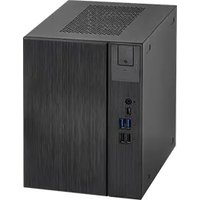
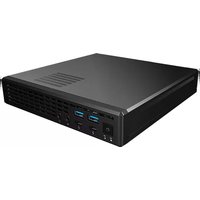
Mars ADL - Desktop computer ASROCK - Free user manual and instructions
Find the device manual for free Mars ADL ASROCK in PDF.


Pick your language and provide your email: we'll send you a specifically translated version.
| Product Type | Mini Desktop Computer |
| Brand | ASROCK |
| Model | Mars ADL |
| Dimensions (W x D x H) | 200 x 200 x 60 mm |
| Weight | 2.5 kg |
| Power Supply | 120W AC adapter |
| Processor | Intel Core (12th gen or newer) |
| Memory | DDR4, 2 slots, up to 64GB |
| Storage | M.2 NVMe SSD, SATA HDD optional |
| Graphics | Integrated Intel UHD Graphics |
| Connectivity | USB 3.2 Gen2, HDMI 2.0, DisplayPort, Gigabit Ethernet |
| Wireless | Wi-Fi 6, Bluetooth 5.2 |
| Audio | 3.5mm headphone/microphone combo jack |
| Operating System Support | Windows 11, Linux |
| Cooling | Active fan with heatsink |
| Mounting | VESA mount compatible (75x75 mm) |
| Maintenance | Regular dust removal, avoid blocking vents |
| Safety | Use only provided power adapter, keep away from liquids |
| Repairability | Modular design: RAM, storage, wireless card replaceable |
| Spare Parts | Available through ASROCK service centers and online retailers |
| Warranty | 1 year limited warranty |
| Certifications | CE, FCC, RoHS |
| Color | Black |
| Included Accessories | Power adapter, VESA mount plate, user manual |
| Energy Efficiency | Typical power consumption ~35W |
Frequently Asked Questions - Mars ADL ASROCK
How do I connect my Mars ADL to a monitor?
Use the HDMI or DisplayPort ports on the back panel. For best performance, connect to a monitor that supports 4K resolution at 60 Hz via HDMI 2.0 or DisplayPort.
Can I upgrade the RAM in my ASROCK Mars ADL?
Yes, the system has two DDR4 SO-DIMM slots supporting up to 64 GB. Open the bottom panel to access the memory modules.
What is the maximum storage capacity?
The Mars ADL supports an M.2 NVMe SSD and one 2.5-inch SATA HDD/SSD. Total storage can exceed 2 TB depending on drive sizes.
Does the Mars ADL support Wi-Fi and Bluetooth?
Yes, it includes built-in Wi-Fi 6 and Bluetooth 5.2 via an M.2 wireless card. Antennas are integrated into the chassis.
How do I clean the Mars ADL?
Unplug the device, then use compressed air to blow out dust from the vents. Avoid using liquids or opening the case unless necessary. Clean the exterior with a soft, dry cloth.
What power adapter should I use?
Only use the supplied 120W AC adapter (19V, 6.32A). Using a different adapter may damage the system or cause safety hazards.
Can I mount the Mars ADL behind a monitor?
Yes, the device is VESA mount compatible with 75x75 mm screw holes. Use the included VESA bracket to attach it to a monitor or arm.
Which operating systems are compatible?
The Mars ADL is designed for Windows 11 (64-bit) and also supports various Linux distributions. Drivers for Windows are available on the ASROCK support page.
How do I obtain warranty service?
Contact ASROCK customer support or visit an authorized service center. You will need proof of purchase and the serial number located on the bottom of the device.
Where can I find the latest drivers and manuals?
Visit the ASROCK official website and navigate to the Mars ADL support page. There you can download drivers, BIOS updates, and the user manual in PDF format.
User questions about Mars ADL ASROCK
0 question about this device. Answer the ones you know or ask your own.
Ask a new question about this device
No questions yet. Be the first to ask one.
Download the instructions for your Desktop computer in PDF format for free! Find your manual Mars ADL - ASROCK and take your electronic device back in hand. On this page are published all the documents necessary for the use of your device. Mars ADL by ASROCK.