KMS3399 - CD Player Kunft - Free user manual and instructions
Find the device manual for free KMS3399 Kunft in PDF.


| Product Type | CD Micro System |
| Brand | Kunft |
| Model | KMS3399 |
| Power Supply | AC 100-240V, 50/60Hz |
| Power Consumption | 20W |
| Max Output Power | 5W x 2 |
| Supported Disc Formats | CD, CD-R, CD-RW, MP3 |
| USB Playback | Yes (USB slot) |
| FM Tuner Range | 87.5 - 108 MHz |
| Remote Control | Full function, range ~8m, angle ±30° |
| Display | Digital screen |
| Headphone Jack | 3.5mm (mutes speakers) |
| Speaker Connection | Via speaker cables (+/- terminals) |
| Functions | Play/Pause, Stop, Next/Previous, Fast Forward/Rewind, Volume +/-, Mute, Repeat, Random, Program, Sleep, Intro, EQ presets, Tuning +/-, Memory, ST/Mono |
| Cleaning | Use dry soft cloth; unplug before cleaning |
| Safety | Do not open; keep away from humidity; use only as intended |
| Package Contents | User manual, remote control (batteries not included), FM antenna, speaker cables |
Frequently Asked Questions - KMS3399 Kunft
User questions about KMS3399 Kunft
0 question about this device. Answer the ones you know or ask your own.
Ask a new question about this device
Download the instructions for your CD Player in PDF format for free! Find your manual KMS3399 - Kunft and take your electronic device back in hand. On this page are published all the documents necessary for the use of your device. KMS3399 by Kunft.
USER MANUAL KMS3399 Kunft
natural_image
Black Kuroft audio recording device with two speakers and a digital display (no visible text or symbols on the devices themselves)

natural_image
Three simple geometric shapes: two circles with dots and one circle with dots, arranged horizontally within a rectangular frame (no text or symbols)micro system
is perfectly enough
KMS3399
kunft.®
Dear client,
We thank you for purchasing this product.
This appliance was submitted to several laboratorial tests, which certify its quality. To simplify the use of this appliance, this instruction manual has been provided.
The instructions must ensure a quick and safe use.
Please read carefully the instructions and safety measures described in this manual.
We wish our clients great satisfaction in using their new appliance.
2


micro system
KMS3399
EN
INDEX
- SAFETY INSTRUCTIONS ...... 4
1.1. Power Supply 5
1.2. Power Cord and Other Cables ...... 6
1.3. Humidity and Water 6
1.4. Cleaning 6
1.5. General Precautions ...... 6
- FEATURES 8
2.1. Package Contents: 8
-
PANEL 8
-
CONNECTIONS ...... 9
-
REMOTE CONTROL 9
5.1. Remote Control Operation 9
5.2. Battery Installation 9
5.3. Remote Control Functions ..... 10
- BASIC PLAYBACK ..... 11
6.1. CD Operation ..... 11
6.2. Tuner Operation 12
-
TROUBLESHOOTING 13
-
TECHNICAL SPECIFICATIONS 14
-
POST-SALE SERVICE 15
-
ENVIRONMENTAL PROTECTION ..... 15
kunft.®
1. SAFETY INSTRUCTIONS
 | WARNING |  |
| Risk of Electric ShockDo Not Open | ||
| Warning: to avoid the risk of electric shock, do not remove the cover.The interior does not contain any parts that can be repaired by the user. Ask for assistance by qualified personnel. | ||
Important Warnings
Before using your appliance read this instructions manual carefully and keep it in a safe place as you may need to consult it in the future.
Before turning on your appliance, and to ensure a safe and correct operation, do not use if:
- It has fallen to the ground;
- You notice any evidence of damage;
- Any anomaly occurs during its operation.
To avoid hazards or deterioration of your appliance through incorrect use it is advisable to read these instructions thoroughly.
Your appliance may not be used for other purposes than the ones intended and solely for household use. Any damage resulting from using the appliance outside this scope, any incorrect use, as well as any ma-
micro system
KMS3399
EN
nual modifications to the product will not be covered and automatically voids the warranty.
Assistance
In case of malfunction, take your appliance to a qualified technician for assistance.
This appliance can be used by children from the age of 8 and by people with reduced physical, sensorial or mental capabilities and/or lack of experience and knowledge if they have been given instructions on using the appliance safely and if they understand the hazards involved. Children may not play with the appliance. Cleaning and maintenance must not be carried out by children without supervision.
These instructions are also available at www.suporteworten.pt
1.1. Power Supply
Make sure the main voltage is compatible with the appliance's. If this is not the case please consult the Customer Support Service.
kunft.®
1.2. Power Cord and Other Cables
Do not tangle the cord or pull it to disconnect the appliance. Also, keep the cord away from warm surfaces.
Never use the appliance if it has a damaged cable or socket.
Take it to the Technical Support Service for replacement.
1.3. Humidity and Water
Do not use your appliance in humid places. Do not allow the appliance to become wet under any circumstances as this may be dangerous. To avoid fire hazard or electric shock do not expose your appliance to humidity or water. Furthermore, do not place your appliance under water (e.g. for cleaning).
1.4. Cleaning
Before cleaning, be sure to switch off the appliance and remove the plug from the main power supply. Always allow the unit to cool down before cleaning.
To clean the exterior of the product use a dry soft cloth only.
1.5. General Precautions
- Please follow the instructions in the user manual which help to properly install and operate this product and enjoy its advanced features. Please keep the instructions for future reference.
micro system
KMS3399
EN
- Read all instructions before using the product.
- Maintenance and service operations are only to be carried out by authorized professionals.
- Any damage caused by manual modifications to the product is not covered by the warranty.
- If this product is used for other purposes than the ones originally intended, or if it is not correctly connected, the product may become damaged and the warranty will be voided.


kunft.®
2. FEATURES
- Compatible with CD, MP3, CD-R, CD-RW, etc.
- With USB Slot.
• Full function remote control.
• FM stereo radio tuner.
2.1. Package Contents:
User manual Remote control FM antenna Speaker cable
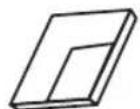
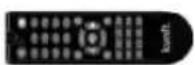
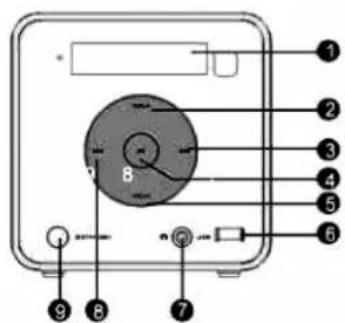
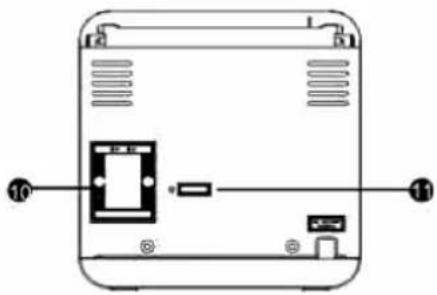
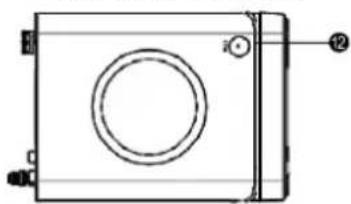
3. PANEL
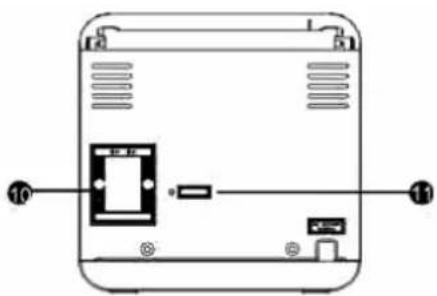
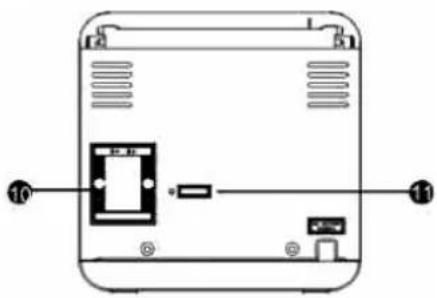
FRONT PANEL REAR PANEL

natural_image
Diagram of a device rear panel with labeled ports and internal components (no text or symbols)
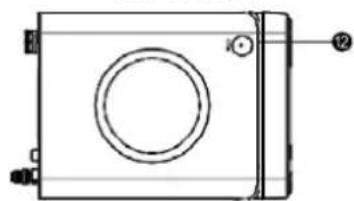
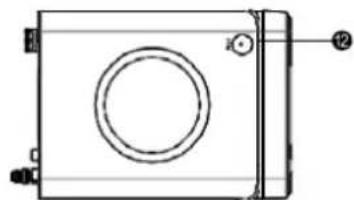
TOP PANEL
natural_image
Technical line drawing of a rectangular mechanical component with a central circular feature and mounting holes (no text or symbols)1 - DISPLAY SCREEN
2 - VOLUME +
3 - NEXT/FAST FORWARD
4-PLAY/PAUSE
5 - VOLUME
6 - USB SLOT
7 - HEADPHONE JACK
8 - PREVIOUS/FAST REWIND
9 - STANDBY
10 - SPEAKER OUT
11 - FM ANTENNA JACK
12 - PUSH (push to open the cover)
Listen with earphones/headphones
Connect earphones or headphones to the headphone jack with the volume set low and increase it if required. When earphones or headphones are connected, no sound will be emitted from the connected speaker system

micro system
KMS3399
EN

WARNING: Excessive sound pressure from earphones or headphones can cause hearing loss.
4. CONNECTIONS
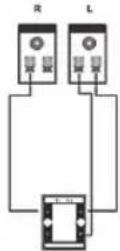
Speaker Output
Connect the speakers to speaker output terminals with their attached speaker cables (white for +, black -).
Amplifier Audio Input
CD Audio Output
5. REMOTE CONTROL
5.1. Remote Control Operation
Insert the batteries into the remote control. Point the remote control at the remote sensor on the front panel. The remote control works within a distance of about 8 meters from the sensor and within an angle of about 30 degrees from the left and right side.

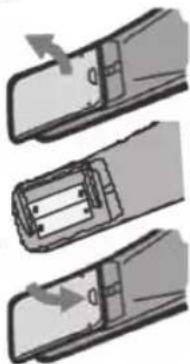
5.2. Battery Installation
1) Remove the battery compartment cover on the back of the remote control.
2) Load two AAA/1.5V batteries into the battery compartment making sure that the batteries have been inserted with the correct polarities matching the symbols +, - as indicated inside the battery compartment.
3) Replace the cover.
natural_image
Three-step diagram showing a battery being inserted into a slot, with arrows indicating direction (no text or symbols)Note:
- Remove the batteries when you do not intend to use the remote control for a long time.
- Do not mix new and used batteries, or different types of batteries.
- Weak batteries can leak and severely damage the remote control.
- The batteries must not be exposed to excessive heat source, such as sunshine, fire or any other things like that
- Be environmentally friendly and dispose of batteries according to your government regulations.
kunft.®
5.3. Remote Control Functions
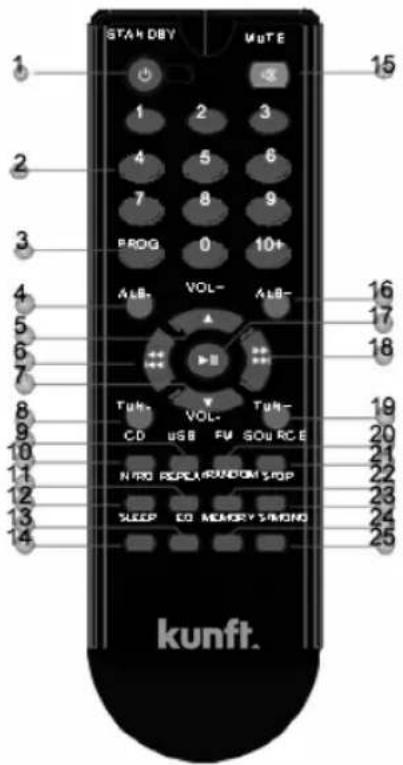
1 - STANDBY
2 - DIGIT KEYS
3 - PROGRAM
4 - ALB -
5 - VOLUME +
6 - FAST REWIND / PREVIOUS
7 - VOLUME -
8 - TUNER
9 - USB
10 - CD
11 - REPEAT
12 - INTRO
13 - EQ
14 - SLEEP
15 - MUTE
16 - ALB +
17 - PLAY / PAUSE
18 - FAST FORWARD / NEXT
19 - TUNER +
20-FM
21 - SOURCE
22-RANDOM
23 - STOP
24 - MEMORY
25-ST/MONO

micro system
KMS3399
EN
6. BASIC PLAYBACK
6.1. CD Operation
| STANDBY | Press to switch on the unit. Press it again to put the unit in standby mode. |
| USB | Press to enter to USB mode. |
| CD | Press to enter to CD mode. |
| FM | Press to enter to FM tuner mode. |
| SOURCE | Press repeatedly to select a signal source among CD, USB and FM mode. |
| The digit keys can be used to input numbers or make selection of a track, etc. | |
| STOP | Press to stop a playback. |
| Press to temporarily pause a playback. Press it again to resume the playback. | |
| Press to skip to the next chapter/track; | |
| Hold down for fast forward. | |
| Press to return to the previous chapter/track. | |
| Hold down for fast rewind. | |
| VOL+ | Press [VOLUME+] to turn up the volume. |
| VOL- | Press [VOLUME-] to turn down the volume. |
| PROGRAM | In stop mode, press [PROGRAM] and input a number to select a track, press [PROGRAM] again to confirm it, then press [▶▶||] to play (for CD disc only). |
| MUTE | Press to temporarily switch off the sound . Press it again to switch it on. |
| RANDOM | Press to switch the random play mode. |
| REPEAT | Press repeatedly to switch the repeat modes. |
| SLEEP | Press repeatedly to select a sleep time and choose option SLEEP OFF to disable the sleep function, after which the unit will go into standby mode automatically. Then press [STANBY] to wake it up. |
| INTRO | Press to introduce the track of the disc in order, it takes approximate ten seconds for each track. |
| EQ | Press to switch the equalizer modes. |
| ALB+/- | Press to skip the catalogue, its only available for MP3 disc. |


kunft.®
6.2. Tuner Operation
- The following buttons are used in tuner mode. Press [SOURCE] to select tuner mode.
| ST/MONO | Press to switch between Mono and Stereo reception of the broadcast signal in FM mode. |
| TUN+/- | TUN+: press to fine tune (increase) the frequency;TUN-: press to fine tune (decrease) the frequency;Hold down [TUN+/-] to increase/decrease the frequency continuously. |
| MEMORY | After tuning in a new frequency, press [MEMORY], then select a preferred station by inputting the corresponding numbers to save it as a preset station. |
| The digit keys can be used to select a preset station.For example, press [2] to select channel 2; press [10+] first, then press[1] and [5] to select channel 15. | |
| Press to skip to the next preset station. | |
| Press to skip to the previous preset station. |

Note: In Tuner mode, [VOLUME+/-], [MUTE] buttons are also active. For details, please refer to the introduction of the CD operation in this chapter.

micro system
KMS3399
EN
7. TROUBLESHOOTING
Before resorting to maintenance service, please kindly check by yourself with the following chart.
| Symptom Cause(s) Remedy | ||
| No Power The AC power cord is not connected to the power supply or is not connected to a power supply securely. | Please check that the AC power cord is connected securely. | |
| SoundThere is no sound or the sound is distorted | The audio cables aren't connected securely. | Connect the audio cables securely. |
| The volume is set to the minimum level. | Turn up the volume. | |
| The sound is switched off. | Press [MUTE] on the remote control to switch on the sound.Press [PLAY /PAUSE]. | |
| Unable to play a disc | This disc is placed in the disc tray in a wrong way. | Check that the disc is placed in the disc tray with its label side upwards. |
| The rating of the disc is higher than the rate set in the parental control item. | Reset the settings in the parental control item. | |
| The unit isn't compatible with the disc. | / | |
| The disc is dirty. Clean the disc. | ||
| The player breaks down when a USB drive is inserted into the player | The connected USB drive is probably not a certified one. | The player cannot play any uncertified USB drive.In case the player breaks down, turn it off, disconnect the power cord from the AC outlet and unplug the USB drive from the player.Then, power on the player again.The player will resume the normal status. |
kunft.®
| Symptom Cause(s) Remedy | ||
| The buttons on the unit doesn't work | The unit is being interfered with static electricity etc. | Switch off and unplug the unit.Then connect the plug to the power supply and switch it on again. |
| The remote control doesn't work | There is no battery in the remote control. | Install two AAA/1.5V batteries in it. |
| The batteries are out of charge. | Replace the batteries with new ones. | |
| The remote control isn't pointed to the remote sensor. | Make sure that the remote control is pointed to the remote control sensor. | |
| The remote control is out of its operating area. | Make sure the remote control is within the operating area. | |
| The unit is shut down. | Switch off the unit and disconnect it from the AC outlet. Then power on the unit again. | |
8. tEcHNlcal SPEclflicatIoNS
| Power supply AC ~100-240V, 50/60Hz | ||
| Power consumption 20W | ||
| Working environment | Temperature -10~+35°C | |
| Relative humidity 5% ~90% | ||
| Disc output Frequency Response 20Hz~20kHz | ||
| S/N (A weight) >80dB (1kHz) | ||
| Frequency Range ≥70dB (1kHz) | ||
| THD + NOISE ≤-60dB (1kHz) | ||
| WOW FLUTTER Below the limit of apparatus measure | ||
| Tuner | FM band Range | 87.5MHz~108MHz |
| Power output (Max) | 5W x 2 | |
| Frequency response | 1.5dB (20Hz~20kHz) | |
micro system
KMS3399
EN
9. POST-SALE SERVICE
KUNFT has designed this appliance in order to guarantee maximum reliability. However, if a problem occurs do not attempt to open the appliance - there is a risk of electrical shock. If you are not able to solve the problem, please contact the Costumer Support Service of any Worten, Modelo or Continente store in order to be assisted. Worten Equipamentos para o Lar provides a 2-year warranty for manufacturing defects from the date of purchase of the appliance.
WARNING: Any attempt to repair the appliance without contacting the manufacturer or seller will void the warranty.
All users must be familiar with these instructions. Knowing what could go wrong can help prevent problems from occurring.
10. ENVIRONMENTAL PROTECTION

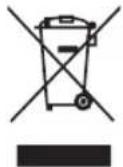
In order to protect the environment we strive to reduce the volume of packaging used, limiting it to three easily sorted materials: cardboard, paper and plastic. The appliance is manufactured using recyclable materials after disassembled by a specialized company. Please comply with local regulations concerning the recycling of all materials.

kunft.®

PANEL SUPERIOR
natural_image
Technical line drawing of a rectangular mechanical component with a circular hole and mounting holes (no text or symbols)natural_image
Three-step diagram showing a mechanical assembly with arrows indicating motion (no text or symbols)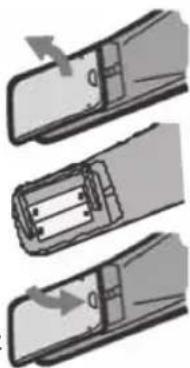
natural_image
Three-step diagram showing a mechanical assembly with arrows indicating motion (no text or symbols)kunft.®
natural_image
Diagram of a device rear panel with labeled ports and connectors (no text or symbols)
PAINEL SUPERIOR
natural_image
Technical line drawing of a rectangular mechanical component with a circular cutout and mounting holes (no text or symbols)1 - ECRÃ DE VISUALIZAÇÃO
2 - VOLUME +
3 - PRÓXIMO / PASSAR
PARA A FRENTE
4 - REPRODUZIR/PAUSAR
5 - VOLUME -
6 - ENTRADA USB
7 - ENTRADA AURICULARES
8 - ANTERIOR / REBOBINAR
RÁPIDO
9 - STANDBY
10 - SAÍDA ALTIFALANTE
11 - ENTRADA ANTENA FM
12 - EMPURRAR (empurre para abrir a tampa)
kunft.®
natural_image
Three-step diagram showing a mechanical assembly with arrows indicating motion (no text or symbols)Nota:
natural_image
Three identical abstract geometric shapes with circles and dots, no text or symbols presentmicro system
is perfectly enough
KMS3399
- micro system
- kunft.®
- KMS3399
- EN
- INDEX
- SAFETY INSTRUCTIONS
- Important Warnings
- Assistance
- Power Supply
- Power Cord and Other Cables
- Humidity and Water
- Cleaning
- General Precautions
- FEATURES
- Package Contents:
- PANEL
- Listen with earphones/headphones
- CONNECTIONS
- Speaker Output
- REMOTE CONTROL
- Remote Control Operation
- Battery Installation
- Note:
- Remote Control Functions
- BASIC PLAYBACK
- CD Operation
- Tuner Operation
- TROUBLESHOOTING
- tEcHNlcal SPEclflicatIoNS
- POST-SALE SERVICE
- ENVIRONMENTAL PROTECTION
- Nota:
Brand : Kunft
Model : KMS3399
Category : CD Player